2021 LINCOLN CORSAIR remote
[x] Cancel search: remotePage 81 of 638

Note:
The system may not function if the
passive key is close to metal objects or
electronic devices, for example keys or a
cell phone.
Note: If the system does not function, use
the key blade to lock and unlock your
vehicle. See Remote Control (page 64).
Unlocking Using Intelligent Access With your intelligent access key within
3 ft
(1 m) of your vehicle, touch the unlock sensor
on the back of the door handle for a brief
period and then pull on the door handle to
unlock, being careful to not touch the lock
sensor at the same time or pulling the door
handle too quickly. The intelligent access
system requires a brief delay to authenticate
your intelligent access key fob. Locking Using Intelligent Access With your intelligent access key within
3 ft
(1 m) of your vehicle, touch the outer door
handle lock sensor for approximately one
second to lock, being careful to not touch
the unlock sensor on the back of the door
handle at the same time. After locking, you
can immediately pull on the door handle to
confirm locking occurred without
inadvertently unlocking.
At the Liftgate
Press the exterior liftgate release button
inside the top of the liftgate pull-cup handle.
Smart Unlocks
This feature helps to prevent you from
unintentionally locking your intelligent access
key inside the passenger compartment or
rear cargo area. When you lock your vehicle with the door
open and the ignition off, your vehicle will
search for an intelligent access key in the
passenger compartment after you close the
door. If your vehicle finds a key, all of the
doors will immediately unlock.
You can override the smart unlock feature
and intentionally lock the intelligent access
key inside your vehicle. To do this, lock your
vehicle after you have closed all the doors
by:
•
Using the keyless entry keypad.
• Pressing the lock button on another
intelligent access key.
• Touching the locking area on the handle
with another intelligent access key in
your hand.
When you open one of the front doors with
the ignition on, and lock your vehicle using
the power door lock, all doors will lock then
unlock.
78
Corsair (CTF) Canada/United States of America, enUSA, Edition date: 202007, First-Printing Doors and LocksE248553 E248554
Page 82 of 638
Autolock (If Equipped)
Autolock locks all the doors when all of the
following occur:
• All doors are closed.
• The ignition is on.
• You shift into any gear putting your
vehicle in motion.
• Your vehicle reaches a speed greater
than
12 mph (20 km/h).
Autolock repeats when:
• You open then close any door while the
ignition is on and your vehicle speed is
9 mph (15 km/h)
or lower.
• Your vehicle reaches a speed greater
than
12 mph (20 km/h). Autounlock
Autounlock unlocks all the doors when:
•
The ignition is on, all the doors are
closed, and your vehicle has been
moving at a speed greater than
12 mph
(20 km/h).
• Your vehicle comes to a stop and you
switch the ignition off or to the accessory
position.
• You open the driver door within 10
minutes of switching the ignition off or to
accessory.
Note: The doors do not autounlock if you
electronically lock your vehicle after you
switch the ignition off before you open the
driver door.
Enabling or Disabling
You can enable or disable the feature from
the touchscreen or an authorized dealer can
do it for you.
See Settings (page 526). Illuminated Entry
(If Equipped)
The interior lamps and select exterior lamps
will light when you unlock the doors with the
remote control.
The system turns off the lights if:
• You start your vehicle.
• You press the remote control lock button.
• They are on for 25 seconds.
The lights will not turn off if:
• You switch them on with the lamp
control.
• Any door is open.
Illuminated Exit
The interior lamps and select exterior lamps
will light when all doors are closed and you
switch the ignition off.
The lamps turn off if all the doors remain
closed and either of the following occurs:
• After 25 seconds elapse.
• You lock your vehicle from the outside.
79
Corsair (CTF) Canada/United States of America, enUSA, Edition date: 202007, First-Printing Doors and Locks
Page 85 of 638

Reprogramming the Unlocking
Function
You can program the unlocking function so
that only the driver door unlocks when you
touch the unlock sensor.
Press and hold both the lock and unlock
buttons on the remote control for four
seconds to disable or enable two-stage
unlocking. Disabling two-stage unlocking
allows your entire vehicle to unlock with one
press of the button.
Intelligent access at the driver door unlocks
your entire vehicle when you disable
two-stage unlocking.
Enabling two-stage unlocking allows only
the driver door to unlock and all of the
following become true:
•
If you open the driver door first, all other
doors remain locked.
• You can unlock all of the other doors
from inside your vehicle using the power
door lock control on the driver door.
• You can unlock individual doors by
pulling the interior door handles on those
doors. Creating Personal Access Codes
To create your own personal access code:
1. Enter the factory-set code.
2. Press 1·2 on the keypad within five
seconds.
3. Enter your personal five-digit code.
4. Press 1·2 on the keypad to save personal
code one.
The doors lock then unlock to confirm that
programming was successful.
To program additional personal access
codes, repeat Steps 1-3, then for Step 4:
• Press
3·4 to save personal code two.
• Press
5·6 to save personal code three.
• Press
7·8 to save personal code four.
• Press
9·0 to save personal code five. Hints:
•
Do not set a code that uses five of the
same number.
• Do not use five numbers in sequential
order.
• The factory-set code works even if you
have set your own personal code.
Clearing All Personal Access Codes
1. Enter the factory-set five-digit code.
2. Press and release
1·2 on the keypad
within five seconds.
3. Press and hold
1·2 for a few seconds.
This must be done within five seconds of
completing Step 2.
All personal codes erase and only the
factory-set five-digit code works.
82
Corsair (CTF) Canada/United States of America, enUSA, Edition date: 202007, First-Printing Keyless Entry
Page 87 of 638

Locking the Doors
Press and hold 7·8 and 9·0 at the same time
with the driver door closed. You do not need
to enter the keypad code first.
Locking Using Passive Key
With your intelligent access key within 3 ft
(1 m) of your vehicle, touch the outer door
handle lock sensor for approximately one
second to lock, being careful to not touch
the unlock sensor on the back of the door
handle at the same time. After locking, you
can immediately pull on the door handle to
confirm locking occurred without
inadvertently unlocking.
Note: Do not use the outside door handle
as a roof cargo strap. KEYLESS ENTRY –
TROUBLESHOOTING
Keyless Entry – Frequently Asked
Questions
Why does the keypad not accept the access
code?
If you enter the access code too fast on
the keypad, the unlock function may not
work. Slowly re-enter the access code.
Why does the passive key not work? The system deactivates passive keys
left inside your vehicle when you lock
it. You cannot switch the ignition on
using a deactivated passive key. Press
the unlock button on the remote control
to reactivate a passive key.
Why does the keypad not function? The keypad goes into an anti-scan
mode if you enter a wrong code seven
times. The anti-scan mode disables the
keypad for one minute and the red light
flashes.
84
Corsair (CTF) Canada/United States of America, enUSA, Edition date: 202007, First-Printing Keyless EntryE248554
Page 88 of 638
LIFTGATE PRECAUTIONS
WARNING: It is extremely dangerous
to ride in a cargo area, inside or outside of
a vehicle. In a crash, people riding in these
areas are more likely to be seriously
injured or killed. Do not allow people to
ride in any area of your vehicle that is not
equipped with seats and seatbelts. Make
sure everyone in your vehicle is in a seat
and properly using a seatbelt. Failure to
follow this warning could result in serious
personal injury or death. WARNING: Keep keys out of reach
of children. Do not allow children to
operate or play near an open or moving
power liftgate. You should supervise the
operation of the power liftgate at all times. OPENING THE LIFTGATE
Opening the Liftgate From Inside Your
Vehicle With the transmission in park (P),
press the button on the instrument
panel.
Note: Be careful when opening or closing
the liftgate in a garage or other enclosed
area to avoid damaging the liftgate.
Note: Do not hang anything, for example a
bike rack, from the glass or liftgate. This
could damage the liftgate and its
components.
Note: Do not leave the liftgate open while
driving. This could damage the liftgate and
its components. Opening the Liftgate From Outside
Your Vehicle
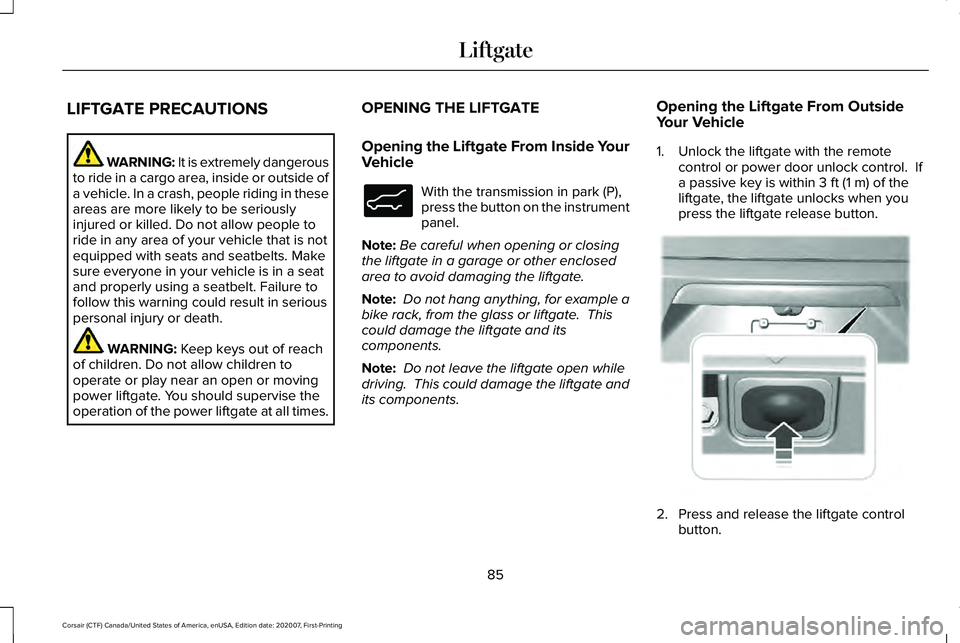
1. Unlock the liftgate with the remote
control or power door unlock control. If
a passive key is within
3 ft (1 m) of the
liftgate, the liftgate unlocks when you
press the liftgate release button. 2. Press and release the liftgate control
button.
85
Corsair (CTF) Canada/United States of America, enUSA, Edition date: 202007, First-Printing LiftgateE138633 E291352
Page 89 of 638
Note:
Allow the power system to open the
liftgate. Manually pushing or pulling the
liftgate could activate the system’ s obstacle
detection feature and stop the power
operation or reverse its direction, replicate
a strut failure, or damage mechanical
components.
Note: Be careful when opening or closing
the liftgate in a garage or other enclosed
area to avoid damaging the liftgate.
Note: Do not hang anything, for example a
bike rack, from the glass or liftgate. This
could damage the liftgate and its
components.
Note: Do not leave the liftgate open while
driving. This could damage the liftgate and
its components.
Switching the Power Liftgate On or Off
You can switch the power liftgate on or off
through the vehicle settings on your
touchscreen.
When switched off, the liftgate only unlatches
and does not power open or close. Opening the Liftgate Using the Remote
Control Press the remote control button
twice within a few seconds.
Opening the Hands-Free Liftgate (If
Equipped)
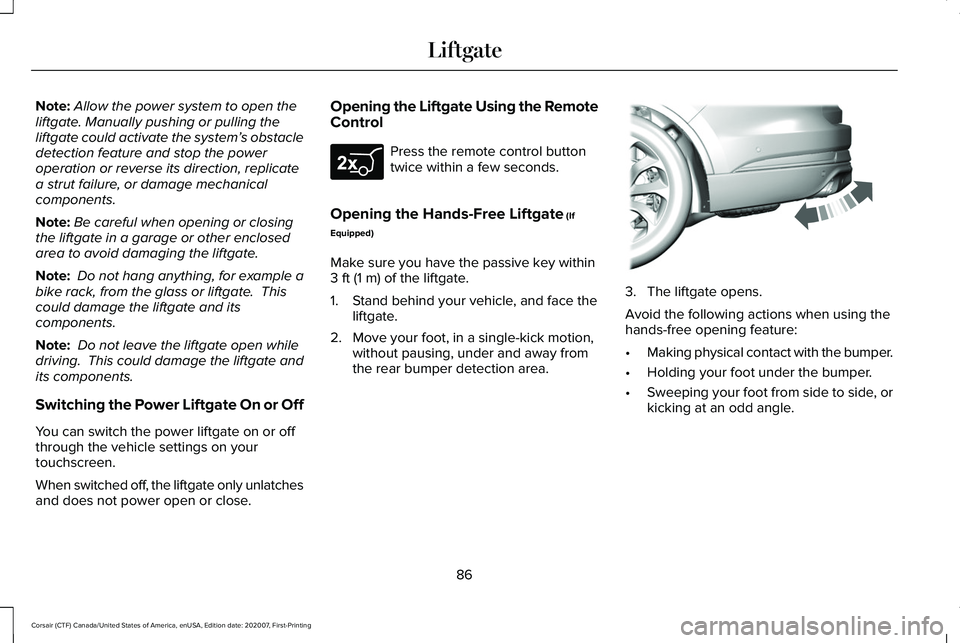
Make sure you have the passive key within
3 ft (1 m)
of the liftgate.
1. Stand behind your vehicle, and face the liftgate.
2. Move your foot, in a single-kick motion, without pausing, under and away from
the rear bumper detection area. 3. The liftgate opens.
Avoid the following actions when using the
hands-free opening feature:
•
Making physical contact with the bumper.
• Holding your foot under the bumper.
• Sweeping your foot from side to side, or
kicking at an odd angle.
86
Corsair (CTF) Canada/United States of America, enUSA, Edition date: 202007, First-Printing LiftgateE267940 E300799
Page 92 of 638
Note:
Make sure that you close the liftgate
before operating or moving your vehicle,
especially in an enclosure, like a garage or
a parking structure. This could damage the
liftgate and its components.
Note: Make sure the area behind your
vehicle is free from obstruction and that
there is enough room for you to operate the
liftgate. Objects too close to your vehicle,
for example a wall, garage door or another
vehicle may come into contact with the
moving liftgate This could damage the
liftgate and its components.
Note: Make sure you fully close the liftgate
to prevent cargo from falling out.
Closing the Liftgate Using the Remote
Control Press the remote control button
twice within three seconds. Closing the Hands-Free Liftgate (If
Equipped)
Make sure you have the passive key within
3 ft (1 m)
of the liftgate.
1. Stand behind your vehicle, and face the liftgate.
2. Move your foot, in a single-kick motion, without pausing, under and away from
the rear bumper detection area. 3. The liftgate closes.
Avoid the following actions when using the
hands-free opening feature:•
Making physical contact with the bumper.
• Holding your foot under the bumper.
• Sweeping your foot from side to side, or
kicking at an odd angle.
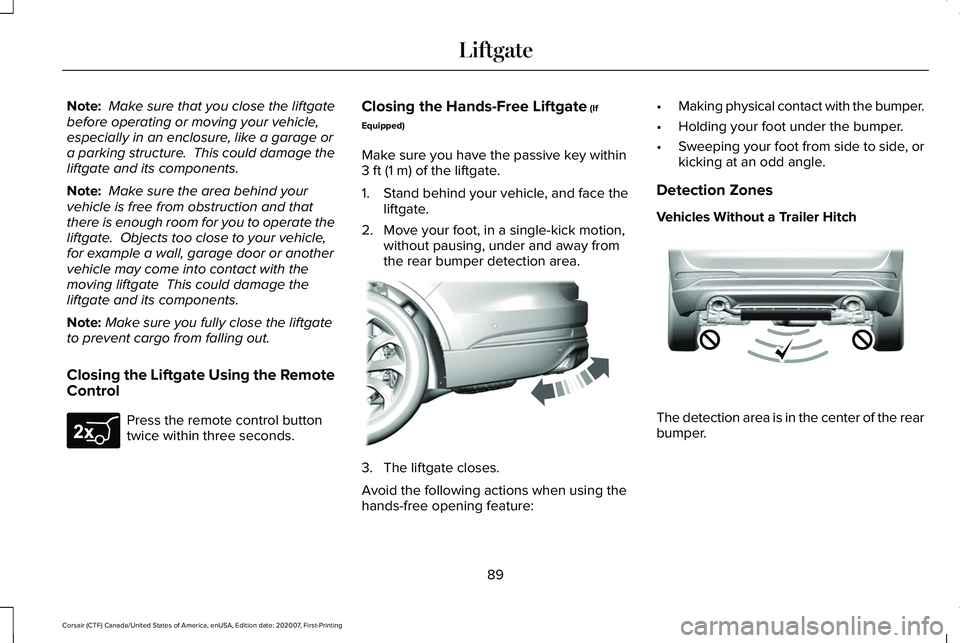
Detection Zones
Vehicles Without a Trailer Hitch The detection area is in the center of the rear
bumper.
89
Corsair (CTF) Canada/United States of America, enUSA, Edition date: 202007, First-Printing LiftgateE267940 E300799 E310717
Page 93 of 638
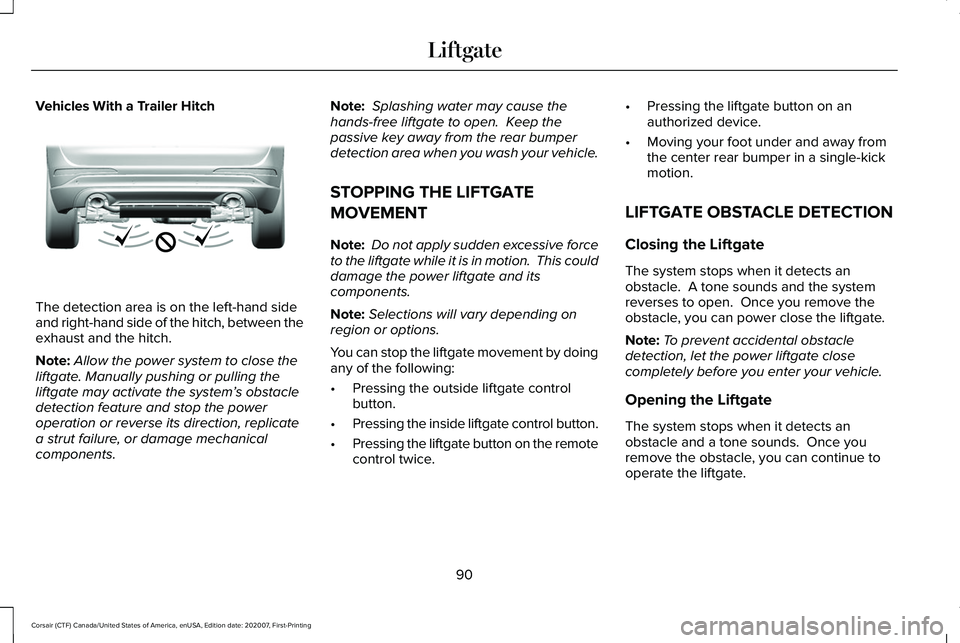
Vehicles With a Trailer Hitch
The detection area is on the left-hand side
and right-hand side of the hitch, between the
exhaust and the hitch.
Note:
Allow the power system to close the
liftgate. Manually pushing or pulling the
liftgate may activate the system’ s obstacle
detection feature and stop the power
operation or reverse its direction, replicate
a strut failure, or damage mechanical
components. Note:
Splashing water may cause the
hands-free liftgate to open. Keep the
passive key away from the rear bumper
detection area when you wash your vehicle.
STOPPING THE LIFTGATE
MOVEMENT
Note: Do not apply sudden excessive force
to the liftgate while it is in motion. This could
damage the power liftgate and its
components.
Note: Selections will vary depending on
region or options.
You can stop the liftgate movement by doing
any of the following:
• Pressing the outside liftgate control
button.
• Pressing the inside liftgate control button.
• Pressing the liftgate button on the remote
control twice. •
Pressing the liftgate button on an
authorized device.
• Moving your foot under and away from
the center rear bumper in a single-kick
motion.
LIFTGATE OBSTACLE DETECTION
Closing the Liftgate
The system stops when it detects an
obstacle. A tone sounds and the system
reverses to open. Once you remove the
obstacle, you can power close the liftgate.
Note: To prevent accidental obstacle
detection, let the power liftgate close
completely before you enter your vehicle.
Opening the Liftgate
The system stops when it detects an
obstacle and a tone sounds. Once you
remove the obstacle, you can continue to
operate the liftgate.
90
Corsair (CTF) Canada/United States of America, enUSA, Edition date: 202007, First-Printing LiftgateE310718