2021 HYUNDAI TUCSON HYBRID park assist
[x] Cancel search: park assistPage 478 of 630
07
7-119
Rear view
The rear image is displayed on the screen
when the gear is in R (Revers) or P (Park)
to assist in parking. The rear view has a
top view/rear view/side view.
Operating conditions
• Shift the gear to R (Reverse), the
image will appear on the screen.
• Press the Parking/View button (1)
while the gear is in P (Park), the image
will appear on the screen.
Off conditions
• The image cannot be turned off when
the gear is in R (Reverse).
• Shift the gear from R (Reverse) to P
(Park), the image will turn off.
• Press the Parking/View button (1)
again while the gear is in P (Park) with
the image on the screen.
Surround View Monitor
Malfunction and Limitations
Surround View Monitor malfunction
When Surround View Monitor is not
working properly, or the screen flickers,
or the camera image does not display
normally, have the vehicle inspected by
an authorized HYUNDAI dealer.
Limitations of Surround View
Monitor
• When the vehicle is stopped for a long
time in winter or when the vehicle is
parked in an indoor parking lot, the
exhaust fumes may temporarily blur
the image.
• The screen may be displayed
abnormally, and an icon will appear at
the top left side of the screen under
the following circumstances:
- The liftga
te is opened
- The driver or fr
ont passenger door
is opened
- The side view mirr
or is folded
Page 485 of 630
Driver assistance system
7-126
WARNING
Take the following precautions when
using Rear Cross-Traffic Safety system:
• For your safety, change the Settings
after parking the vehicle at a safe
location.
• If any other system’s warning
message is displayed or audible
warning is generated, Rear Cross-
Traffic Safety system’s warning
message may not be displayed
and audible warning may not be
generated.
• You may not hear the warning sound
of Rear Cross-Traffic Safety system if
the surrounding is noisy.
• Rear Cross-Traffic Safety system may
not operate if the driver applies the
brake pedal to avoid collision.
• During Rear Cross-Traffic Safety
system operation, the vehicle may
stop suddenly injuring passengers
and shifting loose objects. Always
have the seat belt on and keep loose
objects secured.
• Even if there is a problem with Rear
Cross-Traffic Safety system, the
vehicle’s basic braking performance
will operate normally.
• When Rear Cross-Traffic Safety
system is operating, braking control
by the function will automatically
cancel when the driver excessively
depresses the accelerator pedal.
• Rear Cross-Traffic Safety system does
not operate in all situations or cannot
avoid all collisions.
• Rear Cross-Traffic Safety system may
warn the driver late or may not warn
the driver depending on the road and
driving conditions. •
The driver should hold the
responsibility to control the vehicle.
Do not solely depend on Rear
Cross-Traffic Safety system. Rather,
maintain a safe braking distance, and
if necessary, depress the brake pedal
to reduce driving speed or to stop
the vehicle.
• Never deliberately operate Rear
Cross-Traffic Safety system on
people, animal, objects, etc. It may
cause serious injury or death.
CAUTION
The brake control may not operate
properly depending on the status of
ESC (Electronic Stability Control).
There will only be a warning when:
-The ESC (Electronic S
tability Control)
warning light is on
- ESC (Electronic S
tability Control) is
engaged in a different function
Information
If the function assists you with braking,
the driver must immediately depress
the brake pedal and check vehicle
surroundings.
- Brake control will end when the driver
depresses the brake pedal with sufficient
power.
- After shifting the gear
to R (Reverse),
braking control will operate once for left
and right vehicle approach.
Page 487 of 630
Driver assistance system
7-128
WARNING
• Even though the warning message
does not appear on the cluster, Rear
Cross-Traffic Safety system may not
operate properly.
• Rear Cross-Traffic Safety system may
not operate properly in an area (for
example: open terrain), where any
substance are not detected after
turning ON the engine.
CAUTION
Turn off Rear Cross-Traffic Safety
system to install a trailer, carrier, etc.,
or remove the trailer, carrier, etc. to use
Rear Cross-Traffic Safety system.
Limitations of Rear Cross-Traffic
Safety system
Rear Cross-Traffic Safety system may
not operate normally, or the function
may operate unexpectedly under the
following circumstances:
• Departing from where trees or grass
are overgrown
• Departing from where roads are wet
• Speed of the approaching vehicle is
fast or slow
Braking
con
trol
ma
y
no
t
w
ork,
driv
er’s
att
ention is required in the following
circumstances:
• The vehicle severely vibrates while
driving over a bumpy road, uneven
road or concrete patch
• Driving on a slippery surface due to
snow, water puddle, ice, etc.
• The tire pressure is low or a tire is
damaged
• The brake is reworked
• Remote Smart Parking Assist is
operating (if equipped)
Information
For more details on the limitations of the
rear corner radar, refer to “Blind-Spot
Collision-Avoidance Assist (BCA)” section
in chapter 7.
WARNING
• Driving near a vehicle or structure
OJX1079111[A] : Structure
Rear Cross-Traffic Safety system
may be limited when driving near
a vehicle or structure, and may not
detect the vehicle approaching from
the left or right. If this occurs, the
function may not warn the driver or
control the brakes when necessary.
Always check your surroundings
while backing up.
Page 489 of 630
![HYUNDAI TUCSON HYBRID 2021 Owners Manual Driver assistance system
7-130
• Pulling into the parking space where
there is a structure
OJX1079115[A] : Structure, [B] :Wall
Rear Cross-Traffic Safety system
may detect vehicles passing by in](/manual-img/35/56199/w960_56199-488.png "HYUNDAI TUCSON HYBRID 2021 Owners Manual Driver assistance system
7-130
• Pulling into the parking space where
there is a structure
OJX1079115[A] : Structure, [B] :Wall
Rear Cross-Traffic Safety system
may detect vehicles passing by in")
Driver assistance system
7-130
• Pulling into the parking space where
there is a structure
OJX1079115[A] : Structure, [B] :Wall
Rear Cross-Traffic Safety system
may detect vehicles passing by in
front of you when parking in reverse
into a parking space with a wall or
structure in the rear or side area.
If this occurs, the function may
unnecessarily warn the driver and
control the brake.
Always check your surroundings
while backing up. •
When the vehicle is parked rearward
OJX1079116
Rear Cross-Traffic Safety system may
detect vehicles passing by behind
you when parking in reverse into
a parking space. If this occurs, the
function may unnecessarily warn the
driver and control the brake.
Always check your surroundings
while backing up.
WARNING
• When you are towing a trailer or
another vehicle, we recommend that
Rear Cross-Traffic Safety system is
turned off due to safety reasons.
• Rear Cross-Traffic Safety system may
not operate normally if interfered by
strong electromagnetic waves.
• Rear Cross-Traffic Safety system may
not operate for 3 seconds after the
vehicle is started, or the rear corner
radars are initialized.
Page 491 of 630
Driver assistance system
7-132
reverse parKing distanCe warning (pd w) (iF
equipped)
Reverse Parking Distance Warning will
help warn the driver if an obstacle is
detected within a certain distance when
the vehicle is moving in reverse at low
speeds.
Detecting sensor
ONX4070060[1] : Rear ultrasonic sensors
Refer to the picture above for the
detailed location of the detecting
sensors.
Reverse Parking Distance
Warning Settings
Warning Volume
OTM070141NSelect ‘Driver assistance → Warning volume
’ fr om the clus ter or in fotainment sy
stem Settings menu to change the
Warning
v
olume
t
o
‘High
’,
‘M
edium’,
or ‘L
ow’
f
or
R
everse
P
arking
Dis
tance
Warning.
If y
ou change the Warning Volume,
the Warning Volume of other Driver
Assistance systems may change.
Reverse Parking Distance
Warning Operation
Operating button
Parking Distance Warning Off button
• Press the Parking Distance Warning
Off (
) button to turn off Reverse
Parking Distance Warning. Press the
button again to turn on the function.
• When Reverse Parking Distance
Warning is off (button indicator
light on), if you shift the gear to R
(Reverse), Reverse Parking Distance
Warning will automatically turn on.
Page 493 of 630
Driver assistance system
7-134
WARNING
• Reverse Parking Distance Warning
is a supplemental function. The
operation of Reverse Parking
Distance Warning can be affected
by several factors (including
environmental conditions). It is the
responsibility of the driver to always
check the rear view before and while
parking.
• Your new vehicle warranty does not
cover any accidents or damage to
the vehicle due to the malfunction of
Reverse Parking Distance Warning.
• Pay close attention when driving
near objects, pedestrians, and
especially children. Some objects
may not be detected by the
ultrasonic sensors, due to the objects
distance, size or material, all of
which can limit the effectiveness of
the sensor.
Limitations of Reverse Parking
Distance Warning
• Reverse Parking Distance Warning
may not operate normally when:
- Mois
ture is frozen to the sensor
- Sensor is cov
ered with foreign
material, such as snow or water
(Reverse Parking Distance Warning
will operate normally when such
foreign material are removed.)
- The w
eather is extremely hot or cold
- The sensor or sensor assembly is disassembled
- The surface o
f the sensor is pressed
hard or an impact is applied with a
hard object
- The surface o
f the sensor is
scratched with a sharp object
- The sensors or its surr
ounding
area is directly sprayed with high
pressure washer •
Reverse Parking Distance Warning
may malfunction when:
- Hea
vy rain or water spray is present
- Wa
ter flows on the surface of the
sensor
- Aff
ected
b
y
ano
ther
v
ehicle’s
sensors
- The sensor is cov
ered with snow
- Driving on unev
en road, gravel
roads or bushes
- Objects that gener
ates ultrasonic
waves are near the sensor
- Installing the license pla
te
differently from the original location
- The vehicle bumper heigh
t or
ultrasonic sensor installation has
been modified
- Attaching equipmen
ts or
accessories around the ultrasonic
sensors
• The following objects may not be
detected:
-Sharp or slim objects, such as ropes,
chains or small poles.
- Objects, which tend t
o absorb
sensor frequency, such as clothes,
spongy material or snow.
- Objects smaller than 40 in. (100 cm) in length and narr
ower than 6 in. (14
cm) in diameter.
- Pedes
trians, animals or objects
that are very close to the ultrasonic
sensors
• Parking Distance Warning Indicators
may be displayed differently from
the actual detected location when
the obstacle is located between the
sensors.
• Parking Distance Warning indicator
may not occur sequentially depending
on vehicle speed or obstacle shape.
• If Reverse Parking Distance Warning
needs repair, have the vehicle
inspected by an authorized HYUNDAI
dealer.
Page 494 of 630
07
7-135
Forward/reverse parKing distanCe warning (pd w)
(
iF e
quipped
)
Forward/Reverse Parking Distance
Warning will help warn the driver if an
obstacle is detected within a certain
distance when the vehicle is moving
forward or in reverse at low speeds.
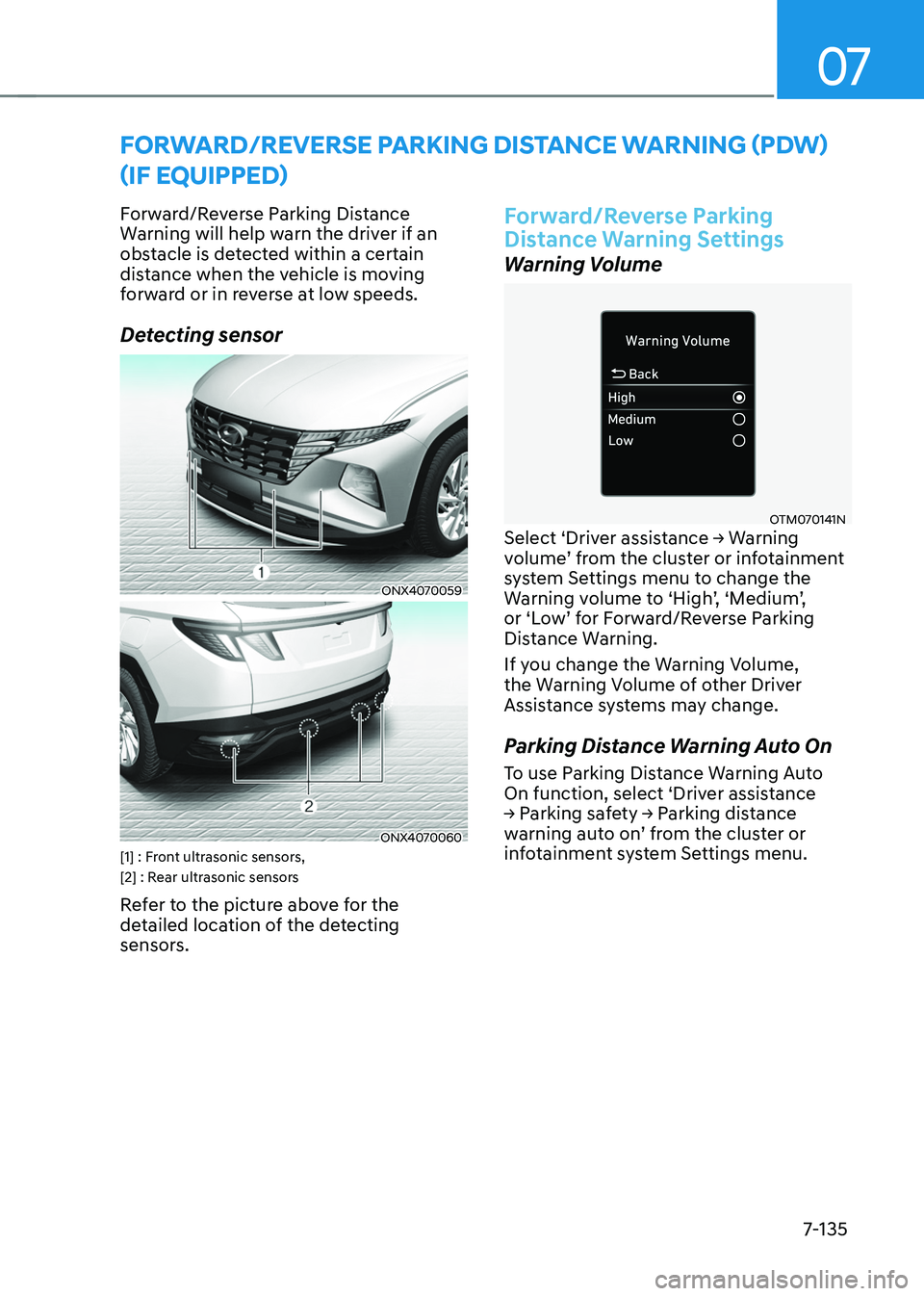
Detecting sensor
ONX4070059
ONX4070060[1] : Front ultrasonic sensors,
[2] : Rear ultrasonic sensors
Refer to the picture above for the
detailed location of the detecting
sensors.
Forward/Reverse Parking
Distance Warning Settings
Warning Volume
OTM070141NSelect ‘Driver assistance → Warning volume ’ fr om the clus ter or in fotainment sy
stem Settings menu to change the
Warning
v
olume
t
o
‘High
’,
‘M
edium’,
or ‘L
ow’
f
or
F
orward/Reverse
P
arking
Distance W
arning.
If you change the Warning Volume,
the Warning Volume of other Driver
Assistance systems may change.
Parking Distance Warning Auto On
To use Parking Distance Warning Auto
On function, select ‘Driver assistance
→
P
arking
sa
fety
→ P
arking
dis
tance
warning aut
o
on
’
fr
om
the clus
ter
or inf
otainment system Settings menu.
Page 495 of 630
Driver assistance system
7-136
Forward/Reverse Parking
Distance Warning Operation
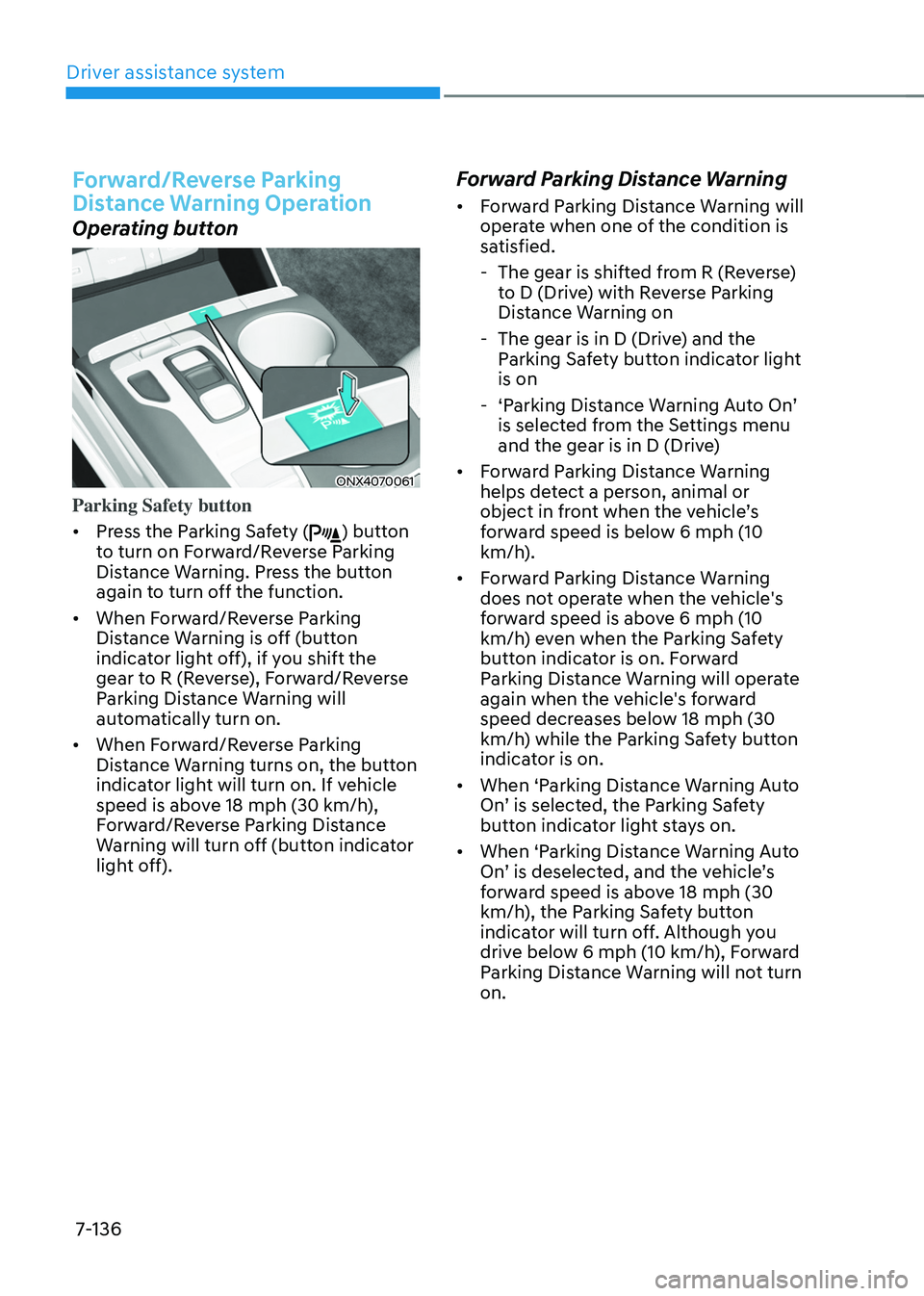
Operating button
ONX4070061
Parking Safety button
• Press the Parking Safety (
) button
to turn on Forward/Reverse Parking
Distance Warning. Press the button
again to turn off the function.
• When Forward/Reverse Parking
Distance Warning is off (button
indicator light off), if you shift the
gear to R (Reverse), Forward/Reverse
Parking Distance Warning will
automatically turn on.
• When Forward/Reverse Parking
Distance Warning turns on, the button
indicator light will turn on. If vehicle
speed is above 18 mph (30 km/h),
Forward/Reverse Parking Distance
Warning will turn off (button indicator
light off).
Forward Parking Distance Warning
• Forward Parking Distance Warning will
operate when one of the condition is
satisfied.
- The gear is shifted fr
om R (Reverse)
to D (Drive) with Reverse Parking
Distance Warning on
- The gear is in D (Drive
) and the
Parking Safety button indicator light
is on
- ‘Parking Dis
tance
W
arning
A
uto
On
’
is selected fr
om the Settings menu
and the gear is in D (Drive)
• Forward Parking Distance Warning
helps detect a person, animal or
object
in fr
ont
when the v
ehicle’s
forw
ard speed is below 6 mph (10
km/h).
• Forward Parking Distance Warning
does not operate when the vehicle's
forward speed is above 6 mph (10
km/h) even when the Parking Safety
button indicator is on. Forward
Parking Distance Warning will operate
again when the vehicle's forward
speed decreases below 18 mph (30
km/h) while the Parking Safety button
indicator is on.
• When ‘Parking Distance Warning Auto
On’
is select
ed,
the P
arking
Sa
fety
button indica
tor light stays on.
• When ‘Parking Distance Warning Auto
On’
is deselect
ed,
and the v
ehicle’s
forw
ard speed is above 18 mph (30
km/h), the Parking Safety button
indicator will turn off. Although you
drive below 6 mph (10 km/h), Forward
Parking Distance Warning will not turn
on.