2021 FORD F-150 ECU
[x] Cancel search: ECUPage 188 of 796

Note:
The vehicle remains secured when
you have remotely started the vehicle. A
valid key must be inside your vehicle to
switch the ignition on and drive your vehicle.
Remotely Stopping the Vehicle Within three seconds, press the
button on the remote control.
Within three seconds, press the
button again.
EXTENDING THE REMOTE
START DURATION (IF EQUIPPED)
To extend the remote start duration during
remote start, do the following: Press the button on the remote
control.
Within three seconds, press the
button on the remote control.
Within three seconds, press the
button again.
If the duration is set to 15 minutes, the
duration extends by another 15 minutes.
This provides a total of 30 minutes.
Note: Remote start can only be extended
once.
Note: A maximum of two remote starts, or
one remote start with an extension, are
allowed. To reset the restart procedure
switch the vehicle to on, then to off.
REMOTE START REMOTE
CONTROL INDICATORS
(IF
EQUIPPED)
Remote Control Feedback
An LED on the remote control provides
status feedback of remote start or stop
commands. Status
LED
Remote startsuccessful.
Solid green.
Remote stopsuccessful.
Solid red.
Request failed or
status not received.
Blinking red.
Status incomplete.
Blinking green.
REMOTE START SETTINGS
SWITCHING CLIMATE CONTROL
AUTO MODE ON AND OFF
1. Press
Settings on the touchscreen.
2. Press
Remote Start Setup.
3. Press
Climate Control.
4. Select
Vehicle.
5. Switch
Auto on or off.
Note: If you switch the auto mode on, the
system attempts to heat or cool the interior
to
72°F (22°C).
Note: When you switch the ignition on, the
climate control system returns to the last
used settings.
SWITCHING CLIMATE CONTROL
LAST SETTINGS ON AND OFF
1. Press
Settings on the touchscreen.
2. Press
Vehicle Settings.
3. Press
Remote Start Setup.
4. Switch
Last settings on or off.
Note: If you switch the last settings on, the
system remembers the last used settings.
184
F-150 (TFD) Canada/United States of America, enUSA, Edition date: 202104, Second-Printing Remote Start
(If Equipped)E138625 E138623 E138625
Page 201 of 796
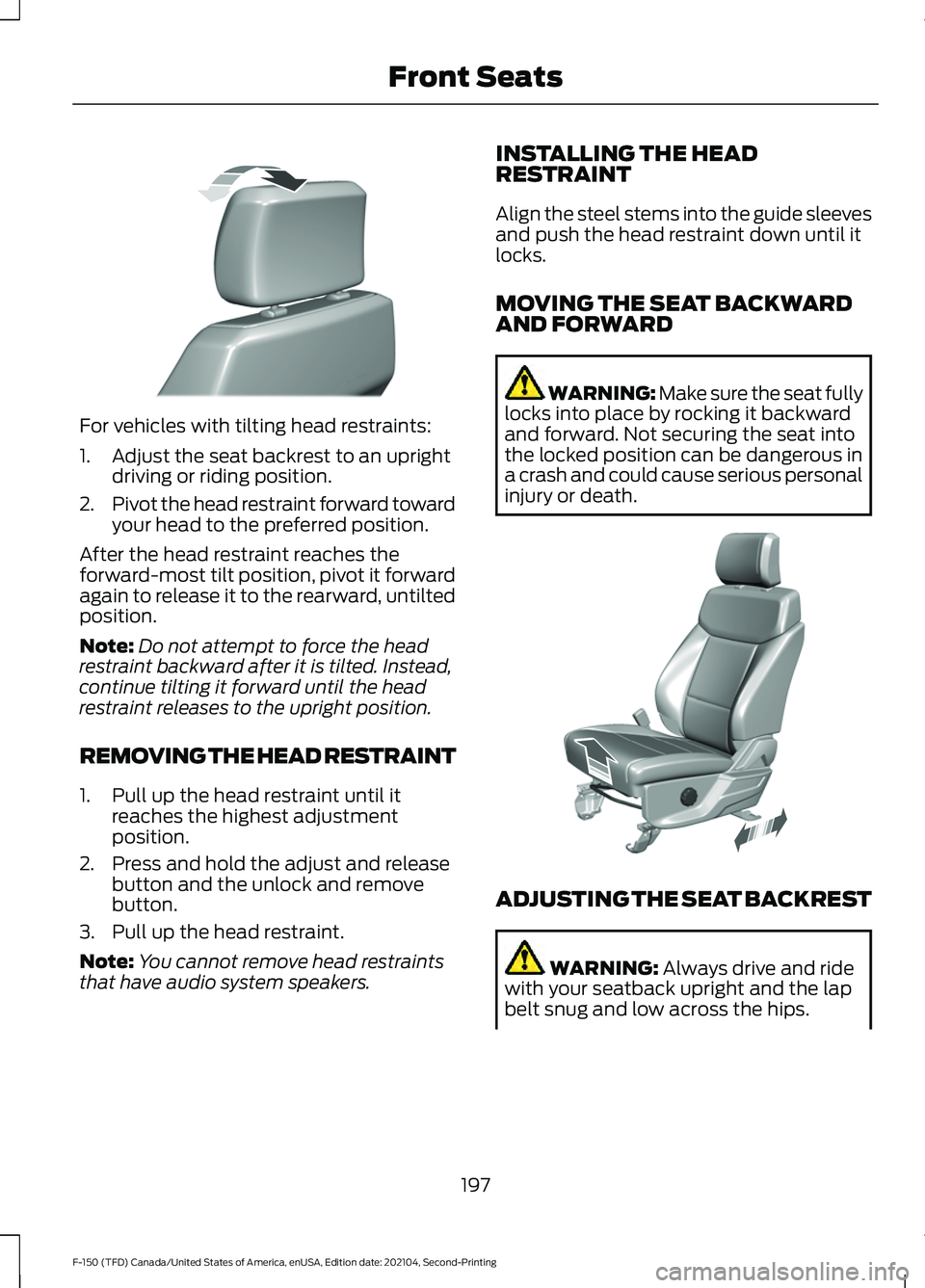
For vehicles with tilting head restraints:
1. Adjust the seat backrest to an upright
driving or riding position.
2. Pivot the head restraint forward toward
your head to the preferred position.
After the head restraint reaches the
forward-most tilt position, pivot it forward
again to release it to the rearward, untilted
position.
Note: Do not attempt to force the head
restraint backward after it is tilted. Instead,
continue tilting it forward until the head
restraint releases to the upright position.
REMOVING THE HEAD RESTRAINT
1. Pull up the head restraint until it reaches the highest adjustment
position.
2. Press and hold the adjust and release button and the unlock and remove
button.
3. Pull up the head restraint.
Note: You cannot remove head restraints
that have audio system speakers. INSTALLING THE HEAD
RESTRAINT
Align the steel stems into the guide sleeves
and push the head restraint down until it
locks.
MOVING THE SEAT BACKWARD
AND FORWARD WARNING: Make sure the seat fully
locks into place by rocking it backward
and forward. Not securing the seat into
the locked position can be dangerous in
a crash and could cause serious personal
injury or death. ADJUSTING THE SEAT BACKREST
WARNING: Always drive and ride
with your seatback upright and the lap
belt snug and low across the hips.
197
F-150 (TFD) Canada/United States of America, enUSA, Edition date: 202104, Second-Printing Front SeatsE327919 E308316
Page 214 of 796
WHAT IS THE GARAGE DOOR
OPENER
HomeLink Wireless Control
System
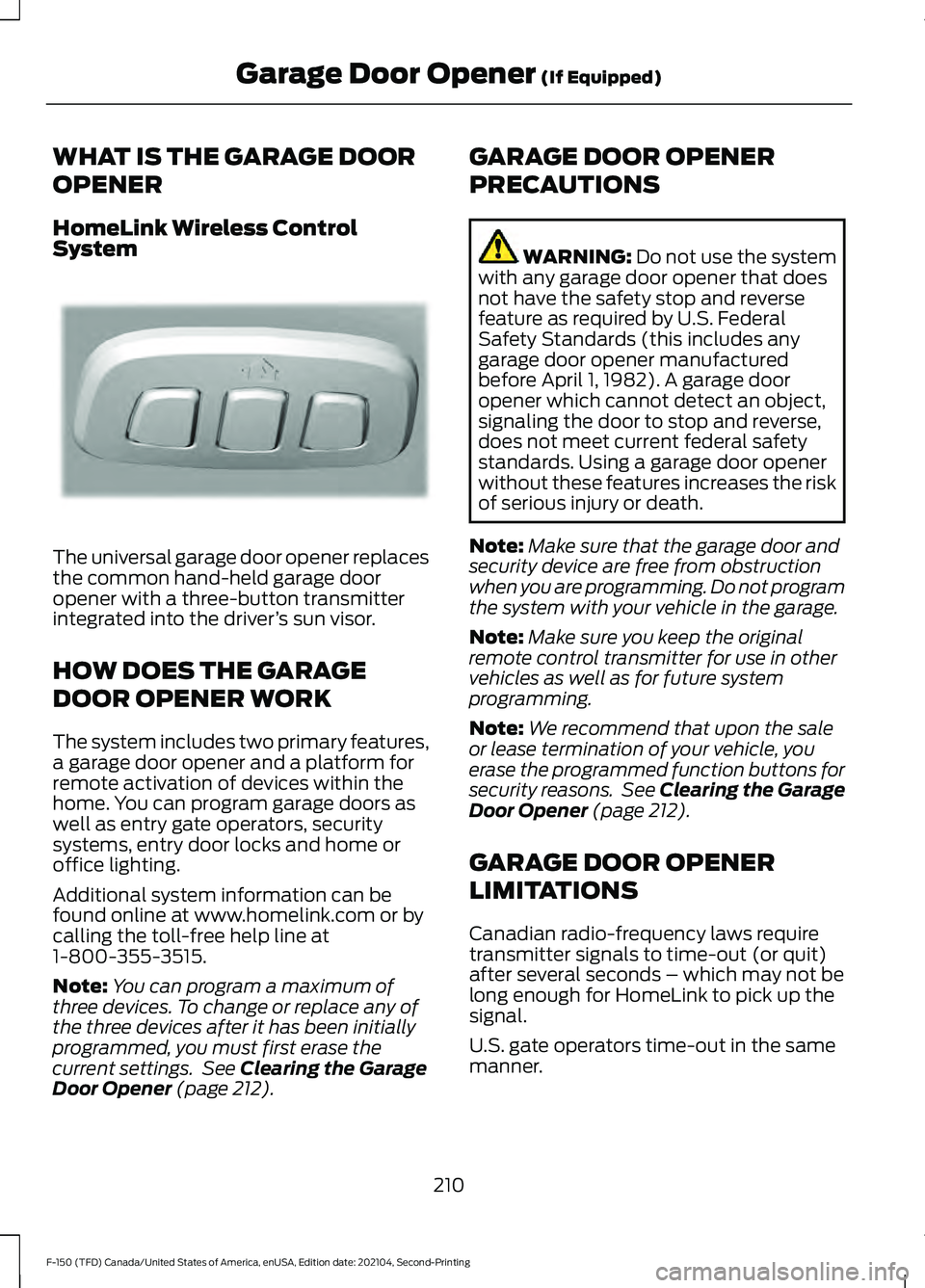
The universal garage door opener replaces
the common hand-held garage door
opener with a three-button transmitter
integrated into the driver
’s sun visor.
HOW DOES THE GARAGE
DOOR OPENER WORK
The system includes two primary features,
a garage door opener and a platform for
remote activation of devices within the
home. You can program garage doors as
well as entry gate operators, security
systems, entry door locks and home or
office lighting.
Additional system information can be
found online at www.homelink.com or by
calling the toll-free help line at
1-800-355-3515.
Note: You can program a maximum of
three devices. To change or replace any of
the three devices after it has been initially
programmed, you must first erase the
current settings. See Clearing the Garage
Door Opener (page 212). GARAGE DOOR OPENER
PRECAUTIONS WARNING:
Do not use the system
with any garage door opener that does
not have the safety stop and reverse
feature as required by U.S. Federal
Safety Standards (this includes any
garage door opener manufactured
before April 1, 1982). A garage door
opener which cannot detect an object,
signaling the door to stop and reverse,
does not meet current federal safety
standards. Using a garage door opener
without these features increases the risk
of serious injury or death.
Note: Make sure that the garage door and
security device are free from obstruction
when you are programming. Do not program
the system with your vehicle in the garage.
Note: Make sure you keep the original
remote control transmitter for use in other
vehicles as well as for future system
programming.
Note: We recommend that upon the sale
or lease termination of your vehicle, you
erase the programmed function buttons for
security reasons. See Clearing the Garage
Door Opener
(page 212).
GARAGE DOOR OPENER
LIMITATIONS
Canadian radio-frequency laws require
transmitter signals to time-out (or quit)
after several seconds – which may not be
long enough for HomeLink to pick up the
signal.
U.S. gate operators time-out in the same
manner.
210
F-150 (TFD) Canada/United States of America, enUSA, Edition date: 202104, Second-Printing Garage Door Opener
(If Equipped)E188211
Page 422 of 796

PICKUP BED PRECAUTIONS
WARNING: Do not allow people or
animals in truck beds that have
modifications, such as bed covers or
slide-in campers, when the engine is
running. Exhaust fumes are toxic. Failure
to follow this instruction could result in
personal injury or death. WARNING: It is extremely
dangerous to ride in a cargo area, inside
or outside of a vehicle. In a crash, people
riding in these areas are more likely to be
seriously injured or killed. Do not allow
people to ride in any area of your vehicle
that is not equipped with seats and
seatbelts. Make sure everyone in your
vehicle is in a seat and properly using a
seatbelt. Failure to follow this warning
could result in serious personal injury or
death.
PICKUP BED ANCHOR POINTS
PICKUP BED ANCHOR POINT
PRECAUTIONS WARNING: Always properly secure
cargo to prevent shifting cargo or cargo
falling from the vehicle. Failure to do so
could result in compromised vehicle
stability and serious personal injury to
vehicle occupants or others. WARNING:
The appropriate
loading capacity of your vehicle can be
limited either by volume capacity (how
much space is available) or by payload
capacity (how much weight the vehicle
should carry). Once you have reached the maximum payload of your vehicle,
do not add more cargo, even if there is
space available. Overloading or
improperly loading your vehicle can
contribute to loss of vehicle control and
vehicle rollover.
WARNING:
It is extremely
dangerous to ride in a cargo area, inside
or outside of a vehicle. In a crash, people
riding in these areas are more likely to be
seriously injured or killed. Do not allow
people to ride in any area of your vehicle
that is not equipped with seats and
seatbelts. Make sure everyone in your
vehicle is in a seat and properly using a
seatbelt. Failure to follow this warning
could result in serious personal injury or
death. WARNING:
Do not use the load
retaining fixtures for towing. Failure to
follow this instruction could result in
personal injury. WARNING:
Do not exceed the
maximum load rating of the load
retaining fixtures. Failure to follow this
instruction could result in personal injury. WARNING:
Check the load
retaining fixtures for damage before
using them. Failure to follow this
instruction could result in personal injury.
LOCATING THE PICKUP BED
ANCHOR POINTS
The pickup bed anchor points are located
at each corner of the pickup bed.
418
F-150 (TFD) Canada/United States of America, enUSA, Edition date: 202104, Second-Printing Pickup Bed
Page 424 of 796
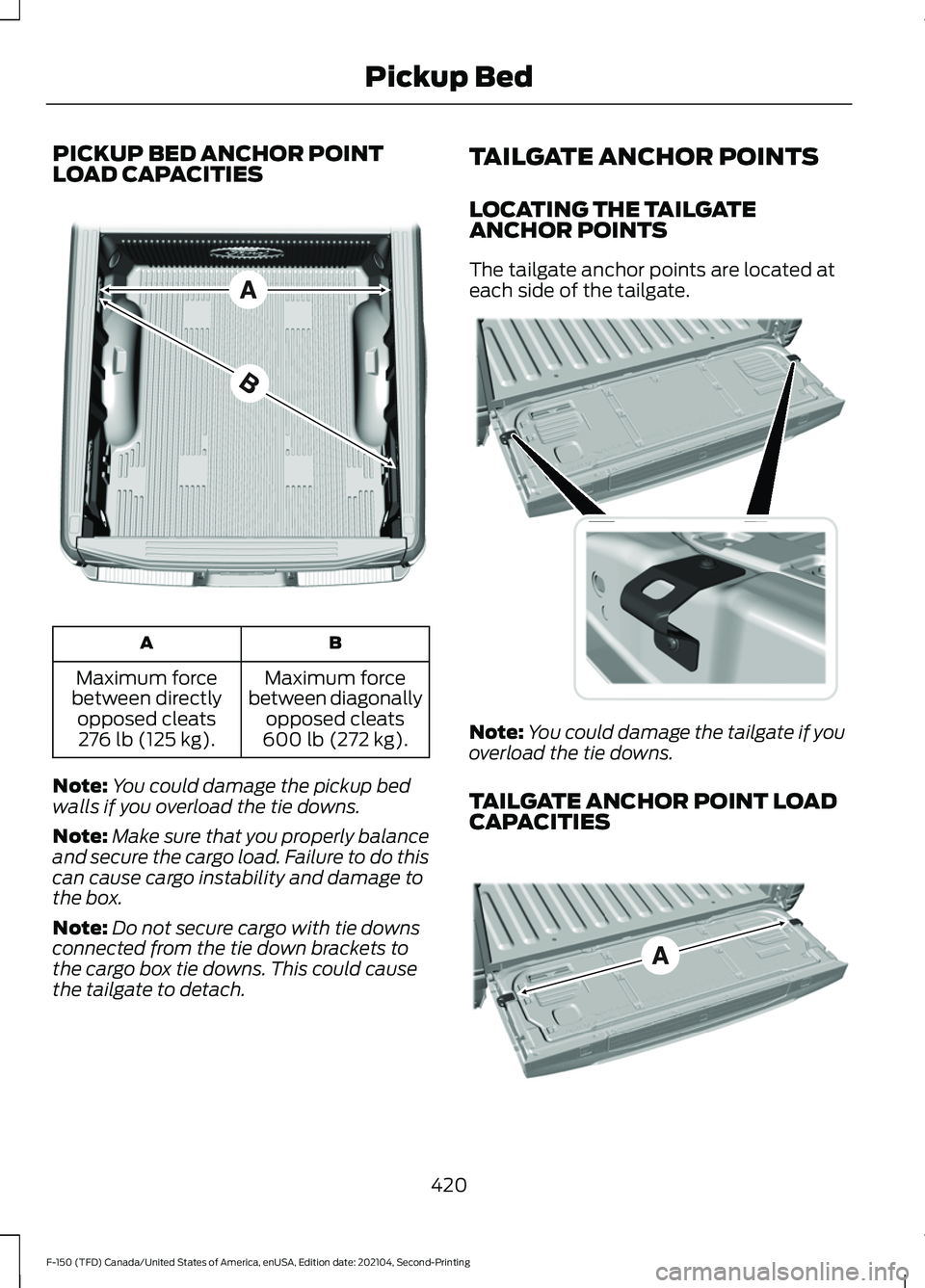
PICKUP BED ANCHOR POINT
LOAD CAPACITIES
B
A
Maximum force
between diagonally opposed cleats
600 lb (272 kg).
Maximum force
between directly opposed cleats276 lb (125 kg).
Note: You could damage the pickup bed
walls if you overload the tie downs.
Note: Make sure that you properly balance
and secure the cargo load. Failure to do this
can cause cargo instability and damage to
the box.
Note: Do not secure cargo with tie downs
connected from the tie down brackets to
the cargo box tie downs. This could cause
the tailgate to detach. TAILGATE ANCHOR POINTS
LOCATING THE TAILGATE
ANCHOR POINTS
The tailgate anchor points are located at
each side of the tailgate.
Note:
You could damage the tailgate if you
overload the tie downs.
TAILGATE ANCHOR POINT LOAD
CAPACITIES 420
F-150 (TFD) Canada/United States of America, enUSA, Edition date: 202104, Second-Printing Pickup BedE327576 E327594 E327790
Page 425 of 796
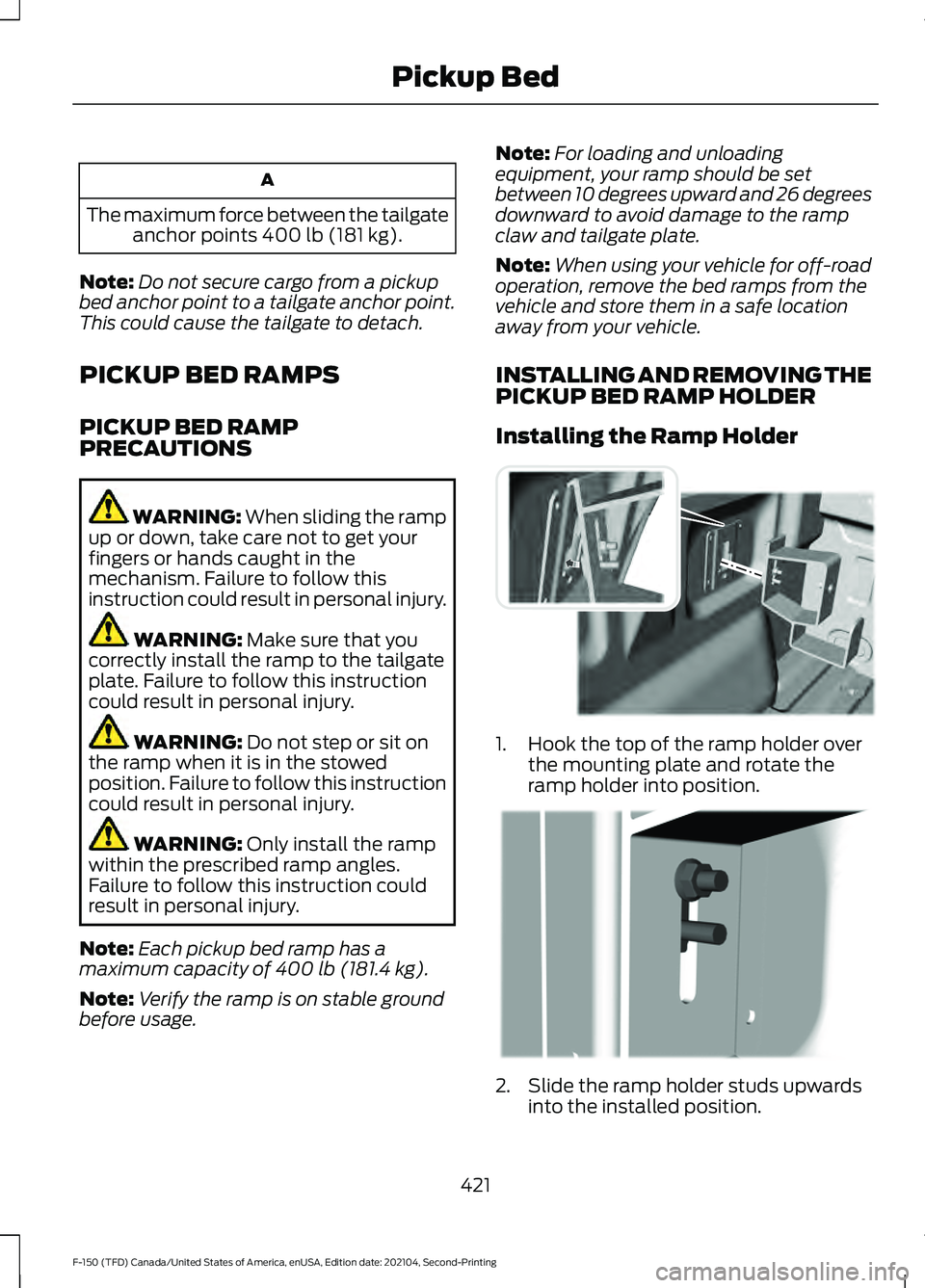
A
The maximum force between the tailgate anchor points 400 lb (181 kg).
Note: Do not secure cargo from a pickup
bed anchor point to a tailgate anchor point.
This could cause the tailgate to detach.
PICKUP BED RAMPS
PICKUP BED RAMP
PRECAUTIONS WARNING:
When sliding the ramp
up or down, take care not to get your
fingers or hands caught in the
mechanism. Failure to follow this
instruction could result in personal injury. WARNING:
Make sure that you
correctly install the ramp to the tailgate
plate. Failure to follow this instruction
could result in personal injury. WARNING:
Do not step or sit on
the ramp when it is in the stowed
position. Failure to follow this instruction
could result in personal injury. WARNING:
Only install the ramp
within the prescribed ramp angles.
Failure to follow this instruction could
result in personal injury.
Note: Each pickup bed ramp has a
maximum capacity of
400 lb (181.4 kg).
Note: Verify the ramp is on stable ground
before usage. Note:
For loading and unloading
equipment, your ramp should be set
between 10 degrees upward and 26 degrees
downward to avoid damage to the ramp
claw and tailgate plate.
Note: When using your vehicle for off-road
operation, remove the bed ramps from the
vehicle and store them in a safe location
away from your vehicle.
INSTALLING AND REMOVING THE
PICKUP BED RAMP HOLDER
Installing the Ramp Holder 1. Hook the top of the ramp holder over
the mounting plate and rotate the
ramp holder into position. 2. Slide the ramp holder studs upwards
into the installed position.
421
F-150 (TFD) Canada/United States of America, enUSA, Edition date: 202104, Second-Printing Pickup BedE194387 E194388
Page 427 of 796
6. Pull the location pin outward and
extend the ramp until the pin is seated
in the usage position, then set the ramp
on even ground.
Removing the Ramp
Remove in the reverse order.
STORING THE PICKUP BED
RAMPS
Storing the Bed Ramp
1. Pick up the ramp. Pull the location pin outward.
2. Slide the ramp into the storage position
until the location pin locks.
Note: Make sure the proper pin location has
been applied for your bed size.
3. Slide the ramp claw off of the tailgate plate.
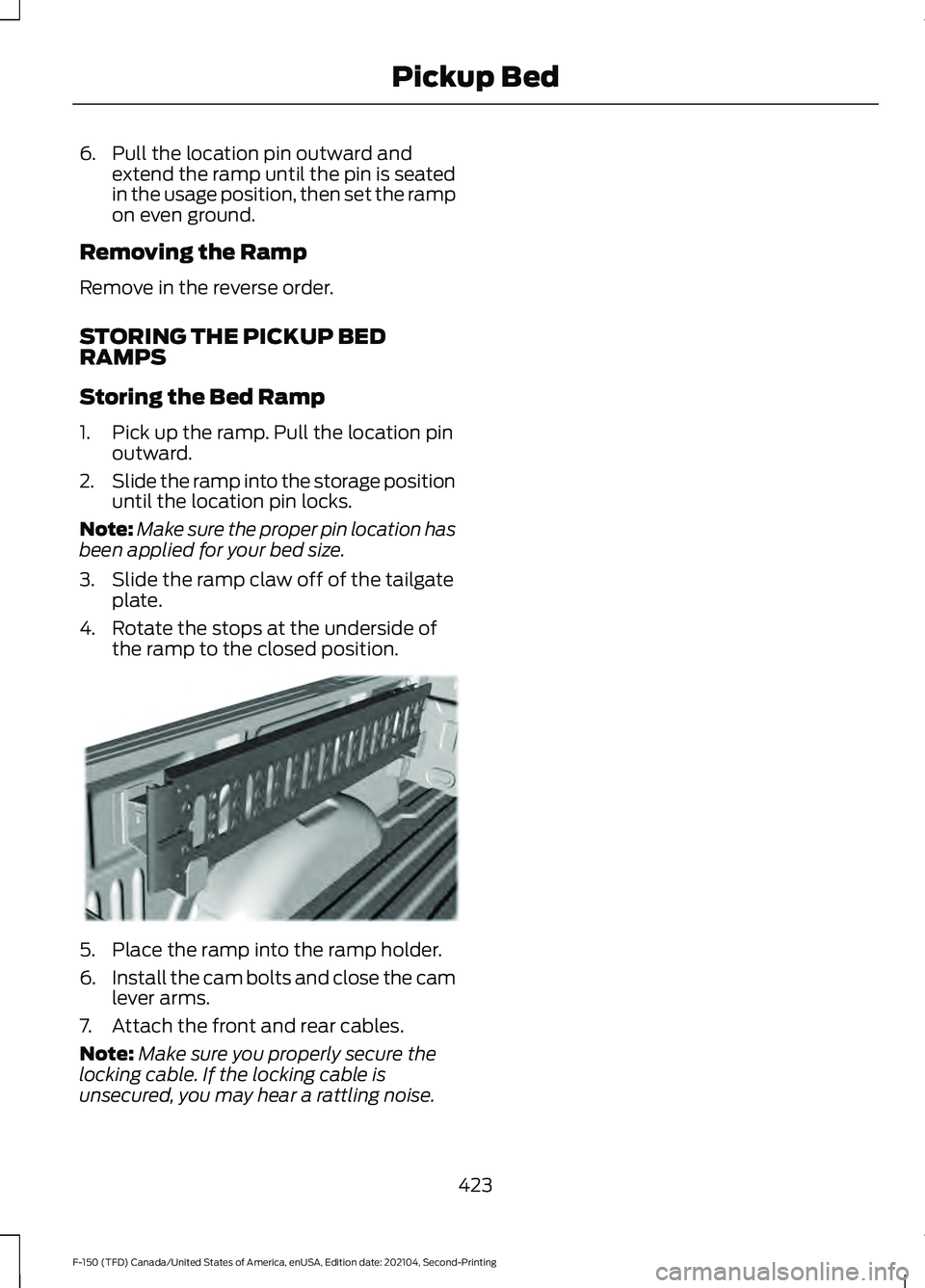
4. Rotate the stops at the underside of the ramp to the closed position. 5. Place the ramp into the ramp holder.
6.
Install the cam bolts and close the cam
lever arms.
7. Attach the front and rear cables.
Note: Make sure you properly secure the
locking cable. If the locking cable is
unsecured, you may hear a rattling noise.
423
F-150 (TFD) Canada/United States of America, enUSA, Edition date: 202104, Second-Printing Pickup BedE194391
Page 474 of 796
OFF-ROAD DRIVING
WHAT IS OFF-ROAD DRIVING
Off-road driving is driving your vehicle on
unsurfaced roads or trails, made from dirt,
rocks, sand and mud.
OFF-ROAD DRIVING
PRECAUTIONS - RAPTOR
WARNING: If you continue to drive
your vehicle when the engine is
overheating, the engine could stop
without warning. Failure to follow this
instruction could result in the loss of
control of your vehicle.
Before going off-road driving, consult with
all the appropriate government entities to
determine where you are legally allowed
to operate your vehicle and what permits
or registrations are required to do so.
Inspect your vehicle before and after any
off-road driving.
Familiarize yourself with the dimensions
of your vehicle including approach angles,
breakover angles, and ground clearance.
Also familiarize yourself with the features
of your vehicle. Some of these features
such as drive modes and cameras can
improve your off-road driving experience.
Secure loose objects inside your vehicle
and in the cargo area.
BASIC OFF-ROAD DRIVING
TECHNIQUES - RAPTOR
Grip the steering wheel with your thumbs
on the outside of the rim. This reduces the
risk of injury due to abrupt steering wheel
motions that occur when negotiating rough
terrain. If you are driving in a dusty area, be sure to
leave ample distance between your vehicle
and any other vehicles to allow for
adequate vision.
BASIC OFF-ROAD DRIVING
TECHNIQUES
Off-road Driving Hints
Before taking your vehicle off-roading, a
basic vehicle inspection should be done to
make sure that the vehicle is in top working
condition. It is always recommended that
at least two vehicles are used while
off-roading. The buddy system helps make
sure that help is close at hand should a
vehicle become stuck or damaged. It is also
wise to take supplies such as a first aid kit,
supply of water, tow strap, cell or satellite
phone with you any time an off-road
excursion is planned.
1. Grip the steering wheel with thumbs
on the outside of the rim. This will
reduce the risk of injury due to abrupt
steering wheel motions that occur
when negotiating rough terrain.
2. Throttle, brake and steering inputs should be made in a smooth and
controlled manner. Sudden inputs to
the controls can cause loss of traction
or upset the vehicle, especially while
on loose terrain or while crossing
obstacles such as rocks or logs.
3. Look ahead on your route noting upcoming obstacles, or any other
factors which may indicate a change
in available traction, and adjust the
vehicle speed and route accordingly.
4. When driving off-road, if the front or rear suspension is bottoming out
and/or excessive contact with the
skid-plates is encountered, reduce
vehicle speed to avoid potential
damage to the vehicle.
470
F-150 (TFD) Canada/United States of America, enUSA, Edition date: 202104, Second-Printing Driving Hints