2021 FORD ESCAPE ignition
[x] Cancel search: ignitionPage 80 of 589
HOW DOES EASY ENTRY AND
EXIT WORK
This feature moves the driver seat
rearward up to 2 in (5 cm) when you switch
the ignition off. The driver seat returns to
its previous position when you switch the
ignition on.
SWITCHING EASY ENTRY AND
EXIT ON AND OFF
1. Press Settings on the touchscreen.
2. Press
Vehicle.
3. Select
Easy Entry/Exit.
If you press any adjustment or memory
button when in easy exit mode, the system
cancels the operation.
77
Escape (CTC) Canada/United States of America, Vehicles Built From: 02-11-2020, enUSA, Edition date: 202011, First-Printing Easy Entry and Exit
Page 90 of 589

PASSIVE ANTI-THEFT
SYSTEM
What Is the Passive Anti-Theft
System
The passive anti-theft system prevents
someone from starting the vehicle with an
incorrectly coded key.
How Does the Passive Anti-Theft
System Work
The passive anti-theft system arms when
you switch the ignition off.
It disarms when the ignition is switched on
with a correctly coded key.
Note:
The system is not compatible with
non-Ford aftermarket remote start systems.
Note: Do not leave a duplicate coded key
in your vehicle. Always take the keys and
lock all doors when leaving your vehicle.
ANTI-THEFT ALARM SYSTEM
What Is the Anti-Theft Alarm
System
The Anti-Theft Alarm System warns you
of an unauthorized entry to your vehicle.
How Does the Anti-Theft Alarm
System Work
When armed, the anti-theft alarm is
triggered in any of the following ways:
• If someone opens a door, the liftgate
or the hood without a correctly coded
key or remote control.
• If you turn the power on without a
correctly coded key.
• If the interior sensors detect movement
inside your vehicle. •
If the inclination sensors detect an
attempt to raise your vehicle.
• If someone disconnects the vehicle
battery or the battery backup alarm.
If the anti-theft alarm is triggered, the
alarm horn sounds for 30 seconds and the
direction indicators flash for 5 minutes.
Any further attempts to carry out one of
the above sounds the alarm again.
What Is the Perimeter Alarm
The perimeter alarm is designed to detect
unauthorized access to your vehicle.
What Are the Interior Sensors
The interior sensors are designed to detect
any movement inside your vehicle.
The interior sensors are in the overhead
console.
Note: Do not cover the interior sensors.
What Are the Inclination Sensors
The inclination sensor is designed to detect
an attempt to raise your vehicle, for
example to remove a wheel or to tow it
away.
What Is the Battery Backup Alarm
The battery backup alarm is an additional
alarm system that has its own battery and
horn. It is designed to detect if the vehicle
battery or the battery backup alarm is
disconnected.
Arming the Anti-Theft Alarm
System
The alarm is ready to arm when there is
not a key in your vehicle.
87
Escape (CTC) Canada/United States of America, Vehicles Built From: 02-11-2020, enUSA, Edition date: 202011, First-Printing Security
Page 91 of 589

Lock your vehicle with your remote control
to arm the alarm.
Disarming the Anti-Theft Alarm
System
Disarm the alarm by performing any of the
following actions:
•
Unlock the doors or luggage
compartment with the remote control.
• Switch your vehicle on or start your
vehicle.
ANTI-THEFT ALARM SYSTEM
SETTINGS
What are the Alarm Security Levels
You can select two levels of alarm security,
all sensors and perimeter sensing.
All Sensors
All sensors is the standard setting.
In all sensors, all equipped sensors are on
when you arm the alarm.
Note: Do not arm the alarm with all sensors
if passengers, animals or other moving
objects are inside your vehicle. Perimeter Sensing
In perimeter sensing, the interior sensors
are off when you arm the alarm.
All the other equipped sensors activate
when you arm the alarm in this mode.
Setting the Alarm Security Level
1. Press Settings on the touchscreen.
2. Press
Vehicle Settings.
3. Press
Alarm System.
4. Press
Motion Sensors.
5. Press a setting.
What Is Ask on Exit
You can choose which level of security you
require after you switch the ignition off.
Note: If you do not choose a setting, the
system defaults to all sensors.
Switching Ask on Exit On and Off
1. Press
Settings on the touchscreen.
2. Press
Vehicle Settings.
3. Press
Alarm System.
4. Switch
Ask on Exit on or off.
88
Escape (CTC) Canada/United States of America, Vehicles Built From: 02-11-2020, enUSA, Edition date: 202011, First-Printing Security
Page 108 of 589
OPENING AND CLOSING THE
WINDOWS
WARNING: Do not leave children
unattended in your vehicle and do not
let them play with the power windows.
Failure to follow this instruction could
result in personal injury. WARNING:
When closing the
power windows, verify they are free of
obstruction and make sure that children
and pets are not in the proximity of the
window openings. Press the window control switch
to open the window. Lift the
window control switch to close
the window.
To reduce wind noise or pulsing noise when
just one window is open, slightly open the
opposite window.
One-Touch Down
(If Equipped)
Press the window control switch fully and
release it. Press again or lift it to stop the
window.
One-Touch Up
(If Equipped)
Lift the window control switch fully and
release it. Press or lift it again to stop the
window.
Resetting One-Touch Up
Start the engine.
1. Lift and hold the window control switch
until you fully close the door window.
Continue to hold the window control
switch for a few seconds after you
close the window.
2. Release the window control switch. 3. Press and hold the window control
switch until you fully open the door
window.
4. Release the window control switch.
5. Lift and hold the window control switch
until you fully close the window.
6. Test for correct window operation by carrying out the one-touch down and
one-touch up features.
Accessory Delay
The window switches remain operational
for several minutes when you switch the
ignition off or until you open either front
door.
WINDOW BOUNCE-BACK (If
Equipped)
What Is Window Bounce-Back
The window stops and reverses some
distance if it detects an obstacle when
closing.
Overriding Window Bounce-Back WARNING: If you override
bounce-back, the window does not
reverse if it detects an obstacle. Take
care when closing the windows to avoid
personal injury or damage to your
vehicle. WARNING: Bounce-back is off until
you reset the memory. Take care when
closing the windows to avoid personal
injury or damage to your vehicle.
Note: The window stops if you release the
switch before the window fully closes.
105
Escape (CTC) Canada/United States of America, Vehicles Built From: 02-11-2020, enUSA, Edition date: 202011, First-Printing Windows
Page 111 of 589
ADJUSTING THE EXTERIOR
MIRRORS
WARNING: Do not adjust the
mirrors when your vehicle is moving. This
could result in the loss of control of your
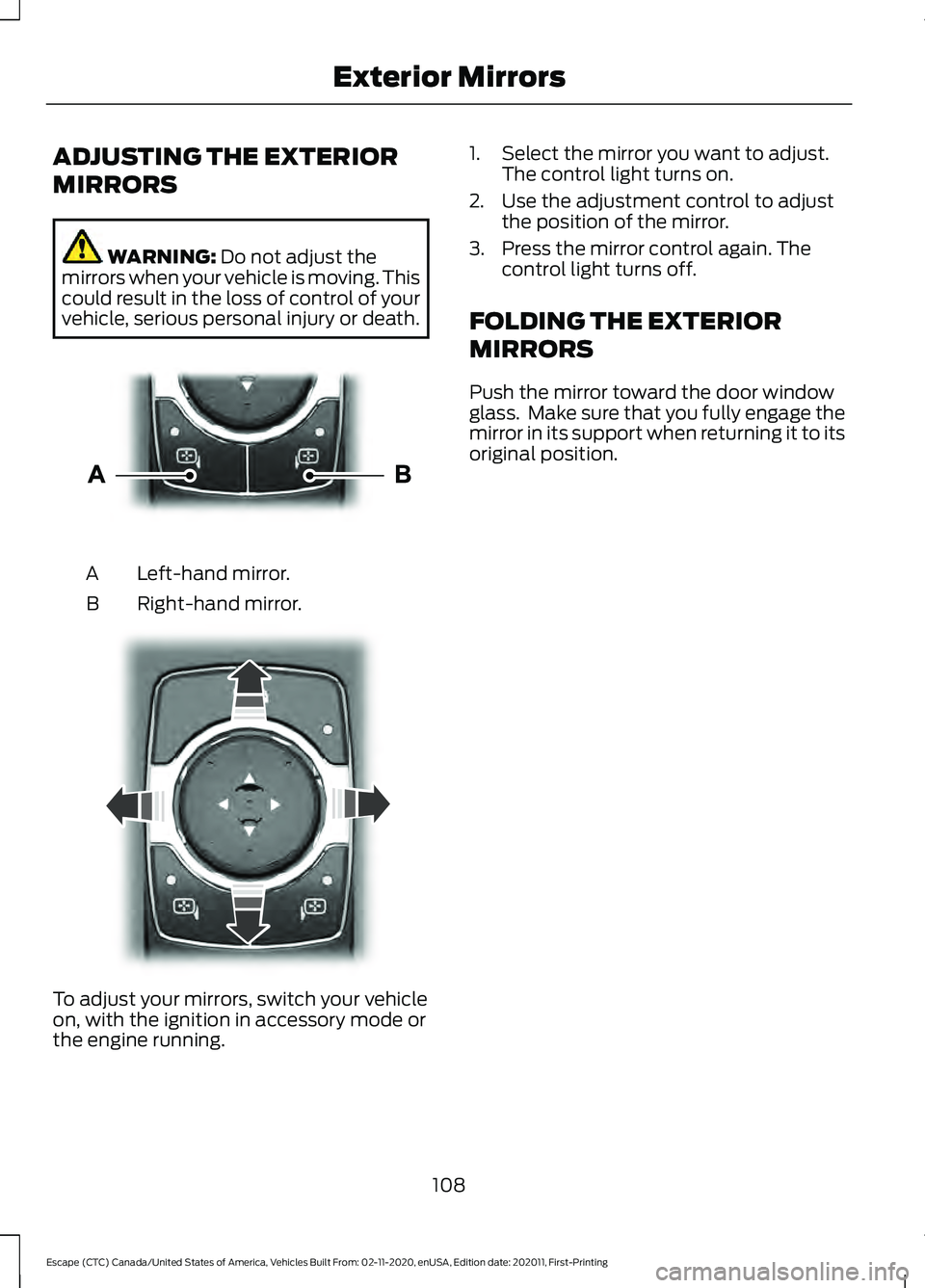
vehicle, serious personal injury or death. Left-hand mirror.
A
Right-hand mirror.
B To adjust your mirrors, switch your vehicle
on, with the ignition in accessory mode or
the engine running. 1. Select the mirror you want to adjust.
The control light turns on.
2. Use the adjustment control to adjust the position of the mirror.
3. Press the mirror control again. The control light turns off.
FOLDING THE EXTERIOR
MIRRORS
Push the mirror toward the door window
glass. Make sure that you fully engage the
mirror in its support when returning it to its
original position.
108
Escape (CTC) Canada/United States of America, Vehicles Built From: 02-11-2020, enUSA, Edition date: 202011, First-Printing Exterior MirrorsE303926 E303927
Page 123 of 589

INSTRUMENT CLUSTER
WARNING LAMPS
Anti-Lock Braking System
If it illuminates when you are
driving, this indicates your
vehicle requires service. Your
vehicle continues to have normal braking
without the anti-lock brake system
function. Have your vehicle checked as
soon as possible.
Battery It illuminates when you switch
the ignition on.
If it illuminates when the engine
is running, this indicates your vehicle
requires service. Have your vehicle
checked as soon as possible.
Brake System It illuminates when you apply the
parking brake and the ignition is
on. If it illuminates when your
vehicle is moving, make sure the
parking brake is released. If the
parking brake is released, this
indicates low brake fluid level or the brake
system requires service. Have your vehicle
checked as soon as possible.
Note: Indicators may vary depending on
region.
Door Ajar It illuminates when you switch
the ignition on and remains on if
any door is open. Electric Park Brake It illuminates or flashes when the
electric parking brake requires
service. Have your vehicle
checked as soon as possible.
Engine or Motor Coolant
Temperature If it illuminates, safely stop your
vehicle and switch your vehicle
off. Have your vehicle checked
as soon as possible.
Fasten Seatbelt It illuminates and a tone sounds
until you fasten the seatbelts.
Fasten Rear Seatbelt It illuminates and a tone sounds
until you fasten the rear
seatbelts.
High Voltage Electric System
Failure It illuminates if your vehicle has
an electrical component fault or
failure that causes your vehicle
to shutdown or enter a limited operating
mode. A message may appear in the
instrument cluster display.
Hood Ajar It illuminates when the ignition
is on and the hood is not
completely closed.
120
Escape (CTC) Canada/United States of America, Vehicles Built From: 02-11-2020, enUSA, Edition date: 202011, First-Printing Instrument Cluster E270480 E146190 E71880 E206718 E144693 E246598
Page 124 of 589

Liftgate Ajar
It illuminates when the ignition
is on and the liftgate is not
completely closed.
Low Beam Warning It illuminates when the low
beam headlamp requires service.
Have the system checked as
soon as possible.
Low Fuel Level It illuminates when the fuel level
is low.
Low Tire Pressure Warning It illuminates when your tire
pressure is low. If illuminated,
check your tire pressure as soon
as possible. If it begins to flash at anytime,
have the system checked as soon as
possible.
Low Washer Fluid It illuminates when the washer
fluid is low.
Malfunction Indicator Lamp It illuminates when the ignition
is on and the engine is off, this is
normal operation. If it illuminates
when the engine is on this indicates that
the emission control system requires
service. If it flashes, have your vehicle
checked immediately. See Starting and
Stopping the Engine – Warning Lamps
(page
177). Oil Pressure It illuminates when the engine
oil pressure is low.
Powertrain Fault Illuminates when the powertrain
requires service. Have the
system checked as soon as
possible.
Vehicle Plugged In
(If Equipped) It illuminates when your vehicle
is plugged in.
WHAT ARE THE INSTRUMENT
CLUSTER INDICATORS
Indicators notify you of various features
that are active on your vehicle.
INSTRUMENT CLUSTER
INDICATORS
Adaptive Cruise Control See
Adaptive Cruise Control
(page 249).
Automatic High Beam Control See
Automatic High Beam
Control Indicators (page 101).
121
Escape (CTC) Canada/United States of America, Vehicles Built From: 02-11-2020, enUSA, Edition date: 202011, First-Printing Instrument ClusterE162453 E181350 E132353 E228962 E144524
Page 137 of 589

WHAT IS REMOTE START
The system allows you to remotely start
your vehicle and to adjust the interior
temperature according to the settings that
you chose.
REMOTE START
PRECAUTIONS
WARNING: Do not start the engine
in a closed garage or in other enclosed
areas. Exhaust fumes are toxic. Always
open the garage door before you start
the engine. Failure to follow this
instruction could result in personal injury
or death.
REMOTE START LIMITATIONS
Remote start does not work under the
following conditions:
• The alarm horn is sounding.
• The hood is open.
• The transmission is not in park (P).
• The ignition is on.
• The battery voltage is below the
minimum operating voltage.
Note: Do not use remote start if your fuel
level is low.
Note: You can use remote start with
FordPass. See Connecting the Vehicle to
a Wi-Fi Network (page 409).
ENABLING REMOTE START
1. Press
Settings on the touchscreen.
2. Press
Vehicle Settings.
3. Press
Remote Start Setup.
4. Switch
Remote Start on or off. Note:
To remote start with FordPass, make
sure that the modem is enabled.
See
Connected Vehicle Requirements (page
409).
REMOTELY STARTING AND
STOPPING THE VEHICLE
Remotely Starting the Vehicle Press the button on the remote
control.
Within three seconds, press the
button twice on the remote
control.
Note: You can also use the FordPass App
to start the vehicle.
Note: The turn signals flash twice.
Note: The parking lamps turn on when the
vehicle is running.
Note: The horn sounds if the system fails
to start.
Note: All other vehicle systems remain off
when you have remotely started the vehicle.
Note: The vehicle remains secured when
you have remotely started the vehicle. A
valid key must be inside your vehicle to
switch the ignition on and drive your vehicle.
Remotely Stopping the Vehicle Within three seconds, press the
button twice on the remote
control.
EXTENDING THE REMOTE
START DURATION
To extend the remote start duration during
remote start, do the following:
134
Escape (CTC) Canada/United States of America, Vehicles Built From: 02-11-2020, enUSA, Edition date: 202011, First-Printing Remote Start
(If Equipped)E138623 E138625 E138625