2021 FORD ESCAPE wheel torque
[x] Cancel search: wheel torquePage 213 of 589

AUTOMATIC TRANSMISSION
PRECAUTIONS
WARNING: When your vehicle is
stationary, keep the brake pedal fully
pressed when shifting gears. Failure to
follow this instruction could result in
personal injury, death or property
damage. WARNING:
Do not apply the brake
pedal and accelerator pedal
simultaneously. Applying both pedals
simultaneously for more than a few
seconds will limit power, which may
result in difficulty maintaining speed in
traffic and could lead to serious injury.
Note: You may not be able to shift out of
park (P) unless the intelligent access key is
inside your vehicle.
AUTOMATIC TRANSMISSION
POSITIONS
Park (P)
This position locks the driveline and
prevents the wheels from turning.
The engine can start with the shifter in this
position.
The electric parking brake could apply if:
• You shift to park (P) on a slope.
• You shift to park (P) without the brake
pedal fully pressed.
Note: A warning tone sounds if you open
the driver door and you have not shifted the
transmission selector to park (P). Reverse (R)
This position allows your vehicle to move
backward. Come to a complete stop
before shifting into and out of reverse (R).
Neutral (N) WARNING:
In neutral (N) your
vehicle has the ability to roll freely. If you
intend to leave your vehicle, make sure
you apply the parking brake.
This position allows your vehicle to roll
freely. Hold the brake pedal down when in
this position.
The engine can start with the shifter in this
position.
Drive (D)
This position, drive (D), is the normal
driving position, and allows your vehicle to
move forward.
Low (L)
This mode is for driving on steep slopes.
The transmission will hold low gear for
maximum torque driving uphill and
maximum engine braking driving downhill.
You can enter this mode at any vehicle
speed.
Note: Prolonged use of this mode could
lower fuel economy. With your vehicle in
drive (D), press the L button to enter this
mode.
210
Escape (CTC) Canada/United States of America, Vehicles Built From: 02-11-2020, enUSA, Edition date: 202011, First-Printing Automatic Transmission
Page 258 of 589

ADAPTIVE CRUISE CONTROL
INDICATORS
Illuminates when you switch
adaptive cruise control on. The
color of the indicator changes to
indicate the system status.
White indicates the system is on but
inactive.
Green indicates that you set the speed and
the system is active.
SWITCHING FROM ADAPTIVE
CRUISE CONTROL TO CRUISE
CONTROL WARNING: Normal cruise control
will not brake when your vehicle is
approaching slower vehicles. Always be
aware of which mode you have selected
and apply the brakes when necessary.
Use the touchscreen to select the
following:
1. Select
Settings.
2. Select
Driver Assist..
3. Select
Cruise Control.
4. Select
Normal. The cruise control indicator
replaces the adaptive cruise
control indicator if you select
normal cruise control. The gap setting does
not display, and the system does not
respond to lead vehicles. Automatic
braking remains active to maintain set
speed. The system remembers the last
setting when you start your vehicle. LANE CENTERING
How Does Lane Centering Work
Adaptive cruise control with lane centering
uses radar and camera sensors to help
keep your vehicle in the lane by applying
continuous assistance steering torque
input toward the lane center on highways.
Note:
The adaptive cruise control gap
setting operates normally.
Lane Centering Precautions WARNING:
Do not use the system
when towing a trailer. Failure to follow
this instruction could result in the loss of
control of your vehicle, personal injury or
death. WARNING:
Do not use the system
if any changes or modifications to the
steering wheel have been made. Any
changes or modifications to the steering
wheel could affect the functionality or
performance of the system. Failure to
follow this instruction could result in the
loss of control of your vehicle, personal
injury or death.
Adaptive cruise control precautions apply
to lane centering unless stated otherwise
or contradicted by a lane centering
precaution. See Adaptive Cruise Control
Precautions
(page 249).
Lane Centering Requirements
You must keep your hands on the steering
wheel at all times.
255
Escape (CTC) Canada/United States of America, Vehicles Built From: 02-11-2020, enUSA, Edition date: 202011, First-Printing Adaptive Cruise Control
(If Equipped)E144529 E71340
Page 259 of 589

The system only activates when all of the
following occur:
•
You have adaptive cruise control with
stop and go on.
• Lane centering assist is enabled in your
information and entertainment screen.
See Switching Lane Centering On
and Off (page 256).
• You have your hands on the steering
wheel.
• The system detects both lane
markings.
Note: If it does not detect valid lane
markings, the system stays inactive until
valid markings are available.
Lane Centering Limitations
Adaptive cruise control limitations apply
to lane centering unless stated otherwise
or contradicted by a lane centering
limitation. See Adaptive Cruise Control
Limitations
(page 250).
Lane Centering may not correctly operate
in any of the following conditions:
• Your vehicle is not centered in the lane.
• The lane is too narrow or wide.
• The system does not detect at least
one lane marking or when lanes merge
or split.
• Limited steering torque input is applied.
• Areas under construction or new
infrastructure.
• When modifications to the steering
system have been made.
• When using a spare tire.
• In high wind conditions.
Note: The driving assistance torque is
limited and may not be sufficient for all
driving situations such as driving through
tight curves or driving through curves at high
speeds. Note:
In exceptional conditions, the system
may deviate from the center line.
Switching Lane Centering On and
Off
You must keep your hands on the steering
wheel at all times.
The controls are on the steering wheel. Press the button.
The indicator appears in the information
display. When the system is on, the color
of the indicator changes to indicate the
system status.
You can override the system at any time
by steering your vehicle.
Note: The correct requirements must be
met before you can switch the system on.
See
Lane Centering Requirements (page
255).
Lane Centering Alerts
You must keep your hands on the steering
wheel at all times.
When the system is active and detects no
steering activity for a period of time, the
system alerts you to put your hands on the
steering wheel. If you do not react to the
warnings the system cancels and slows
your vehicle down to idle speeds while
maintaining steering control.
The system also alerts you if your vehicle
crosses lane markings without detected
steering activity.
Note: The system may detect a light grip
or touch on the steering wheel as hands-off
driving.
256
Escape (CTC) Canada/United States of America, Vehicles Built From: 02-11-2020, enUSA, Edition date: 202011, First-Printing Adaptive Cruise Control
(If Equipped)E262175
Page 260 of 589

When an external condition cancels the
system, for example, no lane markings
available, a tone sounds and a message
appears in the instrument cluster display.
If your vehicle starts to slow
down, provide steering input to
the wheel and press and release
the button to regain full system
performance.
Note: The system disables until the next
key cycle if your vehicle slows down due to
driver inactivity twice within a key cycle.
Lane Centering Automatic
Cancellation
When an external condition cancels the
system, for example, no lane markings
available, a tone sounds and a message
appears in the instrument cluster display. If your vehicle starts to slow
down, you must provide steering
input to the wheel and press and
release the button to regain full system
performance.
Automatic cancellation can also occur if:
• The lane becomes too wide or too
narrow.
• The system cannot detect valid lane
markings.
• Lane markings cross over one another.
Note: The system disables until the next
key cycle if your vehicle slows down due to
driver inactivity twice within a key cycle.
Lane Centering Indicators Illuminates when you switch
lane centering on. The color of
the indicator changes to indicate
the system status.
Gray indicates the system is on but
inactive. Green indicates the system is active and
applying steering torque assistance input
to keep your vehicle in the center of the
lane.
Amber with an audible tone and then gray
indicates a system automatic cancellation.
INTELLIGENT ADAPTIVE
CRUISE CONTROL
How Does Intelligent Adaptive
Cruise Control Work
Intelligent adaptive cruise control
combines speed sign recognition with
adaptive cruise control to adjust the cruise
set speed to the speed limit detected by
the speed sign recognition system. As the
system detects new speed signs, the set
speed updates.
Note:
The adaptive cruise control gap
setting operates normally.
Intelligent Adaptive Cruise Control
Precautions WARNING: You are responsible for
controlling your vehicle at all times. The
system is designed to be an aid and does
not relieve you of your responsibility to
drive with due care and attention. Failure
to follow this instruction could result in
the loss of control of your vehicle,
personal injury or death.
Intelligent Adaptive Cruise Control
Requirements
Traffic sign recognition must be enabled
for intelligent adaptive cruise control to be
active.
257
Escape (CTC) Canada/United States of America, Vehicles Built From: 02-11-2020, enUSA, Edition date: 202011, First-Printing Adaptive Cruise Control (If Equipped)E308130 E308130 E297977
Page 287 of 589
Switching Automatic Emergency
Braking On and Off
To switch the system on or off, use the
touchscreen:
1. Press Settings on the touchscreen.
2. Press
Driver Assistance.
3. Press
Pre-Collision Assist.
4. Press
Active Braking.
5. Switch the feature on or off.
EVASIVE STEERING ASSIST
(If Equipped)
What Is Evasive Steering Assist
If your vehicle is rapidly approaching a road
user, evasive steering assist helps you steer
around the road user.
After you turn the steering wheel in an
attempt to avoid a crash with the road
user, the system applies additional steering
torque to help you steer around the road
user. After you pass the road user, the
system applies steering torque when you
turn the steering wheel to steer back into
the lane. The system deactivates after you
fully pass the road user.
Note: Road users are defined as obstacles
encountered on the road that the system is
able to detect. See
Pre-Collision Assist
Precautions (page 279). Evasive Steering Assist
Limitations
Evasive steering assist only activates when
all the following occur:
•
Automatic emergency braking and
evasive steering assist are on.
• The system detects a road user ahead
and starts to apply the brakes.
• You significantly turn the steering
wheel to steer around a road user.
Note: The system does not automatically
steer around a road user. If you do not turn
the steering wheel, the system does not
activate.
Note: The system does not activate if the
distance to the road user ahead is too small
and the system cannot avoid a crash.
Switching Evasive Steering Assist
On and Off
To switch the system on or off, use the
touchscreen:
1. Press
Settings on the touchscreen.
2. Press
Driver Assistance.
3. Press
Pre-Collision Assist.
4. Press
Evasive Steering.
5. Switch the feature on or off.
Note: If you switch automatic emergency
braking off, evasive steering assist turns off.
Note: Automatic emergency braking and
evasive steering assist turn on every time
you switch the ignition on.
284
Escape (CTC) Canada/United States of America, Vehicles Built From: 02-11-2020, enUSA, Edition date: 202011, First-Printing Pre-Collision Assist
Page 313 of 589

HOW DOES TRAILER SWAY
CONTROL WORK
The system applies the brakes to the
individual wheels and reduces engine
torque to aid vehicle stability.
If the trailer begins to sway, the stability
control lamp flashes and the message
Trailer Sway Reduce Speed appears in
the information display.
Stop your vehicle as soon as it is safe to
do so. Check the vertical weight on the
tow ball and trailer load distribution.
TRAILER SWAY CONTROL
PRECAUTIONS WARNING: Turning off trailer sway
control increases the risk of loss of
vehicle control, serious injury or death.
Ford does not recommend disabling this
feature except in situations where speed
reduction may be detrimental (such as
hill climbing), the driver has significant
trailer towing experience, and can control
trailer sway and maintain safe operation.
Note: This feature only activates when
significant trailer sway occurs.
Note: This feature does not prevent trailer
sway, but reduces it once it begins.
Note: This feature cannot stop all trailers
from swaying.
Note: In some cases, if vehicle speed is too
high, the system may activate multiple
times, gradually reducing vehicle speed.
SWITCHING TRAILER SWAY
CONTROL ON AND OFF
1. Press
Features on the touchscreen. 2. Press
Towing.
3. Switch
Trailer Sway Control on or off.
The system turns on each time you start
your vehicle.
310
Escape (CTC) Canada/United States of America, Vehicles Built From: 02-11-2020, enUSA, Edition date: 202011, First-Printing Trailer Sway Control
Page 393 of 589
WHEEL NUTS
WARNING: When you install a wheel, always remove any corrosion, dirt or foreign
materials present on the mounting surfaces of the wheel or the surface of the wheel
hub, brake drum or brake disc that contacts the wheel. Make sure to secure any fasteners
that attach the rotor to the hub so they do not interfere with the mounting surfaces of
the wheel. Installing wheels without correct metal-to-metal contact at the wheel
mounting surfaces can cause the wheel nuts to loosen and the wheel to come off while
your vehicle is in motion, resulting in loss of vehicle control, personal injury or death. lb.ft (Nm)
Bolt size
100 lb.ft (135 Nm)
M12 x 1.5
* Torque specifications are for nut and bolt threads free of dirt and rust. Use only Ford
recommended replacement fasteners.
Retighten the lug nuts to the specified torque within 100 mi (160 km) after any wheel
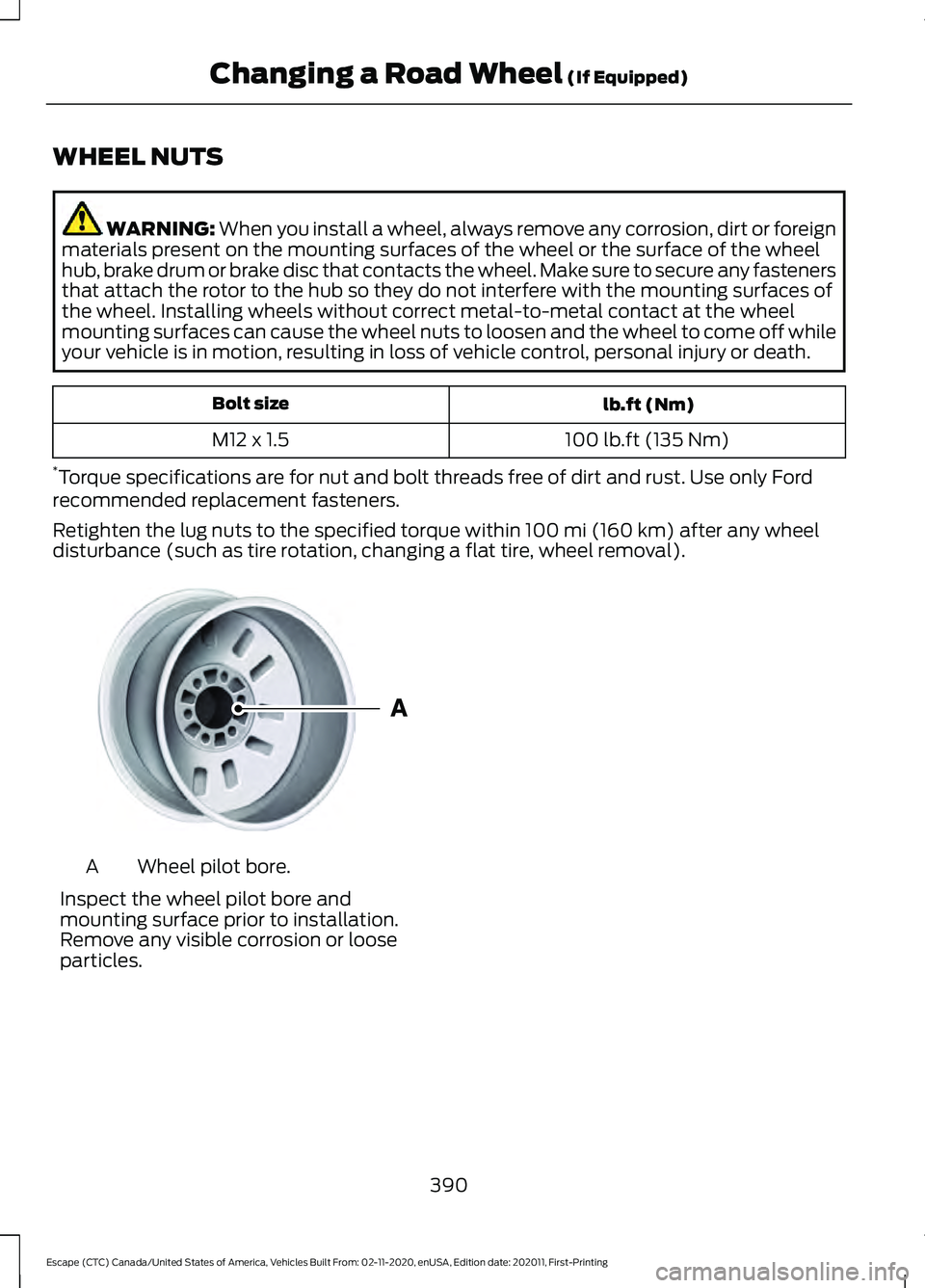
disturbance (such as tire rotation, changing a flat tire, wheel removal). Wheel pilot bore.
A
Inspect the wheel pilot bore and
mounting surface prior to installation.
Remove any visible corrosion or loose
particles.
390
Escape (CTC) Canada/United States of America, Vehicles Built From: 02-11-2020, enUSA, Edition date: 202011, First-Printing Changing a Road Wheel
(If Equipped)E145950