2021 FORD ESCAPE charging
[x] Cancel search: chargingPage 204 of 589
WHAT IS AC CHARGING
AC charging is the preferred method of
charging. AC charging preserves the health
of the battery for longer battery life.
CHARGING YOUR VEHICLE
PRECAUTIONS
WARNING: In Canada, do not use
the 120 volt convenience cord in
commercial garages. WARNING:
This equipment has
arcing or sparking parts. Do not expose
to flammable vapors. Position this
equipment at least
18 in (450 mm)
above the floor. WARNING:
The AC wall plug must
fit firmly into the AC outlet. If the
connection feels loose, worn or the AC
outlet is damaged, please have a
qualified electrician replace the AC
outlet. Using a convenience cord with a
worn outlet may cause burns, property
damage and increase the risk of electric
shock. WARNING:
Do not use the 120 V
convenience cord with an extension cord,
two-prong adapter, surge protector,
timer or other adapter. WARNING:
Do not allow charging
equipment to be immersed in water or
liquids. Failure to follow this warning
could result in fire, serious personal injury
or death. WARNING: Do not attempt to open
the charging equipment. Failure to follow
this instruction could result in personal
injury, death or property damage. WARNING: Do not use the charging
equipment if it is faulty or has been
damaged. Failure to follow this
instruction could result in personal injury,
death or property damage. WARNING:
You risk death or
serious injury to yourself and others if you
do not follow the instruction highlighted
by the warning symbol. Failure to follow
the specific warnings and instructions
could result in personal injury. WARNING:
Install charging
equipment in compliance with local
regulations. Failure to follow this warning
could result in fire, serious personal injury
or death. WARNING:
Do not use an
ungrounded wall outlet. If you suspect
that the wall outlet is not properly
grounded, have a qualified electrician
inspect the wall outlet. Failure to follow
this instruction could result in personal
injury or death. WARNING:
Do not modify the
convenience cord plug. If the
convenience cord plug does not properly
fit into the wall outlet, have a qualified
electrician install the correct wall outlet.
Failure to follow this instruction could
result in personal injury or death.
CHARGING EQUIPMENT
• Read all the instructions before using
this product.
• Supervise this device when in use
around children.
• Do not put fingers into the electric
vehicle connector.
201
Escape (CTC) Canada/United States of America, Vehicles Built From: 02-11-2020, enUSA, Edition date: 202011, First-Printing Charging Your Vehicle - Plug-In Hybrid Electric Vehicle
(PHEV)
(If Equipped)
Page 205 of 589
•
Do not use this product if the flexible
power cord or electric vehicle cable has
broken insulation, or any other signs of
damage.
• Do not use this product if the enclosure
or the electric vehicle connector is
broken, cracked, open, or shows any
other indication of damage.
Note: Ground this product. If it
malfunctions or breaks down, grounding
provides a path of least resistance for
electric current to reduce the risk of electric
shock. This product comes with a cord
having an equipment grounding conductor
and a grounding plug. Make sure you plug it
into an appropriate outlet that is properly
installed and grounded in accordance with
all local codes and ordinances.
Note: You need to plug the convenience
cord into a dedicated outlet.
Note: Firmly fit the AC wall plug into the
AC outlet. If the connection feels loose,
worn or the AC outlet is damaged, please
have a qualified electrician replace the AC
outlet. Using a convenience cord with a
worn outlet could cause burns, property
damage and increase the risk of electric
shock.
Note: Do not use the 120 volt convenience
cord with an extension cord, two-prong
adapter, surge protector, timer or other
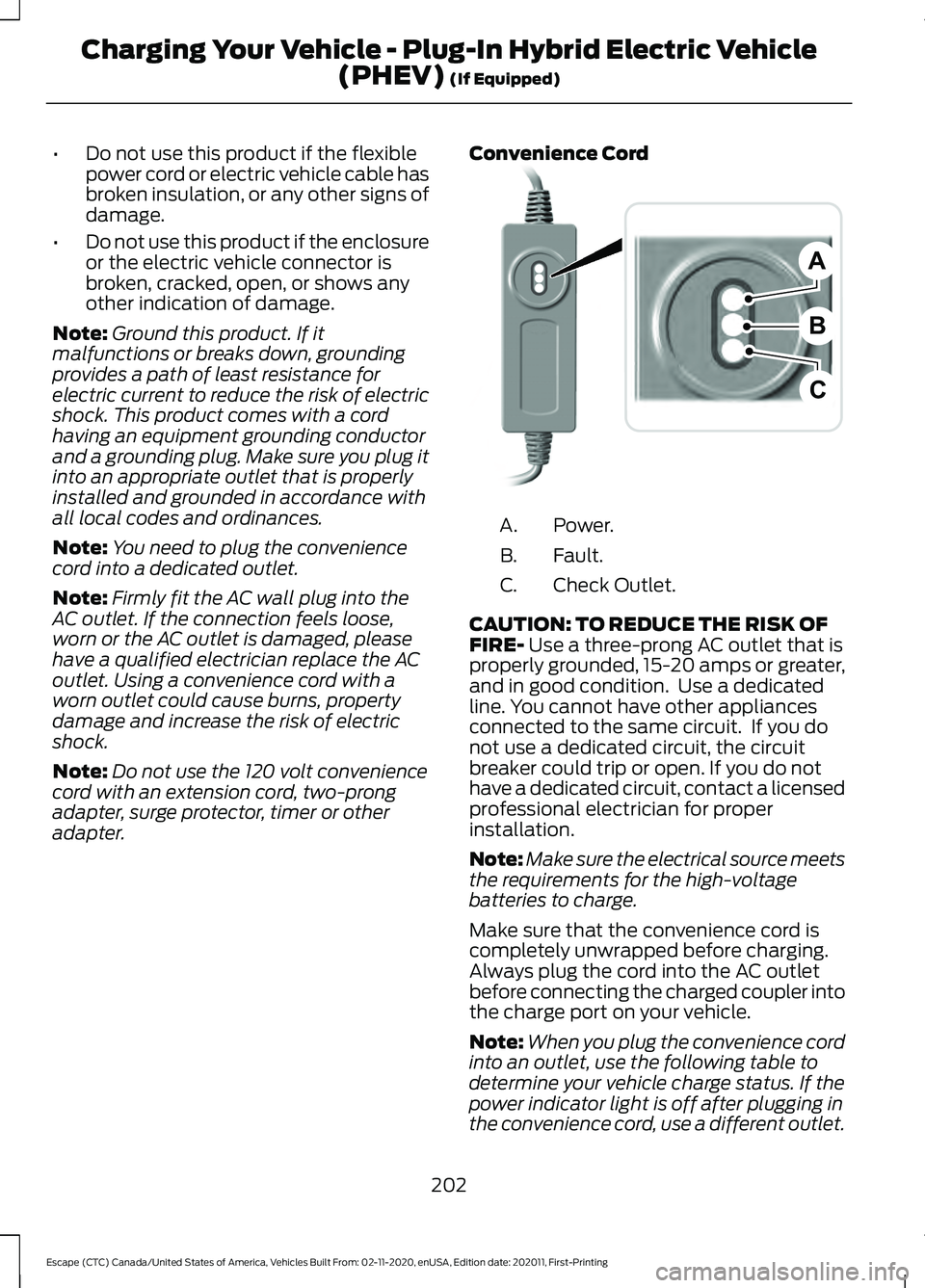
adapter. Convenience Cord Power.
A.
Fault.
B.
Check Outlet.
C.
CAUTION: TO REDUCE THE RISK OF
FIRE- Use a three-prong AC outlet that is
properly grounded, 15-20 amps or greater,
and in good condition. Use a dedicated
line. You cannot have other appliances
connected to the same circuit. If you do
not use a dedicated circuit, the circuit
breaker could trip or open. If you do not
have a dedicated circuit, contact a licensed
professional electrician for proper
installation.
Note: Make sure the electrical source meets
the requirements for the high-voltage
batteries to charge.
Make sure that the convenience cord is
completely unwrapped before charging.
Always plug the cord into the AC outlet
before connecting the charged coupler into
the charge port on your vehicle.
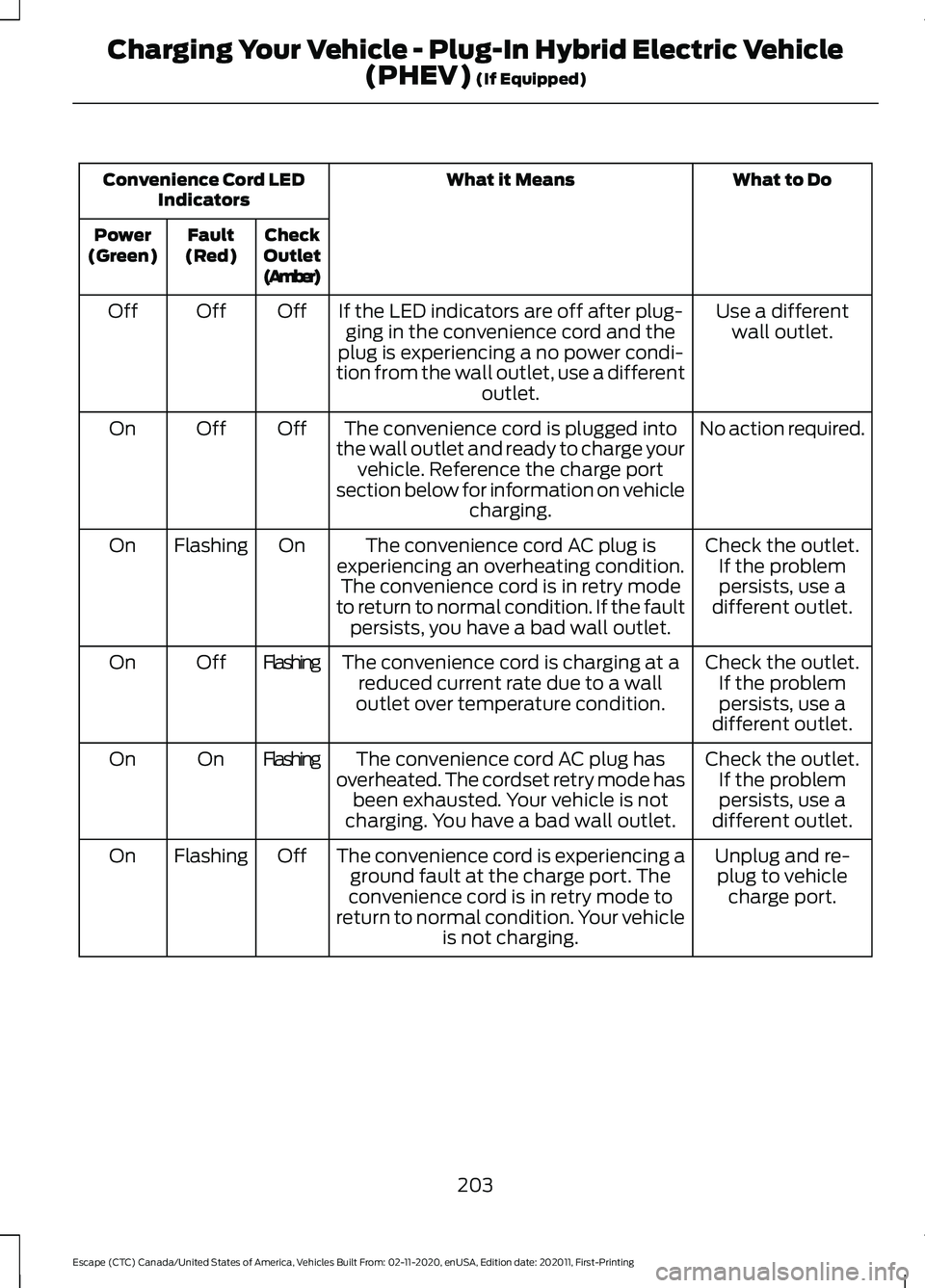
Note: When you plug the convenience cord
into an outlet, use the following table to
determine your vehicle charge status. If the
power indicator light is off after plugging in
the convenience cord, use a different outlet.
202
Escape (CTC) Canada/United States of America, Vehicles Built From: 02-11-2020, enUSA, Edition date: 202011, First-Printing Charging Your Vehicle - Plug-In Hybrid Electric Vehicle
(PHEV)
(If Equipped)B
A
CE299688
Page 206 of 589
What to Do
What it Means
Convenience Cord LED
Indicators
Check
Outlet
(Amber)
Fault
(Red)
Power
(Green)
Use a differentwall outlet.
If the LED indicators are off after plug-
ging in the convenience cord and the
plug is experiencing a no power condi-
tion from the wall outlet, use a different outlet.
Off
Off
Off
No action required.
The convenience cord is plugged into
the wall outlet and ready to charge your vehicle. Reference the charge port
section below for information on vehicle charging.
Off
Off
On
Check the outlet.If the problempersists, use a
different outlet.
The convenience cord AC plug is
experiencing an overheating condition. The convenience cord is in retry mode
to return to normal condition. If the fault persists, you have a bad wall outlet.
On
Flashing
On
Check the outlet.If the problempersists, use a
different outlet.
The convenience cord is charging at a
reduced current rate due to a wall
outlet over temperature condition.
Flashing
Off
On
Check the outlet.If the problempersists, use a
different outlet.
The convenience cord AC plug has
overheated. The cordset retry mode has been exhausted. Your vehicle is not
charging. You have a bad wall outlet.
Flashing
On
On
Unplug and re-plug to vehicle charge port.
The convenience cord is experiencing a
ground fault at the charge port. The
convenience cord is in retry mode to
return to normal condition. Your vehicle is not charging.
Off
Flashing
On
203
Escape (CTC) Canada/United States of America, Vehicles Built From: 02-11-2020, enUSA, Edition date: 202011, First-Printing Charging Your Vehicle - Plug-In Hybrid Electric Vehicle
(PHEV) (If Equipped)
Page 207 of 589

What to Do
What it Means
Convenience Cord LED
Indicators
Check
Outlet
(Amber)
Fault
(Red)
Power
(Green)
Request vehicleservice.
The convenience cord is experiencing a
ground fault at the charge port. The
cordset retry mode has been exhausted. Your vehicle is not charging. Call for service.
Off
On
On
Connect to a prop-erly grounded AC outlet.
Missing ground at AC outlet. Your
vehicle is not charging. The convenience cord is in retry mode.
Two
flash
interval
On/Two
flash
interval
On
Request cordsetservice. Replace the cordset.
The convenience cord is experiencing
an internal fault. Call for service.
Off
On/
Flashing
On
Note: If charging for your plug-in vehicle
fails, please call the Customer Relationship
Center, or click on Call for support or Live
chat at our website.
MOVING AND STORAGE
INSTRUCTIONS
Note: Do not hold the convenience cord by
the flexible power cable.
Make sure that you completely wrap the
convenience cord after charging.
When complete, replace the convenience
cord in the luggage compartment.
Note: Store the convenience cord in a clean,
dry place between the temperature of
-39.9– 193.9°F (-40–90°C).
LOCATING THE CHARGE PORT
The charge port is between the front
left-hand side door and the front left-hand
wheel well. To open, press the center right
edge of the charge port door, and then
release. Note:
Do not force the charge port door
open or closed. Forcing the door open or
closed damages the charge port.
CHARGE PORT INDICATORS
The charge status indicator around the
charge port indicates the charge status of
the high voltage battery in your vehicle.
Divided into five zones, the charge status
indicator displays the state of charge in 20
percent increments.
204
Escape (CTC) Canada/United States of America, Vehicles Built From: 02-11-2020, enUSA, Edition date: 202011, First-Printing Charging Your Vehicle - Plug-In Hybrid Electric Vehicle
(PHEV)
(If Equipped)E295258
Page 208 of 589

We use the color white as a courtesy light
to help with plugging in and to
acknowledge actions such as plugging in,
unplugging or pressing the charge times
button.
We use the color blue when you plug the
vehicle in and are either charging or waiting
to charge.
We use the color orange to indicate charge
faults.
The charge status indicator displays how
far along the charge is:
•
When the bottom zone is pulsing, the
charge is between 0-20 percent.
• When the bottom zone illuminates and
the next is pulsing, the charge is
between 20-40 percent.
• When two zones illuminate and the
next is pulsing, the charge is between
40-60 percent.
• When three zones illuminate and the
next is pulsing, the charge is between
60-80 percent.
• When four zones illuminate and the top
zone is pulsing, the charge is between
80-100 percent.
• When all zones illuminate, the charge
is 100 percent. 80%-100% state of charge.
A.
60%-80% state of charge.
B. 40%-60% state of charge.
C.
20%-40% state of charge.
D.
0%-20% state of charge.
E.
Note: When charging stops, the charge
status indicator shows all the completed
zones solidly lit up in a blue color for 30
seconds before turning off. For example, if
charging stops at 70 percent, then the
bottom three zones light up solidly to
indicate a battery charge level of at least
60 percent but less than 80 percent.
Charging stops when complete or when
paused due to preferred charge settings or
charge station actions.
Note: If the charge status indicator does
not light up or pulse after plugging in, please
verify that the charge port light setting is On.
If you do not wish to have the charge status
indicator light up at all while charging, then
you can switch it Off. See charge port light
under vehicle settings on your touchscreen.
See SYNC™ 3 (page 436).
AC CHARGING
Connecting the Charger To charge the high-voltage battery:
1. Put the vehicle in park (P).
2. Press the center right edge of the
charge port door and then release to
open the door.
3. Plug the charging coupler into the charge port receptacle on your vehicle.
Make sure the button clicks confirming
that you have completely engaged the
coupler.
205
Escape (CTC) Canada/United States of America, Vehicles Built From: 02-11-2020, enUSA, Edition date: 202011, First-Printing Charging Your Vehicle - Plug-In Hybrid Electric Vehicle
(PHEV)
(If Equipped)E301197 E306676
Page 209 of 589
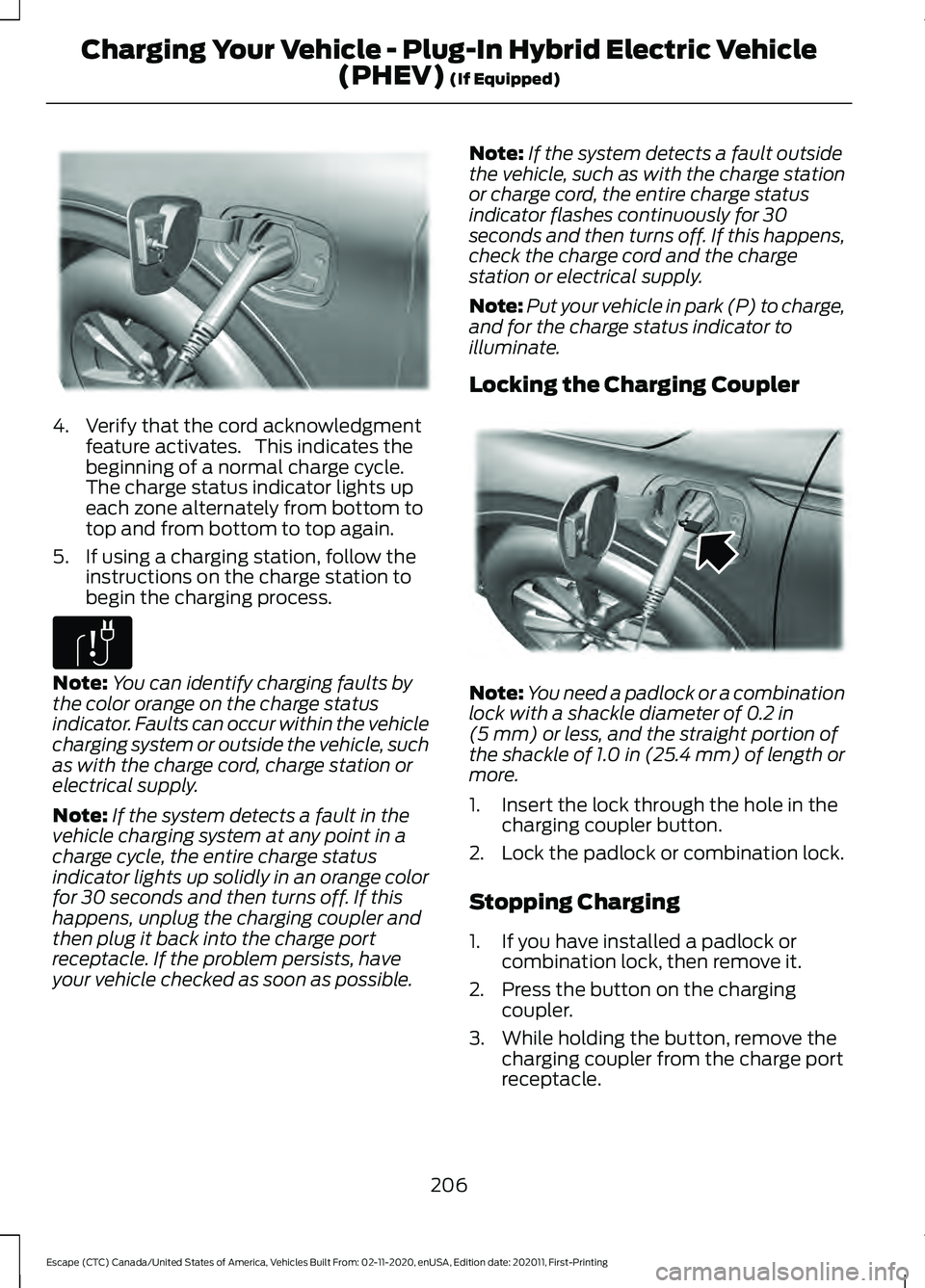
4. Verify that the cord acknowledgment
feature activates. This indicates the
beginning of a normal charge cycle.
The charge status indicator lights up
each zone alternately from bottom to
top and from bottom to top again.
5. If using a charging station, follow the instructions on the charge station to
begin the charging process. Note:
You can identify charging faults by
the color orange on the charge status
indicator. Faults can occur within the vehicle
charging system or outside the vehicle, such
as with the charge cord, charge station or
electrical supply.
Note: If the system detects a fault in the
vehicle charging system at any point in a
charge cycle, the entire charge status
indicator lights up solidly in an orange color
for 30 seconds and then turns off. If this
happens, unplug the charging coupler and
then plug it back into the charge port
receptacle. If the problem persists, have
your vehicle checked as soon as possible. Note:
If the system detects a fault outside
the vehicle, such as with the charge station
or charge cord, the entire charge status
indicator flashes continuously for 30
seconds and then turns off. If this happens,
check the charge cord and the charge
station or electrical supply.
Note: Put your vehicle in park (P) to charge,
and for the charge status indicator to
illuminate.
Locking the Charging Coupler Note:
You need a padlock or a combination
lock with a shackle diameter of 0.2 in
(5 mm) or less, and the straight portion of
the shackle of 1.0 in (25.4 mm) of length or
more.
1. Insert the lock through the hole in the charging coupler button.
2. Lock the padlock or combination lock.
Stopping Charging
1. If you have installed a padlock or combination lock, then remove it.
2. Press the button on the charging coupler.
3. While holding the button, remove the charging coupler from the charge port
receptacle.
206
Escape (CTC) Canada/United States of America, Vehicles Built From: 02-11-2020, enUSA, Edition date: 202011, First-Printing Charging Your Vehicle - Plug-In Hybrid Electric Vehicle
(PHEV)
(If Equipped)E295257 E306677 E295451
Page 210 of 589

4. Press the center right edge of the
charge port door to close.
Note: Do not pull the wall plug from the
wall when your vehicle is charging. Doing so
could damage the outlet and the cord.
SETTING THE CHARGING
SCHEDULE AND
PREFERENCES Note:
Select charge settings on the home
page of the touchscreen or under the vehicle
settings menu to access charge preferences.
See SYNC™ 3 (page 436).
Charging may not begin upon plugging in
if you have set up preferred charge times
for this vehicle location. Your vehicle could
delay charging to take advantage of
off-peak electricity rates. Your vehicle
optimizes the charge schedule to be
complete by your next departure time. When waiting to charge, plugged in and
not currently charging, the charge status
indicator shows the present state of charge
of the high voltage battery by lighting up
all completed zones for 30 seconds before
turning off. For example, if the battery is at
70 percent charge then the bottom three
zones solidly light up to indicate a battery
charge level of at least 60 percent but less
than 80 percent. When the current state
of charge is less than 20 percent, none of
the zones light up.
Note:
When your vehicle is waiting to
charge, the charge status indicator turns off
30 seconds after displaying the present
state of charge. When your vehicle begins
charging, the charge status indicator turns
on and displays the status of the charge, as
described above.
Charge Times Button
Use the charge times button to either turn
off or turn on your charge times settings
for this location. Select charge settings on
the home page of your touchscreen or
under the vehicle settings menu to access
charge preferences.
See SYNC™ 3 (page
436). 207
Escape (CTC) Canada/United States of America, Vehicles Built From: 02-11-2020, enUSA, Edition date: 202011, First-Printing Charging Your Vehicle - Plug-In Hybrid Electric Vehicle
(PHEV)
(If Equipped)E295444 E306678 E301111
Page 211 of 589
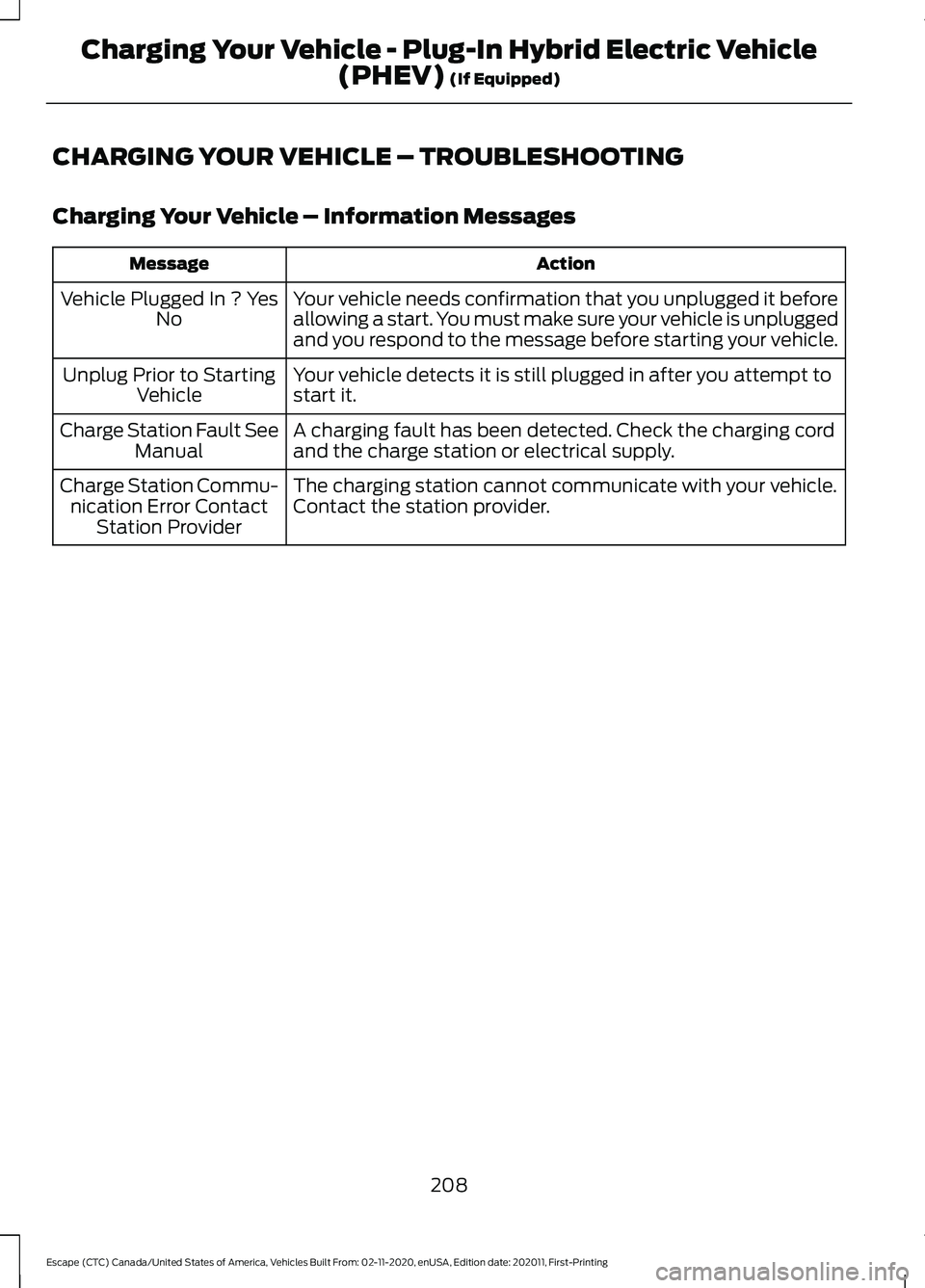
CHARGING YOUR VEHICLE – TROUBLESHOOTING
Charging Your Vehicle – Information Messages
Action
Message
Your vehicle needs confirmation that you unplugged it before
allowing a start. You must make sure your vehicle is unplugged
and you respond to the message before starting your vehicle.
Vehicle Plugged In ? Yes
No
Your vehicle detects it is still plugged in after you attempt to
start it.
Unplug Prior to Starting
Vehicle
A charging fault has been detected. Check the charging cord
and the charge station or electrical supply.
Charge Station Fault See
Manual
The charging station cannot communicate with your vehicle.
Contact the station provider.
Charge Station Commu-
nication Error Contact Station Provider
208
Escape (CTC) Canada/United States of America, Vehicles Built From: 02-11-2020, enUSA, Edition date: 202011, First-Printing Charging Your Vehicle - Plug-In Hybrid Electric Vehicle
(PHEV) (If Equipped)