2021 DODGE DURANGO audio
[x] Cancel search: audioPage 187 of 340

MULTIMEDIA185
STEREO HEADPHONE LIFETIME LIMITED
W
ARRANTY
Who Does This Warranty Cover? This warranty
covers the initial user or purchaser ("you" or "your")
of this particular Aptiv PLC (“Aptiv”) wireless
headphone ("Product"). The warranty is not
transferable.
How Long Does the Coverage Last? This warranty
lasts as long as you own the Product.
What Does This Warranty Cover? Except as
specified below, this warranty covers any Product
that in normal use is defective in workmanship or
materials.
What Does This Warranty Not Cover? This warranty
does not cover any damage or defect that results
from misuse, abuse, or modification of the Product
other than by Aptiv. Foam earpieces, which will
wear over time through normal use, are specifically
not covered (replacement foam is available for a
nominal charge). APTIV IS NOT LIABLE FOR ANY
INJURIES OR DAMAGES TO PERSONS OR
PROPERTY RESULTING FROM THE USE OF, OR ANY
FAILURE OR DEFECT IN, THE PRODUCT, NOR IS
APTIV LIABLE FOR ANY GENERAL, SPECIAL,
DIRECT, INDIRECT, INCIDENTAL, CONSEQUENTIAL,
EXEMPLARY, PUNITIVE OR OTHER DAMAGES OF
ANY KIND OR NATURE WHATSOEVER. Some states
and jurisdictions may not allow the exclusion or
limitation of incidental or consequential damages, so the above limitation may not apply to you. This
warranty gives you specific legal rights. You may
also have other rights, which vary from jurisdiction
to jurisdiction.
What Will Aptiv Do?
Aptiv, at its option, will repair or
replace any defective Product. Aptiv reserves the
right to replace any discontinued Product with a
comparable model. THIS WARRANTY IS THE SOLE
WARRANTY FOR THIS PRODUCT, SETS FORTH
YOUR EXCLUSIVE REMEDY REGARDING
DEFECTIVE PRODUCTS, AND IS IN LIEU OF ALL
OTHER WARRANTIES (EXPRESS OR IMPLIED),
INCLUDING ANY WARRANTY FOR
MERCHANTABILITY OR FITNESS FOR A
PARTICULAR PURPOSE.
If you have any questions or comments regarding
your Aptiv wireless headphones, please email
[email protected] or phone: 888-293-3332
System Information
Disc Menu
When listening to a CD Audio or CD Data disc,
pushing the remote control’s POPUP/MENU button
displays a list of all commands which control
playback of the disc.
Display Settings
Video Screen Display Settings
When watching a video source (Blu-ray™ Disc or
DVD Video with the disc in Play mode, AUX Video,
etc.), pushing the remote control’s SETUP button
activates the Display Settings menu. These
settings control the appearance of the video on the
screen. The factory default settings are already set
for optimum viewing, so there is no need to change
these settings under normal circumstances.
To change the settings, push the remote control’s
navigation buttons to select an item, then push the
remote control’s navigation buttons to change the
value for the currently selected item. To reset all
values back to the original settings, select the
Default Settings menu option and push the remote
control’s ENTER/OK button.5
21_WD_OM_EN_USC_t.book Page 185
Page 188 of 340

186MULTIMEDIA
Disc Features control the remote Blu-ray™ Disc
player's settings of DVD being watched in the
remote player.
Listening To Audio With The Screen Closed
To listen to only the audio portion of the channel
with the screen closed:
Set the audio to the desired source and
channel.
Close the video screen.
To change the current audio mode, push the
remote control’s SOURCE button. This will auto -
matically select the next available audio mode
without using the Mode/Source Select menu.
When the screen is reopened, the video screen
will automatically turn back on and show the
appropriate display menu or media.
If the screen is closed and there is no audio heard,
verify that the headphones are turned on (the ON
indicator is illuminated) and the headphone
selector switch is on the desired channel. If the
headphones are turned on, push the remote
control’s power button to turn audio on. If audio is
still not heard, check that fully charged batteries
are installed in the headphones.
Disc Formats
The Blu-ray™ Disc player is capable of playing the
following types of 4.7-inch (12 centimeter)
diameter discs:
BD: BDMV (Profile 1.1), BDAV (Profile 1.1)
DVD: DVD-Video, DVD-Audio, AVCREC, AVCHD,
DVD-VR
CD: CD-DA, VCD, CD-TEXT
DVD/CD: MP3, WMA, AAC, DivX (versions 3 – 6)
profile 3.0
DVD Region Codes
The Blu-ray™ Disc player and many DVD discs are
coded by geographic region. These region codes
must match in order for the disc to play. If the
region code for the DVD disc does not match the
region code for the player, the disc will not play.
DVD Audio Support
When a DVD-Audio disc is inserted in the Blu-ray™
Disc player, the DVD-Audio title on the disc is
played by default (most DVD-Audio discs also have
a Video title, but the Video title is ignored). All
multichannel program material is automatically
mixed down to two channels, which may result in a
lowered apparent volume level. If you increase the
volume level to account for this change in level,
remember to lower the volume before changing
the disc or to another mode. Recorded Discs
The Blu-ray™ Disc player will play CD-R and CD-RW
discs recorded in CD-Audio or Video-CD format, or
as a CD-ROM containing MP3 or WMA files. The
player will also play DVD-Video content recorded to
a DVD-R or DVD-RW disc. DVD-ROM discs (either
pressed or recorded) are not supported.
If you record a disc using a personal computer,
there may be cases where the Blu-ray™ Disc player
may not be able to play some or the entire disc,
even if it is recorded in a compatible format and is
playable on other players. To help avoid playback
problems, use the following guidelines when
recording discs:
Open sessions are ignored. Only sessions that
are closed are playable.
For multi-session CDs that contain only multiple
CD-Audio sessions, the player will renumber the
tracks so each track number is unique.
For CD Data (or CD-ROM) discs, always use the
ISO-9660 (Level 1 or Level 2), Joliet, or Romeo
format. Other formats (such as UDF, HFS, or
others) are not supported.
The player recognizes a maximum of 512 files
and 99 folders per CD-R and CD-RW disc.
Mixed media recordable DVD formats will only
play the Video_TS portion of the disc.
21_WD_OM_EN_USC_t.book Page 186
Page 189 of 340

MULTIMEDIA187
If you are still having trouble writing a disc that is
playable in the Blu-ray™ Disc player, check with the
disc recording software publisher for more
information about burning playable discs.
The recommended method for labeling recordable
discs (CD-R, CD-RW, and DVD-R) is with a
permanent marker. Do not use adhesive labels as
they may separate from the disc, become stuck,
and cause permanent damage to the DVD player.
Compressed Audio Files (MP3 and WMA)
The Blu-ray™ Disc player is capable of playing MP3
(MPEG-1 Audio Layer 3) and WMA (Windows Media
Audio) files from a CD Data disc (usually a CD-R or
CD-RW).
The Blu-ray™ Disc player always uses the file
extension to determine the audio format, so
MP3 files must always end with the extension
“.mp3” or “.MP3” and WMA files must always
end with the extension “.wma” or “.WMA”. To
prevent incorrect playback, do not use these
extensions for any other types of files.
For MP3 files, only version 1 ID3 tag data (such
as artist name, track title, album, etc.) are
supported.
Any file that is copy protected (such as those
downloaded from many online music stores) will
not play. The Blu-ray™ player will automatically
skip the file and begin playing the next available
file.
Other compression formats such as AAC, MP3
Pro, Ogg Vorbis, and ATRAC3 will not play. The
Blu-ray™ player will automatically skip the file
and begin playing the next available file.
If you are creating your own files, the recom -
mended fixed bit rate for MP3 files is between
96 and 192 Kbps and the recommended fixed
bit rate for WMA files is between 64 and
192Kbps. Variable bit rates are also supported.
For both formats, the recommended sample
rate is either 44.1 kHz or 48 kHz.
To change the current file, use the remote
control’s or Blu-ray™ Disc player’s ? button to
advance to the next file, or the ? button to return
to the start of the current or previous file. Disc Errors
If the Blu-ray™ Disc player is unable to read the
disc, a “Disc Error” message is displayed on the
rear screen and Radio displays. A dirty, damaged,
or incompatible disc format are all potential
causes for a “Disc Error” message.
If a disc has a damaged track which results in
audible or visible errors that persists for two
seconds, the Blu-ray™ Disc player will attempt to
continue playing the disc by skipping forward one
to three seconds at a time. If the end of the disc is
reached, the Blu-ray™ Disc player will return to the
beginning of the disc and attempt to play the start
of the first track.
The Blu-ray™ Disc player may shut down during
extremely hot conditions, such as when the
vehicle’s interior temperature is above 120°F
(48.9°C). When this occurs, the player will display
“High Temp” and will shut off the rear seat displays
until a safe temperature is reached. This shutdown
is necessary to protect the optics of the Blu-ray™
Disc player.
5
21_WD_OM_EN_USC_t.book Page 187
Page 246 of 340

244IN CASE OF EMERGENCY
ASSIST Call
The ASSIST Button is used to automatically
connect you to any one of the following support
centers:
Roadside Assistance – If you get a flat tire, or
need a tow, just push the ASSIST button and you
will be connected to a representative for assis-
tance. Roadside Assistance will know what
vehicle you’re driving and its location. Additional
fees may apply for roadside assistance.
SiriusXM Guardian™ Customer Care – In-vehicle
support for SiriusXM Guardian™.
Vehicle Customer Care – Total support for all
other vehicle issues.
Uconnect Customer Care - Total support for
Radio, Phone and NAV issues.
SOS Call
1. Push the SOS Call button on the Rearview Mirror.
NOTE:In case the SOS Call button is pushed in error,
there will be a 10 second delay before the SOS Call
system initiates a call to a SOS operator. To cancel
the SOS Call connection, push the SOS call button
on the Rearview Mirror or press the cancellation
button on the Device Screen. Termination of the
SOS Call will turn off the green LED light on the
Rearview Mirror. 2. The LED light located between the ASSIST and
SOS buttons on the Rearview Mirror will turn
green once a connection to a SOS operator has
been made.
3. Once a connection between the vehicle and a SOS operator is made, the SOS Call system
may transmit the following important vehicle
information to a SOS operator:
Indication that the occupant placed a
SOS Call
The vehicle brand
The last known GPS coordinates of the
vehicle
4. You should be able to speak with the SOS operator through the vehicle audio system to
determine if additional assistance is needed.
NOTE:
Your vehicle may be transmitting data as
authorized by the subscriber.
Once a connection is made between the
vehicle’s SOS Call system and the SOS oper -
ator, the SOS operator may be able to open
a voice connection with the vehicle to deter -
mine if additional assistance is needed.
Once the SOS operator opens a voice
connection with the vehicle’s SOS Call
system, the operator should be able to
speak with you or other vehicle occupants
and hear sounds occurring in the vehicle.
The vehicle’s SOS Call system will attempt
to remain connected with the SOS operator
until the SOS operator terminates the
connection.
5. The SOS operator may attempt to contact appropriate emergency responders and
provide them with important vehicle
information and GPS coordinates.
WARNING!
ALWAYS obey traffic laws and pay attention to
the road. ALWAYS drive safely with your hands on
the steering wheel. You have full responsibility
and assume all risks related to the use of the
features and applications in this vehicle. Only
use the features and applications when it is safe
to do so. Failure to do so may result in an
accident involving serious injury or death.
21_WD_OM_EN_USC_t.book Page 244
Page 247 of 340

IN CASE OF EMERGENCY245
(Continued) SOS Call System Limitations
Vehicles sold in Mexico DO NOT have SOS Call
system capabilities.
SOS or other emergency line operators in Mexico
may not answer or respond to SOS system calls. If the SOS Call system detects a malfunction, any
of the following may occur at the time the
malfunction is detected, and at the beginning of
each ignition cycle:
The Rearview Mirror light located between the
ASSIST and SOS buttons will continuously illumi
-
nate red.
The Device Screen will display the following
message “Vehicle device requires service.
Please contact an authorized dealer.”
An In-Vehicle Audio message will state “Vehicle
device requires service. Please contact an
authorized dealer.”
WARNING!
If anyone in the vehicle could be in danger
(e.g., fire or smoke is visible, dangerous road
conditions or location), do not wait for voice
contact from an Emergency Services Agent. All
occupants should exit the vehicle immediately
and move to a safe location.
Never place anything on or near the vehicle’s
operable network and GPS antennas. You
could prevent operable network and GPS
signal reception, which can prevent your
vehicle from placing an emergency call. An
operable network and GPS signal reception is
required for the SOS Call system to function
properly.
The SOS Call system is embedded into the
vehicle’s electrical system. Do not add after -
market electrical equipment to the vehicle’s
electrical system. This may prevent your
vehicle from sending a signal to initiate an
emergency call. To avoid interference that can
cause the SOS Call system to fail, never add
aftermarket equipment (e.g., two-way mobile
radio, CB radio, data recorder, etc.) to your
vehicle’s electrical system or modify the
antennas on your vehicle. IF YOUR VEHICLE
LOSES BATTERY POWER FOR ANY REASON
(INCLUDING DURING OR AFTER AN ACCI -
DENT), THE UCONNECT FEATURES, APPS AND
SERVICES, AMONG OTHERS, WILL NOT
OPERATE.
Modifications to any part of the SOS Call
system could cause the air bag system to fail
when you need it. You could be injured if the
air bag system is not there to help protect you.
WARNING!
WARNING!
Ignoring the Rearview Mirror light could mean
you will not have SOS Call services. If the Rear -
view Mirror light is illuminated, have an autho -
rized dealer service the SOS Call system
immediately.
The Occupant Restraint Control module turns
on the air bag Warning Light on the instrument
panel if a malfunction in any part of the
system is detected. If the Air Bag Warning
Light is illuminated, have an authorized dealer
service the Occupant Restraint Control system
immediately.
7
21_WD_OM_EN_USC_t.book Page 245
Page 330 of 340

328
INDEX
A
About Your Brakes......................................... 317Adaptive Cruise Control (ACC)
(Cruise Control).................................... 119, 121Adding Engine Coolant (Antifreeze)............... 281Adding Fuel.................................................... 140Additives, Fuel............................................... 319AdjustDown.................................................... 35, 37Forward................................................ 35, 37Rearward.............................................. 35, 37Up......................................................... 35, 37Air BagAir Bag Operation...................................... 214Air Bag Warning Light...................... 211, 214Driver Knee Air Bag................................... 218Enhanced Accident Response......... 221, 263Event Data Recorder (EDR)....................... 263Front Air Bag............................................. 214If Deployment Occurs................................ 221Knee Impact Bolsters................................ 218Maintaining Your Air Bag System.............. 222Maintenance............................................. 222Redundant Air Bag Warning Light.............212
Side Air Bags............................................ 218Transporting Pets..................................... 239Air Bag Light.................................. 91, 211, 240Air Cleaner, Engine
(Engine Air Cleaner Filter)............................. 272Air Conditioner Maintenance........................ 273Air Conditioner Refrigerant.................. 273, 274Air Conditioner System................................. 273Air ConditioningRear............................................................. 60Air Conditioning Filter.................... 63, 273, 274Air Conditioning System................................... 62Air Conditioning, Operating Tips....................... 62Air Filter........................................................ 272Air PressureTires......................................................... 303AlarmArm The System................................... 21, 22Disarm The System..................................... 21Rearm The System...................................... 22Security Alarm............................................. 94Alarm SystemSecurity Alarm............................................. 21All Wheel Drive (AWD)................................... 112
Alterations/ModificationsVehicle.........................................................10Antifreeze (Engine Coolant).................. 281, 321Disposal.................................................... 282Anti-Lock Brake System (ABS)....................... 189Anti-Lock Warning Light...................................96Assist, Hill Start............................................. 193Audio Systems (Radio).................................. 158Auto Down Power Windows..............................72Automatic Headlights.......................................50Automatic High Beams.....................................50Automatic Temperature Control (ATC)..............62Automatic Transmission....................... 101, 108Adding Fluid.............................................. 284Fluid And Filter Change............................. 284Fluid Change............................................. 284Fluid Level Check...................................... 284Fluid Type........................................ 285, 323Special Additives...................................... 284Automatic Transmission Limp
Home Mode.................................................. 111Auxiliary Driving Systems.............................. 195Auxiliary Electrical Outlet (Power Outlet)..........68Auxiliary Power Outlet......................................68Axle Fluid....................................................... 323
21_WD_OM_EN_USC_t.book Page 328
Page 333 of 340
331
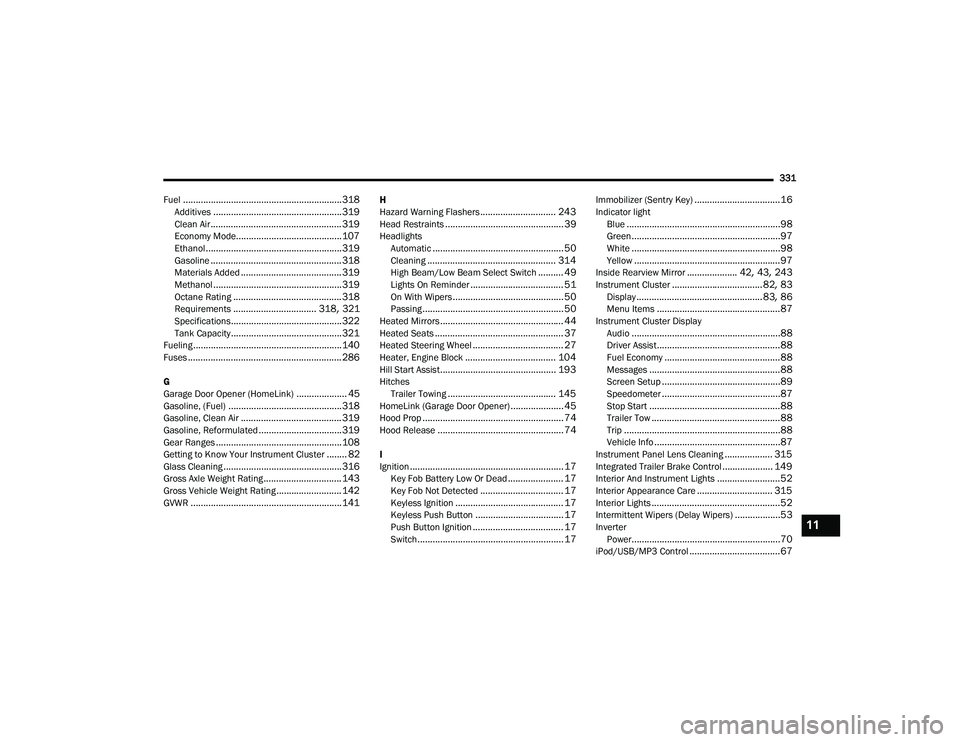
Fuel
............................................................... 318Additives................................................... 319Clean Air.................................................... 319Economy Mode.......................................... 107Ethanol...................................................... 319Gasoline.................................................... 318Materials Added........................................ 319Methanol................................................... 319Octane Rating........................................... 318Requirements................................. 318, 321Specifications............................................ 322Tank Capacity............................................ 321Fueling........................................................... 140Fuses............................................................. 286
G
Garage Door Opener (HomeLink).................... 45Gasoline, (Fuel)............................................. 318Gasoline, Clean Air........................................ 319Gasoline, Reformulated................................. 319Gear Ranges.................................................. 108Getting to Know Your Instrument Cluster........ 82Glass Cleaning............................................... 316Gross Axle Weight Rating............................... 143Gross Vehicle Weight Rating.......................... 142GVWR............................................................ 141
H
Hazard Warning Flashers.............................. 243Head Restraints............................................... 39Headlights Automatic.................................................... 50Cleaning................................................... 314High Beam/Low Beam Select Switch.......... 49Lights On Reminder..................................... 51On With Wipers............................................ 50Passing........................................................ 50Heated Mirrors................................................. 44Heated Seats................................................... 37Heated Steering Wheel.................................... 27Heater, Engine Block.................................... 104Hill Start Assist.............................................. 193HitchesTrailer Towing........................................... 145HomeLink (Garage Door Opener)..................... 45Hood Prop........................................................ 74Hood Release.................................................. 74
I
Ignition............................................................. 17Key Fob Battery Low Or Dead...................... 17Key Fob Not Detected................................. 17Keyless Ignition........................................... 17Keyless Push Button................................... 17Push Button Ignition.................................... 17Switch.......................................................... 17
Immobilizer (Sentry Key)..................................16Indicator lightBlue.............................................................98Green...........................................................97White...........................................................98Yellow..........................................................97Inside Rearview Mirror.................... 42, 43, 243Instrument Cluster....................................82, 83Display.................................................. 83, 86Menu Items.................................................87Instrument Cluster DisplayAudio...........................................................88Driver Assist.................................................88Fuel Economy..............................................88Messages....................................................88Screen Setup...............................................89Speedometer...............................................87Stop Start....................................................88Trailer Tow...................................................88Trip..............................................................88Vehicle Info..................................................87Instrument Panel Lens Cleaning................... 315Integrated Trailer Brake Control.................... 149Interior And Instrument Lights.........................52Interior Appearance Care.............................. 315Interior Lights...................................................52Intermittent Wipers (Delay Wipers)..................53InverterPower...........................................................70iPod/USB/MP3 Control....................................67
11
21_WD_OM_EN_USC_t.book Page 331
Page 337 of 340

335
Seat Belt Pretensioner
.............................. 209Untwisting Procedure................................ 208Seat Belts Maintenance................................ 315Seats.......................................... 29, 35, 37, 38Adjustment............................. 29, 30, 35, 37Easy Entry................................................... 36Heated................................................. 37, 38Memory....................................................... 28Rear Folding......................................... 29, 31Reclining..................................................... 30Seatback Release....................................... 30Tilting................................................... 29, 30Vented......................................................... 38Ventilated.................................................... 38Security Alarm Arm The System.......................................... 21Disarm The System..................................... 21Security System........................................ 21, 94Sentry Key (Immobilizer).................................. 16Sentry Key Replacement................................. 16Service Assistance......................................... 324Service Contract............................................ 325Service Manuals............................................ 327Shifting.......................................................... 106Automatic Transmission.................. 106, 108Shoulder Belts............................................... 206Signals, Turn..................................98, 241, 294Snow Chains (Tire Chains)............................. 310Snow Tires..................................................... 307Spare Tires................................. 249, 307, 308
Speed Control Accel/Decel........................... 120Accel/Decel (ACC Only)............................. 125Cancel...................................................... 121Resume.................................................... 121Set............................................................ 120Speed Control (Cruise Control)... 119, 120, 121Starting......................................................... 101Button......................................................... 17Cold Weather............................................ 104Engine Block Heater................................. 104Engine Fails To Start................................. 103Remote........................................................ 18Starting And Operating.................................. 101Starting Procedures...................................... 101Steering........................................................... 27Power....................................................... 117Tilt Column.................................................. 27Wheel, Heated............................................. 27Wheel, Tilt.................................................... 27Steering Wheel Audio Controls..................... 178Steering Wheel Mounted Sound
System Controls............................................ 178Storage............................................................ 64Storage, Vehicle......................................63, 313Storing Your Vehicle...................................... 313Sun Roof................................................... 73, 74Sun Visor......................................................... 43Sunglasses Storage......................................... 65Sunshade Operation........................................ 73Sway Control, Trailer..................................... 195
Symbol Glossary...............................................10Synthetic Engine Oil...................................... 272SystemVehicle Security...........................................21System, Remote Starting.................................18
T
Telescoping Steering Column...........................27Temperature Control, Automatic (ATC).............62Tie Down Hooks, Cargo....................................77Tilt Steering Column.........................................27Tire And Loading Information Placard........... 300Tire Markings................................................ 295Tire Safety Information.................................. 295Tires.................................. 241, 303, 307, 312Aging (Life Of Tires)................................... 305Air Pressure.............................................. 303Chains...................................................... 310Changing.................................................. 247Compact Spare......................................... 307General Information........................ 303, 307High Speed............................................... 304Inflation Pressure..................................... 303Life Of Tires.............................................. 305Load Capacity.................................. 300, 301Pressure Monitoring System(TPMS)........................................... 95, 201Quality Grading......................................... 312Radial....................................................... 304Replacement............................................ 306
11
21_WD_OM_EN_USC_t.book Page 335