2021 ALFA ROMEO GIULIA stop start
[x] Cancel search: stop startPage 105 of 284
103
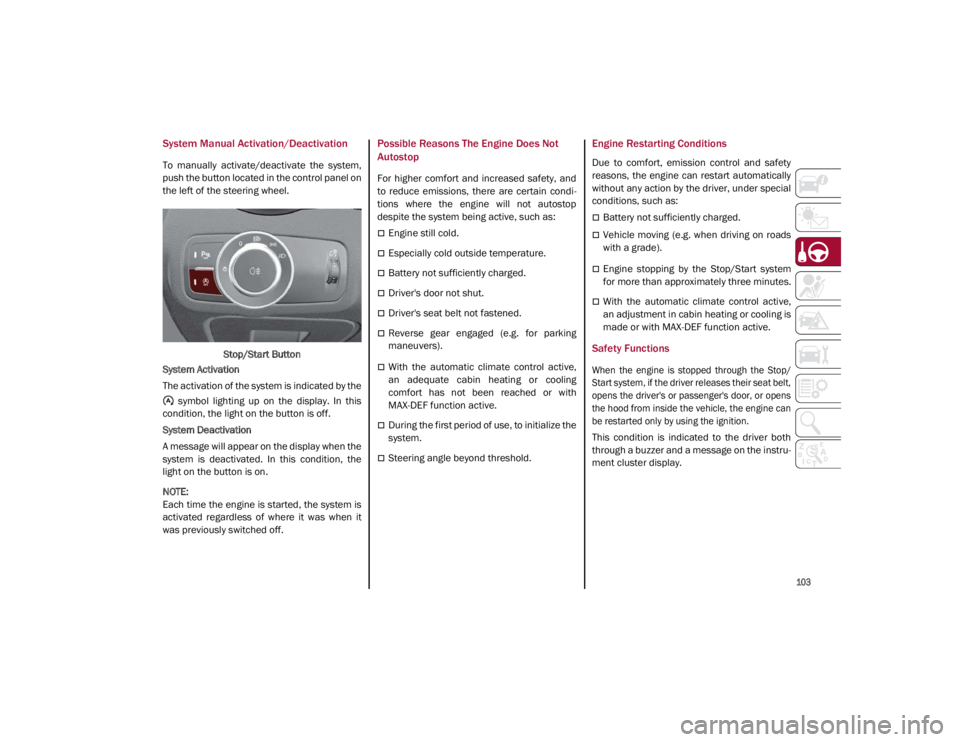
System Manual Activation/Deactivation
To manually activate/deactivate the system,
push the button located in the control panel on
the left of the steering wheel.Stop/Start Button
System Activation
The activation of the system is indicated by the symbol lighting up on the display. In this
condition, the light on the button is off.
System Deactivation
A message will appear on the display when the
system is deactivated. In this condition, the
light on the button is on.
NOTE:
Each time the engine is started, the system is
activated regardless of where it was when it
was previously switched off.
Possible Reasons The Engine Does Not
Autostop
For higher comfort and increased safety, and
to reduce emissions, there are certain condi -
tions where the engine will not autostop
despite the system being active, such as:
Engine still cold.
Especially cold outside temperature.
Battery not sufficiently charged.
Driver's door not shut.
Driver's seat belt not fastened.
Reverse gear engaged (e.g. for parking
maneuvers).
With the automatic climate control active,
an adequate cabin heating or cooling
comfort has not been reached or with
MAX-DEF function active.
During the first period of use, to initialize the
system.
Steering angle beyond threshold.
Engine Restarting Conditions
Due to comfort, emission control and safety
reasons, the engine can restart automatically
without any action by the driver, under special
conditions, such as:
Battery not sufficiently charged.
Vehicle moving (e.g. when driving on roads
with a grade).
Engine stopping by the Stop/Start system
for more than approximately three minutes.
With the automatic climate control active,
an adjustment in cabin heating or cooling is
made or with MAX-DEF function active.
Safety Functions
When the engine is stopped through the Stop/
Start system, if the driver releases their seat belt,
opens the driver's or passenger's door, or opens
the hood from inside the vehicle, the engine can
be restarted only by using the ignition.
This condition is indicated to the driver both
through a buzzer and a message on the instru-
ment cluster display.
21_GA_OM_EN_USC_t.book Page 103
Page 106 of 284

STARTING AND OPERATING
104
Irregular Operation
In the event of malfunction, the Stop/Start
system is deactivated.
For further information on failure indications
Ú
page 73.
Vehicle Inactivity
In the event of vehicle inactivity (or if the battery
is replaced), special attention must be paid to
the disconnection of the battery power supply.
Proceed as follows:
Remove connector from socket to disconnect
sensor (battery status monitoring) installed on
the negative pole of the battery. This sensor
should never be disconnected from the pole
except if the battery is replaced.
Battery Power Supply
NOTE:
After setting the ignition to OFF and having
closed the driver side door, wait at least one
minute before disconnecting the electrical
supply from the battery. When reconnecting
the electrical supply to the battery, make sure
that the ignition is in the OFF mode and the
driver side door is closed.SPEED LIMITER
Description
This feature allows the driver to program the
maximum speed of the vehicle.
NOTE:
The maximum set speed can be exceeded by
continuing to press the accelerator pedal.
The maximum speed can be set with the
vehicle stationary or in motion. The minimum
speed that can be set is 18 mph (30 km/h).
When this feature is active, the vehicle speed
depends on the pressing of the accelerator
pedal until the programmed speed limit is
reached
Ú
page 105.
Activation
The feature can be activated/deactivated
through the radio system.
Activating The Device
To access this feature, select the “Driver Assis -
tance” widget in the radio system, then select
the following items in sequence:
1. “Speed Limiter”
2. “ON”
The activation of this feature is signaled by the
illumination of the green Speed Limiter icon,
along with the last speed set, in the instru -
ment cluster display. The Speed Limiter
feature can remain active concurrently with
the Cruise Control system. If a speed limit
below the one indicated in the Cruise Control
is selected, the Cruise Control speed will be
lowered to that of the Speed Limiter. This func -
tion remains available in RACE mode.
Speed Limiter Display
1 — Socket
2 — Sensor
3 — Connector
21_GA_OM_EN_USC_t.book Page 104
Page 110 of 284

STARTING AND OPERATING
108
(Continued)
The system sets and holds the vehicle at the
desired speed without needing to press the
accelerator. It also sets and holds a distance
from the vehicle ahead (these settings are set
by the driver).Front Bumper Radar Location
Windshield Camera Location If the system detects a vehicle ahead, it will
automatically intervene by slightly braking or
accelerating in order to maintain the preset
distance. It will not exceed the original set
speed when adapting to the speed of the
vehicle ahead.
NOTE:
Adaptive Cruise Control performance is not
guaranteed under the following circum
-
stances, and it is recommended to turn the
system off when:
Driving in fog, heavy rain, or snow.
Driving in heavy traffic or construction
zones.
Driving on icy, snowy, slippery roads, roads
with steep inclines, or roads with numerous
turns and bends.
Entering a turn lane.
When circumstances do not allow safe
driving at a constant speed
Ú
page 273.
WARNING!
Adaptive Cruise Control (ACC) is a conve -
nience system. It is not a substitute for
active driver involvement. It is always the
driver’s responsibility to be attentive of
road, traffic, and weather conditions,
vehicle speed, distance to the vehicle
ahead; and, most importantly, brake oper -
ation to ensure safe operation of the
vehicle under all road conditions. Your
complete attention is always required
while driving to maintain safe control of
your vehicle. Failure to follow these warn -
ings can result in a collision and death or
serious personal injury.
The ACC system:
• May react to pedestrians, oncoming
vehicles, and stationary objects (e.g.,
a stopped vehicle in a traffic jam or a
disabled vehicle) at speeds between
2 mph and 35 mph (4 km/h and
60 km/h).
• Cannot take street, traffic, and
weather conditions into account, and
may be limited upon adverse sight
distance conditions.
21_GA_OM_EN_USC_t.book Page 108
Page 111 of 284

109
Activating Adaptive Cruise Control (ACC)
The minimum set speed for the ACC system is
19 mph (30 km/h) and the maximum is110 mph (180 km/h).
The system cannot be activated:
When pressing the brake pedal.
When the brakes are overheated.
When the Electric Park Brake has been
operated.
When either PARK, REVERSE or NEUTRAL is
engaged.
When the engine RPM is above a maximum
threshold.
When the vehicle speed is not within the
operational speed range.
When the Electronic Stability Control (ESC)
(or Anti-Lock Brake System (ABS) or other
stability control systems) are operating or
have just operated.
When the ESC system is off.
When the Forward Collision Warning system
(if equipped) is braking automatically.
In the event of a system failure.
When the engine is off.
In case of obstruction of the radar sensor (in
this case the bumper area where it is
located must be cleaned).
If the system is set, the conditions described
above also cause a cancellation or deactiva -
tion of the system. These situations may vary
according to the conditions.
NOTE:
The system will not be deactivated when
speeds higher than those set are reached by
pressing the accelerator pedal above
110 mph (180 km/h). In these situations, the system may not work correctly and it is recom -
mended to deactivate it.
To Activate/Deactivate
The system has four operating states:
Enabled (speed not set)
Activated (speed set)
Paused
Deactivated
•
Does not always fully recognize
complex driving conditions, which can
result in wrong or missing distance
warnings.
• Will bring the vehicle to a complete
stop while following a vehicle ahead
and hold the vehicle for approximately
two minutes in the stop position. If the
vehicle ahead does not start moving
within two minutes, the parking brake
will be activated and the ACC sys t
em
will be canceled.
You should switch off the ACC system:
When driving in fog, heavy rain, heavy
snow, sleet, heavy traffic, and complex
driving situations (i.e., in highway
construction zones).
When entering a turn lane or highway off
ramp; when driving on roads that are
winding, icy, snow-covered, slippery, or
have steep uphill or downhill slopes.
When circumstances do not allow safe
driving at a constant speed.
WARNING! (Continued)
21_GA_OM_EN_USC_t.book Page 109
Page 114 of 284

STARTING AND OPERATING
112
To Decrease The Distance
Push and release the distance button to
decrease the distance setting. The distance
setting decreases by one bar (shorter) every
time the button is pushed.Distance Button
The set speed is held if there are no vehicles
ahead. Once the shortest distance has been
selected, the next push of the button will set
the maximum distance.
If a slower vehicle is detected in the same
lane, the vehicle icon on the display illumi -
nates from grey to white. The system automat -
ically adjusts the vehicle’s speed to keep the
set distance, independently of the set speed.
The vehicle holds the set distance until:
The vehicle ahead accelerates to a speed
higher than the set speed.
The vehicle ahead leaves the lane or the
detection field of the Adaptive Cruise
Control system sensor.
The distance setting is changed.
The Adaptive Cruise Control system is deac -
tivated/paused.
Overtake Aid
When driving with ACC engaged and following
a vehicle at a speed greater than 45 mph
(70 km/h), the system will provide an addi -
tional acceleration up to the ACC set speed to
assist in passing the vehicle. This additional acceleration is triggered when the driver
utilizes the left turn signal and will only be
active when passing on the left hand side.
The system detects the direction of traffic auto
-
matically when the vehicle passes from left hand
traffic to right hand traffic. In this case, the over -
taking assist function is only active when the
reference vehicle is overtaken on the right. The
additional acceleration is deactivated when the
driver uses the right direction indicator and
returns to the original lane.
“Stop And Go” Function
The “Stop and Go” operating strategy allows you
to maintain a safe distance from the vehicle
ahead until the vehicle has completely stopped.
In the event that the ACC system brings your
vehicle to a standstill while following the
vehicle in front, if the vehicle in front starts
moving within two seconds of your vehicle
coming to a standstill, your vehicle will resume
motion without the need for any driver action.
If the vehicle in front does not start moving
within two seconds of your vehicle coming to a
standstill, the driver will have to push the RES/
SET switch upward to restart.
WARNING!
The maximum breaking applied by the
system is limited. The driver may apply the
brakes in all cases if needed.
If the system predicts that the braking level
is insufficient to hold the set distance, either
“BRAKE!” or a dedicated message is
displayed to warn the driver of approaching
the vehicle ahead. An acoustic signal is also
emitted. In this case, it is advised to brake
immediately as necessary to hold a safe
distance from the vehicle ahead.
The driver is responsible for ensuring that
there are no pedestrians, other vehicles or
objects along the direction of the vehicle.
Failure to comply with these precautions
may cause serious accidents and injuries.
The driver is fully responsible for holding a
safe distance from the vehicle ahead
respecting the highway code in force in
the respective country.
WARNING!
When the ACC system is resumed, the driver
must ensure that there are no pedestrians,
vehicles or objects in the path of the vehicle.
Failure to follow these warnings can result in a
collision and death or serious personal injury.
21_GA_OM_EN_USC_t.book Page 112
Page 128 of 284

STARTING AND OPERATING
126
ParkSense Sensors
The ParkSense sensors located in the rear
fascia/bumper and (if equipped) in the front
fascia/bumper, monitor the area in front and
behind the vehicle that is within the sensors’
field of view. These sensors detect the pres-
ence of any obstacles and warn the driver
through an acoustic signal and visual indica -
tions, which will be displayed on the instru -
ment cluster display.
Front Sensor LocationRear Sensor Location
ParkSense Display
The driver can select the type of warning they
would like to be displayed through the radio
system. To access the function on the main
menu, select in the following order:
1. “Settings”
2. “Driver Assistance”
3. “ParkSense”
4. “Mode”
5. “Sound and Display”
Visual Indications
The system indicates the presence of an
obstacle by displaying a single red arc in the
detected area, in relation to the distance of
the object and the position of the vehicle.
If the obstacle is detected in the front or rear
central area, a single red arc will be displayed
as the obstacle approaches, first constant,
then flashing, in addition to an acoustic signal.
If the obstacle is detected in the front or rear
left and/or right area, a single red flashing arc
will be shown in the corresponding area on the
display and the system will emit an acoustic
signal, either at frequent intervals or
constantly.
In general, the vehicle is closer to the obstacle
when a single red flashing arc is shown on the
display and the acoustic signal becomes
continuous.
WARNING!
Drivers must be careful when backing up
even when using the ParkSense system.
Always check carefully behind your vehicle,
and be sure to check for pedestrians,
animals, other vehicles, obstructions, or
blind spots before backing up. You are
responsible for the safety of your
surroundings and must continue to pay
attention while backing up. Failure to do so
can result in serious injury or death.
CAUTION!
The ParkSense System is only a parking
aid and it is unable to recognize every
obstacle, including small obstacles.
Parking curbs might be temporarily
detected or not detected at all. Obstacles
located above or below the sensors will
not be detected when they are in close
proximity
The vehicle must be driven slowly when
using the ParkSense System in order to be
able to stop in time when an obstacle is
detected. It is recommended that the
driver looks over his/her shoulder when
using the ParkSense system.
21_GA_OM_EN_USC_t.book Page 126
Page 140 of 284

STARTING AND OPERATING
138
TRAILER TOWING
Trailer towing is not recommended for this
vehicle.
SUGGESTIONS FOR DRIVING
Saving Fuel
Below are some suggestions which may help
you save fuel and lower the amount of harmful
emissions released into the atmosphere.
Vehicle Maintenance
Checks and operations should be carried out
in accordance with the Maintenance Plan
Ú
page 204.
Tires
Check the tire pressures at least once every
four weeks: if the pressure is too low,
consumption levels increase as resistance to
rolling is higher.
Unnecessary Loads
Do not travel with an overloaded trunk. The
weight of the vehicle and its arrangement
greatly affect fuel consumption and stability.
Electric Devices
Use electrical systems only for the amount of
time needed. The rear window defroster, addi -
tional headlights, windshield wipers and
heater blower fan require a considerable
amount of energy; increasing the current
uptake increases fuel consumption (by up to
+25% when city driving). Climate Control System
Using the climate control system will increase
consumption: use standard ventilation when
the temperature outside permits.
Devices for Aerodynamic Control
The use of non-certified devices for aerody
-
namic control may adversely affect air drag
and consumption levels.
Driving Style
Starting
Do not warm up the engine at low or high revs
when the vehicle is stationary; this causes the
engine to warm up more slowly, thereby
increasing fuel consumption and emissions. It
is therefore advisable to drive off immediately,
slowly, avoiding high speeds: by doing this the
engine will warm up more quickly.
Unnecessary Actions
Avoid revving up when starting at traffic lights
or before stopping the engine. This action is
unnecessary and causes increased fuel
consumption and pollution.
Gear Selection
Use a high gear when traffic and road condi -
tions allow it. Using a low gear for faster accel -
eration will increase fuel consumption.
Improper use of a high gear increases
consumption, emissions and engine wear. Max. Speed
Fuel consumption considerably increases as
speed increases. Maintain a constant speed,
avoiding unnecessary braking and accelera
-
tion, which cost in terms of both fuel consump -
tion and emissions.
Acceleration
Accelerating violently severely affects consump -
tion and emissions: acceleration should be
gradual and should not exceed the maximum
torque.
Conditions Of Use
Cold Starting
Short trips and frequent cold starts will not
allow the engine to reach optimum operating
temperature. This results in a significant
increase in consumption levels (from +15 to
+30% in city driving) and emissions.
Traffic And Road Conditions
High fuel consumption is caused by heavy
traffic, for instance when traveling in traffic
with frequent use of low gears or in cities with
many traffic lights. Winding mountain roads
and rough road surfaces also adversely affect
consumption.
Stops In Traffic
During prolonged stops (e.g. railway cross -
ings), turn off the engine.
21_GA_OM_EN_USC_t.book Page 138
Page 143 of 284

141
(Continued)
This very important section describes the
safety systems that your vehicle may be
equipped with, and provides instructions on
how to use them correctly.
ACTIVE SAFETY SYSTEMS
The vehicle may be equipped with the
following active safety devices:
Anti-Lock Brake System (ABS)
Active Torque Vectoring (ATV)
Dynamic Steering Torque (DST)
Drive Train Control (DTC)
Electronic Stability Control (ESC)
Hill Start Assist (HSA)
Panic Brake Assist (PBA)
Traction Control System (TCS)
For the operation of the systems, see the
following pages.
Anti-Lock Brake System (ABS)
An integral part of the braking system, the ABS
prevents one or more wheels from locking and
slipping in all road surface conditions, regard -
less of the intensity of the braking action. The
system ensures that the vehicle can be
controlled even during emergency braking,
allowing the driver to optimize stopping
distances. The system intervenes during braking when
the wheels are about to lock, typically in emer
-
gency braking or low-grip conditions where
locking may be more frequent.
The system also improves control and stability
of the vehicle when braking on a surface
where the grip of the left and right wheels
varies, such as in a corner.
The Electronic Braking Force Distribution
(EBD) system works with the ABS, allowing the
brake force to be distributed between the front
and rear wheels.
System Intervention
The ABS equipped on this vehicle is provided
with the "Brake-by-wire" (Integrated Brake
System — IBS) function. With this system, the
command given by pressing the brake pedal is
not transmitted hydraulically, but electrically.
Therefore, the light pulsation that is felt on the
pedal with the traditional system is no longer
noticeable.
WARNING!
The ABS contains sophisticated electronic
equipment that may be susceptible to
interference caused by improperly
installed or high output radio transmitting
equipment. This interference can cause
possible loss of anti-lock braking capa -
bility. Installation of such equipment
should be performed by qualified profes -
sionals.
Pumping of the Anti-Lock Brakes will
diminish their effectiveness and may lead
to a collision. Pumping makes the stop -
ping distance longer. Just press firmly on
your brake pedal when you need to slow
down or stop.
The ABS cannot prevent the natural laws
of physics from acting on the vehicle, nor
can it increase braking or steering effi -
ciency beyond that afforded by the condi -
tion of the vehicle brakes and tires or the
traction afforded.
The ABS cannot prevent collisions,
including those resulting from excessive
speed in turns, following another vehicle
too closely, or hydroplaning.
The capabilities of an ABS equipped
vehicle must never be exploited in a reck -
less or dangerous manner that could jeop -
ardize the user’s safety or the safety of
others.
WARNING! (Continued)
21_GA_OM_EN_USC_t.book Page 141