2021 ALFA ROMEO GIULIA display
[x] Cancel search: displayPage 57 of 284

55
the number of buttons and knobs indicate that
the selected feature is on/off. If no operation
is performed for a predetermined time, the
pop-up will close on the display.
Humidity Sensor
The Humidity Sensor helps prevent the
windows from fogging up. The AUTO function
(indicator illuminated) must be on for the
Humidity Sensor to function.
When outside temperature is low, the system
may turn the compressor on and turn air recir-
culation off for safer driving.
Stop/Start
The Stop/Start system shuts off the engine
when the vehicle speed is 0 mph (0 km/h), as
a fuel conservation measure.
In order to maintain comfort in the cabin, the
Stop/Start feature will not activate if any of the
following conditions exist:
The climate control system is in AUTO mode
(indicator illuminated), and the vehicle has
yet to reach the set temperature
The climate control system is in LO maximum
cooling
The climate control system is in HI maximum
heating
The climate control system is in the MAX-DEF
status
When the Stop/Start system is active, the
engine will restart if the inside temperature
changes significantly, or if the LO setting, or
MAX-DEF setting, is activated.
With Stop/Start system on (engine is off), air
flow is reduced to keep the compartment
comfort conditions for longer.
Until the temperature drastically changes within
the cabin, the climate control system will
continue to maintain the temperature while the
engine is off. By deactivating the Stop/Start
system with the button (located by the head
-
light switch), the climate control system operates
normally according to the settings.
NOTE:
In harsh climate conditions, limit the use of
the Stop/Start system to prevent the
compressor from continuously switching on
and off. This will prevent rapid misting of the
windows and the accumulation of humidity
in the passenger compartment.
When the Stop/Start system is on, the
climate control system will always take air in
from outside, reducing the probability of the
windows fogging up.
System Maintenance
In winter months, the Climate Control system
must be turned on at least once a month for
approximately ten minutes.
Have the system inspected at an authorized
dealer before the summer.
INTERIOR STORAGE AND
EQUIPMENT
Glove Compartment
The glove compartment is located on the
passenger side of the instrument panel.
Opening The Glove Compartment
Pull the release handle to open the glove
compartment.
When the glove compartment is opened, a
light turns on to illuminate the inside of the
compartment.
NOTE:
If equipped with a lock, unlock the glove
compartment by placing the emergency key
in the lock on the handle.
Do not insert large objects that will prevent
the glove compartment from closing
completely.
21_GA_OM_EN_USC_t.book Page 55
Page 60 of 284
GETTING TO KNOW YOUR VEHICLE
58
NOTE:
Do not place the key fob or any other type of
metal/magnetized object inside the mobile
phone housing or near the wireless
charging pad.
Be sure to place the mobile device correctly
(display facing upward) on the wireless
charging pad.
The ignition must be in the ON/RUN position
in order for the phone to charge.
To avoid interference with the key fob
search, the wireless charging pad will stop
charging when any door is opened.The following messages will display in the
radio system:
“Your Phone Is Being Charged” — The phone
has begun to charge.
“Phone Fully Charged” — The phone has
completed charging its battery.
“Foreign Object Detected” — The phone is
not enabled for wireless charging or an
object that is not permitted has been placed
on the wireless charging pad.
“Unavailable System” — There is a malfunc
-
tion with the wireless charging pad.
The driver can deactivate these messages
through the radio system. Refer to the Infor -
mation and Entertainment System Owner’s
Manual Supplement for further information.
POWER WINDOWS
Power Window Controls
The power window switches work with the igni -
tion in the ACC or ON/RUN position and for
three minutes after the ignition has been
placed in the OFF position. When one of the
front doors is opened, this operation is
disabled.
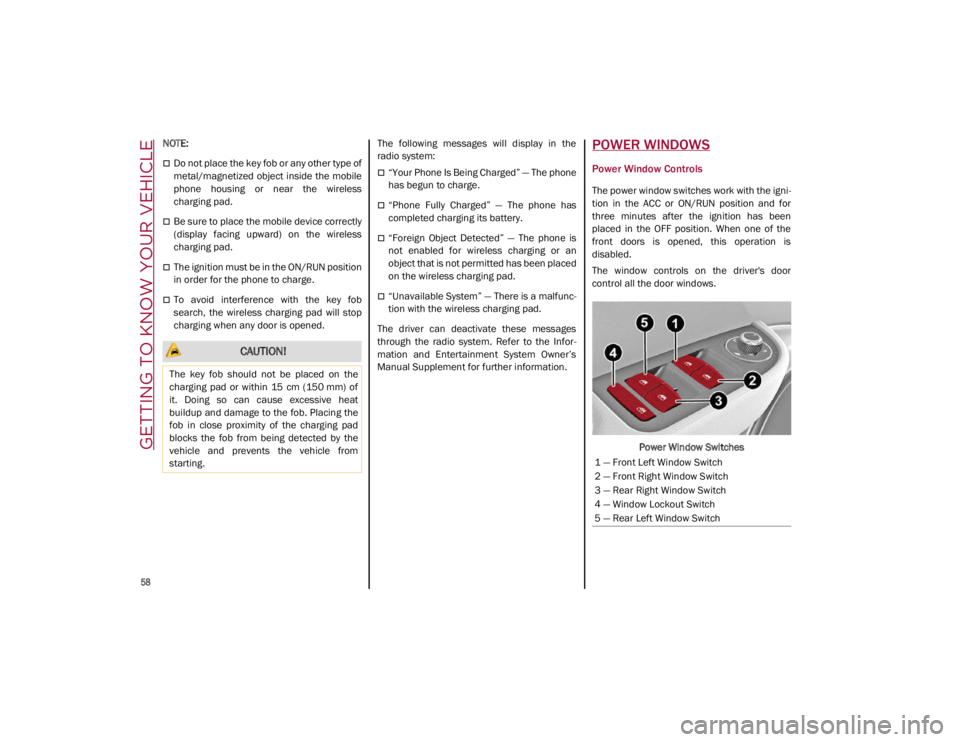
The window controls on the driver's door
control all the door windows.
Power Window Switches
CAUTION!
The key fob should not be placed on the
charging pad or within 15 cm (150 mm) of
it. Doing so can cause excessive heat
buildup and damage to the fob. Placing the
fob in close proximity of the charging pad
blocks the fob from being detected by the
vehicle and prevents the vehicle from
starting.
1 — Front Left Window Switch
2 — Front Right Window Switch
3 — Rear Right Window Switch
4 — Window Lockout Switch
5 — Rear Left Window Switch
21_GA_OM_EN_USC_t.book Page 58
Page 67 of 284

65
ENVIRONMENTAL PROTECTION
SYSTEMS
The following systems are used for reducing
engine emissions:
Catalytic Converter
Oxygen Sensors
Evaporation Control System
ACTIVE AERODYNAMIC SPOILER
(QUADRIFOGLIO VEHICLES)
Carbon Fiber Active Aero Front Spoiler
This is an automatic device working at the
vehicle speed to regulate air flow in the lower
part of the vehicle. It allows higher reactivity at
average speeds and higher vehicle stability at
high speeds.
NOTE:
The Active Aero Spoiler is active in the
Dynamic or RACE mode of the Alfa DNA Pro
Selector; it is not active in any mode when
external temperatures are near or below zero.Front Fascia
If there is a fault, a generic failure icon will light
up on the instrument panel display, along with
a message that will identify the type of
malfunction. See an authorized dealer if a
fault occurs.
21_GA_OM_EN_USC_t.book Page 65
Page 69 of 284

67
Quadrifoglio Instrument Cluster
1. Tachometer
2. Digital Engine Oil Temperature Gauge With Overheating Warning Light
3. Driver Interactive Display
4. Digital Fuel Level Gauge (The triangle on the left side of the symbol indicates that
the Fuel Door Location is on the left side of
the vehicle)
5. Speedometer (Speed Indicator)
Tachometer
The Tachometer indicates the engine Revolu -
tions Per Minute (Giri).
Adjusting Instrument Panel Lighting (Bright -
ness Sensor)
Inside the Tachometer there is a light sensor
capable of detecting light and adjusting the
brightness of the instrument panel and the
Information and Entertainment System display.
Engine Oil Temperature Gauge
The digital indicator monitors the temperature
of the engine oil and starts supplying indica -
tions when the oil temperature reaches
approximately 122°F (50°C).
Under normal usage, the temperature should
remain around the middle of the digital scale
according to the working conditions.
21_GA_OM_EN_USC_t.book Page 67
Page 70 of 284

GETTING TO KNOW YOUR INSTRUMENT PANEL
68
The Engine Oil Temperature warning light
will turn on to signal the excessive increase of
the engine oil temperature.
In the event of excessive engine oil tempera-
ture, stop the engine immediately and contact
an authorized dealer.
Fuel Level Gauge
The digital fuel gauge monitors the amount of
fuel in the tank.
When the Fuel Level warning light turns on,
a message is displayed, and a chime will
sound when 2.3 Gallons (9.0 L) of fuel are left
in the tank.
Proceeding further, the second white notch
will go off and the last one will become red,
together with the indication "E" present at the
bottom of the tank.
Fuel Level Gauge
NOTE:
If the low fuel warning light turns on, refuel the
vehicle at your nearest fuel station.
Speedometer
The speedometer shows the vehicle speed in
miles per hour and/or kilometers per hour
(mph/km/h).
INSTRUMENT CLUSTER
DISPLAY
Instrument Cluster Display Description
This vehicle is equipped with a driver interac
-
tive display that is located in the instrument
cluster.
When one or more of the doors have been
opened or closed and the ignition is in the OFF
position, the instrument cluster will display the
vehicle mileage for a few seconds.
Reconfigurable Instrument Cluster Display
During operation, the instrument cluster
display is divided into multiple sections which
show driving data, warnings and failure indica -
tions.
Instrument Cluster Display
Reconfigurable Display Items
1. External Lights (Low Beam/High Beam)Display
2. Front, Side Anti-Collision Systems, Cruise Control Change Information
3. Speed Limiter Display
4. Driving Assistance Systems (Forward Colli -
sion Warning (FCW), Lane Departure
Warning (LDW), Highway Assist System
(HAS)) Information Display
5. Active Cruise Control (ACC) / Cruise Control (CC) Information Display
CAUTION!
Do not travel with the fuel tank almost
empty: any gaps in fuel supply could
damage the catalytic converter.
21_GA_OM_EN_USC_t.book Page 68
Page 71 of 284

69
6. Traffic Sign Recognition (TSR) / SpeedLimiter Information Display
7. Traffic Sign Recognition (TSR) Information Display
8. Time
9. External Temperature
10. Main Display: Vehicle Speed Display, Trip Computer Information, etc...
The screens can be selected, on rotation,
by pushing the MENU selection button on
the windshield wiper stalk.
MENU Selection/Reset Button
Depending on the driving mode chosen us -
ing the Alfa DNA (Dynamic, Natural, and
Advanced Efficiency) the screens can be
graphically different. Navigation instruc -
tions and call information can be set and
displayed in the Information and Entertain -
ment System. Home
The parameters shown on the display, for
the modes: Dynamic, Normal and Ad
-
vanced Efficiency are:
• Time
• External Temperature
• Current speed (shown only if the repeat
mode of the “Navigation” and “Phone”
functions have not been previously acti-
vated).
• Range
In RACE mode (if equipped) the consump -
tion indication index is not active and a
sports gear shift indicator is displayed.
Instrument Cluster Display Instrument Cluster Display
Trip A And B
For all driving modes (Dynamic, Natural,
and Advanced Efficiency) and with the igni -
tion device ON, the Trip computer can be
used to display the measurements regard -
ing the operating state of the vehicle. This
function is characterized by two separate
records, called Trip A and Trip B (the latter
can be deactivated by Information and En -
tertainment System), where the complete
journeys are recorded in a reciprocally in -
dependent manner.
1 — Time
2 — Temperature
3 — Distance To Empty
4 — Speed
21_GA_OM_EN_USC_t.book Page 69
Page 72 of 284

GETTING TO KNOW YOUR INSTRUMENT PANEL
70
Trip A and Trip B are used to display the
values relating to:
• Distance traveled
• Average fuel consumption
• Average speed
• Active trip
• Fuel consumption indicator
Instrument Cluster Display
To reset the values, press and hold down
the button on the windshield wiper stalk. MENU Selection/Reset Button
Performance
The displayed parameters differ according
to the active mode. The modes which can
be selected using the Alfa DNA system are:
Natural
Efficiency Consumption Graph The screen graphically reproduces some
parameters closely linked to the efficiency
of the driving style, with a view to limiting
consumption.
Advanced Efficiency
Dynamic Driving Style
The three central icons, on the screen, in -
dicate the effectiveness of the driving style
linked to the parameters of: acceleration,
deceleration and gear shift with a view to
reducing fuel consumption.
The graphic bar below the icons shows
current consumption and the green line
represents the optimal area. The globe
lights up gradually according to lower
consumption.
1 — Acceleration
2 — Deceleration
3 — Gear Shifts
21_GA_OM_EN_USC_t.book Page 70
Page 73 of 284

71
Alternative Performance
The displayed parameters vary depending
on the active mode. The modes can be se-
lected through the “Alfa DNA™” system
and are as follows:
Normal and Advanced Efficiency
The display graphically shows the values of:
○ instantaneous consumption
○ average fuel consumption (based on “Trip A”);
Below a certain speed value, when the ac -
celerator pedal is not pressed or in the
event of failure, dashes are displayed in
place of the consumption value ("– –. –").
Normal and Advanced Efficiency Dynamic
The display graphically shows the values of:
○ accelerator pedal position (expressed in percentage);
○ brake pedal position (expressed in percentage);
○ engine coolant temperature (H = hot C = cold).
Dynamic
Race (If Equipped)
The display graphically shows the values of:
○ engine torque;
○ turbocharger pressure;
○ engine oil pressure (L = low pressure/H= high pres -
sure).
NOTE:
The engine torque and turbocharger pressure
values vary according to the engine type.
Race
Dynamic
Acceleration Gauge
The displayed parameters are related to
vehicle stability, the graphs illustrate the
trend of the longitudinal/lateral accelera -
tions (G-meter information), considering
gravity acceleration as a reference unit.
Lateral acceleration peaks are also indi -
cated.
21_GA_OM_EN_USC_t.book Page 71