2020 MERCEDES-BENZ SPRINTER service
[x] Cancel search: servicePage 178 of 348
The on-boar
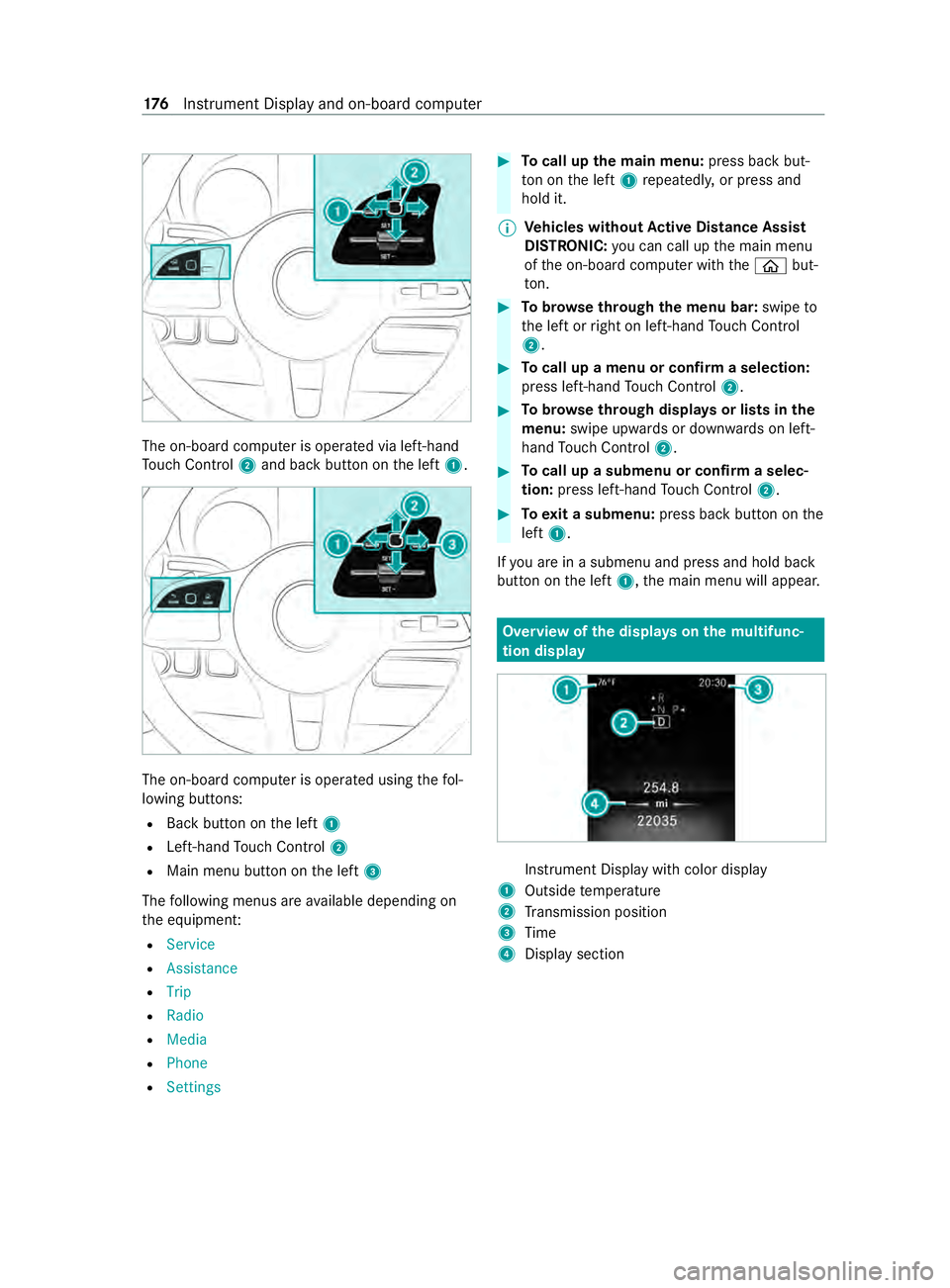
dcomputer is operated via left-hand
To uc hC ontrol 2and bac kbutton on thel eft 1. The on-boar
dcomputer is operated using thef ol‐
lowing buttons:
R Backbutton on thel eft 1
R Left-hand Touc hC ontrol 2
R Main men ubutton on thel eft 3
The following menus ar eavailable depending on
th ee quipment:
R Service
R Assistance
R Trip
R Radio
R Media
R Phone
R Settings #
Tocall up them ainm enu: press bac kbut‐
to nont he left 1repeatedly ,orpress and
hold it.
% Ve
hicles without Activ eD ista nce Assist
DISTRO NIC:youc an call up them ain menu
of theo n-boar dcomputer wit hthe 00E2 but‐
to n. #
Tobrows ethrough them enu bar: swipeto
th el eftorr ight on left-han dTouc hControl
2. #
Tocall up amenuorc onfirmas election:
press left-han dTouc hControl 2. #
Tobrows ethrough displa ysor lists in the
menu: swipe upwards or down wardsonl eft-
hand Touc hC ontrol 2. #
Tocall up asubmenu or confir maselec‐
tion: press left-han dTouc hControl 2. #
Toexitas ubmenu: press backbutton on the
left 1.
If yo ua reinas ubmenu and press and hold back
button on thel eft 1,t he main menu will appear. Overvie
wofthe displa yson them ultifunc‐
tion display In
stru ment Displa ywithc olor display
1 Outsid etemperature
2 Transmission position
3 Time
4 Displa ysection 176
Instrument Displa yand on-boar dcomputer
Page 179 of 348

Instrument Displa
ywithb lack and whit edis‐
play
1 Outside temp erature
2 Displa ysection
3 Time
4 Transmission position
Fu rther displa yson them ultifunction display:
0097 Gearshif
trecommendation
é Parking Assis tPARKTRONIC switched
off
00B2 Cruise control (/
page 151)
ç ActiveD ista nce Assi stDISTRONIC
(/ page 152)
z DSR (/page126)
00D9 HOLD function (/
page155)
00CE Ad
aptiv eHighbeam Assist
(/ page86)
Û ATTENTION ASSIS Tswitched off
003E Ad
oor is no tfully closed.
00C5 Re
ar wind owwiper swit ched on
(/ page95)
002E LO
WR ANGE activ e(/pag e126)
SOS
NOT
READY Emergency call sy
stem no tactive
h ActiveL aneK eeping Assis tswitched
of f(/pag e166)
00D4 Ac
tiveB rake Assi stswitched off
(/ page149)
e Blind SpotAssistswitched off
(/ page163) Setting
thei nstrument lighting #
Turn brightness control knob 1upwards or
down wards.
The lighting on theI nstrument Displa yand
th ec ont role lements in thev ehicle interior is
set.
% In
vehicles without brightness contro lknob
1 ,the instrument lighting can be se tviathe
on-boar dcomputer (/ page181). Menu
sand submenus Calling up function
sonthe servic emenu On-boar
dcomputer:
4 Service #
Selec tand con firm ther equired function.
The following function sareavailable on the
service menu:
R Announcements:m essagememory
(/ page291 )
R DEF:d isplaythe DEF fill le vel(/pag e137)
R Tires :
- Che ck th etirep ressur ewitht he tir epres‐
sur em onitor (/ page252)
- Restar tt he tir epressur emonitor
(/ page252)
R ASSYST PLUS:c all upthes ervice due date
(/ page214 )
R Engine Oil Level :measur ethe engine oil le vel Instrument Displa
yand on-boar dcomputer 17 7
Page 184 of 348
Information abou
tMercedes PR O(Mercedes
me)
Mercedes-Ben zVans vehicles suppor tthe follow‐
ing telematics solutions depending on what is
selec ted:
R Mercedes PRO
R Mercedes me
When youl og in wit hauser accoun ttothe
Mercedes PR OportalorM ercedes me Portal,
th en services and of fers from Mercedes-Benz
Va ns will be available toyou.
Av ailabilit yiscountr y-dependent. Youc an check
th ea vailabilit yofM ercedes PR Oinyour country
at thef ollowing page: http://www.mercedes.pro
Yo uc an checkt he availabilit yofMercedes me in
yo ur countr yatthefollowing page: http://
www.me rcedes.me
Fo rm orei nformation on Mercedes PR Oor
Mercedes me contact an authorized Mercedes-
Benz Center or visit theM ercedes PR OPortalor
Mercedes me Portal. Information abou
tMercedes PR Oconnect
(Mercedes me connect)
Among stothers, Mercedes PR Oconnect or
Mercedes me connect pr ovide thef ollowing serv‐
ices:
R Accident and breakdown mana gement
(breakdown assi stanc ecall button or auto‐
matic acciden torbreakd ownd etection) as a
supplement tothee mer gency cal lsyst em
Use theb reakdown assis tance cal lbuttonin
th eo verhead cont rolp anel tomak eac allto
th eM ercedes-Benz Cus tomer Center
(/ page183).
Yo uc an also selec tamenue ntry inthem ulti‐
media sy stem (/ page182).
R Emergency Call Sy stem
Use the0053 button (SOS button) in the
ove rhead cont rolp anel tomak eac alltothe
Mercedes-Benze mergency cal lcenter
(/ page 183).
The Mercedes-Benz Cust omer Center andthe
Mercedes-Benze mergency cal lcenter are availa‐
ble fory ou around thec lockfor theu se of the
services.
Please no tethat Mercedes PR Oconnect, or
Mercedes me connect, is aMercedes-Benz service. In emer
gencies, al ways cal lthe national
emergency servic esfirs tu sing thes tandard
national emer gency service phone numbers. In
emergencies, youc an also use theE mer gency
Call Sy stem (/ page228). Obser vethel egal
requ irements fort he countr yinwhichyou are
st ay ing.
The following condition smustbem etto use
Mercedes PR Oconnec torMercedes me connect
services in thev ehicle:
R Youh avea ccess toaG SM network
R The contract partner' sGSM networ kcove r‐
ag eisa vailable in ther espectiv eregion
R The ignition is switched on, so that vehicle
dat acan be transfer reda utomatically Calling
theM ercedes-Benz Cus tomer Center
using the multimedi asystem
Multimedia sy stem:
4 © 5
Phone 5
g #
Call Mercedes PRO connect orMercedes me
connect.
Then, youc an selec taservic eand be connec ted
to as pecialis tatthe Mercedes-Benz Cus tomer
Center.
Yo uc an find information on thef ollowing topics:
R Activation of Mercedes PR Oconnect or
Mercede smeconnect
R Ope rating thev ehicle
R Neares tauthorized Mercedes-BenzC enter
R Other products and services from Mercedes-
Benz 18 2
Mercedes PRO
Page 185 of 348

Making
acall via the overhead control panel 1
Breakdown assis tance cal lbutton
2 Release cat chfort he co veront he0053 but‐
to n( SOS button)
3 0053 button (SOS button) #
Tomak eab reakdown assistanc ecall:
press button 1. #
Tomak eane mergency call: pressthe
re lease cat chfort he co veron0053button
2 brief lyto open. #
Press and hold 0053button 3foratl east
one second.
An emer gency cal lcan still be triggered when a
breakdown assis tance cal lisactive.T hish aspri‐
ority overallot her activ ecalls. Information on
theb reakd owna ssistance
call via the overhead control panel
Ac alltotheM ercedes-Benz Cus tomer Center
using theb reakdown assis tance button ha sbeen
initia tedv iatheo verhead cont rolp anel:
In thee vent of abreak down, youw illge ts uppo rt:
R Aqualified tech nician car ries out repair son
sit ea nd/or thev ehicle will be towe dtot he
neares tauthorize dMercedes-Ben zCenter
Thes eservices ma yrequir epayment.
Dat aist ransmit tedd uring thec onnection tothe
Mercedes-BenzC ustomer Center (/ page183). Giving permission
ford atat rans fer
Re quirements:
R Ther eisana ctivebreakdown assis tance call
(/ page 183).
The Do yo uconsent to the transfe rofyourv ehi-
cle data and the vehicle's positio ntothe
Mercedes-Benz Customer Center in order to
improv ethe processing of your request? message
appears. #
Select Yes.
Re leva nt identi fication da tais transmitted
automaticall y. Tr
ansfer redd ata during aservic ecall
In cer tain countries youm ustc onfirm thed ata
transfer.
The dat atransfer redw hen calling depends on the
services activated and thet ype of call made.
R General information about thev ehicle
R Concier geService
R Accident and breakdown assis tance
R Service appointment ar rangement
The following dat aistransmitted if thed atap ro‐
te ction queryh as been confirmed in them ultime‐
dia sy stem or in thei nstrument clus ter:
R Vehicle identification number
R Reason fort he initiation of thec all
R Languag esetinthem ultimedia sy stem
R Confirmation of thed atap rotection prom pt
If ac all is made foras ervice appointment via the
service reminder ,the following dat amaybe
transmitte d:
R Current milea geand main tenance da ta
Tr ans ferisp ossible assuming ther equired
dat atransfer tech nology is suppor tedbyt he Mercedes PRO
18 3
Page 186 of 348

mobil
eservice operator and theq uality of the
mobil econnection is suf ficient.
If accident and breakdown assis tance is called
via thev oice control sy stem, and thed atap rotec‐
tion queryh as been confirmed, thef ollowing data
can also be called up from thev ehicle bythe
Mercedes-BenzC ustomer Center:
R Current vehicle location
The following dat aistransmit tedift he dat apro‐
te ction queryh as been declined in them ultime‐
dia sy stem or in thei nstrument clus ter:
R Reason fort he initiation of thec all
R Rejection of thed atap rotection prom pt 184
Mercedes PRO
Page 200 of 348

If
th eP BAPB luetooth ®
profile is no tsuppor ted,
th ee ffects ar easfollows:
R The multimedia sy stem generates acalllist
independentl yassoon as calls ar emade in
th ev ehicle.
R The call lis tisnotsynchronized wit hthe call
lists in them obile phone.
Making acall from thec all list
Multimedia sy stem:
4 © 5
Phone #
Select +Recent Calls. #
Select an entry.
The call is made.
Calling up additional options in thec all list
Multimedia sy stem:
4 © 5
Phone #
Select +Recent Calls. #
Forp reviousl ystore dc ontacts: select 0048in
th el ine of an entry.
The sear chresults ar edispla yed. Apple CarPlay
® Overvie
wofApple CarPlay ® &
WARNING Risk of distraction from infor‐
mation sy stems and communications
equipment
If yo uo perat einformation and communica‐
tio ne quipment integ ratedint hevehicle when
driving, youw ill be distracted from thet raffic
situation. This could also cause youtol ose
control of thev ehicle. #
Onlyoperat ethis equipment when the
traf fics ituation permits. #
Ifyo uc anno tbes ureoft his,stop the
ve hicle whils tpaying attention toroad
and traf ficc onditions and ope rate the
equipment wit hthe vehicle stationar y. Yo
um usto bse rvet he legal requirements fort he
countr yinwhich youa recur rentl yd riving when
ope rating them ultimedia sy stem.
iPhone ®
functions can be used via them ultime‐
dia sy stem using Apple CarPlay ®
.T he ya reoper‐
ated using thet ouchscreen, Touc hC ontrol or the
Siri ®
vo ice-operated control sy stem. Youc an acti‐
va te thev oice-operated control sy stem bypress‐ ing and holding
the£ button on them ultifunc‐
tion steering wheel.
Onl yone mobile phone at atime can be connec‐
te dv ia Apple CarPlay ®
to them ultimedia sy stem.
The availabilit yofApple CarPlay ®
ma yvary
according tothec ount ry.
The service pr ovider is responsible fort his appli‐
cation and thes ervices and content connected to
it.
Apple CarPlay ®
is ar egis tere dt rademar kof
Apple Inc.
Information on Apple CarPlay ®
When Apple CarPlay ®
is being used, thei Pod ®
media source is no tavailable fort he respective
iPhone ®
.
Connecting an iPhone ®
via Apple CarPlay ®
(with cable)
Requ irements:
R The multimedia sy stem is equipped wit hthe
function.
R The cur rent version of your device's operating
sy stem is being used (see them anufacturer's
operating instructions).
R The full rang eoff unctions forA pple CarPlay ®
is only available wit hanInterne tconnection. #
Connect thei Phone ®
to the ç USB port
on them ultimedia sy stem using asuitable
cable (/ page203). #
If no other device is connected wit hthe sys‐
te mv ia Blue tooth®
:c onfir mthe dat aprotec‐
tion pr ovisions. #
If ano ther device is connected via Blue tooth®
or Apple CarPlay ®
(wireless) wit hthe sy stem:
ta pont heTap here to start Apple CarPlay
for:
or #
Select thei Phone ®
in the í device list
under thea pplication.
The pr evious connection via Blue tooth®
or
Apple CarPlay ®
(wireless) is disconnected.
The device newl yconnected via cable is
active.
Ac cepting/rejecting thed atap rotection pro‐
visions
Am essag ewitht he dat aprotection pr ovisions
appears. #
Select Accept &Start. 19 8
MBUX multimedia sy stem
Page 202 of 348

Only one mobile phone at
atime can be connec‐
te dv ia Android Auto to them ultimedia sy stem.
The availabilit yofAndroid Au toand Android Auto
apps ma yvarya ccordin gtothe countr y.
The service pr ovider is responsible fort his appli‐
cation and thes ervices and content connected to
it.
Information on Android Auto
While using Android Auto,v arious func tions of
th em ultimedia sy stem, fore xamp lethem edia
source Blue tooth®
audio, ar enotavailable.
Connecting amobile phone via Android Auto
(wired)
Requ irements:
R The multimedia sy stem is equipped wit hthe
function.
R The cur rent version of your device's operating
sy stem is being used (see them anufacturer's
operating instructions).
R Ther eisanI nternetconnection fort he full
ra ng eoff unctions forA ndroid Auto.
Multimedia sy stem:
4 © 5
Smartphone
5 Mercedes PRO &Apps 5
Android Auto
5 Star tAndroid Auto #
Connec tthe mobile phone totheU SB por ton
th em ultimedia sy stem using asuitable cable
(/ page203). #
If no other device is connected wit hthe sys‐
te mv ia Blue tooth®
or Apple CarPlay ®
(wire‐
less): confir mthe dat aprotection pr ovisions. #
If ano ther device is connected via Blue tooth®
,
Androi dAuto( wireless) or Apple CarPlay ®
(wireless) wit hthe sy stem: taponthe Tap
here to start Android Auto
for:
or #
Select thed evice in theí device list
under thea pplication.
All existin gdevice connection svia USB ,Blue‐
tooth ®
,A ndroid Au to(wireless) or Apple Car‐
Play ®
(wireless) ar edisconnec ted. The device
newl yconnected via cable is active.
% If an Android
Autoapplicatio nisactive, you
can cal lupthis activ eapplication using the
z or002B application buttons. Ac
cepting/rejecting thed atap rote ction pro‐
visions
% The
firs ta ctivatio nofA ndroidAutoont he
multimedia sy stem mus tbecarried out when
th ev ehicle is stationar yfor saf etyr easons.
Fo rthe initial star toft he application:a message
wit hthe dat aprotection pr ovision sappears. #
Select Accept &Start.
Re turning tothem ainm enu #
Press the00E2 button.
% If
yo uu se bo th thewired as well as wireless
Android Autofunction, obser vethat aw ire‐
less connectio nmaybe es tablished when the
device is next connected using Blue tooth®
or
af te rs tartin gt he multimedia sy stem. If
Android Autowa sn otdispla yedint hefore‐
ground be fore disconnecting, thea pplication
st arts in theb ackg round when reconnected.
Yo uc an call up Android Autointhem ain
menu.
Connecting amobile phone via Android Auto
(wireless)
Requ irements:
R The multimedia sy stem is equipped wit hthe
function.
R The cur rent version of your device's operating
sy stem is being used (see them anufacturer's
operating instructions).
R The device supports theA ndroid Autowire‐
less function.
R Blue tooth ®
is activated on thed evice (see the
manufacturer's operating instructions).
R The device is "visible" foro ther devices.
R The full rang eoff unctions forA ndroid Autois
onl ypossible wit hanInterne tconnection.
Multimedia sy stem:
4 © 5
Phone 5
í
Connecting amobile phone #
Connec tthe mobile phone using Blue tooth®
( / pag e194).
St arting Android Auto #
Select Start Androi dAuto. 200
MBUX multimedi asystem
Page 203 of 348

%
Depending on
thec onfiguration of the
device, af terc onnecting them obile phone via
Blue tooth ®
,t he prom ptma yappear in the
media displa yasking if Android Autoshould
be star ted. The querym ustint hat case be
answered with Yes.
% It is possible at an
ytime toswitc hbetwe en
connection via Blue tooth®
or Android Auto
(wireless) in thed evice list.
Ac cepting/rejecting thed atap rotection pro‐
visions
Am essag ewitht he dat aprotection pr ovisions
appears. #
Select Accept &Start.
Re turning tothem ainm enu #
Press the00E2 button.
% If Android
Autowa sn otdispla yedint hefore‐
ground befor edisconnecting, thea pplication
st arts in theb ackg round when reconnected.
Yo uc an call up Android Autointhem ain
menu.
Calling up theA ndroid Autosound settings
Multimedia sy stem:
4 © 5
Smartphone 5
Android Auto
5 Z #
Select sound settings.
Ending Android Auto #
Disconnect thec onnectin gcable between the
mobil ephone and multimedia sy stem.
Mercedes-Benz recommends disconnecting
th ec onnectin gcable onl ywhen thev ehicle is
st ationar y. Tr
ansfer redv ehicle dat awith Android Auto
and Apple CarPlay ®Overvie
woftransfer redv ehicle data
Whe nusing Android Autoor Apple CarPlay ®
,c er‐
ta in vehicle dat aistransfer redtot he mobile
phone. This enables youtog ettheb esto ut of
selected mobile phone services. Vehicle dat ais
no td irectl yaccessible.
The following sy stem information is transmit ted:
R softwar erelease of them ultimedia sy stem
R system ID (anonymized)
The transfer of this dat aisusedtooptimize com‐
munication between thev ehicle and them obile
phone. To
do this, and toassig nseve ralv ehicles tothe
mobil ephone, avehicle ID is random lyge ner‐
ated.
Thi sh asno connection tothev ehicle identifica‐
tion number (VIN) and is dele tedw hen them ulti‐
media sy stem is rese t(/ pag e193).
The following vehicle status dat aistransmitted:
R transmission position engaged
R distinction between par ked, standstill ,rolling
and driving
R day/night mode of thei nstrument clus ter
The transfer of this dat aisusedtoalter ho wcon‐
te nt is displ ayed tocor respond tothed riving sit‐
uation.
The following position dat aistransmitted:
R coordinates
R speed
R compass direction
R acceleration direction
This dat aisonlyt ransfer redw hile then avigation
sy stem is active, in order toimpr oveit (e.g. so it
can continue functioning when in atunnel). Media
Information about media mode
Information about suppor
tedf ormats and
dat astorage media &
WARNING Risk of distraction whe nhan‐
dling da tastorag emedia
If yo uh andle adatas torage medium while
driving, your attention is diver tedf romt he
traf ficc onditions. Thi scould also cause you
to lose control of thev ehicle. #
Onlyhandle adatas tora ge medium
when thev ehicle is stationar y. %
Depending on
thee quipment ins talled play‐
bac kofv ideoform ats ma ynotbe possible. MBU
Xmultimedi asystem 201