2020 MERCEDES-BENZ METRIS ABS
[x] Cancel search: ABSPage 66 of 320

Top Tether anchorages
Example: rear bench seat
Top Tether anchorage ; is located at the bot-
tom of the rear side of the rear seat on the
cross brace between the seat or bench seat
legs.
X Move head restraint : up.
X Install the LATCH-type (ISOFIX) child
restraint system with Top Tether. Always
comply with the child restraint system man-
ufacturer's installation instructions when
doing so. X
Route Top Tether belt ? under head
restraint : between the two head restraint
bars.
X Hook Top Tether hook = of Top Tether
belt ? into Top Tether anchorage ;.
Make sure that Top Tether belt ? is not
twisted.
X Tension Top Tether belt ?. Always comply
with the child restraint system manufactur-
er's installation instructions when doing so.
X Move head restraint : back down again
slightly if necessary (Y page 93). Make
sure that you do not interfere with the cor-
rect routing of Top Tether belt ?. Child restraint system on the co-driv-
er's seat
General notes Accident statistics show that children secured
in the rear seats are safer than children
secured in the front seats. For this reason,
Mercedes-Benz strongly advises that you
install a child restraint system on a rear seat.
If it is absolutely necessary to install a child
restraint system on the co-driver's seat, be
sure to observe the instructions and safety
notes on the "Occupant Classification System
(OCS)"
(Y page 54).
This will help to rule out any risks that may
arise due to:
R an incorrectly categorized person in the co-
driver's seat
R an unintentionally deactivated co-driver's air
bag
R an unfavorable positioning of the child
restraint system, e.g. too near to the dash-
board
Rearward-facing child restraint system If circumstances require you to install a rear-
ward-facing child restraint system on the co-
driver's seat, you must always make sure that
the co-driver's air bag is deactivated. The co-
driver's air bag is deactivated only when the
PASSENGER AIR BAG OFF indicator lamp is lit
continuously ( Y page
54).
Always comply with the manufacturer's instal-
lation and operating instructions for the child
restraint system.
Forward-facing child restraint system If it is absolutely necessary to secure a child in
a forward-facing child restraint system on the
co-driver's seat, you must always move the co-
driver's seat as far back as possible. The base
of the child restraint system must always rest
on the seat cushion of the co-driver's seat. As
much as possible of the backrest of the child
restraint system must be resting on the back-
rest of the co-driver's seat. The child restraint
system may not touch the roof or be subjected
to a load by the head restraint. Adjust the
angle of the seat backrest and the head
restraint position accordingly. Always make
sure the shoulder belt is correctly secured,64
Children in the vehicle
Safety
Page 68 of 320

Child-proof lock for sliding door
Sliding door (example: left side of the vehicle)
: Child safety bolt
2 Sliding door released
3 Sliding door secured – then make sure
that the child-proof locks are working
properly.
You can secure each sliding door individually
with the child-proof locks on the sliding doors.
A secured sliding door cannot be opened from
inside the vehicle. When the vehicle is
unlocked, the sliding door can be opened from
the outside. If the electric sliding door is
secured, only the sliding door rear controls are
deactivated. If the electric sliding door is
unlocked, you can open the electric sliding
door using the corresponding Å or Æ
sliding door button in the center console
(Y page
79). Pets in the vehicle
G
WARNING
If you leave animals unsupervised or unse-
cured in the vehicle, they may press buttons
or switches, for instance.
In this way, animals may:
R activate vehicle equipment and become
trapped, for example
R switch systems on or off and thereby
endanger other road users
Furthermore, unsecured animals may be
flung around inside the vehicle in the event
of an accident or abrupt steering or braking maneuver, and thereby injure vehicle occu-
pants. There is a risk of accident and injury.
Never leave animals unattended in the vehi-
cle.
Always secure animals properly when driv-
ing, for instance with a suitable pet carrier. Driving safety systems
Overview
In this section, you will find information about
the following driving safety systems:
R EBD ( Electronic Brake Force Distribution)
R ABS ( Anti-lock Braking System)
R BAS ( Brake A ssist System)
R ESP ®
(Electronic Stability Program) Important safety notes
If you fail to adapt your driving style or if you
are inattentive, the driving safety systems can
neither reduce the risk of accident nor over-
ride the laws of physics. Driving safety sys-
tems are merely aids designed to assist driv-
ing. You are responsible for the distance to the
vehicle in front, for vehicle speed, braking in
good time and for staying in your lane. Always
adapt your driving style to the prevailing road
and weather conditions and maintain a suffi-
cient, safe distance from other road users.
Drive carefully.
Please note that the driving safety systems
described only work optimally when the follow-
ing conditions are fulfilled:
R there is adequate contact between the tires
and the road surface.
R you use winter tires
(M+S tires) with snow
chains if necessary, when the road condi-
tions are wintry.
R the speed information determined by the
vehicle is within the legally prescribed dis-
play accuracy.
Pay particular attention to the information
regarding tires, tire tread and winter operation
under "Wheels and tires" (Y page 278). 66
Driving safety systems
Safety
Page 69 of 320

ABS (Anti-lock Braking System)
General notes ABS regulates brake pressure in such a way
that the wheels do not lock when you brake.
This allows you to continue steering the vehi-
cle when braking.
The ò warning lamp in the instrument clus-
ter lights up when the ignition is switched on.
The lamp goes out when the engine starts run-
ning.
Important safety notes Observe the important safety guidelines for
the driving safety system (
Y page
66).
ABS works from a speed of about 5 mph
(8 km/h), regardless of road-surface condi-
tions. ABS works on slippery surfaces, even
when you only brake gently. G
WARNING
If ABS is faulty, the wheels could lock when
braking. The steerability and braking charac-
teristics may be severely impaired. Addition-
ally, further driving safety systems are deac-
tivated. There is an increased danger of
skidding and accidents.
Drive on carefully. Have ABS checked imme-
diately at a qualified specialist workshop.
If ABS is malfunctioning, the ò warning
lamp
(Y page 230) lights up while the engine
is running and the display shows a message:
R on vehicles without steering wheel buttons
(Y page 196)
R on vehicles with steering wheel buttons
(Y page 210)
BAS, Hill Start Assist and ESP ®
and its driving
safety systems and other driving systems also
fail. Observe the notes on the ò warning
lamp and the display messages.
Braking If ABS intervenes when braking, you will feel a
pulsating in the brake pedal.
The pulsating brake pedal can be an indication
of hazardous road conditions and functions as
a reminder to take extra care while driving. X
If ABS intervenes: continue to depress the
brake pedal with force until the braking sit-
uation is over.
X To make a full brake application: depress
the brake pedal with full force. BAS (Brake Assist System)
General notes BAS operates in emergency braking situations.
If you depress the brake pedal quickly, BAS
automatically boosts the braking force, thus
shortening the stopping distance.
Important safety notes Observe the important safety guidelines for
the driving safety system
(Y page 66). G
WARNING
If BAS is malfunctioning, the braking dis-
tance in an emergency braking situation is
increased. There is a risk of an accident.
In an emergency braking situation, depress
the brake pedal with full force. ABS prevents
the wheels from locking.
If BAS is malfunctioning, the ÷ warning
lamp lights up while the engine is running
(Y page
230) and the display shows a mes-
sage:
R on vehicles without steering wheel buttons
(Y page 200)
R on vehicles with steering wheel buttons
(Y page 214)
Braking X
Keep the brake pedal firmly depressed until
the emergency braking situation is over.
ABS prevents the wheels from locking.
The brakes will function as usual once you
release the brake pedal. BAS is deactivated. Driving safety systems
67
Safety Z
Page 95 of 320
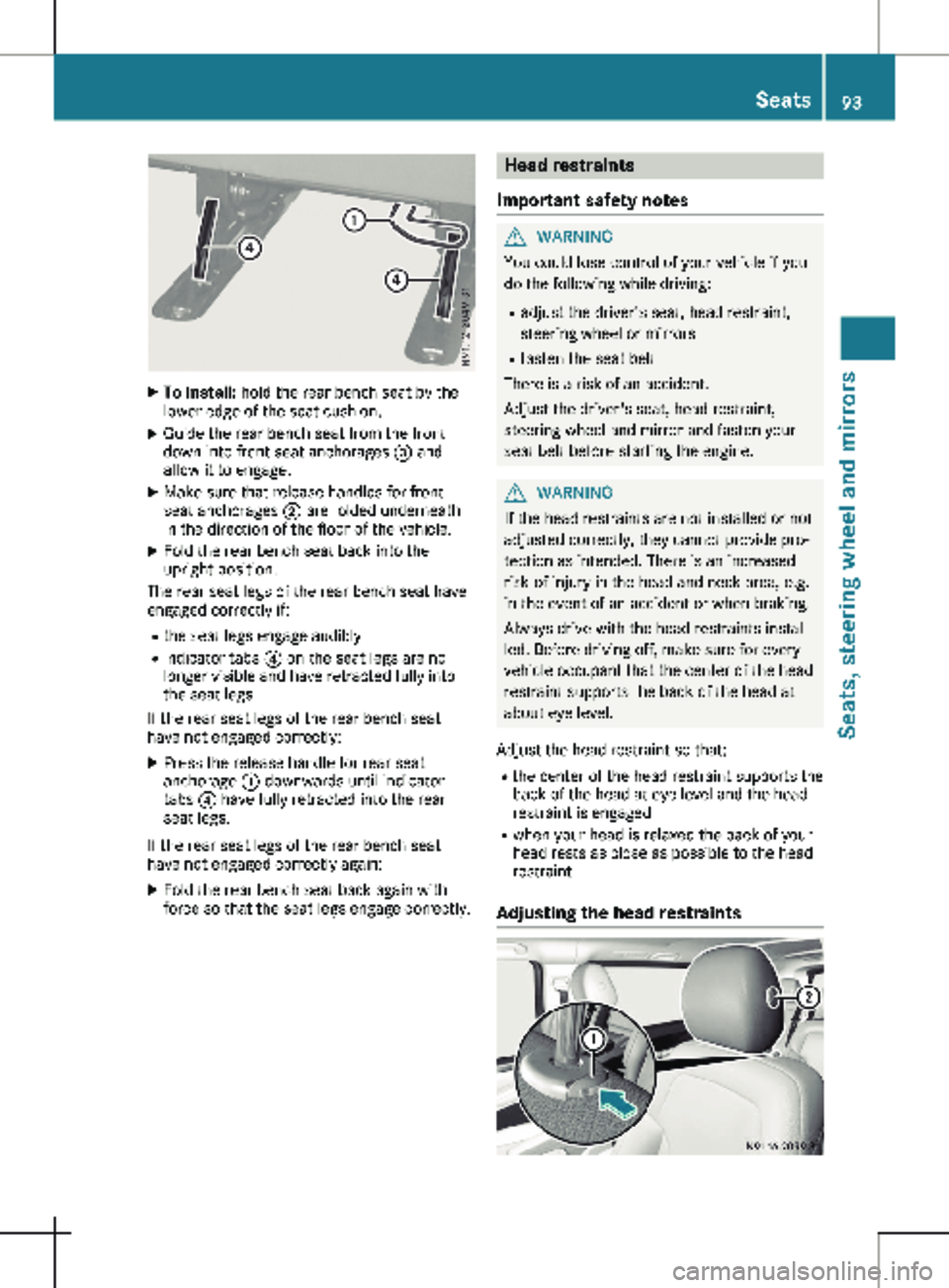
X
To install: hold the rear bench seat by the
lower edge of the seat cushion.
X Guide the rear bench seat from the front
down into front seat anchorages = and
allow it to engage.
X Make sure that release handles for front
seat anchorages ; are folded underneath
in the direction of the floor of the vehicle.
X Fold the rear bench seat back into the
upright position.
The rear seat legs of the rear bench seat have
engaged correctly if:
R the seat legs engage audibly
R indicator tabs ? on the seat legs are no
longer visible and have retracted fully into
the seat legs
If the rear seat legs of the rear bench seat
have not engaged correctly:
X Press the release handle for rear seat
anchorage : downwards until indicator
tabs ? have fully retracted into the rear
seat legs.
If the rear seat legs of the rear bench seat
have not engaged correctly again: X Fold the rear bench seat back again with
force so that the seat legs engage correctly. Head restraints
Important safety notes G
WARNING
You could lose control of your vehicle if you
do the following while driving:
R adjust the driver's seat, head restraint,
steering wheel or mirrors
R fasten the seat belt
There is a risk of an accident.
Adjust the driver's seat, head restraint,
steering wheel and mirror and fasten your
seat belt before starting the engine. G
WARNING
If the head restraints are not installed or not
adjusted correctly, they cannot provide pro-
tection as intended. There is an increased
risk of injury in the head and neck area, e.g.
in the event of an accident or when braking.
Always drive with the head restraints instal-
led. Before driving off, make sure for every
vehicle occupant that the center of the head
restraint supports the back of the head at
about eye level.
Adjust the head restraint so that: R the center of the head restraint supports the
back of the head at eye level and the head
restraint is engaged
R when your head is relaxed the back of your
head rests as close as possible to the head
restraint
Adjusting the head restraints Seats
93Seats, steering wheel and mirrors Z
Page 151 of 320

R
you shift to neutral i while the vehicle is in
motion
R ESP ®
intervenes or you deactivate ESP ®
R there is a malfunction in the ESP ®
or ABS
system
If cruise control automatically deactivates, a
warning tone sounds and the Cruise Con‐
trol Off message appears briefly in the dis-
play.
The V symbol and the display of the stored
speed in the header or in the status area of
the display are then not shown.
Problems with cruise control The speed cannot be set when cruise control
is activated.
The display is showing a message of high pri-
ority and cannot therefore show a change in
speed.
X Proceed as instructed by the message in the
display. COLLISION PREVENTION ASSIST
General notes COLLISION PREVENTION ASSIST helps you:
R to minimize the risk of a front-end collision
with a detected obstacle in the path of your
vehicle
R to reduce the consequences of a collision
with the vehicle in front
The system uses radar sensors to detect vehi-
cles in front.
COLLISION PREVENTION ASSIST consists of
the distance warning function and Adaptive
Brake Assist.
If COLLISION PREVENTION ASSIST is malfunc-
tioning, the display shows a corresponding
message
(Y page 222). Distance warning function Important safety notes
G
WARNING
The distance warning function does not
react:
R to people or animals
R to oncoming vehicles
R to crossing traffic
R when cornering
The distance warning function may not give
warnings in all critical situations. There is a
risk of an accident.
Always pay careful attention to the traffic
situation and be ready to brake.
Always adapt your speed to suit the prevail-
ing road and traffic conditions. G
WARNING
The distance warning function cannot
always clearly identify objects and complex
traffic situations.
In such cases, the distance warning function
may:
R give an unnecessary warning
R not give a warning
There is a risk of an accident.
Always pay careful attention to the traffic
situation and do not rely solely on the dis-
tance warning function.
In particular, the detection of obstacles can be
impaired in the case of: R dirt on the sensors or anything else covering
the sensors
R snow or heavy rain
R interference from other radar sources
R strong radar reflections, for example, in
parking garages
R a narrow vehicle traveling in front, e.g. a
motorbike
R a vehicle traveling in front on a different line
Due to the nature of the system, particularly
complicated but non-critical driving conditions Driving systems
149
Driving and parking Z
Page 153 of 320

Always pay careful attention to the traffic
situation and be ready to brake. G
WARNING
Adaptive Brake Assist cannot always clearly
identify objects and complex traffic situa-
tions.
In such cases, Adaptive Brake Assist can:
R intervene unnecessarily
R not intervene
There is a risk of an accident.
Always pay careful attention to the traffic
situation and be ready to brake. Terminate
the intervention in a non-critical driving sit-
uation.
In particular, the detection of obstacles can be
impaired in the case of:
R dirt on the sensors or anything else covering
the sensors
R snow or heavy rain
R interference from other radar sources
R strong radar reflections, for example, in
parking garages
R a narrow vehicle traveling in front, e.g. a
motorbike
R a vehicle traveling in front on a different line
Due to the nature of the system, particularly
complicated but non-critical driving conditions
may also cause Adaptive Brake Assist to inter-
vene.
If you fail to adapt your driving style, Adaptive
Brake Assist can neither reduce the risk of
accident nor override the laws of physics.
Adaptive Brake Assist cannot take into
account road, weather or traffic conditions.
Adaptive Brake Assist is only an aid. You are
responsible for the distance to the vehicle in
front, for vehicle speed, braking in good time
and for staying in your lane.
Following damage to the front end of the vehi-
cle, have the configuration and operation of
the radar sensor checked at a qualified spe-
cialist workshop. This also applies to collisions
at slow speeds where there is no visible dam-
age to the front of the vehicle.
If you change wheel size, make sure they cor-
respond to the correct wheel size category
(Y page
278). If the category is changed with- out recoding the control units in the vehicle,
the functioning of Adaptive Brake Assist may
be impaired. COLLISION PREVENTION ASSIST
may then detect a malfunction and switch
itself off.
If Adaptive Brake Assist is not available due to
a malfunction in the radar sensor system, the
brake system remains available with full brake
boosting effect and BAS.
Operation With the help of the radar sensor system,
Adaptive Brake Assist can detect obstacles
that have been in the path of your vehicle for
an extended period of time. Adaptive Brake
Assist does not react to stationary obstacles.
If Adaptive Brake Assist detects a risk of colli-
sion with a vehicle traveling in front or with a
stationary obstacle, the system calculates the
braking force necessary to avoid this collision.
If you apply the brakes forcefully, Adaptive
Brake Assist will automatically increase the
braking force to a level suitable for the traffic
conditions.
X Brake until the distance to the obstacle
increases and the risk of a collision passes.
ABS prevents the wheels from locking.
The brakes function as usual again if:
R you release the brake pedal
R there is no longer any danger of a collision
R no obstacle is detected in front of your vehi-
cle
Braking assistance is then ended. Blind Spot Assist
General notes Blind Spot Assist monitors the areas on either
side of the vehicle that are not visible to the
driver with two lateral, rear-facing radar sen-
sors in the bumper. It supports you from
speeds of approximately
20 mph (30 km/h). A
warning display in the exterior mirrors draws
your attention to vehicles detected in the
monitored area. If you then switch on the cor-
responding turn signal to change lane, you will
also receive an optical and audible collision
warning. Driving systems
151
Driving and parking Z
Page 157 of 320

Assist is ready for use, the lane markings in
the symbol are shown as solid lines
;.
Setting the sensitivity of Lane Keeping
Assist X
In the Assist. menu on the on-board com-
puter, select the Lane Keeping Assist:
function
(Y page 191).
X Select Standard or Adaptive.
In the Standard setting, no warning vibration
occurs if:
R you operate the turn signal in the corre-
sponding direction. In this event, the warn-
ings are suppressed for a certain period of
time.
R a driving safety system, such as ABS, BAS or
ESP ®
, intervenes or performs a control
action.
When Adaptive is selected, there is also no
warning vibration when: R you accelerate hard, e.g. kickdown.
R brake sharply.
R you steer actively, e.g. swerve to avoid an
obstacle or change lanes quickly.
R you cut the corner on a sharp bend.
In order that you are warned only when neces-
sary and in good time if you cross the lane
marking, the system differentiates between
various conditions and warns you accordingly.
The warning vibration occurs earlier if:
R you approach the outer lane marking on a
bend.
R the road has very wide lanes, such as a
highway.
R the system detects solid lane markings.
The warning vibration occurs later if:
R the road has narrow lanes.
R you cut the corner on a bend. Alertness Assistant ATTENTION
ASSIST
General notes ATTENTION ASSIST helps you during long,
monotonous journeys such as on freeways and
interstate highways. It is active in the 40 mph
(
60 km/h) to 125 mph (200 km/h) range. If
ATTENTION ASSIST detects typical indicators of fatigue or increasing lapses in concentration
on the part of the driver, it suggests taking a
break.
Important safety notes ATTENTION ASSIST is only an aid. The system
may not always detect fatigue or lapses in
concentration until too late, or may not detect
them at all. ATTENTION ASSIST is not a substi-
tute for a well-rested and attentive driver.
The functionality of ATTENTION ASSIST is
restricted, and warnings may be delayed or
not occur at all:
R if the length of the journey is less than
approximately
30 minutes
R if the road condition is poor, e.g. if the sur-
face is uneven or if there are potholes
R if there is a strong side wind
R if you have adopted a sporty driving style
with high cornering speeds or high rates of
acceleration
R if you are predominantly driving at a speed
below 40 mph (60 km/h) or above 125 mph
(200 km/h)
R if the time has been set incorrectly
R in active driving situations, such as when
you change lanes or change your speed
ATTENTION ASSIST is reset and starts assess-
ing your attention again when you continue
your journey if:
R you switch off the engine
R you take off your seat belt and open the
driver's door, e.g. for a change of drivers or
to take a break
Displaying the attention level Driving systems
155
Driving and parking Z
Page 198 of 320

Safety systems
Display messages
Possible causes/consequences and
M SolutionsABS, ESP Inopera‐
tive
+
ABS, BAS, hill start assist, and ESP
®
as well as its driving safety sys-
tems are unavailable due to a malfunction.
ATTENTION ASSIST is deactivated and other driving systems could
be automatically deactivated.
G WARNING
The brake system continues to function normally, but without the
functions listed above. The wheels could therefore lock if you brake
hard, for example.
This causes steerability and braking to be greatly impaired. The
braking distance can increase in emergency braking situations.
If ESP ®
is not operational, ESP ®
will not stabilize the vehicle.
There is an increased risk of skidding and accidents.
X Switch the engine off, wait briefly and start the engine again.
X Check if the display message has disappeared and ESP ®
is opera-
tional.
X If the display message continues to be displayed:
R Drive on with care.
R Visit a qualified specialist workshop immediately. ABS, ESP Curr.
Unavail.
+
ABS, BAS, hill start assist, and ESP
®
as well as its driving safety sys-
tems are temporarily unavailable.
ATTENTION ASSIST is deactivated and other driving systems could
be automatically deactivated.
For example, the on-board voltage may be insufficient.
G WARNING
The brake system continues to function normally, but without the
functions listed above. The wheels could therefore lock if you brake
hard, for example.
This causes steerability and braking to be greatly impaired. The
braking distance can increase in emergency braking situations.
If ESP ®
is not operational, ESP ®
will not stabilize the vehicle.
There is an increased risk of skidding and accidents.
X Drive on with care and on a suitable stretch of road make slight
steering movements at a speed above 12 mph (20 km/h ).
X Switch the engine off, wait briefly and start the engine again.
X Check if the display message has disappeared and ESP ®
is opera-
tional.
X If the display message continues to be displayed:
R Drive on with care.
R Visit a qualified specialist workshop immediately.196
Display messages (vehicles without steering wheel buttons)
On-board computer and displays