2020 MERCEDES-BENZ GLS SUV charging
[x] Cancel search: chargingPage 5 of 549
Symbols
........................................................ 5At
agl ance .................................................... 6
Cockpit ........................................................... 6
Indica tor and warning lamps ........................ .10
Overhead contro l panel ................................ 12
Door operating unit and seat adjustment ..... 14
Control settings in there ar passenger
compartment ................................................ 16
Emergencies and breakdowns ...................... 18Digital Owner's Manual
.............................20
Calling up the Digital Owner's Manual ..........20 Genera
l notes............................................. 22
Pr otection of the environment ......................22
Ta ke -ba ckof end-of-life vehicles ...................22
Mercedes-Benz GenuineParts ....................... 23
Owner's Manual ............................................ 24
Operating saf ety .......................................... .24
Declaration of conformity ............................. 26
Diagno stics connection ................................ 31
Qualified specialist workshop ....................... 32 Ve
hicle registration ....................................... 33
Cor rect use of theve hicle ............................33
Information on the REA CHregulation ........... 33
No tesfo r persons with electronic medi‐
cal aids ......................................................... 33
Implied warranty .......................................... .34
QR code forre scue card ...............................34
Data storage .................................................34
Copyright ...................................................... 38 Occupant saf
ety......................................... 39
Re stra int sy stem ...........................................39
Seat belts ...................................................... 41
Airbags ......................................................... 45
PRE-SAFE ®
sy stem ....................................... 53
Au tomatic measu res af ter an accident ......... 54
Safely transporting children in theve hi‐
cle ................................................................55
No tes on pets in theve hicle .........................77 Opening and closing
.................................. 78
Ke y .............................................................. .78
Doo rs............................................................ 81
Ru nning boards ............................................ 85 Load compa
rtment ....................................... 86
Side windo ws............................................... 92
Sliding sunroof ............................................. 96
Ro ller sunblinds .......................................... 101
Anti-theft pr otection ................................... 102 Seats and
stowing ................................... 105
No tes on the cor rect driver's seat posi‐
tion ............................................................. 105
Seats .......................................................... 105
St eering wheel ............................................ 124
Easy entry and exitfeature ........................ .126
Memory function ........................................ 127
Memory function in there ar compart‐
ment .......................................................... .128
St ow age areas ............................................ 13 2
Cup holders ................................................ 14 6
Soc kets ....................................................... 14 8
Coolbox ...................................................... 15 0
Wi reless charging of the mobile phone
and connection with theex terior aerial .......1 51
Fitting/removing thefloor mats ................. 1542
Contents
Page 35 of 549
#
Stow all objects in theve hicle securely
so that they cannot getinto the driver's
fo ot we ll. #
Alw aysfit th efloor mats securely and
as prescribed in order toensure that
th ere is alw ays suf ficient room forthe
pedals. #
Do not use loose floor mats and do not
place floor mats on top of one ano ther. *
NO
TEBattery discharging from using
devices connected tothe diagnostics
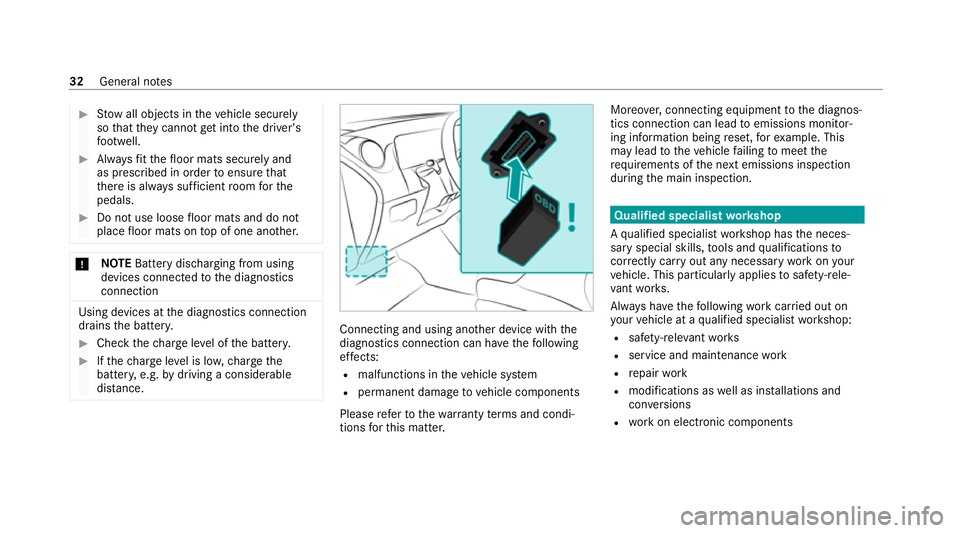
connection Using devices at
the diagnostics connection
drains the batter y. #
Check thech arge leve l of the batter y. #
Ifth ech arge leve l is lo w,charge the
batter y,e.g. bydriving a considerable
dis tance. Connecting and using ano
ther device with the
diagnostics connection can ha vethefo llowing
ef fects:
R malfunctions in theve hicle sy stem
R permanent damage tovehicle components
Please referto thewa rranty term s and condi‐
tions forth is matter. Moreo
ver,connecting equipment tothe diagnos‐
tics connection can lead toemissions monitor‐
ing information being reset, forex ample. This
may lead totheve hicle failing tomeet the
re qu irements of the next emissions inspection
during the main inspection. Qualified specialist
workshop
A qu alified specialist workshop has the neces‐
sary special skills, tools and qualifications to
cor rectly car ryout any necessary workon your
ve hicle. This particular lyapplies tosaf ety-re le‐
va nt wo rks.
Alw ays ha vethefo llowing workcar ried out on
yo ur vehicle at a qualified specialist workshop:
R safety-re leva nt wo rks
R service and maintenance work
R repair work
R modifications as well as ins tallations and
con versions
R workon electronic components 32
General no tes
Page 138 of 549
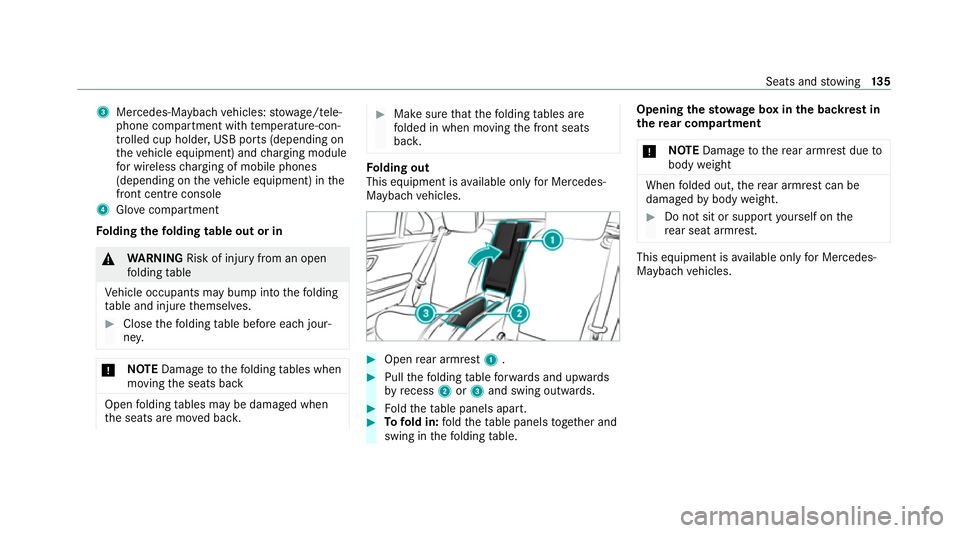
3
Mercedes-Maybach vehicles: stowage/tele‐
phone compartment with temp erature-con‐
trolled cup holder, USB ports (depending on
th eve hicle equipment) and charging module
fo r wireless charging of mobile phones
(depending on theve hicle equipment) in the
front centre console
4 Glovecompa rtment
Fo lding thefo lding table out or in &
WARNING Risk of inju ryfrom an open
fo lding table
Ve hicle occupants may bump into thefo lding
ta ble and injure themselves. #
Close thefo lding table before each jour‐
ne y. *
NO
TEDama getothefo lding tables when
moving the seats back Open
folding tables may be damaged when
th e seats are mo ved bac k. #
Make sure that thefo lding tables are
fo lded in when moving the front seats
bac k. Fo
lding out
This equipment is available on lyfor Mercedes-
Maybach vehicles. #
Open rear armrest 1. #
Pull thefo lding table forw ards and upwards
by recess 2or3 and swing outwards. #
Foldtheta ble panels apart. #
Tofold in: fold theta ble panels toget her and
swing in thefo lding table. Opening
thesto wage box in the backrest in
th ere ar comp artment
* NO
TEDama getothere ar armrest due to
body weight When
folded out, there ar armrest can be
damaged bybody weight. #
Do not sit or support yourself on the
re ar seat armrest. This equipment is
available on lyfor Mercedes-
Maybach vehicles. Seats and
stowing 13 5
Page 154 of 549
Example:
vehicles with individual rear seats #
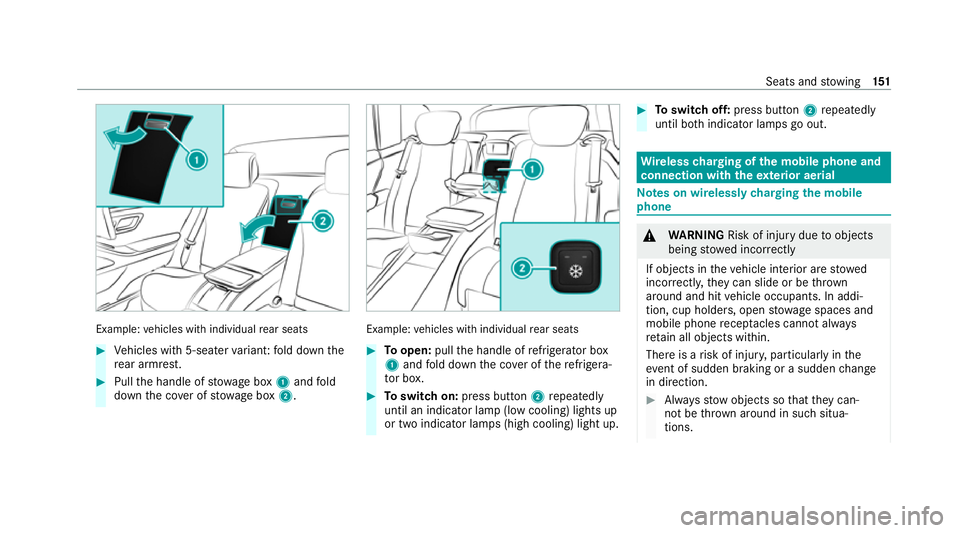
Vehicles with 5-seater variant: fold down the
re ar armrest. #
Pull the handle of stowage box 1and fold
down the co ver of stow age box 2. Example:
vehicles with individual rear seats #
Toopen: pullthe handle of refrigerator box
1 and fold down the co ver of there frigera‐
to r box. #
Toswitch on: press button 2repeatedly
until an indicator lamp (low cooling) lights up
or two indicator lamps (high cooling) light up. #
Toswitch off: press button 2repeatedly
until bo thindicator lamps go out. Wire
lesscharging of the mobile phone and
connection with theex terior aerial Note
s on wirelessly charging the mobile
phone &
WARNING Risk of inju rydue toobjects
being stowed inco rrectly
If objects in theve hicle interior are stowed
incor rectly, they can slide or be thrown
around and hit vehicle occupants. In addi‐
tion, cup holders, open stowage spaces and
mobile phone recep tacles cannot al ways
re tain all objects within.
There is a risk of injur y,particularly in the
ev ent of sudden braking or a sudden change
in direction. #
Alw aysstow objects so that they can‐
not be throw n around in su chsitua‐
tions. Seats and
stowing 151
Page 155 of 549
#
Alw ays make sure that objects do not
pr otru de from stowage spaces, luggage
nets or stowage nets. #
Close the loc kable stow age spaces
before starting a journe y. #
Alw aysstow and secure heavy, hard,
poin ted, sharp-edged, fragile or bulky
objects in the boot/load compartment. Obser
vethe no tes on loading theve hicle. &
WARNING Risk offire from placing
objects in the mobile phone stowage
compartment
Placing other objects in the mobile phone
stow age compartment could con stitute a fire
hazard. #
Apart from a mobile phone, do not
place any other objects in the mobile
phone stowage compartment, espe‐
cially those made of me tal. *
NO
TEDama getoobjects caused by
placing them in the mobile phone stow‐
age compartment If objects are placed in
the mobile phone
stow age compartment, they may be dam‐
aged byelectromagnetic fields. #
Do not place credit cards, data storage
devices, ski passes or other objects
sensitive toelectromagnetic fields in
th e mobile phone stowage compart‐
ment. *
NO
TEDama getothe mobile phone
stow age compartment caused byliquids If liquids enter
the mobile phone stowage
compartment, the compartment may be
damaged. #
Ensure that no liquids enter the mobile
phone stowage compartment. Alw
ays obser vethe no tesfo r persons with elec‐
tronic medical aids (/ page 33). R
Depending on theve hicle equipment, the
mobile phone is connected totheve hicle's
ex terior aerial via thech arging module.
R The charging function and wireless connec‐
tion of the mobile phone totheve hicle's
ex terior aerial are only available if the ignition
is switched on.
R Small mobile phones may not be able tobe
ch arge d in everyposition of the mobile
phone stowage compartment.
R Largemobile phones which do not rest flat in
th e mobile phone stowage compartment may
not be able tobe charge d or connec ted with
th eve hicle's exterior aerial.
R The mobile phone may heat up during the
ch arging process. This may also depend on
th e applications (apps) cur rently open in the
bac kground.
R Toensure more ef ficient charging and con‐
nection with theve hicle's exterior aerial,
re mo vethe pr otective co ver from the mobile
phone. Pr otective co vers which are neces‐
sary for wireless charging are excluded. 15 2
Seats and stowing
Page 156 of 549
Wire
lesscharging of a mobile phone in the
cockpit Re
quirements:
R The mobile phone is suitable for wireless
ch arging.
% A list of compatible mobile phones can be
found at: https://www.mercedes-benz-
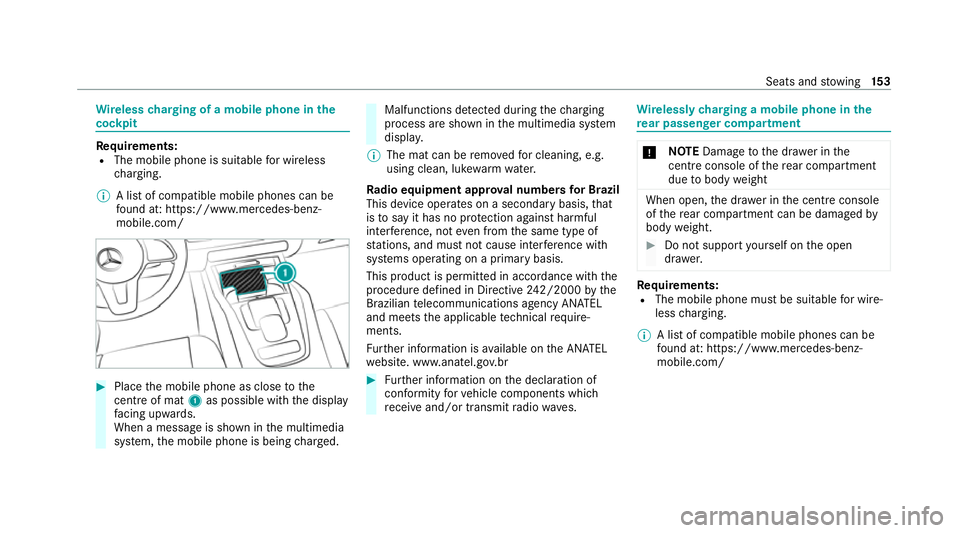
mobile.com/ #
Place the mobile phone as close tothe
centre of mat 1as possible wi th the display
fa cing up wards.
When a message is shown in the multimedia
sy stem, the mobile phone is being charge d. Malfunctions de
tected du ring thech arging
process are shown in the multimedia sy stem
displa y.
% The mat can be remo vedfo r cleaning, e.g.
using clean, luk ewarmwate r.
Ra dio equipment appr oval numbers for Brazil
This device operates on a secondary basis, that
is to say it has no pr otection against harmful
inter fere nce, not even from the same type of
st ations, and must not cause inter fere nce wi th
sy stems operating on a primary basis.
This product is permitted in accordance with the
procedure defined in Directive 242/2000 bythe
Brazilian telecommunications agency AN ATEL
and meets the applicable tech nical requ ire‐
ments.
Fu rther information is available on the AN ATEL
we bsite. www.anatel.go v.br #
Further information on the declaration of
confo rmity forve hicle components which
re cei veand/or transmit radio wav es. Wire
lessly charging a mobile phone in the
re ar passenger comp artment *
NO
TEDama getothe dr awe r inthe
centre console of there ar compartment
due tobody weight When open,
the dr awe r inthe cent reconsole
of there ar compartment can be damaged by
body weight. #
Do not support yourself on the open
dr awe r. Re
quirements:
R The mobile phone must be suitable for wire‐
less charging.
% A list of compatible mobile phones can be
found at: https://www.mercedes-benz-
mobile.com/ Seats and
stowing 15 3
Page 160 of 549
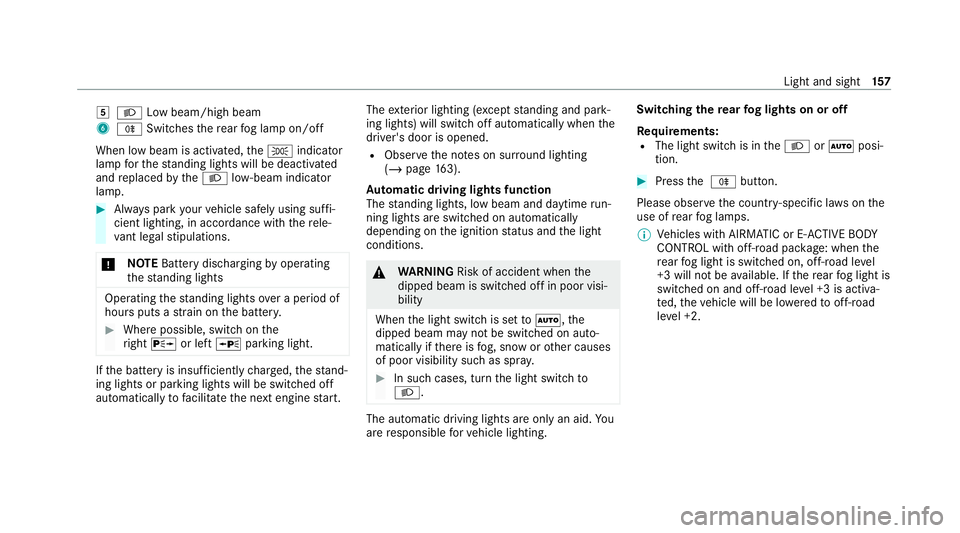
5
L Low beam/high beam
6 R Switches there ar fog lamp on/off
When low beam is activated, theT indicator
lamp forth est anding lights will be deactivated
and replaced bytheL low- beam indicator
lamp. #
Alw ays park your vehicle safely using suf fi‐
cient lighting, in acco rdance with there le‐
va nt le galst ipulations.
* NO
TEBattery discharging byoperating
th est anding lights Operating
thest anding lights over a period of
hours puts a stra in on the batter y. #
Where possible, switch on the
ri ght X or left Wparking light. If
th e battery is insuf ficiently charge d, thest and‐
ing lights or parking lights will be swit ched off
automatically tofacilitate the next engine start. The
exterior lighting (e xcept standing and park‐
ing lights) will swit choff automatically when the
driver's door is opened.
R Obser vethe no tes on sur round lighting
(/ page 163).
Au tomatic driving lights function
The standing lights, low beam and daytime run‐
ning lights are switched on au tomatically
depending on the ignition status and the light
conditions. &
WARNING Risk of accident when the
dipped beam is switched off in poor visi‐
bility
When the light switch is set toà ,the
dipped beam may not be switched on auto‐
matically if there is fog, snow or other causes
of poor visibility such as spr ay. #
In such cases, turn the light switch to
L . The automatic driving lights are only an aid.
Yo u
are responsible forve hicle lighting. Switching
there ar fog lights on or off
Re quirements:
R The light switch is in theL orà posi‐
tion. #
Press the R button.
Please obser vethe count ry-specific la wsonthe
use of rear fog lamps.
% Vehicles with AIRMATIC or E- ACTIVE BODY
CO NTROL with off-road pac kage : when the
re ar fog light is switched on, off-road le vel
+3 will not be available. If there ar fog light is
switched on and off-road le vel +3 is activa‐
te d, theve hicle will be lo weredto off-road
le ve l +2. Light and sight
157
Page 192 of 549
St
arting theve hicle with theke y in the
ma rked space (emer gency operation mode)
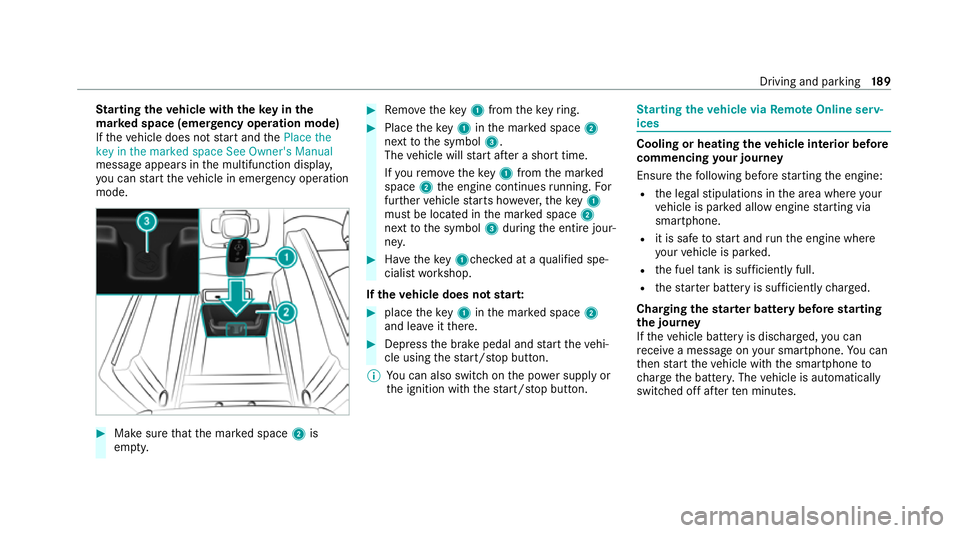
If th eve hicle does not start and thePlace the
key in the marked space See Owner's Manual
message appears in the multifunction displa y,
yo u can start theve hicle in emer gency operation
mode. #
Makesure that the mar ked space 2is
em pty. #
Remo vetheke y1 from theke yring. #
Place theke y1 inthe mar ked space 2
next tothe symbol 3.
The vehicle will start af ter a short time.
If yo ure mo vetheke y1 from the mar ked
space 2the engine continues running. For
fur ther vehicle starts ho wever,th eke y1
must be located in the mar ked space 2
next tothe symbol 3during the entire jour‐
ne y. #
Have theke y1ch ecked at a qualified spe‐
cialist workshop.
If th eve hicle does not star t: #
place theke y1 inthe mar ked space 2
and lea veitth ere. #
Depress the brake pedal and start theve hi‐
cle using thest art/ stop button.
% You can also swit chon the po wer supp lyor
th e ignition with thest art/ stop button. St
arting theve hicle via Remo teOnline serv‐
ices Cooling or heating
theve hicle interior before
commencing your journey
Ensure thefo llowing before starting the engine:
R the legal stipulations in the area where your
ve hicle is par ked allow engine starting via
smartphone.
R it is safe tostart and runth e engine where
yo ur vehicle is par ked.
R the fuel tank is su fficiently full.
R thest ar ter battery is suf ficiently charge d.
Charging thest ar ter battery be fore starting
th e jou rney
If th eve hicle battery is dischar ged, you can
re cei vea message on your smartphone. You can
th en start theve hicle with the smartphone to
ch arge the batter y.The vehicle is automatically
switched off af terte n minu tes. Driving and parking
18 9