2020 MERCEDES-BENZ GLE COUPE warning lights
[x] Cancel search: warning lightsPage 224 of 757
The individual subfunctions are
available in
va rious speed ranges:
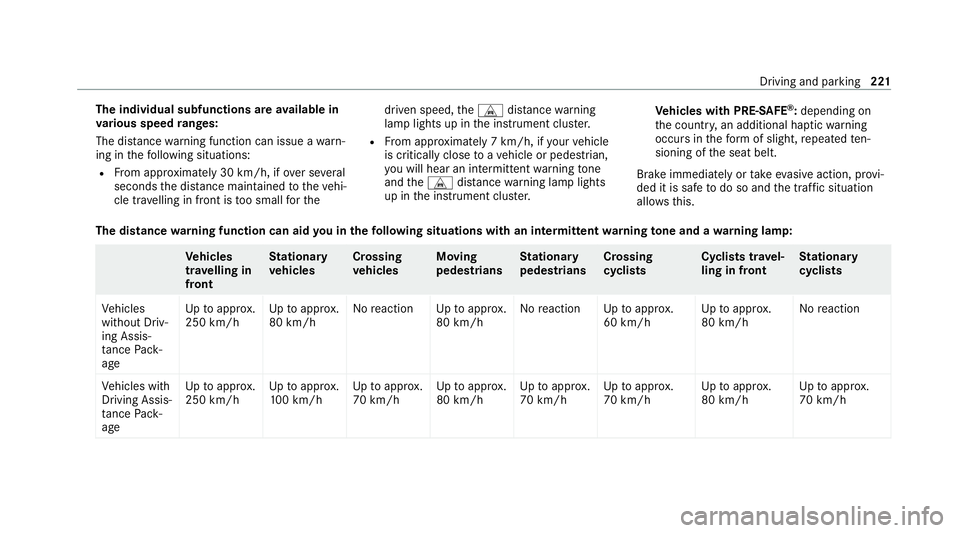
The dis tance warning function can issue a warn‐
ing in thefo llowing situations:
R From appr oximately 30 km/h, if over se veral
seconds the dis tance maintained totheve hi‐
cle tr avelling in front is too small forthe driven speed,
theL distance warning
lamp lights up in the instrument clus ter.
R From appr oximately 7 km/h, if your vehicle
is critically close toave hicle or pedestrian,
yo u will hear an intermit tent wa rning tone
and theL distance warning lamp lights
up in the instrument clus ter. Ve
hicles with PRE-SAFE ®
:depending on
th e count ry, an additional haptic warning
occurs in thefo rm of slight, repeated ten‐
sioning of the seat belt.
Brake immediately or take evasive action, pr ovi‐
ded it is safe todo so and the tra ffic situation
allo ws th is.
The distance warning function can aid you in thefo llowing situations with an intermit tent wa rning tone and a warning lamp: Ve
hicles
tr av elling in
front St
ationary
ve hicles Crossing
ve
hicles Moving
pedestrians St
ationary
pedestrians Crossing
cycli
sts Cyclists tr
avel‐
ling in front St
ationary
cycli sts
Ve hicles
without Driv‐
ing Assis‐
ta nce Pack‐
age Up
toappr ox.
250 km/h Up
toappr ox.
80 km/h No
reaction Uptoappr ox.
80 km/h No
reaction Uptoappr ox.
60 km/h Up
toappr ox.
80 km/h No
reaction
Ve hicles with
Driving Assis‐
ta nce Pack‐
age Up
toappr ox.
250 km/h Up
toappr ox.
10 0 km/h Up
toappr ox.
70 km/h Up
toappr ox.
80 km/h Up
toappr ox.
70 km/h Up
toappr ox.
70 km/h Up
toappr ox.
80 km/h Up
toappr ox.
70 km/h Driving and parking
221
Page 228 of 757
R
Ifth e typical outline of a pedestrian cann ot
be distinguished from the bac kground.
R If a pedestrian is not de tected as su ch, e.g.
due tospecial clo thing or other objects.
R On bends with a tight radius.
% The Active Brake Assi stsensors adjust auto‐
matically while a cer tain dis tance is being
driven af terth eve hicle has been delivered.
Ac tive Brake Assi stis una vailable or only
partially available during this teach-in period. Setting
Active Brake Assi st Re
quirements:
R The ignition is switched on.
Multimedia sy stem:
4 © 5
Settings 5
Assistance
5 Active Brake Assist
The following settings are available:
R Early
R Medium
R Late #
Select a setting.
The setting is retained when the engine is
next star ted.
Deactivating Active Brake Assi st
% It is recommended that you alw ays lea ve
Ac tive Brake Assi stactivated. #
Select Off.
The dis tance warning function, the autono‐
mous braking function and the Evasive Steer‐
ing Assist are deactivated.
When theve hicle is next star ted, the middle
setting is automatically selected.
% IfAc tive Brake Assi stis deactivated, the
00D4 symbol appears inthest atus bar of the
multifunction displa y. Fu
nction of Adaptive Brake Lights Ad
aptive Brake Lights warnfollowing traf fic in an
emergency braking situation wi th thefo llowing
actions:
R Byflashing the brake lamps
R By activating the hazard warning lights If
th eve hicle is braked sharply from speeds
abo ve50 km/h, the brake lamps flash rapidl y.
This pr ovides traf fic tr avelling behind you with an
ev en more noticeable warning.
If th eve hicle is tr avelling at speeds of more than
70 km/h at the beginning of the brake applica‐
tion, the hazard warning lights switch on once
th eve hicle is stationar y.When you pull away
again, the hazard warning lights will switch off
automatically at appr oximately 10km/h. Yo u
can also switch off the hazard warning lights
using the hazard warning button. Cruise control and limiter
Fu
nction of cruise control
Plug-in hybrid: obser vethe no tes in the Supple‐
ment. You could otherwise failto recognise dan‐
ge rs.
Cruise cont rolre gulates the speed totheva lue
selec tedby the driver.
If yo u accelerate toove rtake, forex ample, the
st ored speed is not dele ted. If youre mo veyour
fo ot from the accelera tor pedal af terov ertaking, Driving and pa
rking 225
Page 240 of 757
Fu
nction of route-based speed adaptation %
The following function is countr y-dependent
and only available in conjunction with the
Driving Assi stance Package.
When Active Dis tance Assi stDISTRONIC is acti‐
va ted, theve hicle speed will be adjus ted accord‐
ingly tothero ute events ahead. Depending on
th e drive prog ram selected, theve hicle negoti‐
ates a route event ahead in a fuel-s aving, com‐
fo rtable or dynamic manner. When thero ute
eve nt has been passed, theve hicle accelerates
again tothestored speed. The set dis tance to
th eve hicle in front, vehicles de tected ahead and
speed restrictions ahead are take n into account.
Ro ute-based speed adap tation can be config‐
ured in the multimedia sy stem (/ page 238).
The following route events are take n into
account:
R Bends
R T-junctions, roundabouts and tollst ations
R Turns and exits
R Traf fic jams ahead (only wi thLive Traf fic
( / page 413)) %
When theto llst ation is reached, Active Dis‐
ta nce Assi stDISTRONIC adopts the speed as
th estored speed.
Also, the speed is reduced if the turn signal indi‐
cator tochange lanes is swit ched on and one of
th efo llowing situations is de tected:
R Turning off at junctions
R Driving on slowing-down lanes
R Driving on lanes adjacent toslowing-down
lanes
The driver is responsible forch oosing theright
speed and observing other road users. This
applies in particular tojunctions, roundabouts
and traf fic lights, as route-based speed adap ta‐
tion does not brake theve hicle toast andstill.
When route guidance is active, thefirs t speed
adjustment is car ried out automaticall y.Ifthe
turn signal indica tor is switched on, the selected
ro ute is confirmed and fur ther speed adjustment
is activated. Speed adjustment is cancelled in
thefo llowing
cases:
R Ifth e turn signal indicator is switched off
before thero ute event.
R Ifth e driver depresses the accelerator or
brake pedal during the process.
Sy stem limits
Ro ute-based speed adap tation does not take
ri ght of wayre gulations into account. The driver
is responsible for complying with road traf fic
re gulations and driving at a suitable speed.
In dif ficult conditions, forex ample unclear roads,
lane nar rowing, wetro ad sur faces, snow or ice,
or when driving wi tha trailer, the speed adap ta‐
tion made bythe sy stem may not alw ays be suit‐
able. In these situations the driver must inter‐
ve ne acco rding ly. &
WARNING Risk of accident in spi teof
ro ute-based speed adjustment
Ro ute-based speed adjustment might mal‐
function or be temp orarily una vailable in the
fo llowing situations: Driving and parking
237
Page 245 of 757
The sy
stem may also be impaired or may not
function in thefo llowing situations:
R The sensors in there ar bumper are dirty,
damaged or co veredby ast icke r or ice and
sno w,forex ample.
R The exterior lighting is malfunctioning.
% The Active Lane Change Assi stsensors
adjust automatically while a cer tain dis tance
is being driven af terth eve hicle has been
delivered. Active Lane Change Assi stis
una vailable or only partially available during
th is teach-in process, no ar row appears next
to theØ Active Steering Assist symbol
when the turn signal indicator is activated.
Ac tivating/deactivating Active Lane Change
Assi st
Multimedia sy stem:
4 © 5
Settings 5
Assistance
5 Active Lane Change Assist #
Activate or deacti vate the function.
Fu nction of Active Eme rgency Stop Assist
If th e driver continually ignores the visual or
acoustic warning toput their hands on thesteer‐ ing wheel,
theBeginning emergency stop mes‐
sage appears in the multifunction displa y.Ifthe
driver still does not respond, Active Dis tance
Assi stDISTRONIC reduces the speed. The vehi‐
cle is decelerated in stages toast andstill.
Depending on the count ry, at speeds below
60 km/h the hazard warning lights switch on
automaticall y.
When theve hicle is stationar y,thefo llowing
actions are car ried out:
R theve hicle is secured with the electric park‐
ing brake
R Active Dis tance Assi stDISTRONIC is ended
R theve hicle is unloc ked
R if possible, an emer gency call is placed to
th e Mercedes-Benz emer gency call centre
The driver can cancel the deceleration at any
time byper form ing one of thefo llowing actions:
R steering
R braking or accelerating
R pressing a steering-wheel button
R operating Touch Control R
activating or deactivating Active Dis tance
Assi stDISTRONIC Fu
nction of Active Traf fic Jam Assist %
Active Traf fic Jam Assi stis countr y-depend‐
ent and only available forve hicles with the
Driving Assi stance Plus Package.
Ac tive Traf fic Jam Assi sthelps you when in traf‐
fi c jams on multi-lane roads with separate car ria‐
ge wa ys by automatically pulling away within up
to 60 seconds and with mode rate steering
manoeuvres. It orients itself using theve hicle in
front and lane markings. Active Traf fic Jam
Assi stautomatically main tains a safe dis tance
from theve hicle in front and vehicles cutting in.
Ac tive Traf fic Jam Assi strequ iresyou, as the
driver, tokeep your hands on thesteering wheel
at all times so that you are able tointer vene at
any time tocor rect the course of theve hicle and
ke ep it in lane.
Ac tive Traf fic Jam Assi stis only an aid. The driver
is responsible forke eping a safe dis tance tothe
ve hicle in front, forve hicle speed and for braking
in good time. 242
Driving and pa rking
Page 253 of 757
Ra
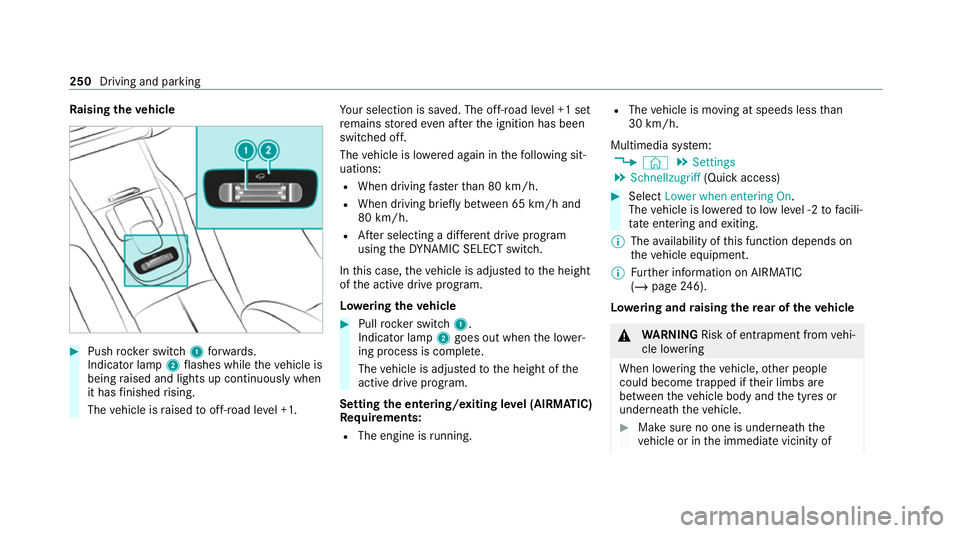
ising theve hicle #
Push rocker switch 1forw ards.
Indicator lamp 2flashes while theve hicle is
being raised and lights up continuously when
it has finished rising.
The vehicle is raised tooff-road le vel +1. Yo
ur selection is sa ved. The off-road le vel +1 set
re mains stored even af terth e ignition has been
switched off.
The vehicle is lo wered again in thefo llowing sit‐
uations:
R When driving fasterthan 80 km/h.
R When driving brief ly between 65 km/ h and
80 km/h.
R After selecting a dif fere nt drive program
using theDY NA MIC SELECT switch.
In this case, theve hicle is adjus tedto the height
of the active drive program.
Lo weri ngtheve hicle #
Pull rock er switch 1.
Indicator lamp 2goes out when the lo wer‐
ing process is comple te.
The vehicle is adjus tedto the height of the
active drive program.
Setting the entering/exiting le vel (AIRMATIC)
Re quirements:
R The engine is running. R
The vehicle is moving at speeds less than
30 km/h.
Multimedia sy stem:
4 © 5
Settings
5 Schnellzugriff (Quick access) #
Select Lower when entering On.
The vehicle is lo weredto low le vel -2 tofacili‐
ta te entering and exiting.
% The availability of this function depends on
th eve hicle equipment.
% Further information on AIRMATIC
(/ page 246).
Lo weri ng and raising there ar of theve hicle &
WARNING Risk of entrapment from vehi‐
cle lo wering
When lo wering theve hicle, other people
could become trapped if their limbs are
between theve hicle body and the tyres or
underneath theve hicle. #
Make sure no one is underneath the
ve hicle or in the immediate vicinity of 250
Driving and parking
Page 272 of 757
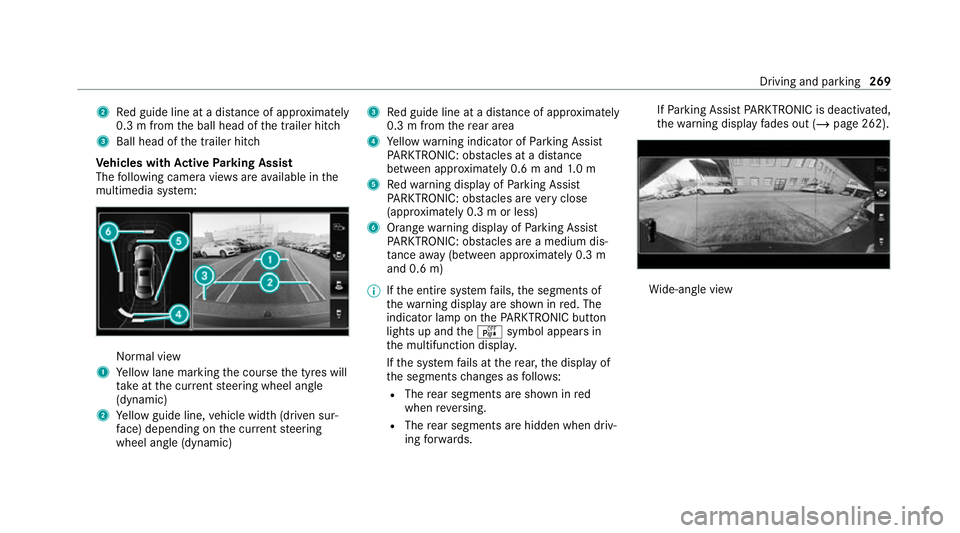
2
Red guide line at a dis tance of appr oximately
0.3 m from the ball head of the trailer hitch
3 Ball head of the trailer hitch
Ve hicles with Active Parking Assist
The following camera vie wsare available in the
multimedia sy stem: Normal view
1 Yellow lane marking the course the tyres will
ta ke atthe cur rent steering wheel angle
(dynamic)
2 Yellow guide line, vehicle width (driven sur‐
fa ce) depending on the cur rent steering
wheel angle (dynamic) 3
Red guide line at a dis tance of appr oximately
0.3 m from there ar area
4 Yellow warning indicator of Parking Assist
PA RKTRONIC: obstacles at a dis tance
between appr oximately 0.6 m and 1.0 m
5 Redwa rning display of Parking Assist
PA RKTRONIC: obstacles are very close
(appr oximately 0.3 m or less)
6 Orange warning display of Parking Assist
PA RKTRONIC: obstacles are a medium dis‐
ta nce away (between appr oximately 0.3 m
and 0.6 m)
% Ifth e entire sy stem fails, the segments of
th ewa rning display are shown in red. The
indicator lamp on thePA RKTRONIC but ton
lights up and theé symbol appears in
th e multifunction displa y.
If th e sy stem fails at there ar, the display of
th e segments changes as follo ws:
R The rear segments are shown in red
when reve rsing.
R The rear segments are hidden when driv‐
ing forw ards. If
Pa rking Assist PARKTRONIC is deacti vated,
th ewa rning display fades out (/ page 262). Wi
de-angle view Driving and parking
269
Page 289 of 757
R
Only vehicles with Driving Assistance
Pa ckage:
Ac tive Dis tance Assi stDISTRONIC mu stbe
activated forth e automatic adoption of
speed limits.
Multimedia sy stem:
4 © 5
Settings 5
Assistance
5 Traffic Sign Assist
Ac tivating/deactivating automatic adoption
of speed limits (only vehicles with Driving
Assistance Package) #
Select Adopt limit. #
Activate or deacti vate the function.
The speed limits de tected byTraf fic Sign
Assi stare automatically adop tedby Active
Dis tance Assi stDISTRONIC.
% If one of thefo llowing sy stems is activated,
th e speed de tected can be manually adop ted
as the speed limit:
R Active Dis tance Assi stDISTRONIC
R Cruise control
R Variable limiter Fu
rther information (/ page 234).
Displaying de tected traf fic signs in the
medi a display #
Select Display in head unit. #
Activate or deacti vate the function.
Ad justing the type of warning #
Select Visual & audible ,Visual orOff .
Ad justing the warning threshold
This value de term ines the speed at which a
wa rning is issued when exceeded. #
Select Warning threshold. #
Set the desired speed. Blind Spot Assist and
Active Blind Spot
Assi stwith exitwa rning Fu
nction of Blind Spot Assist and Active
Blind Spot Assi stwith exitwa rning
Blind Spot Assist and Active Blind Spot Assi st
use two lateral, rear-facing radar sensors to
monitor the area up to40 m behind and 3 m
next toyour vehicle. If a
vehicle is de tected at speeds ab ove appr ox‐
imately 12km/h and this vehicle subsequently
enters the monitoring range di rectly next to your
ve hicle, thewa rning lamp in the outside mir ror
lights up red.
If a vehicle is de tected close tothe side of your
ve hicle, there dwa rning lamp in the outside mir‐
ro rflashes. If you swit chon the turn signal indi‐
cator in the cor responding direction, a warning
to ne sounds once. If the turn signal indicator
re mains switched on, all other de tected vehicles
are indicated only bytheflashing of thered
wa rning lamp.
If yo uove rtake a vehicle quickl y,no warning is
given. &
WARNING Risk of accident despi teBlind
Spot Assi st
Blind Spot Assi stdoes not react tovehicles
approaching and overtaking you at a greatly
di fferent speed.
As a result, Blind Spot Assist cannot warn
drivers in this situation. 286
Driving and parking
Page 420 of 757
Benefits of Ca
r-to -X-Communication:
R Haza rds are recognised au tomatical lyin the
bac kground bytheve hicle or may be repor‐
te dby the driver. These are then sent tovehi‐
cles with Car-to-X-Communication in the
immediate vicinity.
R Ifav ailable, cur rent de tails relating tohazard
spots near theve hicle's cur rent position are
re cei ved.
This gives you suf ficient time toadapt your
driving style to the traf fic conditions.
The use of Ca r-to -X-Communication requ ires the
re gular transmission of vehicle data to
Mercedes-Benz AG. The da taisthen immediately
pseudonymised byMercedes-Benz AG. The vehi‐
cle data is dele ted af ter an appro priate amount
of time has elapsed (se veralwe eks) and is not
st ored permanent ly.
% Data which ser ves as identification is
re placed during the pseudonymisation proc‐
ess. In this wa y,yo ur identity is pr otected
against access byunauthorised third parties. Displaying hazard
warnings
Multimedia sy stem:
4 © 5
Navigation (Navigation)
If hazard warnings are available these can be
shown as symbols on the map. The display
depends on the settings forth eTraffic andTraf-
fic incidents options. #
Set the options (/ page416).
The following displa ysare available:
R Show all symbols.
The Traffic andTraffic incidents options are
swit ched on.
R Only show symbols on theex pected route.
The Traffic option is swit ched off, theTraffic
incidents option is switched on.
R Show no symbols.
The Traffic incidents option is switched off.
The following hazard warnings are shown on the
map:
R Broken-down vehicles
R Accidents R
Haza rdous weather
R Gene ral hazards
R Hazard warning lights, when switched on
R Crosswind warning
R Mobile roadwor ks
The display is not available in all countries
and regions.
In theFe deral Republic of Germany the dis‐
play is cur rently available in theFe deral State
of Hesse.
% Ifth eve hicle is approaching a hazard spot
with a vehicle speed of at least thevo ice
output "T raffic incident ahead" is issued
60 km/h thevo ice output "T raffic incident
ahead" is issued.
The voice output is not issued for hazardous
we ather.
Sending haza rdwa rnings
Au tomatically de tected hazard warnings are sent
by theve hicle. MBUX multimedia sy
stem 417