Page 209 of 604

Features of your vehicle
100
4
Manual reset
To reset average fuel economy man-
ually, press the OK button (reset) on
the steering wheel for more than 1
second when the average fuel econ-
omy is displayed.
Automatic reset
To make the average fuel economy
be reset automatically whenever
refueling, select the “Auto Reset”
mode in User Setting menu of the
LCD display (Refer to “LCD
Display”). OFF - You may set to default man-
ually by using the trip switch reset
button.
When driving - The vehicle will automatically set to default once 4
hours pass after the Engine
Start/Stop Button or ignition switch
is in the ACC or OFF position.
When refueling - After refueling more than 6 liters (1.6 gallons) and
driving over 1 km/h (1 mph), the
vehicle will reset to default auto-
matically.
✽ ✽ NOTICE
The average fuel economy is not dis-
played for more accurate calculation
if the vehicle does not drive more
than 300 meters (0.2 miles) since the
ignition switch or Engine Start/Stop
button is turned to ON.
Instant Fuel Economy (2)
This mode displays the instant fuel
economy during the last few sec-
onds when the vehicle speed is
more than 8 km/h (5 mph).
- Fuel economy range: 0 ~ 30km/L, L/100km or 0 ~ 50 MPG
Page 210 of 604
4101
Features of your vehicle
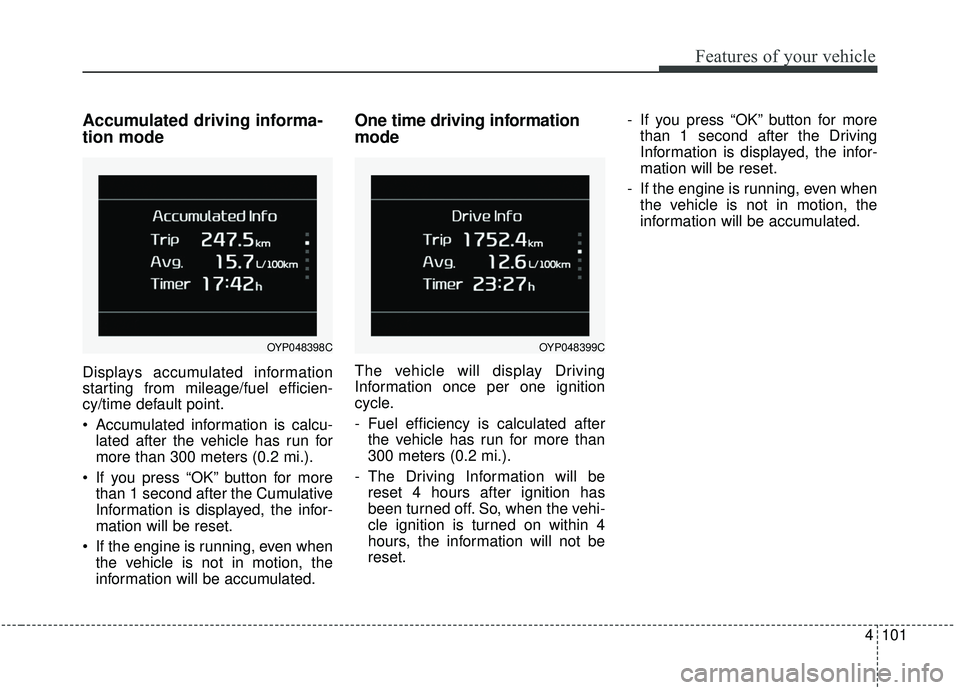
Accumulated driving informa-
tion mode
Displays accumulated information
starting from mileage/fuel efficien-
cy/time default point.
Accumulated information is calcu-lated after the vehicle has run for
more than 300 meters (0.2 mi.).
If you press “OK” button for more than 1 second after the Cumulative
Information is displayed, the infor-
mation will be reset.
If the engine is running, even when the vehicle is not in motion, the
information will be accumulated.
One time driving information
mode
The vehicle will display Driving
Information once per one ignition
cycle.
- Fuel efficiency is calculated afterthe vehicle has run for more than
300 meters (0.2 mi.).
- The Driving Information will be reset 4 hours after ignition has
been turned off. So, when the vehi-
cle ignition is turned on within 4
hours, the information will not be
reset. - If you press “OK” button for more
than 1 second after the Driving
Information is displayed, the infor-
mation will be reset.
- If the engine is running, even when the vehicle is not in motion, the
information will be accumulated.
OYP048399COYP048398C
Page 211 of 604
Features of your vehicle
102
4
Digital speedometer
This mode displays the current
speed of the vehicle.
Smart Shift (if equipped)
This mode displays the currently
selected drive mode.
Turn By Turn Mode (if equipped)
This mode displays the state of the
navigation.
OUMA048558OYP048400NOUMA048531C
Page 212 of 604
4103
Features of your vehicle
Assist mode (if equipped)Assist mode displays the state of
below systems.
- Smart Cruise Control with Stop &Go (if equipped)
- Lane Departure Warning (Refer to “Lane Departure Warning system”
in chapter 5)Service mode
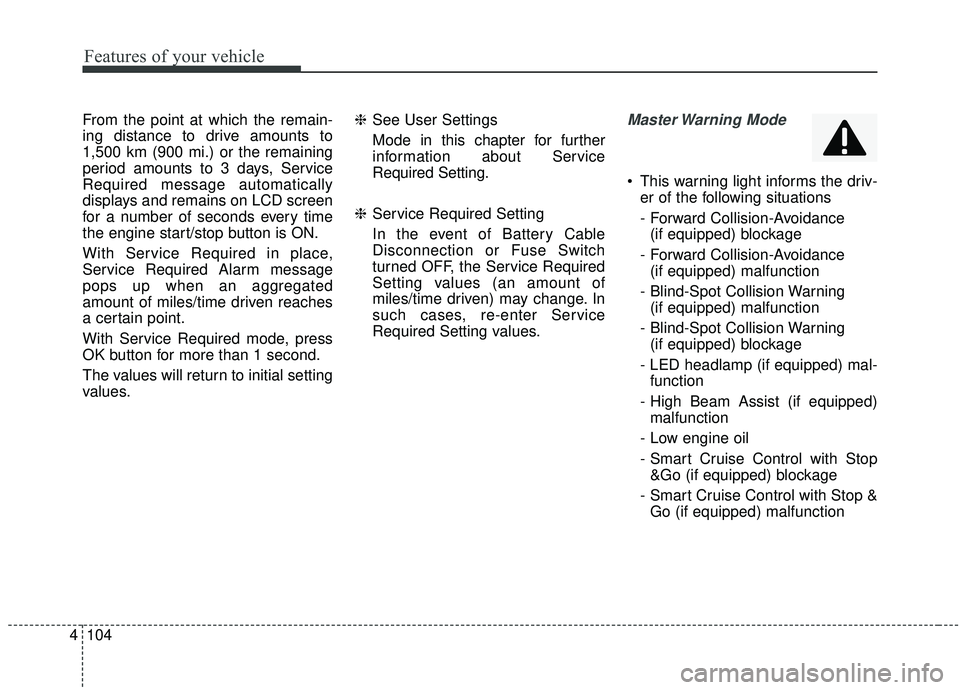
When Service Required is set, the
remaining distance/period to drive
before service is required appears
on the LCD screen.
OYP048391C
OYP048394C
■Type A
■ Type B
OYP048402N
OYP048401N
■ SCC with S&G
■LDW
Page 213 of 604
Features of your vehicle
104
4
From the point at which the remain-
ing distance to drive amounts to
1,500 km (900 mi.) or the remaining
period amounts to 3 days, Service
Required message automatically
displays and remains on LCD screen
for a number of seconds every time
the engine start/stop button is ON.
With Service Required in place,
Service Required Alarm message
pops up when an aggregated
amount of miles/time driven reaches
a certain point.
With Service Required mode, press
OK button for more than 1 second.
The values will return to initial setting
values. ❈
See User Settings
Mode in this chapter for further
information about Service
Required Setting.
❈ Service Required Setting
In the event of Battery Cable
Disconnection or Fuse Switch
turned OFF, the Service Required
Setting values (an amount of
miles/time driven) may change. In
such cases, re-enter Service
Required Setting values.Master Warning Mode
This warning light informs the driv- er of the following situations
- Forward Collision-Avoidance (if equipped) blockage
- Forward Collision-Avoidance (if equipped) malfunction
- Blind-Spot Collision Warning (if equipped) malfunction
- Blind-Spot Collision Warning (if equipped) blockage
- LED headlamp (if equipped) mal- function
- High Beam Assist (if equipped) malfunction
- Low engine oil
- Smart Cruise Control with Stop &Go (if equipped) blockage
- Smart Cruise Control with Stop & Go (if equipped) malfunction
Page 214 of 604

4105
Features of your vehicle
The Master Warning Light illumi-
nates when more than one of the
above warning situations occur.
If the warning situation is solved, the
master warning light will be turned
off.Distance to empty
The distance to empty is the esti-mated distance the vehicle can be
driven with the remaining fuel.
- Distance range : 1 ~ 9,999 km (1~ 9,999 mi.)
If the estimated distance is below 1 km (1 mi.), the trip computer will
display “---” as distance to empty.
✽ ✽ NOTICE
• If the vehicle is not on level ground
or the battery power has been
interrupted, the distance to empty
function may not operate correct-
ly.
• The distance to empty may differ from the actual driving distance as
it is an estimate of the available
driving distance.
• The trip computer may not regis- ter additional fuel if less than 6
liters (1.6 gallons) of fuel are
added to the vehicle.
• The fuel economy and distance to empty may vary significantly
based on driving conditions, driv-
ing habits, and condition of the
vehicle.
OYP048390C
Page 218 of 604
4109
Features of your vehicle
Sound
Parking Distance Warning Volume(if equipped) :
- Adjust the Parking DistanceWarning Volume. (Level 1 ~ 3)
❈ For more details, refer to “Parking
Distance Warning Volume” in this
chapter.
Welcome Sound (if equipped) : - If this item checked, the welcomesound function will be activated. Convenience
Seat Easy Access (if equipped)
- Off : The seat easy access func-tion will be deactivated.
- Normal/Extended : When you turn off the engine, the driver’s seat will
automatically move rear 7.6 cm (3
in.) (Enhanced) for you to enter or
exit the vehicle more comfortably.
- If you change the Engine Start/Stop Button from OFF posi-
tion to the AC function, the driver’s
seat will return to the original posi-
tion.
❈ For more details, refer to “Driver
Position Memory System” in chap-
ter 3.
Welcome Mirror/Light (if equipped) : - If this item checked, the welcomeMirror/light function will be acti-
vated.
Wiper/Lights Display (if equipped) : - If this item checked, theWiper/Lights Display will be acti-
vated. Welcome Light (if equipped) :
- If this item checked, the welcomelight function will be activated.
Auto rear wiper (in R, if equipped) : - If this item is checked, the rearwiper will automatically activate
when the front wiper is in ON
position and shift lever is in R
(reverse) position.
Gear Position Pop-up (if equipped) : - If this item checked, the gearposition pop-up display will be
activated.
Icy road warning (if equipped) : - If this item checked, the Icy roadwarning display will be activated.
Page 223 of 604

Features of your vehicle
114
4
Align steering wheel
This warning message illuminates
if you start the engine when the
steering wheel is turned to more
than 90 degrees to the left or right.
It means that you should turn the steering wheel and make the angle
of the steering wheel be less than
30 degrees.
Low Washer Fluid
This warning message illuminateson the service reminder mode if
the washer fluid level in the reser-
voir is nearly empty.
It means that you should refill the washer fluid.
Turn on FUSE SWITCH
This warning message illuminatesif the fuse switch on the fuse box is
OFF.
It means that you should turn the fuse switch on.
❈ For more details, refer to “Fuses”
in chapter 7.
Low Fuel
This warning message illuminates if
the fuel tank is nearly empty.
- When the low fuel level warning
light is illuminated.
- When the trip computer displays "--- km (or mile)" as range.
Add fuel as soon as possible.
Check high beam assist system (if equipped)
This warning message illuminates if
there is a malfunction (burned-out
bulb or circuit malfunction) with the
headlamp. In this case, have your
vehicle inspected by an authorized
Kia dealer.
Check headlight
This warning message illuminates if
there is a malfunction (burned-out
bulb except LED lamp or circuit mal-
function) with the headlamp. In this
case, have your vehicle inspected by
an authorized Kia dealer.
✽ ✽ NOTICE
When replacing the bulb, use the
same wattage bulb.
❈ ❈
For more information, refer to
“BULB WATTAGE” in chapter 8.