2020 Hyundai Tucson brake light
[x] Cancel search: brake lightPage 379 of 637
5-62
Driving your vehicle
Vehicle Stability Management
(if equipped)
Vehicle Stability Management (VSM)
helps ensure the vehicle stays stable
when accelerating or braking sud-
denly on wet, slippery and rough
roads where traction over the four
tyres can suddenly become uneven.
VSM operation
VSM ON condition
The VSM operates when:
The Electronic Stability Control
(ESC) is on.
Vehicle speed is approximately
above 15 km/h (9 mph) on curve
roads.
Vehicle speed is approximately
above 20 km/h (12 mph) when the
vehicle is braking on rough roads.
When operating
When you apply your brakes under
conditions which may activate the
ESC, you may hear sounds from the
brakes, or feel a corresponding sen-
sation in the brake pedal. This is nor-
mal and it means your VSM is active.
Information
The VSM does not operate when:
• Driving on bank road such as gradi-
ent or incline
• Driving in reverse.
• The ESC OFF indicator light is on.
• The EPS (Electronic Power Steering)
warning light ( ) is on.
VSM OFF condition
To cancel the VSM operation, press
the ESC OFF button. ESC OFF indi-
cator light ( ) will illuminate.
To turn on VSM, press the ESC OFF
button again. The ESC OFF indicator
light will go out.
Driving with varying tyre or wheel
sizes may cause the ESC system
to malfunction. When replacing
tyres, make sure they are the
same size as your original tyres
for this vehicle.
NOTICEi
Take the following precautions
when using the Vehicle Stability
Management (VSM):
ALWAYS check the speed and
the distance to the vehicle
ahead. The VSM is not a sub-
stitute for safe driving prac-
tices.
Never drive too fast for the
road conditions. The VSM sys-
tem will not prevent acci-
dents. Excessive speed in bad
weather, slippery and uneven
roads can result in severe
accidents.
WARNING
If the ESC indicator light ( ) or
EPS warning light ( ) stays
on, your vehicle may have a
malfunction with the VSM sys-
tem. When the warning light illu-
minates we recommend that the
vehicle be checked by an autho-
rised HYUNDAI dealer as soon
as possible.
WARNING
Page 380 of 637
5-63
Driving your vehicle
5
Hill-Start Assist Control (HAC)
(if equipped)
A vehicle has the tendency to slide
rearwards on a steep slope, before
depressing the accelerator after a
stop. The HAC prevents the vehicle
from sliding rearwards by automati-
cally operating the brake systems for
about 2 seconds. The brake systems
are automatically released, when the
accelerator pedal is depressed
Information
• The HAC does not operate when the
shift lever is in P (Park) or N
(Neutral)
• The HAC activates even when the
ESC (Electronic Stability Control) is
off. However, it does not activate,
when the ESC is not operationg nor-
mally.
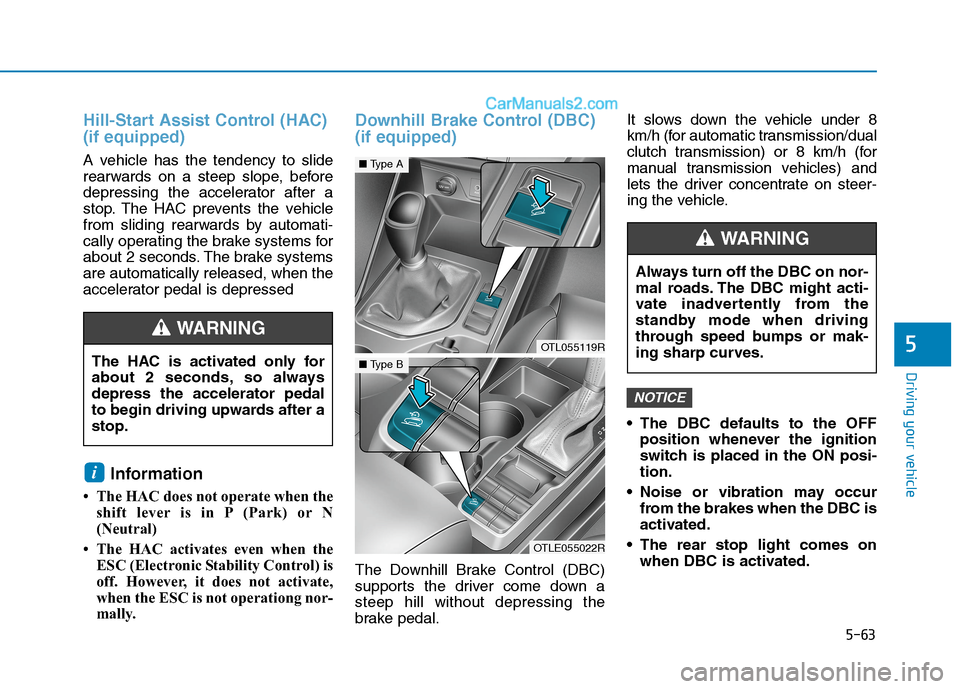
Downhill Brake Control (DBC)
(if equipped)
The Downhill Brake Control (DBC)
supports the driver come down a
steep hill without depressing the
brake pedal.It slows down the vehicle under 8
km/h (for automatic transmission/dual
clutch transmission) or 8 km/h (for
manual transmission vehicles) and
lets the driver concentrate on steer-
ing the vehicle.
The DBC defaults to the OFF
position whenever the ignition
switch is placed in the ON posi-
tion.
Noise or vibration may occur
from the brakes when the DBC is
activated.
The rear stop light comes on
when DBC is activated.
NOTICE
i
The HAC is activated only for
about 2 seconds, so always
depress the accelerator pedal
to begin driving upwards after a
stop.
WARNING
OTL055119R
■Type A
OTLE055022R
■Type B
Always turn off the DBC on nor-
mal roads. The DBC might acti-
vate inadvertently from the
standby mode when driving
through speed bumps or mak-
ing sharp curves.
WARNING
Page 381 of 637
5-64
Driving your vehicle
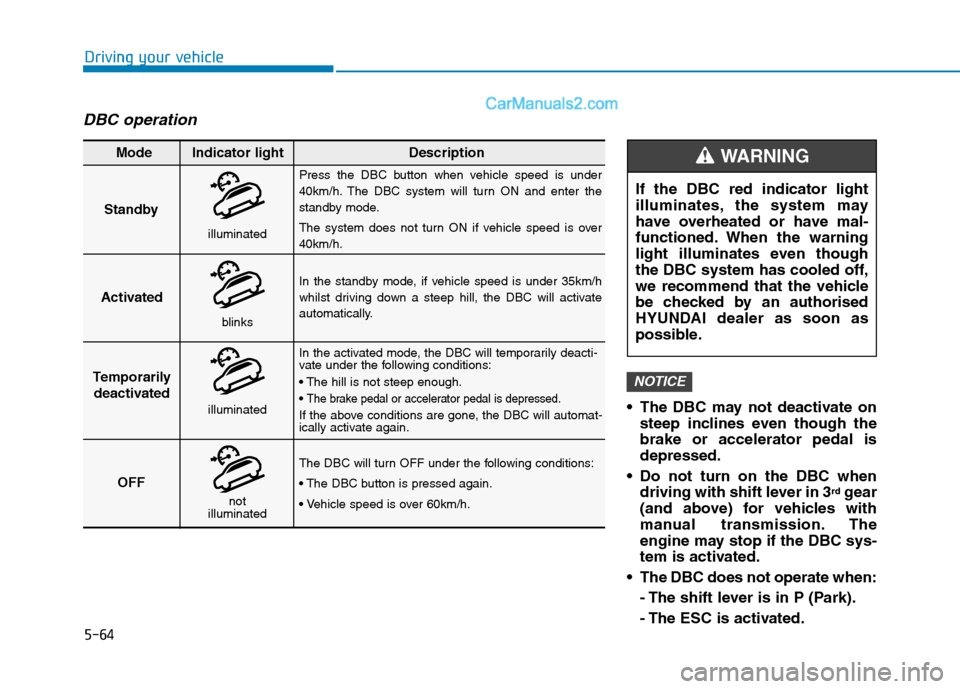
DBC operation
The DBC may not deactivate on
steep inclines even though the
brake or accelerator pedal is
depressed.
Do not turn on the DBC when
driving with shift lever in 3
rdgear
(and above) for vehicles with
manual transmission. The
engine may stop if the DBC sys-
tem is activated.
The DBC does not operate when:
- The shift lever is in P (Park).
- The ESC is activated.
NOTICE
Standby
Press the DBC button when vehicle speed is under
40km/h. The DBC system will turn ON and enter the
standby mode.
The system does not turn ON if vehicle speed is over
40km/h.
In the standby mode, if vehicle speed is under 35km/h
whilst driving down a steep hill, the DBC will activate
automatically.
In the activated mode, the DBC will temporarily deacti-
vate under the following conditions:
The brake pedal or accelerator pedal is depressed.
If the above conditions are gone, the DBC will automat-
ically activate again.
The DBC will turn OFF under the following conditions:
Activated
Temporarily
deactivated
OFF Mode Indicator light Description
blinks
illuminated
not
illuminated
illuminated
If the DBC red indicator light
illuminates, the system may
have overheated or have mal-
functioned. When the warning
light illuminates even though
the DBC system has cooled off,
we recommend that the vehicle
be checked by an authorised
HYUNDAI dealer as soon as
possible.
WARNING
Page 382 of 637
5-65
Driving your vehicle
5
Low Vacuum Assist (LVA)
(if equipped)
Low Vacuum Assist (LVA) amplifies
the hydraulic brake force to assist the
driver under low or temporarily low
engine vacuum. You may hear a
motor running sound and feel a slight
vibration in the brake pedal like ABS
operating. This indicates that the
Supplemental Brake Assist system is
working to maintain braking power.
Emergency Stop Signal (ESS)
(if equipped)
The Emergency Stop Signal system
alerts the driver following your vehi-
cle, by blinking the stop lights, whilst
sharply and severely braking.
The system is activated when:
The vehicle suddenly stops (the
deceleration power exceeds 7
m/s
2, and the driving speed
exceeds 55 km/h).
The ABS is activated.
The hazard warning flasher automat-
ically turns ON; after blinking the
stop lights, when driving speed is
below 40 km/h , when the ABS is
deactivated, and when a sudden
braking situation has stopped.
The hazard warning flasher turns
OFF, when the driving speed
exceeds 10 km/h after a complete
stop. The hazard warning flasher
turns OFF, when the vehicle drives at
a low speed for a certain period of
time. The driver can manually turn
OFF the hazard warning flasher by
pressing the button.
Information
The Emergency Stop Signal (ESS) sys-
tem will not activate, when the hazard
warning flasher blinks.
i
Low Vacuum Assist (LVA) will
not prevent accidents due to
improper or dangerous driving
manoeuvres.
WARNING
Page 383 of 637
5-66
Driving your vehicle
Good braking practices
Wet brakes can be dangerous! The
brakes may get wet if the vehicle is
driven through standing water or if it
is washed. Your vehicle will not stop
as quickly if the brakes are wet. Wet
brakes may cause the vehicle to pull
to one side.To dry the brakes, apply the brakes
lightly until the braking action returns
to normal, taking care to keep the
vehicle under control at all times. If
the braking action does not return to
normal, stop as soon as it is safe to
do so and we recommend that you
call an authorised HYUNDAI dealer
for assistance.
DO NOT drive with your foot resting
on the brake pedal. Even light, but
constant pedal pressure can result in
the brakes overheating, brake wear,
and possibly even brake failure.
If a tyre goes flat whilst you are driv-
ing, apply the brakes gently and
keep the vehicle pointed straight
ahead whilst you slow down. When
you are moving slowly enough for it
to be safe to do so, pull off the road
and stop in a safe location.
Keep your foot firmly on the brake
pedal when the vehicle is stopped to
prevent the vehicle from rolling for-
ward.
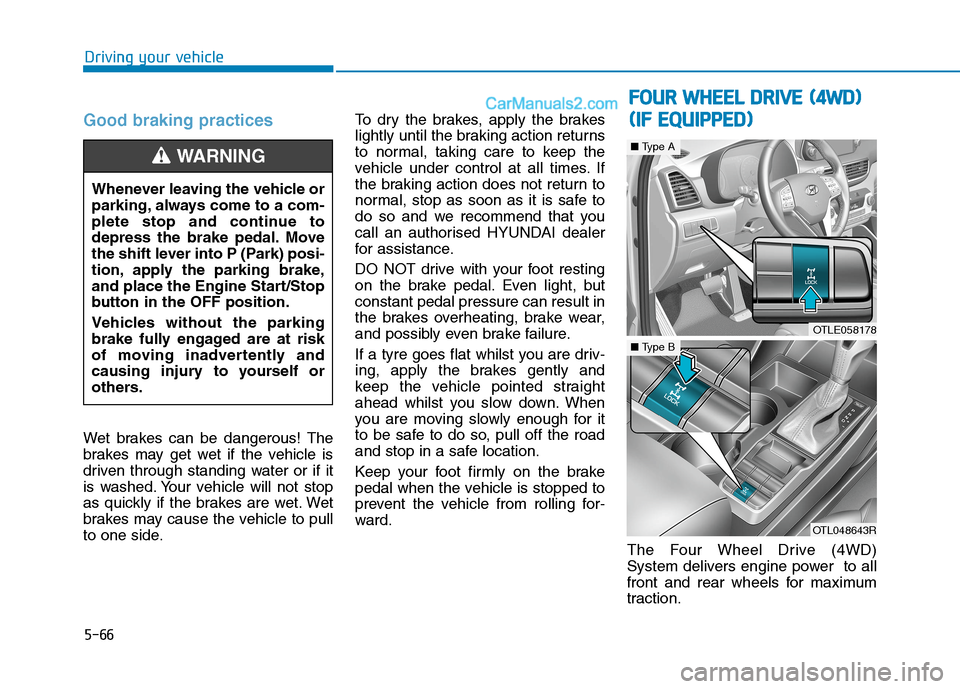
The Four Wheel Drive (4WD)
System delivers engine power to all
front and rear wheels for maximum
traction. Whenever leaving the vehicle or
parking, always come to a com-
plete stop and continue to
depress the brake pedal. Move
the shift lever into P (Park) posi-
tion, apply the parking brake,
and place the Engine Start/Stop
button in the OFF position.
Vehicles without the parking
brake fully engaged are at risk
of moving inadvertently and
causing injury to yourself or
others.
WARNING
OTLE058178
■Type A
OTL048643R
■Type B
F
FO
OU
UR
R
W
WH
HE
EE
EL
L
D
DR
RI
IV
VE
E
(
(4
4W
WD
D)
)
( (I
IF
F
E
EQ
QU
UI
IP
PP
PE
ED
D)
)
Page 386 of 637
5-69
Driving your vehicle
5
Maintain 4WD Auto mode when
driving on roads in normal con-
ditions.
When driving under normal road
conditions (especially when cor-
nering) in 4WD Lock mode, a
driver may find minor mechani-
cal vibration or noise, which is
extremely normal phenomenon,
not a malfunction. When 4WD
Lock mode is released, such
noise or vibration will be imme-
diately gone.
When the 4WD LOCK mode is
deactivated, a sensation may be
felt as the driving power is deliv-
ered entirely to the front wheels.
For safe 4WD operation
Before driving
Make sure all passengers are
wearing seat belts.
Sit upright and closer to the steer-
ing wheel than usual. Adjust the
steering wheel to a position which
is comfortable for you to drive.
Driving on snow-covered or icy
roads
Start off slowly by applying the
accelerator pedal gently.
Use snow tyres or tyre chains.
Keep sufficient distance between
your vehicle and the vehicle in front
of you.
Use engine braking during deceler-
ation.
Avoid speeding, rapid acceleration,
sudden brake applications, and
sharp turns to prevent skids.
NOTICE
NOTICE
When driving on normal roads,
deactivate the 4WD LOCK mode
by pushing the 4WD LOCK but-
ton (4WD LOCK indicator light
goes off). Driving on normal
roads with the 4WD LOCK
mode, especially, when corner-
ing may cause mechanical
noise or vibration. The noise
and vibration will disappear
when the 4WD LOCK mode is
deactivated. Prolonged driving
with the noise and vibration
may damage some parts of the
power train.
CAUTION
Page 398 of 637
5-81
Driving your vehicle
Prerequisite for activation
The FCA gets ready to be activated,
when the FCA is selected on the
LCD display, and when the following
prerequisites are satisfied.
- The ESC (Electronic Stability
Control) is on.
- Vehicle speed is over 8 km/h (The
FCA is only activated within a cer-
tain speed range.).
- The system detects a vehicle in
front, which may collide with your
vehicle. The FCA may not be acti-
vated or may sound a warning
alarm in accordance with the driv-
ing situation or vehicle condition.
FCA warning message and
system control
The FCA produces warning mes-
sages and warning alarms in accor-
dance with the collision risk levels,
such as abrupt stopping of the vehi-
cle in front, insufficient braking dis-
tance detection. Also, it controls the
brakes in accordance with the colli-
sion risk levels.
The driver can select the initial warn-
ing activation time in the User
Settings in the LCD display. The
options for the initial Forward
Collision Warning include Early,
Normal or Late initial warning time.
5
Completely stop the vehicle in
a safe location before operat-
ing the switch on the steering
wheel to activate/deactivate
the FCA system.
The FCA automatically acti-
vates upon placing the igni-
tion switch to the ON position.
The driver can deactivate the
FCA by cancelling the system
setting on the LCD display.
The FCA automatically deacti-
vates upon cancelling the
ESC (Electronic Stability
Control). When the ESC is
cancelled, the FCA cannot be
activated on the LCD display.
The FCA warning light will
illuminate which is normal.
WARNING
Page 403 of 637
5-86
System malfunction
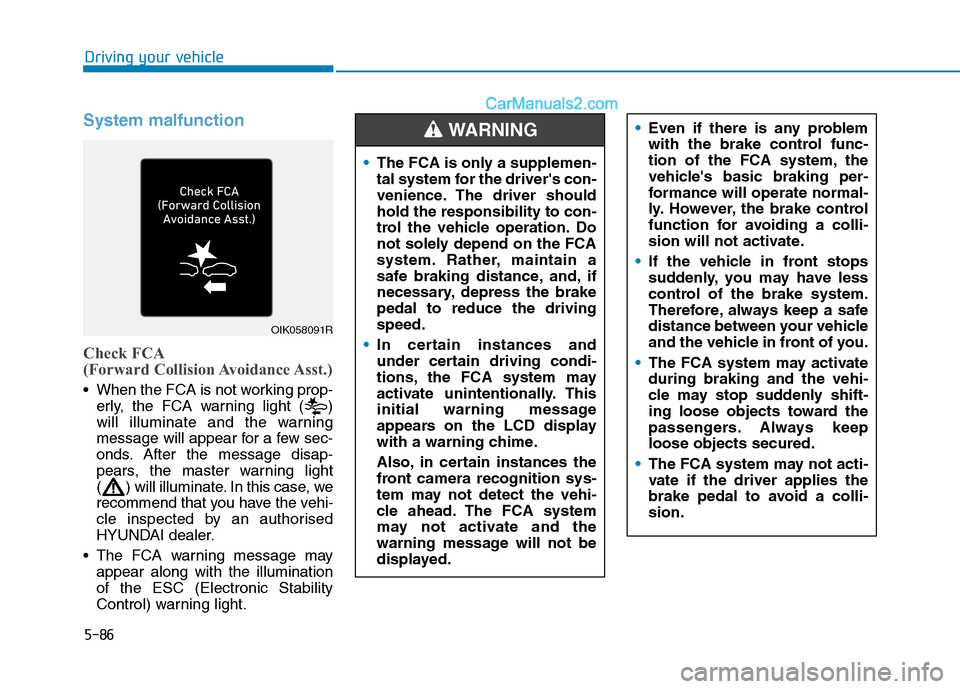
Check FCA
(Forward Collision Avoidance Asst.)
When the FCA is not working prop-
erly, the FCA warning light ( )
will illuminate and the warning
message will appear for a few sec-
onds. After the message disap-
pears, the master warning light
( ) will illuminate. In this case, we
recommend that you have the vehi-
cle inspected by an authorised
HYUNDAI dealer.
The FCA warning message may
appear along with the illumination
of the ESC (Electronic Stability
Control) warning light.
Driving your vehicle
OIK058091R
The FCA is only a supplemen-
tal system for the driver's con-
venience. The driver should
hold the responsibility to con-
trol the vehicle operation. Do
not solely depend on the FCA
system. Rather, maintain a
safe braking distance, and, if
necessary, depress the brake
pedal to reduce the driving
speed.
In certain instances and
under certain driving condi-
tions, the FCA system may
activate unintentionally. This
initial warning message
appears on the LCD display
with a warning chime.
Also, in certain instances the
front camera recognition sys-
tem may not detect the vehi-
cle ahead. The FCA system
may not activate and the
warning message will not be
displayed.
Even if there is any problem
with the brake control func-
tion of the FCA system, the
vehicle's basic braking per-
formance will operate normal-
ly. However, the brake control
function for avoiding a colli-
sion will not activate.
If the vehicle in front stops
suddenly, you may have less
control of the brake system.
Therefore, always keep a safe
distance between your vehicle
and the vehicle in front of you.
The FCA system may activate
during braking and the vehi-
cle may stop suddenly shift-
ing loose objects toward the
passengers. Always keep
loose objects secured.
The FCA system may not acti-
vate if the driver applies the
brake pedal to avoid a colli-
sion.WARNING