2020 FORD TRANSIT service
[x] Cancel search: servicePage 163 of 529
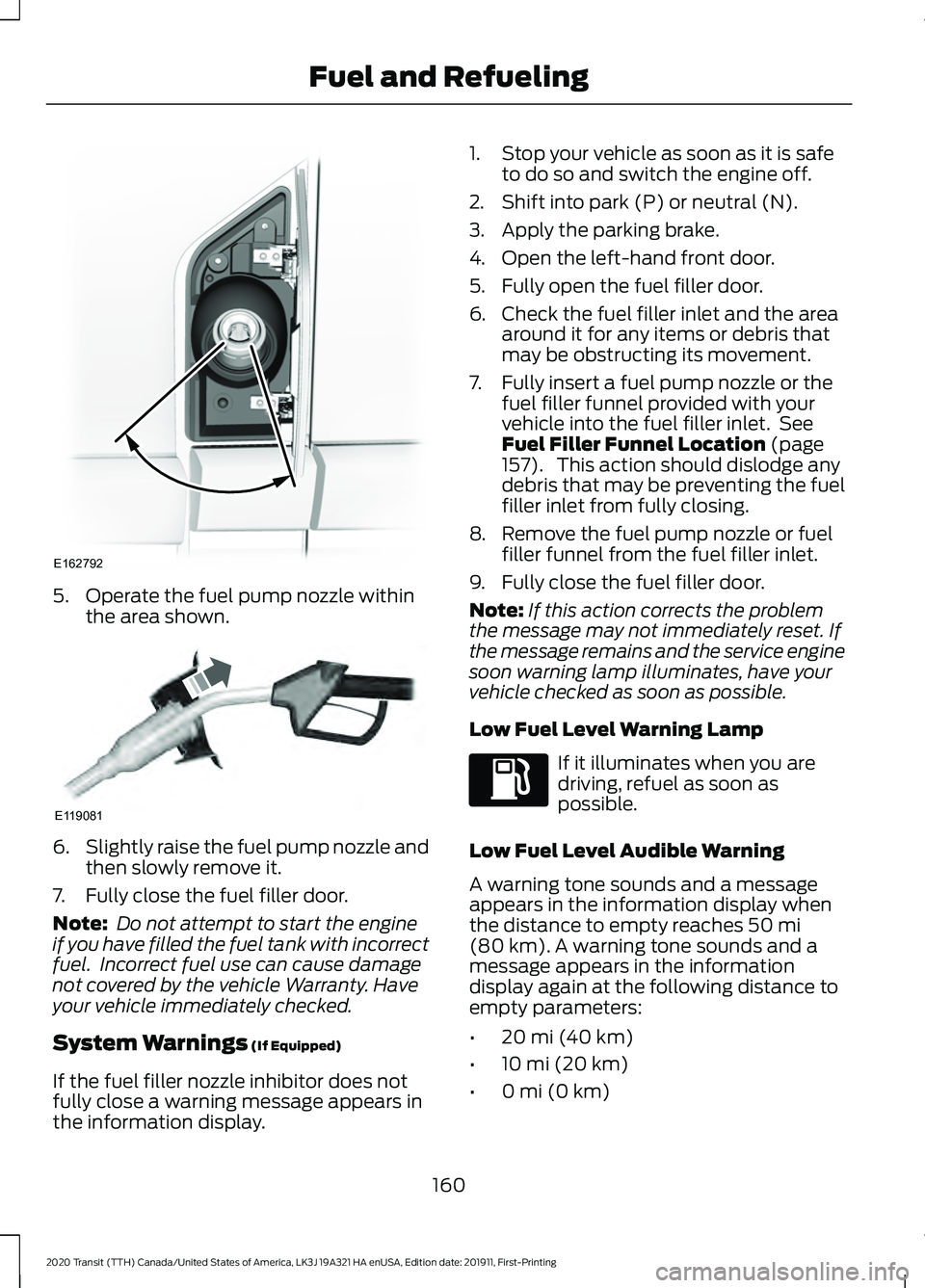
5. Operate the fuel pump nozzle within
the area shown. 6.
Slightly raise the fuel pump nozzle and
then slowly remove it.
7. Fully close the fuel filler door.
Note: Do not attempt to start the engine
if you have filled the fuel tank with incorrect
fuel. Incorrect fuel use can cause damage
not covered by the vehicle Warranty. Have
your vehicle immediately checked.
System Warnings (If Equipped)
If the fuel filler nozzle inhibitor does not
fully close a warning message appears in
the information display. 1. Stop your vehicle as soon as it is safe
to do so and switch the engine off.
2. Shift into park (P) or neutral (N).
3. Apply the parking brake.
4. Open the left-hand front door.
5. Fully open the fuel filler door.
6. Check the fuel filler inlet and the area around it for any items or debris that
may be obstructing its movement.
7. Fully insert a fuel pump nozzle or the fuel filler funnel provided with your
vehicle into the fuel filler inlet. See
Fuel Filler Funnel Location
(page
157). This action should dislodge any
debris that may be preventing the fuel
filler inlet from fully closing.
8. Remove the fuel pump nozzle or fuel filler funnel from the fuel filler inlet.
9. Fully close the fuel filler door.
Note: If this action corrects the problem
the message may not immediately reset. If
the message remains and the service engine
soon warning lamp illuminates, have your
vehicle checked as soon as possible.
Low Fuel Level Warning Lamp If it illuminates when you are
driving, refuel as soon as
possible.
Low Fuel Level Audible Warning
A warning tone sounds and a message
appears in the information display when
the distance to empty reaches
50 mi
(80 km). A warning tone sounds and a
message appears in the information
display again at the following distance to
empty parameters:
• 20 mi (40 km)
• 10 mi (20 km)
• 0 mi (0 km)
160
2020 Transit (TTH) Canada/United States of America, LK3J 19A321 HA enUSA, Edition date: 201911, First-Printing Fuel and RefuelingE162792 E119081
Page 165 of 529

EMISSION LAW
WARNING: Do not remove or alter
the original equipment floor covering or
insulation between it and the metal floor
of the vehicle. The floor covering and
insulation protect occupants of the
vehicle from the engine and exhaust
system heat and noise. On vehicles with
no original equipment floor covering
insulation, do not carry passengers in a
manner that permits prolonged skin
contact with the metal floor. Failure to
follow these instructions may result in
fire or personal injury.
U.S. federal laws and certain state laws
prohibit removing or rendering inoperative
emission control system components.
Similar federal or provincial laws may
apply in Canada. We do not approve of any
vehicle modification without first
determining applicable laws. Tampering with emissions
control systems including
related sensors or the Diesel
Exhaust Fluid system can result in reduced
engine power and the illumination of the
service engine soon light. Tampering With a Noise Control
System
Federal laws prohibit the following acts:
•
Removal or rendering inoperative by
any person other than for purposes of
maintenance.
• Repair or replacement of any device or
element of the design incorporated into
a new vehicle for the purpose of noise
control prior to its sale or delivery to
the ultimate purchaser or while it is in
use.
• The use of the vehicle after any person
removes or renders inoperative any
device or element of the design.
The U.S. Environmental Protection Agency
may presume to constitute tampering as
follows:
• Removal of hood blanket, fender apron
absorbers, fender apron barriers,
underbody noise shields or acoustically
absorptive material.
• Tampering or rendering inoperative the
engine speed governor, to allow engine
speed to exceed manufacturer
specifications.
If the engine does not start, runs rough,
experiences a decrease in engine
performance, experiences excess fuel
consumption or produces excessive
exhaust smoke, check for the following:
• A plugged or disconnected air inlet
system hose.
• A plugged engine air filter element.
• Water in the fuel filter and water
separator.
• A clogged fuel filter.
• Contaminated fuel.
• Air in the fuel system, due to loose
connections.
• An open or pinched sensor hose.
• Incorrect engine oil level.
162
2020 Transit (TTH) Canada/United States of America, LK3J 19A321 HA enUSA, Edition date: 201911, First-Printing Engine Emission Control
Page 175 of 529
If you switch the engine off during manual
regeneration, turbo charger flutter occurs.
This is a consequence of switching a diesel
engine off during turbo charger boost
operation, which is normal.
Diesel Particulate Filter Information Messages Action
Message
Exhaust Filter at Limit Drive
to Clean Now •
Drive at a varied range of conditions, including highway
conditions for 20 minutes or until the message disap-
pears.
• Avoid prolonged engine idling.
• Select a suitable gear to maintain engine speed
between 1500 and 4000 RPM.
Exhaust Filter Over Limit
Service Now •
Drive at a moderate speed.
• Avoid heavy acceleration and deceleration.
• Have your vehicle checked as soon as possible.
172
2020 Transit (TTH) Canada/United States of America, LK3J 19A321 HA enUSA, Edition date: 201911, First-Printing Engine Emission Control
Page 178 of 529

3. Push the brake shift interlock lever
toward the rear of your vehicle and
hold it there.
4. Move the selector lever from park (P) to neutral (N).
5. Install the panel.
6. Press the brake pedal, start the engine
and release the parking brake.
Transmission Not in Park (P)
Audible Warning
Sounds when you open the driver door and
you have not moved the selector lever to
park (P).
Automatic Transmission Information Messages Description
Message
The system has detected a fault that requires service. Have
your vehicle checked as soon as possible.
Transmission Service
Required
Displays as a reminder to shift into park (P).
Transmission Not in Park
Press the brake pedal to unlock the transmission.
Press Brake to Unlock
Gearshift Lever
TOW/HAUL WARNING: Do not use tow/haul
when the road surface is slippery. Failure
to follow this instruction could result in
the loss of control of your vehicle. WARNING:
Do not use diesel
engine exhaust braking when the road
surface is slippery. Failure to follow this
instruction could result in the loss of
control of your vehicle. Tow/haul delays upshifts to reduce the
frequency of transmission shifting.
Tow/haul provides engine braking in all
forward gears, which slows your vehicle
and assists you in controlling your vehicle
when descending a slope.
Tow/haul improves transmission operation
when towing a trailer or a heavy load.
Depending on driving conditions and load
conditions, tow/haul may downshift the
transmission, slow your vehicle and control
your vehicle speed when descending a hill,
without pressing the accelerator pedal.
The amount of downshift braking provided
varies based upon the amount the brake
pedal is pressed.
175
2020 Transit (TTH) Canada/United States of America, LK3J 19A321 HA enUSA, Edition date: 201911, First-Printing TransmissionE174827
Page 184 of 529

Maintenance and Modifications
The suspension and steering systems on
your vehicle have been designed and
tested to provide predictable performance
whether loaded or empty and durable load
carrying capability. For this reason, we
strongly recommend that you do not make
modifications such as adding or removing
parts (such as lowering kits or stabilizer
bars) or by using replacement parts not
equivalent to the original factory
equipment.
Any modifications to a vehicle that raise
the center of gravity can make it more likely
the vehicle will rollover as a result of a loss
of control. We strongly recommend that
caution be used with any vehicle equipped
with a high load or device (such as ladder
or luggage racks).
Failure to maintain your vehicle properly
could void the warranty, increase your
repair cost, reduce vehicle performance
and operational capabilities and adversely
affect driver and passenger safety.
Frequent inspection of vehicle chassis
components is recommended if the vehicle
is subjected to off-highway usage.
All-Wheel Drive Gauge
This feature shows how the engine power
is split between the front and rear axles in
real time.
1. Using the information display controls
on the steering wheel, select Settings.
2. Select Information.
3. Select
Intelligent AWD.
All-Wheel Drive Information Messages Description
Message
The system is temporarily locked. This could be due to the
system increasing its capacity in order to improve perform-
ance.
AWD Temporarily Locked
The system temporarily turns off. This could be due to the
system overheating. Stop your vehicle as soon as it is safe
to do so and allow the system to cool.
AWD Temporarily
Disabled
The system resumes normal function.
AWD Restored
The system has malfunctioned. Have your vehicle checked
as soon as possible.
AWD Malfunction Service
Required
The system temporarily turns off to protect itself from over-
heating or if you are using a mismatched tire.
AWD OFF
181
2020 Transit (TTH) Canada/United States of America, LK3J 19A321 HA enUSA, Edition date: 201911, First-Printing All-Wheel Drive
Page 191 of 529

PRINCIPLE OF OPERATION
The traction control system helps avoid
drive wheel spin and loss of traction.
If your vehicle begins to slide, the system
applies the brakes to individual wheels
and, when needed, reduces engine power
at the same time. If the wheels spin when
accelerating on slippery or loose surfaces,
the system reduces engine power in order
to increase traction.
USING TRACTION CONTROL
WARNING: The stability and
traction control light illuminates steadily
if the system detects a failure. Make sure
you did not manually disable the traction
control system using the information
display controls or the switch. If the
stability control and traction control light
is still illuminating steadily, have the
system serviced by an authorized dealer
immediately. Operating your vehicle with
the traction control disabled could lead
to an increased risk of loss of vehicle
control, vehicle rollover, personal injury
and death.
The system automatically turns on each
time you switch the ignition on.
If your vehicle is stuck in mud or snow,
switching traction control off may be
beneficial as this allows the wheels to spin.
Note: When you switch traction control off,
stability control remains fully active.
Switching the System Off or On
When you switch the system off or on, a
message appears in the information
display showing system status. Press the traction control button
on the instrument panel to
switch the system off or on.
System Indicator Lights and
Messages The stability and traction control
light:
• Temporarily illuminates on engine
start-up.
• Flashes when a driving condition
activates either of the systems.
• Illuminates if a problem occurs in either
of the systems. The stability and traction control
off light temporarily illuminates
on engine start-up and stays on
when you switch the traction control
system off.
188
2020 Transit (TTH) Canada/United States of America, LK3J 19A321 HA enUSA, Edition date: 201911, First-Printing Traction ControlE313166 E138639 E130458
Page 223 of 529

Black and White Information Display
System Status
Indicator
Unavailable.
Gray.
Available.
White.
Temporary steering assistance.
White and inverted.
Temporary steering assistance and steering wheel vibration.
White and flashing.
Color Information Display System Status
Indicator
Unavailable.
Gray.
Available.
Green.
Temporary steering assistance.
Amber.
Temporary steering assistance and steering wheel vibration.
Red.
Lane Keeping System Messages Action
Message
The system has detected a fault that requires service. Have
your vehicle checked as soon as possible.
Lane Keeping Sys.
Malfunction Service
Required
BLIND SPOT INFORMATION
SYSTEM WARNING: Do not use the blind
spot information system as a
replacement for using the interior and
exterior mirrors or looking over your
shoulder before changing lanes. The
blind spot information system is not a
replacement for careful driving. WARNING:
The system may not
operate properly during severe weather
conditions, for example snow, ice, heavy
rain and spray. Always drive with due
care and attention. Failure to take care
may result in a crash.
220
2020 Transit (TTH) Canada/United States of America, LK3J 19A321 HA enUSA, Edition date: 201911, First-Printing Driving Aids
Page 227 of 529

Blind Spot Information System Information Messages
Description
Message
Displays if the new trailer is attached but not selected. Select
a trailer.
Trailer Blind Spot Add
Trailer Exit Press OK to
Select
Displays if the blind spot information system sensors are
blocked.
Blind Spot Not Available
Sensor Blocked See
Manual
Displays if you attach a trailer to your vehicle.
Blind spot & cross Traffic
alert deact. Trailer
attached
The system has detected a fault that requires service. Have
your vehicle checked as soon as possible.
Blind Spot System Fault
CROSS TRAFFIC ALERT WARNING: Do not use the cross
traffic alert system as a replacement for
using the interior and exterior mirrors or
looking over your shoulder before
reversing out of a parking space. The
cross traffic alert system is not a
replacement for careful driving. WARNING:
The system may not
operate properly during severe weather
conditions, for example snow, ice, heavy
rain and spray. Always drive with due
care and attention. Failure to take care
may result in a crash. The system is designed to alert you of
vehicles approaching from the sides behind
your vehicle when you shift into reverse
(R).
Using Cross Traffic Alert
The system is designed to detect vehicles
that approach at a speed between
4 mph
(6 km/h) and 37 mph (60 km/h). Coverage
decreases when the sensors are partially,
mostly or fully obstructed. Slowly reversing
helps increase the coverage area and
effectiveness.
The system turns on when you start the
engine and you shift into reverse (R). The
system turns off when you shift out of
reverse (R).
224
2020 Transit (TTH) Canada/United States of America, LK3J 19A321 HA enUSA, Edition date: 201911, First-Printing Driving Aids