2020 FORD EXPLORER brake fluid
[x] Cancel search: brake fluidPage 9 of 555

The Better Business Bureau (BBB) Auto
Line Program (U.S. Only) ....................308
Utilizing the Mediation/Arbitration Program (Canada Only) .....................
309
Getting Assistance Outside the U.S. and Canada ......................................................
309
Ordering Additional Owner's Literature ........................................................................\
..
311
Reporting Safety Defects (U.S. Only) ........................................................................\
..
311
Reporting Safety Defects (Canada Only) ........................................................................\
..
311
Fuses
Fuse Specification Chart ...........................
313
Changing a Fuse ...........................................
321
Maintenance
General Information ..................................
323
Opening and Closing the Hood .............
323
Under Hood Overview - 2.3L EcoBoost™ ........................................................................\
324
Under Hood Overview - 3.0L ..................
325
Under Hood Overview - 3.3L ..................
326
Engine Oil Dipstick - 2.3L EcoBoost™ ........................................................................\
.
327
Engine Oil Dipstick - 3.0L .........................
327
Engine Oil Dipstick - 3.3L ..........................
327
Engine Oil Check ..........................................
327
Oil Change Indicator Reset .....................
328
Changing the Engine Air Filter - 2.3L EcoBoost™ ...............................................
329
Changing the Engine Air Filter - 3.0L ........................................................................\
330
Changing the Engine Air Filter - 3.3L .....
331
Engine Coolant Check ...............................
332
Automatic Transmission Fluid Check ........................................................................\
336
Brake Fluid Check ........................................
337
Power Steering Fluid Check ....................
338
Changing the 12V Battery ........................
338
Adjusting the Headlamps .......................
340Washer Fluid Check
....................................
341
Fuel Filter ........................................................
341
Checking the Wiper Blades .....................
342
Changing the Front Wiper Blades ........
342
Changing the Rear Wiper Blades ..........
342
Changing a Bulb ..........................................
343
Vehicle Care
General Information ..................................
345
Cleaning Products ......................................
345
Cleaning the Exterior .................................
346
Waxing ............................................................
347
Cleaning the Engine ...................................
347
Cleaning the Windows and Wiper Blades ........................................................................\
347
Cleaning the Interior ..................................
348
Cleaning the Instrument Panel and Instrument Cluster Lens ......................
348
Cleaning Leather Seats ............................
349
Repairing Minor Paint Damage .............
350
Cleaning the Wheels .................................
350
Vehicle Storage ...........................................
350
Wheels and Tires
General Information ..................................
353
Tire Care .........................................................
355
Using Summer Tires ..................................
368
Using Snow Chains ...................................
368
Tire Pressure Monitoring System ..........
370
Changing a Road Wheel ..........................
376
Technical Specifications ..........................
382
Capacities and Specifications
Engine Specifications - 2.3L EcoBoost™ ........................................................................\
384
Engine Specifications - 3.0L ..................
385
Engine Specifications - 3.0L, ST ...........
385
Engine Specifications - 3.3L, Gasoline ........................................................................\
387
6
Explorer (CTW) Canada/United States of America, enUSA, Edition date: 201902, Third-Printing- Table of Contents
Page 12 of 555

ABOUT THIS MANUAL
Thank you for choosing Ford. We
recommend that you take some time to
get to know your vehicle by reading this
manual. The more that you know about
your vehicle, the greater the safety and
pleasure you will get from driving it.
WARNING: Driving while
distracted can result in loss of vehicle
control, crash and injury. We strongly
recommend that you use extreme
caution when using any device that may
take your focus off the road. Your
primary responsibility is the safe
operation of your vehicle. We
recommend against the use of any
hand-held device while driving and
encourage the use of voice-operated
systems when possible. Make sure you
are aware of all applicable local laws
that may affect the use of electronic
devices while driving.
Note: This manual describes product
features and options available throughout
the range of available models, sometimes
even before they are generally available. It
may describe options not fitted to the
vehicle you have purchased.
Note: Some of the illustrations in this
manual may show features as used in
different models, so may appear different
to you on your vehicle.
Note: Always use and operate your vehicle
in line with all applicable laws and
regulations.
Note: Pass on this manual when selling
your vehicle. It is an integral part of your
vehicle.
This manual may qualify the location of a
component as left-hand side or right-hand
side. The side is determined when facing
forward in the seat. Right-hand side.
A
Left-hand side.
B
SYMBOLS GLOSSARY
These are some of the symbols you may
see on your vehicle. Air conditioning system
Air conditioning system lubricant
type
Anti-lock braking system
Avoid smoking, flames or sparks
Battery
Battery acid
Brake fluid - non petroleum
based
Brake system
9
Explorer (CTW) Canada/United States of America, enUSA, Edition date: 201902, Third-Printing- IntroductionE154903 E162384 E231157
Page 13 of 555

Brake system
Cabin air filter
Check fuel cap
Child safety door lock or unlock
Child seat lower anchor
Child seat tether anchor
Cruise control
Do not open when hot
Engine air filter
Engine coolant
Engine coolant temperature
Engine oil
Explosive gas
Fan warning
Fasten seatbelt Flammable
Front airbag
Front fog lamps
Fuel pump reset
Fuse compartment
Hazard flashers
Heated rear window
Windshield defrosting system
Interior luggage compartment
release
Jack
Keep out of reach of children
Lighting control
Low tire pressure warning
Maintain correct fluid level
Note operating instructions
10
Explorer (CTW) Canada/United States of America, enUSA, Edition date: 201902, Third-Printing- IntroductionE270480 E71340 E71880 E231160 E67017 E161353
Page 14 of 555

Horn control
Panic alarm
Parking aid
Parking brake
Power steering fluid
Power windows front/rear
Power window lockout
Requires registered technician
Safety alert
See Owner's Manual
See Service Manual
Service engine soon
Passenger airbag activated
Passenger airbag deactivated
Side airbag Shield the eyes
Stability control
Hill descent control
Trail control
Windshield wiping system
Windshield wash and wipe
DATA RECORDING WARNING: Do not connect
wireless plug-in devices to the data link
connector. Unauthorized third parties
could gain access to vehicle data and
impair the performance of safety related
systems. Only allow repair facilities that
follow our service and repair instructions
to connect their equipment to the data
link connector.
We respect your privacy and are
committed to protecting it. The
information contained in this publication
was correct at the time of going to print,
but as technology rapidly changes, we
recommend that you visit the regional Ford
website for the latest information.
11
Explorer (CTW) Canada/United States of America, enUSA, Edition date: 201902, Third-Printing- IntroductionE270945 E139213 E231159 E231158 E270849 E270850 E167012 E138639 E163957 E272858 E270969
Page 111 of 555

Auto Hold Unavailable
Illuminates when the system is
on, but unavailable to hold your
vehicle stationary.
Auto Start-stop (If Equipped) Illuminates when the engine
shuts down or in conjunction
with a message.
Battery If it illuminates while driving, it
indicates a system error. Switch
off all unnecessary electrical
equipment and have the system checked
by an authorized dealer immediately.
Blind Spot Monitor
(If Equipped) Illuminates when you switch this
feature off or in conjunction with
a message. See
Blind Spot
Information System (page 264).
Brake System Warning Lamp WARNING:
Driving your vehicle
with the warning lamp on is dangerous.
A significant decrease in braking
performance may occur. It may take you
longer to stop your vehicle. Have your
vehicle checked as soon as possible.
Driving extended distances with the
parking brake engaged can cause brake
failure and the risk of personal injury.
Note: Indicators vary depending on region.
This lamp is a dual function lamp and
illuminates when: •
You apply the parking brake with the
ignition on.
• Your vehicle has a brake fault or low
brake fluid level, regardless of parking
brake position. If the lamp illuminates when you
are moving, you may have the
parking brake applied. Make sure
the parking brake is off. Have
your vehicle checked as soon as
possible if the lamp continues to
illuminate.
Cruise Control
(If Equipped) Illuminates when you switch this
feature on.
Direction Indicator Illuminates when you switch on
the left or right direction
indicator or the hazard flasher. If
the indicators stay on or flash faster, check
for a burned out bulb. See
Changing a
Bulb (page 343).
Door Ajar Illuminates when the ignition is
on and any door is not
completely closed.
Electric Park Brake
Note: Indicators vary depending on region. Illuminates or flashes when the
electric parking brake has a
system error. See
Electric
Parking Brake (page 215).
108
Explorer (CTW) Canada/United States of America, enUSA, Edition date: 201902, Third-Printing- Instrument ClusterE197934 E322411 E151262 E270480 E71340 E146190
Page 131 of 555

Action
Message
Displayed during spare key programming, when an intelligentaccess key has failed to be programmed.
Key Program Failure
Displayed during spare key programming when not enoughkeys have been programmed.
Not Enough Keys
Learned
Displays when the key battery is low. Change the battery as soon as possible.
Key Battery Low Replace
Soon
Displays when the vehicle is switched off.
Vehicle Switched Off
Lane Keeping System Action
Message
The system has malfunctioned. Contact an authorized dealer as soon as possible.
Lane Keeping Sys.
Malfunction Service Required
The system has detected a condition that has caused thesystem to be temporarily unavailable.
Front Camera Tempor-
arily Not Available
The system has detected a condition that requires the wind-shield to be cleaned to operate properly.
Front Camera Low Visib-
ility Clean Screen
The system has malfunctioned. Contact an authorized dealeras soon as possible.
Front Camera Malfunc-
tion Service Required
The system requests the driver to keep their hands on thesteering wheel.
Keep Hands on Steering
Wheel
Maintenance Action
Message
Stop your vehicle as soon as safely possible, turn off the
engine. Check the oil level. If the warning stays on or continues to come on with your engine running, contact an authorized dealer as soon as possible.
Low Engine Oil Pressure
The engine oil life remaining is 10% or less.
Change Engine Oil Soon
The oil life left reaches 0%.
Oil Change Required
The brake fluid level is low and the brake system should be
inspected immediately. See Brake Fluid Check (page 337).
Brake Fluid Level Low
128
Explorer (CTW) Canada/United States of America, enUSA, Edition date: 201902, Third-Printing- Information Displays
Page 132 of 555

Action
Message
The brake system needs servicing. Stop the vehicle in a safeplace. Contact an authorized dealer.
Check Brake System
The engine coolant temperature is excessively high.
Engine Coolant Over
Temperature
The washer fluid is low and needs to be refilled.
Washer Fluid Level Low
Indicates that your vehicle is still in Transport mode. This maynot allow some features to operate properly. Contact an authorized dealer.
Transport Mode Contact
Dealer
Indicates that your vehicle is still in Factory mode. This maynot allow some features to operate properly. Contact an authorized dealer.
Factory Mode Contact
Dealer
Informs the driver that the powertrain needs service due to a powertrain malfunction.
See Manual
The engine has reduced power to help reduce high engine temperature.
Power Reduced to
Lower Engine Temp
The brake system has reduced stopping power.
Brake Applied Power
Reduced
MyKey Action
Message
You cannot program a MyKey.
MyKey not Created
MyKey is active.
MyKey Active Drive
Safely
When switching on your vehicle and MyKey is in use, displaysthat the MyKey speed limit is on.
Speed Limited to {avg
speed XXXX} km/h
MyKey is in use and the MyKey speed limit is on and the vehiclespeed is approaching 81 mph (130 km/h).
Near Vehicle Top Speed
You have reached the speed limit set for your MyKey.
Vehicle at Top Speed of
MyKey Setting
You have an active MyKey with a programmed set speed limit.
Check Speed Drive
Safely
Belt-Minder turns on with a MyKey in use.
Buckle Up to Unmute
Audio
129
Explorer (CTW) Canada/United States of America, enUSA, Edition date: 201902, Third-Printing- Information Displays
Page 139 of 555
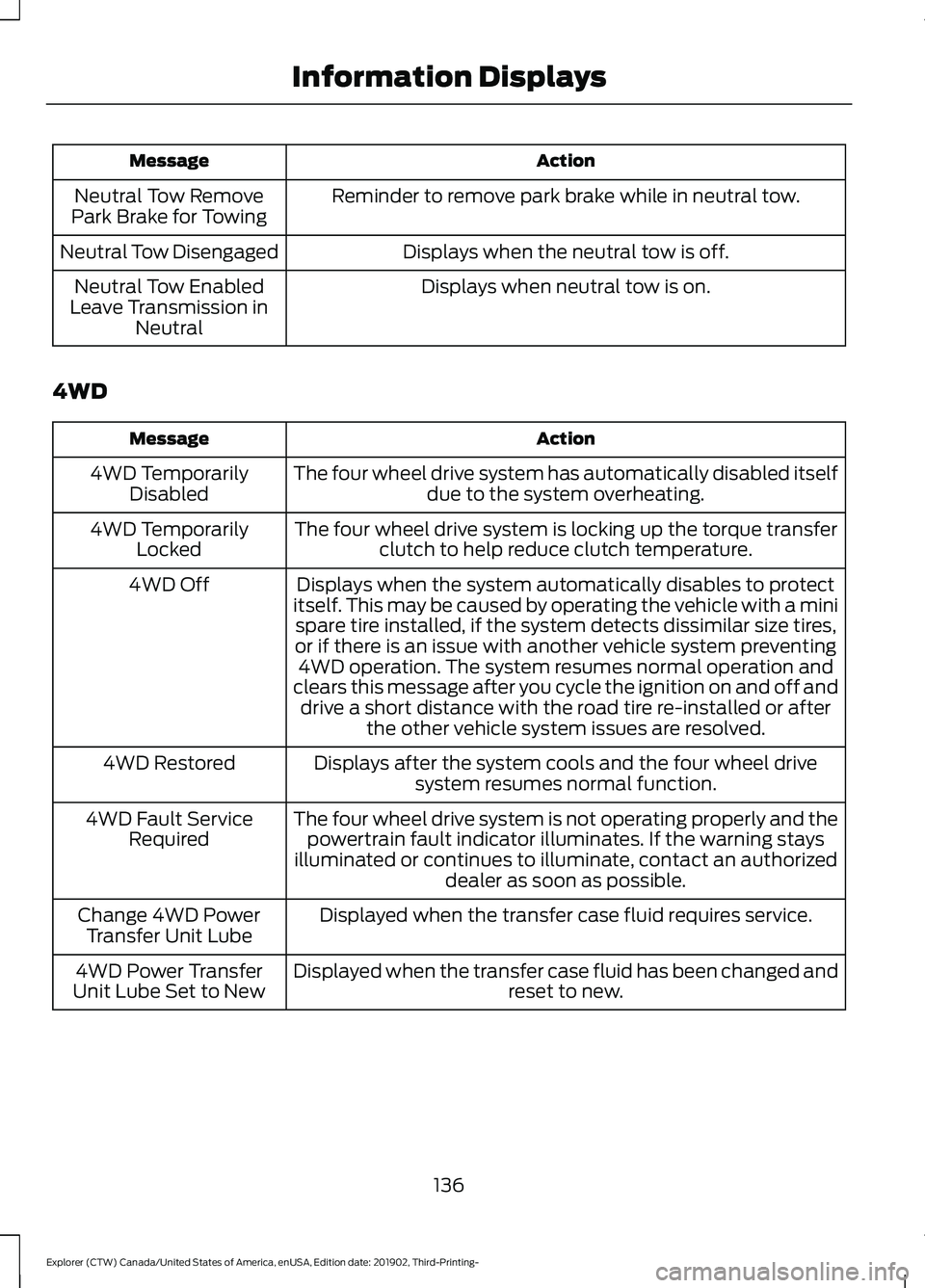
Action
Message
Reminder to remove park brake while in neutral tow.
Neutral Tow Remove
Park Brake for Towing
Displays when the neutral tow is off.
Neutral Tow Disengaged
Displays when neutral tow is on.
Neutral Tow Enabled
Leave Transmission in Neutral
4WD Action
Message
The four wheel drive system has automatically disabled itselfdue to the system overheating.
4WD Temporarily
Disabled
The four wheel drive system is locking up the torque transferclutch to help reduce clutch temperature.
4WD Temporarily
Locked
Displays when the system automatically disables to protect
itself. This may be caused by operating the vehicle with a mini spare tire installed, if the system detects dissimilar size tires,
or if there is an issue with another vehicle system preventing 4WD operation. The system resumes normal operation and
clears this message after you cycle the ignition on and off and drive a short distance with the road tire re-installed or after the other vehicle system issues are resolved.
4WD Off
Displays after the system cools and the four wheel drivesystem resumes normal function.
4WD Restored
The four wheel drive system is not operating properly and thepowertrain fault indicator illuminates. If the warning stays
illuminated or continues to illuminate, contact an authorized dealer as soon as possible.
4WD Fault Service
Required
Displayed when the transfer case fluid requires service.
Change 4WD Power
Transfer Unit Lube
Displayed when the transfer case fluid has been changed and reset to new.
4WD Power Transfer
Unit Lube Set to New
136
Explorer (CTW) Canada/United States of America, enUSA, Edition date: 201902, Third-Printing- Information Displays