2020 FORD EXPLORER engine
[x] Cancel search: enginePage 127 of 555

Action
Message
You selected auto EV mode with the EVbutton.
Auto EV Normal Operation
Your vehicle enables the engine due to theclimate control defrost setting. This is normal operation.
Engine Enabled Due to Defrost Setting
For full defrost heat press the EV button toselect either EV Later or EV Auto. The
engine may run to provide more cabin heat.
Press EV Button for Full Defrost
Your vehicle enables the engine for systemperformance. This is normal operation.
Engine Enabled for System Performance
You can press OK to enable the engine
temporarily for increased performance when in EV Now mode.
Press OK to Enable Engine
Blind Spot Information and Cross Traffic Alert System Action
Message
A system error has occurred. Contact an authorized dealer as soon as possible.
Blind Spot System Fault
The system sensors are blocked. See
Blind Spot Informa-
tion System (page 264).
Blind Spot Not Available
Sensor Blocked See Manual
The system detects a vehicle and automatically applied the brakes.
Cross Traffic Alert
Applying Brakes
The blind spot information system and cross traffic alert
system sensors are blocked. See Cross Traffic Alert (page 268
).
Cross Traffic Not Avail-
able Sensor Blocked See Manual
124
Explorer (CTW) Canada/United States of America, enUSA, Edition date: 201902, Third-Printing- Information Displays
Page 130 of 555
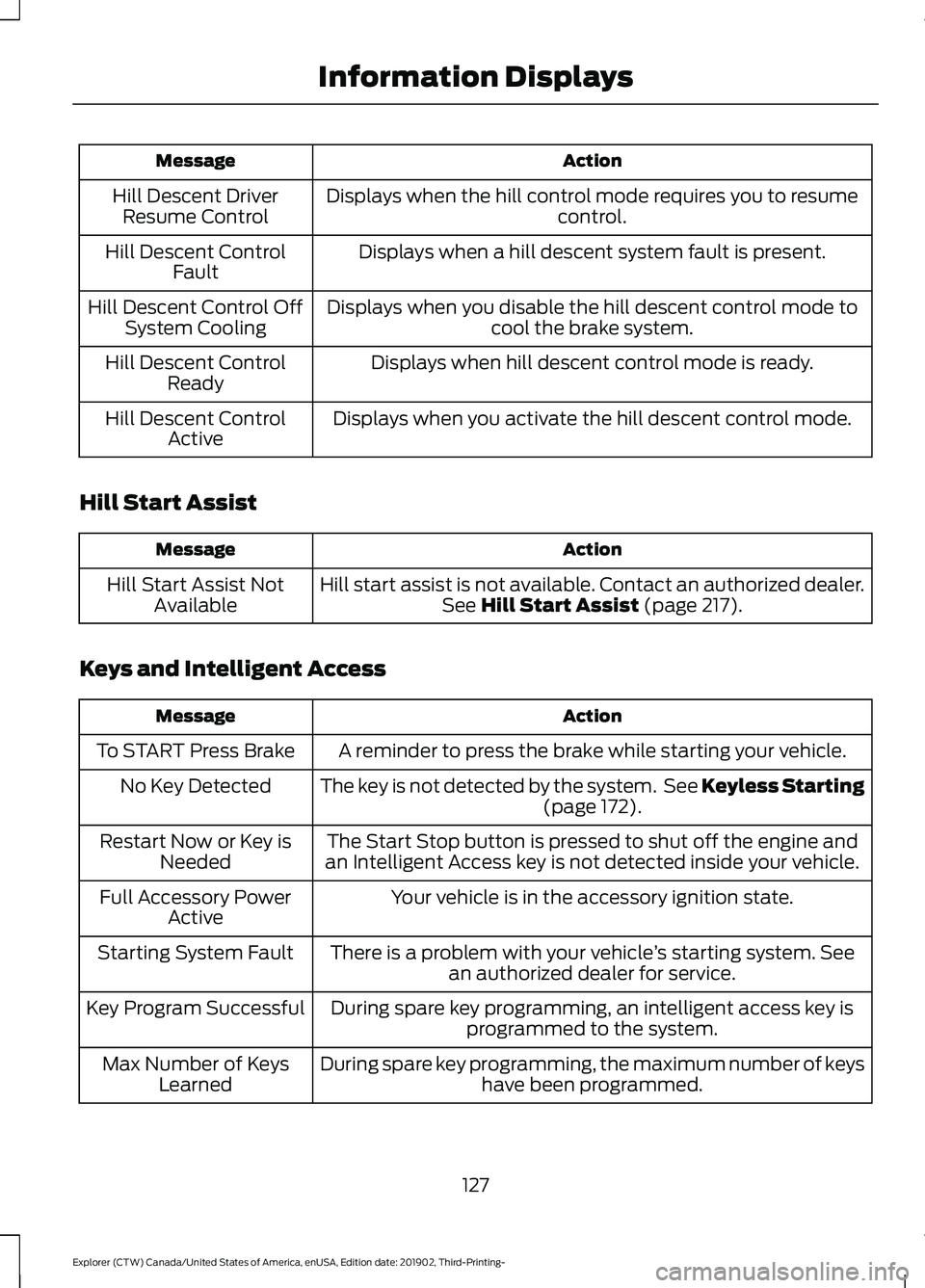
Action
Message
Displays when the hill control mode requires you to resume control.
Hill Descent Driver
Resume Control
Displays when a hill descent system fault is present.
Hill Descent Control
Fault
Displays when you disable the hill descent control mode to cool the brake system.
Hill Descent Control Off
System Cooling
Displays when hill descent control mode is ready.
Hill Descent Control
Ready
Displays when you activate the hill descent control mode.
Hill Descent Control
Active
Hill Start Assist Action
Message
Hill start assist is not available. Contact an authorized dealer.See Hill Start Assist (page 217).
Hill Start Assist Not
Available
Keys and Intelligent Access Action
Message
A reminder to press the brake while starting your vehicle.
To START Press Brake
The key is not detected by the system. See Keyless Starting(page
172).
No Key Detected
The Start Stop button is pressed to shut off the engine and
an Intelligent Access key is not detected inside your vehicle.
Restart Now or Key is
Needed
Your vehicle is in the accessory ignition state.
Full Accessory Power
Active
There is a problem with your vehicle ’s starting system. See
an authorized dealer for service.
Starting System Fault
During spare key programming, an intelligent access key isprogrammed to the system.
Key Program Successful
During spare key programming, the maximum number of keyshave been programmed.
Max Number of Keys
Learned
127
Explorer (CTW) Canada/United States of America, enUSA, Edition date: 201902, Third-Printing- Information Displays
Page 131 of 555

Action
Message
Displayed during spare key programming, when an intelligentaccess key has failed to be programmed.
Key Program Failure
Displayed during spare key programming when not enoughkeys have been programmed.
Not Enough Keys
Learned
Displays when the key battery is low. Change the battery as soon as possible.
Key Battery Low Replace
Soon
Displays when the vehicle is switched off.
Vehicle Switched Off
Lane Keeping System Action
Message
The system has malfunctioned. Contact an authorized dealer as soon as possible.
Lane Keeping Sys.
Malfunction Service Required
The system has detected a condition that has caused thesystem to be temporarily unavailable.
Front Camera Tempor-
arily Not Available
The system has detected a condition that requires the wind-shield to be cleaned to operate properly.
Front Camera Low Visib-
ility Clean Screen
The system has malfunctioned. Contact an authorized dealeras soon as possible.
Front Camera Malfunc-
tion Service Required
The system requests the driver to keep their hands on thesteering wheel.
Keep Hands on Steering
Wheel
Maintenance Action
Message
Stop your vehicle as soon as safely possible, turn off the
engine. Check the oil level. If the warning stays on or continues to come on with your engine running, contact an authorized dealer as soon as possible.
Low Engine Oil Pressure
The engine oil life remaining is 10% or less.
Change Engine Oil Soon
The oil life left reaches 0%.
Oil Change Required
The brake fluid level is low and the brake system should be
inspected immediately. See Brake Fluid Check (page 337).
Brake Fluid Level Low
128
Explorer (CTW) Canada/United States of America, enUSA, Edition date: 201902, Third-Printing- Information Displays
Page 132 of 555

Action
Message
The brake system needs servicing. Stop the vehicle in a safeplace. Contact an authorized dealer.
Check Brake System
The engine coolant temperature is excessively high.
Engine Coolant Over
Temperature
The washer fluid is low and needs to be refilled.
Washer Fluid Level Low
Indicates that your vehicle is still in Transport mode. This maynot allow some features to operate properly. Contact an authorized dealer.
Transport Mode Contact
Dealer
Indicates that your vehicle is still in Factory mode. This maynot allow some features to operate properly. Contact an authorized dealer.
Factory Mode Contact
Dealer
Informs the driver that the powertrain needs service due to a powertrain malfunction.
See Manual
The engine has reduced power to help reduce high engine temperature.
Power Reduced to
Lower Engine Temp
The brake system has reduced stopping power.
Brake Applied Power
Reduced
MyKey Action
Message
You cannot program a MyKey.
MyKey not Created
MyKey is active.
MyKey Active Drive
Safely
When switching on your vehicle and MyKey is in use, displaysthat the MyKey speed limit is on.
Speed Limited to {avg
speed XXXX} km/h
MyKey is in use and the MyKey speed limit is on and the vehiclespeed is approaching 81 mph (130 km/h).
Near Vehicle Top Speed
You have reached the speed limit set for your MyKey.
Vehicle at Top Speed of
MyKey Setting
You have an active MyKey with a programmed set speed limit.
Check Speed Drive
Safely
Belt-Minder turns on with a MyKey in use.
Buckle Up to Unmute
Audio
129
Explorer (CTW) Canada/United States of America, enUSA, Edition date: 201902, Third-Printing- Information Displays
Page 134 of 555
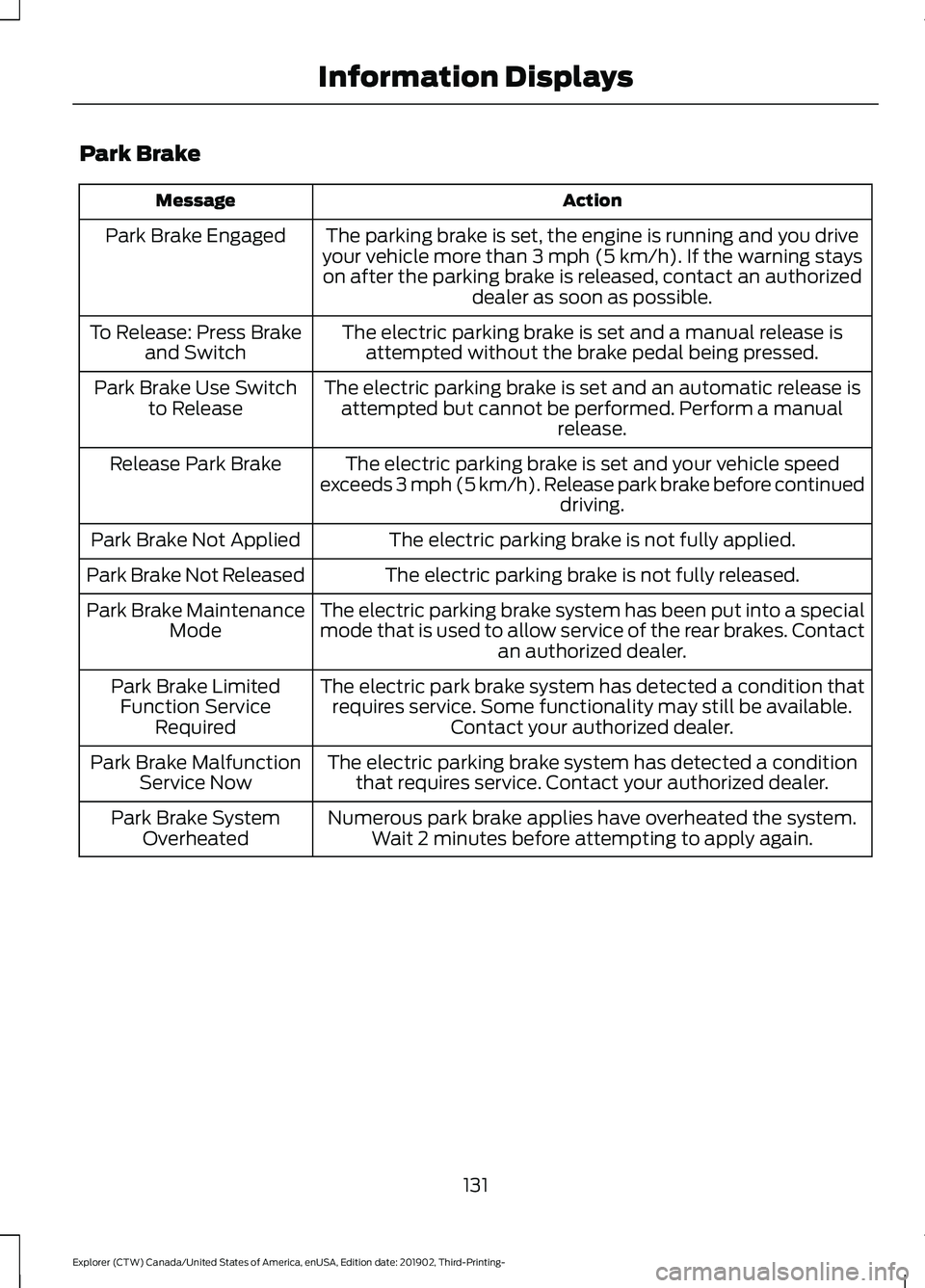
Park Brake
Action
Message
The parking brake is set, the engine is running and you drive
your vehicle more than 3 mph (5 km/h). If the warning stays
on after the parking brake is released, contact an authorized dealer as soon as possible.
Park Brake Engaged
The electric parking brake is set and a manual release isattempted without the brake pedal being pressed.
To Release: Press Brake
and Switch
The electric parking brake is set and an automatic release isattempted but cannot be performed. Perform a manual release.
Park Brake Use Switch
to Release
The electric parking brake is set and your vehicle speed
exceeds 3 mph (5 km/h). Release park brake before continued driving.
Release Park Brake
The electric parking brake is not fully applied.
Park Brake Not Applied
The electric parking brake is not fully released.
Park Brake Not Released
The electric parking brake system has been put into a special
mode that is used to allow service of the rear brakes. Contactan authorized dealer.
Park Brake Maintenance
Mode
The electric park brake system has detected a condition thatrequires service. Some functionality may still be available. Contact your authorized dealer.
Park Brake Limited
Function Service Required
The electric parking brake system has detected a conditionthat requires service. Contact your authorized dealer.
Park Brake Malfunction
Service Now
Numerous park brake applies have overheated the system.Wait 2 minutes before attempting to apply again.
Park Brake System
Overheated
131
Explorer (CTW) Canada/United States of America, enUSA, Edition date: 201902, Third-Printing- Information Displays
Page 136 of 555

Seats
Action
Message
Objects are by the passenger seat. After the objects are movedaway from the seat, if the warning stays on or continues to
come on contact an authorized dealer as soon as possible.
Occupant Sensor
BLOCKED Remove
Objects Near Passenger Seat
Displays as a reminder that memory seats are not available while driving.
Memory Recall Not
Permitted While Driving
Displays to show where your memory setting has been saved.
Memory X Saved
Starting System Action
Message
Displays when starting the vehicle as a reminder to apply the brake.
To START Press Brake
Displays when the starter has exceeded its cranking time inattempting to start the vehicle.
Cranking Time Exceeded
Displays when the starter is attempting to start the vehicle.
Engine Start Pending
Please Wait
Displays when the pending start has been cancelled.
Pending Start Cancelled
Tire Pressure Monitoring System Action
Message
One or more tires on your vehicle have low tire pressure. SeeTire Pressure Monitoring System (page 370).
Tire Pressure Low
The tire pressure monitoring system is malfunctioning. If thewarning stays on or continues to come on, contact an
authorized dealer.
See Tire Pressure Monitoring System (page 370).
Tire Pressure Monitor
Fault
A tire pressure sensor is malfunctioning, or your spare tire isin use. For more information on how the system operatesunder these conditions, See
Tire Pressure Monitoring
System (page 370). If the warning stays on or continues to
come on, contact an authorized dealer as soon as possible.
Tire Pressure Sensor
Fault
133
Explorer (CTW) Canada/United States of America, enUSA, Edition date: 201902, Third-Printing- Information Displays
Page 137 of 555

Trailer
Action
Message
A correct trailer connection is sensed during a givenignition cycle.
Trailer Connected
A trailer connection becomes disconnected, either
intentionally or unintentionally, and has been sensed during a given ignition cycle.
Trailer Disconnected
The trailer sway control has detected trailer sway.
Trailer Sway Reduce Speed
There are certain faults in your vehicle wiring and trailer
wiring/brake system. See Towing a Trailer (page 289).
Trailer Wiring Fault
There is a fault with your trailer turn lamp. Check yourlamp.
Trailer Left Turn Lamps Fault
Check Lamps
There is a fault with your trailer turn lamp. Check yourlamp.
Trailer Right Turn Lamps Fault
Check Lamps
There is a fault with your trailer battery. See Towing
a Trailer (page 289).
Trailer Battery Not Charging See
Manual
There is a fault with your vehicle trailer lighting module.See
Towing a Trailer (page 289).
Trailer Lighting Module Fault
See Manual
Transmission Action
Message
You switched the engine off and shift select lever is in anyposition other than park (P).
Shift to Park
Transmission is too cold. Wait for it to warm up before you drive.
Transmission Warming
Up Please Wait
Displays when the brake pedal needs to be depressed.
Press Brake Pedal
The transmission is overheating and needs to cool. Stop in asafe place as soon as it’ s possible.
Transmission Over
Temperature Stop Safely
See an authorized dealer.
Transmission Service
Required
The transmission is overheating and needs to cool. Stop in asafe place as soon as it’ s possible.
Transmission Too Hot
Press Brake
134
Explorer (CTW) Canada/United States of America, enUSA, Edition date: 201902, Third-Printing- Information Displays
Page 143 of 555
Note:
Do not place objects under the front
seats as this may interfere with the airflow
to the rear seats.
Note: Remove any snow, ice or leaves from
the air intake area at the base of the
windshield.
Note: To improve the time to reach a
comfortable temperature in hot weather,
drive with the windows open until you feel
cold air through the air vents.
Automatic Climate Control
Note: Adjusting the settings when your
vehicle interior is extremely hot or cold is
not necessary. Automatic mode is best
recommended to maintain set temperature.
Note: The system adjusts to heat or cool
the interior to the temperature you select
as quickly as possible.
Note: For the system to function efficiently,
the instrument panel and side air vents
should be fully open.
Note: If you select AUTO during cold
outside temperatures, the system directs
air flow to the windshield and side window
air vents. In addition, the blower motor may
run at a slower speed until the engine warms
up.
Note: If you select
AUTO during hot
temperatures and the inside of the vehicle
is hot, the system uses recirculated air to
maximize interior cooling. Blower motor
speed may also reduce until the air cools.
Quickly Heating the Interior
1. Press and release
AUTO.
2. Adjust the temperature function to the
setting you prefer.
Recommended Settings for
Heating
1. Press and release
AUTO. 2.
Adjust the temperature function to the
setting you prefer. Use
72°F (22°C) as
a starting point, then adjust the setting
as necessary.
Quickly Cooling the Interior
1. Press and release
MAX A/C.
Recommended Settings for
Cooling
1. Press and release
AUTO.
2. Adjust the temperature function to the
setting you prefer. Use
72°F (22°C) as
a starting point, then adjust the setting
as necessary.
Defogging the Side Windows in
Cold Weather
1. Press and release defrost or maximum
defrost.
2. Adjust the temperature control to the setting you prefer. Use
72°F (22°C) as
a starting point, then adjust the setting
as necessary.
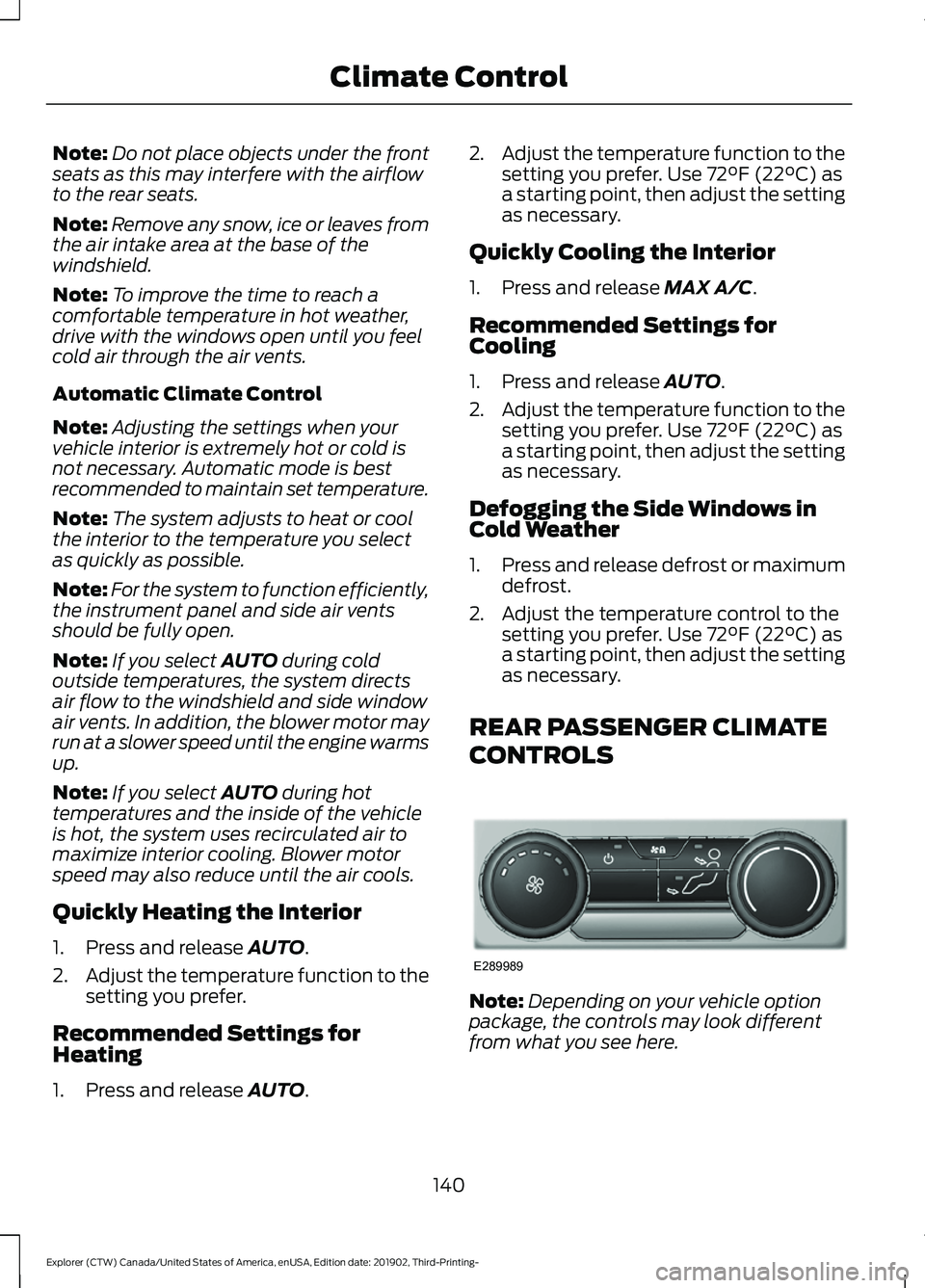
REAR PASSENGER CLIMATE
CONTROLS Note:
Depending on your vehicle option
package, the controls may look different
from what you see here.
140
Explorer (CTW) Canada/United States of America, enUSA, Edition date: 201902, Third-Printing- Climate ControlE289989