2020 FORD EXPLORER brake
[x] Cancel search: brakePage 120 of 555
Phone
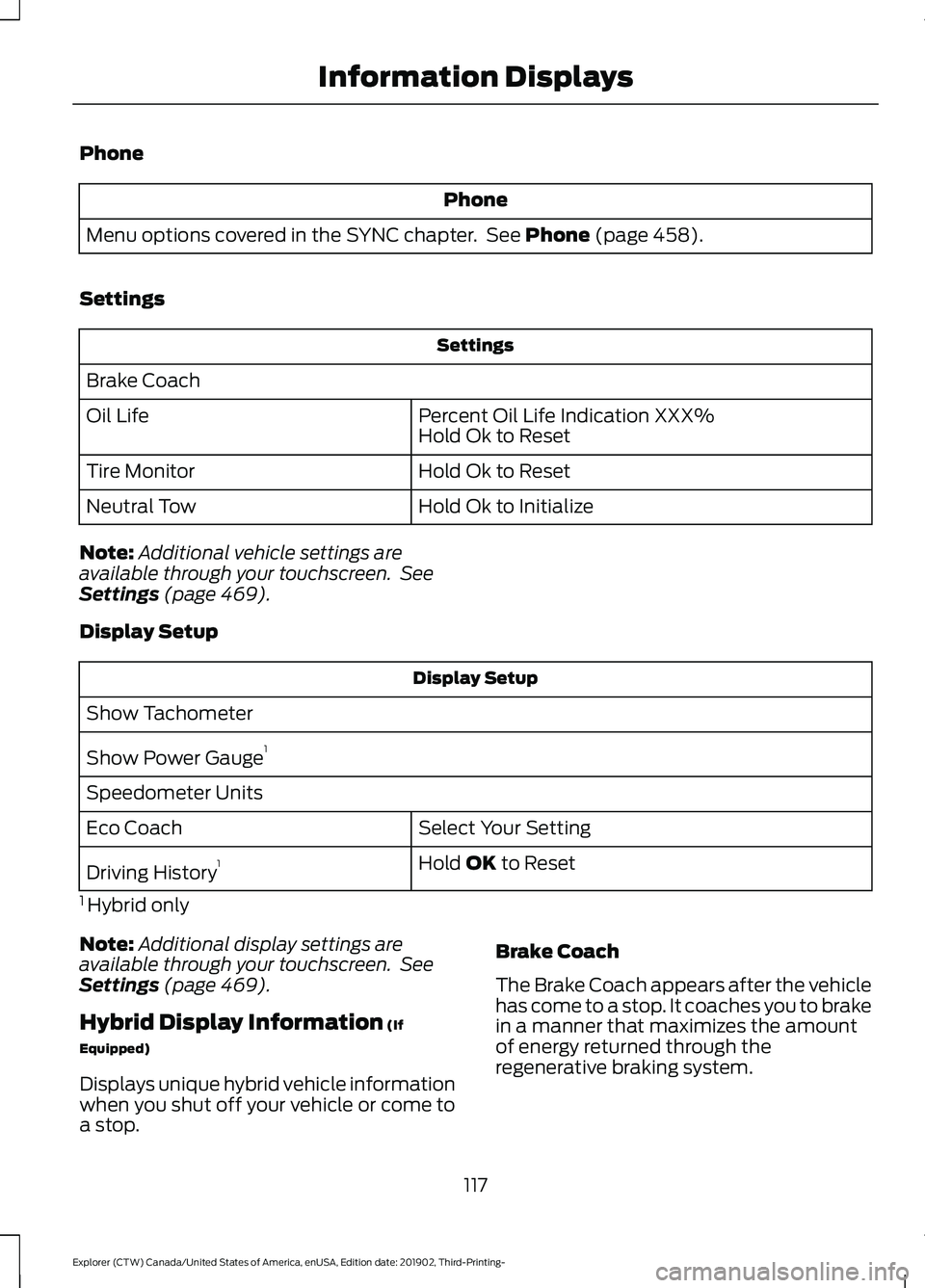
Phone
Menu options covered in the SYNC chapter. See Phone (page 458).
Settings Settings
Brake Coach Percent Oil Life Indication XXX%
Hold Ok to Reset
Oil Life
Hold Ok to Reset
Tire Monitor
Hold Ok to Initialize
Neutral Tow
Note: Additional vehicle settings are
available through your touchscreen. See
Settings
(page 469).
Display Setup Display Setup
Show Tachometer
Show Power Gauge 1
Speedometer Units Select Your Setting
Eco Coach
Hold
OK to Reset
Driving History 1
1 Hybrid only
Note: Additional display settings are
available through your touchscreen. See
Settings
(page 469).
Hybrid Display Information
(If
Equipped)
Displays unique hybrid vehicle information
when you shut off your vehicle or come to
a stop. Brake Coach
The Brake Coach appears after the vehicle
has come to a stop. It coaches you to brake
in a manner that maximizes the amount
of energy returned through the
regenerative braking system.
117
Explorer (CTW) Canada/United States of America, enUSA, Edition date: 201902, Third-Printing- Information Displays
Page 121 of 555
The percent displayed is an indication of
the regenerative braking efficiency with
100% representing the maximum amount
of energy recovery. Brake Coach can be
turned on or off in the settings menu.
Trip Summary
Displays upon shutting off your vehicle.
The values are cumulative since you last
started your vehicle.
The information shown is the same as the
This Trip on demand screen. See
Personalized Settings (page 118).
Vehicle Charging Status
Displays when you switch off your vehicle
and when you switch on your vehicle while
plugged in. Charging status includes the
charge start or charge end time as
appropriate. You can modify your vehicle
charge settings through the touchscreen.
See
SYNC™ 3 (page 438).
PERSONALIZED SETTINGS
Select one of these options to display on
your main screen.
Note: Some options may appear slightly
different or not at all if the items are
optional.
Note: EV Now information is only available
when in EV Now mode. Select Screens
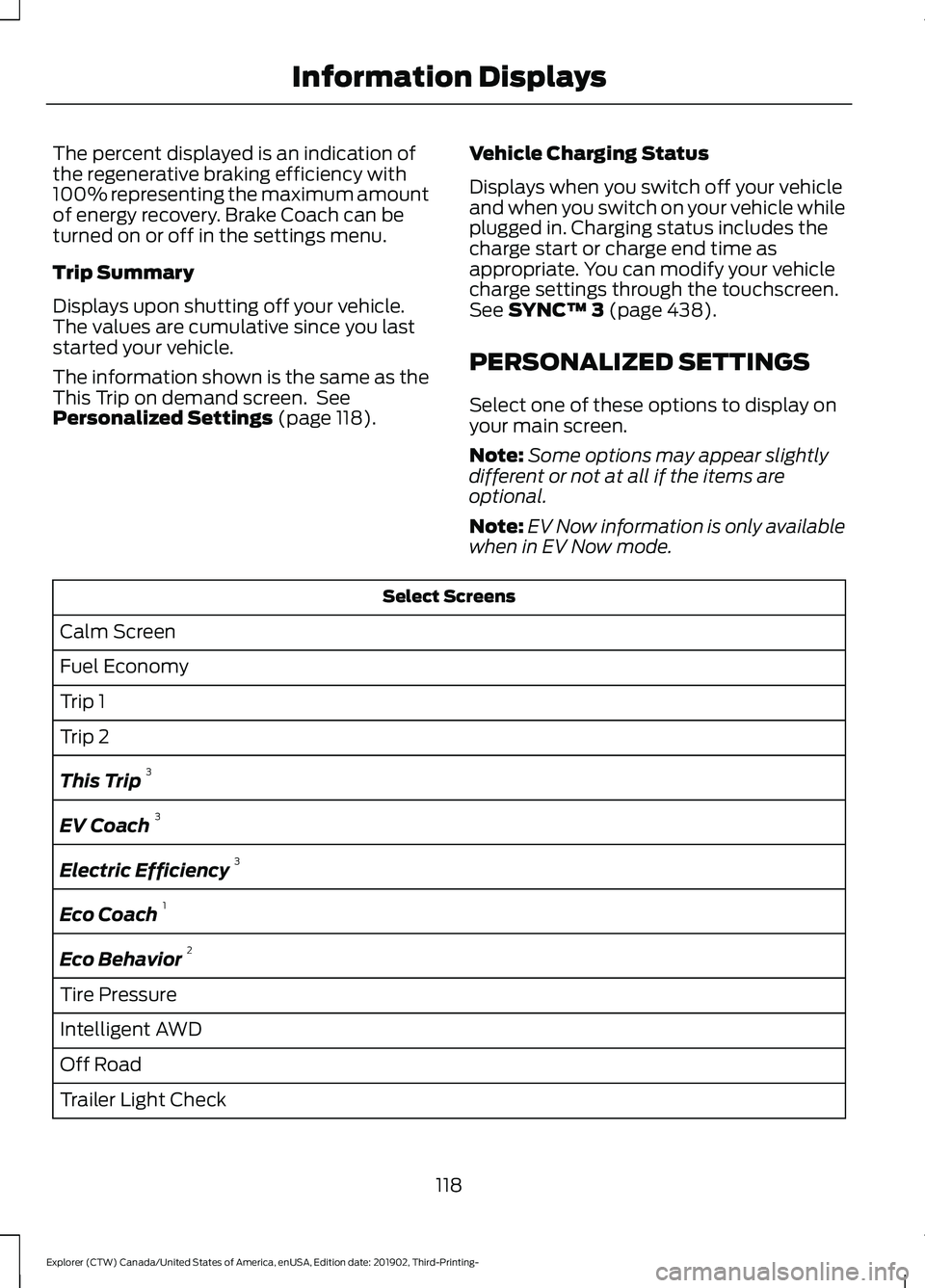
Calm Screen
Fuel Economy
Trip 1
Trip 2
This Trip 3
EV Coach 3
Electric Efficiency 3
Eco Coach 1
Eco Behavior 2
Tire Pressure
Intelligent AWD
Off Road
Trailer Light Check
118
Explorer (CTW) Canada/United States of America, enUSA, Edition date: 201902, Third-Printing- Information Displays
Page 123 of 555
•
When your power level is within the box
the color of the bar will be blue. This
means you are in Electric operation and
the engine is off.
• When your power level is outside of the
box the color of the bar will be white.
This means you are in Hybrid operation
with a combination of the electric
motor and the engine providing vehicle
power.
When you are decelerating with either your
foot off the accelerator pedal or on the
brake pedal you will see a green or white
solid bar indicating the power being used
to slow down the vehicle. You may also
see a green rectangular box which shows
the amount of power that can be
recaptured by the regenerative braking
system and returned to the high voltage
battery.
• When your power level is completely
within the box the color of the bar will
be all green. This means that the
regenerative braking system is being
used to efficiently slow the vehicle
down and return the maximum
percentage of energy to the high
voltage battery.
• When your power level is outside of the
green box then the bar will be white.
This means that both the regenerative
braking system and conventional
braking system are being used.
Electric Efficiency
Note: This feature applies to Plug-in
vehicles only.
This screen shows your average driving
distance per kWh of electricity used on
your plug-in hybrid vehicle. The value is
calculated only when your available
electric range is being used and the
gasoline engine is off. Distance per full charge is also shown. This
is an estimate of the electric range you
would have if you plugged in and fully
charged your vehicle right now. The higher
your electric efficiency, the higher your
distance per full charge.
Your electric efficiency is affected by your
driving style and route, climate control use,
outside temperature and other factors.
Best efficiency is achieved in mild ambient
temperatures with mild to moderate
acceleration and braking, moderate speeds
and low climate control usage.
INFORMATION MESSAGES
Note:
Depending on your vehicle options
and instrument cluster type, not all of the
messages could display or be available.
Certain messages may be abbreviated or
shortened depending upon which cluster
type you have. Press the OK button to acknowledge and
remove some messages from the
information display. Other message will
be removed automatically after a short
time.
Certain messages need to be confirmed
before you can access the menus.
120
Explorer (CTW) Canada/United States of America, enUSA, Edition date: 201902, Third-Printing- Information DisplaysE222314
Page 127 of 555

Action
Message
You selected auto EV mode with the EVbutton.
Auto EV Normal Operation
Your vehicle enables the engine due to theclimate control defrost setting. This is normal operation.
Engine Enabled Due to Defrost Setting
For full defrost heat press the EV button toselect either EV Later or EV Auto. The
engine may run to provide more cabin heat.
Press EV Button for Full Defrost
Your vehicle enables the engine for systemperformance. This is normal operation.
Engine Enabled for System Performance
You can press OK to enable the engine
temporarily for increased performance when in EV Now mode.
Press OK to Enable Engine
Blind Spot Information and Cross Traffic Alert System Action
Message
A system error has occurred. Contact an authorized dealer as soon as possible.
Blind Spot System Fault
The system sensors are blocked. See
Blind Spot Informa-
tion System (page 264).
Blind Spot Not Available
Sensor Blocked See Manual
The system detects a vehicle and automatically applied the brakes.
Cross Traffic Alert
Applying Brakes
The blind spot information system and cross traffic alert
system sensors are blocked. See Cross Traffic Alert (page 268
).
Cross Traffic Not Avail-
able Sensor Blocked See Manual
124
Explorer (CTW) Canada/United States of America, enUSA, Edition date: 201902, Third-Printing- Information Displays
Page 130 of 555
Action
Message
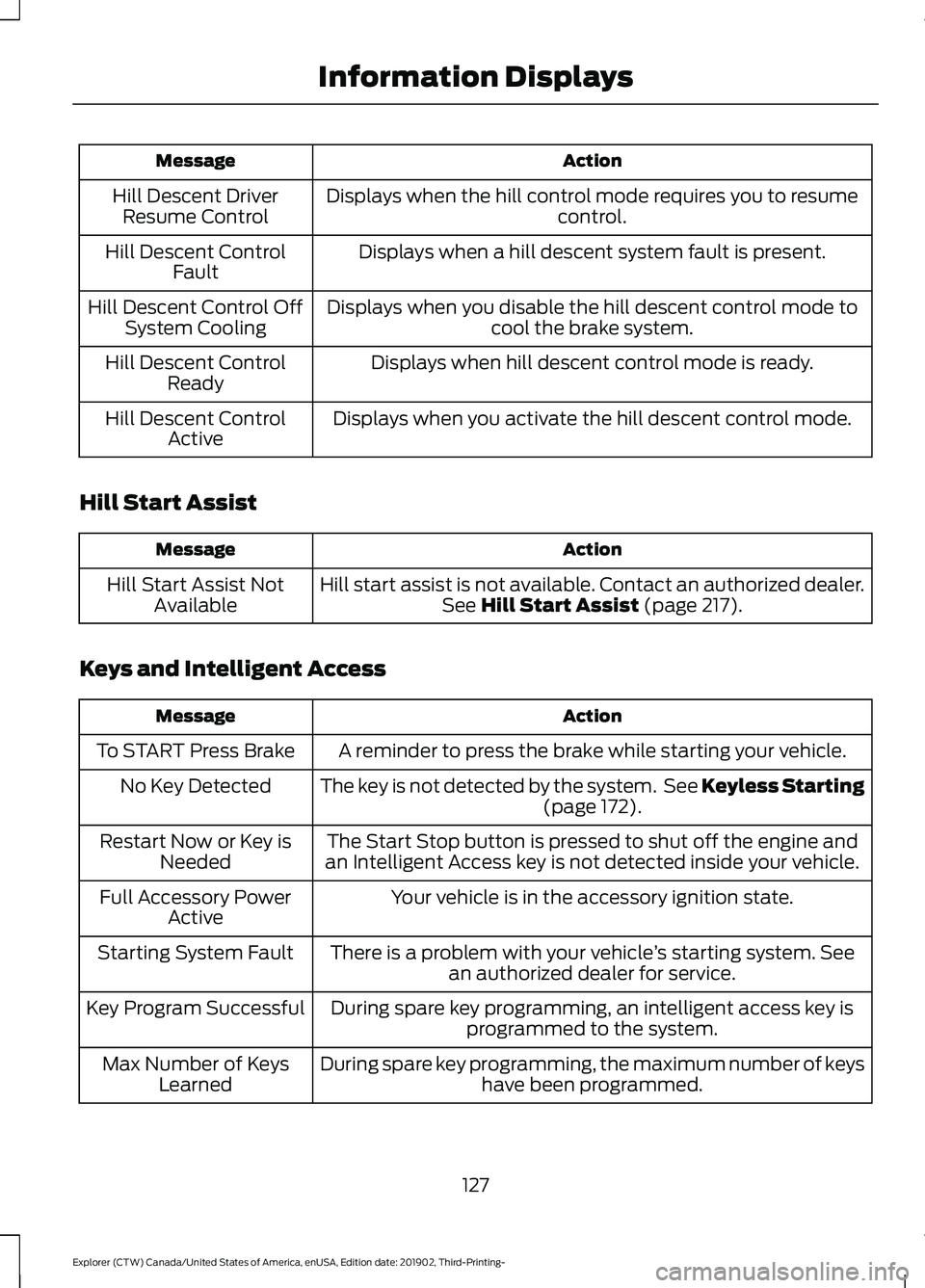
Displays when the hill control mode requires you to resume control.
Hill Descent Driver
Resume Control
Displays when a hill descent system fault is present.
Hill Descent Control
Fault
Displays when you disable the hill descent control mode to cool the brake system.
Hill Descent Control Off
System Cooling
Displays when hill descent control mode is ready.
Hill Descent Control
Ready
Displays when you activate the hill descent control mode.
Hill Descent Control
Active
Hill Start Assist Action
Message
Hill start assist is not available. Contact an authorized dealer.See Hill Start Assist (page 217).
Hill Start Assist Not
Available
Keys and Intelligent Access Action
Message
A reminder to press the brake while starting your vehicle.
To START Press Brake
The key is not detected by the system. See Keyless Starting(page
172).
No Key Detected
The Start Stop button is pressed to shut off the engine and
an Intelligent Access key is not detected inside your vehicle.
Restart Now or Key is
Needed
Your vehicle is in the accessory ignition state.
Full Accessory Power
Active
There is a problem with your vehicle ’s starting system. See
an authorized dealer for service.
Starting System Fault
During spare key programming, an intelligent access key isprogrammed to the system.
Key Program Successful
During spare key programming, the maximum number of keyshave been programmed.
Max Number of Keys
Learned
127
Explorer (CTW) Canada/United States of America, enUSA, Edition date: 201902, Third-Printing- Information Displays
Page 131 of 555

Action
Message
Displayed during spare key programming, when an intelligentaccess key has failed to be programmed.
Key Program Failure
Displayed during spare key programming when not enoughkeys have been programmed.
Not Enough Keys
Learned
Displays when the key battery is low. Change the battery as soon as possible.
Key Battery Low Replace
Soon
Displays when the vehicle is switched off.
Vehicle Switched Off
Lane Keeping System Action
Message
The system has malfunctioned. Contact an authorized dealer as soon as possible.
Lane Keeping Sys.
Malfunction Service Required
The system has detected a condition that has caused thesystem to be temporarily unavailable.
Front Camera Tempor-
arily Not Available
The system has detected a condition that requires the wind-shield to be cleaned to operate properly.
Front Camera Low Visib-
ility Clean Screen
The system has malfunctioned. Contact an authorized dealeras soon as possible.
Front Camera Malfunc-
tion Service Required
The system requests the driver to keep their hands on thesteering wheel.
Keep Hands on Steering
Wheel
Maintenance Action
Message
Stop your vehicle as soon as safely possible, turn off the
engine. Check the oil level. If the warning stays on or continues to come on with your engine running, contact an authorized dealer as soon as possible.
Low Engine Oil Pressure
The engine oil life remaining is 10% or less.
Change Engine Oil Soon
The oil life left reaches 0%.
Oil Change Required
The brake fluid level is low and the brake system should be
inspected immediately. See Brake Fluid Check (page 337).
Brake Fluid Level Low
128
Explorer (CTW) Canada/United States of America, enUSA, Edition date: 201902, Third-Printing- Information Displays
Page 132 of 555

Action
Message
The brake system needs servicing. Stop the vehicle in a safeplace. Contact an authorized dealer.
Check Brake System
The engine coolant temperature is excessively high.
Engine Coolant Over
Temperature
The washer fluid is low and needs to be refilled.
Washer Fluid Level Low
Indicates that your vehicle is still in Transport mode. This maynot allow some features to operate properly. Contact an authorized dealer.
Transport Mode Contact
Dealer
Indicates that your vehicle is still in Factory mode. This maynot allow some features to operate properly. Contact an authorized dealer.
Factory Mode Contact
Dealer
Informs the driver that the powertrain needs service due to a powertrain malfunction.
See Manual
The engine has reduced power to help reduce high engine temperature.
Power Reduced to
Lower Engine Temp
The brake system has reduced stopping power.
Brake Applied Power
Reduced
MyKey Action
Message
You cannot program a MyKey.
MyKey not Created
MyKey is active.
MyKey Active Drive
Safely
When switching on your vehicle and MyKey is in use, displaysthat the MyKey speed limit is on.
Speed Limited to {avg
speed XXXX} km/h
MyKey is in use and the MyKey speed limit is on and the vehiclespeed is approaching 81 mph (130 km/h).
Near Vehicle Top Speed
You have reached the speed limit set for your MyKey.
Vehicle at Top Speed of
MyKey Setting
You have an active MyKey with a programmed set speed limit.
Check Speed Drive
Safely
Belt-Minder turns on with a MyKey in use.
Buckle Up to Unmute
Audio
129
Explorer (CTW) Canada/United States of America, enUSA, Edition date: 201902, Third-Printing- Information Displays
Page 134 of 555
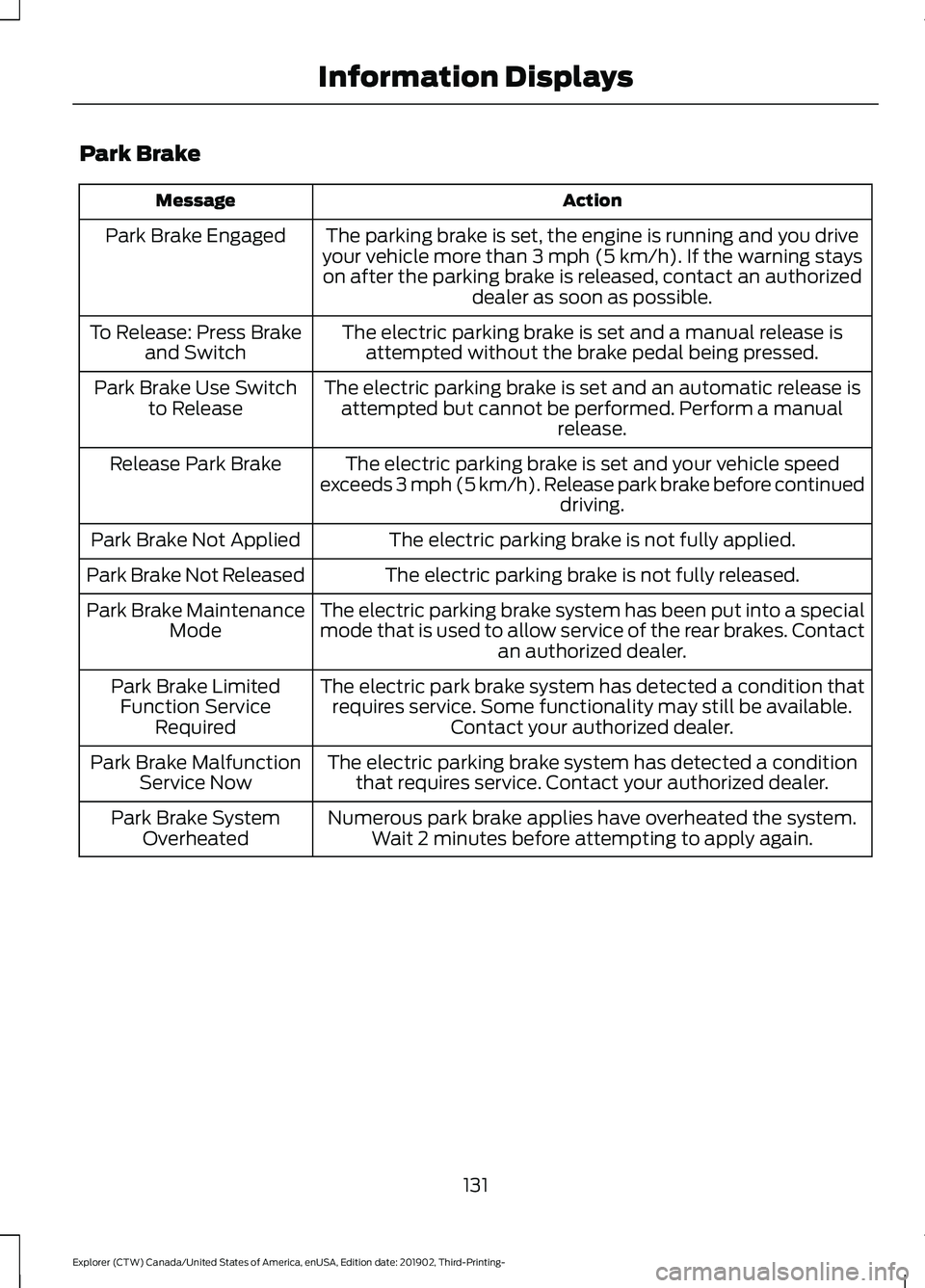
Park Brake
Action
Message
The parking brake is set, the engine is running and you drive
your vehicle more than 3 mph (5 km/h). If the warning stays
on after the parking brake is released, contact an authorized dealer as soon as possible.
Park Brake Engaged
The electric parking brake is set and a manual release isattempted without the brake pedal being pressed.
To Release: Press Brake
and Switch
The electric parking brake is set and an automatic release isattempted but cannot be performed. Perform a manual release.
Park Brake Use Switch
to Release
The electric parking brake is set and your vehicle speed
exceeds 3 mph (5 km/h). Release park brake before continued driving.
Release Park Brake
The electric parking brake is not fully applied.
Park Brake Not Applied
The electric parking brake is not fully released.
Park Brake Not Released
The electric parking brake system has been put into a special
mode that is used to allow service of the rear brakes. Contactan authorized dealer.
Park Brake Maintenance
Mode
The electric park brake system has detected a condition thatrequires service. Some functionality may still be available. Contact your authorized dealer.
Park Brake Limited
Function Service Required
The electric parking brake system has detected a conditionthat requires service. Contact your authorized dealer.
Park Brake Malfunction
Service Now
Numerous park brake applies have overheated the system.Wait 2 minutes before attempting to apply again.
Park Brake System
Overheated
131
Explorer (CTW) Canada/United States of America, enUSA, Edition date: 201902, Third-Printing- Information Displays