2020 FORD ECOSPORT warning
[x] Cancel search: warningPage 97 of 448

GENERAL INFORMATION
WARNING: Driving whiledistracted can result in loss of vehiclecontrol, crash and injury. We stronglyrecommend that you use extremecaution when using any device that maytake your focus off the road. Yourprimary responsibility is the safeoperation of your vehicle. Werecommend against the use of anyhand-held device while driving andencourage the use of voice-operatedsystems when possible. Make sure youare aware of all applicable local lawsthat may affect the use of electronicdevices while driving.
You can control various systems on yourvehicle using the information displaycontrols on the steering wheel.
The information display shows thecorresponding information.
Information Display Controls
•Press the up and down arrow buttonsto scroll through and highlight theoptions within a menu.
•Press the right button to enter asubmenu.
•Press the left button to exit a submenu.
•Press the OK button to choose andconfirm settings or messages.
Menu Structure - InformationDisplay
You can access the menu using theinformation display control.
Note:It may describe options not fitted tothe vehicle you have purchased.
Trip computer 1 and 2
Trip 1
Trip 2
Reset AllReset Individual Values
Reset Trip Odometer
Reset Trip Timer
Reset Average Fuel
93
EcoSport (CBW) Canada/United States of America, Vehicles Built From: 17-06-2019, LN1J-19A321-ZFA enUSA, Edition date: 201904, First-PrintingInformation Displays
Page 102 of 448

Brake System
ActionMessage
The system has detected a fault that requires service.Have your vehicle checked as soon as possible.Check Brake System
Battery and Charging System
ActionMessage
Stop your vehicle as soon as it is safe to do so andswitch off the ignition. Contact an authorized dealer.Electrical system overvoltageStop safely
Displays to warn of a low battery condition. Turn offall unneeded electrical accessories. Contact anauthorized dealer.
Battery low See manual
Tire Pressure Monitoring System
ActionMessage
Displays if the tire pressure in one or more tires is belowthe correct pressure. See Tire Pressure MonitoringSystem (page 271).
Tire Pressure Low
Tire Pressure Low Specified:
The system has detected a fault that requires service.Have your vehicle checked as soon as possible. SeeTire Pressure Monitoring System (page 271).
Tire Pressure Monitor Fault
Displays if the system detects a fault with a tire pres-sure sensor or the spare tire is in use. See Tire Pres-sure Monitoring System (page 271).If the warning message remains on after you havechecked the tire pressures, the system has detecteda fault that requires service. Have your vehicle checkedas soon as possible.
Tire Pressure Sensor Fault
98
EcoSport (CBW) Canada/United States of America, Vehicles Built From: 17-06-2019, LN1J-19A321-ZFA enUSA, Edition date: 201904, First-PrintingInformation Displays
Page 106 of 448

Park Aid
ActionMessage
The system has detected a fault that requires service.Have your vehicle checked as soon as possible.Park Aid Fault
The system has detected a fault that requires service.Have your vehicle checked as soon as possible.
Check Park Aid
Check Front Park Aid
Check Rear Park Aid
Displays when the park pilot system sensors areblocked. See Parking Aids (page 162).
Park Pilot Not Available SensorBlocked See Manual
Front Park Pilot Not AvailableSensor Blocked See Manual
Rear Park Pilot Not AvailableSensor Blocked See Manual
Park Brake
ActionMessage
Displays when the parking brake is set, the engine isrunning and the vehicle is driven more than 3 mph(5 km/h). If the warning stays on after the parkingbrake is released, contact an authorized dealer.
Park brake applied
Displays as a reminder to apply the parking brake.
Park Brake Not Applied
Park Brake Not Applied ApplyPark Brake
Displays if you have not released the parking brakeand the vehicle speed reaches 3 mph (5 km/h).Brake Applied Power Reduced
Release Park BrakeIf the warning message remains on after you havereleased the parking brake, the system has detecteda fault that requires service. Have your vehicle checkedas soon as possible.
The system has detected a fault that requires service.Have your vehicle checked as soon as possible.Park Brake Malfunction ServiceNow
102
EcoSport (CBW) Canada/United States of America, Vehicles Built From: 17-06-2019, LN1J-19A321-ZFA enUSA, Edition date: 201904, First-PrintingInformation Displays
Page 117 of 448

•The alarm horn is sounding.
•The hood is open.
•The transmission is not in park (P).
Setting Remote Start to Active
1.Using the information display controlson the steering wheel, select Settings.
2.Select Vehicle Settings.
3.Select Remote Start.
4.Switch System on.
Note:You have to enable the modem usingthe FordPass app to use remote start. SeeGeneral Information (page 319).
Remotely Starting the Engine
WARNING: To avoid exhaustfumes, do not use remote start if yourvehicle is parked indoors or in areas thatare not well ventilated.
Use the FordPass app to start the engine.
Note:The direction indicators flash twice.
Note:The parking lamps turn on when theengine is running.
Note:The horn sounds if the system failsto start.
Note:You must switch on the ignitionbefore driving your vehicle.
Extending the Vehicle Run Time
To extend the engine running time durationof your vehicle during remote start, repeatthe activation using FordPass app whilethe engine is running. If you programmedthe duration to last 10 minutes, the second10 minutes will begin after what is left of
the first activation time. For example, ifyour vehicle had been running from the firstremote start for 5 minutes, your vehiclecontinues to run now for a total of 20minutes. You can extend the remote startup to a maximum of 30 minutes.
Remotely Stopping the Engine
Use the FordPass app to stop the engine.
Remote Start Settings
Use the information display to adjust theremote start settings.
Note:You cannot adjust the climate controlsettings when you have remotely startedthe engine.
Note:When you switch the ignition on, theclimate control system returns to the lastused settings.
Switching Auto On
1.Using the information display controlson the steering wheel, select Settings.
2.Select Vehicle Settings.
3.Select Remote Start.
4.Select Climate Control.
5.Switch Auto on.
Note:If you switch Auto on, the systemattempts to heat or cool the interior to 72°F(22°C).
Note:The heated windshield, heated rearwindow, heated mirrors, heated seats andheated steering wheel could turn on in coldweather.
Switching Last Settings On
1.Using the information display controlson the steering wheel, select Settings.
2.Select Vehicle Settings.
3.Select Remote Start.
4.Select Climate Control.
113
EcoSport (CBW) Canada/United States of America, Vehicles Built From: 17-06-2019, LN1J-19A321-ZFA enUSA, Edition date: 201904, First-PrintingClimate Control
Page 119 of 448

SITTING IN THE CORRECT
POSITION
WARNING: Do not recline theseatback too far as this can cause theoccupant to slide under the seatbelt,resulting in serious injury in the event ofa collision.
WARNING: Do not place objectshigher than the top of the seat backrest.Failure to follow this instruction couldresult in personal injury or death in theevent of a sudden stop or crash.
When you use them properly, the seat,head restraint, seatbelt and airbags willprovide optimum protection in the eventof a crash.
We recommend that you follow theseguidelines:
•Sit in an upright position with the baseof your spine as far back as possible.
•Do not recline the seatback more than30 degrees.
•Adjust the head restraint so that thetop of it is level with the top of yourhead and as far forward as possible.Make sure that you remaincomfortable.
•Keep sufficient distance betweenyourself and the steering wheel. Werecommend a minimum of 10 in(25 cm) between your breastbone andthe airbag cover.
•Hold the steering wheel with your armsslightly bent.
•Bend your legs slightly so that you canpress the pedals fully.
•Position the shoulder strap of theseatbelt over the center of yourshoulder and position the lap straptightly across your hips.
Make sure that your driving position iscomfortable and that you can maintain fullcontrol of your vehicle.
HEAD RESTRAINTS
WARNING: Fully adjust the headrestraint before you sit in or operate yourvehicle. This will help minimize the riskof neck injury in the event of a crash. Donot adjust the head restraint when yourvehicle is moving.
115
EcoSport (CBW) Canada/United States of America, Vehicles Built From: 17-06-2019, LN1J-19A321-ZFA enUSA, Edition date: 201904, First-PrintingSeats
Page 120 of 448

WARNING: The head restraint isa safety device. Whenever possible itshould be installed and properlyadjusted when the seat is occupied.Failure to adjust the head restraintproperly could reduce its effectivenessduring certain impacts.
WARNING: Adjust the headrestraints for all passengers before youdrive your vehicle. This will help minimizethe risk of neck injury in the event of acrash. Do not adjust the head restraintswhen your vehicle is moving.
Note:Adjust the seat backrest to an uprightdriving position before adjusting the headrestraint. Adjust the head restraint so thatthe top of it is level with the top of your headand as far forward as possible. Make surethat you remain comfortable. If you areextremely tall, adjust the head restraint toits highest position.
Front Seat Head Restraint
The front seat head restraint consists of:
An energy absorbing headrestraint.A
Two steel stems.B
Guide sleeve adjust and unlockbutton.C
Guide sleeve unlock and removebutton.D
Rear Seat Outermost Head Restraint
The rear seat outermost head restraintconsists of:
An energy absorbing headrestraint.A
Two steel stems.B
Guide sleeve adjust and unlockbutton.C
Guide sleeve unlock and removebutton.D
Fold button.E
Rear Seat Center Head Restraint
116
EcoSport (CBW) Canada/United States of America, Vehicles Built From: 17-06-2019, LN1J-19A321-ZFA enUSA, Edition date: 201904, First-PrintingSeats
Page 121 of 448
The rear center head restraint consists of:
An energy absorbing headrestraint.A
Two steel stems.B
Guide sleeve unlock and removebutton.C
Raising the Head Restraint
Pull the head restraint up.
Lowering the Head Restraint
1.Press and hold button C.
2.Push the head restraint down.
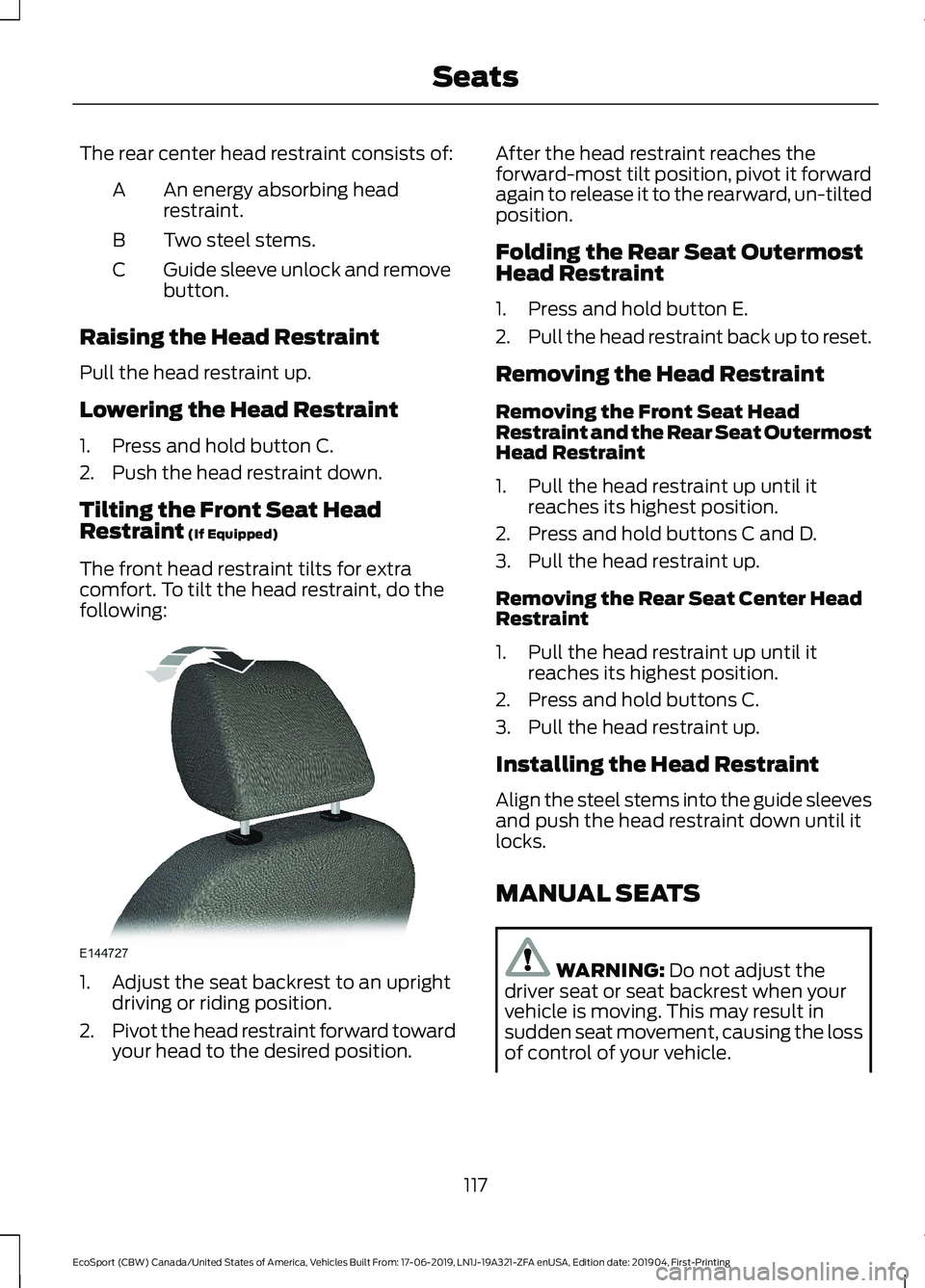
Tilting the Front Seat HeadRestraint (If Equipped)
The front head restraint tilts for extracomfort. To tilt the head restraint, do thefollowing:
1.Adjust the seat backrest to an uprightdriving or riding position.
2.Pivot the head restraint forward towardyour head to the desired position.
After the head restraint reaches theforward-most tilt position, pivot it forwardagain to release it to the rearward, un-tiltedposition.
Folding the Rear Seat OutermostHead Restraint
1.Press and hold button E.
2.Pull the head restraint back up to reset.
Removing the Head Restraint
Removing the Front Seat HeadRestraint and the Rear Seat OutermostHead Restraint
1.Pull the head restraint up until itreaches its highest position.
2.Press and hold buttons C and D.
3.Pull the head restraint up.
Removing the Rear Seat Center HeadRestraint
1.Pull the head restraint up until itreaches its highest position.
2.Press and hold buttons C.
3.Pull the head restraint up.
Installing the Head Restraint
Align the steel stems into the guide sleevesand push the head restraint down until itlocks.
MANUAL SEATS
WARNING: Do not adjust thedriver seat or seat backrest when yourvehicle is moving. This may result insudden seat movement, causing the lossof control of your vehicle.
117
EcoSport (CBW) Canada/United States of America, Vehicles Built From: 17-06-2019, LN1J-19A321-ZFA enUSA, Edition date: 201904, First-PrintingSeats
Page 122 of 448
WARNING: Do not recline theseatback too far as this can cause theoccupant to slide under the seatbelt,resulting in serious injury in the event ofa collision.
WARNING: Do not place cargo orany objects behind the seat backrestbefore returning it to the original position.Pull on the seat backrest to make surethat it has fully latched after returningthe seat backrest to its original position.An unlatched seat may becomedangerous if you stop suddenly or havea crash.
WARNING: Make sure the seatfully locks into place by rocking itbackward and forward. Not securing theseat into the locked position can bedangerous in a crash and could causeserious personal injury or death.
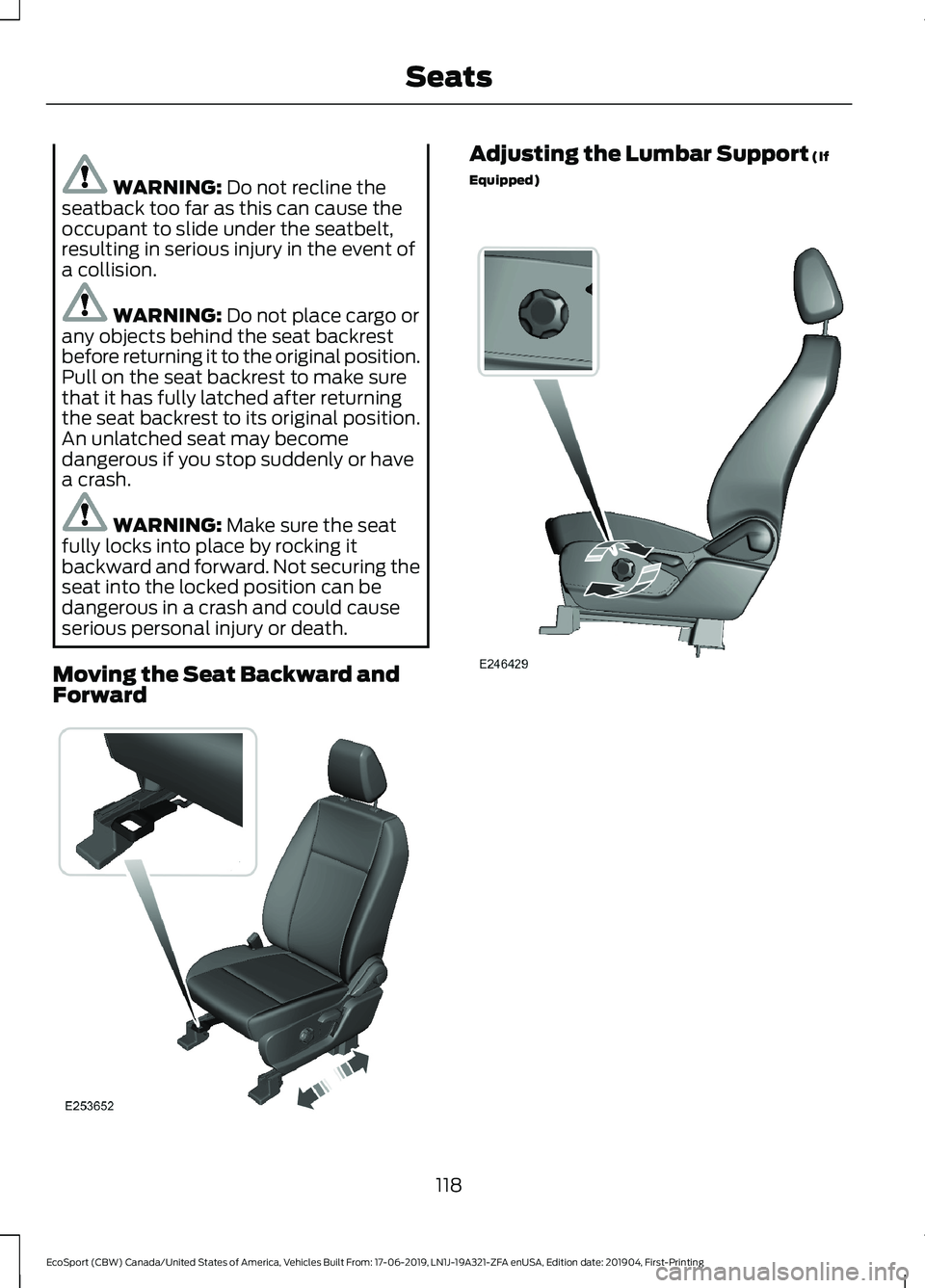
Moving the Seat Backward andForward
Adjusting the Lumbar Support (If
Equipped)
118
EcoSport (CBW) Canada/United States of America, Vehicles Built From: 17-06-2019, LN1J-19A321-ZFA enUSA, Edition date: 201904, First-PrintingSeats