2020 FORD ECOSPORT warning
[x] Cancel search: warningPage 51 of 448

CRASH SENSORS AND
AIRBAG INDICATOR
WARNING: Modifying or addingequipment to the front end of yourvehicle (including hood, bumper system,frame, front end body structure, towhooks and hood pins) may affect theperformance of the airbag system,increasing the risk of injury. Do notmodify or add equipment to the frontend of your vehicle.
Your vehicle has a collection of crash andoccupant sensors which provideinformation to the restraints controlmodule. The restraints control moduledeploys (activates) the front seatbeltpretensioners, driver airbag, passengerairbag, knee airbag(s), seat mounted sideairbags and Safety Canopy airbags. Basedon the type of crash, the restraints controlmodule deploys the appropriate safetydevices.
The restraints control module alsomonitors the readiness of the above safetydevices plus the crash and occupantsensors. The readiness of the safetysystem is indicated by a warning indicatorlight in the instrument cluster or by abackup tone if the warning light is notworking. Routine maintenance of theairbag is not required.
A difficulty with the system is indicated byone or more of the following:
•The readiness light will not illuminateimmediately after the ignition isswitched on.
•The readiness light either flashes orstays lit.
•A series of five beeps will be heard. Thetone pattern repeats periodically untilthe problem, the light or both arerepaired.
If any of these things happen, evenintermittently, have the supplementalrestraint system serviced at an authorizeddealer immediately. Unless serviced, thesystem may not function properly in theevent of a crash.
The seatbelt pretensioners and the frontairbag supplemental restraint system aredesigned to activate when the vehiclesustains frontal deceleration sufficient tocause the restraints control module todeploy a safety device.
The fact that the seatbelt pretensionersor front airbags did not activate for bothfront seat occupants in a crash does notmean that something is wrong with thesystem. Rather, it means the restraintscontrol module determined the accidentconditions (crash severity, belt usage)were not appropriate to activate thesesafety devices.
•The design of the front airbags is toactivate only in frontal and near-frontalcrashes (not rollovers, side impacts orrear impacts) unless the crash causessufficient frontal deceleration.
•The design of the seatbeltpretensioners is to activate in frontal,near-frontal and side crashes, and inrollovers.
•The knee airbag(s) may deploy basedon crash severity and occupantconditions.
47
EcoSport (CBW) Canada/United States of America, Vehicles Built From: 17-06-2019, LN1J-19A321-ZFA enUSA, Edition date: 201904, First-PrintingSupplementary Restraints System
Page 53 of 448
![FORD ECOSPORT 2020 Owners Manual ABOUT 911 ASSIST
911 Assist is a SYNC system feature thatcan call for help if you’re in an accident. Ifa crash deploys an airbag (excluding kneeairbags and rear inflatable seatbelts [ifequipped]) or](/manual-img/11/40639/w960_40639-52.png "FORD ECOSPORT 2020 Owners Manual ABOUT 911 ASSIST
911 Assist is a SYNC system feature thatcan call for help if you’re in an accident. Ifa crash deploys an airbag (excluding kneeairbags and rear inflatable seatbelts [ifequipped]) or")
ABOUT 911 ASSIST
911 Assist is a SYNC system feature thatcan call for help if you’re in an accident. Ifa crash deploys an airbag (excluding kneeairbags and rear inflatable seatbelts [ifequipped]) or activates the fuel pumpshut-off, your SYNC-equipped vehicle maybe able to contact emergency services bydialing 911 through a paired and connectedBluetooth-enabled phone. You can learnmore about the 911 Assist feature, byvisiting:
Website
www.owner.ford.comwww.syncmyride.cawww.syncmaroute.ca
Not all crashes will deploy an airbag oractivate the fuel pump shut-off (thetriggers for 911 Assist). If a connected cellphone sustains damage or loses itsconnection to SYNC during a crash, SYNCwill search for and try to connect to apreviously paired cell phone; SYNC willthen attempt to call the emergencyservices.
Before making the call:
•SYNC provides a short window of time(about 10 seconds) to cancel the call.If you fail to cancel the call, SYNCattempts to dial 911.
•SYNC says the following, or a similarmessage: "SYNC will attempt to call911, to cancel the call, press Cancel onyour screen or press and hold thephone button on your steering wheel."
If you do not cancel the call, and SYNCmakes a successful call, a pre-recordedmessage plays for the 911 operator, andthen the occupant(s) in your vehicle is ableto talk with the operator. Be prepared toprovide your name, phone number andlocation immediately, because not all 911systems are capable of receiving thisinformation electronically.
During an emergency call, the systemtransmits vehicle data to the emergencyservice. See Data Recording (page 9).
EMERGENCY CALL
REQUIREMENTS
WARNING: Do not wait for 911Assist to make an emergency call if youcan do it yourself. Dial emergencyservices immediately to avoid delayedresponse time which could increase therisk of serious injury or death after acrash. If you do not hear 911 Assist withinfive seconds of the crash, the system orphone may be damaged ornon-functional.
WARNING: Always place yourphone in a secure location in your vehicleso it does not become a projectile or getdamaged in a crash. Failure to do so maycause serious injury to someone ordamage the phone which could prevent911 Assist from working properly.
WARNING: Unless the 911 Assistsetting is set on before a crash, thesystem will not dial for help which coulddelay response time, potentiallyincreasing the risk of serious injury ordeath after a crash.
49
EcoSport (CBW) Canada/United States of America, Vehicles Built From: 17-06-2019, LN1J-19A321-ZFA enUSA, Edition date: 201904, First-Printing911 Assist
Page 60 of 448

PRINCIPLE OF OPERATION
The system allows you to program keyswith restricted driving modes to promotegood driving habits. All but one of the keysprogrammed to the vehicle can beactivated with these restricted modes.
Any keys that have not been programmedare referred to as administrator keys oradmin keys. These can be used to:
•Create a MyKey.
•Program configurable MyKey settings.
•Clear all MyKey features.
When you have created a MyKey, you canaccess the following information using theinformation display:
•How many admin keys and MyKeys areprogrammed to your vehicle.
•The total distance your vehicle hastraveled using a MyKey.
Note: All MyKeys are programmed to thesame settings. You cannot program themindividually.
Note:For vehicles with keyless start, whenboth a MyKey and an admin key are present,the admin fob will be recognized by thevehicle to start the engine.
Non-configurable Settings
The following settings cannot be changedby an admin key user:
•Seatbelt minder. You cannot disablethis feature. The audio system willmute when the front seat occupants'seatbelts are not fastened.
•Early low fuel. The low-fuel warningactivates earlier, giving the MyKey usermore time to refuel.
•Driver assist features, if equipped onyour vehicle, are forced on: parking aid,blind spot information system (BLIS)with cross traffic alert, lane departurewarning and forward collision warningsystem.
Configurable Settings
WARNING: Do not set MyKeymaximum speed limit to a limit that willprevent the driver from maintaining asafe speed considering posted speedlimits and prevailing road conditions. Thedriver is always responsible to drive inaccordance with local laws andprevailing conditions. Failure to do socould result in accident or injury.
With an admin key, you can configurecertain MyKey settings when you firstcreate a MyKey and before you recycle thekey or restart the vehicle.
56
EcoSport (CBW) Canada/United States of America, Vehicles Built From: 17-06-2019, LN1J-19A321-ZFA enUSA, Edition date: 201904, First-PrintingMyKey™ (If Equipped)
Page 61 of 448

You can also change the settingsafterward with an admin key:
•Vehicle speed limits can be set.Warnings will be shown in the displayfollowed by an audible tone when yourvehicle reaches the set speed. Youcannot override the set speed by fullydepressing the accelerator pedal.
•Once you select a speed, it will beshown in the display followed by anaudible tone when the set vehiclespeed is exceeded.
•Audio system maximum volume of45%. A message will be shown in thedisplay when you attempt to exceedthe limited volume. Also, the speedsensitive compensated volume(automatic volume control) featurewill be disabled.
•Always on setting. When this isselected, you will not be able to disableemergency assistance or the do notdisturb feature (if your vehicle isequipped with these features).
CREATING A MYKEY
Vehicles With a Key
1.Insert the key you want to program intothe ignition.
2.Switch the ignition on.
3.Access the main menu using theinformation display. Select MyKey andpress OK.
4.Select Create MyKey and press OK.
5.When prompted, press and hold OKuntil you see a message informing youto label this key as a MyKey. The keywill be restricted the next time you useit.
Note:Make sure you label the MyKey soyou can distinguish it from the admin keys.
Vehicles With Push-Button Start
Switch the ignition on using an admin key.
Access the main menu using theinformation display. Select MyKey andpress OK.
1.Open the floor console storagecompartment lid.
2.Remove the tray.
57
EcoSport (CBW) Canada/United States of America, Vehicles Built From: 17-06-2019, LN1J-19A321-ZFA enUSA, Edition date: 201904, First-PrintingMyKey™ (If Equipped)
Page 64 of 448

LOCKING AND UNLOCKING
Note:All doors will be unlocked 10 secondsafter the airbag deploys due to impact andfollowing this the hazard warning flasherswill flash.
Power Door Locks
The power door lock switch is located atthe front part of the front inner handles.
Press the top button once. Thedoors will unlock.A
Door lock indication.B
Press the button once. Thedoors will lock.C
Door Lock Indicator
A LED on the power door lock controlilluminates when you lock the door.
They will remain illuminated for up to fiveminutes after you switch the ignition off.
Door Lock Switch Inhibitor
When you electronically lock your vehiclewhile the ignition is off, the power door lockswitch will no longer operate after twentyseconds. You must unlock your vehicle withthe remote control, or switch the ignitionon to restore function to these switches.You can switch this feature on or off in theinformation display See InformationMessages (page 96).
Autolock
The autolock feature will lock all the doorswhen:
•all doors and swing gate are closed,
•the ignition is on,
•you shift into any gear putting thevehicle in motion, and
•the vehicle attains a speed greater than10 mph (20 km/h)
If you open one or more doors, the autolockfeature will repeat when:
•the vehicle speed has been less than9.3 mph (15 km/h) for at least twoseconds; and
•your vehicle meets the autolockconditions again.
Remote Control
You can use the remote control any timethe vehicle is not running.
When the ignition is on and your vehiclespeed is at or below 3.1 mph (5 km/h), youcan use the remote control to lock andunlock the doors.
Unlocking the Doors
Note: You can unlock the driver door withthe key. Use the key when the remotecontrol is not functioning.
60
EcoSport (CBW) Canada/United States of America, Vehicles Built From: 17-06-2019, LN1J-19A321-ZFA enUSA, Edition date: 201904, First-PrintingDoors and Locks
Page 69 of 448

TAILGATE
WARNING: It is extremelydangerous to ride in a cargo area, insideor outside of a vehicle. In a crash, peopleriding in these areas are more likely to beseriously injured or killed. Do not allowpeople to ride in any area of your vehiclethat is not equipped with seats andseatbelts. Make sure everyone in yourvehicle is in a seat and properly using aseatbelt. Failure to follow this warningcould result in serious personal injury ordeath.
WARNING: Make sure that youfully close the tailgate to preventexhaust fumes from entering yourvehicle. If you are unable to fully closethe tailgate, open the air vents or thewindows to allow fresh air to enter yourvehicle. Failure to follow this instructioncould result in personal injury or death.
WARNING: Make sure that youfully close the tailgate to preventpassengers and cargo from falling out.Failure to follow this instruction couldresult in personal injury or death.
Note:Be careful when opening or closingthe tailgate in a garage or other enclosedarea to avoid damaging the tailgate.
Opening the Tailgate
tailgate release button.A
Note:Vehicle without Intelligent Access,you must unlock your vehicle in order toopen the tailgate.
Note:Vehicle with Intelligent Access youcan unlock your vehicle in order to open thetailgate or if an intelligent access key iswithin 3.3 ft (1 m) of the tailgate, thetailgate unlocks when you press the tailgaterelease button even if the vehicle is locked.
Note:For vehicles with a spare wheel, whenyou unlatch the tailgate and pull the exteriorhandle, the mechanism fully opens thetailgate. When closing, the mechanismslowly closes the tailgate.
Press the release button located on thetailgate right-hand tail lamp.
65
EcoSport (CBW) Canada/United States of America, Vehicles Built From: 17-06-2019, LN1J-19A321-ZFA enUSA, Edition date: 201904, First-PrintingDoors and Locks
Page 74 of 448

If the alarm is triggered, the alarm horn willsound for 30 seconds and the hazardwarning flasher will flash for five minutes.
Any further attempts to perform one of theabove will trigger the alarm again.
Arming the Alarm
With ignition OFF and doors closed, lockthe vehicle via Remote Control or exteriordoor handle. Alarm will be armed after 20seconds.
Arming the alarm can also be achieved bylocking the vehicle using the trim switcheswhile a side door is open and closing alldoors, or using the driver's door cylinder.In these two last cases, alarm will bearmed after 20 seconds.
Note:Alarm will arm due to an auto-relock.See Doors and Locks (page 60).
Disarming the Alarm
Vehicles Without Intelligent AccessSystem
Disarm and silence the alarm by unlockingthe doors with the key and switching yourvehicle on with a correctly coded key orunlocking the doors with the remotecontrol.
Vehicles with Intelligent AccessSystem
Note:A valid intelligent access key mustbe located within the detection range ofthat door for entry.
Disarm the alarm by performing aintelligent access entry, or switching yourvehicle on, or unlocking the vehicle withthe remote control.
Disarm the alarm by performing a keylessentry, or switching your vehicle on, orunlocking the vehicle with the remotecontrol.
70
EcoSport (CBW) Canada/United States of America, Vehicles Built From: 17-06-2019, LN1J-19A321-ZFA enUSA, Edition date: 201904, First-PrintingSecurity
Page 75 of 448
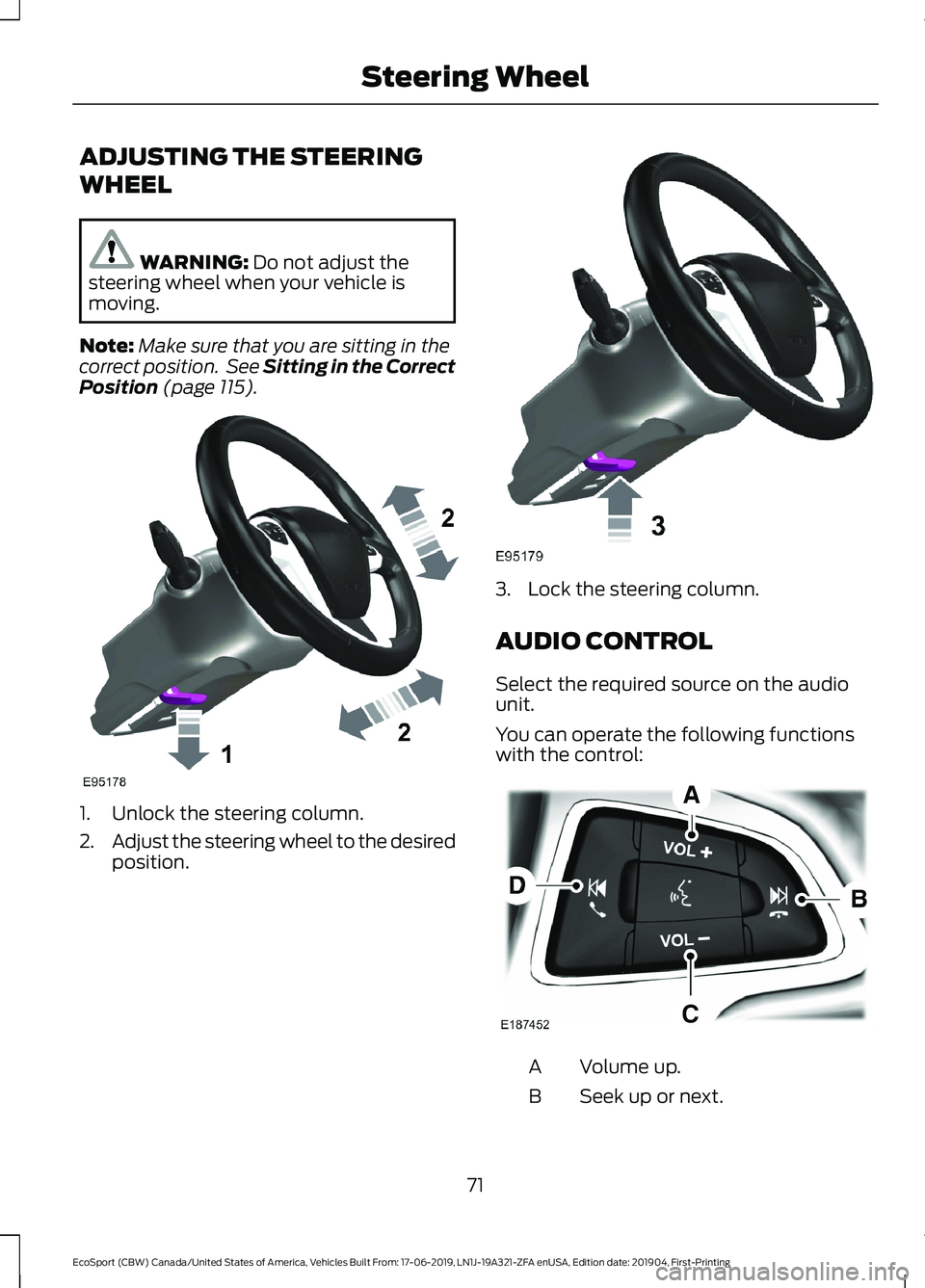
ADJUSTING THE STEERING
WHEEL
WARNING: Do not adjust thesteering wheel when your vehicle ismoving.
Note:Make sure that you are sitting in thecorrect position. See Sitting in the CorrectPosition (page 115).
1.Unlock the steering column.
2.Adjust the steering wheel to the desiredposition.
3.Lock the steering column.
AUDIO CONTROL
Select the required source on the audiounit.
You can operate the following functionswith the control:
Volume up.A
Seek up or next.B
71
EcoSport (CBW) Canada/United States of America, Vehicles Built From: 17-06-2019, LN1J-19A321-ZFA enUSA, Edition date: 201904, First-PrintingSteering Wheel