2020 DODGE JOURNEY park assist
[x] Cancel search: park assistPage 175 of 396

STARTING AND OPERATING 173
The vehicle is close to the obstacle when the warning display shows one flashing arc and sounds a continuous tone. The following chart shows the
warning alert operation when the system is detecting an obstacle:
PARKSENSE WARNING DISPLAY
The ParkSense Warning screen will only be
displayed if “Sound and Display” is selected from
the Uconnect System. Refer to “Uconnect
Settings” in “Multimedia” for further information.
The ParkSense Warning screen is located within
th
e instrument cluster display. It provides visual
warnings to indicate the distance between the
rear fascia/bumper and the detected obstacle.
Refer to “Instrument Cluster Display” in "Getting
To Know Your Instrument Panel” for further
information.
ENABLING AND DISABLING PARKSENSE
ParkSense can be enabled and disabled using
the Uconnect System. The available choices
are: Off, Sound Only, or Sound and Display.
Refer to “Uconnect Settings” in “Multimedia”
for further information.
When the ParkSense button is pushed to
di
sable the system, the instrument cluster
display will show the “PARK ASSIST SYSTEM
OFF” message for approximately five seconds.
Refer to “Instrument Cluster Display” in
“Getting To Know Your Instrument Panel” for
further information. When the gear selector is
moved to REVERSE and the system is disabled,
the instrument cluster display will show the
“PARK ASSIST SYSTEM OFF” message for as
long as the vehicle is in REVERSE.
SERVICE THE PARKSENSE REAR PARK
A
SSIST SYSTEM
During vehicle start up, when the ParkSense
Rear Park Assist system has detected a fault
condition, the instrument cluster display will
actuate a single chime, once per ignition cycle,
and it will display the “CLEAN PARK ASSIST”,
“SERVICE PARK ASSIST”, or “SERVICE PARK
ASSIST SYSTEM” message. Refer to
“Instrument Cluster Display” in “Getting To
Know Your Instrument Panel” for further
information. When the gear selector is moved to
REVERSE and the system has detected a fault
condition, the instrument cluster display will
show the "CLEAN PARK ASSIST", "SERVICE
WARNING ALERTS
Rear Distance
(inches/cm) Greater than
79
inches (200 cm) 79-39
inches
(2
00-100 cm) 39-25
inches
(1
00-65 cm) 25-12
inches
(6
5-30 cm) Less than 12
inches
(3
0 cm)
Audible Alert C
hime None Single 1/2-
S econd
Tone Slow
FastContinuous
Arcs None3 Solid (Continuous) 3
Slow Flashing2 Slow Flashing1 Slow Flashing
5
Page 176 of 396

174 STARTING AND OPERATING
(Continued)
PARK ASSIST", OR "SERVICE PARK ASSIST
SYSTEM" messages for as long as the vehicle is
in REVERSE. Under this condition, ParkSense
will not operate.
If “CLEAN PARK ASSIST” appears in the
in
strument cluster display, make sure the outer
surface and the underside of the rear fascia/
bumper are clean and clear of snow, ice, mud,
dirt or other obstruction. Then, cycle the
ignition. If the message continues to appear,
see an authorized dealer.
If “SERVICE PARK ASSIST” or “SERVICE PARK
A S
SIST SYSTEM” appears in the instrument
cluster display, see an authorized dealer.
CLEANING THE PARKSENSE SYSTEM
Clean the ParkSense sensors with water, car
wash soap and a soft cloth. Do not use rough or
hard cloths. Do not scratch or poke the sensors.
Otherwise, you could damage the sensors.
PARKSENSE SYSTEM USAGE
P
RECAUTIONS
NOTE:
Ensure that the rear bumper is free of snow, ice,
mud, dirt and debris to keep the ParkSense
system operating properly.
Jackhammers, large trucks, and other vibrations
could affect the performance of ParkSense.
When you turn ParkSense off, the instrument
cluster display will read “PARK ASSIST
SYSTEM OFF.” Furthermore, once you turn
ParkSense off, it remains off until you turn it
on again, even if you cycle the ignition key.
When you move the gear selector to the
REVERSE position and ParkSense is turned
off, the instrument cluster display will show
the “PARK ASSIST SYSTEM OFF” message for
as long as the vehicle is in REVERSE.
Clean the ParkSense sensors regularly,
taking care not to scratch or damage them.
The sensors must not be covered with ice,
snow, slush, mud, dirt or debris. Failure to do
so can result in the system not working prop -erly. The ParkSense system might not detect
a
n
obstacle behind the fascia/bumper, or it
could provide a false indication that an
obstacle is behind the fascia/bumper.
Ensure the ParkSense system is off if objects
such as bicycle carriers, trailer hitches, etc.,
are placed within 12 inches (30 cm) from the
r e
ar fascia/bumper. Failure to do so can
result in the system misinterpreting a close
object as a sensor problem, causing the
“SERVICE PARK ASSIST SYSTEM” message
to appear in the instrument cluster display.
WARNING!
Drivers must be careful when backing up
even when using ParkSense. Always check
carefully behind your vehicle, look behind
you, and be sure to check for pedestrians,
animals, other vehicles, obstructions, and
blind spots before backing up. You are
responsible for safety and must continue to
pay attention to your surroundings. Failure to
do so can result in serious injury or death.
Page 261 of 396

TECHNICAL SPECIFICATIONS 259
(Continued)
DO NOT USE E-85 IN NON-FLEX FUEL
V
EHICLES
Non-Flex Fuel Vehicles (FFV) are compatible
with gasoline containing up to 15% ethanol
(E-15). Use of gasoline with higher ethanol
content may void the New Vehicle Limited
Warranty.
If a Non-FFV vehicle is inadvertently fueled with
E-
85 fuel, the engine will have some or all of
these symptoms:
Operate in a lean mode.
OBD II Malfunction Indicator Light on.
Poor engine performance.
Poor cold start and cold driveability.
Increased risk for fuel system component
corrosion.
CNG AND LP FUEL SYSTEM
M
ODIFICATIONS
Modifications that allow the engine to run on
Compressed Natural Gas (CNG) or Liquid
Propane (LP) may result in damage to the
engine, emissions, and fuel system
components. Problems that result from running
CNG or LP are not the responsibility of the
manufacturer and may void or not be covered
under the New Vehicle Limited Warranty.
MMT IN GASOLINE
Methylcyclopentadienyl Manganese Tricarbonyl
(MMT) is a manganese-containing metallic
additive that is blended into some gasoline to
increase octane. Gasoline blended with MMT
provides no performance advantage beyond
gasoline of the same octane number without
MMT. Gasoline blended with MMT reduces
spark plug life and reduces emissions system
performance in some vehicles. The
manufacturer recommends that gasoline
without MMT be used in your vehicle. The MMT content of gasoline may not be indicated on the
gasoline pump; therefore, you should ask your
gasoline retailer whether the gasoline contains
MMT. MMT is prohibited in Federal and
California reformulated gasoline.
FUEL SYSTEM CAUTIONS
CAUTION!
Follow these guidelines to maintain your
vehicle’s performance:
The use of leaded gasoline is prohibited by
Federal law. Using leaded gasoline can
impair engine performance and damage
the emissions control system.
An out-of-tune engine or certain fuel or igni -
tion malfunctions can cause the catalytic
c o
nverter to overheat. If you notice a
pungent burning odor or some light smoke,
your engine may be out of tune or malfunc -
tioning and may require immediate service.
C o
ntact an authorized dealer for service
assistance.
8
Page 270 of 396
268 MULTIMEDIA
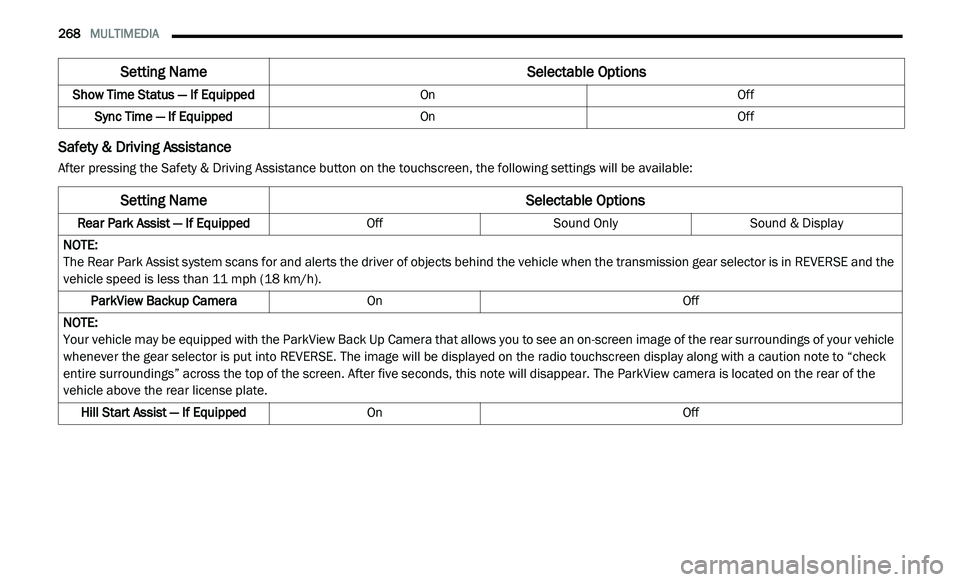
Safety & Driving Assistance
After pressing the Safety & Driving Assistance button on the touchscreen, the following settings will be available:Show Time Status — If Equipped
OnOff
Sync Time — If Equipped OnOff
Setting Name Selectable Options
Setting NameSelectable Options
Rear Park Assist — If EquippedOffSound Only Sound & Display
NOTE:
The Rear Park Assist system scans for and alerts the driver of objects behind the vehicle when the transmission gear selector is in REVERSE and the
v e
hicle speed is less than 11 mph (18 km/h).
ParkView Backup Camera On Off
NOTE:
Your vehicle may be equipped with the ParkView Back Up Camera that allows you to see an on-screen image of the rear surroundings of your vehicle
w h
enever the gear selector is put into REVERSE. The image will be displayed on the radio touchscreen display along with a caution note to “check
entire surroundings” across the top of the screen. After five seconds, this note will disappear. The ParkView camera is located on the rear of the
vehicle above the rear license plate.
Hill Start Assist — If Equipped On Off
Page 279 of 396
MULTIMEDIA 277
Clock
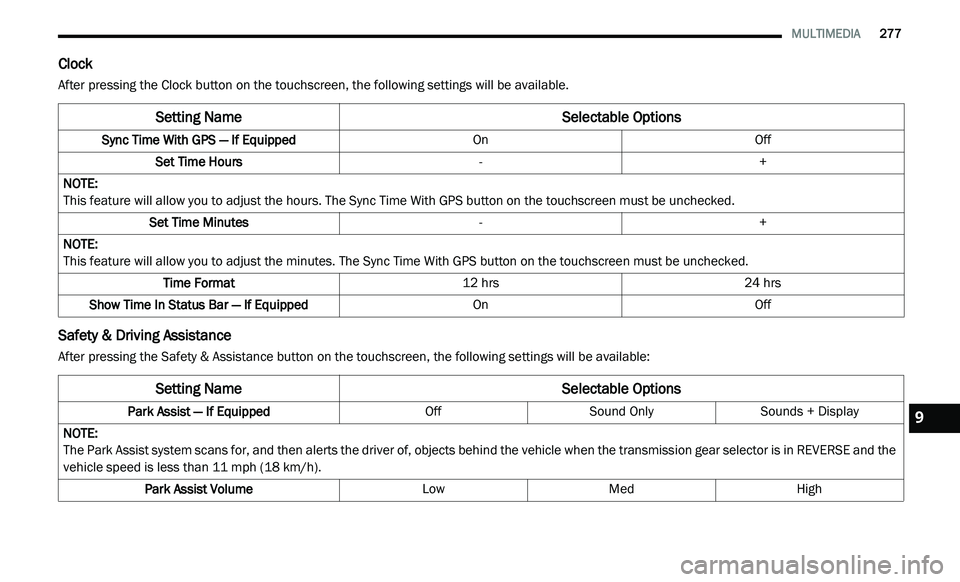
After pressing the Clock button on the touchscreen, the following settings will be available.
Safety & Driving Assistance
After pressing the Safety & Assistance button on the touchscreen, the following settings will be available:
Setting Name Selectable Options
Sync Time With GPS — If Equipped OnOff
Set Time Hours -+
NOTE:
This feature will allow you to adjust the hours. The Sync Time With GPS button on the touchscreen must be unchecked.
Set Time Minutes -+
NOTE:
This feature will allow you to adjust the minutes. The Sync Time With GPS button on the touchscreen must be unchecked.
Time Format 12 hrs24 hrs
Show Time In Status Bar — If Equipped OnOff
Setting NameSelectable Options
Park Assist — If Equipped OffSound Only Sounds + Display
NOTE:
The Park Assist system scans for, and then alerts the driver of, objects behind the vehicle when the transmission gear selector is in REVERSE and the
v e
hicle speed is less than 11 mph (18 km/h).
Park Assist Volume LowMed High
9
Page 280 of 396
278 MULTIMEDIA
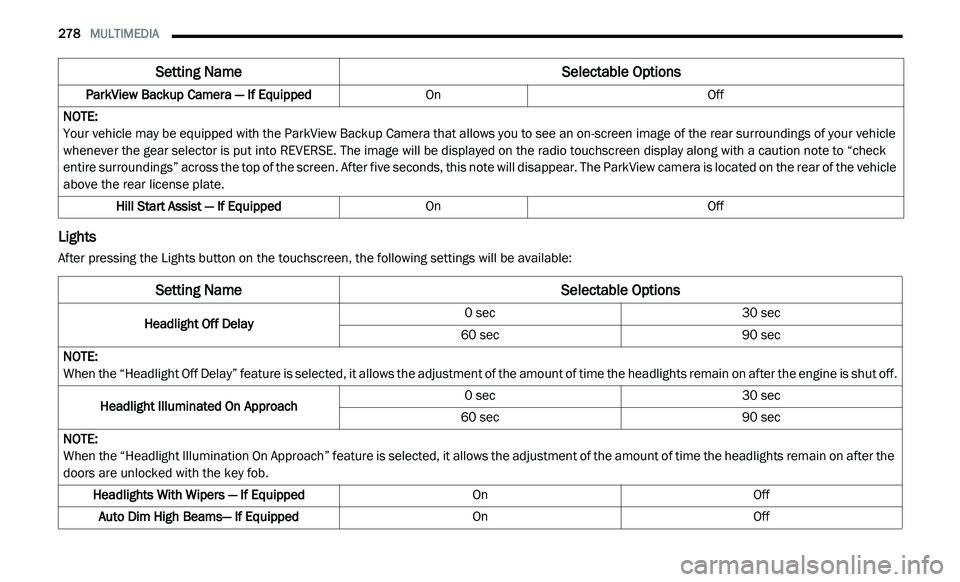
Lights
After pressing the Lights button on the touchscreen, the following settings will be available:ParkView Backup Camera — If Equipped
OnOff
NOTE:
Your vehicle may be equipped with the ParkView Backup Camera that allows you to see an on-screen image of the rear surroundings of your vehicle
w h
enever the gear selector is put into REVERSE. The image will be displayed on the radio touchscreen display along with a caution note to “check
entire surroundings” across the top of the screen. After five seconds, this note will disappear. The ParkView camera is located on the rear of the vehicle
above the rear license plate.
Hill Start Assist — If Equipped OnOff
Setting Name Selectable Options
Setting NameSelectable Options
Headlight Off Delay0 sec
30 sec
60 sec 90 sec
NOTE:
When the “Headlight Off Delay” feature is selected, it allows the adjustment of the amount of time the headlights remain on after the engine is shut off.
Headlight Illuminated On Approach 0 sec
30 sec
60 sec 90 sec
NOTE:
When the “Headlight Illumination On Approach” feature is selected, it allows the adjustment of the amount of time the headlights remain on after the
d o
ors are unlocked with the key fob.
Headlights With Wipers — If Equipped OnOff
Auto Dim High Beams— If Equipped OnOff
Page 298 of 396

296 MULTIMEDIA
For each feature explanation in this section, only
the compound command form of the voice
command is given. You can also break the
commands into parts and say each part of the
command when you are asked for it. For
example, you can use the compound command
form voice command “Search for John Smith,” or
you can break the compound command form into
two voice commands: “Search Contact” and
when asked “John Smith.” Please remember, the
Uconnect Phone works best when you talk in a
normal conversational tone, as if speaking to
someone sitting a few feet/meters away from
you.
Natural Speech
Your Uconnect Phone Voice system uses a
Na
tural Language Voice Recognition (VR)
engine.
Natural speech allows the user to speak
c o
mmands in phrases or complete sentences.
The system filters out certain non-word
utterances and sounds such as “ah” and “eh”.
The system handles fill-in words such as “I would
like to.”
The system handles multiple inputs in the same
p
h
rase or sentence such as “make a phone
call” and “to Kelly Smith.” For multiple inputs in
the same phrase or sentence, the system
identifies the topic or context and provides the
associated follow-up prompt such as “Who do
you want to call?” in the case where a phone
call was requested but the specific name was
not recognized.
The system utilizes continuous dialog; when the
s y
stem requires more information from the user
it will ask a question to which the user can
respond without pushing the Voice Command
button on your steering wheel.
Help Command
If you need assistance at any prompt, or if you
w a
nt to know your options at any prompt, say
“Help” following the beep.
To activate the Uconnect Phone from idle,
s i
mply push the Phone button (if active) on
your steering wheel and say a command or say
“ h
elp”. All Uconnect Phone sessions begin with
a push of the VR button or the Phone button
(if active) on the radio control head. Cancel Command
At any prompt, after the beep, you can say
“
C
ancel” and you will be returned to the main
menu.
You can also push the Voice Recognition (VR)
b u
tton or Phone button (if active) on your
steering wheel when the system is listening for
a
command and be returned to the main or
previous menu.
Pair (Link) Uconnect Phone To A Mobile Phone
To begin using your Uconnect Phone, you must
p a
ir your compatible Bluetooth® enabled
mobile phone.
To complete the pairing process, you will need
t o
reference your mobile phone Owner's
Manual. The Uconnect website may also
provide detailed instructions for pairing.
NOTE:
You must have Bluetooth® enabled on your
phone to complete this procedure.
The vehicle must be in PARK.
Page 387 of 396

385
Brake System......................................232, 256Fluid Check.....................................232, 264Master Cylinder.........................................232Parking......................................................160Warning Light............................................100Brake, Parking...............................................160Brake/Transmission Interlock.......................162Brakes...........................................................256Brightness, Interior Lights................................43Bulb Replacement.........................................189Bulbs, Light..........................................156, 189
C
Camera, Rear................................................175Capacities, Fluid............................................261Caps, FillerOil (Engine)......................................220, 223Power Steering..........................................168Radiator (Coolant Pressure)......................230Car Washes...................................................253Carbon Monoxide Warning..................154, 260CargoVehicle Loading..................................78, 177Cargo Area Cover.............................................78Cargo Compartment........................................78Luggage Carrier...........................................91Cargo Load Floor.............................................78Cargo Management System............................78Rollaway Tonneau Cover.............................78
Tri-Fold Load Floor.......................................78
Cargo Tie-Downs..............................................79Cellular Phone..............................................376Certification Label.........................................177Chains, Tire...................................................250Changing A Flat Tire......................................234Chart, Tire Sizing...........................................236Check Engine Light (Malfunction Indicator
Light).............................................................108Checking Your Vehicle For Safety.................154Checks, Safety..............................................154Child Restraint..............................................139Child Restraints Booster Seats...........................................142Child Seat Installation..............................151How To Stow An unused ALR Seat Belt....148Infant And Child Restraints.......................141Locating The LATCH Anchorages..............146Lower Anchors And Tethers For Children..144Older Children And Child Restraints.........141Seating Positions......................................143Using The Top Tether Anchorage..............153Clean Air Gasoline.........................................258CleaningWheels.....................................................249Climate Control................................................47Automatic....................................................58Manual........................................................47Rear......................................................53, 64Coin Holder......................................................85
Cold Weather Operation...............................159
Compact Spare Tire......................................247ConsoleFloor............................................................85Contract, Service...........................................381Cooling Pressure Cap (Radiator Cap)............230Cooling System.............................................228Adding Coolant (Antifreeze)......................229Coolant Level...................................228, 231Cooling Capacity.......................................261Disposal Of Used Coolant.........................230Drain, Flush, And Refill.............................229Inspection.................................................231Points To Remember................................231Pressure Cap............................................230Selection Of Coolant
(Antifreeze).........................229, 261, 262Corrosion Protection.....................................252Cruise Light...................................................106Cupholders.............................................86, 255Customer Assistance....................................380Customer Programmable Features...............266Cybersecurity................................................265
D
Daytime Brightness, Interior Lights..................43Daytime Running Lights...................................41Dealer Service...............................................222Defroster, Windshield...................................155Delay (Intermittent) Wipers..............................45
Diagnostic System, Onboard.........................107
11