2020 DODGE DURANGO door lock
[x] Cancel search: door lockPage 371 of 464

MULTIMEDIA369
Mirrors & Wipers — If Equipped
After pressing the Mirrors & Wipers button on the touchscreen, the following settings will be available:
Lights
After pressing the Lights button on the touchscreen, the following settings will be available:
Setting Name Selectable Options
Rain Sensing Auto WipersOnOff
Tilt Side Mirrors in Reverse OnOff
Headlights with Wipers OnOff
Setting Name Selectable Options
Headlight Off Delay0 sec
30 sec
60 sec 90 sec
NOTE:
When the “Headlight Off Delay” feature is selected, it allows the adjustment of the amount of time the headlights remain on after the engine is shut off. Headlights With Wipers — If Equipped OnOff
Headlight Illumination On Approach 0 sec
30 sec
60 sec 90 sec
NOTE:
When this feature is selected, it allows the adjustment of the amount of time the headlights remain on after the doors are unlocked with the key fob.
9
20_WD_OM_EN_USC_t.book Page 369
Page 372 of 464

370MULTIMEDIA
Doors & Locks
After pressing the Doors & Locks button on the touchscreen, the following settings will be available:Auto High Beam — If Equipped
OnOff
NOTE:
When the “Auto High Beam” is selected, the high beam headlights will activate/deactivate automatically under certain conditions. Daytime Running Lights — If Equipped OnOff
NOTE:
When the “Daytime Running Lights” feature is selected, the daytime running lights can be turned On or Off. The feature is only available if allowed by
law in the country of the vehicle purchase. Flash Lights With Lock OnOff
Setting Name Selectable Options
Setting NameSelectable Options
Auto Unlock On ExitOn Off
NOTE:
When the “Auto Unlock On Exit” feature is selected, all doors unlock when the vehicle is stopped and the transmission is in the PARK or NEUTRAL
position and the driver's door is opened. Flash Lights With Lock On Off
Horn With Lock Off1st Press 2nd Press
20_WD_OM_EN_USC_t.book Page 370
Page 373 of 464

MULTIMEDIA371
Horn With Remote Start — If
Equipped On
Off
Passive Entry On Off
Remote Door Unlock/Door Lock Driver All
NOTE:
When “Driver” is programmed, only the driver's door will unlock on the first push of the key fob unlock button. You must push the key fob unlock button
twice to unlock the passengers’ doors. When “All” is programmed, all of the doors unlock on the first press of the key fob unlock button. If “All” is
programmed, all doors unlock no matter which Passive Entry equipped door handle is grasped. If “Driver” is programmed, only the driver’s door
unlocks when the driver’s door is grasped. Touching the handle more than once only results in the driver’s door opening once. If the driver door is
opened, the interior door lock/unlock switch can be used to unlock all doors (or use key fob). Personal Settings Linked To Key Fob — If Equipped On
Off
NOTE:
The “Personal Settings Linked To Key Fob” feature provides automatic recall of all settings stored to a memory location (driver’s seat, exterior mirrors,
steering column position, and radio station presets) to enhance driver mobility when entering and exiting the vehicle. Power Liftgate Alert — If Equipped On Off
NOTE:
The “Power Liftgate Alert” feature plays an alert when the power liftgate is raising or lowering.
Setting Name Selectable Options
9
20_WD_OM_EN_USC_t.book Page 371
Page 379 of 464
MULTIMEDIA377
CUSTOMER PROGRAMMABLE FEATURES
— U
CONNECT 4C/4C NAV SETTINGS
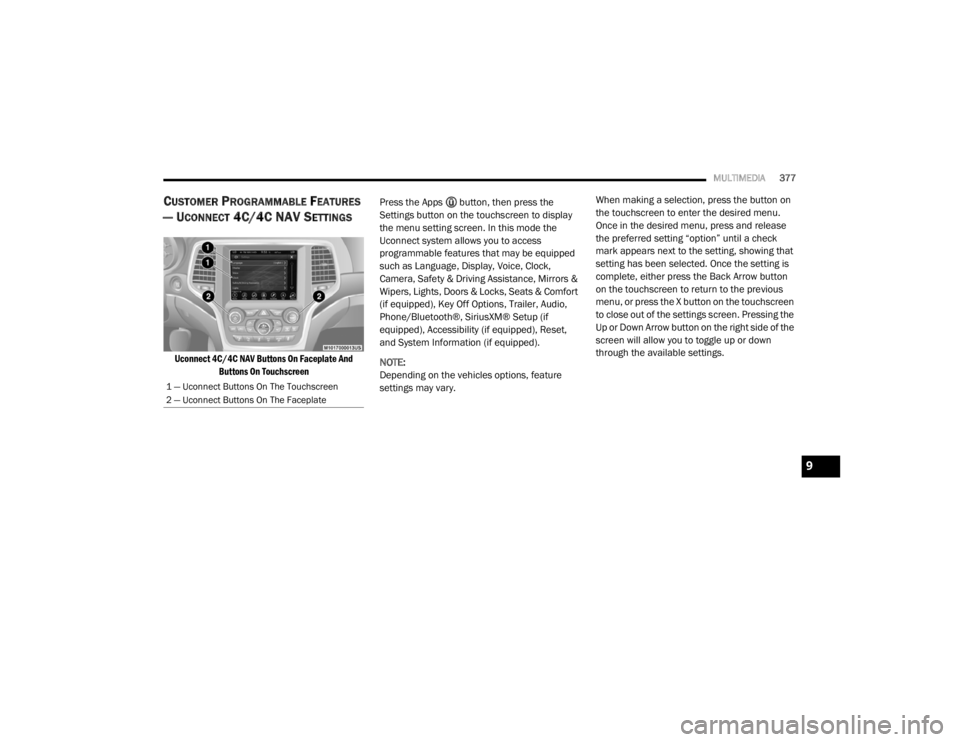
Uconnect 4C/4C NAV Buttons On Faceplate And
Buttons On Touchscreen
Press the Apps button, then press the
Settings button on the touchscreen to display
the menu setting screen. In this mode the
Uconnect system allows you to access
programmable features that may be equipped
such as Language, Display, Voice, Clock,
Camera, Safety & Driving Assistance, Mirrors &
Wipers, Lights, Doors & Locks, Seats & Comfort
(if equipped), Key Off Options, Trailer, Audio,
Phone/Bluetooth®, SiriusXM® Setup (if
equipped), Accessibility (if equipped), Reset,
and System Information (if equipped).
NOTE:
Depending on the vehicles options, feature
settings may vary. When making a selection, press the button on
the touchscreen to enter the desired menu.
Once in the desired menu, press and release
the preferred setting “option” until a check
mark appears next to the setting, showing that
setting has been selected. Once the setting is
complete, either press the Back Arrow button
on the touchscreen to return to the previous
menu, or press the X button on the touchscreen
to close out of the settings screen. Pressing the
Up or Down Arrow button on the right side of the
screen will allow you to toggle up or down
through the available settings.
1 — Uconnect Buttons On The Touchscreen
2 — Uconnect Buttons On The Faceplate
9
20_WD_OM_EN_USC_t.book Page 377
Page 386 of 464

384MULTIMEDIA
Mirrors & Wipers
After pressing the Mirrors & Wipers button on the touchscreen, the following settings will be available:
Lights
After pressing the Lights button on the touchscreen, the following settings will be available:
Setting Name Selectable Options
Tilt Side Mirrors in ReverseOnOff
Rain Sensing Auto Wipers OnOff
Headlights with Wipers OnOff
Setting Name Selectable Options
Headlight Off Delay0 sec
30 sec
60 sec 90 sec
NOTE:
When the “Headlight Off Delay” feature is selected, it allows the adjustment of the amount of time the headlights remain on after the engine is shut off.
Headlight Illuminated On Approach 0 sec
30 sec
60 sec 90 sec
NOTE:
When the “Headlight Illumination On Approach” feature is selected, it allows the adjustment of the amount of time the headlights remain on after the
doors are unlocked with the key fob. Auto Dim High Beams— If Equipped OnOff
NOTE:
When the “Auto Dim High Beams” feature is selected, the high beam headlights activates/deactivates automatically under certain conditions.
20_WD_OM_EN_USC_t.book Page 384
Page 387 of 464

MULTIMEDIA385
Doors & Locks
After pressing the Doors & Locks button on the touchscreen, the following settings will be available:Daytime Running Lights — If Equipped
OnOff
NOTE:
When the “Daytime Running Lights” feature is selected, the daytime running lights can be turned On or Off. The feature is only available if allowed by
law in the country of the vehicle purchase. Flash Lights With Lock OnOff
Setting Name Selectable Options
Setting NameSelectable Options
Auto Door LocksOn Off
NOTE:
When the “Auto Door Locks” feature is selected, all doors will lock automatically when the vehicle reaches a speed of 12 mph (20 km/h). Auto Unlock On Exit On Off
NOTE:
When this feature is selected, all doors unlock when the vehicle is stopped, the transmission is in the PARK or NEUTRAL position and the driver's door
is opened. Flash Lights With Lock On Off
Sound Horn With Lock Off1st Press 2nd Press
Sound Horn With Remote Start On Off
9
20_WD_OM_EN_USC_t.book Page 385
Page 388 of 464

386MULTIMEDIA
1st Press Of Key Fob Unlocks Driver Door All Doors
NOTE:
When "Driver Door" is programmed with 1st Press Of Key Fob Unlocks, only the driver's door will unlock with the first press of the key fob unlock button.
You must push the key fob unlock button twice to unlock the passengers’ doors. When "All Doors" is programmed for 1st Press Of Key Fob Unlocks,
all doors will unlock on the first push of the key fob unlock button. If the vehicle is programmed 1st Press Of Key Fob Unlocks “All Doors”, all doors
will unlock no matter which Passive Entry equipped door handle is grasped. If 1st Press Of Key Fob Unlocks “Driver Door” is programmed, only the
driver’s door will unlock when the driver’s door is grasped. With Passive Entry, if 1st Press Of Key Fob Unlocks “Driver Door” is programmed, touching
the handle more than once will result in only the driver’s door opening. If “Driver Door” is selected, once the driver door is opened, the interior door
lock/unlock switch can be used to unlock all doors (or use the key fob). Passive Entry — If Equipped On Off
NOTE:
This feature allows you to lock and unlock the vehicle’s door(s) without having to push the key fob lock or unlock buttons.
Personal Settings Linked to Key Fob — If Equipped On
Off
NOTE:
This feature provides automatic recall of all settings stored to a memory location (driver’s seat, exterior mirrors, steering column position, and radio
station presets) to enhance driver mobility when entering and exiting the vehicle. Power Liftgate Alert — If Equipped On Off
Setting Name Selectable Options
20_WD_OM_EN_USC_t.book Page 386
Page 452 of 464

450
Radiator Cap
............................................. 323Selection Of Coolant (Antifreeze)......322, 355, 356, 357, 359Corrosion Protection...................................... 346Cruise Control (Speed Control)............ 205, 208Cruise Light......................................... 117, 119Cupholders...................................................... 86Customer Assistance..................................... 444Cybersecurity................................................. 361
D
Daytime Running Lights................................... 51Dealer Service............................................... 308Defroster, Windshield.................................... 181Diagnostic System, Onboard......................... 120Disabled Vehicle Towing................................ 290DisposalAntifreeze (Engine Coolant)....................... 323Disturb........................................................... 420Do Not Disturb............................................... 441Door Ajar.............................................. 111, 112Door Ajar Light..................................... 111, 112Door Locks............................................... 24, 29Child-Protection Door Lock — Rear Doors.... 29Door Opener, Garage....................................... 78Doors............................................................... 24Driver’s Seat Back Tilt..................................... 32Driving........................................................... 257DVD Player (Video Entertainment
System)......................................................... 425
E
Economy (Fuel) Mode................................... 192Electric Brake Control System....................... 123Anti-Lock Brake System............................ 122Electronic Roll Mitigation................. 124, 130Electric Remote Mirrors................................... 49Electrical Outlet, Auxiliary (Power Outlet)......... 87Electronic Speed Control (Cruise Control)..... 206Electronic Stability Control (ESC).................. 125Electronic Throttle Control Warning Light...... 111Electronically Shifted Transfer Case............. 199Emergency Gas Can Refueling...................... 286Emergency, In Case OfFreeing Vehicle When Stuck..................... 289Hazard Warning Flasher........................... 261Jacking............................................ 275, 327Jump Starting........................................... 283Emission Control System Maintenance........ 121Engine.................................................. 304, 306Air Cleaner................................................ 311Block Heater............................................. 188Break-In Recommendations............ 188, 189Compartment......................... 304, 305, 306Compartment Identification............. 304, 305Coolant (Antifreeze).................................. 359Cooling..................................................... 321Exhaust Gas Caution....................... 180, 354Fails To Start............................................ 187Flooded, Starting...................................... 187
Fuel Requirements.......................... 351, 355Jump Starting........................................... 283Oil........................ 308, 309, 355, 356, 359Oil Filler Cap........................... 304, 309, 310Oil Filter.................................................... 311Oil Selection.................. 309, 355, 356, 357Oil Synthetic.............................................. 311Overheating.............................................. 287Starting............................................ 184, 185Engine Oil Viscosity.............................. 309, 310Engine Oil Viscosity Chart.............................. 310Enhanced Accident Response Feature161, 293Ethanol.......................................................... 353Exhaust Gas Cautions.......................... 180, 354Exhaust System................................... 180, 320Exterior Lights............................... 50, 183, 266
F
FiltersAir Cleaner
................................................ 311Air Conditioning........................ 70, 311, 314Engine Oil........................................ 311, 359Engine Oil Disposal................................... 311Flashers........................................................ 261Hazard Warning........................................ 261Turn Signals............................ 118, 183, 269Flash-To-Pass...................................................52Flooded Engine Starting................................ 187
20_WD_OM_EN_USC_t.book Page 450