2020 CITROEN C4 lock
[x] Cancel search: lockPage 93 of 260

91
Driving
6Automatic operation
Automatic release
First ensure that the engine is running and that
the driver's door is closed.
The electric parking brake gradually releases
automatically as the vehicle moves off.
With a manual gearbox
►
Fully depress the clutch pedal and engage
first gear or reverse.
►
Depress the accelerator pedal and release
the clutch pedal.
W
ith an automatic gearbox
►
Depress the brake pedal.
►
Select mode
D, M or R.
►
Release the brake pedal and depress the
accelerator pedal.
W
ith a drive selector
►
Depress the brake pedal.
►
Select mode
D, B or R.
►
Release the brake pedal and depress the
accelerator pedal.
With an automatic gearbox or drive
selector, if the brake does not release
automatically, check that the front doors are
properly closed.
When stationary with the engine running,
do not depress the accelerator pedal
unnecessarily. Risk of parking brake release.
Automatic application
With the vehicle stationary, the parking brake
is applied automatically when the engine is
switched off.
It is not applied automatically if the
engine stalls or enters STOP mode with
Stop & Start.
In automatic mode, the parking brake
can be manually applied or released at
any time using the control.
Special cases
Immobilising the vehicle with the
engine running
To immobilise the vehicle with the engine
running, briefly pull the control.
Parking the vehicle with the brake
released
In very cold conditions (ice), applying the
parking brake is not recommended.
To immobilise the vehicle, engage a gear or
place the chocks against one of the wheels.
With an automatic gearbox or drive
selector, mode P is automatically
selected when the ignition is switched off. The
wheels are blocked.
For more information on Free-wheeling, refer
to the corresponding section.
With an automatic gearbox or drive
selector, while mode N is selected,
opening the driver’s door triggers an audible
signal. It stops when the driver's door closes
again.
Deactivating automatic
operation
In some situations, for example when it is
extremely cold or when towing (e.g. caravan,
breakdown), it may be necessary to deactivate
automatic operation of the system.
►
Start the engine.
►
Use the control to apply the parking brake, if
it is released.
►
T
ake your foot fully off the brake pedal.
►
Keep the control pushed in the release
direction for 10 to a maximum of
15 seconds.
►
Release the control.
►
Depress and hold the brake pedal.
►
Pull the control in the application direction for
2
seconds.
This indicator lamp on the instrument panel comes on to confirm deactivation of
the automatic functions.
►
Release the control and the brake pedal.
Page 94 of 260

92
Driving
From this point onwards, only the manual
functions, using the control, allow the parking
brake to be applied and released.
►
Follow this procedure again to reactivate
automatic operation (confirmed by the indicator
lamp on the instrument panel going out).
Emergency braking
If depressing the brake pedal fails to provide
effective braking or in exceptional circumstances
(e.g.
driver unwell, assisted driving), the vehicle
can be braked by sustained pulling on the
electric parking brake control. Braking continues
for as long as the control is kept pulled, and
ceases when the control is released.
The ABS and DSC systems stabilise the vehicle
during emergency braking.
If emergency braking malfunctions, the message
"Parking brake fault" will be displayed on the
instrument panel.
If the ABS and DSC systems
malfunction, indicated by lighting
one or both warning lamps on the instrument
panel, the vehicle’s stability is no longer ensured.
►
In this case, ensure the vehicle's stability by
successive and repeated "pull-release" actions
on the electric parking brake control until the
vehicle comes to a complete stop.
6-speed manual gearbox
Engaging 5th or 6th gear
► Move the gear selector fully to the right to
engage 5th or 6th gear.
Failure to follow this instruction could
cause permanent damage to the gearbox
(inadvertent engagement of 3
rd or 4th gear).
Engaging reverse gear
► Raise the ring under the knob and move the
gear selector to the left, then forwards.
Only engage reverse gear when the
vehicle is stationary with the engine at
idle.
As a safety precaution and to facilitate starting the engine:
–
Always select neutral.
–
Press the clutch pedal.
Automatic gearbox
Automatic 8-speed gearbox with push selector. It also offers a manual mode with gear changes
via control paddles located
behind the steering
wheel.
Push selector
P. Auto Park
Press this button to switch to Parking mode.
For parking the vehicle: the front wheels are
blocked.
R. Reverse
N. Neutral
To free-wheel and move the vehicle, with the
ignition off.
For more information on Free-wheeling, refer
to the corresponding section.
D. Driving in automatic mode
The gearbox manages gear changes
according to the style of driving, the road
profile and the vehicle load.
Page 96 of 260

94
Driving
Steering mounted controls allow the driver to
temporarily select a gear, if the vehicle speed
and engine speed conditions permit.
Special aspects of manual mode
The gearbox only changes from one gear to
another if the vehicle speed and engine speed
conditions permit.
Starting the vehicle
► Fully depress the brake pedal.
► Start the engine.
►
With your foot on the brake pedal, push once
or twice backwards to select automatic mode D
,
or forwards to shift into reverse gear R.
►
Release the brake pedal.
►
Accelerate gradually to automatically release
the electric parking brake.
The vehicle moves off immediately
.
Automatic gearbox
Never try to start the engine by pushing
the vehicle.
Switching the vehicle off
Regardless of the current gearbox mode, mode
P is immediately engaged automatically when
the ignition is switched off.
However, in mode N, mode P will be engaged
after a delay of 5 seconds (time to enable free-
wheeling mode). Check that mode
P has been engaged and
that the electric parking brake was applied
automatically; if not, apply it manually.
The corresponding indicator lamps on the gear selector and the electric parking
brake control must be on, as well as the
indicator
lamps on the instrument panel.
Gearbox malfunction
This warning lamp comes on, accompanied by an audible signal and
the display of a message.
Visit a CITROËN dealer or a qualified workshop.
Do not drive faster than 62
mph (100 km/h),
keeping to the speed limit.
Switching of the gearbox to back-up mode
Mode D locks in third gear.
The paddles on the steering wheel do not work
and mode M is no longer accessible.
You may feel a significant jolt on engaging
reverse gear. This will not damage the gearbox.
Selector malfunction
Minor malfunction
This warning lamp comes on, accompanied by the display of a message
and an audible signal.
Drive carefully.
Visit a CITROËN dealer or a qualified workshop.
In some cases, the selector indicator lamps may
no longer come on, but the gearbox state is still
displayed on the instrument panel.
Major malfunction
This warning lamp comes on, accompanied by the display of a
message.
You must stop the vehicle.
Stop as soon as it is safe to do so and
switch off the ignition.
Contact a CITROËN dealer or a qualified
workshop.
Drive selector (Electric)
The drive selector is a pulse selector with a
regenerative braking function.
The drive selector provides traction control
based on the driving style, the road profile and
the vehicle load.
With regenerative braking activated, it also
manages engine braking when the accelerator
pedal is released.
Page 97 of 260

95
Driving
6P.Park
Button for parking the vehicle: the front
wheels are locked (the button lights up to
indicate that it is activated).
R. Reverse
To engage reverse gear, with your foot on the
brake pedal.
N. Neutral
To move the vehicle with the ignition off and
so allow it to free-wheel.
For more information on Free-wheeling, refer
to the corresponding section.
D. Drive (automatic forward gear)
B. Brake (regenerative braking)
Button for changing to Drive/automatic
forward gear
mode with regenerative braking
function (the button lights up to indicate that it
is activated).
Information displayed on
the instrument panel
When the ignition is switched on, the drive
selector status is displayed on the instrument
panel:
P : Park.
R : Reverse.
N : Neutral.
D : Drive (automatic forward gear).
B : Brake (automatic forward gear with
regenerative braking function activated).
Operation
► In mode N, with your foot on the brake pedal,
push without passing the point of resistance: •
Forwards, mode
R is selected.
•
Backwards, mode D
is selected.
Release the selector fully after each push; it
will then return to its initial position.
Special cases
To avoid mode N (quick change from D to R and
back again):
►
In mode
R, push backwards past the point of
resistance, mode D is selected.
►
In mode
D, push forwards past the point of
resistance,
mode R is selected.
►
T
o return to mode N, push without passing
the point of resistance.
Regenerative braking
With the Brake function and when
decelerating
The Brake function emulates engine braking,
slowing the vehicle with no need to depress the
brake pedal. The vehicle slows more quickly
when the driver releases the accelerator pedal.
The energy recovered when the accelerator
pedal is released is then used to partially
recharge the traction battery, thereby increasing
the vehicle's driving range.
The resulting deceleration of the vehicle does not cause the brake lamps to come
on.
► From mode D, press button B to activate/
deactivate the function (the button lights up when
the function is activated).
B is displayed on the instrument panel.
The system status is not saved when the ignition
is switched off.
In some situations (e.g. battery full,
extreme temperatures), the amount of
regenerative braking may be temporarily
limited, resulting in less deceleration.
The driver must remain alert to traffic
conditions and must always be ready to use
the brake pedal.
With the brake pedal
When the brake pedal is depressed, the
intelligent braking system automatically recovers
some of the energy and uses it to recharge the
traction battery.
This energy recovery also reduces use of the
brake pads, thereby limiting their wear.
The driver may experience a different sensation when depressing the brake
pedal compared to a vehicle without
regenerative braking.
Driving modes
The driving modes available depend on the engine and equipment of the vehicle.
Page 105 of 260

103
Driving
6– Signs indicating a shared traffic zone detected
by the camera.
Sign detected Suggested speed (calculated)
Entry into a shared traffic zoneExample:
Without CITROËN
Connect Nav
10 mph or 20
km/h
(depending on
the units on the
instrument panel) With CITROËN Connect Nav
Display of the speed
in force in the country you are driving in.
–
Some supplementary traffic signs detected by
the camera.
Supplementary
traffic sign detected Display of
the speed
associated with
the supplementary traffic sign
Speed limit when raining
Examples:
If the wiper control stalk is in the
"intermittent wipe"
or "automatic wipe" position (in order
to activate the rain sensor):
68 mph (110
km/h)
(for example)
Speed limit when towing
If an approved towing device is fixed to the vehicle:
56 mph (90
km/h)
(for example)
Speed limit
applicable over a certain distance Example:
43 mph (70 km/h)
(for example)
Supplementary
traffic sign detected Display of
the speed
associated with
the supplementary traffic sign
Speed limit for
vehicles with a gross vehicle
weight or gross
train weight less than 3.5 tonnes
56 mph (90 km/h)
(for example)
Speed limit in case of snow
Example:
If the outside
temperature is below 3°C:
19 mph (30
km/h)
(for example)
with a "snowflake" symbol
Speed limit at
certain times of the day
Example:
19 mph (30 km/h)
(for example)
with a "clock" symbol
Navigation mapping should be regularly
updated in order to receive accurate
speed limit information from the system.
Page 140 of 260
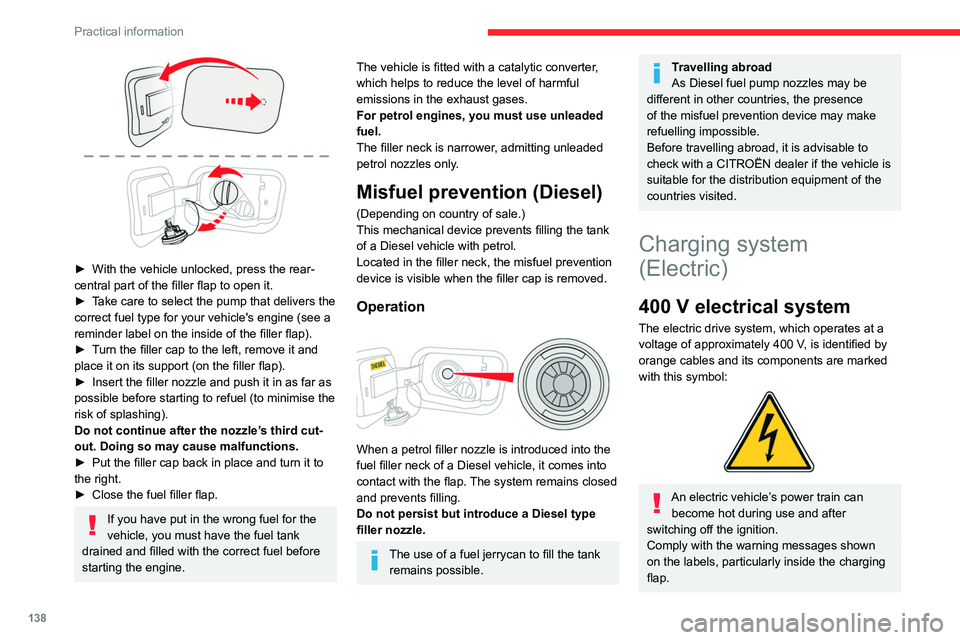
138
Practical information
► With the vehicle unlocked, press the rear-
central part of the filler flap to open it.
►
T
ake care to select the pump that delivers the
correct fuel type for your vehicle's engine (see a
reminder label on the inside of the filler flap).
►
T
urn the filler cap to the left, remove it and
place it on its support (on the filler
flap).
►
Insert the filler nozzle and push it in as far as
possible before starting to refuel (to minimise the
risk of splashing).
Do not continue after the nozzle’
s third cut-
out. Doing so may cause malfunctions.
►
Put the filler cap back in place and turn it to
the right.
►
Close the fuel filler flap.
If you have put in the wrong fuel for the
vehicle, you must have the fuel tank
drained and filled with the correct fuel before
starting the engine.
The vehicle is fitted with a catalytic converter,
which helps to reduce the level of harmful
emissions in the exhaust gases.
For petrol engines, you must use unleaded
fuel.
The filler neck is narrower, admitting unleaded
petrol nozzles only.
Misfuel prevention (Diesel)
(Depending on country of sale.)
This mechanical device prevents filling the tank
of a Diesel vehicle with petrol.
Located in the filler neck, the misfuel prevention
device is visible when the filler cap is removed.
Operation
When a petrol filler nozzle is introduced into the
fuel filler neck of a Diesel vehicle, it comes into
contact with the flap. The system remains closed
and prevents filling.
Do not persist but introduce a Diesel type
filler nozzle.
The use of a fuel jerrycan to fill the tank remains possible.
Travelling abroad
As Diesel fuel pump nozzles may be
different in other countries, the presence
of the misfuel prevention device may make
refuelling impossible.
Before travelling abroad, it is advisable to
check with a CITROËN dealer if the vehicle is
suitable for the distribution equipment of the
countries visited.
Charging system
(Electric)
400 V electrical system
The electric drive system, which operates at a
voltage of approximately 400 V, is identified by
orange cables and its components are marked
with this symbol:
An electric vehicle’s power train can become hot during use and after
switching off the ignition.
Comply with the warning messages shown
on the labels, particularly inside the charging
flap.
Page 142 of 260

140
Practical information
Traction battery
This battery stores the energy that powers
the electric motor and the thermal comfort
equipment in the passenger compartment. It is
discharged during use, and must therefore be
regularly recharged. There is no need to wait
for the traction battery to fall to its reserve level
before recharging.
The range of the battery may vary according
to the type of driving, the route, the use of
thermal comfort equipment and the ageing of its
components.
The lifespan of the traction battery depends on multiple factors, such as
climatic conditions, distance travelled and
how often it has been fast-charged.
To preserve the mileage of your vehicle and the durability of your traction battery,
CITROËN recommends that you:
–
Do not fully charge the battery of your
electric vehicle daily (charge the traction
battery below 80% as often as possible).
–
Do not completely discharge the battery
.
–
Do not store the vehicle for a long period
of non-use (more than 12
hours) when the
traction battery has a low or high charge level.
Prefer a charge level between 20 and 40%.
–
Limit the use of fast charging.
–
Do not expose the vehicle to temperatures
below -30°C and above +60°C for more than
24
hours.
– Avoid charging the vehicle at negative
temperatures (except if the vehicle ran more
than 20 minutes) or above +30°C.
–
Do not use the vehicle's traction battery as
a generator of energy
.
–
Do not use a generator to recharge your
vehicle's traction battery
.
In the event of damage to the traction
battery
It is strictly prohibited to work on the vehicle
yourself.
Do not touch liquids coming from the battery,
and in the event of skin contact with these
products, wash abundantly with water and
contact a doctor as soon as possible.
Contact a CITROËN dealer or a qualified
workshop to have the system checked.
Disposal of the traction battery
The traction battery is designed for the life of the
vehicle if the recommendations of CITROËN are
followed.
If it becomes necessary to replace the battery,
contact the CITROËN dealer for instructions on
its disposal. Improper disposal carries the risk of
severe burns, electric shock, and damage to the
environment.
In accordance with regulations, CITROËN
ensures a second life or recycling of this
component in collaboration with qualified
operators.
Charging connectors and
indicator lamps
1. Charging connectors
2. Deferred charging activation button
3. Nozzle locking indicator lamp
Fixed red: nozzle positioned correctly and
locked in the connector.
Flashing red: nozzle incorrectly positioned or
locking not possible.
4. Charging indicator lamp
Page 143 of 260

141
Practical information
7State of charging
indicator lampMeaning
Fixed white Welcome lighting on
opening the flap and
disconnecting the
charging cable.
Fixed blue Deferred charging.
Flashing green Charging.
Fixed green Charging complete.
The charging
indicator lamp goes
off after about 2
minutes as the
vehicle's functions go
into standby.
The indicator lamp
comes on again
when the vehicle is
unlocked with the
Keyless Entry and
Start system or when
a door is opened
to indicate that
the battery is fully
charged.State of charging
indicator lampMeaning
Fixed red Malfunction.
In case of impact, even light, against the
charging flap, do not use it.
Do not dismantle or modify the charging
connector - risk of electrocution and/or fire!
Contact a CITROËN dealer or a qualified
workshop.
Charging cables, sockets
and chargers
The charging cable supplied with the vehicle
(depending on version) is compatible with the
electrical systems in the country of sale. When
travelling abroad, check the compatibility of local
electrical systems with the charging cable.
A full range of charging cables is available from
your dealer.
Contact a CITROËN dealer or a qualified
workshop for more information and to obtain
suitable charging cables.
Identification labels on charging
sockets/connectors
Identification labels are affixed to the vehicle,
charging cable and charger to inform the user
about which device needs to be used.
The meaning of each identification label is as
follows:
Identification label LocationConfigurationPower type/Voltage range
C
Charging connector (vehicle side) TYPE 2AC
< 480 Vrms