2020 CHEVROLET SILVERADO lane assist
[x] Cancel search: lane assistPage 5 of 495

Chevrolet Silverado Owner Manual (GMNA-Localizing-U.S./Canada/Mexico-
13337620) - 2020 - CTC - 1/27/20
4 Introduction
R:Fuse Block Cover Lock
Location
+: Fuses
j:ISOFIX/LATCH System Child
Restraints
Q: Keep Fuse Block Covers
Properly Installed
|: Lane Change Alert
@:Lane Departure Warning
A:Lane Keep Assist
*: Malfunction Indicator Lamp
::Oil Pressure
X:Park Assist
~:Pedestrian Ahead Indicator
O:Power
7:Rear Cross Traffic Alert
I:Registered Technician
/:Remote Vehicle Start
>:Seat Belt Reminders
I: Side Blind Zone Alert
h:Stop/Start
7:Tire Pressure Monitor
d:Traction Control/StabiliTrak/
Electronic Stability Control (ESC)
a: Under Pressure
V:Vehicle Ahead Indicator
Page 7 of 495

Chevrolet Silverado Owner Manual (GMNA-Localizing-U.S./Canada/Mexico-
13337620) - 2020 - CTC - 1/27/20
6 Introduction
1. Tow/Haul Mode (On SomeModels). See Driver Mode
Control 0234.
Automatic Transfer Case
Control (If Equipped). See
Four-Wheel Drive 0223.
Driver Mode Control 0234 (If
Equipped).
2. Air Vents 0179.
3. Turn Signal Lever. See Turn
and Lane-Change Signals
0 167.
Windshield Wiper/Washer
0 117.
4. Head-Up Display (HUD) 0149
(If Equipped).
5. Instrument Cluster 0124.
6. Shift Lever. See Automatic
Transmission 0217.
Range Selection Mode. See
Manual Mode 0220.
7. Light Sensor. See Automatic
Headlamp System 0165.
8. Infotainment 0173. 9.
Climate Control Systems 0174
(If Equipped).
Dual Automatic Climate Control
System 0176 (If Equipped).
10. Heated and Ventilated Front
Seats 058 (If Equipped).
11.
XPark Assist Switch (If
Equipped). See Assistance
Systems for Parking or Backing
0 253.
gTraction Control/Electronic
Stability Control 0231.
|Hazard Warning Flashers
0 166.
ALane Keep Assist (LKA)
(1500 Series) 0274 (If
Equipped).
@Lane Departure Warning
(LDW) (2500/3500 Series)
0 272 (If Equipped).
5Hill Descent Control Switch
(If Equipped). See Hill Descent
Control (HDC) 0233.
jPower Assist Steps 032 (If
Equipped).
5Power Release Tailgate
(If Equipped). See Tailgate
0 29.
DC/AC Switch. See Power
Outlets 0118.
hAuto Stop Disable Switch (If
Equipped). See Stop/Start
System 0210.
LExpress Window Down
Button (If Equipped). See
Power Windows 045.
Tow/Haul Mode 0223 (On
Some Models).
Exhaust Brake (If Equipped).
See Duramax Diesel
Supplement.
Power Take-Off (PTO) (If
Equipped). See Duramax
Diesel Supplement.
12. Power Outlet (Alternating Current) (If Equipped). See
Power Outlets 0118.
13. Power Outlets 0118.
14. USB Port. See the infotainment manual.
Page 116 of 495

Chevrolet Silverado Owner Manual (GMNA-Localizing-U.S./Canada/Mexico-
13337620) - 2020 - CTC - 1/27/20
Instruments and Controls 115
Instruments and
Controls
Controls
Steering Wheel Adjustment . . . 116
Steering Wheel Controls . . . . . . 117
Heated Steering Wheel . . . . . . . 117
Horn . . . . . . . . . . . . . . . . . . . . . . . . . . 117
Windshield Wiper/Washer . . . . 117
Compass . . . . . . . . . . . . . . . . . . . . . 118
Clock . . . . . . . . . . . . . . . . . . . . . . . . . 118
Power Outlets . . . . . . . . . . . . . . . . 118
Wireless Charging . . . . . . . . . . . . 121
Warning Lights, Gauges, and
Indicators
Warning Lights, Gauges, andIndicators . . . . . . . . . . . . . . . . . . . 123
Instrument Cluster . . . . . . . . . . . . 124
Speedometer . . . . . . . . . . . . . . . . . 128
Odometer . . . . . . . . . . . . . . . . . . . . . 128
Trip Odometer . . . . . . . . . . . . . . . . 129
Tachometer . . . . . . . . . . . . . . . . . . . 129
Fuel Gauge . . . . . . . . . . . . . . . . . . . 129
Engine Oil Pressure Gauge . . . . . . . . . . . . . . . . . . . . . . 130
Engine Coolant Temperature Gauge . . . . . . . . . . . . . . . . . . . . . . 131 Voltmeter Gauge . . . . . . . . . . . . . 132
Seat Belt Reminders . . . . . . . . . 132
Airbag Readiness Light . . . . . . . 133
Passenger Airbag Status
Indicator . . . . . . . . . . . . . . . . . . . . 133
Charging System Light . . . . . . . 134
Malfunction Indicator Lamp (Check Engine Light) . . . . . . . . 135
Brake System Warning Light . . . . . . . . . . . . . . . . . . . . . . . . 137
Electric Parking Brake Light . . . . . . . . . . . . . . . . . . . . . . . . 137
Service Electric Parking Brake Light . . . . . . . . . . . . . . . . . . . . . . . . 138
Antilock Brake System (ABS) Warning Light . . . . . . . . . . . . . . . 138
Four-Wheel-Drive Light . . . . . . . 138
Tow/Haul Mode Light . . . . . . . . . 139
Hill Descent Control Light . . . . 139
Lane Departure Warning (LDW) Light (2500/3500
Series) . . . . . . . . . . . . . . . . . . . . . . 139
Lane Keep Assist (LKA) Light (1500 Series) . . . . . . . . . . . . . . . 139
Vehicle Ahead Indicator . . . . . . 140
Pedestrian Ahead Indicator . . . 140
Traction Off Light . . . . . . . . . . . . . 140
Traction Control System (TCS)/ Electronic Stability Control
Light . . . . . . . . . . . . . . . . . . . . . . . . 140 Electronic Stability Control
(ESC) Off Light . . . . . . . . . . . . . . 141
Engine Coolant Temperature Warning Light . . . . . . . . . . . . . . . 141
Driver Mode Control Light . . . . 142
Tire Pressure Light . . . . . . . . . . . 142
Engine Oil Pressure Light
(Uplevel Cluster) . . . . . . . . . . . . 143
Low Fuel Warning Light . . . . . . 143
Security Light . . . . . . . . . . . . . . . . . 143
High-Beam On Light . . . . . . . . . . 143
Front Fog Lamp Light . . . . . . . . . 144
Lamps On Reminder . . . . . . . . . 144
Cruise Control Light . . . . . . . . . . 144
Door Ajar Light . . . . . . . . . . . . . . . 144
Information Displays
Driver Information Center (DIC) (Base Level) . . . . . . . . . . . . . . . . 145
Driver Information Center (DIC) (Midlevel and Uplevel) . . . . . . 146
Head-Up Display (HUD) . . . . . . 149
Vehicle Messages
Vehicle Messages . . . . . . . . . . . . 152
Engine Power Messages . . . . . 153
Vehicle Speed Messages . . . . . 153
Vehicle Personalization
Vehicle Personalization . . . . . . . 153
Page 140 of 495
Chevrolet Silverado Owner Manual (GMNA-Localizing-U.S./Canada/Mexico-
13337620) - 2020 - CTC - 1/27/20
Instruments and Controls 139
If the light turns amber, there may
be a malfunction with the
four-wheel-drive system. See your
dealer.
SeeFour-Wheel Drive 0223.
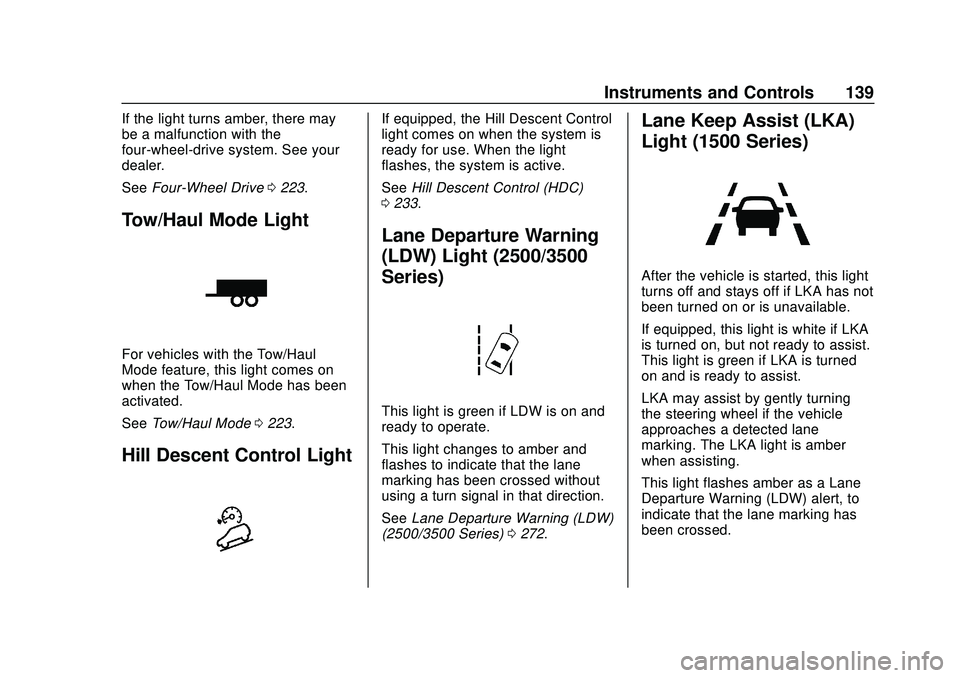
Tow/Haul Mode Light
For vehicles with the Tow/Haul
Mode feature, this light comes on
when the Tow/Haul Mode has been
activated.
See Tow/Haul Mode 0223.
Hill Descent Control Light
If equipped, the Hill Descent Control
light comes on when the system is
ready for use. When the light
flashes, the system is active.
See Hill Descent Control (HDC)
0 233.
Lane Departure Warning
(LDW) Light (2500/3500
Series)
This light is green if LDW is on and
ready to operate.
This light changes to amber and
flashes to indicate that the lane
marking has been crossed without
using a turn signal in that direction.
See Lane Departure Warning (LDW)
(2500/3500 Series) 0272.
Lane Keep Assist (LKA)
Light (1500 Series)
After the vehicle is started, this light
turns off and stays off if LKA has not
been turned on or is unavailable.
If equipped, this light is white if LKA
is turned on, but not ready to assist.
This light is green if LKA is turned
on and is ready to assist.
LKA may assist by gently turning
the steering wheel if the vehicle
approaches a detected lane
marking. The LKA light is amber
when assisting.
This light flashes amber as a Lane
Departure Warning (LDW) alert, to
indicate that the lane marking has
been crossed.
Page 141 of 495

Chevrolet Silverado Owner Manual (GMNA-Localizing-U.S./Canada/Mexico-
13337620) - 2020 - CTC - 1/27/20
140 Instruments and Controls
LKA will not assist or alert if the turn
signal is active in the direction of
lane departure, or if LKA detects
that you are accelerating, braking,
or actively steering.
SeeLane Keep Assist (LKA) (1500
Series) 0274.
Vehicle Ahead Indicator
If equipped, this indicator will
display green when a vehicle is
detected ahead and amber when
you are following a vehicle ahead
much too closely.
See Forward Collision Alert (FCA)
System 0264.
Pedestrian Ahead
Indicator
If equipped, this indicator will
display amber when a nearby
pedestrian is detected in front of the
vehicle.
See Front Pedestrian Braking (FPB)
System (1500 Series) 0268.
Traction Off Light
This light comes on briefly while
starting the engine. If it does not,
have the vehicle serviced by your dealer. If the system is working
normally, the indicator light then
turns off.
The traction off light comes on when
the Traction Control System (TCS)
has been turned off by pressing and
releasing the TCS/ESC button.
This light and the Electronic Stability
Control (ESC) OFF light come on
when ESC is turned off.
If the TCS is off, wheel spin is not
limited. Adjust driving accordingly.
See
Traction Control/Electronic
Stability Control 0231.
Traction Control System
(TCS)/Electronic Stability
Control Light
Page 150 of 495

Chevrolet Silverado Owner Manual (GMNA-Localizing-U.S./Canada/Mexico-
13337620) - 2020 - CTC - 1/27/20
Instruments and Controls 149
Transmission Fluid
Temperature :Shows the
temperature of the automatic
transmission fluid in either degrees
Celsius (°C) or degrees
Fahrenheit (°F).
Trailer Brake : On vehicles with the
Integrated Trailer Brake Control
(ITBC) system, the trailer brake
display appears in the DIC.
TRAILER GAIN shows the trailer
gain setting. This setting can be
adjusted from 0.0 to 10.0 with either
a trailer connected or disconnected.
TRAILER OUTPUT shows the
power output to the trailer any time
a trailer with electric brakes is
connected. Output is displayed as a
bar graph. Dotted lines may appear
in the OUTPUT display if a trailer is
not connected.
Off Road : Displays vehicle pitch
and roll information, road wheel
angle, and four-wheel drive (4WD)
status. Follow Distance :
If equipped, the
current follow time to the vehicle
ahead is displayed as a time value
on this page.
Driver Assistance : If equipped,
shows information for Lane Keep
Assist (LKA) and Forward Collision
Alert (FCA).
Info Page Options : Scroll to
choose which info pages appear on
the DIC. Press the thumbwheel to
select or deselect.
Blank Page : Shows no
information.
Head-Up Display (HUD)
{Warning
If the HUD image is too bright or
too high in your field of view, it
may take you more time to see
things you need to see when it is
dark outside. Be sure to keep the
HUD image dim and placed low in
your field of view. If equipped with HUD, some
information about the operation of
the vehicle is projected onto the
windshield. The image is projected
through the HUD lens on top of the
instrument panel. The information
appears as an image focused out
toward the front of the vehicle.
Caution
If you try to use the HUD image
as a parking aid, you may
misjudge the distance and
damage your vehicle. Do not use
the HUD image as a parking aid.
The HUD information can be
displayed in various languages. The
speedometer reading and other
numerical values can be displayed
in either English or metric units.
The language selection is changed
through the radio, and the units of
measurement is changed through
the instrument cluster. See
“Settings” in the infotainment
manual and “Options”under
Instrument Cluster 0124.
Page 152 of 495

Chevrolet Silverado Owner Manual (GMNA-Localizing-U.S./Canada/Mexico-
13337620) - 2020 - CTC - 1/27/20
Instruments and Controls 151
Scroll to adjust the angle of the
HUD display. Press the thumbwheel
to confirm and save the setting. This
feature may only be available in
P (Park).
Speed Limit Style Adjustment
If equipped, the speed limit style
can be changed to a speed limit bar
or speed limit sign from the Options
menu in the instrument cluster.
Press the thumbwheel while Speed
Limit Style is highlighted to change
the speed sign style or to turn it off.
HUD Views
There are four views in the HUD.
Some vehicle information and
vehicle messages or alerts may be
displayed in any view.
English Shown, Metric Similar
Speed View : This displays the
speedometer reading in English or
metric units, and speed limit. Some
information only appears on
vehicles that have these features,
and when they are active.
English Shown, Metric Similar
Active Safety View : This displays
the speed view along with a driver
assistance graphic on the left. Driver assistance graphics show
your vehicle, vehicle ahead, gap
setting, and lane status information.
In addition to driver assistance
graphics, pedestrian advisory and
trailer sway indicators will be
displayed.
English Shown, Metric Similar
Navigation/Active OnStar View :
This displays the speed view along
with indicators for vehicle ahead,
Lane Departure Warning/Lane Keep
Assist, trailer sway, and pedestrian
advisory. Turn-by-Turn navigation
information is shown during active
route. The compass heading is
displayed when navigation routing is
not active.
Page 153 of 495

Chevrolet Silverado Owner Manual (GMNA-Localizing-U.S./Canada/Mexico-
13337620) - 2020 - CTC - 1/27/20
152 Instruments and Controls
Navigation Turn-by-Turn Alerts
shown in the instrument cluster may
also be displayed in any HUD view.
English Shown, Metric Similar
Off Road View : This displays the
speed view along with indicators for
vehicle ahead, Lane Departure
Warning/Lane Keep Assist, trailer
sway, four-wheel drive status, and
pedestrian advisory. Off-road
information such as pitch angle,
steering angle, and rolling angle is
also shown.
Care of the HUD
Clean the inside of the windshield to
remove any dirt or film that could
reduce the sharpness or clarity of
the HUD image. Clean the HUD lens with a soft cloth
sprayed with glass cleaner. Wipe
the lens gently, then dry it.
HUD Troubleshooting
Check that:
.
Nothing is covering the
HUD lens.
. The HUD brightness setting is
not too dim or too bright.
. The HUD is adjusted to the
proper height.
. Polarized sunglasses are
not worn.
. The windshield and HUD lens
are clean.
If the HUD image is not correct,
contact your dealer.
The windshield is part of the HUD
system. See Windshield
Replacement 0361.
Vehicle Messages
Messages displayed on the Driver
Information Center (DIC) indicate
the status of the vehicle or some
action that may be needed to
correct a condition. Multiple
messages may appear one after
another.
The messages that do not require
immediate action can be
acknowledged and cleared by
pressing the thumbwheel. The
messages that require immediate
action cannot be cleared until that
action is performed.
All messages should be taken
seriously; clearing the message
does not correct the problem.
If a SERVICE message appears,
see your dealer.
Follow the instructions given in the
messages. The system displays
messages regarding the following
topics:
.
Service Messages
. Fluid Levels