2020 CHEVROLET BOLT EV speed
[x] Cancel search: speedPage 21 of 347
Chevrolet BOLT EV Owner Manual (GMNA-Localizing-U.S./Canada/Mexico-
13556250) - 2020 - CRC - 2/11/20
20 Keys, Doors, and Windows
If a vehicle door is unlocked and
then opened and closed, the doors
will lock either when your foot is
removed from the brake or the
vehicle speed becomes faster than
13 km/h (8 mph).
To unlock the doors:
.Press
Kon a door.
. Shift the vehicle into P (Park).
Automatic door unlocking can be
programmed. See Vehicle
Personalization 0121.
Lockout Protection
If the vehicle is on or in Service
Mode and the power door lock
switch is pressed with the driver
door open, all the doors will lock
and only the driver door will unlock.
If the vehicle is off and locking is
requested while a door is open,
when all doors are closed the
vehicle will check for RKE
transmitters inside. If an RKE
transmitter is detected and the
number of RKE transmitters inside has not reduced, the driver door will
unlock and the horn will chirp three
times.
Lockout Protection can be manually
overridden with the driver door open
by pressing and holding
Qon the
power door lock switch.
If Unlocked Door Anti Lockout is
turned on and the vehicle is off, the
driver door is open, and locking is
requested, all the doors will lock and
only the driver door will unlock. The
Unlocked Door Anti Lockout feature
can be turned on or off. See Vehicle
Personalization 0121.
Safety Locks
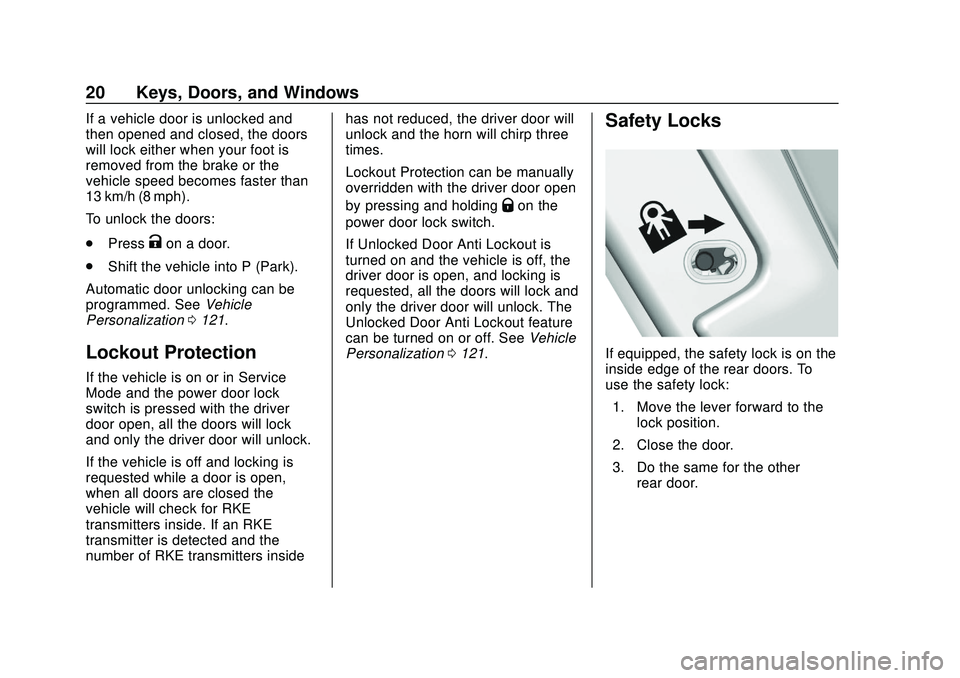
If equipped, the safety lock is on the
inside edge of the rear doors. To
use the safety lock:
1. Move the lever forward to the lock position.
2. Close the door.
3. Do the same for the other rear door.
Page 51 of 347

Chevrolet BOLT EV Owner Manual (GMNA-Localizing-U.S./Canada/Mexico-
13556250) - 2020 - CRC - 2/11/20
50 Seats and Restraints
Warning (Continued)
inflating airbag must be kept
clear. Do not put anything
between an occupant and an
airbag, and do not attach or put
anything on the steering wheel
hub or on or near any other
airbag covering.
Do not use seat accessories that
block the inflation path of a
seat-mounted side impact airbag.
Never secure anything to the roof
of a vehicle with roof-rail airbags
by routing a rope or tie‐down
through any door or window
opening. If you do, the path of an
inflating roof-rail airbag will be
blocked.
When Should an Airbag
Inflate?
This vehicle is equipped with
airbags. Airbags are designed to
inflate if the impact exceeds the
specific airbag system's deploymentthreshold. Deployment thresholds
are used to predict how severe a
crash is likely to be in time for the
airbags to inflate and help restrain
the occupants. The vehicle has
electronic sensors that help the
airbag system determine the
severity of the impact. Deployment
thresholds can vary with specific
vehicle design.
Frontal airbags are designed to
inflate in moderate to severe frontal
or near frontal crashes to help
reduce the potential for severe
injuries, mainly to the driver's or
front outboard passenger's head
and chest.
Whether the frontal airbags will or
should inflate is not based primarily
on how fast the vehicle is traveling.
It depends on what is hit, the
direction of the impact, and how
quickly the vehicle slows down.
Frontal airbags may inflate at
different crash speeds depending on
whether the vehicle hits an object
straight on or at an angle, and
whether the object is fixed or
moving, rigid or deformable, narrow
or wide.
Frontal airbags are not intended to
inflate during vehicle rollovers, rear
impacts, or in many side impacts.
In addition, the vehicle has
advanced technology frontal
airbags. Advanced technology
frontal airbags adjust the restraint
according to crash severity.
Knee airbags are designed to inflate
in moderate to severe frontal or
near frontal impacts. Knee airbags
are not designed to inflate during
vehicle rollovers, in rear impacts,
or in many side impacts.
Seat-mounted side impact airbags
are designed to inflate in moderate
to severe side crashes depending
on the location of the impact.
Seat-mounted side impact airbags
are not designed to inflate in frontal
impacts, near frontal impacts,
rollovers, or rear impacts.
A seat-mounted side impact airbag
is designed to inflate on the side of
the vehicle that is struck.
Page 85 of 347
Chevrolet BOLT EV Owner Manual (GMNA-Localizing-U.S./Canada/Mexico-
13556250) - 2020 - CRC - 2/11/20
84 Instruments and Controls
Instruments and
Controls
Controls
Steering Wheel Adjustment . . . . 85
Steering Wheel Controls . . . . . . . 85
Heated Steering Wheel . . . . . . . . 86
Horn . . . . . . . . . . . . . . . . . . . . . . . . . . . 86
Pedestrian Safety Signal . . . . . . . 86
Windshield Wiper/Washer . . . . . . 87
Rear Window Wiper/Washer . . . 88
Compass . . . . . . . . . . . . . . . . . . . . . . 89
Clock . . . . . . . . . . . . . . . . . . . . . . . . . . 90
Power Outlets . . . . . . . . . . . . . . . . . 90
Wireless Charging . . . . . . . . . . . . . 91
Warning Lights, Gauges, and
Indicators
Warning Lights, Gauges, andIndicators . . . . . . . . . . . . . . . . . . . . 94
Instrument Cluster . . . . . . . . . . . . . 94
Speedometer . . . . . . . . . . . . . . . . . . 97
Odometer . . . . . . . . . . . . . . . . . . . . . . 97
Trip Odometer . . . . . . . . . . . . . . . . . 97
Battery Gauge (High
Voltage) . . . . . . . . . . . . . . . . . . . . . . 98
Driver Efficiency Gauge . . . . . . . . 98
Power Indicator Gauge . . . . . . . . 99 Seat Belt Reminders . . . . . . . . . . . 99
Airbag Readiness Light . . . . . . . 100
Passenger Airbag Status
Indicator . . . . . . . . . . . . . . . . . . . . 100
Charging System Light (12-Volt
Battery) . . . . . . . . . . . . . . . . . . . . . 101
Service Vehicle Soon Light . . . 102
Brake System Warning Light . . . . . . . . . . . . . . . . . . . . . . . . 102
Electric Parking Brake Light . . . . . . . . . . . . . . . . . . . . . . . . 102
Service Electric Parking Brake Light . . . . . . . . . . . . . . . . . . . . . . . . 103
Antilock Brake System (ABS) Warning Light . . . . . . . . . . . . . . . 103
Sport Mode Light . . . . . . . . . . . . . 103
Lane Keep Assist (LKA) Light . . . . . . . . . . . . . . . . . . . . . . . . 103
Vehicle Ahead Indicator . . . . . . 104
Pedestrian Ahead Indicator . . . 104
Traction Off Light . . . . . . . . . . . . . 104
StabiliTrak OFF Light . . . . . . . . . 105
Traction Control System (TCS)/ StabiliTrak Light . . . . . . . . . . . . . 105
Tire Pressure Light . . . . . . . . . . . 105
Security Light . . . . . . . . . . . . . . . . . 106
Vehicle Ready Light . . . . . . . . . . 106
High-Beam On Light . . . . . . . . . . 106
Lamps On Reminder . . . . . . . . . 106
Cruise Control Light . . . . . . . . . . 107 Door Ajar Light . . . . . . . . . . . . . . . 107
Information Displays
Power Flows . . . . . . . . . . . . . . . . . 107
Programmable Charging . . . . . . 107
Energy Information . . . . . . . . . . . 115
Charging Options . . . . . . . . . . . . . 117
Driver Information
Center (DIC) . . . . . . . . . . . . . . . . 118
Vehicle Messages
Vehicle Messages . . . . . . . . . . . . 120
Propulsion PowerMessages . . . . . . . . . . . . . . . . . . . 120
Vehicle Speed Messages . . . . . 121
Vehicle Personalization
Vehicle Personalization . . . . . . . 121
Page 87 of 347
Chevrolet BOLT EV Owner Manual (GMNA-Localizing-U.S./Canada/Mexico-
13556250) - 2020 - CRC - 2/11/20
86 Instruments and Controls
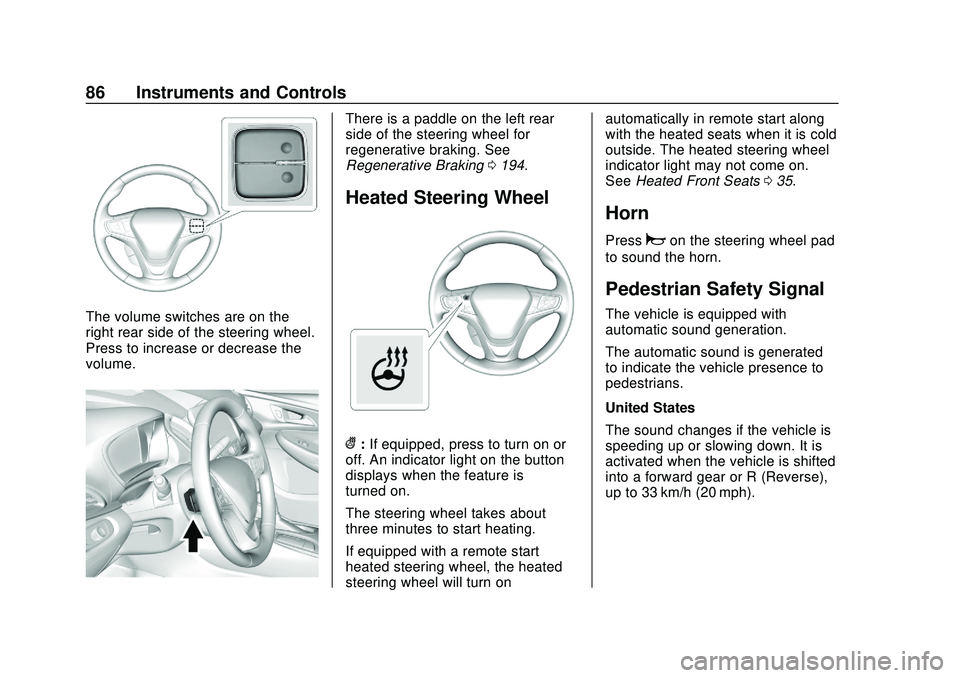
The volume switches are on the
right rear side of the steering wheel.
Press to increase or decrease the
volume.
There is a paddle on the left rear
side of the steering wheel for
regenerative braking. See
Regenerative Braking0194.
Heated Steering Wheel
(:If equipped, press to turn on or
off. An indicator light on the button
displays when the feature is
turned on.
The steering wheel takes about
three minutes to start heating.
If equipped with a remote start
heated steering wheel, the heated
steering wheel will turn on automatically in remote start along
with the heated seats when it is cold
outside. The heated steering wheel
indicator light may not come on.
See
Heated Front Seats 035.
Horn
Pressaon the steering wheel pad
to sound the horn.
Pedestrian Safety Signal
The vehicle is equipped with
automatic sound generation.
The automatic sound is generated
to indicate the vehicle presence to
pedestrians.
United States
The sound changes if the vehicle is
speeding up or slowing down. It is
activated when the vehicle is shifted
into a forward gear or R (Reverse),
up to 33 km/h (20 mph).
Page 88 of 347
Chevrolet BOLT EV Owner Manual (GMNA-Localizing-U.S./Canada/Mexico-
13556250) - 2020 - CRC - 2/11/20
Instruments and Controls 87
Canada
The sound changes if the vehicle is
speeding up or slowing down. It is
activated when the vehicle is shifted
into a forward gear or R (Reverse),
up to 23 km/h (14 mph).
Windshield Wiper/Washer
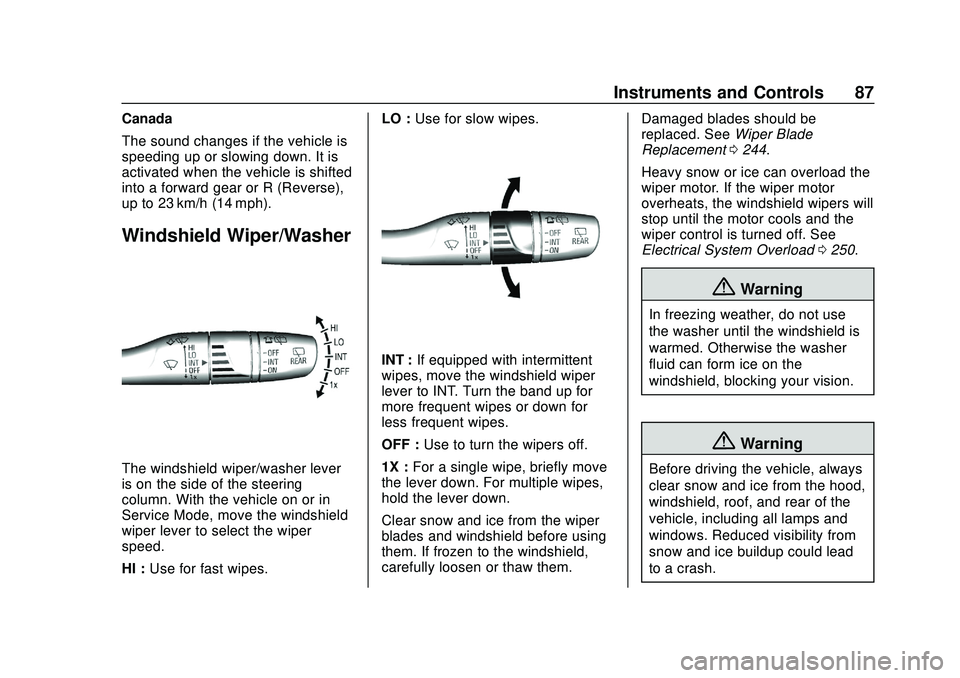
The windshield wiper/washer lever
is on the side of the steering
column. With the vehicle on or in
Service Mode, move the windshield
wiper lever to select the wiper
speed.
HI :Use for fast wipes. LO :
Use for slow wipes.
INT : If equipped with intermittent
wipes, move the windshield wiper
lever to INT. Turn the band up for
more frequent wipes or down for
less frequent wipes.
OFF : Use to turn the wipers off.
1X : For a single wipe, briefly move
the lever down. For multiple wipes,
hold the lever down.
Clear snow and ice from the wiper
blades and windshield before using
them. If frozen to the windshield,
carefully loosen or thaw them. Damaged blades should be
replaced. See
Wiper Blade
Replacement 0244.
Heavy snow or ice can overload the
wiper motor. If the wiper motor
overheats, the windshield wipers will
stop until the motor cools and the
wiper control is turned off. See
Electrical System Overload 0250.
{Warning
In freezing weather, do not use
the washer until the windshield is
warmed. Otherwise the washer
fluid can form ice on the
windshield, blocking your vision.
{Warning
Before driving the vehicle, always
clear snow and ice from the hood,
windshield, roof, and rear of the
vehicle, including all lamps and
windows. Reduced visibility from
snow and ice buildup could lead
to a crash.
Page 90 of 347
Chevrolet BOLT EV Owner Manual (GMNA-Localizing-U.S./Canada/Mexico-
13556250) - 2020 - CRC - 2/11/20
Instruments and Controls 89
{Warning
In freezing weather, do not use
the washer until the windshield is
warmed. Otherwise the washer
fluid can form ice on the
windshield, blocking your vision.
Auto Wipe in Reverse Gear
If the rear wiper control is off, the
rear wiper will automatically operate
continuously when the vehicle is in
R (Reverse), and the front
windshield wiper is performing low
or high speed wipes. If the rear
wiper control is off, the vehicle is in
R (Reverse), and the front
windshield wiper is performing
intermittent wipes, then the rear
wiper automatically performs
intermittent wipes. This feature can be turned on or off.
See
Vehicle Personalization 0121.
The windshield washer reservoir is
used for the windshield and the rear
window. Check the fluid level in the
reservoir if either washer is not
working.
Rear Wiper Arm Assembly
Protection
Wiper operation returns to normal
when the shift lever is no longer in
N (Neutral) or the vehicle speed
increases. The rear wiper will also
stop when the liftgate is open.
When using an automatic car wash,
move the rear wiper control to OFF
to disable the rear wiper. If the shift
lever is in N (Neutral) and the
vehicle speed is very slow, the rear
wiper will automatically stop at the
base of the rear window.
Compass
The vehicle has a compass display
in the instrument cluster above the
speedometer. The compass
receives its heading and other
information from the Global
Positioning System (GPS) antenna
and vehicle speed information.
The compass system has automatic
calibration and zone adjustment
features.
Avoid covering the GPS antenna for
long periods of time with objects
that may interfere with the antenna's
ability to receive a satellite signal.
The compass system is designed to
operate for a certain number of
miles or degrees of turn before
needing a signal from the GPS
satellites. The compass system will
automatically determine when a
GPS signal is restored and provide
a heading.
Page 93 of 347
Chevrolet BOLT EV Owner Manual (GMNA-Localizing-U.S./Canada/Mexico-
13556250) - 2020 - CRC - 2/11/20
92 Instruments and Controls
{Warning
Remove all objects from the
charging pocket before charging
your mobile phone. Objects, such
as coins, keys, rings, paper clips,
or cards, between the mobile
phone and the charger will
become very hot. On the rare
occasion that the charging system
does not detect an object, and the
object gets wedged between the
mobile phone and the charger,
remove the mobile phone and
allow the object to cool before
removing it from the charging
pocket, to prevent burns.
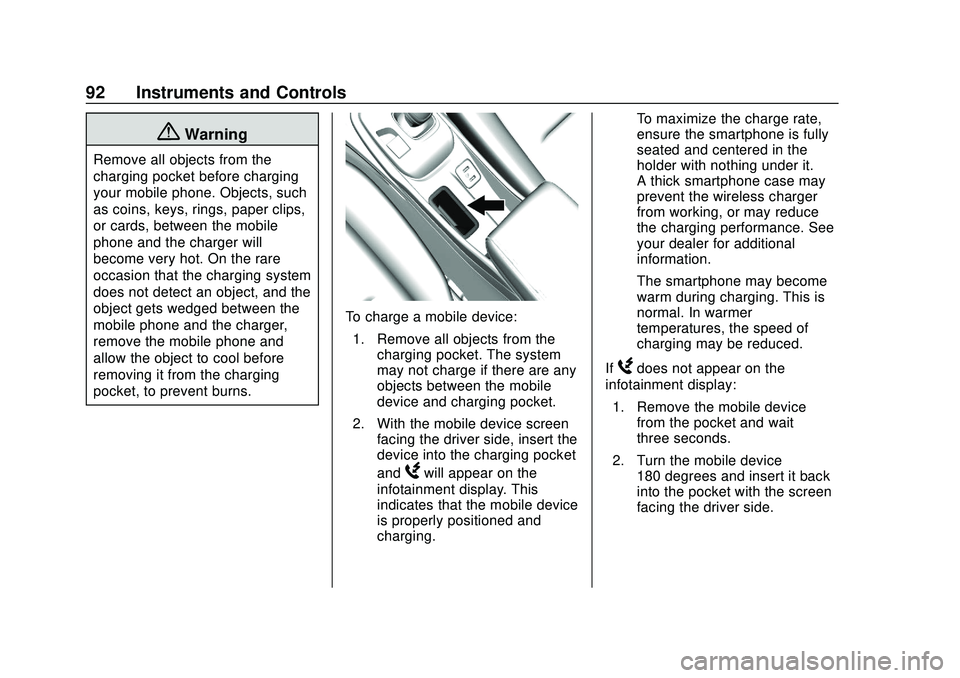
To charge a mobile device:1. Remove all objects from the charging pocket. The system
may not charge if there are any
objects between the mobile
device and charging pocket.
2. With the mobile device screen facing the driver side, insert the
device into the charging pocket
and
Wwill appear on the
infotainment display. This
indicates that the mobile device
is properly positioned and
charging. To maximize the charge rate,
ensure the smartphone is fully
seated and centered in the
holder with nothing under it.
A thick smartphone case may
prevent the wireless charger
from working, or may reduce
the charging performance. See
your dealer for additional
information.
The smartphone may become
warm during charging. This is
normal. In warmer
temperatures, the speed of
charging may be reduced.
If
Wdoes not appear on the
infotainment display:
1. Remove the mobile device from the pocket and wait
three seconds.
2. Turn the mobile device 180 degrees and insert it back
into the pocket with the screen
facing the driver side.
Page 97 of 347

Chevrolet BOLT EV Owner Manual (GMNA-Localizing-U.S./Canada/Mexico-
13556250) - 2020 - CRC - 2/11/20
96 Instruments and Controls
Reconfigurable Instrument
Cluster
The cluster layout can be changed.
There are three display
configurations to choose from:
Classic, Modern, and Enhanced.
Use the steering wheel control to
move between the different display
zones and scroll through the
different displays. See“Layout”
under “Cluster Menu” following.
. Classic configuration displays
the speedometer with a
simplified battery gauge and
efficiency light.
. Modern configuration displays
the speedometer with a battery
gauge and efficiency gauge.
. Enhanced configuration displays
the speedometer with battery
gauge, efficiency ring, and
power gauge.
Cluster Menu
There is an interactive display area
in the center of the instrument
cluster.
Use the right steering wheel control
to open and scroll through the
different items and displays.
Press
oto access the cluster
applications. Use
worxto scroll
through the list of available
applications. Press
Vto select the
application, then press
pto enter
the application menu. Exit the menu
by pressing
o.
Not all applications will be available
on all vehicles. Cluster Menu Applications
.
Vehicle info. This is where the
Driver Information Center (DIC)
displays can be viewed. See
Driver Information Center (DIC)
0118.
. Audio
. Phone
. Onstar Navigation
. Layout
. Options
Audio
In the main view of the Audio
application, press
worxto scroll
through radio stations or move to
the next/previous track of a USB/
Bluetooth device that is connected
to the vehicle. Press
Vto select the
Audio app, then press
pto enter
the Audio menu. In the Audio menu
browse for music, select from the
favorites, or change the audio
source.