2020 CHEVROLET BOLT EV speed
[x] Cancel search: speedPage 98 of 347
Chevrolet BOLT EV Owner Manual (GMNA-Localizing-U.S./Canada/Mexico-
13556250) - 2020 - CRC - 2/11/20
Instruments and Controls 97
Phone
In the Phone menu, if there is no
active phone call, view recent calls,
scroll through contacts, or select
from the favorites. If there is an
active call, mute or unmute the
phone or switch to handset or
handsfree operation.
Onstar Navigation
This display is used for OnStar
Turn-by-Turn guidance, if equipped.
Layout
Choose Classic, Modern,
or Enhanced layout by pressing
V
while the desired item is highlighted.
Exit the Layout menu by
pressing
o.
Options
PressVto select the Options app.
Use
worxto scroll through the
items in the Options menu. Exit the
Options menu by pressing
o. Units :
Press
pwhile Units is
displayed to enter the Units menu.
Use
worxto scroll through the
items. Choose U.S., Metric,
or Imperial by pressing
Vwhile the
desired item is highlighted.
Speed Warning : The speed
warning display allows the driver to
set a speed that they do not want to
exceed. To set the speed warning,
press
Vwhen Speed Warning is
displayed. Press
worxto adjust
the value. Press
Vto set the speed.
Once set, this feature can be turned
off by pressing
Vwhile viewing this
page. If the selected speed limit is
exceeded, a pop-up warning is
displayed and a chime may sound.
Help : Press
pwhile Help is
displayed to enter the Help menu.
Use
worxto scroll through the
items in the Help menu.
Open Source Software : Press
V
while Open Source Software is
highlighted to display open source
software information.
Speedometer
The speedometer shows the
vehicle's speed in either kilometers
per hour (km/h) or miles per
hour (mph).
Odometer
The odometer shows how far the
vehicle has been driven, in either
kilometers or miles.
Trip Odometer
The trip odometer shows how far
the vehicle has been driven since
the trip odometer was last reset.
The trip odometer is accessed and
reset through the Driver Information
Center (DIC). SeeDriver
Information Center (DIC) 0118.
Page 99 of 347
Chevrolet BOLT EV Owner Manual (GMNA-Localizing-U.S./Canada/Mexico-
13556250) - 2020 - CRC - 2/11/20
98 Instruments and Controls
Battery Gauge (High
Voltage)
Enhanced Battery Gauge
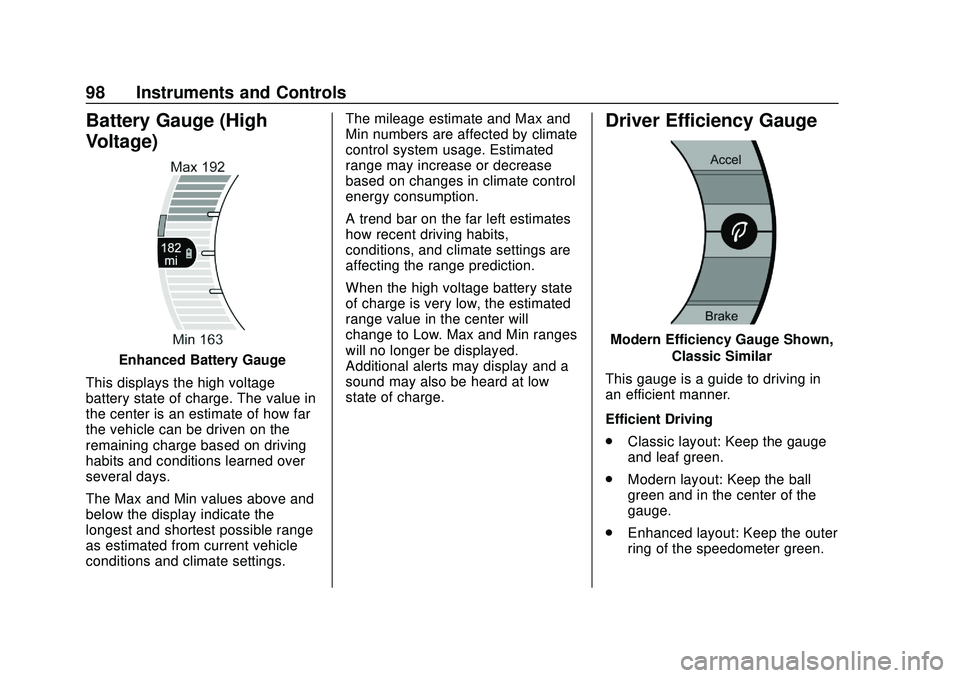
This displays the high voltage
battery state of charge. The value in
the center is an estimate of how far
the vehicle can be driven on the
remaining charge based on driving
habits and conditions learned over
several days.
The Max and Min values above and
below the display indicate the
longest and shortest possible range
as estimated from current vehicle
conditions and climate settings. The mileage estimate and Max and
Min numbers are affected by climate
control system usage. Estimated
range may increase or decrease
based on changes in climate control
energy consumption.
A trend bar on the far left estimates
how recent driving habits,
conditions, and climate settings are
affecting the range prediction.
When the high voltage battery state
of charge is very low, the estimated
range value in the center will
change to Low. Max and Min ranges
will no longer be displayed.
Additional alerts may display and a
sound may also be heard at low
state of charge.
Driver Efficiency Gauge
Modern Efficiency Gauge Shown,
Classic Similar
This gauge is a guide to driving in
an efficient manner.
Efficient Driving
. Classic layout: Keep the gauge
and leaf green.
. Modern layout: Keep the ball
green and in the center of the
gauge.
. Enhanced layout: Keep the outer
ring of the speedometer green.
Page 100 of 347
Chevrolet BOLT EV Owner Manual (GMNA-Localizing-U.S./Canada/Mexico-
13556250) - 2020 - CRC - 2/11/20
Instruments and Controls 99
Inefficient Driving/Aggressive
Braking
.Classic layout: The gauge and
leaf turn yellow.
. Modern layout: When driving
inefficiently, the ball turns yellow
and moves above the center of
the gauge. When braking
aggressively, the ball turns
yellow and moves below the
center of the gauge.
. Enhanced layout: The outer ring
of the speedometer turns yellow.
Power Indicator Gauge
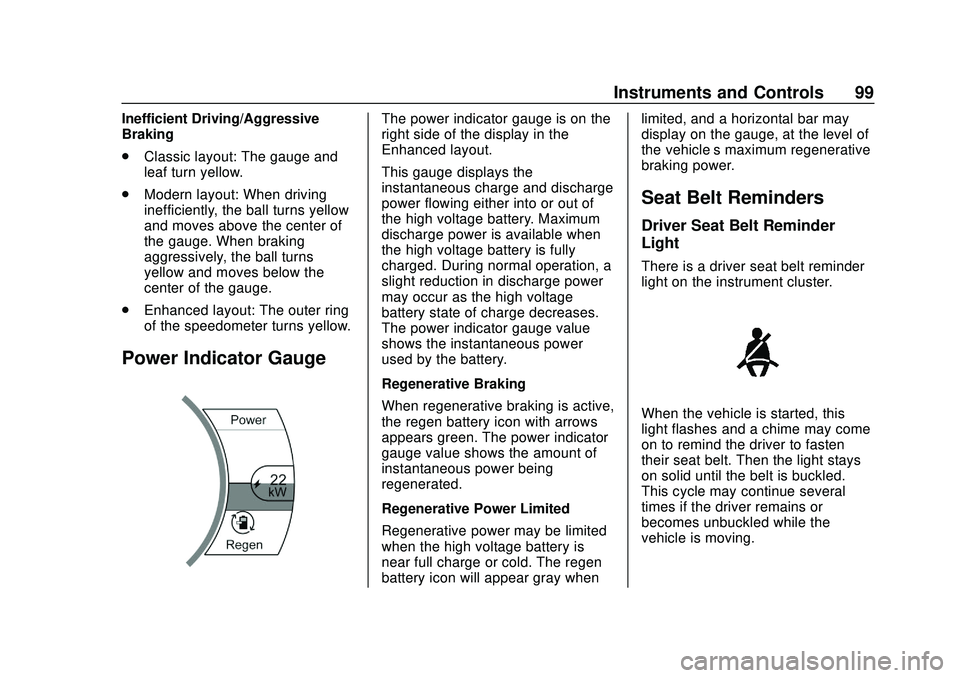
The power indicator gauge is on the
right side of the display in the
Enhanced layout.
This gauge displays the
instantaneous charge and discharge
power flowing either into or out of
the high voltage battery. Maximum
discharge power is available when
the high voltage battery is fully
charged. During normal operation, a
slight reduction in discharge power
may occur as the high voltage
battery state of charge decreases.
The power indicator gauge value
shows the instantaneous power
used by the battery.
Regenerative Braking
When regenerative braking is active,
the regen battery icon with arrows
appears green. The power indicator
gauge value shows the amount of
instantaneous power being
regenerated.
Regenerative Power Limited
Regenerative power may be limited
when the high voltage battery is
near full charge or cold. The regen
battery icon will appear gray when limited, and a horizontal bar may
display on the gauge, at the level of
the vehicle’
s maximum regenerative
braking power.
Seat Belt Reminders
Driver Seat Belt Reminder
Light
There is a driver seat belt reminder
light on the instrument cluster.
When the vehicle is started, this
light flashes and a chime may come
on to remind the driver to fasten
their seat belt. Then the light stays
on solid until the belt is buckled.
This cycle may continue several
times if the driver remains or
becomes unbuckled while the
vehicle is moving.
Page 117 of 347
Chevrolet BOLT EV Owner Manual (GMNA-Localizing-U.S./Canada/Mexico-
13556250) - 2020 - CRC - 2/11/20
116 Instruments and Controls
Energy Detail
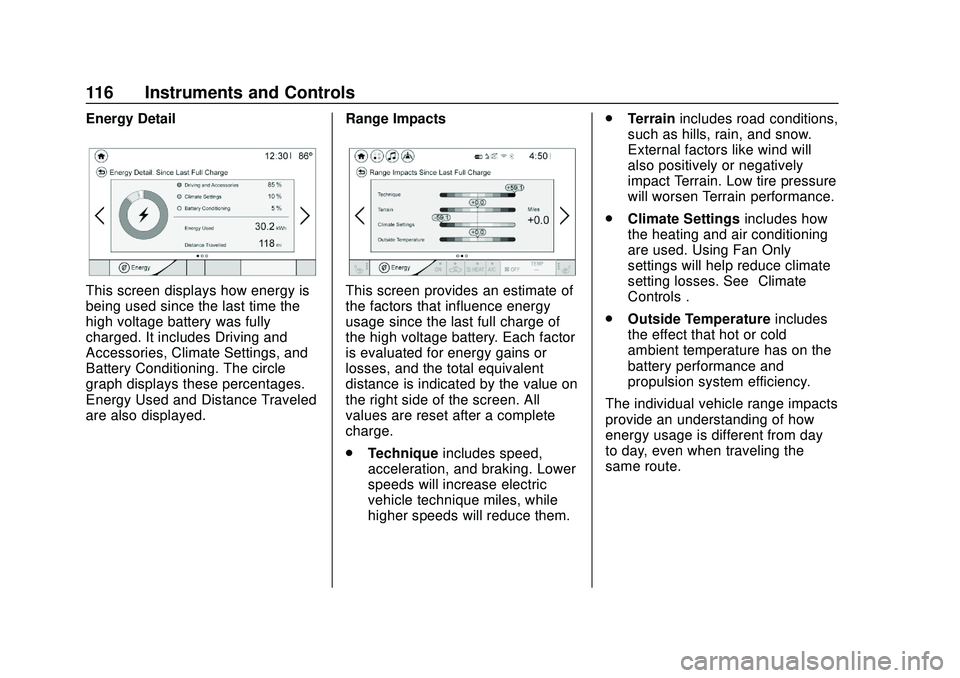
This screen displays how energy is
being used since the last time the
high voltage battery was fully
charged. It includes Driving and
Accessories, Climate Settings, and
Battery Conditioning. The circle
graph displays these percentages.
Energy Used and Distance Traveled
are also displayed.Range ImpactsThis screen provides an estimate of
the factors that influence energy
usage since the last full charge of
the high voltage battery. Each factor
is evaluated for energy gains or
losses, and the total equivalent
distance is indicated by the value on
the right side of the screen. All
values are reset after a complete
charge.
.
Technique includes speed,
acceleration, and braking. Lower
speeds will increase electric
vehicle technique miles, while
higher speeds will reduce them. .
Terrain includes road conditions,
such as hills, rain, and snow.
External factors like wind will
also positively or negatively
impact Terrain. Low tire pressure
will worsen Terrain performance.
. Climate Settings includes how
the heating and air conditioning
are used. Using Fan Only
settings will help reduce climate
setting losses. See “Climate
Controls”.
. Outside Temperature includes
the effect that hot or cold
ambient temperature has on the
battery performance and
propulsion system efficiency.
The individual vehicle range impacts
provide an understanding of how
energy usage is different from day
to day, even when traveling the
same route.
Page 120 of 347
Chevrolet BOLT EV Owner Manual (GMNA-Localizing-U.S./Canada/Mexico-
13556250) - 2020 - CRC - 2/11/20
Instruments and Controls 119
2. Pressworxto scroll to the
Options application.
3. Press
Vto enter the
Options menu.
4. Scroll to Info Pages and press
p.
5. Press
worxto move through
the list of possible information
displays.
6. Press
Vwhile an item is
highlighted to select or
deselect that item. When an
item is selected, a checkmark
will appear next to it.
DIC Info Pages
The following is the list of all
possible DIC info page displays.
Some may not be available for your
particular vehicle. Some items may
not be turned on by default but can
be turned on through the Options
app. See “DIC Info Page Options”
earlier in this section. Trip and Average Electrical
Energy Economy :
The Trip display
shows the current distance traveled,
in either kilometers (km) or
miles (mi), since the trip odometer
was last reset. The trip odometer
can be reset by pressing and
holding
Vwhile this display is
active.
The Average Electrical Energy
Economy display shows the
approximate average kWh per
100 kilometers (kWh/100 km) or
miles per kWh. This number is
calculated based on the number of
kWh/100 km recorded since the last
time this menu item was reset. This
number reflects only the
approximate average electrical
energy economy that the vehicle
has right now, and will change as
driving conditions change. The
Average Electrical Energy Economy
can be reset along with the trip
odometer by pressing and holding
V
while this display is active. Tire Pressure :
Shows the
approximate pressures of all four
tires. Tire pressure is displayed in
either kilopascal (kPa) or in pounds
per square inch (psi). If the pressure
is low, the value for that tire is
shown in amber.
Average Speed : Shows the
average speed of the vehicle in
kilometers per hour (km/h) or miles
per hour (mph). This average is
calculated based on the various
vehicle speeds recorded since the
last reset of this value. The average
speed can be reset by pressing and
holding
Vwhile this display is
active.
Page 121 of 347

Chevrolet BOLT EV Owner Manual (GMNA-Localizing-U.S./Canada/Mexico-
13556250) - 2020 - CRC - 2/11/20
120 Instruments and Controls
Timer :This display can be used as
a timer. To start the timer, press
V
while this display is active. The
display will show the amount of time
that has passed since the timer was
last reset. To stop the timer, press
V
briefly while this display is active
and the timer is running. To reset
the timer to zero, press and hold
V
while this display is active.
Follow Distance Indicator : The
current follow time to the vehicle
ahead is displayed as a time value
on this page.
Blank Page : The Blank Page
display allows for no information to
be displayed in the cluster info
display areas.
Vehicle Messages
Messages displayed on the DIC
indicate the status of the vehicle or
some action that may be needed to
correct a condition. Multiple
messages may appear one after
another.
The messages that do not require
immediate action can be
acknowledged and cleared by
pressing
V. The messages that
require immediate action cannot be
cleared until that action is
performed.
All messages should be taken
seriously; clearing the message
does not correct the problem.
If a SERVICE message appears,
see your dealer.
Follow the instructions given in the
messages. The system displays
messages regarding the following
topics:
. Service Messages
. Fluid Levels
. Vehicle Security .
Brakes
. Ride Control Systems
. Driver Assistance Systems
. Cruise Control
. Lighting and Bulb Replacement
. Wiper/Washer Systems
. Doors and Windows
. Seat Belts
. Airbag Systems
. Propulsion and Transmission
. Tire Pressure
. Battery
Propulsion Power
Messages
PROPULSION POWER IS
REDUCED
This message displays when the
propulsion power is reduced and
can affect the ability to accelerate.
The vehicle may be driven at a
reduced speed while this message
is on, but maximum acceleration
and speed may be reduced.
Page 122 of 347

Chevrolet BOLT EV Owner Manual (GMNA-Localizing-U.S./Canada/Mexico-
13556250) - 2020 - CRC - 2/11/20
Instruments and Controls 121
This message is most commonly
displayed when the high voltage
battery charge level is low. The
vehicle is limiting power to maximize
range.
This message can display after the
vehicle is parked during extreme
cold conditions without being
plugged in. While driving the vehicle
with this message displayed, the
vehicle speed may be reduced until
the high voltage battery is
conditioned.
Vehicle Speed Messages
SPEED LIMITED TO XXX
KM/H (MPH)
This message shows that the
vehicle speed has been limited to
the speed displayed. The limited
speed is a protection for various
propulsion and vehicle systems,
such as lubrication, thermal, brakes,
suspension, Teen Driver if
equipped, or tires.
Vehicle
Personalization
Use the audio system controls to
access the personalization menus
for customizing vehicle features.
The following are all possible
personalization features. Depending
on the vehicle, some may not be
available.
{:Press to access the
Home Page.
T: Touch to access the Icon view.
Y:Drag the scroll bar to navigate
the list.
0 :Touch to exit or return to the
previous screen or menu.
To access the menu:
1. Touch
T.
2. Touch Settings.
3. Touch the menu item to select it.
Each of the menus is detailed in the
following information.
Personalization Menu
The following list of menu items may
be available:
. Time and Date
. Rear Seat Reminder
. Language (Language)
. Teen Driver
. Radio Settings
. Vehicle
. Devices
. Device Remote Access
. Bluetooth Phone
. Apple CarPlay
. Android Auto
. KeyPass
. USB Auto Launch
. Wi-Fi
. Display Settings
. Rear Camera
. Return to Factory Settings
. Audible Touch Feedback
. Text Scroll
Page 123 of 347

Chevrolet BOLT EV Owner Manual (GMNA-Localizing-U.S./Canada/Mexico-
13556250) - 2020 - CRC - 2/11/20
122 Instruments and Controls
.Software Information
Each menu is detailed in the
following information.
Time and Date
Manually set the time and date. See
Clock 090.
Rear Seat Reminder
This message displays under
certain conditions indicating there
may be an item or passenger in the
rear seat. Check before exiting the
vehicle.
This feature allows for a chime and
a message when the rear door has
been opened before or during
operation of the vehicle.
Select Off or On.
Language (Language)
Select Language, then select from
the available language(s).
Teen Driver
See Teen Driver 0158.
Radio Settings
To manage the radio features, see
“Radio Settings” underSettings
0 157.
Vehicle
Select and the following may
display:
.
Climate and Air Quality
. Comfort and Convenience
. Collision / Detection Systems
. Lighting
. Power Door Locks
. Remote Lock / Unlock / Start
Climate and Air Quality
Select and the following may
display:
. Auto Fan Speed
. Auto Heated Seats
. Auto Defog
Auto Fan Speed
This feature will set the maximum
auto fan speed. Select Low, Medium, or High.
Auto Heated Seats
When set to On and it is cold
outside, both the heated seats and
the heated steering wheel will
automatically turn on when the
vehicle is started. See
Automatic
Climate Control System 0163.
Select Off or On.
Auto Defog
When set to On, the front defog will
automatically come on when the
vehicle is started. See Automatic
Climate Control System 0163.
Select Off or On.
Comfort and Convenience
Select and the following may
display:
. Chime Volume
. Auto Wipe in Reverse Gear
Chime Volume
This allows the selection of the
chime volume level.
Select + or −to adjust the volume.