2020 AUDI S4 Roof button
[x] Cancel search: Roof buttonPage 158 of 296
Parking and maneuvering
— The driver is always responsible when enter-
ing or exiting a parking space and during
similar maneuvers.
— Do not use this function if the vehicle cannot
move freely, for example when on a vehicle
jack.
— Sensors and cameras have spots in which
the surrounding area cannot be detected.
Objects, animals, and people may only be
detected with limitations may not be detect-
ed at all. Always monitor the traffic and the
vehicle's surroundings directly and do not
become distracted.
@ Note
— Do not use the park assist systems when
transporting cargo that extends out of the
vehicle, when snow chains are mounted, or
when the parking space is on a hill or in-
cline.
— Park assist guides the vehicle either away
from curbs or onto them if other vehicles
are parked on the curb. Make sure that your
vehicle's tires and rims are not damaged.
Resume control of the vehicle in time or
stop the parking process if needed to pre-
vent damage.
— In parking spaces without curbs, maintain a
distance of at least 19 inches (50 cm) from
walls and buildings in order to reduce the
risk of vehicle damage.
@ Tips
Follow the legal regulations in the country
where you are located when using Park assist.
Parking with the park assists
Applies to: vehicles with park assist
Requirement: a suitable parking space must be
found and selected > page 154. The vehicle must
initially be stationary.
> Select the reverse gear after stopping briefly.
> Remove your hands from the steering wheel.
> Pay attention to the path of the vehicle. If the
traffic situation permits, accelerate carefully
>A.
156
> Follow the visual instructions in the center dis-
play and the warning tones until the parking
process
has ended.
> The indicators in the center display show the
necessary direction of travel. Drive in the direc-
tion indicated by the arrows or symbols on the
roof in the parking aid image @) > page 154,
fig. 136.
Park assist automatically steers the vehicle into
the parking space while the driver presses the
pedals. The maximum parking speed is approxi-
mately 4 mph (7 km/h).
ZA WARNING
— Follow the safety precautions and note the
limits of the assist systems, sensors, and
cameras > page 114.
— The park assist is an assist system. The driv-
er is still responsible for monitoring the ve-
hicle's surroundings and preventing colli-
sions when using the system.
— When using park assist to drive into or out
of a parking space, the steering wheel turns
quickly on its own. Reaching into the steer-
ing wheel spokes while this is happening can
result in injury.
G) Tips
You can also cancel the driving direction set
by the system by shifting between D and re-
verse gear. Based on the position of the vehi-
cle, the system then calculates the additional
steering and driving directions for maneuver-
ing.
Exiting parking spaces with park assist
Applies to: vehicles with park assist
If you parked the vehicle in a parallel parking
space, park assist can help you drive out of it.
> Start the engine.
> Press the Pe button in the center console.
> Wait until a message appears in the center dis-
play that specifies the direction of travel re-
quired to exit the parking space.
Page 159 of 296
8W1012721BB
Parking and maneuvering
> Activate the turn signal on the desired side or
press that side next to the vehicle in the center
display.
> Remove your hands from the steering wheel.
> Pay attention to the path of the vehicle. If the
traffic situation permits, accelerate carefully
of.
> Follow the visual instructions in the display and
the warning tones until the vehicle has finished
exiting the parking space.
> The indicators in the center display show the
necessary direction of travel. Drive in the direc-
tion indicated by the arrows or symbols on the
roof in the parking aid image @) 9 page 154,
fig. 136.
> The process of exiting the parking space has
ended if additional corrective movements are
no longer necessary and the specified steering
wheel angle is sufficient to drive out of the
parking space. Resume control of the steering
wheel >@).
Park assist automatically steers the vehicle out of
the parking space while the driver presses the
pedals. The maximum speed for exiting a parking
space is 3 mph (5 km/h).
Z\ WARNING
— Follow the safety precautions and note the
limits of the assist systems, sensors, and
cameras © page 114.
— The park assist is an assist system. The driv-
er is still responsible for monitoring the ve-
hicle's surroundings and preventing colli-
sions when using the system.
— When using park assist to drive into or out
of a parking space, the steering wheel turns
quickly on its own. Reaching into the steer-
ing wheel spokes while this is happening can
result in injury.
@) Note
Resume steering immediately after the last
corrective movement and the takeover
prompt, so that the specified steering wheel
angle is not recentered.
Interrupting the park assists
Applies to: vehicles with park assist
Park assist will be canceled automatically in the
following scenarios:
— You switch the system off.
— You start steering.
— The speed is too high.
— The time limit is exceeded.
— An obstacle is detected.
— ESC intervenes.
Resume control of the vehicle, end the parking
process manually, or:
— You can resume the parking process in some sit-
uations. Press the Pe button in the center con-
sole.
— To continue exiting the parking space, switch
the engine off and on. Press the Pe button.
Z\ WARNING
Follow the safety precautions and note the
limits of the assist systems, sensors, and
cameras > page 114.
tLe Ly
Applies to: vehicles with park assist
If the & or indicator light turns on, the park
assist is not available or was interrupted.
A message that indicates the cause and possible
solution may appear with some displays. The
weather conditions may be too poor or a sensor
may be covered. Clean the area in front of the
sensors > page 116, fig. 106 and try to turn on
the systems again later.
If the malfunction remains, drive to an author-
ized Audi dealer or authorized Audi Service Facili-
ty immediately to have the malfunction correct-
ed.
157
Page 190 of 296
Radio
Radio
General information
Selecting the radio
ee
ya) oes 2) Ww fa
OPE Pa) y 4
3s CRD Paso se NG fa
‘M
fee
RAZ-0922
e®
106.7 ae Ww FM
eta
0 RADIO 5)
Se ue
fee
RAZ-0923
Pao
S$
Fig. 151 Center display: SiriusXM station list
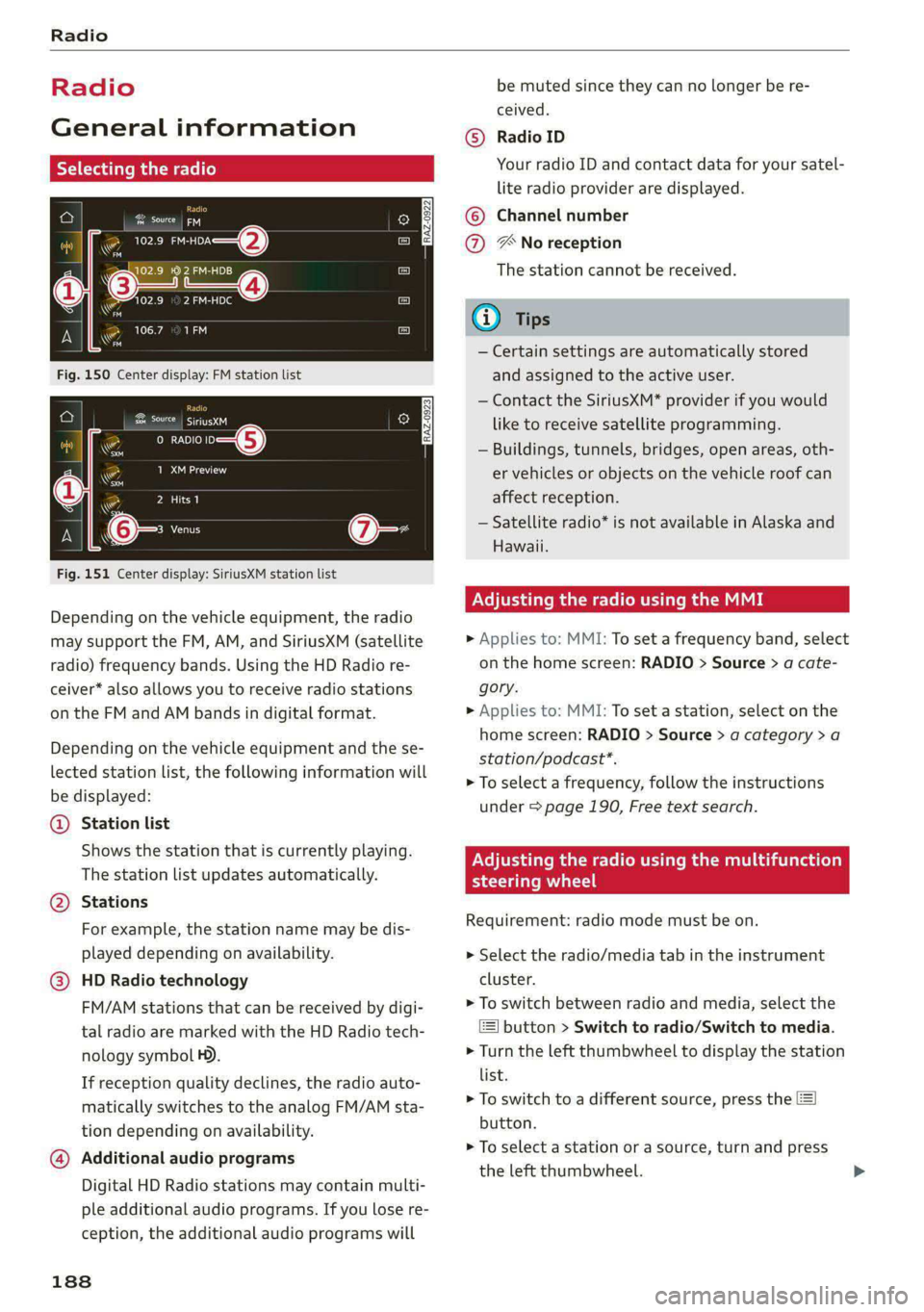
Depending on the vehicle equipment, the radio
may support the FM, AM, and SiriusXM (satellite
radio) frequency bands. Using the HD Radio re-
ceiver* also allows you to receive radio stations
on the FM and AM bands in digital format.
Depending on the vehicle equipment and the se-
lected station list, the following information will
be displayed:
@ Station list
Shows the station that is currently playing.
The station list updates automatically.
@ Stations
For example, the station name may be dis-
played depending on availability.
@ HD Radio technology
FM/AM stations that can be received by digi-
tal radio are marked with the HD Radio tech-
nology symbol H).
If reception quality declines, the radio auto-
matically switches to the analog FM/AM sta-
tion depending on availability.
@ Additional audio programs
Digital HD Radio stations may contain multi-
ple additional audio programs. If you lose re-
ception, the additional audio programs will
188
be muted since they can no longer be re-
ceived.
Radio ID
Your radio ID and contact data for your satel-
lite radio provider are displayed.
©
Channel number
® No reception
The station cannot be received.
G) Tips
— Certain settings are automatically stored
and assigned to the active user.
— Contact the SiriusXM* provider if you would
like to receive satellite programming.
— Buildings, tunnels, bridges, open areas, oth-
er vehicles or objects on the vehicle roof can
affect reception.
— Satellite radio* is not available in Alaska and
Hawaii.
Node mame Mle mam
> Applies to: MMI: To set a frequency band, select
on the home screen: RADIO > Source > a cate-
gory.
> Applies to: MMI: To set a station, select on the
home screen: RADIO > Source > a category > a
station/podcast*.
> To select a frequency, follow the instructions
under > page 190, Free text search.
PN ema mem em eaCmual ie iiad (olay
steering wheel
Requirement: radio mode must be on.
> Select the radio/media tab in the instrument
cluster.
> To switch between radio and media, select the
button > Switch to radio/Switch to media.
> Turn the left thumbwheel to display the station
list.
> To switch to a different source, press the
button.
> To select a station or a source, turn and press
the left thumbwheel.
Page 290 of 296

Index
Reporting Safety Defects................ 274
Reverse gear
refer to Gears... . eee eee eee 94
Reversible cargo floor.............-.0005 85
Rewinding (media files)................. 197
RUMS%: = sms 2 o snuse © = ceume = a mur 2 oe cose eo 242
Cleaning ...... 2... cece eee eee eee ee 248
Roof
refer to Panoramic glass roof............ 44
Roof load.... 2... cece eee eee ee eee 86, 278
Roof rack... eee eee eee 86
also refer to Roof rack..............0--- 86
Route guidance
StOPPING sews « 2 sees « = Sows oe eee te ee 180
also refer to Navigation............... 176
Running direction (tires)................ 258
S
SatetybeltsSrec 2s meow os memos v wemes a 2 nme 64
Cleaning... 0.2... cee cece 249
Locking
Securing child safety seats.............. 75
Satellite Map « cies ss gees se eee es HEE ses 183
Saving fuel
ENergy CONSUMES sess 6% wssoe oo cwsim 3% covcu 15
Recuperation... 0.00... cee cece eee eee 15
Screen
refer to Touch display...............-0. 16
Screwdriver... 2.2... e eee 253:
Search function
refer to Free text search............... 200
Seat heating. ........ 00. e eee eee eee eee 89
Seats
AGjUStING 0x < = aewe 2 v peme serene sec e 60
Cleaning :s « « sien 2 6 asain © 6 ame © seme w © Bie 250
Head restraints....................005 63
MEMOry FUNCTION : sic ss yore 3 x wae 6 x oes 67
Resetting the position.................. 62
Storing a seat profile...............00.. 67
Seat ventilation................0022000. 89
Selecting a source (media).............. 197
Selector levers « « svc «a swovee xs smsnens wo awauane & 94
Selector lever position
refer to Gears... . eee eee ee 94
288
Sensors
Coverage areaS..... 2... eee eee eee 115
LOGStIONS sex s 2 wom « & wear sew go RRS 116
Service interval display................. 226
SET REAR (button) ........... 0000 ee eee 89
Setting measurement units.............. 206
SOCEM
GS ioe ow cnnsaue xo exexeize © wtntene © stesiate oe 206
BIUGEGOCH:: « 2 macez a 5 same st RaueR 2s eR 206
Daterand timer: « « sancu <2 vemeoue 2 a mem oo 206
Language... ...... cee eee ee eee eee 206
Measurement units................0-. 206
Medidion + 2 meow 2 4 uae x somm a 5 Reo oe eo 201
Navigationccec « sscser «0 mveeas we enews =o ewan 186
Radio... eee eee eee 193
SOUNG sem 5 eewe vo qewe zd EE Soe ee 206
SYSECIIE 3 = crease «a cusaene © # aretias ¥ o onevane a o oie 206
TIME ZONE... eee 206
WIE HOESPOE + ees + = cams « + ewe so teen 172
Setting the language................... 206
Setting the time................0000005 206
Shift paddles................. eee eee 96
SS) 0)» 171
SHUG Osaiane 6 « cece om ovens a sone wn, sere 197,199
also refer to Shuffle.................. 199
Side assist. ...............0.000 0c eee 143
Cleaning the sensors.........0eeeeeeee 248
SIM afd » « nea ¢ 5 eee Hawa Fe HeeS a s FeaR 170
Sliding/tilting sunroof................... 43
Emergency closing............-eeeeeeee 43
SuMSMAME « ener ou sori © auames oe = wueneme wo soe 43
also refer to Panoramic glass roof........ 44
Smartphone
refer to Telephone...........-..-+005- 158
Smart presets............0...0.0000005 191
Snow chains............0. 000 e eee eee 243
Socket
refer to Power sourceS.........---000-05 78
Software information
Legal information’ « » mes vs saws ae caw + 208
Software version (MMI)
Version informationices © «vw 0 wave « v0 208
Sound
refer to Adjusting the sound............ 206
Space-saving spare tire (compact spare tire) . 258
SParesth thes + asec + cess 2 + wine @ o oma «vo 258
Page 291 of 296

8W1012721BB
Speed limit information
refer to Traffic sign recognition......... 118
Speed limits
refer to Traffic sign recognition......... 118
Speedometer......... cece eee ee eee 1d,
Speed warning system..............0005 118
Sport differential..............00220008 108
Start/Stop system. .......-...0-.00 ee eee 99
Switching offandon..............000- 100
Starting to drive... ... eee eee eee 93.
Starting (EMGIME)'. . scssese a» wecnse sw apecmae 9 & exe 100
SECOTING . cassene x susows @ eneass a @ stetaie w & ne 107
Audi drive select. ............0 eee e eee 106
also refer to Steering...............55 107
Steering lock: « s saeg ss eae sv pees se eeR ees 92
Steering wheel
AGJUStING!a: « 9 seovos x 3 waxsu a ¢ Hawes 3 2 Bem 4 62
Adjusting manually..................0- 62
Shift
paddles.......... 00... cece sees 96
Steering wheel heating................. 90
also refer to Multifunction steering wheel. . 12
Steps for determining correct load limit... 241
Stopover (navigation) .................. 180
Stopping (ENGIN) ax « = was = 2 eevee 3 « swe s & 100
StOrage areas: = case « = ems sy ewe FE RE Be 78
Stored stations
refer to Presets. « 2 oxo oe aww oo coe vo 190
Sunshade
ReardOorst. « avers s 1 ana w a aumvens 0 0 amine © 6 54
ROOF... eee ee 44
SUN VISOFS 2... eee ee eee 54
SUSPEASION) csr 6 6 ccesere & 6 esennire & presen a 6 stenonts 106
Audi drive select.......... 0.0 eee eee 106
Swapping calls.............-.00022000e 164
Swerve assist... 2.0... e eee eee eee 142
Symbols
Navigation... 0.0.0... 0... e cece ee eee 180
UratfiGws = s wows ss wewe : eens t see cs ee 185
also refer to Indicator lights.............. 7
SYNG (Button) « 0 seen oo snen on onan wo cmon x 89
SYSECMTSELLINGS senses oo cases oo sees o wee» 206
T
Tachometer es s ¢ oases se mewn 2 x qawe 2 nae 11,13
Tail lights
Cleaning « x ccsiese i a scene x = suenens 4 x semcwre wo ome 248
Techriicalidatais © « swivis w sswersse « wees 2 e coe 277
Technical modifications................. 272
Telephone’: « ¢ saws = + sews os eee oe ews ee 158
Accepting/ending acall................ 164
Audi phone box........ 0... e ee eee eee 160
Charging the battery (USB)............. 160
Charging the battery (wireless)......... 160
Connecting a mobile phone............ 158
Diglinig ANUMBEr: « caus « gaan ss pews ae ee 164
Exterior'antennass «+ sccscs ae anne a i atiome a a 160
Mobile device reminder signal.......... 161
Options during aphonecall............ 164
Playing Musi¢ sven «0 ven oe ence omen ve 195
Temperature display (outside temperature) .. 14
Temperature gauge
COOLAME cassie» 5 cxcowms 5 0 esemns 4 0 omnis a 8 ee & 11
TeXtINPUt sss 3 6 cw oo wee oo een oo oe 21
Text messages
SettingS 0.0... 0. cece eee eee eee eee 166
Text messaging settings............... 166
also refer to Text messages............ 166
TiesdOWiS's = saves 5 « ees 3 2 cess ce eae «Fae 84
Tightening specification
Wheel Doltstin so icnasi s 2 aasn <0 mason © svann 258
Tightening specification (wheel bolts) .... . 258
Ti@s: = worms < 5 eeu 2 ¢ ews ge eee Fo ee zs 15
tiptronic
refer to Manual shifting................ 96
Tire Mobility System (tire repair set)....... 253
Tin@S « wee ¢ & wea & Goes x eR ge ROR a 2 227
GRANGIAG' ie = soci 2 eranenss e mweeee a meee 2 255
Low-profile tires. .............00 0-0 ee 243
Repainisets ; swe : seen os een ¢ 5 em vb 253
Senvice liferces < viva + wean @ + sae wo eave 236
Tire pressure... 2... eee eee eee 237
Tire pressure monitoring system.... 244,245
Tire pressure table..................-. 239
Tire pressure (trailer mode)............ 112
Treadwear indicators.................. 236
Uinidireetioniale: « = exces 22 ween 2 ¢ eeem 229, 258
Uniform tire quality grading............ 243
Tires and wheels
Glossary of tire and loading terminology .. 230
Tires and vehicle load limits............ 240
TOO Sissi: ¢ 2 czas ¢ aes 2 Gee EX Ream FE eee 253
Top tether anchor (securing the child safety
S@at)'s « v saws y # ows ¥ 0 eww ey coo Se ED a YY 76
289