2020 AUDI E-TRON lights
[x] Cancel search: lightsPage 4 of 316
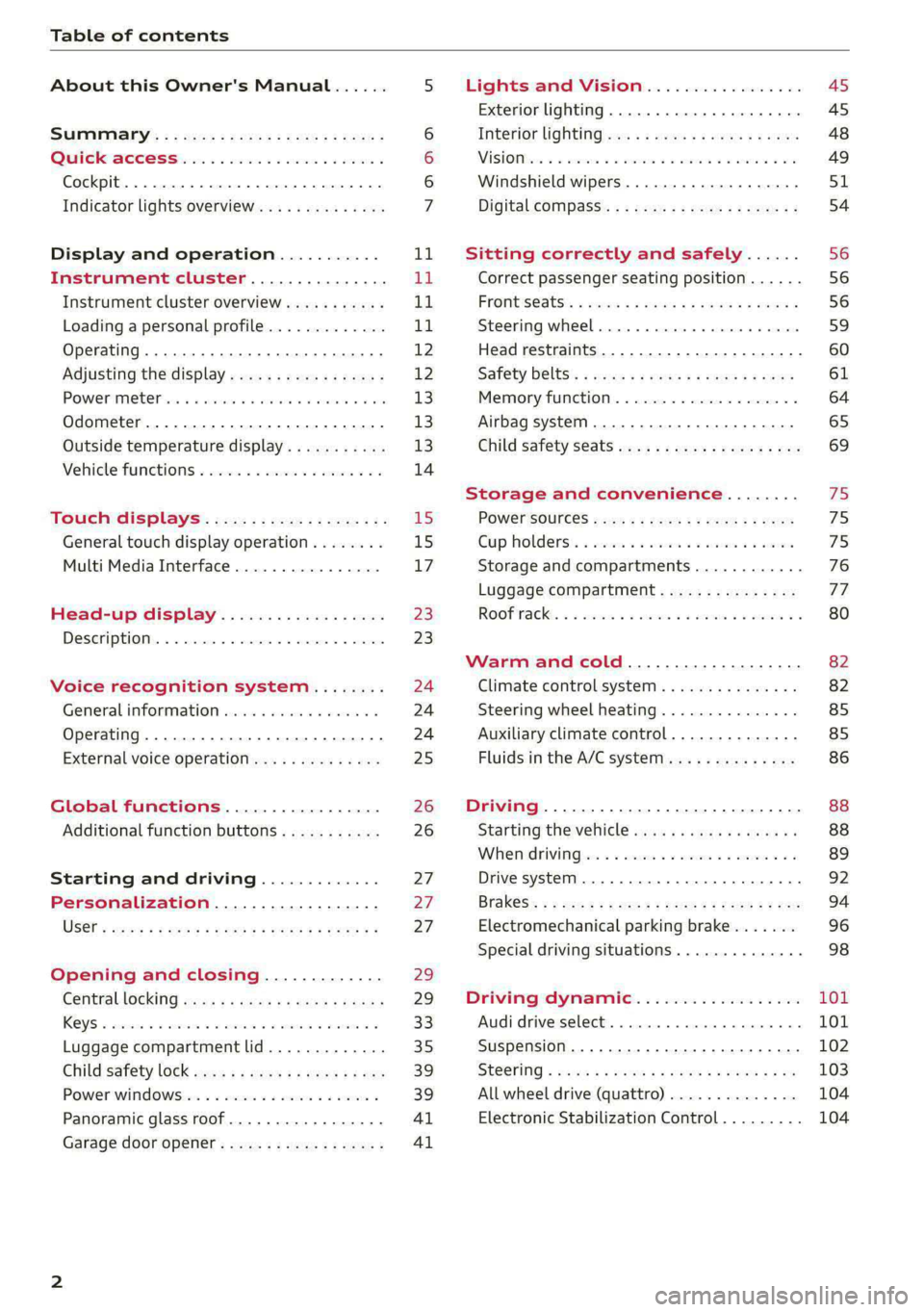
Table of contents
About this Owner's Manual......
SUMIMAry: < = exe : eens: Seen cs sens
QutckeaeCe ssh: «i esis se ois a eaves @
Cockpit. ...... 0... eee eee eee eee
Indicator lights overview...........4..
Display and operation...........
Instrument cluster...............
Instrument cluster overview...........
Loading a personal profile.............
Operating......... 2.00. cece eee eee
Adjusting the display.................
POWEP IMGT cis 6s. sxcwsue o svanens ow shaun 6 a 80a
Odometer.............. cee eee eee ee
Outside temperature display...........
Vehicle functions « ss... seen ve ome ee
TOUCH GISBIAYS): cscs « : wows st eens:
General touch display operation........
Multi Media Interface................
Head-up display..................
DeSGrIPELOIN:. « + asowies « a seen < awtine » coven
Voice recognition system........
General information 00. coe. wen es
Operating..................0..0000.
External voice operation..............
Global functions.................
Additional function buttons...........
Starting and driving.............
Personalization..................
Opening and closing.............
Centrablocking gas « x saws < # aene « naunes
KEYS « sscesus oo oases va aamies wot aeons v Be
Luggage compartment lid.............
Child’satety lOCK sms ¢ ¢ semw se cease ¢ een
Power windowsSec oo vase x a mwas ¥ a arasws ¥
Panoramic glass roof.................
Garage door opener............0.00..
NOD
OO
11
ga:
11
11,
12 12 13 13
13
14
15
15
17
Z3
23
24 24 24
25
26
26
27 27 27
29;
29
33 35
39 39
41 Al
Lights and Vision................. 45
Exterior lighting...............0000ee AS
Interior lightingissss « ¢ ews + ¢ ees es eee 48
MiSIOM iss +o seas os aroma oo ewe wo eS wars 49
Windshield wipers................05- S51
Digital compass’ « < sces ss sees sz wees ae 54
Sitting correctly and safely...... 56
Correct passenger seating position...... 56
PROMUSCStS: + wares x x nouns 6 e RawER ye eae 8 56
Steering wheel. ...........00.- ee ee ee 59
Head restraints...................00. 60
Safety belts’: ¢ esas ss mean ¢ o cere oe ee 61
Memory function..............-.0004 64
Airbag system. .... 2. ee eee eee eee 65
Child safety seats.................000- 69
Storage and convenience........ 75
PoW6r SOUICES scx ¢ x sous x sees x foes 75
Cup holdersss « seiwse + «cnn sw senses + = enue 75
Storage and compartments............ 76
Luggage compartment............... oe
ROOF PACK « + iannce 4 o amiss oo mses ao omamau ¥ 6 80
Warm and cold................... 82
Climate control system............... 82
Steering wheel heating............... 85
Auxiliary climate control.............. 85
Fluids in the A/C system.............. 86
Driving................. 0.00.00 000. 88
Starting the vehicle. ..........eee cues 88
Whenrdrivingser. sess os eeu oe emcee ves 89
Drive system... 02... ee eee eee 92
Brak@Sk: « » seg « eae e + neem © x seme ee ee 94
Electromechanical parking brake....... 96
Special driving situations.............. 98
Driving dynamic.................. 101
Audi drive:seleets, . scvceie «0 assne oo mien oo 101
Suspension..............0 2.020000 ee 102
SEGELING « weg w 5 saree a & wane 5 4 wee 2 Ee 103
All wheel drive (quattro) .............. 104
Electronic Stabilization Control......... 104
Page 9 of 316

4KE012721BE
Quick access
— Audi musicinterface .......... 225
— Audi phone box ............... 175
—SDcardreader ............... 222
SOGKEE vcs sw isiness x x seein sw oem a ws 75
@ Electromechanical parking brake
BUtEON acces ox comme: « 2 sure 2 3 conte © 96
@® Selector lever ..............00. 90
@) [START STOP] button ............ 88
@) Steering wheel adjustment ...... 59
@3) Lever for:
— Cruise control system ......... 139
— Adaptive cruise assist .......... 142
@4 Connection port for the On Board
Diagnostic System (OBD) ........ 288
@3) Hood release ..........-..-0005 241
@8 Memory function buttons ........ 64
@) Buttons for:
PELIQHES ac x 2 wsvcene ao esezoss vo aenere @ s 45
—All-weather lights ............ 45
Luggage compartment lid button . 35
@9) Exterior mirror adjustment ...... 49
69 Buttons for:
— Power windows ............0. 39
—Child safety lock .............. 39
G) Tips
Some the equipment listed here is only instal-
led in certain models or is available as an op-
tion.
Indicator lights overview
The indicator lights in the instrument cluster
blink or turn on. They indicate functions or mal-
functions. Some warning and indicator lights
turn on when you switch the ignition on and must
turn off when the drive system is switched on or
while driving.
With some indicator lights, messages may ap-
pear and warning signals may sound. The indica-
tor lights and messages may be covered by other
displays. To show them again, select the second
tab for messages with the multifunction steering
wheel > page 12.
Some indicator lights in the display can display in
several colors.
A\ Central indicator light
If the A or indicator light turns on, check
the message in the instrument cluster.
The following indicator lights may be available,
depending on the vehicle equipment:
Red indicator lights
Central indicator light
=> page 7,
Instrument cluster
=> page 11
Safety belt
=> page 63
Motor start system
=> page 89
Transmission
=> page 92
Drive system
=> page 94,
Electrical system
=> page 244
Charging system
=>page 115
Electromechanical parking brake
=> page 96
Electromechanical parking brake
=> page 98
Brake system
=> page 96, > page 98,
=> page 243
Brake system
=> page 96, > page 98,
=> page 243
Steering
=> page 103
Steering lock
=> page 103
Page 10 of 316

Quick access
Air suspension
=> page 102
Electrical system
=> page 244
Cooling system
=> page 242
Hood
=> page 241
Charging system
=>page 115
Loose wheel warning
=> page 263
Night vision assist
=> page 136
Night vision assist
=>page 136
Distance warning
=> page 152
Steering intervention request
=> page 146
Safe start monitor
=> page 150,
Driver intervention request
=> page 150
Lane departure warning
=> page 153
Lane departure warning
= page 153
Audi pre sense
=> page 155,
Intersection assist
=> page 162
Yellow indicator lights
Central indicator light
=> page 7
Safety systems
=> page 65
Transmission
=> page 92
Drive system
=> page 94
Cooling system
=> page 242
Drive system
=> page 94
Vehicle sound
=> page 94
Motor start system
=> page 89
Keys
=> page 89
Electromechanical parking brake
=> page 98
Brake system
=> page 96
Electronic Stabilization Control
(ESC)
=> page 104
Electronic Stabilization Control
(ESC)
=> page 104
Electronic Stabilization Control
(ESC)
=>page 105
Anti-lock braking system (ABS)
=> page 106
Anti-lock braking system (ABS)
=> page 106
Steering
=> page 103
Steering lock
=> page 103
All wheel drive
=> page 104
Suspension control
= page 102
Air suspension
=> page 102
Electrical system
=> page 244
Washer fluid level
=> page 246
Windshield wipers
=> page 53
High-voltage battery range
>page 115
Page 11 of 316
4KE012721BE
Quick access
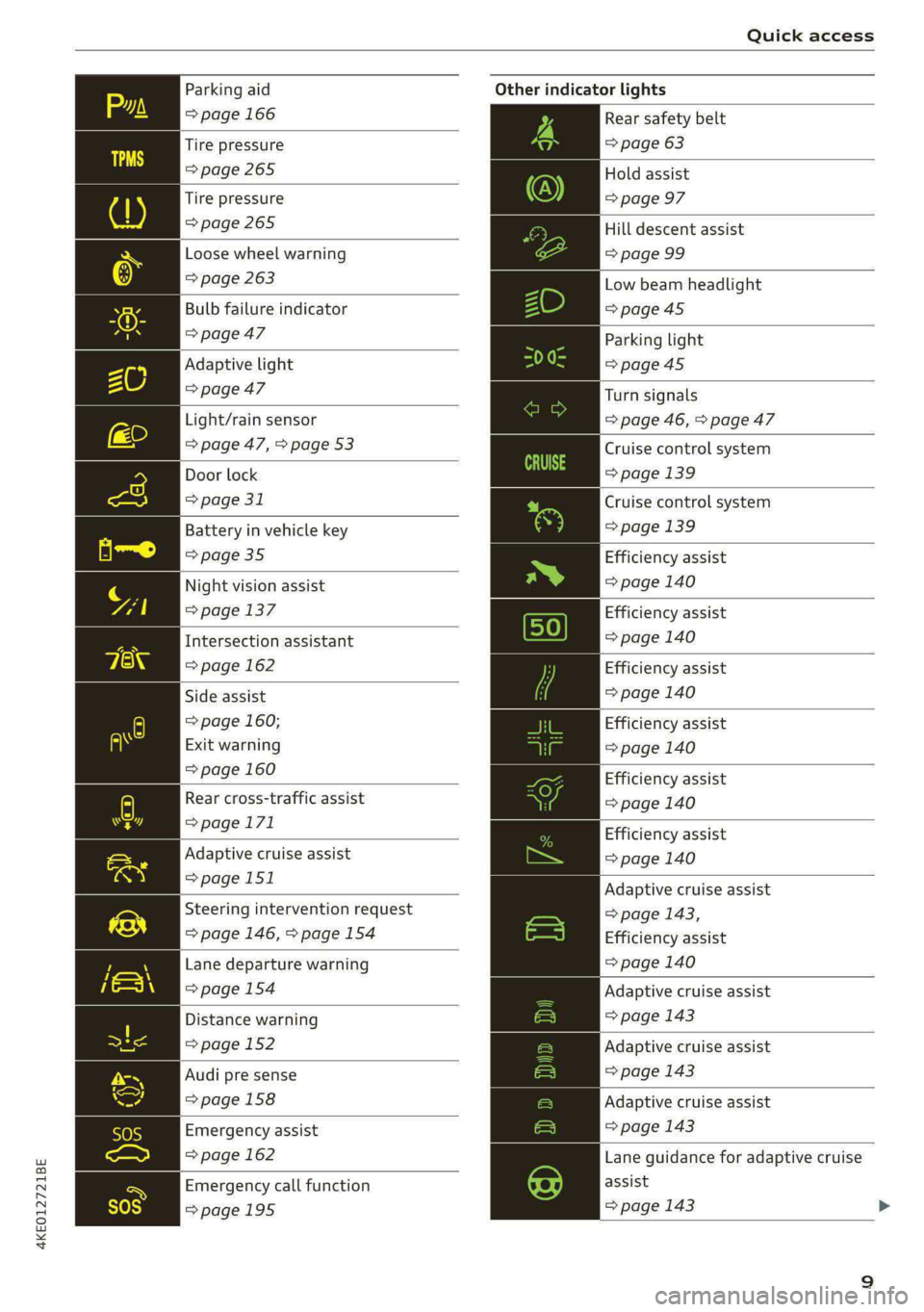
Parking aid
=> page 166
Tire pressure
=> page 265
Tire pressure
=>page 265
Loose wheel warning
=> page 263
Bulb failure indicator
=>page 47
Adaptive light
> page 47
Light/rain sensor
=> page 47, > page 53
Door lock
=> page 31
Battery in vehicle key
> page 35
Night vision assist
=> page 137
Intersection assistant
=> page 162
Side assist
=> page 160;
Exit warning
=> page 160
Rear cross-traffic assist
=>page 171
Adaptive cruise assist
=>page 151
Steering intervention request
=> page 146, >page 154
Lane departure warning
=>page 154
Distance warning
=> page 152
Audi pre sense
=>page 158
Emergency assist
=> page 162
Emergency call function
=>page 195
Other indicator lights
Rear safety belt
=> page 63
Hold assist
=> page 97
Hill descent assist
=> page 99
Low beam headlight
=>page 45
Parking light
=>page 45
Turn signals
=> page 46, > page 47
Cruise control system
=> page 139
Cruise control system
=>page
139
Efficiency assist
=> page 140
Efficiency assist
=> page 140
Efficiency assist
=> page 140
Efficiency assist
=> page 140
Efficiency assist
= page 140
Efficiency assist
=> page 140
Adaptive cruise assist
=> page 143,
Efficiency assist
=> page 140
Adaptive cruise assist
=> page 143
Adaptive cruise assist
=> page 143
Adaptive cruise assist
=> page 143
Lane guidance for adaptive cruise
assist
=> page 143
Page 25 of 316
4KE012721BE
Head-up display
Head-up display
Description
Applies to: vehicles with head-up display
The head-up display projects certain warnings or
selected information from the assist systems on
the windshield. The display appears within the
driver's field of vision.
Switching on and off
The Y button is located in the function bar on
the lower display > page 18.
> To switch the head-up display on or off, press
and hold the Y button.
Settings in the Infotainment system
> Applies to: MMI: Select on the home screen:
SETTINGS > Display & brightness > Head-up
display, or
> Press the Y button.
Possible settings:
— Picture rotation
— Brightness
— Display height: you can adjust the height of the
display. Sit in the correct seating position
=> page 56 and adjust the head-up display.
— Display contents: you can set which informa-
tion should be displayed. The display of certain
information and some of the red indicator
lights cannot be hidden.
@) Note
To reduce the risk of scratches on the glass
covering the head-up display, do not place any
objects in the projection opening.
@ Tips
— Sunglasses with polarization filters and un-
favorable lighting conditions can impair visi-
bility of the display.
— An optimal display depends on the seat po-
sition and the height adjustment of the
head-up display.
— A special windshield is needed for the head-
up display function.
— For information on cleaning, see > table In-
terior cleaning on page 270.
23
Page 26 of 316
Voice recognition system
Voice recognition system
General information
Applies to: vehicles with voice recognition system
You can operate many functions in the vehicle
easily using voice commands.
Using the voice recognition system optimally
> Speak clearly and distinctly at a normal volume.
Speak louder when driving faster.
> Emphasize the words in the commands evenly
and do not leave long pauses.
> Close the doors, the windows, and the sunroof*
to reduce background noise. Make sure that
passengers are not speaking when you are giv-
ing a voice command.
> Do not direct the vents toward the hands-free
microphone, which is in the roof headliner near
the front interior lights.
> Only the driver should speak to the system, be-
cause the handsfree microphone is aimed to-
ward this seating position.
ZA\ WARNING
— Direct your full attention to driving. As the
driver, you have complete responsibility for
safety in traffic. Only use the functions in
such a way that you always maintain com-
plete control over your vehicle in all traffic
situations.
— Do not use the voice recognition system in
emergencies because your voice may change
in stressful situations. The system may take
longer to dial the number or may not be
able to dial it at all. Dial the emergency
number manually.
G) Tips
There are no voice guidance* prompts when a
dialog is active.
24
Operating
Applies to: vehicles with voice recognition system
See
Dat)
Where is a
Connect
Diala
coy
Es
ea
cog
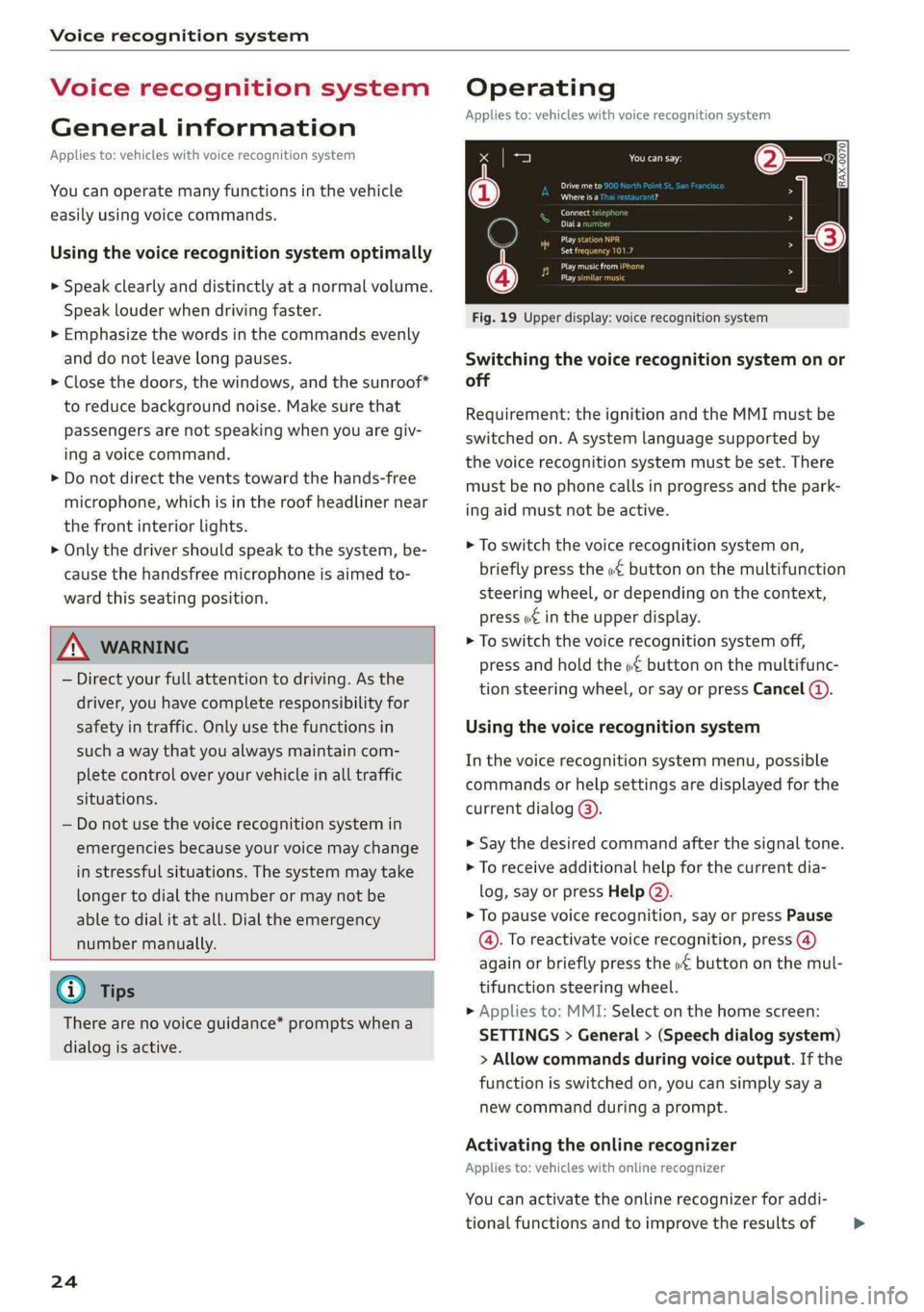
Fig. 19 Upper display: voice recognition system
Switching the voice recognition system on or
off
Requirement: the ignition and the MMI must be
switched on. A system language supported by
the voice recognition system must be set. There
must be no phone calls in progress and the park-
ing aid must not be active.
> To switch the voice recognition system on,
briefly press the «€ button on the multifunction
steering wheel, or depending on the context,
press wt in the upper display.
> To switch the voice recognition system off,
press and hold the « button on the multifunc-
tion steering wheel, or say or press Cancel (4).
Using the voice recognition system
In the voice recognition system menu, possible
commands or help settings are displayed for the
current dialog @).
> Say the desired command after the signal tone.
> To receive additional help for the current dia-
log, say or press Help (2).
> To pause voice recognition, say or press Pause
@. To reactivate voice recognition, press ()
again or briefly press the «€ button on the mul-
tifunction steering wheel.
> Applies to: MMI: Select on the home screen:
SETTINGS > General > (Speech dialog system)
> Allow commands during voice output. If the
function is switched on, you can simply say a
new command during a prompt.
Activating the online recognizer
Applies to: vehicles with online recognizer
You can activate the online recognizer for addi-
tional functions and to improve the results of >
Page 43 of 316

4KE012721BE
Opening and closing
Panoramic glass roof
Operating the p ic glass roof and
roof sunshade
Applies to: vehicles with panoramic glass roof and roof sun-
shade
Fig. 34 Headliner: panoramic glass roof and sunshade*
buttons
The control buttons are equipped with a two-
stage function.
When tilting or opening the roof, the roof sun-
shade will open partially or completely if the sun-
shade is closed.
Operating the roof sunshade
> Opening and closing the sunshade: slide the
switch in in the headliner @) forward or toward
the rear to the second level.
> Partially opening the sunshade: press the
switch to the first level until the sunshade
reaches the desired position.
Operating the roof
> Tilting the roof: press the 2S switch in the
headliner briefly upward to the second level @).
> Closing the tilted roof: pull the 2 switch
downward briefly to the second level.
> Opening the roof: Push the 2S switch back
briefly to the second level @).
> Closing the roof: push the 2S switch forward
briefly to the second level.
> Opening or closing partially: slide the A>
switch to the first level and hold it there until
the roof reaches the desired position.
Quick opening
You can also open the roof and roof sunshade in
one movement.
> Push the > switch back briefly to the second
level @) twice in a row.
Roof emergency closing
If an object is detected when closing, the roof
will open again automatically. In this case, you
can then close it with the power emergency clos-
ing function.
> Within five seconds after the sunroof opens au-
tomatically, pull the applicable button until the
roof is closed.
ZA WARNING
To reduce the risk of injury, always pay atten-
tion when closing the roof. Always switch the
ignition off and take the key with you when
leaving the vehicle.
CG) Note
Always close the roof when you leave the vehi-
cle and when there is precipitation to reduce
the risk of damage to the interior equipment,
particularly the electronic equipment.
G) Tips
— After switching off the ignition, the roof and
sunshades can still be operated for several
minutes as long as neither of the front
doors have been opened.
— It is not possible to open the roof when
temperatures are too low.
Garage door opener
Applies to: vehicles with garage door opener
With the garage door opener, you can activate
systems such as the garage doors, security sys-
tems or house lights from inside your vehicle.
41
>
Page 47 of 316

4KE012721BE
Lights and Vision
Lights and Vision
Exterior lighting
Switching the lights on and off
Fig. 35 Instrument panel: light button module
© Light sensor
Press and hold @ until the desired light function
is selected. The selected function is displayed
briefly in the instrument cluster. When switching
on the ignition, the AUTO light function is auto-
matically selected.
— AUTO - The automatic headlights adapt to the
surrounding brightness automatically. The day-
time running lights* will automatically turn on.
In vehicles for certain markets, you can switch
the automatic daytime running lights* on and
off in the MMI.
— 20 - You can switch the low beam headlights on
manually once the ignition is switched on.
— 2 - You can switch the parking lights on at
speeds below 20 mph (32 km/h).
— USA models: OFF - You can switch off all light
functions at speeds below 6 mph (10 km/h).
— Canada models: OFF - You can switch off all
light functions when the ignition is switched off
while the vehicle is stationary.
When the low beam headlights or parking lights
are switched on, the respective Ba or EB indica-
tor light appears in the instrument cluster.
@ All-weather lights 2
The headlights automatically adjust so that there
will be less glare, for example when the road sur-
face is wet.
Automatic headlight range control
Your vehicle is equipped with automatic head-
light range control. It reduces glare for oncoming
traffic if the vehicle load changes. The headlight
range adjusts automatically.
Audi adaptive light
Applies to: vehicles with adaptive light
Audi adaptive light provides better visibility when
driving in the dark. The lights are adapted to the
road conditions based on speed, such as when
driving on expressways, rural roads, at intersec-
tions, and around curves. The adaptive light only
functions when the automatic headlights are ac-
tivated.
Z\ WARNING
— Observe the safety precautions and note the
limits of the assist systems, sensors, and
cameras > page 127.
— Automatic headlights are only intended to
assist the driver. They do not relieve the
driver of responsibility to check the head-
lights and to turn them on manually based
on the current light and visibility conditions.
For example, fog cannot be detected by the
light sensors. So always switch on the low
beams ZO under these weather conditions
and when driving in the dark.
@ Tips
— If the vehicle battery has been discharging
for a while, the parking light may switch off
automatically. Avoid using the parking
lights for several hours.
— Follow the regulations applicable to the
country where you are operating the vehicle
when stopping the vehicle and when using
the lighting systems.
— Only the front headlights turn on when the
daytime running lights are switched on*. In
vehicles in certain markets, the tail lights
will also turn on.
—Incool or damp weather, the inside of the
headlights, turn signals, and tail lights can
fog
over due to the temperature difference
between the inside and outside. They will
clear shortly after switching them on. This
4s
>