2020 AUDI A3 service
[x] Cancel search: servicePage 112 of 400
High-voltage system
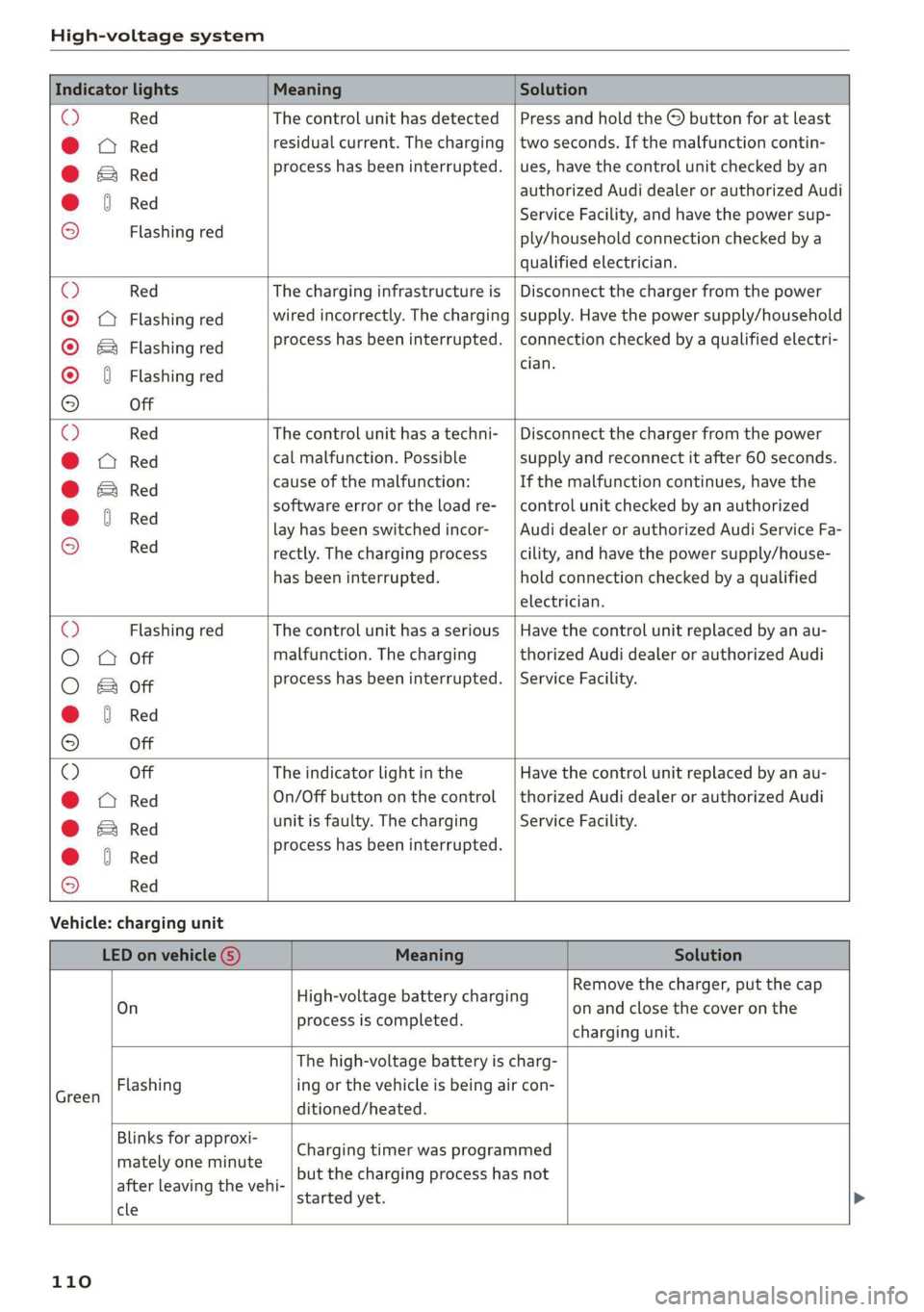
Indicator lights Meaning Solution
O Red The control unit has detected | Press and hold the © button for at least
@ X Red residual current. The charging | two seconds. If the malfunction contin-
@ EB Red process has been interrupted. | ues, have the control unit checked by an
@ © Red authorized Audi dealer or authorized Audi
€ / Service Facility, and have the power sup-
9 Flashing red ply/household connection checked by a
qualified electrician.
© Red The charging infrastructure is | Disconnect the charger from the power
© Q Flashing red wired incorrectly. The charging | supply. Have the power supply/household
© & Flashing red process has been interrupted. | connection checked by a qualified electri-
© § Flashing red eas
9 Off
O Red The control unit has a techni- | Disconnect the charger from the power
@ CX Red cal malfunction. Possible supply and reconnect it after 60 seconds.
@ EB Red cause of the malfunction: If the malfunction continues, have the
@ 0 Red software error or the load re-_ | control unit checked by an authorized
. lay has been switched incor- _| Audi dealer or authorized Audi Service Fa-
9 Red rectly. The charging process cility, and have the power supply/house-
has been interrupted. hold connection checked by a qualified
electrician.
O Flashing red The control unit has a serious | Have the control unit replaced by an au-
O 0 off malfunction. The charging thorized Audi dealer or authorized Audi
O Bot process has been interrupted. | Service Facility.
@ @ Red
9 Off
© Off The indicator light in the Have the control unit replaced by an au-
@ C Red On/Off button on the control | thorized Audi dealer or authorized Audi
@ B Red unit is faulty. The charging Service Facility.
@ 0 Red process has been interrupted.
e
© Red
Vehicle: charging unit
LED on vehicle G) Meaning Solution
. . Remove the charger, put the cap
On High voltage battery charging on and close the cover on the
process is completed. . .
charging unit.
The high-voltage battery is charg-
isan Flashing ing or the vehicle is being air con-
ditioned/heated.
Blinks for approxi-
mately one minute
after leaving the vehi-
cle
started yet.
Charging timer was programmed
but the charging process has not
110
Page 113 of 400

8V2012721BK
High-voltage system
LED on vehicle © Meaning Solution
Have the power supply or power
supply system inspected. Check
No power supply was recognized | the status display on the control
On even though the charging cable is | unit > table on page 107. See an
Yellow plugged in. authorized Audi dealer or author-
ized Audi Service Facility for assis-
tance if necessary.
‘ The selector lever in notin the P | Move the selector lever into the P
Flashing vps ue
position. position.
Check if the charging connector is
inserted correctly. Remove the
The charging connector could not | charging connector and insert it in-
On be correctly locked in the vehicle | to the charging port again. See an
charging port. authorized Audi dealer or author-
ized Audi Service Facility for assis-
Red tance if necessary.
Fault in the charging system. The
ong penne meme See an authorized Audi dealer or
Flashing cargec. . . authorized Audi Service Facility for
Or: the outside temperature is too . .
: assistance if necessary.
low. The high-voltage battery
could not be fully charged.
@) Tips
The operation status indicated by the LED G)
on the vehicle is also displayed in the instru-
ment cluster/Infotainment system.
Indicator lights and
messages
Applies to: vehicles with plug-in hybrid drive
If the Ey indicator light turns on, the high-volt-
age battery is charging or is already completely
charged.
If the EX indicator light stays on, there is a mal-
function in the charging system. Have the prob-
lem corrected immediately by an authorized Audi
dealer or authorized Audi Service Facility.
Charging connector still attached. Vehicle
cannot be driven
This message appears when the charging system
is still connected to the vehicle. Remove the con-
nector > page 106.
Incompatible charging system. Please check
charging system
This message appears when the charging system
is incompatible. Only charge using the charging
system that is designed for your vehicle.
Eg AC charging system: malfunction! Please
contact Service
This message appears if there is a malfunction in
the charging system. Have the problem corrected
immediately by an authorized Audi dealer or au-
thorized Audi Service Facility.
Warning! Charging unit cover is unlocked.
See owner's manual
This message appears if the charging unit cover is
open. Close the cover and lock it > page 107.
111
Page 116 of 400

Trailer towing
Exterior lighting
Follow the legal regulations regarding the light-
ing equipment on your trailer. Contact an author-
ized Audi dealer or authorized Audi Service Facili-
ty for more information.
Before you start driving, check all lighting equip-
ment on the trailer while it is hitched to the vehi-
cle.
The headlight range control automatically ad-
justs the light range of the headlights.
Safety chains
Make sure the safety chains are correctly applied
when pulling a trailer. The chains should hang
enough so that the trailer can drive around
curves. However, they must not touch the
ground.
G) Tips
— Block the wheels with chocks when parking
on inclines if the trailer is loaded.
— Having the vehicle inspected between the
inspection intervals is recommended if you
tow a trailer frequently.
— Avoid driving with a trailer during the vehi-
cle break-in period.
Driving with a trailer
Driving with a trailer requires extra caution.
Speed
Adhere to the legal speed limits. Follow the legal
regulations specific to the country.
As the speed increases, the driving stability of
the trailer decreases. Therefore you should not
exceed the maximum legal speed limit when
there are unfavorable road, weather, and/or wind
conditions. This especially applies when driving
downhill.
Hill
When you start driving uphill or downhill, trailers
may tilt or sway sooner than when driving ona
level surface. If small swaying movements have
already occurred, you can stabilize the trailer by
114
firmly braking immediately. Never attempt to
“straighten out” the trailer by accelerating.
Downshift before driving on hills to utilize the en-
gine braking effect > A\.
Brakes
When using a trailer with overrun brakes, first
brake gently then quickly. This reduces the risk of
jerking while braking if the trailer wheels lock up.
Engine coolant temperature
Pay attention specifically to the coolant tempera-
ture display when there are high outside temper-
atures, and when driving on long inclines
=> page 15. Shift to a higher gear in a timely man-
ner.
Z\ WARNING
Constant braking causes the brakes to over-
heat and can substantially reduce braking per-
formance, increase braking distance, or cause
complete failure of the brake system.
Page 121 of 400

8V2012721BK
Assist systems
Which functions can be controlled?
When you switch adaptive cruise control on, you
can set the current speed as the “control speed”
= page 120, Switching on and off.
When driving, you can stop cruise control
= page 122 or change the speed > page 121 at
any time.
You can also set the distance to the vehicle ahead
and set the adaptive cruise control driving pro-
gram > page 123.
er l eieleurlsela)
Applies to: vehicles with Audi adaptive cruise control/Audi pre
sense front
Fig. 109 Front of vehicle: sensor
The radar sensor area > fig. 109 must not be cov-
ered with stickers, deposits or any other obstruc-
tions as it may impair the function of the adap-
tive cruise control or the pre sense front. For in-
formation on cleaning, see > page 342. The
same applies for any modifications made in the
front area.
The function of the adaptive cruise control sys-
tem or pre sense front is limited in some condi-
tions:
— Vehicles can only be detected when they are
within the sensor range > page 118, fig. 108.
—The system has a limited ability to detect
vehicles that are a short distance ahead, off to
the side of your vehicle or moving into your
lane.
— Objects that are difficult to detect such as mo-
torcycles, vehicles with high ground clearance
or an overhanging load are detected late or not
detected at all.
— When driving through curves > page 120.
— When the vehicle is stationary > page 120.
Z\ WARNING
Always pay attention to the traffic around you
when adaptive cruise control is switched on.
As the driver, you are still responsible for your
own speed and the distance to other vehicles.
The adaptive cruise control is used to assist
you. The driver must always take action to
avoid a collision. The driver is always responsi-
ble for braking at the correct time.
— For safety reasons, do not use adaptive
cruise control when driving on roads with
many curves, when the road surface is in
poor condition and/or in bad weather (such
as ice, fog, gravel, heavy rain and hydroplan-
ing). Using the system under these condi-
tions could result in a collision.
— Switch adaptive cruise control off temporari-
ly when driving in turning lanes, on express-
way exits or in construction zones. This pre-
vents the vehicle from accelerating to the
stored speed when in these situations.
— The adaptive cruise control system will not
brake by itself if you put your foot on the ac-
celerator pedal. Doing so can override the
speed and distance regulation.
— Adaptive cruise control does not respond to
people, animals, or crossing or oncoming
objects.
— The function of the radar sensors can be af-
fected by reflective objects such as guard
rails, the entrance to a tunnel, heavy rain or
ice
@) Note
The sensor can be displaced by impacts or
damage to the bumper, wheel housing and
underbody. This can impair the adaptive
cruise control. Have an authorized Audi dealer
or authorized Audi Service Facility check their
function.
@) Tips
For an explanation on conformity with the
FCC regulations in the United States and the
Industry Canada regulations, see > page 377.
119
Page 126 of 400

Assist systems
Driving program > Comfort, Standard or Dy-
namic.
Setting the driving mode on vehicles with
drive select*
See > page 91.
@ Tips
Your settings are automatically stored and as-
signed to the remote control key being used.
Driver intervention request
Applies to: vehicles with Audi adaptive cruise control
Fig. 118 Instrument cluster: request for driver interven-
tion
The request for driver intervention instructs you
to take over if the adaptive cruise control braking
function is not able to maintain a sufficient dis-
tance to the vehicle driving ahead > fig. 118.
Pele Me EAM Hee Cll)
Applies to: vehicles with Audi adaptive cruise control
This function measures the time between the ve-
hicle driving ahead and shows this in the instru-
ment cluster display.
Fig. 119 Instrument cluster: distance indicator/warning
124
Description
At speeds above approximately 40 mph (65
km/h), this function measures the distance to the
vehicle ahead as time.
> Switch the adaptive cruise control display on in
the instrument cluster display > page 17.
The B indicator light turns on if you fall below
the set distance.
Setting the warning threshold
You can set, change or delete the warning thresh-
old in the Infotainment system.
> In the Infotainment system, select: [MENU
button > Vehicle > left control button > Driver
assistance > Distance warning.
Z\ WARNING
— Read and follow the warnings on > A\ in
General information on page 119.
— The driver is always responsible for adhering
to the regulations applicable in the country
where the vehicle is being operated.
(i) Tips
You may fall below he warning threshold
briefly when passing or when quickly ap-
proaching a slow vehicle. There is no warning
in this scenario. A warning is given only if you
fall below the warning threshold for an ex-
tended period of time.
Messages
Applies to: vehicles with Audi adaptive cruise control
ACC: unavailable
The system cannot guarantee that it will detect
vehicles correctly and it has switched off. The
sensor was moved or is faulty. Drive to an author-
ized Audi dealer or authorized Audi Service Facili-
ty immediately to have the malfunction correct-
ed.
a ACC: currently unavailable. No sensor view
Si ACC: currently unavailable. Sensor vision re-
stricted due to surroundings. See owner's man-
ual
Page 127 of 400
8V2012721BK
Assist systems
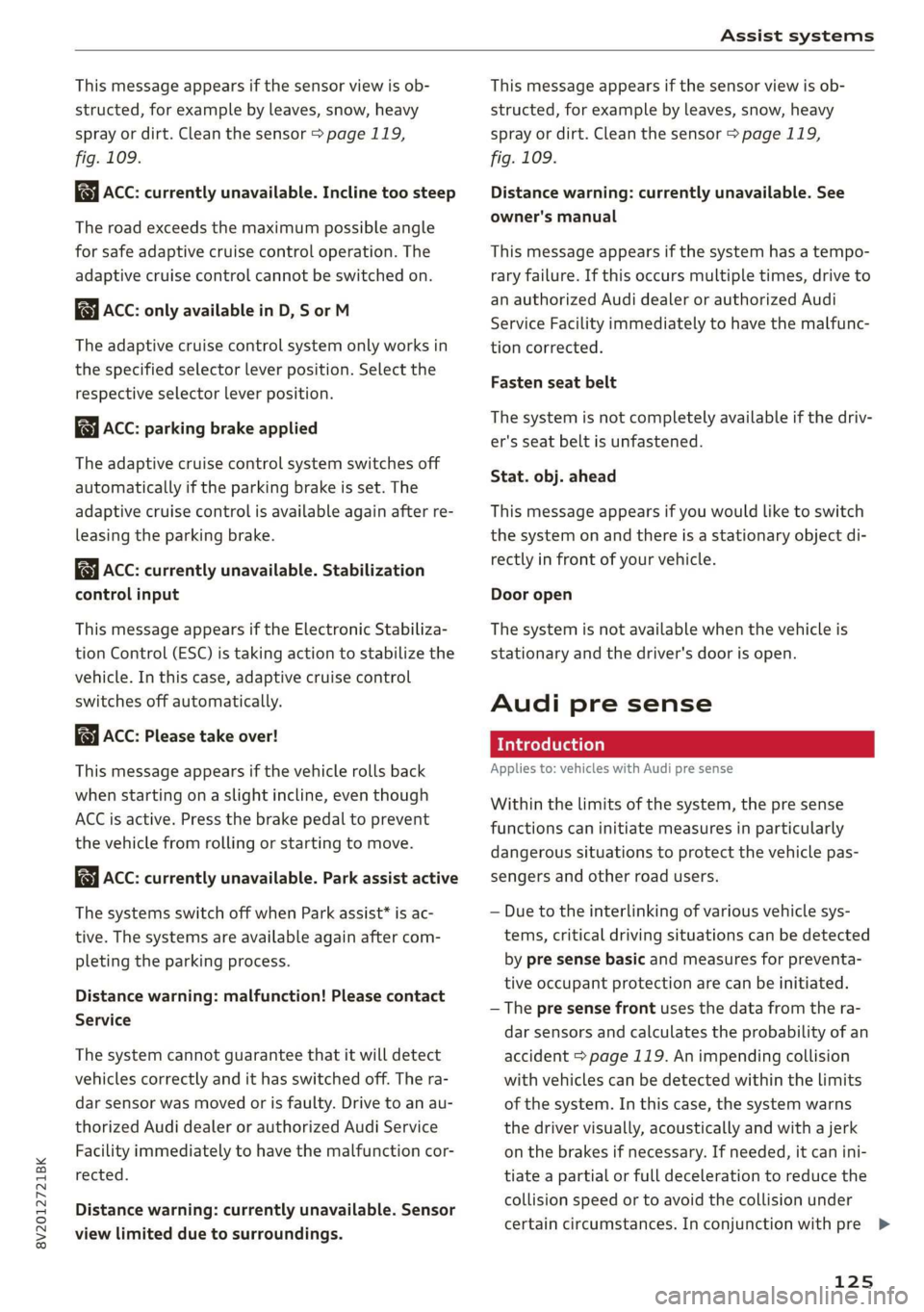
This message appears if the sensor view is ob-
structed, for example by leaves, snow, heavy
spray or dirt. Clean the sensor > page 119,
fig. 109.
ACC: currently unavailable. Incline too steep
The road exceeds the maximum possible angle
for safe adaptive cruise control operation. The
adaptive cruise control cannot be switched on.
ACC: only available in D, Sor M
The adaptive cruise control system only works in
the specified selector lever position. Select the
respective selector lever position.
ACC: parking brake applied
The adaptive cruise control system switches off
automatically if the parking brake is set. The
adaptive cruise control is available again after re-
leasing the parking brake.
ACC: currently unavailable. Stabilization
control input
This message appears if the Electronic Stabiliza-
tion Control (ESC) is taking action to stabilize the
vehicle. In this case, adaptive cruise control
switches off automatically.
ACC: Please take over!
This message appears if the vehicle rolls back
when starting on a slight incline, even though
ACC is active. Press the brake pedal to prevent
the vehicle from rolling or starting to move.
ACC: currently unavailable. Park assist active
The systems switch off when Park assist* is ac-
tive. The systems are available again after com-
pleting the parking process.
Distance warning: malfunction! Please contact
Service
The system cannot guarantee that it will detect
vehicles correctly and it has switched off. The ra-
dar sensor was moved or is faulty. Drive to an au-
thorized Audi dealer or authorized Audi Service
Facility immediately to have the malfunction cor-
rected.
Distance warning: currently unavailable. Sensor
view limited due to surroundings.
This message appears if the sensor view is ob-
structed, for example by leaves, snow, heavy
spray or dirt. Clean the sensor > page 119,
fig. 109.
Distance warning: currently unavailable. See
owner's manual
This message appears if the system has a tempo-
rary failure. If this occurs multiple times, drive to
an authorized Audi dealer or authorized Audi
Service Facility immediately to have the malfunc-
tion corrected.
Fasten seat belt
The system is not completely available if the driv-
er's seat belt is unfastened.
Stat. obj. ahead
This message appears if you would like to switch
the system on and there is a stationary object di-
rectly in front of your vehicle.
Door open
The system is not available when the vehicle is
stationary and the driver's door is open.
Audi pre sense
Introduction
Applies to: vehicles with Audi pre sense
Within the limits of the system, the pre sense
functions can initiate measures in particularly
dangerous situations to protect the vehicle pas-
sengers and other road users.
— Due to the interlinking of various vehicle sys-
tems, critical driving situations can be detected
by pre sense basic and measures for preventa-
tive occupant protection are can be initiated.
— The pre sense front uses the data from the ra-
dar sensors and calculates the probability of an
accident > page 119. An impending collision
with vehicles can be detected within the limits
of the system. In this case, the system warns
the driver visually, acoustically and with a jerk
on the brakes if necessary. If needed, it can ini-
tiate a partial or full deceleration to reduce the
collision speed or to avoid the collision under
certain circumstances. In conjunction with pre >
125
Page 129 of 400

8V2012721BK
Assist systems
strongly. The message Audi pre sense A
=> fig. 120 and a warning tone will warn you
about the danger.
If there is an impending collision with vehicles,
there will also be an acute warning in the form of
sharp braking. If you do not react to the acute
warning, pre sense front can brake with increas-
ing force within the limits of the system. This re-
duces the vehicle speed in the event of a colli-
sion.
Automatic deceleration
Depending on the speed, pre sense front can de-
celerate automatically shortly before a collision:
— if there are stationary vehicles when you are
traveling at speeds up to approximately 28
mph (45 km/h)
— if there are vehicles driving or stopped ahead
when you are traveling at speeds up to approxi-
mately 155 mph (250 km/h)
Automatic braking force increase
If pre sense front determines that you are not
braking strongly enough when a collision is immi-
nent, it can increase the braking force, depending
on the situation and speed:
— if there are stationary vehicles when you are
traveling at speeds up to approximately 50
mph (85 km/h)
— if there are vehicles driving or stopped ahead
when you are traveling at speeds up to approxi-
mately 155 mph (250 km/h)
— The system can deploy incorrectly due to
system-specific limits.
— Please note that the sensor does not always
detect all objects. This increases the risk of a
collision.
— Pre sense front does not react to vehicles
traveling toward you in the same lane, to
people, groups of people, animals, objects
that are crossing the road, or objects that
are difficult to detect > A\ in General infor-
mation on page 119.
ZA\ WARNING
Pre sense front may be restricted or not avail-
able in the following example situations:
— If there are other reflective objects nearby,
such as guard rails or vehicles
— When driving into a tunnel
— In heavy fog, rain, spray, or snow
—If the radar sensor is dirty, covered in ice,
damaged, or covered
— In curves
— If the ESC was switched off.
Z\ WARNING
Pre sense front cannot overcome the laws of
physics. It is a system designed to assist and
it cannot prevent a collision in every circum-
stance. The driver must always intervene. The
driver is always responsible for braking at the
correct time. Do not let the increased safety
provided tempt you into taking risks. This
could increase your risk of a collision.
— Loose objects can be thrown around the ve-
hicle interior during sudden driving or brak-
ing maneuvers, which increases the risk of
an accident. Store objects securely while
driving.
@) Note
The sensor can be displaced by impacts or
damage to the bumper, wheel housing and
underbody. Pre sense front can be impaired by
this. Have an authorized Audi dealer or au-
thorized Audi Service Facility check their func-
tion.
(i) Tips
— You can cancel the braking with increasing
force that is initiated by the system by brak-
ing yourself, by accelerating noticeably or by
swerving.
— When driving in reverse, certain pre sense
front functions are switched off.
— System functions may not be available if the
ESC is limited or switched off, or if there is a
malfunction.
127
Page 130 of 400
![AUDI A3 2020 Owner´s Manual Assist systems
Settings in the Infotainment system
Applies to: vehicles with Audi pre sense
> Select in the Infotainment system: [MENU] but-
ton > Vehicle > left control button > Driver](/manual-img/6/40265/w960_40265-129.png "AUDI A3 2020 Owner´s Manual Assist systems
Settings in the Infotainment system
Applies to: vehicles with Audi pre sense
> Select in the Infotainment system: [MENU] but-
ton > Vehicle > left control button > Driver")
Assist systems
Settings in the Infotainment system
Applies to: vehicles with Audi pre sense
> Select in the Infotainment system: [MENU] but-
ton > Vehicle > left control button > Driver as-
sistance > Audi pre sense.
System - The pre sense functions can be switched
on and off.
If the system is switched off, it switches on again
automatically once the ignition is switched on
again.
Prewarning - The early warning can be switched
off permanently or the pre sense front warning
point can be set (Early/Medium/Late).
Set the warning time for the early warning to
Early at first. If this causes undesired early warn-
ings to appear, then set the warning time to Me-
dium. The Late warning time should only be set
in special circumstances.
@ Tips
If the system is switched off, it switches on
again automatically once the ignition is
switched on again.
Messages
Applies to: vehicles with Audi pre sense
& Audi pre sense: malfunction! Please contact
Service
This message appears when the pre sense func-
tion
is affected. For example, this could be
caused by a faulty sensor. If the message stays
on, drive immediately to an authorized Audi deal-
er or authorized Audi Service Facility to have the
malfunction corrected.
Audi pre sense: currently limited. Sensor
view limited due to surroundings.
This message appears if the sensor view is ob-
structed, for example by leaves, snow, heavy
spray or dirt. Clean the sensor if necessary
=> page 119, fig. 109.
Audi pre sense: currently limited
This message appears if the ESC is restricted or
switched off, for example.
128
udi pre sense: currently limited. See own-
er's manual
This message appears when there is a temporary
failure in a subsystem, such as the ESC. If this
message appears repeatedly, drive to an author-
ized Audi dealer or authorized Audi Service Facili-
ty to have the malfunction corrected.
Audi pre sense: emergency braking system
off
This message appears if the pre sense functions
are switched off through the Infotainment sys-
tem or if the system is not ready.
Audi active lane assist
Applies to: vehicles with Audi active lane assist
Active lane assist (lane departure warning) de-
tects lane marker lines within the limits of the
system using a camera in the windshield. If you
are approaching a detected lane marker line and
it appears likely that you will leave the lane, the
system will warn you with corrective steering.
You can override this steering at any time. If you
pass over a line, the steering wheel will vibrate
lightly. In order for this warning vibration to oc-
cur, it must first be switched on in the Infotain-
ment system. Active lane assist is ready for oper-
ation when the lane marker line is detected on at
least one side of the vehicle.
The system is designed for driving on express-
ways and highways and therefore only activates
at speeds above approximately 40 mph (65
km/h).
Applies to: vehicles with Audi side assist
If you activate a turn signal when active lane as-
sist is ready and it classifies a lane change as crit-
ical because of vehicles traveling alongside you or
approaching you, there will be noticeable correc-
tive steering shortly before you leave the lane.
This will attempt to keep your vehicle in the lane.
Applies to: vehicles without Audi side assist
The system will not warn you before crossing a
lane marker line if you have activated the turn >