Page 342 of 657
341
uuCustomized Features u
Continued
Features
Rear Only
Reset to Default
Front Only
Full Vehicle
Driver Only
Roof Speaker Volume
Center Speaker Volume
Reset to Default
Roof / Center Volume*
Sound
Speed Volume
Compensation
DTS Neural Surround*
Notifications
Compressed Audio
Enhancement*
Treble
Midrange
Bass
Bass / Treble
Center Speaker Volume
Reset to Default
Center Volume*
Reset to Default
Audio Zones & Balance /
Fader*
Reset to DefaultBalance / Fader*
* Not available on all models
20 ACURA RDX-31TJB6111.book 341 ページ 2020年2月11日 火曜日 午後2時6分
Page 344 of 657
343
uuCustomized Features u
Continued
Features
*1:Default SettingSetup Group Customizable Features
Description Selectable Settings
System
Date & TimeSet Time
Zone
Automatic
Time ZoneSets the audio system to automatically
adjust the clock when driving through
different time zones.
On*1/Off
(Select time
zone)Changes the time zone manually.—
System Units
Changes the speed/distance unit on
the multi-information display, head-up
display
* and audio/information screen.
Miles*1/KM (U.S.)
Miles/ KM*1 (Canada)
LanguageChanges the display language.English*1/Français /
Español
Factory Data Reset
Resets all the settings to their factory
default.
2 Defaulting All the Settings P. 357
Continue/Cancel
AboutDisplays the Android setting items.—
Advanced
OptionsLocation Access
Selects Off not to allow apps including
the navigation system* to access the
vehicle’s location.On*1/ Off
* Not available on all models
20 ACURA RDX-31TJB6111.book 343 ページ 2020年2月11日 火曜日 午後2時6分
Page 345 of 657
344
uuCustomized Features u
Features
*1:Default SettingSetup Group Customizable Features Description Selectable Settings
SystemAdvanced
OptionsInterruptions
Interruption
ModeSets the interruption mode for
allowing to notify when calls and
notifications arrive.Always interrupt*1/
Don’t interrupt/
Allow only priority
interruptions
Events and
remindersSets priority interruptions of events
and reminders.On*1/ Off
CallsSets priority interruptions of calls.On /Off
MessagesSets priority interruptions of messages.On /Off
Calls/
messages
from
Sets priority interruptions of from who.
Anyone*1/Contacts
only /Starred
contacts only
20 ACURA RDX-31TJB6111.book 344 ページ 2020年2月11日 火曜日 午後2時6分
Page 347 of 657
346
uuCustomized Features u
Features
*1:Default Setting
*2:Appears when Wi-Fi mode is Off.
*3:Appears when Wi-Fi mode is Hotspot.
*4:Appears when Wi-Fi mode is Network.
Setup Group
Customizable Features DescriptionSelectable Settings
Connections Wi-Fi Change Mode
*2Changes the Wi-Fi mode.
Off*1/
Hotspot /
Network
Change Mode
*3Changes the Wi-Fi mode. Off
/Hotspot/
Network
Network SSID
*3Sets this network name. —
Security Type
*3Sets the network security type to
WPA2-PSK mode or security off mode. None
/WPA2-PSK*1
Password*3Sets password for require entering
password when connecting Wi-Fi
device to this network. —
Connected Devices List
*3Displays the connected device list. —
Change Mode
*4Changes the Wi-Fi mode. Off
/Hotspot/
Network
(Available Networks)
*4Displays the available network(s). —
Add Network
*4Searches a new available network(s). —
20 ACURA RDX-31TJB6111.book 346 ページ 2020年2月11日 火曜日 午後2時6分
Page 348 of 657
347
uuCustomized Features u
Continued
Features
*1:Default SettingSetup Group Customizable Features
Description Selectable Settings
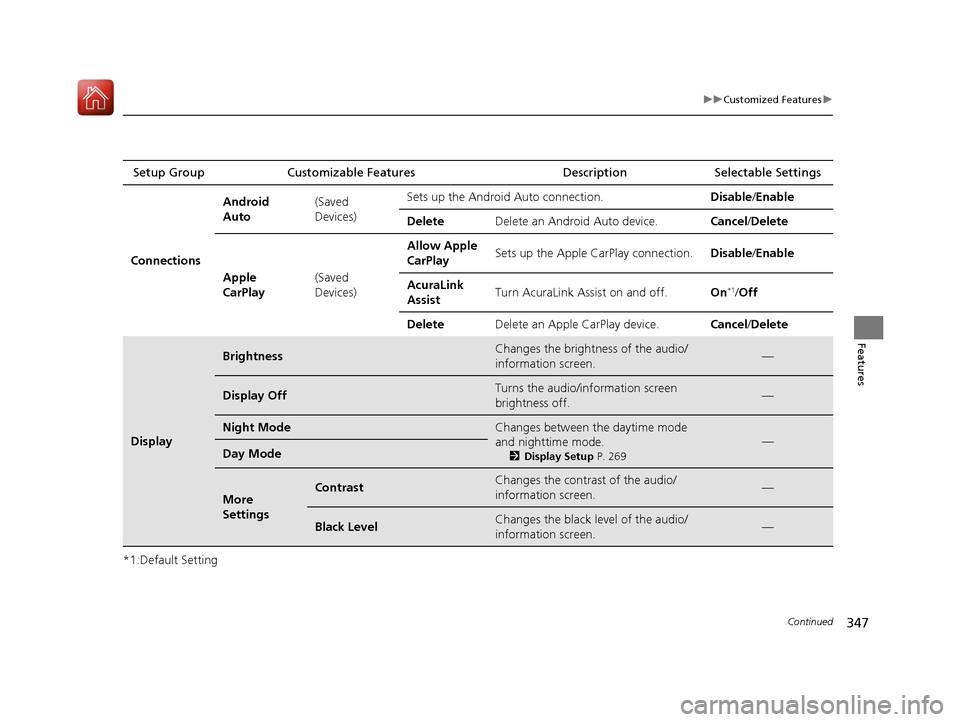
Connections Android
Auto
(Saved
Devices)Sets up the Android Auto connection.
Disable/Enable
Delete Delete an Android Auto device. Cancel/Delete
Apple
CarPlay (Saved
Devices)Allow Apple
CarPlay
Sets up the Apple CarPlay connection.
Disable/Enable
AcuraLink
Assist Turn AcuraLink Assist on and off.
On
*1/Off
Delete Delete an Apple CarPlay device. Cancel/Delete
Display
BrightnessChanges the brightness of the audio/
information screen.—
Display OffTurns the audio/information screen
brightness off.—
Night ModeChanges between the daytime mode
and nighttime mode.
2 Display Setup P. 269
—Day Mode
More
SettingsContrastChanges the contrast of the audio/
information screen.—
Black LevelChanges the black level of the audio/
information screen.—
20 ACURA RDX-31TJB6111.book 347 ページ 2020年2月11日 火曜日 午後2時6分
Page 349 of 657
348
uuCustomized Features u
Features
*1:Default SettingSetup Group Customizable Features Description Selectable Settings
Vehicle Driver Assist
System
SetupForward Collision Warning
Distance
Changes Collision Mitigation Braking
System (CMBS
TM) alert distance.Long
/Normal
*1/
Short
ACC Forward Vehicle Detect
Beep Causes the system to beep when the
system detects a vehicle, or when the
vehicle goes out of the ACC with Low
Speed Follow range.
On
/Off
*1
Road Departure Mitigation
Setting Changes the setting for the road
departure mitigation system. Normal*1/
Wide /
Warning Only
Lane Keeping As sist Suspend
Beep Causes the system to beep when Lane
Keeping Assist Sy
stem (LKAS) is
suspended. On
/Off
*1
Blind Spot Information*Changes the setting for the blind spot
information. Audible and Visual
Alert*1/
Visual Alert /
Off
* Not available on all models
20 ACURA RDX-31TJB6111.book 348 ページ 2020年2月11日 火曜日 午後2時6分
Page 350 of 657

349
uuCustomized Features u
Continued
Features
*1:Default SettingSetup Group Customizable Features
Description Selectable Settings
Vehicle Meter Setup Adjust Outside Temp Display
Adjusts the temperature reading by a
few degrees. −5°F ~
±0°F
*1 ~ 5°F
(U.S.)
−3°C ~ ±0°C
*1 ~ 3°C
(Canada)
“Trip A” Reset Timing Changes the setting of how to reset
trip meter A and average fuel economy
A. With Refuel
/IGN
Off /Manually
Reset
*1
“Trip B” Reset Timing Changes the setting of how to reset
trip meter B and average fuel economy
B. With Refuel
/IGN
Off /Manually
Reset*1
Reverse Shift Position Beep Causes the beeper to sound once
when the transmission is put into (R.On*1/
Off
Auto Idle Stop Display Selects whether the Auto Idle Stop
display comes on or not.
On
/Off
*1
Adjust Alarm Volume Changes the alarm volume, such as
buzzers, warnings, turn signal sound,
and so on.
High
/Mid*1/Low
Turn by Turn Display
*Selects whether the turn-by-turn
display comes on during the route
guidance. On*1/
Off
* Not available on all models
20 ACURA RDX-31TJB6111.book 349 ページ 2020年2月11日 火曜日 午後2時6分
Page 351 of 657
350
uuCustomized Features u
Features
*1:Default SettingSetup Group Customizable Features Description Selectable Settings
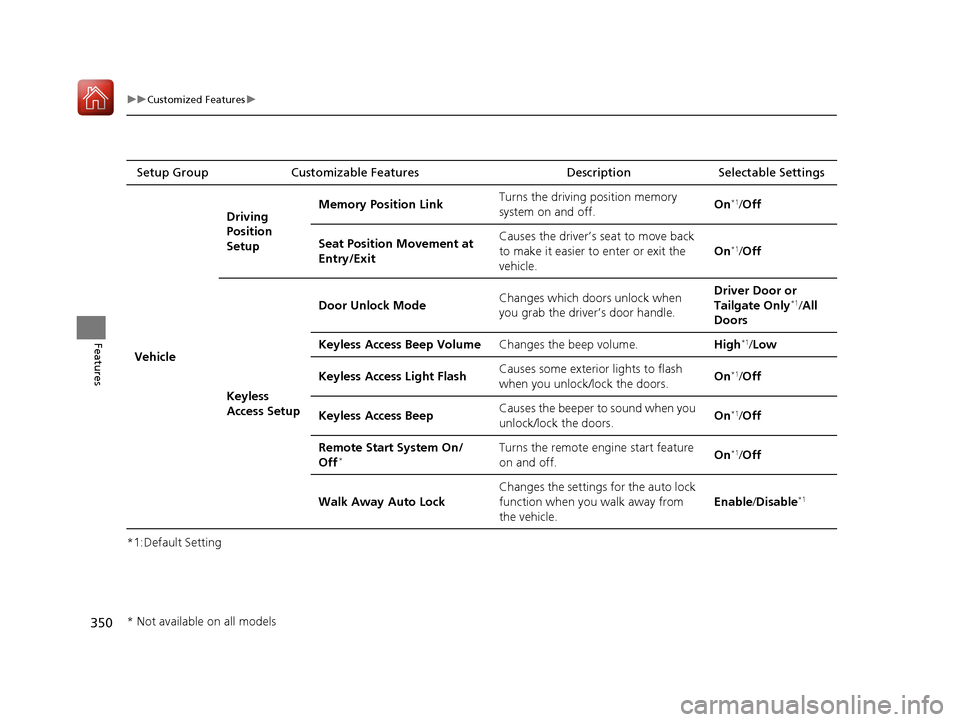
Vehicle Driving
Position
Setup
Memory Position Link
Turns the driving position memory
system on and off. On
*1/
Off
Seat Position Movement at
Entry/Exit Causes the driver’s seat to move back
to make it easier to enter or exit the
vehicle.
On
*1/
Off
Keyless
Access Setup Door Unlock Mode
Changes which doors unlock when
you grab the driver’s door handle. Driver Door or
Tailgate Only
*1/
All
Doors
Keyless Access Beep Volume Changes the beep volume. High
*1/Low
Keyless Access Light Flash Causes some exterior lights to flash
when you unlock/lock the doors.
On
*1/
Off
Keyless Access Beep Causes the beeper to sound when you
unlock/lock the doors. On
*1/
Off
Remote Start System On/
Off
*Turns the remote engine start feature
on and off. On*1/
Off
Walk Away Auto Lock Changes the settings for the auto lock
function when you walk away from
the vehicle. Enable
/Disable
*1
* Not available on all models
20 ACURA RDX-31TJB6111.book 350 ページ 2020年2月11日 火曜日 午後2時6分