Page 352 of 657

351
uuCustomized Features u
Continued
Features
*1:Default SettingSetup Group Customizable Features
Description Selectable Settings
Vehicle Lighting
SetupInterior Ligh
t Dimming Time Changes the length of time the interior
lights stay on after you close the doors. 15 sec/
30 sec
*1/60
sec
Headlight Auto Off Timer Changes the length of time the
exterior lights stay on after you close
the driver’s door. 0 sec
/15 sec
*1/30 sec /
60 sec
Auto Interior Illumination
Sensitivity Changes the sensitivity of the
brightness of the instrument panel
when the headlight switch is in
AUTO
position. Min/
Low/ Mid
*1/
High /Max
Auto Headligh t On with
Wiper On Causes the headlights to come on
when the headlight switch is in the
AUTO
position and the wipers are
used several times within a certain
number of intervals. On
*1/
Off
Auto Light Sensitivity
*Changes the timing for the headlights
to come on. Min/
Low/ Mid*1/
High /Max
* Not available on all models
20 ACURA RDX-31TJB6111.book 351 ページ 2020年2月11日 火曜日 午後2時6分
Page 353 of 657
352
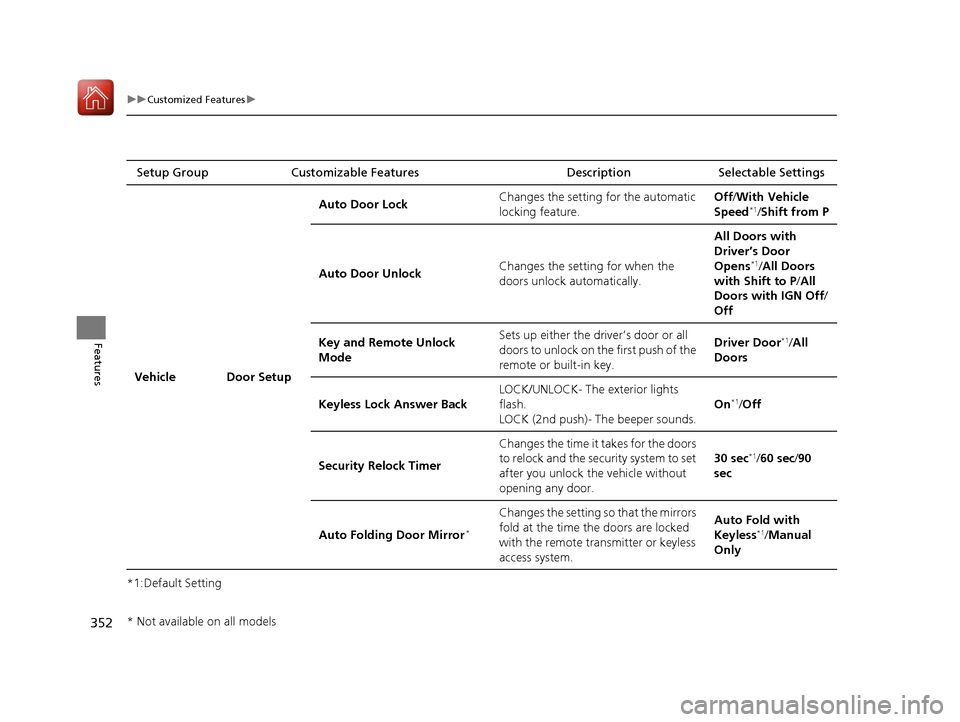
uuCustomized Features u
Features
*1:Default SettingSetup Group Customizable Features Description Selectable Settings
Vehicle Door Setup Auto Door Lock
Changes the setting for the automatic
locking feature. Off
/With Vehicle
Speed
*1/ Shift from P
Auto Door Unlock Changes the setting for when the
doors unlock automatically. All Doors with
Driver’s Door
Opens
*1/
All Doors
with Shift to P /All
Doors with IGN Off /
Off
Key and Remote Unlock
Mode Sets up either the driver’s door or all
doors to unlock on the first push of the
remote or built-in key. Driver Door
*1/
All
Doors
Keyless Lock Answer Back LOCK/UNLOCK- The exterior lights
flash.
LOCK (2nd push)- The beeper sounds. On
*1/
Off
Security Relock Timer Changes the time it takes for the doors
to relock and the security system to set
after you unlock the vehicle without
opening any door. 30 sec
*1/
60 sec /90
sec
Auto Folding Door Mirror
*
Changes the setting so that the mirrors
fold at the time the doors are locked
with the remote transmitter or keyless
access system. Auto Fold with
Keyless
*1/
Manual
Only
* Not available on all models
20 ACURA RDX-31TJB6111.book 352 ページ 2020年2月11日 火曜日 午後2時6分
Page 354 of 657

353
uuCustomized Features u
Continued
Features
*1:Default SettingSetup Group Customizable Features
Description Selectable Settings
Vehicle Power
Tailgate
SetupPower Tailgate Keyless Open
Mode
Changes the setting to enable the
power tailgate to be opened with the
keyless access remote at anytime or
only when the doors are unlocked.
Anytime
*1/
When
Unlocked
Power Tailgate Open by
Outer Handle Changes the setting to enable or
disable the power tailgate open
operation when the user presses the
outer handle of the power tailgate. Off (Manual only)
/
On (Power/
Manual)
*1
Hands Free Access Power
Tailgate*
Changes the setting to enable or
disable the power tailgate open
operation when a kicking motion
under the rear bumper is detected. On
*1/
Off
Maintenance
Information (Select Reset Items) Resets the Maintenance Minder
TM
display when you have performed the
maintenance service. —
Reset All Due
* Not available on all models
20 ACURA RDX-31TJB6111.book 353 ページ 2020年2月11日 火曜日 午後2時6分
Page 355 of 657
354
uuCustomized Features u
Features
*1:Default SettingSetup Group Customizable Features Description Selectable Settings
Camera
Rear Camera*
Guidelines
Selects whether the guidelines come
on the rear camera monitor.
2
Multi-View Rear Camera P. 511
Dynamic/Fixed /
Both*1/ Off
Cross Traffic Monitor*Turns the cross traffic monitor feature
on and off.On*1/Off
Surround
View
Camera
*
Guidelines
Selects whether the guidelines come
on the rear camera monitor.
2 Surround View Camera System*
P. 513
Dynamic /Fixed /
Both*1/ Off
Cross Traffic MonitorTurns the cross traffic monitor feature
on and off.On*1/Off
Show after Shifting from
ReverseSets the rear view to be automatically
switched to the fr ont view when the
transmission is out of
(R.
On /Off*1
* Not available on all models
20 ACURA RDX-31TJB6111.book 354 ページ 2020年2月11日 火曜日 午後2時6分
Page 356 of 657
355
uuCustomized Features u
Continued
Features
*1:Default SettingSetup Group Customizable Features
Description Selectable Settings
Sound Bass / Treble
Treble
Adjusts the settings of the audio
speakers’ sound.
2Adjusting the Sound P. 268
—
Midrange
Bass
Reset to Default
Roof / Center
Volume
*
Roof Speaker Volume
Center Speaker Volume
Reset to Default
Center
Volume
*
Center Speaker Volume
Reset to Default
Audio Zones
& Balance /
Fader
*
Full Vehicle
Driver Only
Front Only
Rear Only
Reset to Default
Balance /
Fader*Reset to Default
* Not available on all models
20 ACURA RDX-31TJB6111.book 355 ページ 2020年2月11日 火曜日 午後2時6分
Page 357 of 657
356
uuCustomized Features u
Features
*1:Default SettingSetup Group Customizable Features Description Selectable Settings
Sound Speed Volume Compensation
Adjusts the settings of the audio
speakers’ sound.
2Adjusting the Sound P. 268
Off/Low /Mid*1/High
DTS Neural Surround
*On /Off*1
Compressed Audio Enhancement*On /Off*1
NotificationsChanges the notification settings for
apps.—
* Not available on all models
20 ACURA RDX-31TJB6111.book 356 ページ 2020年2月11日 火曜日 午後2時6分
Page 363 of 657

uuBluetooth ® HandsFreeLink ®u Using HFL
362
Features
Left Selector Wheel:
• Incomming call: Move the selector wheel to the ri ght to answer the call. Move it
to the left to decline the call.
• During a call: Move the selector wheel to the ri ght to display the call options
menu. Move it to the left to end the call.
• (back) button: Press the button to go back to the previous screen or to
cancel a command.
• (talk) button: Press the button to start voice recognition.
To go to the phone screen of the multi-information display or the head-up display
*:
1. Press the APPS button on the steering wheel.
2. Using the selector wheel, scroll to Phone on the multi-information display or the
head-up display
*, and then press the left selector wheel.
u You can select Favorites or Recents by moving the selector wheel to the left
or the right.
1 Bluetooth ® HandsFreeLink ®
Bluetooth ® Wireless Technology
The Bluetooth ® word mark and logos are registered
trademarks owned by Bluetooth SIG, Inc., and any
use of such marks by Honda Motor Co., Ltd., is under
license. Other trademarks and trade names are those
of their respective owners.
HFL Limitations
An incoming call on HFL will interrupt the audio
system when it is playing. It will resume when the call
is ended.
* Not available on all models
20 ACURA RDX-31TJB6111.book 362 ページ 2020年2月11日 火曜日 午後2時6分
Page 364 of 657
Continued363
uuBluetooth ® HandsFreeLink ®u Using HFL
Features
The audio/information scr een notifies you when there is an incoming call.
Bluetooth ® connection status is displayed in the secondary information area.
■HFL Status Display1HFL Status Display
The information that appears on the audio/
information screen vari es between phone models.
HFL Mode
Caller’s Name (If registered)/
Caller’s Number (If not registered)
Bluetooth
Indicator
Appears when your phone is connected to HFL.
Signal Strength
Battery Level Status
20 ACURA RDX-31TJB6111.book 363 ページ 2020年2月11日 火曜日 午後2時6分


