2019 VOLVO XC90 TWIN ENGINE light
[x] Cancel search: lightPage 487 of 697

STARTING AND DRIVING
}}
* Option/accessory. 485
The automatic transmission selects the optimal
gear for the current load and engine speed.
Steep inclines
Do not lock the automatic transmission into a
higher gear than what the engine can handle ‒ it
is not always preferable to drive in high gears at
low rpm.
Parking on a hill
1. Depress the brake pedal.
2. Apply the parking brake.
3. Put the gear selector in P.
4. Release the brake pedal.
Put chocks behind the wheels when the vehicle
is parked on a hill with a trailer attached.
Starting on a hill
1. Depress the brake pedal.
2. Put the gear selector in D.
3. Release the parking brake.
4. Release the brake pedal and start driving.
Related information
Trailer Stability Assist* (p. 485)
Checking trailer lights (p. 486)
Towing capacity and tongue weight (p. 670)
Overheating of engine and transmission
(p. 479) Trailer Stability Assist*
Trailer Stability Assist (TSA 8
) is a function
designed to help stabilize a vehicle that is tow-
ing a trailer when the vehicle and trailer have
begun to sway. The function is part of the Elec-
tronic Stability Control system ESC 9
.
Reasons for swayingA vehicle towing a trailer may begin to sway for
various reasons. Normally this only occurs at high
speeds. However, if the trailer is overloaded or
unevenly distributed, e.g. too far back, there is a
risk of swaying even at low speeds.
Swaying may be caused by factors such as:
The vehicle and trailer are hit by a sudden,
strong crosswind.
The vehicle and trailer are traveling on an
uneven road or over a bump.
Sudden movements of the steering wheel.
Once swaying has begun, it can be difficult or
impossible to stop it. This makes the vehicle and
trailer difficult to control and there is a risk of
swerving into oncoming traffic or driving off the
road.
Trailer Stability Assist functionTrailer Stability Assist continuously monitors the
vehicle's movements, particularly lateral move- ments. If swaying is detected, the brakes are
applied individually on the front wheels, which has
a stabilizing effect on the vehicle and trailer. This
is often enough to enable the driver to regain
control of the vehicle.
If the Trailer Stability Assist function's first
attempt is not adequate to stop the swaying
motion, the brakes are applied on all wheels and
engine power is temporarily reduced. As the
swaying motion begins to decrease and the vehi-
cle and trailer have once again become stable,
TSA stops regulating the brakes/engine power
and the driver regains control of the vehicle.
NOTE
Trailer Stability Assist is deactivated if the
driver selects the sport mode by deactivating
ESC in the center display's menu system. Trailer Stability Assist may not intervene if the
driver tries to compensate for the swaying motion
by moving the steering wheel rapidly, because
the system will then not be able to determine if it
is the trailer or the driver causing the swaying.
8
Trailer Stability Assist
9 Electronic Stability Control
Page 488 of 697

||STARTING AND DRIVING
* Option/accessory.
486 When Trailer Stability Assist is
activated, the ESC symbol is
displayed in the instrument
panel.
Related information
Driving with a trailer (p. 483)
Electronic Stability Control (p. 279) Checking trailer lights
When connecting a trailer, make sure that all of
the lights on the trailer are functioning before
starting to drive.
Trailer turn signals and brake lightsIf one or more of the turn signals or brake lights
on the trailer is not working, a symbol and mes-
sage will be displayed in the instrument panel.
The other lights on the trailer must be checked
manually by the driver before the vehicle is driven. Symbol
Message
Trailer turn indicator Right
turn indicator malfunction
Trailer turn indicator Left
turn indicator malfunction
Trailer brake light Malfunc-
tion If any of the trailer's turn signal lights is not work-
ing, the turn signal symbol in the instrument
panel will also flash more quickly than normal.
Trailer rear fog lightWhen a trailer is connected, the vehicle's rear fog
light may not illuminate and rear fog light func-
tionality is instead transferred to the trailer. If this
is the case, check to see if the trailer is equipped
with a rear fog light before activating the vehicle'sfog lights when driving with a trailer to help
ensure safe operation.
Checking trailer lights*
Automatic check
When the trailer has been connected to the vehi-
cle's electrical system, its lights can be checked
by automatically activating them. This function
helps the driver check that the trailer's lights are
functioning correctly before starting to drive.
In order to perform this check, the engine must
be turned off.
1. When a trailer is connected to the towbar, the message Automatic Trailer Lamp
Check will appear in the instrument panel.
2.
Acknowledge the message by pressing the
O button on the right-side steering wheel
keypad.
> The light check will begin.
3. Get out of the vehicle to perform the check. > All of the lights on the trailer will beginflashing, and then illuminate separately
one at a time.
4. Visually check that all of the trailer's lights are functioning correctly.
5. After a short time, all of the trailer's lights will start flashing again.
> The light check is completed.
Page 489 of 697

STARTING AND DRIVING
487
Disabling the automatic check
The automatic light check can be disabled in the
center display.
1.Tap Settings in the Top view.
2.
Tap My Car Lights and Lighting
.
3. Deselect Automatic Trailer Lamp Check.
Manual check
If the automatic check has been disabled, the
check can be started manually.
1.
Tap Settings in the Top view.
2.
Tap My Car Lights and Lighting
.
3. Select Manual Trailer Lamp Check.
>
The light check will begin. Get out of the
vehicle to perform the check.
Related information
Driving with a trailer (p. 483) Towing using a towline
This section refers to one vehicle being towed
behind another using a towline.
Twin Engine vehicles may not be towed behind
another vehicle due to the risk of damage to the
electric motor. The vehicle must be lifted onto a
tow truck and transported with all four wheels on
the bed or lifting platform of the truck (no wheels
may touch the road).
Towing another vehicleTowing another vehicle requires a lot of power -
use the AWD drive mode. This helps charge the
hybrid battery and improve the vehicle's driving
and roadholding characteristics.
Before towing another vehicle, check applicable
speed limit regulations.
Jump startingDo not tow the vehicle to start the engine. Use an
auxiliary battery if the start battery's charge level
is so low that the engine cannot be started.
CAUTION Attempts to tow-start the vehicle could cause
damage to the electrical drive motor and
three-way catalytic converter.
Related information
Attaching and removing the towing eyelet
(p. 488)
Hazard warning flashers (p. 161)
Recovery (p. 489)
Jump starting using another battery (p. 481)
Selecting ignition mode (p. 438)
Page 491 of 697
STARTING AND DRIVING
}}
* Option/accessory. 489
Recovery
This section refers to transporting the vehicle
with a tow truck or similar vehicle.
Call a professional towing service for assistance.
In certain conditions, the towing eyelet can be
used to pull the vehicle onto a flatbed tow truck.
CAUTION Note that vehicles with Twin Engine must
always be towed raised with all wheels on the
tow truck.
For vehicles equipped with leveling control*:
If the vehicle is equipped with pneumatic suspen-
sion, this feature must be turned off before the
vehicle is lifted onto a tow truck. Turning off the
function in the center display.
1. Tap Settings in the Top view.
2.
Tap My Car Parking Brake and
Suspension .
3. Select Disable Leveling Control.
The vehicle's location and ground clearance
determine if it can be lifted onto a tow truck. If
the incline of the tow truck is too steep or if the
ground clearance under the vehicle is insufficient,
attempting to pull it up may result in damage. In
this case, the vehicle should only be lifted with
the tow truck's lifting equipment.
WARNING No person or object should be behind the tow
truck when the vehicle is lifted onto the bed
of the truck.
Related information
Attaching and removing the towing eyelet
(p. 488) HomeLink
®
*10
HomeLink ®11
is a programmable remote control,
integrated in the vehicle electrical system, that
can control up to three different devices (e.g.
garage door opener, alarm system, outdoor and
indoor lighting) and thereby replace the remote
controls for these.
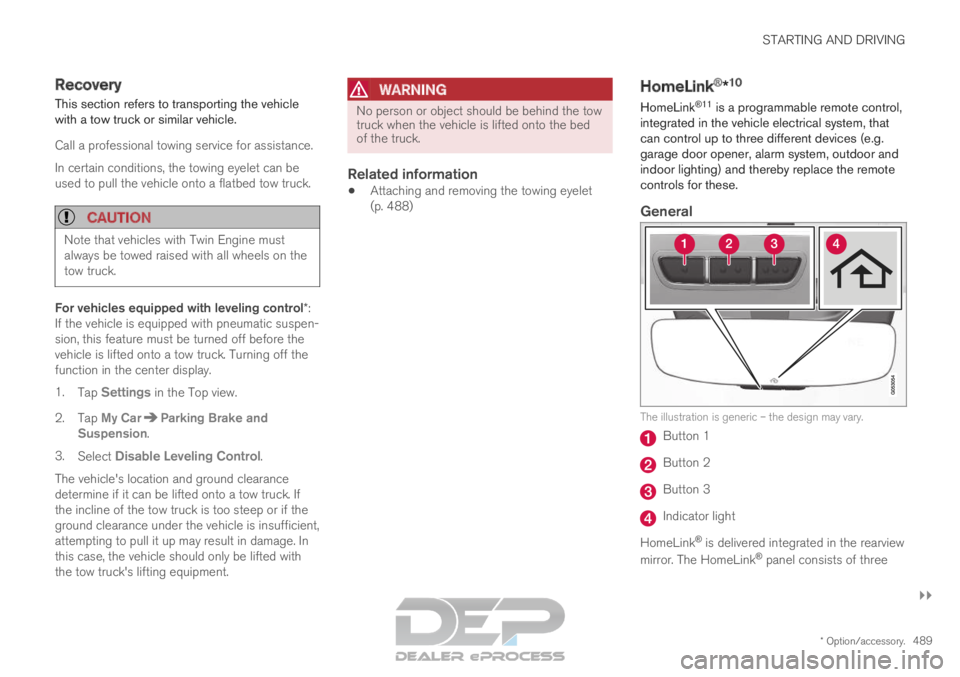
General The illustration is generic – the design may vary.
Button 1
Button 2
Button 3
Indicator light
HomeLink ®
is delivered integrated in the rearview
mirror. The HomeLink ®
panel consists of three
Page 492 of 697

||STARTING AND DRIVING
* Option/accessory.
490 programmable buttons and an indicator light in
the mirror.
For more information about HomeLink
®
, please
visit www.HomeLink.com, www.youtube.com/
HomeLinkGentex or call 1-800-355-3515.
Save the original remote controls for future pro-
gramming (e.g. for use in another vehicle). It is
also advisable to delete the button programming
if the vehicle is sold.
Related information
Using HomeLink ®
* (p. 491)
Programming HomeLink ®
* (p. 490)
Type approval for HomeLink ®
* (p. 492) Programming HomeLink
®
*12
Follow these instructions to program
HomeLink ®
, reset all programming, or program
individual buttons.
NOTE In some vehicles, the ignition must be on or in
the "accessory position" before HomeLink
®
can be programmed or used. It can be a good
idea to put new batteries in the remote con-
trol being replaced by HomeLink ®
for faster
programming and better radio signal trans-
mission. The HomeLink ®
buttons should be
reset before programming.
WARNING While HomeLink
®
is being programmed, the
garage door or gate being programmed may
be activated. Make sure that no one is near
the door or gate during programming. When
programming a garage door opener, it is
advised to park outside of the garage. 1.
Point the remote control at the HomeLink ®
button to be programmed and hold it about
2-8 cm (1-3 inches) from the button. Do not
obstruct the HomeLink ®
indicator light.
Note: Some remote controls are more effec-
tive at programming HomeLink ®
from a dis-
tance of about 15-20 cm (6-12 inches). Try
moving the remote control closer or further
away if you are experiencing any difficulties
programming.
2.
Press and hold both the remote control but-
ton and the HomeLink ®
button to be pro-
grammed.
3. Do not release the buttons until the indicator light has stopped flashing slowly (about once
a second) and either flashes quickly (about
10 times a second) or glows steadily.
>Steady glow: Indication that program-
ming is complete. Press the programmed
button twice to activate.
Flashing quickly: The device being pro-
grammed with HomeLink ®
may have a
security function that requires an extra
step. Try pressing the programmed button
twice to see whether the programming
works. Otherwise, continue with the fol-
lowing steps. 10
Certain markets only.
11 HomeLink and the HomeLink house symbol are registered trademarks of Gent\
ex Corporation.
12 Certain markets only.
Page 493 of 697

STARTING AND DRIVING
}}
* Option/accessory. 4914. Locate the "training" button
13
on the
receiver for the e.g. garage door opener. It is
usually located near the antenna bracket on
the receiver.
5.
Press and release the "training" button once.
Programming must be completed within 30
seconds after pressing the button.
6. Press and release the HomeLink ®
button to
be programmed. Repeat the press/hold/
release sequence a second time. For some
receivers, the sequence may need to be
repeated a third time.
> Programming is now completed and the garage door, gate, etc. should now be
activated when the programmed button is
pressed.
If you experience any difficulties programming,
please contact HomeLink ®
at:
www.HomeLink.com, www.youtube.com/
HomeLinkGentex or call 1-800-355-3515.
Programming individual buttons
To program an individual HomeLink ®
button:
1. Press and hold the desired button for about 20 seconds.
2. When the indicator light on HomeLink ®
starts flashing slowly, it is possible to pro-
gram as usual.
Note: If the button you are reprogramming
does not program with a new device, it will
return to the previously saved programming.
Resetting the HomeLink ®
buttons
It is only possible to reset all HomeLink ®
buttons
at once. It is not possible to reset individual but-
tons. Individual buttons can only be reprogram-
med.
– Press and hold the outer buttons (1 and 3)
on HomeLink ®
for about 10 seconds.
>
When the indicator light goes from a
steady glow to flashing, the buttons have
been reset and are ready for reprogram-
ming.
Related information
Using HomeLink ®
* (p. 491)
HomeLink ®
* (p. 489)
Type approval for HomeLink ®
* (p. 492) Using HomeLink
®
*14
Once HomeLink ®
is programmed, it can be
used instead of the separate remote controls.
Press and hold the programming button. The
garage door, gate, alarm system, etc. will be acti-
vated (this may take several seconds). If the but-
ton is held down for more than 20 seconds,
reprogramming will begin. The indicator light will
glow steadily or flash when the button has been
pressed. The original remote controls may be
used concurrently with HomeLink ®
if desired.
NOTE If the ignition is off, HomeLink
®
works for
30 minutes after the driver's door has been
opened. 13
The name and color of the button varies depending on the manufacturer.
Page 574 of 697

||WHEELS AND TIRES
* Option/accessory.
572
NOTE Always remember to calibrate the Tire Pres-
sure Monitoring System when the wheels
have been changed or the tire inflation pres-
sure has been corrected according to the tire
pressure decal or tire inflation pressure table.
If correct reference values have not been set,
the system cannot issue low tire pressure
alerts correctly.
The vehicle must be stationary with the
engine running to access the calibration but-
ton and to start the calibration process.
WARNING
The exhaust gases contain carbon monoxide,
which is invisible and odorless but very poi-
sonous. For this reason, always perform the
calibration procedure outdoors or in a work-
shop with exhaust gas evacuation equipment.
Related information
Recommended tire pressure (p. 569)
Adjusting tire pressure (p. 568)
Viewing tire pressure status in the center
display* (p. 572)
Action when warned of low tire pressure
(p. 573)
Tire pressure monitoring system* (p. 569) Viewing tire pressure status in the
center display*
With the system for tire pressure monitoring 10
,
tire pressure status can be viewed in the center
display.
Checking status1. Open the Car Status app in App view. 2.
Tap TPMS to display the status of the tires.
Status indicator light
The graphic in the center display shows the sta-
tus of each tire 11
. Green tire:
Inflation pressure is above the warning
threshold.
Yellow tire:
The tire's inflation pressure is too low. Stop
and check/inflate the tire as soon as possi-
ble. Recalibrate the system after adjusting
the tire pressure.
All tires yellow:
The inflation pressure is too low in one or
more tires. Stop and check/inflate the tires
as soon as possible. Recalibrate the system
after adjusting tire pressure. 10
Tire Pressure Monitoring System (TPMS)
Page 577 of 697
WHEELS AND TIRES
}}
* Option/accessory. 575
Jack*
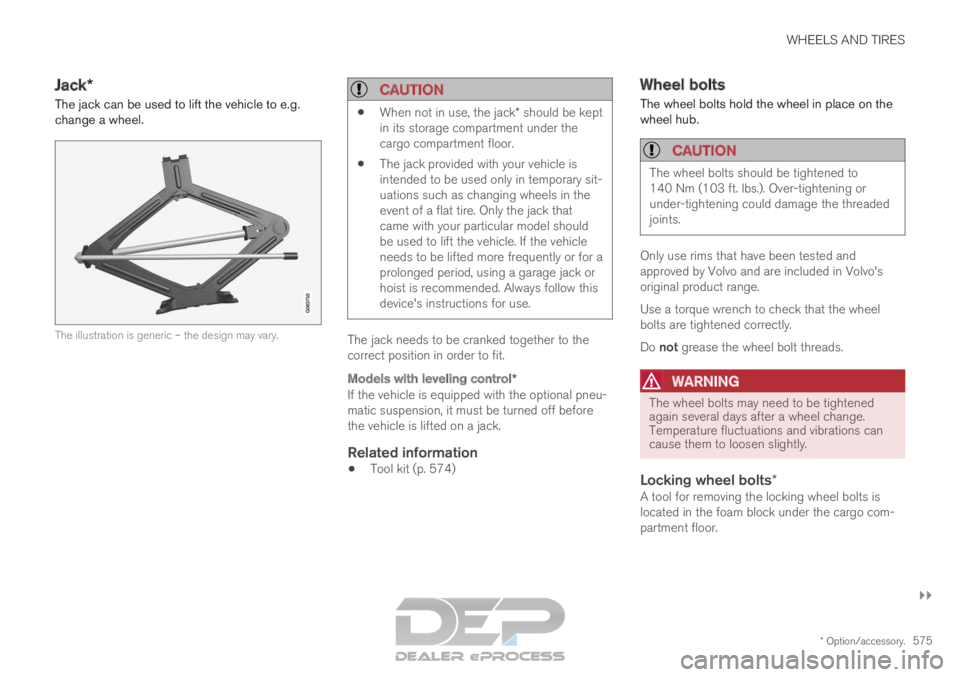
The jack can be used to lift the vehicle to e.g.
change a wheel. The illustration is generic – the design may vary.
CAUTION
When not in use, the jack* should be kept
in its storage compartment under the
cargo compartment floor.
The jack provided with your vehicle is
intended to be used only in temporary sit-
uations such as changing wheels in the
event of a flat tire. Only the jack that
came with your particular model should
be used to lift the vehicle. If the vehicle
needs to be lifted more frequently or for a
prolonged period, using a garage jack or
hoist is recommended. Always follow this
device's instructions for use. The jack needs to be cranked together to the
correct position in order to fit.
Models with leveling control*
If the vehicle is equipped with the optional pneu-
matic suspension, it must be turned off before
the vehicle is lifted on a jack.
Related information
Tool kit (p. 574) Wheel bolts
The wheel bolts hold the wheel in place on the
wheel hub.
CAUTION The wheel bolts should be tightened to
140 Nm (103 ft. lbs.). Over-tightening or
under-tightening could damage the threaded
joints.
Only use rims that have been tested and
approved by Volvo and are included in Volvo's
original product range.
Use a torque wrench to check that the wheel
bolts are tightened correctly.
Do not grease the wheel bolt threads.
WARNING
The wheel bolts may need to be tightened
again several days after a wheel change.
Temperature fluctuations and vibrations can
cause them to loosen slightly.
Locking wheel bolts*A tool for removing the locking wheel bolts is
located in the foam block under the cargo com-
partment floor.