2019 VOLVO XC90 TWIN ENGINE light
[x] Cancel search: lightPage 428 of 697

||HYBRID INFORMATION
426
When the charging cable is connected to the
vehicle's charging socket, the blue light will flash
once.
Charging cable connected to the vehicle's charg-
ing socket:
Indicator
light's color
Meaning
Flashing
blue Charging is in progress. The
light flashes about once every
other second
Solid blue
Charging completed. This will
also be indicated in the instru-
ment panel
Related information
Charging the hybrid battery (p. 417)
Charging status in the vehicle's charging
socket (p. 425)
Charging status in the instrument panel
(p. 427)
Stopping hybrid battery charging (p. 429)
Page 429 of 697

HYBRID INFORMATION
}}
427
Charging status in the instrument
panel
Charging status is indicated in the instrument
panel using both graphics and messages. This information is displayed as long as the instru-
ment panel is active.Graphic
Message MeaningFully charged at: [Time] displayed along with an animated blue puls-
ing light through the charging cable. Charging is in progress and the approximate time at which the
battery will be fully charged is displayed.Charging complete is displayed. An image will be superimposed over
the graphic of the vehicle with a green LED indicator light in the socket. The battery is fully charged.Charging error will be displayed. The LED indicator light in the charg-
ing socket will be red. Malfunction. Make sure the charging cable is correctly con-
nected to the vehicle's charging socket and to the 120/240 V
outlet (alternating current).
Page 438 of 697

||STARTING AND DRIVING
436
CAUTION
When starting in cold weather, the auto-
matic transmission may shift up at slightly
higher engine speeds than normal until
the automatic transmission fluid reaches
normal operating temperature.
Do not race a cold engine immediately
after starting. This could prevent fluids
from properly lubricating vital compo-
nents in the engine before it has reached
the proper operating temperature.
The engine should be idling when the
gear selector is moved. Never accelerate
until the gear is fully engaged. Accelerat-
ing rapidly before a gear is properly
engaged could lead to harder wear of
components.
To help prevent the transmission oil from
overheating, select P or N when idling at
a standstill for prolonged periods of time.
Related information
Switching off the vehicle (p. 436)
Ignition modes (p. 437)
Adjusting the steering wheel (p. 201)
Jump starting using another battery (p. 481)
Selecting ignition mode (p. 438) Switching off the vehicle
The vehicle can be switched off using the start
knob in the tunnel console.
Start knob in the tunnel console.
To switch off the vehicle:
– Turn the start knob clockwise and release to
switch off the vehicle. The control will auto-
matically return to the original position.
If the vehicle rolls:
– Turn clockwise and hold the knob until the
vehicle switches off.
Related information
Starting the vehicle (p. 434)
Ignition modes (p. 437)
Adjusting the steering wheel (p. 201)
Jump starting using another battery (p. 481)
Selecting ignition mode (p. 438)
Page 439 of 697

STARTING AND DRIVING
* Option/accessory.437
Ignition modes
The vehicle's ignition can be put in various
modes (levels) to make different functions availa-
ble.
To enable the use of a limited number of func-
tions when the engine is not running, the ignition
can be put in one of three different levels: 0, I
and II. These levels are referred to as "ignition
modes" in the Owner's Manual.
The following table shows which functions are
available in each ignition mode: Mode
Functions
0 The odometer, clock and tem-
perature gauge are illuminated A
.
The power* seats can be
adjusted.
The power windows can be used.
The center display is activated
and can be used A
.
The infotainment system can be
used A
.
In this mode, the functions are availa-
ble for a limited time and then switch
off automatically.
I The panoramic roof, power win-
dows, 12-volt electrical socket in
the passenger compartment,
Bluetooth, navigation, phone,
blower and windshield wipers can
be used.
The power seats can be adjusted.
The 12-volt electrical socket* in
the cargo compartment can be
used.
Electrical current will be taken
from the battery in this ignition
mode. Mode
Functions
II The headlights illuminate.
Warning/indicator lights illumi-
nate for 5 seconds.
A number of other systems are
activated. However, seat and rear
window heating can only be acti-
vated when the engine is running.
This ignition mode uses a lot of
current from the battery and
should be avoided whenever pos-
sible! A
Also activated when the door is opened.
Related information
Starting the vehicle (p. 434)
Adjusting the steering wheel (p. 201)
Jump starting using another battery (p. 481)
Selecting ignition mode (p. 438)
Page 440 of 697

STARTING AND DRIVING
438Selecting ignition mode
The vehicle's ignition can be put in various
modes (levels) to make different functions availa-
ble.
Selecting an ignition mode Start knob in the tunnel console.
Ignition mode 0 - Unlock the vehicle and
keep the remote key in the passenger com-
partment.
NOTE To set level I or II without engine start – do
not depress the brake pedal (or clutch pedal
for vehicles with manual transmission) when
selecting this ignition mode.
Ignition mode I - Turn the start knob clock-
wise and release it. The control will automati-
cally return to the original position.
Ignition mode II - Turn the start knob clock-
wise and hold it there for approx. 5 seconds.
Release the knob, which will automatically
return to its original position.
Back to ignition mode 0 - To return to igni-
tion mode 0 from mode I and II, turn the start
knob clockwise and release it. The control
will automatically return to the original posi-
tion.
Related information
Starting the vehicle (p. 434)
Switching off the vehicle (p. 436)
Ignition modes (p. 437)
Adjusting the steering wheel (p. 201)
Jump starting using another battery (p. 481) Brake functions
The vehicle's brakes are used to reduce speed
or prevent the vehicle from rolling.
In addition to the wheel brakes and parking
brakes, the vehicle is also equipped with a num-
ber of automatic brake assist functions. These
systems help the driver by e.g. keeping the vehi-
cle stationary when the brake pedal is not
depressed (e.g. at a traffic light or intersection),
when starting up a hill or when driving down a hill.
Depending on how the vehicle is equipped, the
following brake assist functions may be included:
Auto-hold brakes (Auto Hold)
Hill Start Assist (Hill Start Assist)
Braking assist after a collision
City Safety
Hill Descent Control (Hill Descent Control)
Related information
Brakes (p. 439)
Parking brake (p. 442)
Auto-hold brakes (p. 446)
Braking assist after a collision (p. 447)
Hill Start Assist (p. 447)
City Safety™ (p. 341)
Hill Descent Control (p. 466)
Page 441 of 697
STARTING AND DRIVING
}}
439
Brakes
The brake pedal is used to apply the vehicle's
regular brakes, which are part of the brake sys-
tem.
The vehicle is equipped with two brake circuits. If
one brake circuit is damaged, the brake pedal will
go down further when depressed. More pressure
will then be required from the driver for normal
braking effect.
WARNING
The power brakes only work when the electric
motor or combustion engine is running.
If the brake pedal is used when the engine is
switched off, greater pressure must be applied to
brake the vehicle.
In very hilly areas or when driving with a heavy
load, gear position B can be used to augment the
brakes with engine braking.
Use the Off Road drive mode to increase the
engine braking effect when driving on steep
downgrades at low speeds.
Anti-lock brakesThe vehicle is equipped with an Anti-lock Braking
System (ABS), which helps prevent the wheels
from locking and helps maintain steering control
when braking. Vibrations may be felt from the brake pedal when ABS is operating, which is nor-
mal.
After the vehicle is started, a brief test of the
ABS system is automatically performed when the
driver releases the brake pedal. An additional
automatic test of the system may be performed
when the vehicle is traveling at a low speed. Dur-
ing the test, the brake pedal may feel as though it
is pulsating.
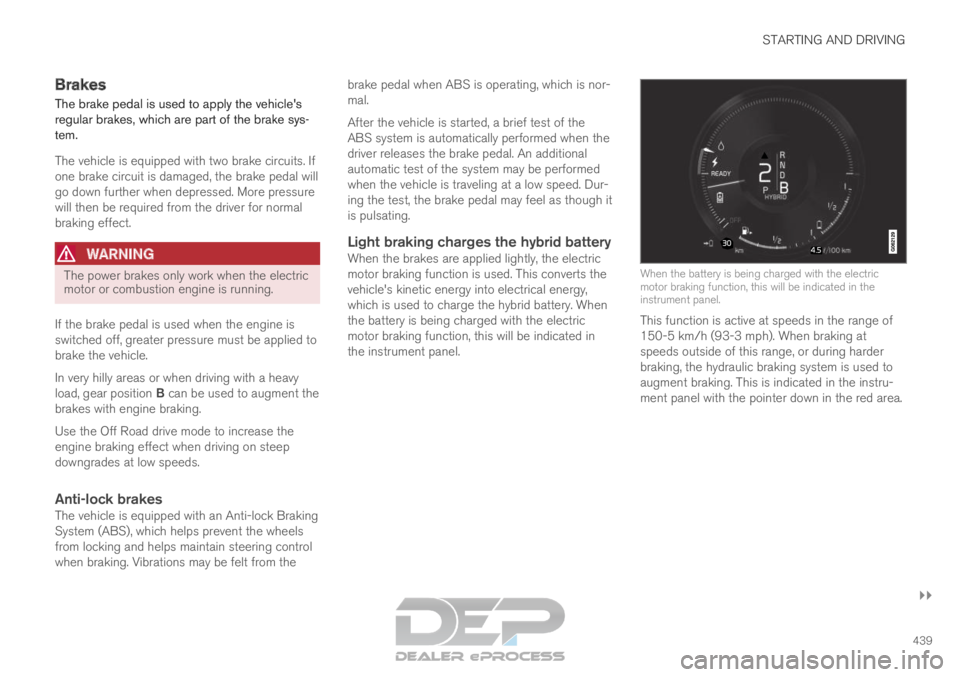
Light braking charges the hybrid batteryWhen the brakes are applied lightly, the electric
motor braking function is used. This converts the
vehicle's kinetic energy into electrical energy,
which is used to charge the hybrid battery. When
the battery is being charged with the electric
motor braking function, this will be indicated in
the instrument panel.
When the battery is being charged with the electric
motor braking function, this will be indicated in the
instrument panel.
This function is active at speeds in the range of
150-5 km/h (93-3 mph). When braking at
speeds outside of this range, or during harder
braking, the hydraulic braking system is used to
augment braking. This is indicated in the instru-
ment panel with the pointer down in the red area.
Page 442 of 697

||STARTING AND DRIVING
440
Symbols in the instrument panel
Symbol
Meaning A
B
Check the brake fluid level. If the
level is low, fill brake fluid and
check to determine the reason for
the loss of brake fluid. A
B
Fault in pedal sensor. Symbol
Meaning A
B
Steady glow for 2 seconds after
the engine is started: Automatic
function check.
Steady glow for more than 2 sec-
onds: Fault in the ABS system. The
vehicle's regular brake system is
still working, but without the ABS
function. If the message Brake pedal Cha-
racteristics changed Service
required is displayed, the "Brake-
by-wire" system is not functioning
properly. Greater pressure will be
required to brake the vehicle. A
In Canada.
B In the US.WARNING If the warning symbols for both brake fault
and ABS fault are lit simultaneously, there
may be a fault in the brake system.
If the brake fluid reservoir level is normal
when this occurs, drive carefully to the
nearest workshop to have the brake sys-
tem checked - an authorized Volvo work-
shop is recommended.
If the brake fluid has fallen below the MIN
level in the brake fluid reservoir, the vehi-
cle should not be driven until the brake
fluid has been filled. The reason for the
brake fluid loss must be checked.
Related information
Brake Assist System (p. 441)
Auto-hold brakes (p. 446)
Hill Start Assist (p. 447)
Braking on wet roads (p. 441)
Braking on salted roads (p. 441)
Maintenance of the brake system (p. 442)
Brake lights (p. 160)
Page 443 of 697

STARTING AND DRIVING
441
Brake Assist System
The brake enhancing system, Brake Assist
System (BAS
), helps increase braking force and
thereby reduce braking distance.
The system monitors the driver's braking habits
and increases braking force when necessary.
Braking force can be increased up to the point at
which the ABS intervenes. The function is deacti-
vated when pressure on the brake pedal is
decreased.
Related information
Brakes (p. 439) Braking on wet roads
Prolonged driving in heavy rain without braking
may cause braking effect to be slightly delayed
the first time the brakes are applied.
This may also occur after washing the vehicle. It
will then be necessary to apply greater pressure
to the brake pedal. You should therefore maintain
a greater distance to the vehicle ahead.
Firmly apply the brakes after washing the vehicle
or driving on wet roads. This helps warm up the
brake discs, enabling them to dry more quickly
and protecting them against corrosion. Consider
the current traffic situation when braking.
Related information
Brakes (p. 439)
Braking on salted roads (p. 441) Braking on salted roads
When driving on salted roads, a layer of salt may
form on the brake discs and brake pads.
This could increase stopping distance. Maintain
an extra large safety distance to the vehicle
ahead. Make sure to also:
Apply the brakes from time to time to help
remove salt. Make sure braking does not
pose a risk to any other road users.
Gently apply the brakes when you have fin-
ished driving and before driving again.
Related information
Brakes (p. 439)
Braking on wet roads (p. 441)