2019 VOLVO S60 TWIN ENGINE brake
[x] Cancel search: brakePage 82 of 645

DISPLAYS AND VOICE CONTROL
* Option/accessory.80
Instruments and controls in left-hand drive vehicles
The overviews show the location of the vehicle'sdisplays and controls.
Steering wheel and dashboard
Parking lights, daytime running lights, lowbeams, high beams, turn signals, rear foglight, trip computer reset
Steering wheel paddles for manual shifting*
Head-up display*
Instrument panel
Wipers and washers, rain sensor*
Right-side steering wheel keypad
Steering wheel adjustment
Horn
Left-side steering wheel keypad
Hood open
Display lighting, trunk lid unlock/open, halo-gen headlight height adjustment
Ceiling console
Front reading lights and courtesy lighting
Panoramic roof*
Ceiling console display ON CALL button
HomeLink®*
Center and tunnel console
Center display
Hazard warning flashers, defrosting, media
Gear selector
Start knob
Drive modes
Parking brake
Auto-hold brakes
Driver's door
Page 84 of 645

DISPLAYS AND VOICE CONTROL
* Option/accessory.82
Instrument panel
The instrument panel displays information rela-ted to the vehicle and driving.
The instrument panel contains gauges, indicatorsand monitoring and warning symbols. What isshown in the instrument panel varies dependingon the equipment, settings and functions cur-rently active.
The instrument panel is activated as soon as adoor is opened, i.e. in ignition mode 0. The panelwill power down after a short period of time if it isnot used. To reactivate it, do one of the following:
Depress the brake pedal.
Activate ignition mode I.
Open one of the doors.
WARNING
If the instrument panel turns off, does notactivate when the ignition is switched on, orpart/all of the panel cannot be read, do notdrive the vehicle. Consult a workshop immedi-ately. Volvo recommends an authorized Volvoworkshop.
WARNING
If the instrument panel is not functioningproperly, information about brakes, airbags orother safety-related systems may not be dis-played. The driver will then not be able tocheck the status of the vehicle systems orreceive relevant warnings and information.
The illustration is generic - details may vary according tovehicle model.
Location in the instrument panel:
Left sideIn the centerRight side
SpeedometerIndicator and warning symbolsTachometer/Hybrid gaugeA
Trip odometerAmbient temperature sensorGear indicator
OdometerBClockDrive Mode
Cruise control/speed limiter information Message (also graphics in some cases) Fuel gauge
Road sign information*Door and seat belt statusHybrid gauge
–Hybrid battery's charge levelDistance to empty tank
–Media playerDistance to discharged battery
Page 87 of 645

DISPLAYS AND VOICE CONTROL
}}
85
Fuel gauge
The fuel gauge in the instrument panel showsthe fuel level in the tank.
The beige area in the fuel gauge indicates theamount of fuel left in the tank.
When the fuel level is low and it is time to refuel,the fuel pump symbol will illuminate with anamber-colored light. The trip computer also indi-cates the approximate distance driven on the fuelremaining in the tank.
Related information
Instrument panel (p. 82)
Hybrid battery gauge (p. 86)
Refueling (p. 426)
Fuel tank volume (p. 622)
Hybrid gauge
In Hybrid and Pure drive modes, the instrumentpanel will display a hybrid gauge, which can helpthe driver achieve optimal driving economy.
The hybrid gauge shows the ratio between theelectric motor's current power consumption andthe remaining available power. This information isshown in various ways.
Symbols in the hybrid gauge
Indicates the current available powerfrom the electric motor. A solid symbolindicates that the electric motor isbeing used.
A hollow symbol indicates that theelectric motor is not being used.
Indicates the power level when theinternal combustion engine starts. Asolid symbol indicates that the internalcombustion engine is being used.
Indicates the power level when theinternal combustion engine will start. Ahollow symbol indicates that the inter-nal combustion engine is not beingused.
Indicates that the hybrid battery isbeing charged, e.g. by lightly pressingthe brake pedal.
Driver-requested power
The hybrid gauge displays the amount of powerrequested (utilized) by the driver through pres-sure on the accelerator pedal. The higher thereading on the scale, the more power utilized inthe current gear. The mark between the lightningsymbol and the drop symbol indicates the pointat which the combustion engine will start.
Page 88 of 645

||
DISPLAYS AND VOICE CONTROL
86
For example:
The vehicle has been started, but is stationary and nopower is being requested.
The electric motor cannot supply the requested powerand the internal combustion engine will start.
The vehicle is generating current to recharge the battery,e.g. during light braking or engine braking on a down-slope.
Related information
Drive modes (p. 412)
Instrument panel (p. 82)
Brakes (p. 397)
Starting and stopping the combustion enginein Twin Engine vehicles (p. 411)
Hybrid battery gauge
The hybrid battery gauge shows how much cur-rent is left in the hybrid battery.
The current in the hybrid battery is used to powerthe electric motor, but can also be used to heator cool the vehicle. The trip computer calculatesan approximate driving distance with the remain-ing current in the hybrid battery.
Page 94 of 645

DISPLAYS AND VOICE CONTROL
* Option/accessory.92
Ambient temperature sensor
The ambient temperature is shown in the instru-ment panel.
The sensor detects the temperature outside thevehicle.
If the vehicle has been stationary, the sensorreading may be higher than the actual tempera-ture.
When the ambient temperature isbetween –5 °C and +2 °C (23 °F and36 °F), a snowflake symbol will illumi-nate to alert the driver of the risk ofslippery conditions.
The symbol is also temporarily lit in the head-updisplay* if the vehicle is equipped with one.
Change the measurement standard for the tem-perature sensor etc. via system settings in thecenter display's Top view.
Related information
Instrument panel (p. 82)
Changing system units of measurement(p. 130)
Indicator symbols in the instrumentpanel
The indicator symbols alert the driver that a func-tion has been activated, that a system is running,or that a fault or error may have occurred.
SymbolMeaning
Information, see the message inthe display
The information symbol illuminatesand a message is displayed in theinstrument panel if one of the vehi-cle's systems requires the driver'sattention. The information symbolmay also illuminate in combinationwith other symbols.
A
B
Fault in brake system
This symbol illuminates if there is aproblem with the parking brake.
Page 95 of 645

DISPLAYS AND VOICE CONTROL
}}
93
SymbolMeaning
A
B
Fault in ABS system
If this symbol is illuminated, theABS system is malfunctioning. Thevehicle's regular brakes will stillwork, but without the ABS function.
A
B
Auto-brake on
This symbol illuminates when thefunction is activated and the brakesor parking brakes are being used.The brakes hold the vehicle at astandstill after it has stopped.
SymbolMeaning
Tire pressure system
This symbol illuminates to indicatelow tire pressure. If there is a faultin the tire pressure system, thesymbol will first flash for approxi-mately 1 minute and then glowsteadily. This may occur if the sys-tem cannot detect or alert thedriver of low tire pressure asintended.
Emission control system
If this symbol illuminates after star-ting the engine, it could indicate afault in the vehicle's emission con-trol system. Have the vehiclechecked by a workshop. Volvo rec-ommends contacting an authorizedVolvo workshop.
Left/right turn signals
These symbols flash when the turnsignals are used.
SymbolMeaning
Parking lights
This symbol illuminates when theparking lights are on.
Fault in headlight system
This symbol illuminates if a faulthas been detected in the ABL(Active Bending Lights) function oranother fault in the headlight sys-tem.
Active high beams on
This symbol lights up in blue whenthe active high beams are on.
Active high beams off
This symbol lights up in white whenthe active high beams are off.
High beams on
This symbol illuminates when thehigh beams are on or flashed.
Active high beams on
This symbol lights up in blue whenthe active high beams are on. Park-ing lights are on.
Page 97 of 645

DISPLAYS AND VOICE CONTROL
95
Warning symbols in the instrumentpanel
The warning symbols alert the driver that animportant function is activated or that a seriousfault or error has occurred.
SymbolMeaning
WARNING
The red warning symbol illuminatesto indicate that a fault has beendetected that could affect safety ordriveability. An explanatory mes-sage will be simultaneously dis-played in the instrument panel. Thewarning symbol may also illuminatein combination with other symbols.
Seat belt reminder
This symbol will glow steadily orflash if the driver or front seat pas-senger has not fastened their seatbelt or if anyone in the rear seathas removed their seat belt.
SymbolMeaning
Airbags
If this symbol remains illuminatedor comes on while driving, a faulthas been detected in one of thevehicle's safety systems. Read themessage in the instrument panel.Volvo recommends contacting anauthorized Volvo workshop.
A
B
Fault in brake system
If this symbol illuminates, the brakefluid level may be too low. Contactyour nearest authorized workshopto have the brake fluid levelchecked and adjusted.
A
B
Parking brake on
This symbol glows steadily whenthe parking brake is applied.
A flashing symbol indicates that afault has occurred. Read the mes-sage in the instrument panel.
SymbolMeaning
Low oil pressure
If this symbol illuminates while driv-ing, the engine oil level is too low.Stop the engine immediately andcheck the engine oil level. Add oil ifnecessary. If the symbol illuminatesand the oil level is normal, contacta workshop. Volvo recommendscontacting an authorized Volvoworkshop.
Generator not charging
This symbol illuminates during driv-ing if a fault is detected in the elec-trical system. Contact a workshop.Volvo recommends contacting anauthorized Volvo workshop.
Collision risk
City Safety warns the driver if thereis a risk of a collision with anothervehicle, pedestrian, cyclist or largeanimal.
ACanadian models.BUS models.
Related information
Indicator symbols in the instrument panel(p. 92)
Instrument panel (p. 82)
Page 135 of 645
DISPLAYS AND VOICE CONTROL
}}
* Option/accessory.133
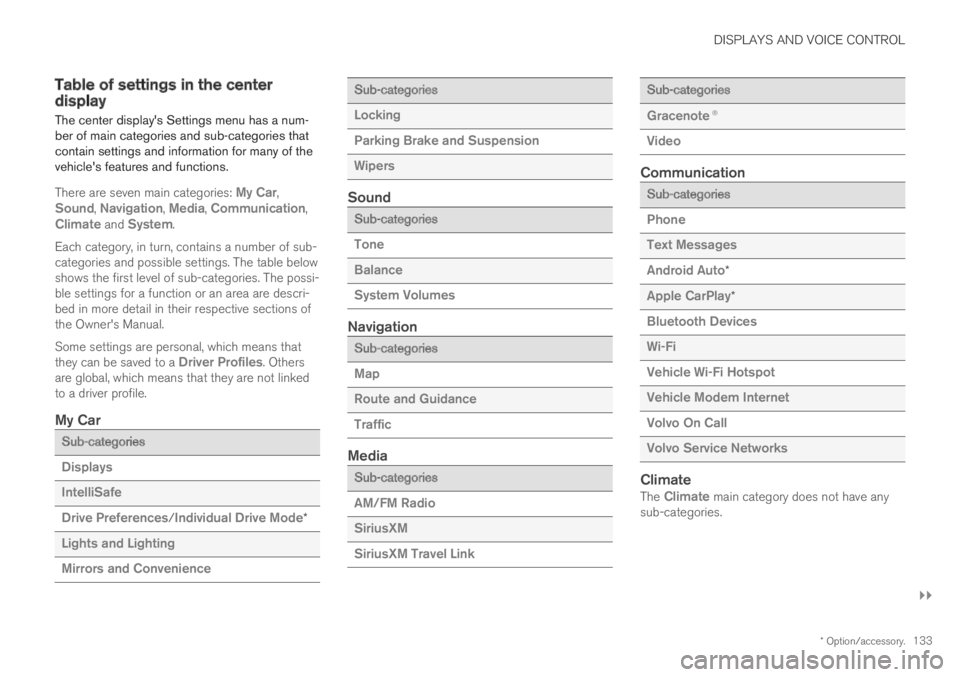
Table of settings in the centerdisplay
The center display's Settings menu has a num-ber of main categories and sub-categories thatcontain settings and information for many of thevehicle's features and functions.
There are seven main categories: My Car,Sound, Navigation, Media, Communication,Climate and System.
Each category, in turn, contains a number of sub-categories and possible settings. The table belowshows the first level of sub-categories. The possi-ble settings for a function or an area are descri-bed in more detail in their respective sections ofthe Owner's Manual.
Some settings are personal, which means thatthey can be saved to a Driver Profiles. Othersare global, which means that they are not linkedto a driver profile.
My Car
Sub-categories
Displays
IntelliSafe
Drive Preferences/Individual Drive Mode*
Lights and Lighting
Mirrors and Convenience
Sub-categories
Locking
Parking Brake and Suspension
Wipers
Sound
Sub-categories
Tone
Balance
System Volumes
Navigation
Sub-categories
Map
Route and Guidance
Traffic
Media
Sub-categories
AM/FM Radio
SiriusXM
SiriusXM Travel Link
Sub-categories
Gracenote®
Video
Communication
Sub-categories
Phone
Text Messages
Android Auto*
Apple CarPlay*
Bluetooth Devices
Wi-Fi
Vehicle Wi-Fi Hotspot
Vehicle Modem Internet
Volvo On Call
Volvo Service Networks
Climate
The Climate main category does not have anysub-categories.