2019 TOYOTA CAMRY HYBRID light
[x] Cancel search: lightPage 200 of 592

2004-1. Before driving
WARNING
Observe the following precautions.
Failure to do so may result in death or serious injury.
■When driving the vehicle
● Do not drive in excess of the speed limit. Even if the legal sp eed limit per-
mits it, do not drive over 85 mph (140 km/h) unless your vehicl e has high-
speed capability tires. Driving over 85 mph (140 km/h) may resu lt in tire
failure, loss of control and possible injury. Be sure to consult a tire dealer
to determine whether the tires on your vehicle are high-speed c apability
tires or not before driving at such speeds.
■ When driving on slippery road surfaces
● Sudden braking, acceleration and steering may cause tire slippa ge and
reduce your ability to control the vehicle.
● Sudden acceleration, engine braking due to shifting, or changes in engine
speed could cause the vehicle to skid.
● After driving through a puddle, lightly depress the brake pedal to make
sure that the brakes are functioning properly. Wet brake pads m ay prevent
the brakes from functioning properly. If the brakes on only one side are wet
and not functioning properly, steering control may be affected.
■ When shifting the shift lever
● Do not let the vehicle roll backward while the shift lever is i n a driving posi-
tion, or roll forward while the shift lever is in R.
Doing so may result in an accident or damage to the vehicle.
● Do not shift the shift lever to P while the vehicle is moving.
Doing so can damage the transmission and may result in a loss o f vehicle
control.
● Do not shift the shift lever to R while the vehicle is moving forward.
Doing so can damage the transmission and may result in a loss o f vehicle
control.
● Do not shift the shift lever to a driving position while the ve hicle is moving
backward.
Doing so can damage the transmission and may result in a loss o f vehicle
control.
● Shifting the shift lever to N while the vehicle is moving will disengage the
hybrid system. Engine braking is not available when N is select ed.
● Be careful not to shift the shift lever with the accelerator pe dal depressed.
Shifting the shift lever to any position other than P or N may lead to unex-
pected rapid acceleration of the vehicle that may cause an acci dent and
result in death or serious injury.
Page 201 of 592

2014-1. Before driving
4
Driving
WARNING
Observe the following precautions.
Failure to do so may result in death or serious injury.
■If you hear a squealing or scrap ing noise (brake pad wear limit indica-
tors)
Have the brake pads checked and replaced by your Toyota dealer as soon
as possible.
Rotor damage may result if the pads are not replaced when neede d.
It is dangerous to drive the vehicle when the wear limits of the brake pads
and/or those of the brake discs are exceeded.
■ When the vehicle is stopped
● Do not depress the accelerator pedal unnecessarily.
If the shift lever is in any position other than P or N, the vehicle may accel-
erate suddenly and unexpectedly, causing an accident.
● In order to prevent accidents due to the vehicle rolling away, always keep
depressing the brake pedal while stopped with the “READY” indic ator is
illuminated, and apply the parking brake as necessary.
● If the vehicle is stopped on an incline, in order to prevent ac cidents caused
by the vehicle rolling forward or backward, always depress the brake pedal
and securely apply the parking brake as needed.
● Avoid revving or racing the engine.
Running the engine at high speed while the vehicle is stopped m ay cause
the exhaust system to overheat, which could result in a fire if combustible
material is nearby.
■ When the vehicle is parked
● Do not leave glasses, cigarette lighters, spray cans, or soft d rink cans in
the vehicle when it is in the sun.
Doing so may result in the following:
• Gas may leak from a cigarette lighter or spray can, and may le ad to a
fire.
• The temperature inside the vehicle may cause the plastic lenses and
plastic material of glasses to deform or crack.
• Soft drink cans may fracture, causing the contents to spray ov er the
interior of the vehicle, and may also cause a short circuit in the vehicle’s
electrical components.
● Do not leave cigarette lighters in the vehicle. If a cigarette lighter is in a
place such as the glove box or on the floor, it may be lit acci dentally when
luggage is loaded or the seat is adjusted, causing a fire.
● Do not attach adhesive discs to the windshield or windows. Do n ot place
containers such as air fresheners on the instrument panel or da shboard.
Adhesive discs or containers may act as lenses, causing a fire in the vehi-
cle.
Page 215 of 592
2154-2. Driving procedures
4
Driving
NOTICE
■To prevent 12-volt b attery discharge
● Do not leave the power switch in ACCESSORY or ON mode for long peri-
ods of time without the hybrid system on.
● If “ACCESSORY” or “IGNITION ON” is displayed on the multi-infor mation
display, the power switch is not off. Exit the vehicle after tu rning the power
switch off.
● Do not stop the hybrid system when the shift lever is in a position other
than P. If the hybrid system is stopped in another shift lever position, the
power switch will not be turned off but instead be turned to ACCESSORY
mode. If the vehicle is left in ACCESSORY mode, 12-volt battery dis-
charge may occur.
■ When starting th e hybrid system
● Do not depress the accelerator pedal unnecessarily.
● If the hybrid system becomes difficult to start, have your vehicle checked
by your Toyota dealer immediately.
■ Symptoms indicating a malfunc tion with the power switch
If the power switch seems to be operating somewhat differently than usual,
such as the switch sticking slightly, there may be a malfunctio n. Contact
your Toyota dealer immediately.
Page 225 of 592
2254-2. Driving procedures
4
Driving
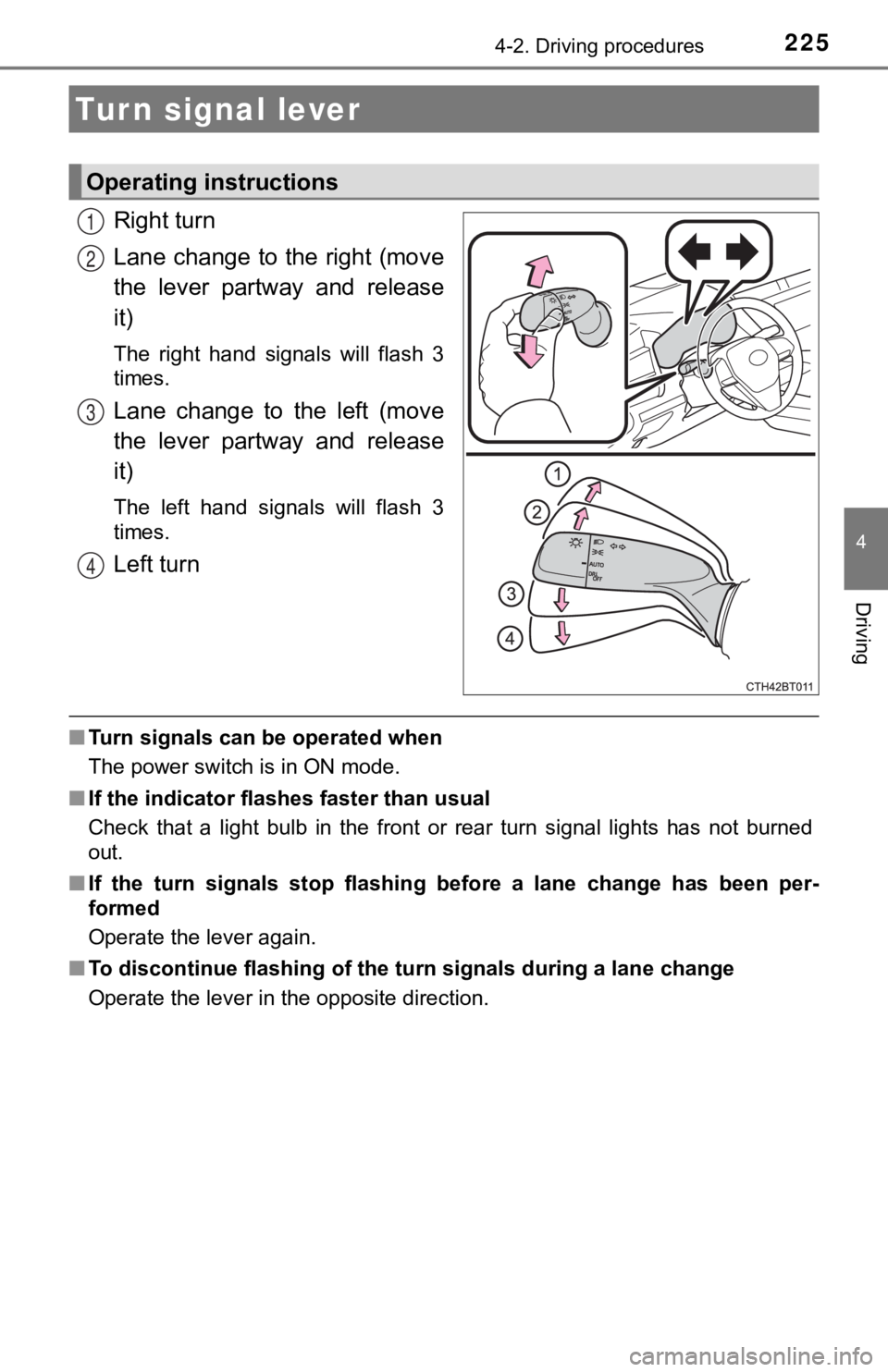
Right turn
Lane change to the right (move
the lever partway and release
it)
The right hand signals will flash 3
times.
Lane change to the left (move
the lever partway and release
it)
The left hand signals will flash 3
times.
Left turn
■Turn signals can be operated when
The power switch is in ON mode.
■ If the indicator flashes faster than usual
Check that a light bulb in the front or rear turn signal lights has not burned
out.
■ If the turn signals stop flashing before a lane change has been per-
formed
Operate the lever again.
■ To discontinue flashing of the turn signals during a lane chang e
Operate the lever in the opposite direction.
Turn signal lever
Operating instructions
1
2
3
4
Page 226 of 592
2264-2. Driving procedures
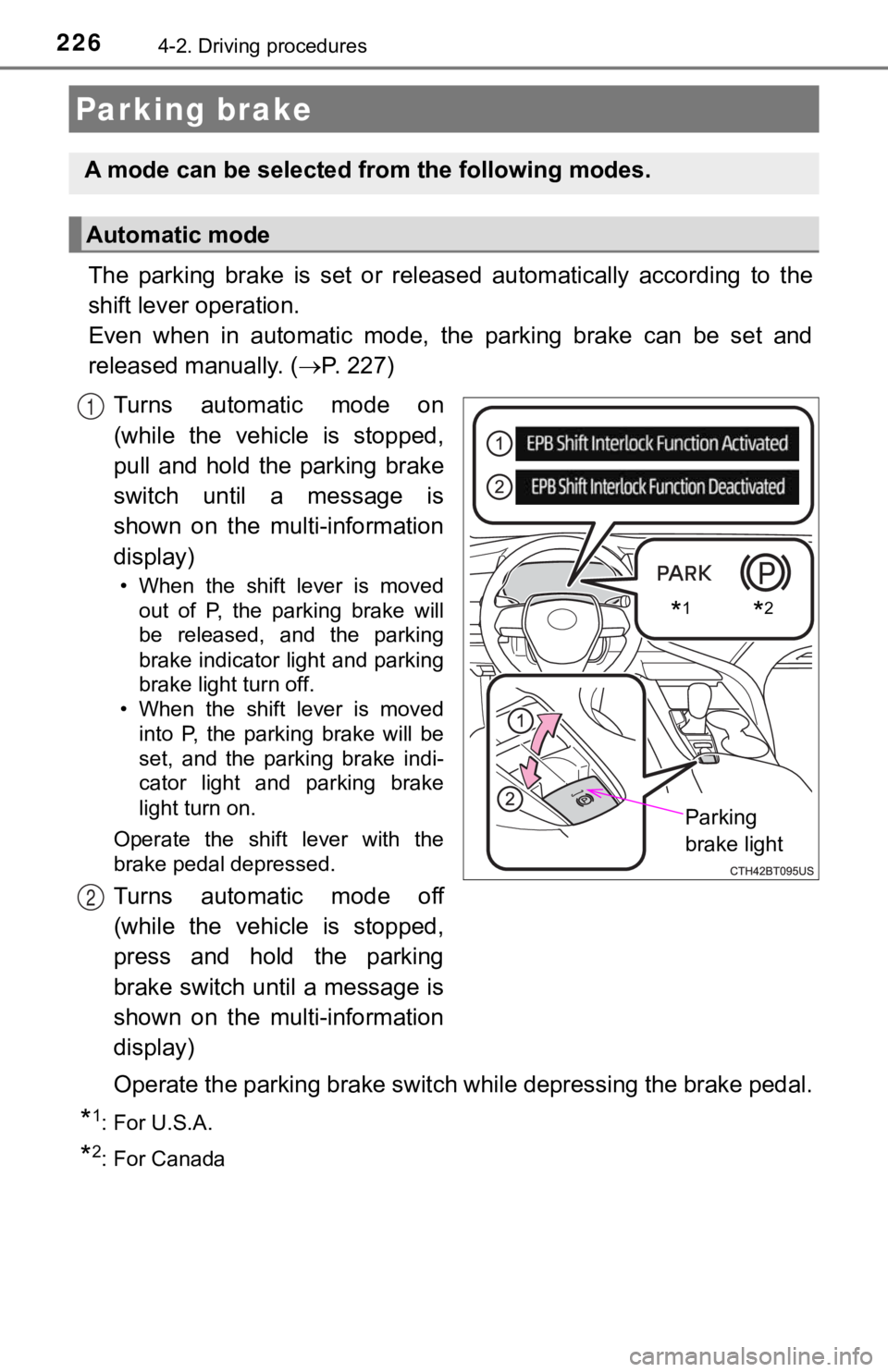
The parking brake is set or released automatically according to the
shift lever operation.
Even when in automatic mode, t he parking brake can be set and
released manually. ( P. 227)
Turns automatic mode on
(while the vehicle is stopped,
pull and hold the parking brake
switch until a message is
shown on the multi-information
display)
• When the shift lever is moved out of P, the parking brake will
be released, and the parking
brake indicator light and parking
brake light turn off.
• When the shift lever is moved
into P, the parking brake will be
set, and the parking brake indi-
cator light and parking brake
light turn on.
Operate the shift lever with the
brake pedal depressed.
Turns automatic mode off
(while the vehicle is stopped,
press and hold the parking
brake switch until a message is
shown on the multi-information
display)
Operate the parking brake swit ch while depressing the brake ped al.
*1: For U.S.A.
*2: For Canada
Parking brake
A mode can be selected from the following modes.
Automatic mode
*1*2
Parking
brake light
1
2
Page 227 of 592
2274-2. Driving procedures
4
Driving
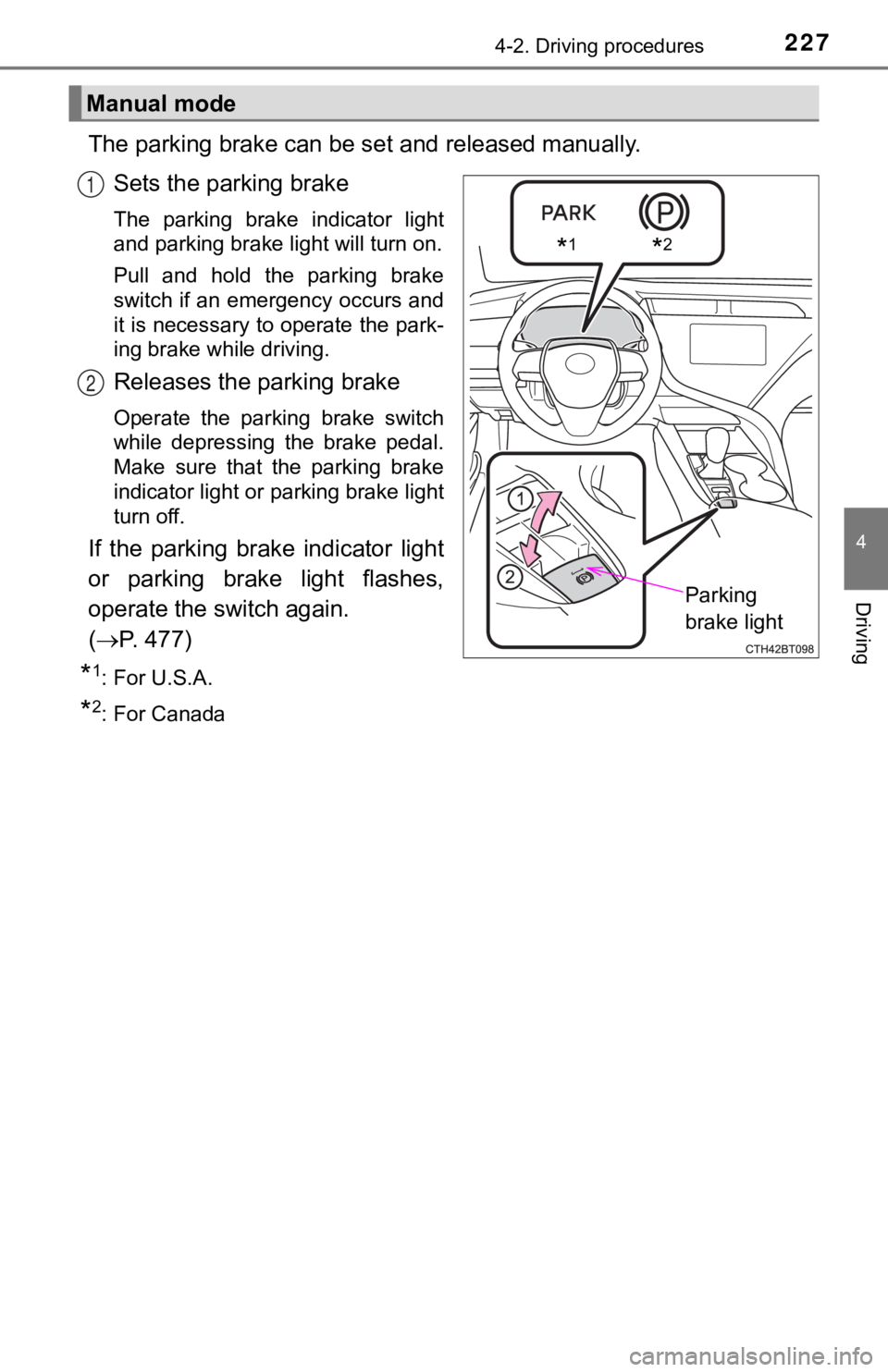
The parking brake can be set and released manually.
Sets the parking brake
The parking brake indicator light
and parking brake light will turn on.
Pull and hold the parking brake
switch if an emergency occurs and
it is necessary to operate the park-
ing brake while driving.
Releases the parking brake
Operate the parking brake switch
while depressing the brake pedal.
Make sure that the parking brake
indicator light or parking brake light
turn off.
If the parking brake indicator light
or parking brake light flashes,
operate the switch again.
( P. 477)
*1: For U.S.A.
*2: For Canada
Manual mode
*1*2
Parking
brake light
1
2
Page 228 of 592

2284-2. Driving procedures
■Parking the vehicle
P. 196
■ Parking brake operation
●When the power switch is not in ON mode, the parking brake cannot be
released using the parking brake switch.
● When the power switch is not in ON mode, automatic mode (automa tic
brake setting and releasing) is not available.
■ Automatic release function
The parking brake is automatica lly released when slowly depress the acceler-
ator pedal.
The parking brake will be released automatically under the foll owing condi-
tions:
● The driver’s door is closed.
● The driver’s seatbelt is fastened.
● Shift the shift lever is in a forward or reverse position.
● The malfunction indicator lamp or brake system warning light is not illumi-
nated.
If the automatic release function does not operate, manually re lease the park-
ing brake.
■ If “Parking Brake Temporarily Un available” is displayed on the multi-
information display
If the parking brake is operated repeatedly over a short period of time, the
system may restrict operation to prevent overheating. If this happens, refrain
from operating the parking brake. Normal operation will return after about 1
minute.
■ If “Parking Brake Unavailable” is displayed on the multi-information dis-
play
Operate the parking brake switch. If the message does not disappear after
operating the switch several times, the system may be malfuncti oning. Have
the vehicle inspected by your Toyota dealer immediately.
■ Parking brake operation sound
When the parking brake operates, a motor sound (whirring sound) may be
heard. This does not indicate a malfunction.
■ Parking brake indicator light and parking brake light
●Depending on the power switch mode, the parking brake indicator light and
parking brake light will turn on and stay on as described below :
ON mode: Comes on until the parking brake is released.
Not in ON mode: Stays on for approximately 15 seconds.
● When the power switch is turned off with the parking brake set, the parking
brake indicator light and parking brake light will stay on for about 15 sec-
onds. This does not indicate a malfunction.
Page 229 of 592

2294-2. Driving procedures
4
Driving
■Parking brake engaged warning buzzer
A buzzer will sound if the vehicle is driven with the parking b rake engaged.
“Release Parking Brake” is displayed on the multi-information d isplay.
■ Warning messages and buzzers
Warning messages and buzzers are used to indicate a system malfunction or
to inform the driver of the need for caution. If a warning message is shown on
the multi-information display, read the message and follow the instructions.
■ If the brake system warning light comes on
P. 476
■ Usage in winter time
P. 345
WARNING
■When parking the vehicle
Do not leave a child in the vehicle alone. The parking brake ma y be
released unintentionally and there is the danger of the vehicle moving that
may lead to an accident resulting in death or serious injury.
■ Parking brake switch
Do not set any objects near the parking brake switch. Objects m ay interfere
with the switch and may lead the parking brake to unexpectedly operate.
NOTICE
■When parking the vehicle
Before you leave the vehicle, shift the shift lever to P, set the parking brake
and make sure that the vehicle does not move.
■ When the system malfunctions
Stop the vehicle in a safe place and check the warning messages .
■ When the parking brake cannot be released due to a malfunction
Driving the vehicle with the parking brake set will lead to bra ke components
overheating, which may affect braking performance and increase brake
wear. Contact your Toyota dealer immediately if this occurs.