Page 595 of 698
Uconnect 4/4C/4C NAV Settings
Press the “Apps” button on the touchscreen then press the
“Settings” button on the touchscreen to display the settings
menu screen. In this mode the Uconnect system allows you
to access programmable features that may be equipped
such as Display, Voice, Clock, Safety & Driving Assistance,
Lights, Doors & Locks, Auto-On Comfort (if equipped),Engine Off Options, Suspension, Trailer Brake, Audio,
Phone/Bluetooth, SiriusXM Setup (if equipped), Restore
Settings, Clear Personal Data and System Information.
NOTE:
Only one category may be selected at a time.
When making a selection, press the button on the touch-
screen to enter the desired mode. Once in the desired
mode, press and release the preferred setting until a
check-mark appears next to the setting, showing that
setting has been selected. Once the setting is complete,
press the back arrow button on the touchscreen to return to
the previous menu or press the “X” button on the touch-
screen to close out of the settings screen. Pressing the Up or
Down Arrow buttons on the touchscreen on the right side
of the screen will allow you to toggle up or down through
the list of available settings.
NOTE: All settings should be changed with the ignition in
the RUN position.
Uconnect 4/4C/4C NAV With 8.4–inch Display Buttons On
The Touchscreen And Buttons On The Faceplate
1 — Uconnect Buttons On The Touchscreen
2 — Uconnect Buttons On The Faceplate
10
MULTIMEDIA 593
Page 602 of 698
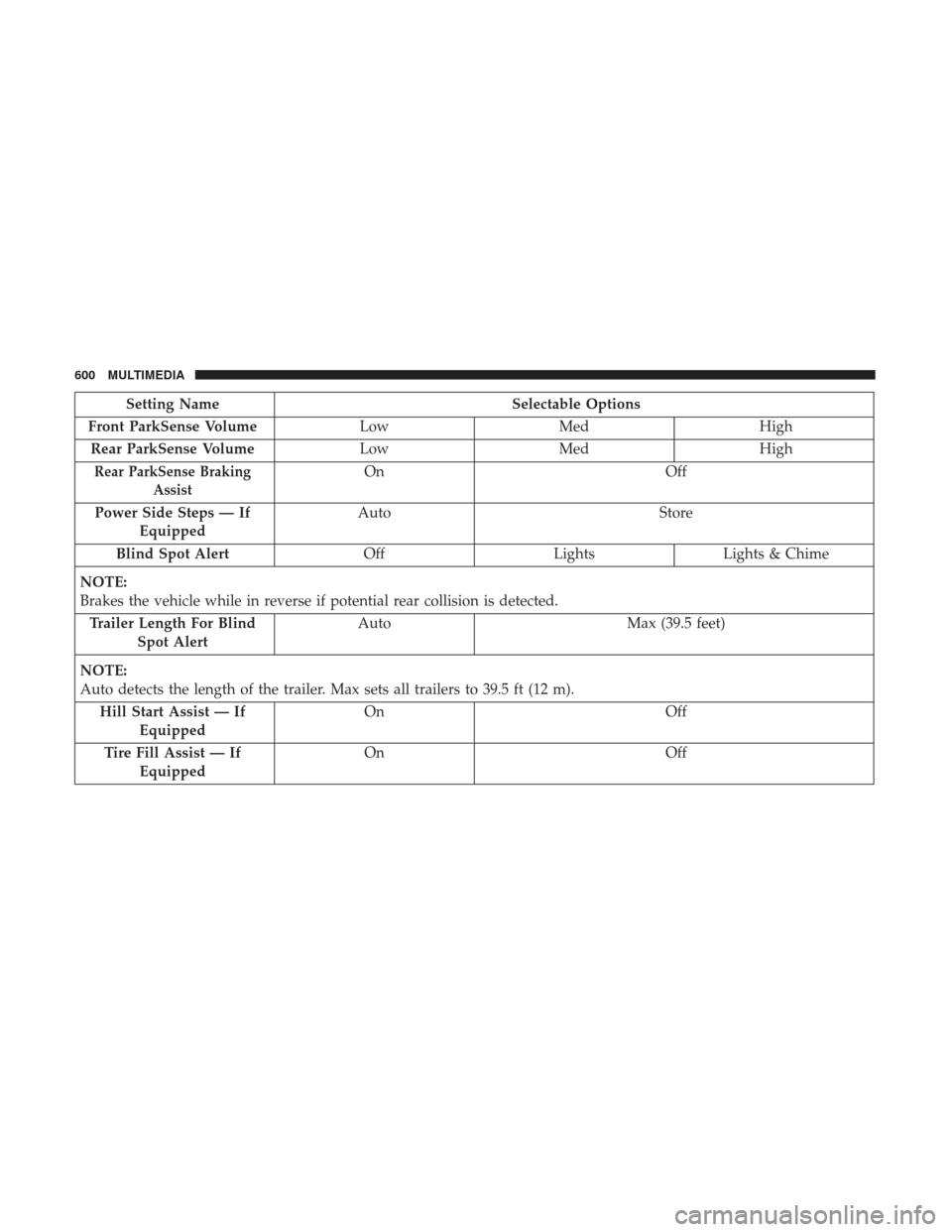
Setting NameSelectable Options
Front ParkSense Volume LowMed High
Rear ParkSense Volume LowMed High
Rear ParkSense Braking
AssistOn Off
Power Side Steps — If Equipped Auto
Store
Blind Spot Alert OffLightsLights & Chime
NOTE:
Brakes the vehicle while in reverse if potential rear collision is detected. Trailer Length For Blind Spot Alert Auto
Max (39.5 feet)
NOTE:
Auto detects the length of the trailer. Max sets all trailers to 39.5 ft (12 m). Hill Start Assist — If Equipped On
Off
Tire Fill Assist — If Equipped On
Off
600 MULTIMEDIA
Page 613 of 698
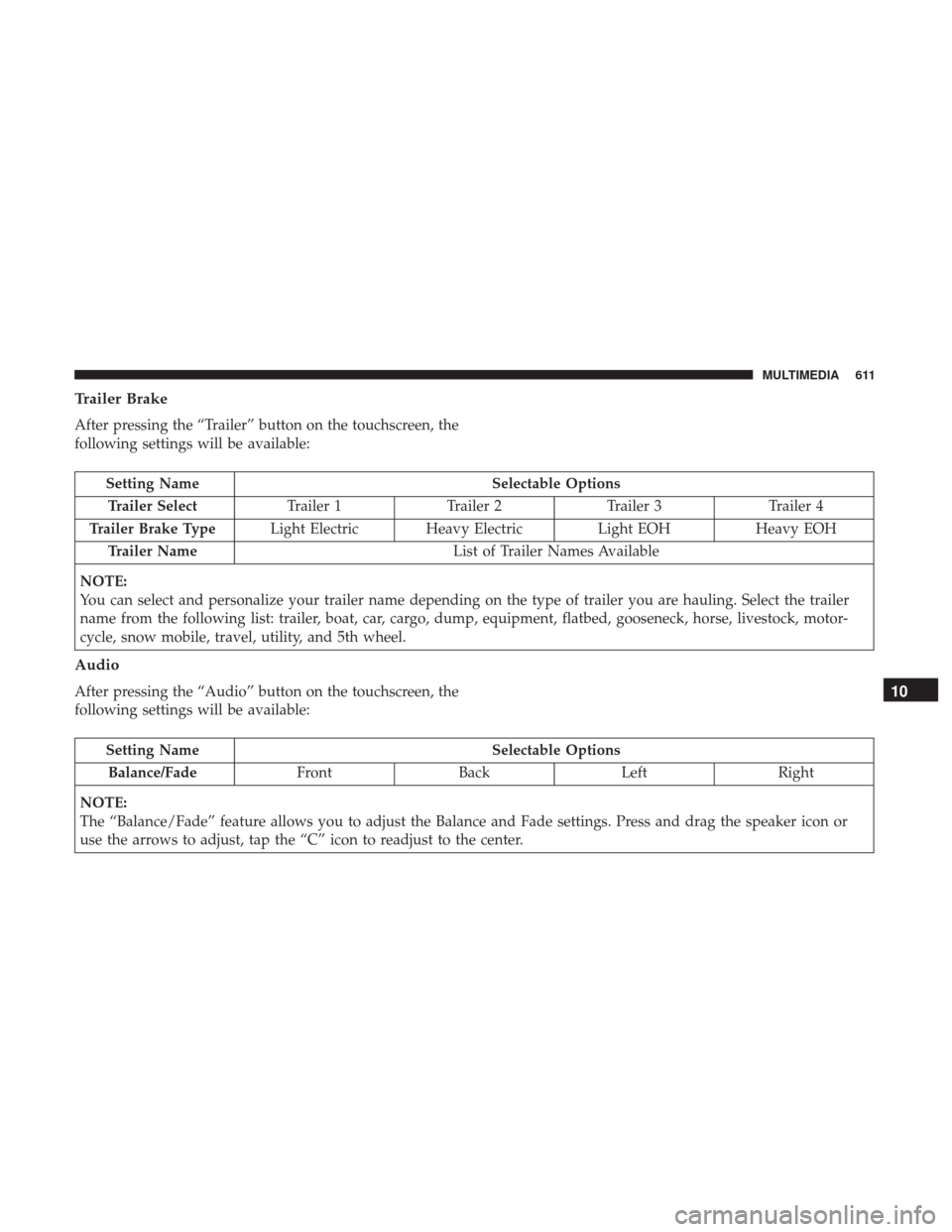
Trailer Brake
After pressing the “Trailer” button on the touchscreen, the
following settings will be available:
Setting NameSelectable Options
Trailer Select Trailer 1Trailer 2Trailer 3 Trailer 4
Trailer Brake Type Light Electric Heavy Electric Light EOHHeavy EOH
Trailer Name List of Trailer Names Available
NOTE:
You can select and personalize your trailer name depending on the type of trailer you are hauling. Select the trailer
name from the following list: trailer, boat, car, cargo, dump, equipment, flatbed, gooseneck, horse, livestock, motor-
cycle, snow mobile, travel, utility, and 5th wheel.
Audio
After pressing the “Audio” button on the touchscreen, the
following settings will be available:
Setting Name Selectable Options
Balance/Fade FrontBack LeftRight
NOTE:
The “Balance/Fade” feature allows you to adjust the Balance and Fade settings. Press and drag the speaker icon or
use the arrows to adjust, tap the “C” icon to readjust to the center.
10
MULTIMEDIA 611
Page 619 of 698

Uconnect 4C NAV With 12–inch Display Settings
Press the “Settings” button on the touchscreen to display
the settings menu screen. In this mode the Uconnect
system allows you to access programmable features that
may be equipped such as Language, Display, Voice Set-
tings, Clock & Date, Camera, Safety & Driving Assistance,
Mirrors and Wipers, Brakes, Lights, Doors & Locks,Auto-On Comfort & Remote Start (if equipped), Engine Off
Options, Suspension, Trailer Brake, Audio Settings,
Bluetooth, SiriusXM Setup (if equipped), and Reset.
NOTE:
Only one category may be selected at a time.
When making a selection, press the button on the touch-
screen to enter the desired mode. Once in the desired
mode, press and release the preferred setting until a
check-mark appears next to the setting, showing that
setting has been selected. Once the setting is complete,
press the back arrow button on the touchscreen to return to
the previous menu or press the “X” button on the touch-
screen to close out of the settings screen. Pressing the Up or
Down Arrow buttons on the touchscreen on the right side
of the screen will allow you to toggle up or down through
the list of available settings.
NOTE: All settings should be changed with the ignition in
the RUN position.
Uconnect 4C NAV With 12–inch Display Buttons On The
Touchscreen And Buttons On The Faceplate
1 — Uconnect Buttons On The Touchscreen
2 — Uconnect Buttons On The Faceplate
10
MULTIMEDIA 617
Page 626 of 698
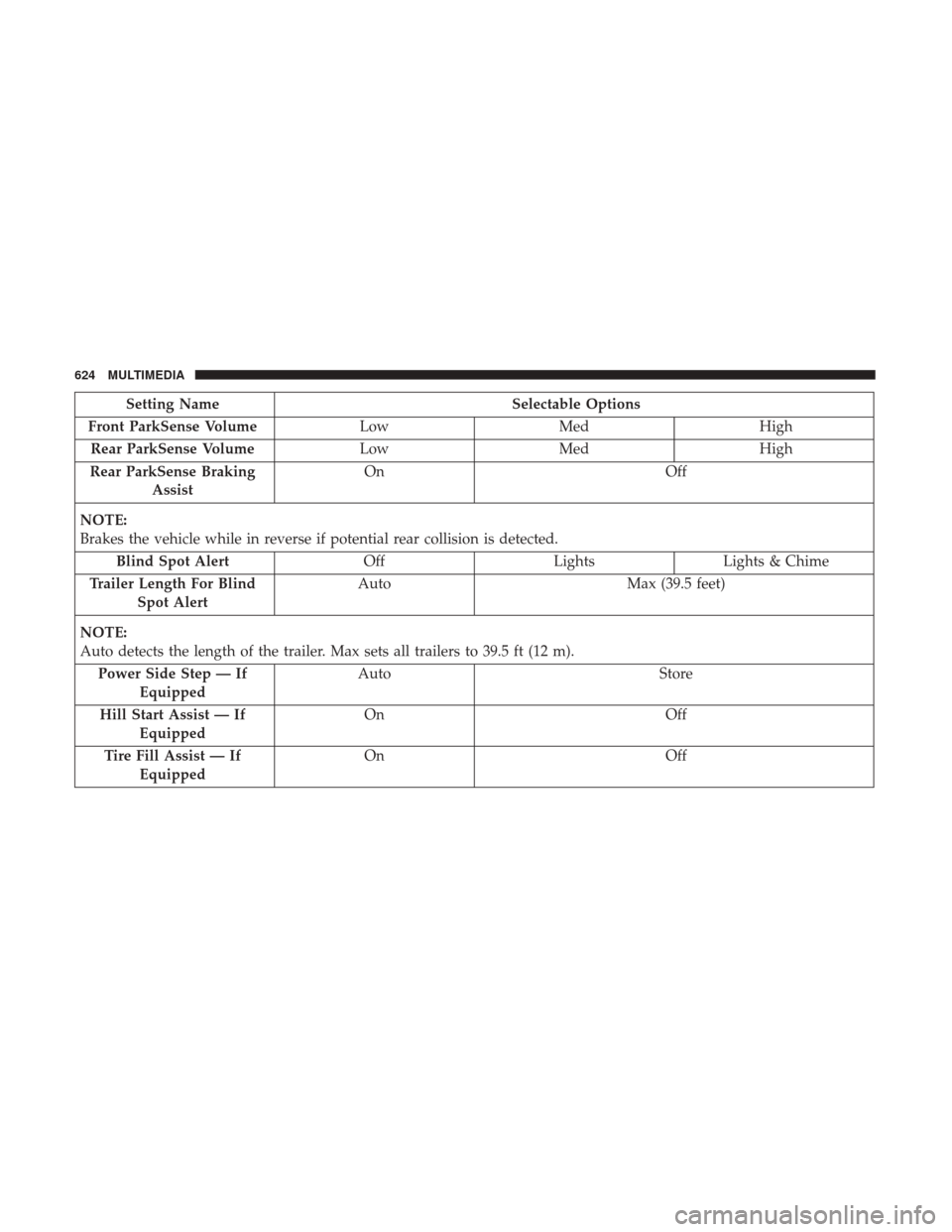
Setting NameSelectable Options
Front ParkSense Volume LowMed High
Rear ParkSense Volume LowMed High
Rear ParkSense Braking Assist On
Off
NOTE:
Brakes the vehicle while in reverse if potential rear collision is detected. Blind Spot Alert OffLightsLights & Chime
Trailer Length For Blind Spot Alert Auto
Max (39.5 feet)
NOTE:
Auto detects the length of the trailer. Max sets all trailers to 39.5 ft (12 m). Power Side Step — If Equipped Auto
Store
Hill Start Assist — If Equipped On
Off
Tire Fill Assist — If Equipped On
Off
624 MULTIMEDIA
Page 636 of 698
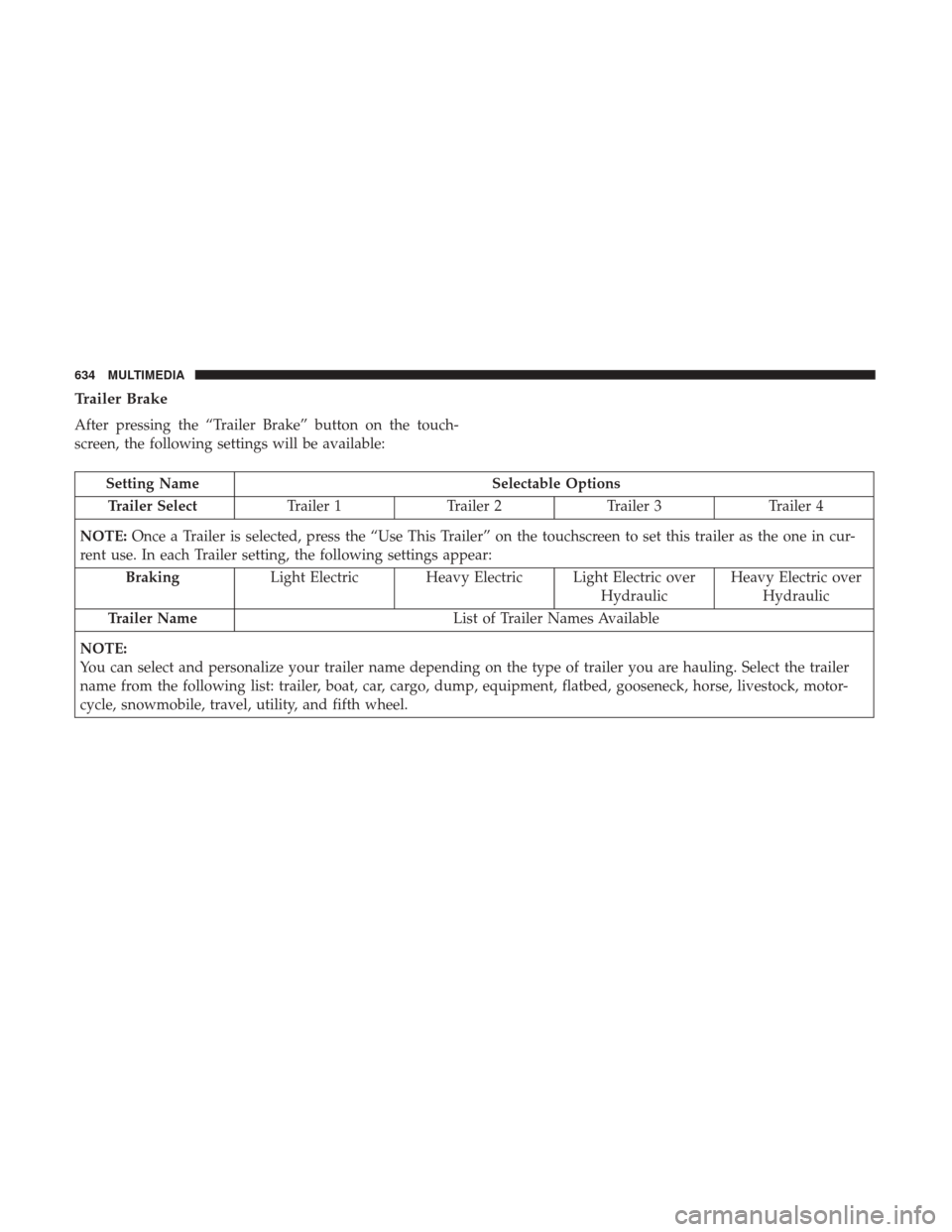
Trailer Brake
After pressing the “Trailer Brake” button on the touch-
screen, the following settings will be available:
Setting NameSelectable Options
Trailer Select Trailer 1Trailer 2Trailer 3 Trailer 4
NOTE: Once a Trailer is selected, press the “Use This Trailer” on the touchscreen to set this trailer as the one in cur-
rent use. In each Trailer setting, the following settings appear:
Braking Light Electric Heavy Electric Light Electric over
HydraulicHeavy Electric over
Hydraulic
Trailer Name List of Trailer Names Available
NOTE:
You can select and personalize your trailer name depending on the type of trailer you are hauling. Select the trailer
name from the following list: trailer, boat, car, cargo, dump, equipment, flatbed, gooseneck, horse, livestock, motor-
cycle, snowmobile, travel, utility, and fifth wheel.
634 MULTIMEDIA
Page 687 of 698

Glass Cleaning........................... .553
Grocery Bag Retainer .........................55
Gross Axle Weight Rating .....................408
Gross Vehicle Weight Rating ...................408
Guide Body Builders ............................5
GVWR ................................. .406
Hazard Driving Through Flowing, Rising, Or Shallow
Standing Water ......................... .430
Hazard Warning Flashers .....................435
Headlights .............................. .442
Cleaning .............................. .547
High Beam ..............................69
High Beam/Low Beam Select Switch ...........69
Passing ................................71
Switch .................................68
Head Restraints ............................55
Head Rests ................................55
Heated Mirrors .............................66
Heater, Engine Block ....................... .299
High Beam/Low Beam Select (Dimmer) Switch ......69
Hill Descent Control ....................... .208
Hill Descent Control Indicator .................208Hill Start Assist
........................... .200
Hitches Trailer Towing .......................... .413
Hoisting ................................ .522
HomeLink (Garage Door Opener) ...............109
Hood Prop .............................. .106
Hood Release ............................ .106
Ignition ..................................27
Switch .................................27
Illuminated Entry ...........................76
Inside Rearview Mirror ....................61, 436
Instrument Cluster Descriptions ........................... .192
Display .............................. .167
Instrument Panel Lens Cleaning ................552
Integrated Trailer Brake Control ................417
Interior Appearance Care .....................550
Interior Lights ..............................74
Intermittent Wipers (Delay Wipers) ...............
77
Introduction ................................4
In Vehicle Help Vehicle User Guide ........................18
Inverter Outlet (115V) ...................... .13012
INDEX 685
Page 689 of 698

Passing................................71
Seat Belt Reminder ...................... .179
Security Alarm ......................... .181
Service ............................... .441
Traction Control ........................ .206
Turn Signals ................73, 192, 287, 442, 447
Warning Instrument Cluster Descriptions . . . .181, 192
Limited-Slip Differential ..................335, 521
Loading Vehicle ........................... .406
Tires................................. .528
Load Shed Battery Saver Mode .................177
Load Shed Battery Saver On ...................177
Load Shed Electrical Load Reduction .............177
Load Shed Intelligent Battery Sensor .............177
Locks Automatic Door ..........................41
Child Protection ..........................42
Power Door .............................37
Low Tire Pressure System .....................225
Lubrication, Body ......................... .509
Lug Nuts ............................ .556, 557
Maintenance Free Battery .....................497
Maintenance Schedule ...................... .489
Malfunction Indicator Light (Check Engine) . . . .184, 195 Manual
Service ............................... .678
Manual Transmission Fluid Level Check ....................... .522
Lubricant Selection ...................... .566
Media Hub .............................. .642
Memory Feature (Memory Seats) ................43
Memory Seat ........................... .43, 49
Memory Seats And Radio .....................43
Methanol ............................... .560
Mirrors ..................................61
Electric Powered ..........................63
Heated .................................66
Memory ................................49
Outside ................................62
Rearview ........................... .61, 436
Trailer Towing ...........................66
Modifications/Alterations V
ehicle .................................6
Monitor, Tire Pressure System ..................225
Mopar Parts ............................. .677
MP3 Control ............................. .642
Multi-Function Control Lever ...................69
Navigation System (Uconnect GPS) ..............396
12
INDEX 687