Page 75 of 698

Turn Signals
Move the multifunction lever up or down and the arrows
on each side of the instrument cluster display will flash to
show proper operation of the front and rear turn signal
lights.
NOTE:If either light remains on and does not flash, or
there is a very fast flash rate, check for a defective outside
light bulb. If an indicator fails to light when the lever is
moved, it would suggest that the indicator bulb is defec-
tive.
Lane Change Assist — If Equipped
Tap the multifunction lever up or down once, without
moving beyond the detent, and the turn signal (right or
left) will flash three times then automatically turn off.
Cargo Light With Bed Lights — If Equipped
The cargo light and bed lights (if equipped) are turned on
by pushing the cargo lights button located on the lower
half of the headlight switch.
If the vehicle’s speed is 0 mph (0 km/h), these lights can
also be turned on using the switch located just inside the
pickup box, on the lower part of the bed light lens. A
Turn Signal Lever
Cargo/Bed Lights Button On Headlight Switch
3
GETTING TO KNOW YOUR VEHICLE 73
Page 76 of 698

telltale will illuminate in the instrument cluster display
when these lights are on. Pushing the switch a second time
will turn the lights off.
The cargo light and bed lights (if equipped) will turn on for
approximately 60 seconds when a key fob unlock button is
pushed, as part of the Illuminated Entry feature.
Battery Saver
To protect the life of your vehicle’s battery, load shedding
is provided for both the interior and exterior lights.If the ignition is OFF and any door is left ajar for 10 minutes
or the dimmer control is rotated all the way up to the dome
on position for 10 minutes, the interior lights will automati-
cally turn off.
NOTE:
Battery saver mode is canceled if the ignition is
ON.
If the headlights remain on while the ignition is cycled OFF,
the exterior lights will automatically turn off after eight
minutes. If the headlights are turned on and left on for
eight minutes while the ignition is OFF, the exterior lights
will automatically turn off.
INTERIOR LIGHTS
Courtesy Lights
Courtesy and dome lights are turned on when the front
doors are opened, the ambient dimmer control is rotated to
the highest detent, or the Illuminated Entry ON button is
pushed on the overhead console. Also, if your vehicle is
equipped with Remote Keyless Entry, and the unlock
button is pushed on the key fob, the courtesy and dome
lights will turn on.Bed Light Switch In Truck Bed
74 GETTING TO KNOW YOUR VEHICLE
Page 77 of 698
Courtesy/Reading Lights
The overhead console lights can also be operated individu-
ally as reading lights by pushing the corresponding but-
tons.
Three types of Rear Courtesy/Reading Lights are available
for your vehicle.
•Push button on/off •
Push lens on/off
• Push round puck lens on/off (if equipped with Dual
Pane Sunroof)
NOTE: The courtesy/reading lights will remain on until
the switch is pushed a second time, so be sure they have
been turned off before exiting the vehicle. If the interior
lights are left on after the ignition is turned off, they will
automatically turn off after 10 minutes.
Front Courtesy/Reading Lights
1 — Reading Light On/Off Buttons
2 — Illuminated Entry OFF Button
3 — Illuminated Entry ON Button
Push Lens On/Off Rear Courtesy Light
3
GETTING TO KNOW YOUR VEHICLE 75
Page 78 of 698
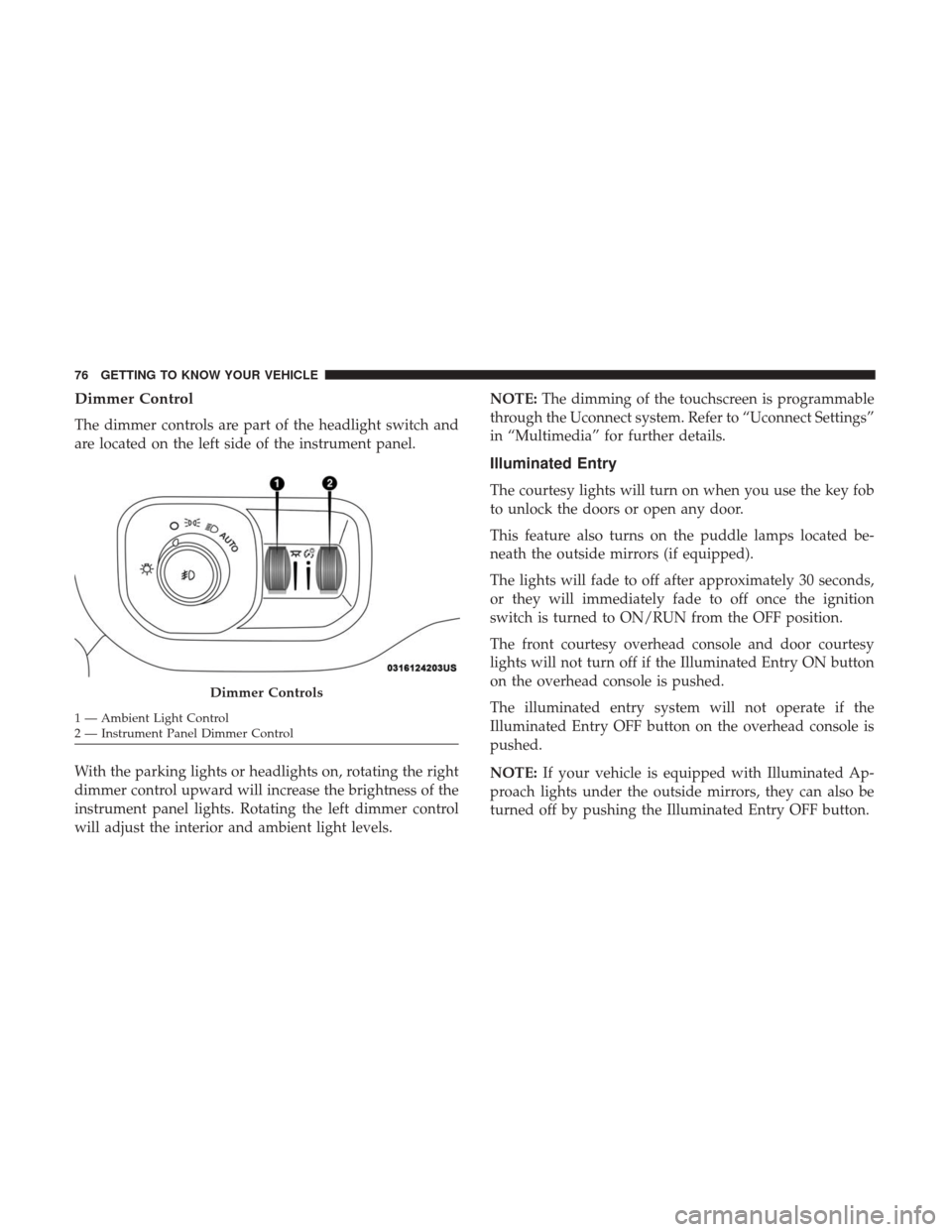
Dimmer Control
The dimmer controls are part of the headlight switch and
are located on the left side of the instrument panel.
With the parking lights or headlights on, rotating the right
dimmer control upward will increase the brightness of the
instrument panel lights. Rotating the left dimmer control
will adjust the interior and ambient light levels.NOTE:
The dimming of the touchscreen is programmable
through the Uconnect system. Refer to “Uconnect Settings”
in “Multimedia” for further details.
Illuminated Entry
The courtesy lights will turn on when you use the key fob
to unlock the doors or open any door.
This feature also turns on the puddle lamps located be-
neath the outside mirrors (if equipped).
The lights will fade to off after approximately 30 seconds,
or they will immediately fade to off once the ignition
switch is turned to ON/RUN from the OFF position.
The front courtesy overhead console and door courtesy
lights will not turn off if the Illuminated Entry ON button
on the overhead console is pushed.
The illuminated entry system will not operate if the
Illuminated Entry OFF button on the overhead console is
pushed.
NOTE: If your vehicle is equipped with Illuminated Ap-
proach lights under the outside mirrors, they can also be
turned off by pushing the Illuminated Entry OFF button.
Dimmer Controls
1 — Ambient Light Control
2 — Instrument Panel Dimmer Control 76 GETTING TO KNOW YOUR VEHICLE
Page 101 of 698

Wind Buffeting
Wind buffeting can be described as the perception of
pressure on the ears or a helicopter-type sound in the ears.
Your vehicle may exhibit wind buffeting with the windows
down, or the sunroof (if equipped) in certain open or
partially open positions. This is a normal occurrence and
can be minimized. If the buffeting occurs with the rear
windows open, open the front and rear windows together
to minimize the buffeting. If the buffeting occurs with the
sunroof open, adjust the sunroof opening to minimize the
buffeting or open any window.
POWER SUNROOF — IF EQUIPPED
Single Pane Power Sunroof — If Equipped
The power sunroof switches are located on the overhead
console between the courtesy/reading lights.
WARNING!
•Never leave children unattended in a vehicle, or with
access to an unlocked vehicle. Never leave the key
fob in or near the vehicle, or in a location accessible
to children. Do not leave the ignition of a vehicle
equipped with Keyless Enter-N-Go in the ACC or
(Continued)
Power Sunroof Switches
1 — Opening/Closing Sunroof
2 — Venting Sunroof
3
GETTING TO KNOW YOUR VEHICLE 99
Page 104 of 698

Relearn Procedure
For vehicles equipped with a sunroof, there is a relearn
procedure that allows you to calibrate the sunroof when
the “Express Operation” feature stops working. To reset the
sunroof, follow these steps:
1. Set the ignition to the ACC or the ON/RUN position.
2. Ensure that the sunroof is in the fully closed position.
3. Push and hold the close switch. The sunroof will hit thehard stop and move to the vent position after ten
seconds.
4. Release the close switch.
5. Push and hold the close switch again within five sec- onds to begin the teaching process. The sunroof will
complete one full cycle and return to the fully closed
position.
NOTE: If the close switch is released anytime during the
teach cycle, the procedure will need to be repeated starting
from the first step.
6. Once the sunroof has stopped in the fully closed posi- tion, release the close switch. The sunroof is now reset
and ready to use.
Dual Pane Power Sunroof — If Equipped
The power sunroof switches are located on the overhead
console between the courtesy/reading lights.
Power Sunroof Switches
1 — Opening/Closing Sunroof
2 — Venting Sunroof
3 — Opening/Closing Sunshade
102 GETTING TO KNOW YOUR VEHICLE
Page 131 of 698

WARNING!
To avoid serious injury or death:
•Only devices designed for use in this type of outlet
should be inserted into any 12 Volt outlet.
• Do not touch with wet hands.
• Close the lid when not in use and while driving the
vehicle.
• If this outlet is mishandled, it may cause an electric
shock and failure.
CAUTION!
• Many accessories that can be plugged in draw power
from the vehicle’s battery, even when not in use (i.e.,
cellular phones, etc.). Eventually, if plugged in long
enough, the vehicle’s battery will discharge suffi-
ciently to degrade battery life and/or prevent the
engine from starting.
(Continued)
CAUTION! (Continued)
•Accessories that draw higher power (i.e., coolers,
vacuum cleaners, lights, etc.), will discharge the
battery even more quickly. Only use these intermit-
tently and with greater caution.
• After the use of high power draw accessories, or long
periods of the vehicle not being started (with acces-
sories still plugged in), the vehicle must be driven a
sufficient length of time to allow the generator to
recharge the vehicle’s battery.
3
GETTING TO KNOW YOUR VEHICLE 129
Page 139 of 698

NOTE:RamBox will not open when the pushbutton is
pushed if the RamBox is locked.CAUTION!
Leaving the lid open for extended periods of time
could cause the vehicle battery to discharge. If the lid
is required to stay open for extended periods of time, it
is recommended that the bin lights be turned off
manually using the on/off switch.
The interior of the RamBox will automatically illuminate
when the lid is opened. The timing can be adjusted through
your touchscreen.
Refer to “Uconnect Settings” in “Multimedia” for further
information.
Cargo bins feature two removable drain plugs (to allow
water to drain from bins). To remove plug, pull up on the
edge. To install push plug downward into drain hole.
If equipped, a power inverter can be found inside the
RamBox.
Refer to “Electrical Power Outlets” in “Getting To Know
Your Vehicle” for further information.
NOTE: Provisions are provided in the bins for cargo
dividers. These accessories (in addition to other RamBox
accessories) are available from Mopar.
RamBox Push Button And Keyhole Lock
1 — Keyhole Lock
2 — Push Button
3
GETTING TO KNOW YOUR VEHICLE 137
