2019 Peugeot Partner key
[x] Cancel search: keyPage 276 of 312

16
Select a Wi-Fi network found by the
system and connect.
Wi-Fi connection
This function is only available if it has been
activated either via the "Notifications" or
via the "Applications" menu. Press " Notifications ".
Select Wi-Fi to activate it.
OR Press Applications to display the
primary page.
Press the " OPTIONS" button to go to the
secondary page.
Select "Wi- Fi network
connection ".
Select the " Secured" or "Not
secured " or "Stored " tab.
Select a network. Using the virtual keypad, enter the
"
Key " for the Wi-Fi network and the
" Password ".
Press " OK" to start the connection.
Restrictions of use:
-
W
ith CarPlay
®, connection sharing is
only with a Wi-Fi connection.
-
W
ith MirrorLink
TM, connection sharing
is only with a USB connection.
The quality of ser vices depends on the
quality of the network connection.
When "TOMTOM TR AFFIC"
appears, the services are available.
The ser vices offered with connected
navigation are as follows.
A Connected Services pack:
-
Weather,
-
F
illing stations,
-
C
ar park,
-
Tr a f f i c ,
-
P
OI local search.
A Danger zone pack (option).
The processes and standards are
constantly changing; for the communication
process between the smartphone and the
system to work correctly, we recommend
that you update the operating system of
the smar tphone as well as the date and
time of the smar tphone and the system.
Settings specific to
connected navigation
In the "Settings" menu you can create
a profile for just one person or a group
of people with common points, with the
possibility of entering a multitude of
settings (radio presets, audio settings,
navigation history, contact favourites,
etc.); these settings are taken into account
automatically.
Press Navigation to display the
primary page.
Press the " MENU" button to go to the
secondary page.
Select "Settings ".
PEUGEOT Connect Nav
Page 277 of 312
17
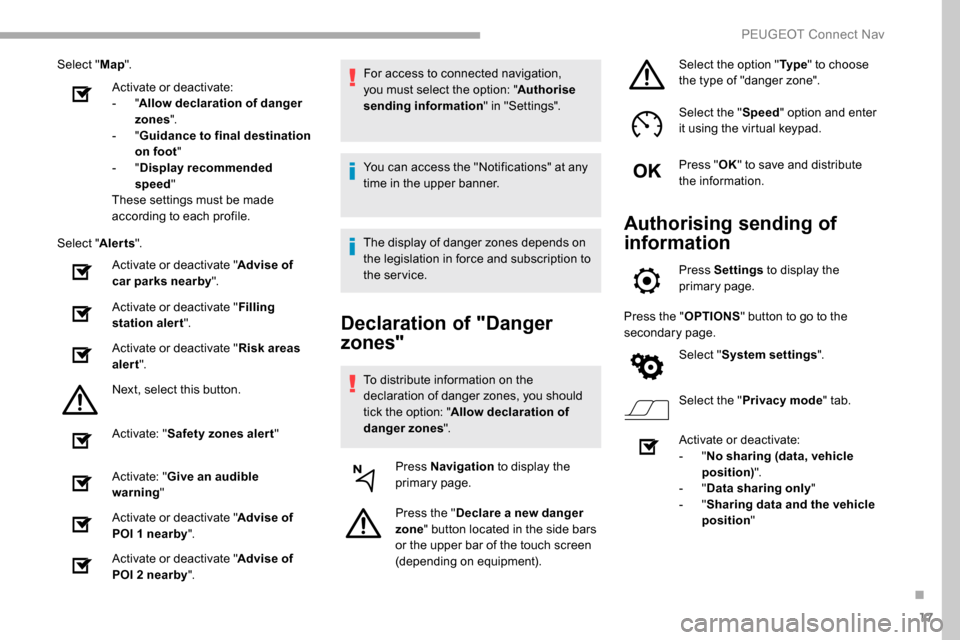
Select "Map".
Activate or deactivate:
-
"Allow declaration of danger
zones ".
-
"Guidance to final destination
on foot "
-
"Display recommended
speed "
These settings must be made
according to each profile.
Select " Alerts".
Activate or deactivate " Advise of
car parks nearby".
Activate or deactivate " Filling
station alert ".
Activate or deactivate " Risk areas
alert ".
Next, select this button.
Activate: " Safety zones alert "
Activate: " Give an audible
warning "
Activate or deactivate " Advise of
POI 1 nearby ".
Activate or deactivate " Advise of
POI 2 nearby ". For access to connected navigation,
you must select the option: "
Authorise
sending information " in "Settings".
You can access the "Notifications" at any
time in the upper banner.
The display of danger zones depends on
the legislation in force and subscription to
the service.
Declaration of "Danger
zones"
To distribute information on the
declaration of danger zones, you should
tick the option: " Allow declaration of
danger zones ".
Press Navigation to display the
primary page.
Press the " Declare a new danger
zone " button located in the side bars
or the upper bar of the touch screen
(depending on equipment). Select the option "
Ty p e" to choose
the type of "danger zone".
Select the " Speed" option and enter
it using the virtual keypad.
Press " OK" to save and distribute
the information.
Authorising sending of
information
Press Settings to display the
primary page.
Press the " OPTIONS" button to go to the
secondary page.
Select "System settings ".
Select the " Privacy mode " tab.
Activate or deactivate:
-
"No sharing (data, vehicle
position) ".
-
"Data sharing only "
-
"Sharing data and the vehicle
position "
.
PEUGEOT Connect Nav
Page 282 of 312
22
Connection sharing
The system offers to connect the telephone
with 3 profiles:
- "Telephone " (hands-free kit, telephone
only),
-
"Streaming " (streaming: wireless playing of
the audio files on the telephone),
-
"Mobile internet data ".
The " Mobile internet data " profile
must be activated for connected
navigation (where the vehicle does not
have "Emergency and assistance call"
ser vices), having first activated sharing of
this connection on your smartphone.
Select one or more profiles.
Press " OK" to confirm.
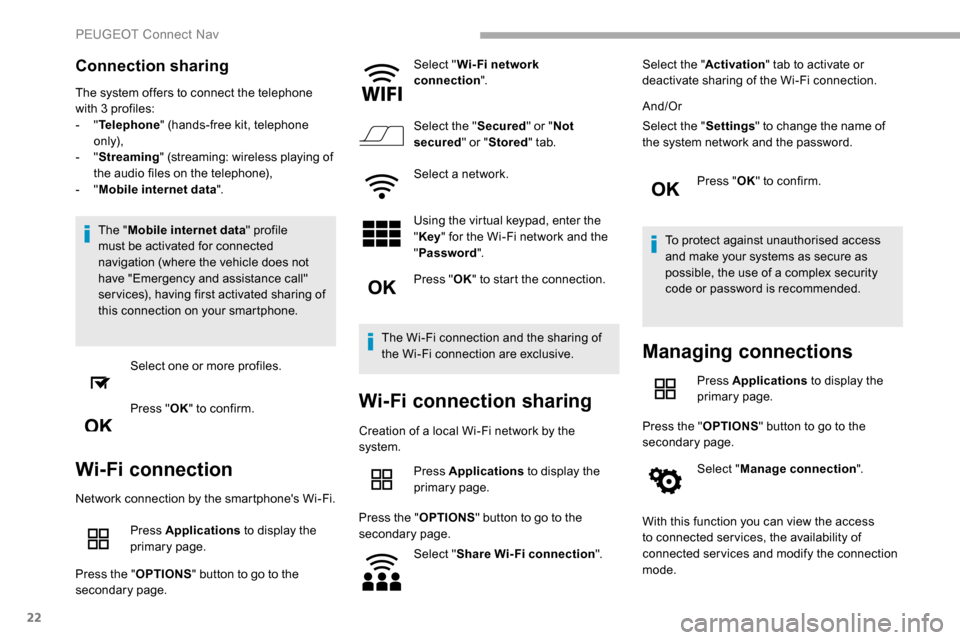
Wi-Fi connection
Network connection by the smartphone's Wi-Fi.
Press Applications to display the
primary page.
Press the " OPTIONS" button to go to the
secondary page. Select "
Wi- Fi network
connection ".
Select the " Secured" or "Not
secured " or "Stored " tab.
Select a network.
Using the virtual keypad, enter the
" Key " for the Wi-Fi network and the
" Password ".
Press " OK" to start the connection.
The Wi-Fi connection and the sharing of
the Wi-Fi connection are exclusive.
Wi-Fi connection sharing
Creation of a local Wi-Fi network by the
system. Press Applications to display the
primary page.
Press the " OPTIONS" button to go to the
secondary page.
Select "Share Wi-Fi connection ".Select the "
Activation" tab to activate or
deactivate sharing of the Wi-Fi connection.
And/Or
Select the " Settings" to change the name of
the system network and the password.
Press "OK" to confirm.
To protect against unauthorised access
and make your systems as secure as
possible, the use of a complex security
code or password is recommended.
Managing connections
Press Applications to display the
primary page.
Press the " OPTIONS" button to go to the
secondary page.
Select "Manage connection ".
With this function you can view the access
to connected ser vices, the availability of
connected services and modify the connection
mode.
PEUGEOT Connect Nav
Page 283 of 312

23
Radio
Selecting a station
Press Radio Media to display the
primary page.
Press " Frequency ".
Press one of the buttons for an
automatic search for radio stations.
Or Move the cursor for a manual search
for frequencies up or down.
Or Press Radio Media to display the
primary page.
Press the " OPTIONS" button to go to the
secondary page.
Select "Radio stations " in the
secondary page.
Press " Frequency ".
Enter the values using the virtual
keypad.
First enter the units then click on the
decimals zone to enter the figures
after the decimal point. Press "
OK" to confirm.
Radio reception may be affected by the
use of electrical equipment not approved
by the Brand, such as a USB charger
connected to the 12 V socket.
The external environment (hills, buildings,
tunnels, basement car parks, etc.) may
block reception, including in RDS mode.
This is a normal effect of the way in
which radio waves are transmitted and
does not indicate any failure of the audio
equipment.
Presetting a station
Select a radio station or frequency.
(refer to the corresponding section)
Press " Presets ".
Make a long press on one of the
buttons to preset the station.
Changing waveband
Press Radio Media to display the
primary page.
To change the waveband, press "Band…"
displayed at the top right of the screen.
Activating/Deactivating RDS
Press Radio Media to display the
primary page.
Press the " OPTIONS" button to go to the
secondary page.
Select "Radio settings ".
Select " General ".
Activate/Deactivate " Station
tracking ".
Press " OK" to confirm.
RDS, if activated, allows you to continue
listening to the same station by automatically
retuning to alternative frequencies. However,
in certain conditions, coverage of an RDS
station may not be assured throughout the
entire country as radio stations do not cover
100% of the territory. This explains the loss of
reception of the station during a journey.
.
PEUGEOT Connect Nav
Page 289 of 312
29
Press the basket alongside the
telephone chosen to delete it.
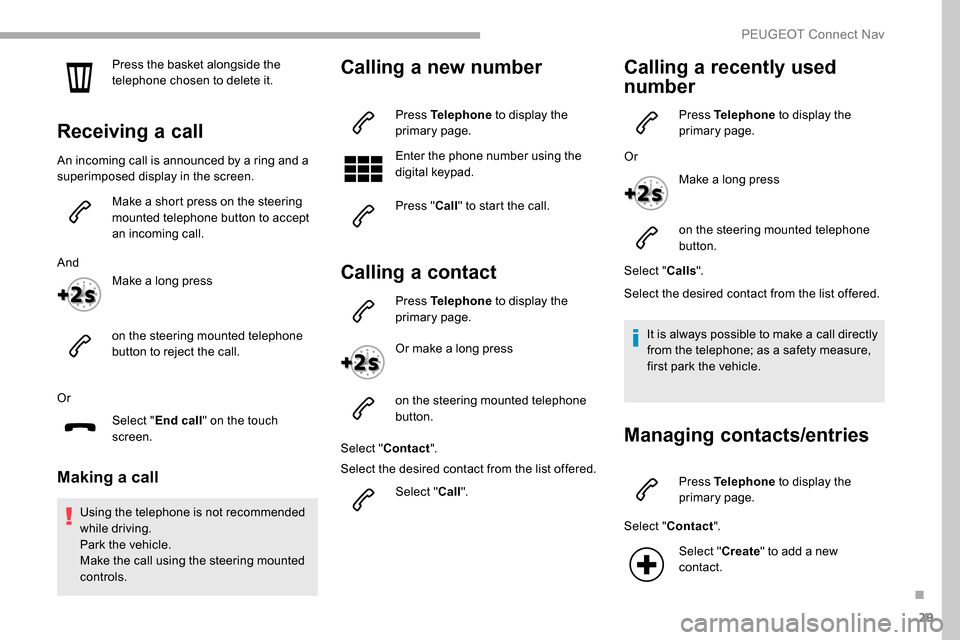
Receiving a call
An incoming call is announced by a ring and a
superimposed display in the screen.Make a short press on the steering
mounted telephone button to accept
an incoming call.
And Make a long press
on the steering mounted telephone
button to reject the call.
Or Select "End call" on the touch
screen.
Making a call
Using the telephone is not recommended
while driving.
Park the vehicle.
Make the call using the steering mounted
controls.
Calling a new number
Press Telephone to display the
primary page.
Enter the phone number using the
digital keypad.
Press " Call" to start the call.
Calling a contact
Press Telephone to display the
primary page.
Or make a long press
on the steering mounted telephone
button.
Select " Contact ".
Select the desired contact from the list offered.
Select "Call".
Calling a recently used
number
Press Telephone to display the
primary page.
Or Make a long press
on the steering mounted telephone
button.
Select " Calls".
Select the desired contact from the list offered.
It is always possible to make a call directly
from the telephone; as a safety measure,
first park the vehicle.
Managing contacts/entries
Press Telephone to display the
primary page.
Select " Contact ".
Select " Create" to add a new
contact.
.
PEUGEOT Connect Nav
Page 291 of 312
31
Settings
Audio settings
Press Settings to display the
primary page.
Select " Audio settings ".
Select " Ambience ".
Or
" Distribution ".
Or
" Sound ".
Or
" Voice ".
Or
" Ringtone ".
Press " OK" to save the settings. The balance/distribution (or spatialisation
with the Arkamys
© system) is audio
processing that allows the quality of the
sound to be adapted according to the
number of passengers in the vehicle.
Available only with the front and rear
speakers configuration.
The audio settings Ambience (6 optional
ambiences) and Bass , Medium and
Tr e b l e are different and independent for
each audio source.
Activate or Deactivate " Loudness".
The settings for " Position" (All
passengers, Driver and Front only) are
common to all sources.
Activate or Deactivate " Touch tones",
" Volume linked to speed " and "Auxiliary
input ".
Onboard audio: Arkamys
© Sound Staging
optimises the distribution of sound in the
passenger compartment.
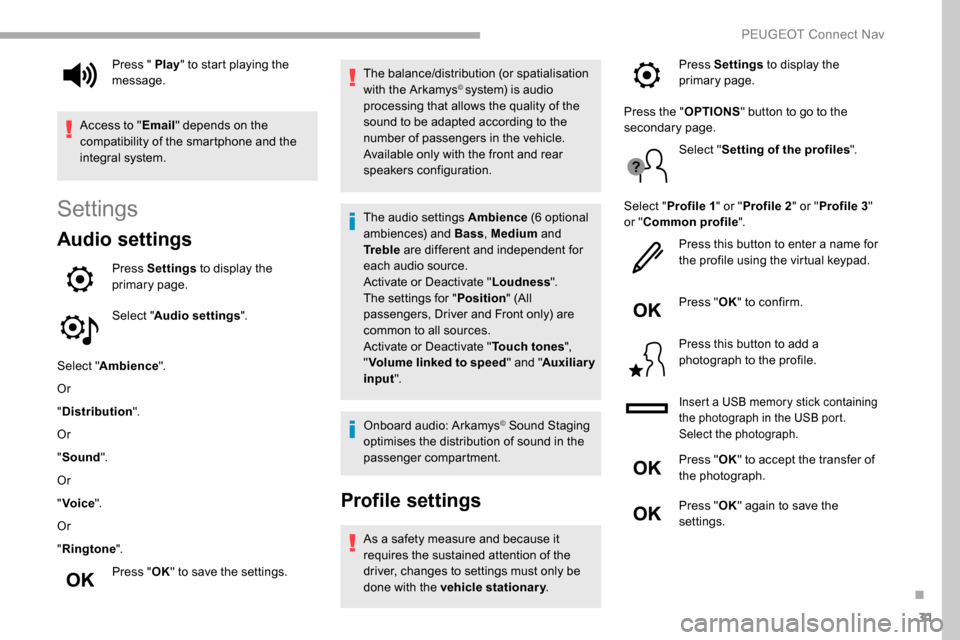
Profile settings
As a safety measure and because it
requires the sustained attention of the
driver, changes to settings must only be
done with the vehicle stationary .
Press " Play
" to start playing the
message.
Access to " Email" depends on the
compatibility of the smartphone and the
integral system. Press Settings
to display the
primary page.
Press the " OPTIONS" button to go to the
secondary page.
Select "Setting of the profiles ".
Select " Profile 1 " or "Profile 2 " or "Profile 3 "
or " Common profile ".
Press this button to enter a name for
the profile using the virtual keypad.
Press " OK" to confirm.
Press this button to add a
photograph to the profile.
Insert a USB memory stick containing
the photograph in the USB port.
Select the photograph.
Press " OK" to accept the transfer of
the photograph.
Press " OK" again to save the
settings.
.
PEUGEOT Connect Nav
Page 293 of 312
33
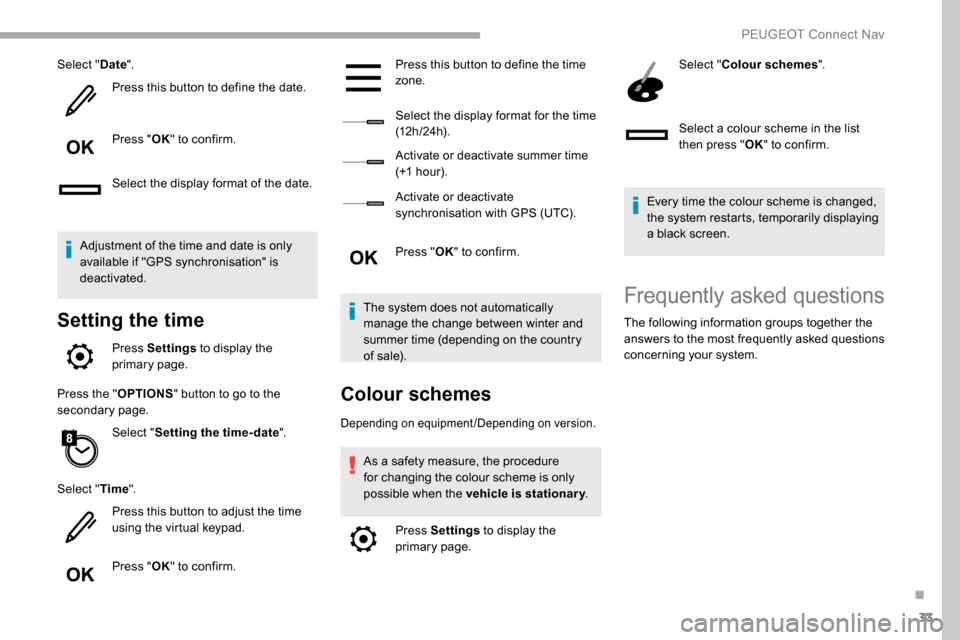
Select "Date".
Press this button to define the date.
Press " OK" to confirm.
Select the display format of the date.
Adjustment of the time and date is only
available if "GPS synchronisation" is
deactivated.
Setting the time
Press Settings to display the
primary page.
Press the " OPTIONS" button to go to the
secondary page.
Select "Setting the time- date".
Select " Time".
Press this button to adjust the time
using the virtual keypad.
Press " OK" to confirm. Press this button to define the time
zone.
Select the display format for the time
(12 h / 24 h).
Activate or deactivate summer time
(+1
hour).
Activate or deactivate
synchronisation with GPS (UTC).
Press " OK" to confirm.
The system does not automatically
manage the change between winter and
summer time (depending on the country
of sale).
Colour schemes
Depending on equipment/Depending on version.
As a safety measure, the procedure
for changing the colour scheme is only
possible when the vehicle is stationary .
Press Settings to display the
primary page. Select "
Colour schemes ".
Select a colour scheme in the list
then press " OK" to confirm.
Every time the colour scheme is changed,
the system restarts, temporarily displaying
a black screen.
Frequently asked questions
The following information groups together the
answers to the most frequently asked questions
concerning your system.
.
PEUGEOT Connect Nav
Page 303 of 312

221
Hill Assist Descent Control (HADC) ....26 , 102-103Hill Descent Control ...............................102-103
Hill start assist ........................................ 124 -125
Horn ................................................................. 97
IIdentification, vehicle .................................... 217
Ignition ................ .............................. 11 9 -12 0, 29
Ignition on ...................................................... 120
Immobiliser, electronic
......................44, 47 , 120
Indicator, AdBlue
® range ................................. 31
Indicator, coolant temperature ..................28-30
Indicator, engine oil level
................................ 30
Indicator lamps, operation
................... 1
5 -16, 85
Indicator lamps, status
.................................... 15
I
ndicators, direction
........................................ 86
Inflating tyres
................................................ 183
Inflating tyres and accessories (using the kit)
................................................. 189, 191
Instrument panel
............................................. 11
Instrument panels
........................................... 29
Internet browser
.............................................. 21
JJack .........................................................191, 25
Jump starting ................................................ 204
KKey ................................................ 37, 39 , 42, 47
Key, electronic ......................................... 37, 120
Keyless Entry and Starting .................
3 7- 4 0, 42, 44 , 47- 4 8 , 11 8 -11 9
Key with remote control
......................37,
42, 44
Kit, hands-free
..................... 1
0 -11, 13 -14 , 27-2 8
Kit, temporary puncture repair
....... 18
8 -189, 191
LLabels ................................................................ 4
Labels, identification ..................................... 217
Lamps, front
........................................... 197-19 9
Lamps, parking
............................................... 87
Lamps, rear
................................................... 19 9
Lane departure warning active
............... 20,
15 3
LEDs - Light-emitting diodes
..........................87
Level, brake fluid
........................................... 18 0
Level, Diesel additive
.............................181-182
Level, engine coolant
........................28-30, 18 0
Level, engine oil
.............................. 30, 179 -18 0
Levels and checks
..............................
...178 -181
Level, screenwash fluid
...................92,
18 0 -181
Light-emitting diodes - LEDs
..........................87
Lighting
............................................................ 85
Lighting, cornering
.................................... 90 -91
Lighting, directional
......................................... 90
Lighting, guide-me home
................................88
Lighting, welcome
........................................... 88
Loading
................................................... 68, 17 7
Load reduction mode
.................................... 17 7
Load restraint
...............................
...................67
Locating your vehicle
...................................... 44
Locking
...............................
.................37, 42 , 47
Locking from the inside
.............................48-49
Low fuel level
......................................... 17
1-172
Lumbar
............................................................ 60
MMarkings, identification .................................217
Mat .................................................... 64-65, 11 8
Memorising a speed
..............................1
4 9 -15 0
Menu
............................................................... 12
Menu, main
....................................................... 4
M
enus (audio) ........................................ 4-5, 4-5
Messages
........................................................ 30
Messages, quick
............................................. 3
0
Mirror, rear view
.............................................. 58
Mirrors, door ......................... 57- 5 8, 79, 157-15 8
Misfuel prevention
......................................... 172
MP3 CD
............................................................. 9
NNumber plate lamps ...................................... 200
OObstacle detection ........................................ 160
Oil change .............................................. 17
9 -18 0
Oil consumption
..................................... 179 -18 0
Oil, engine
.............................................. 179 -18 0
On-board tools
....................................... 187-188
Opening the bonnet
...............................17 7-178
Opening the boot
............................................ 37
Opening the doors
.......................................... 37
Opening the fuel filler flap
.............................171
Overhead storage
........................................... 65
O
verload indicator
........................................... 21
.
Alphabetical index