2019 Peugeot Partner Box
[x] Cancel search: BoxPage 18 of 312

16
Warning/indicator lampStateCause Actions/Observations
Orange warning/indicator lamps
Automatic
functions (with
automatic
electronic parking
brake)Fixed.
The "automatic application" (on
switching off the engine) and
"automatic release" functions are
deactivated. Activate the functions again.
+ Automatic
application
(with automatic
electronic parking
brake) Fixed, accompanied
by the message
"Parking brake fault".
The automatic application is not
available, the parking brake can
only be used manually. Use the automatic electronic parking brake control
l eve r.
If automatic release is also not available, use manual
release.
+
+
+ Malfunction
(with automatic
electronic parking
brake)
Fixed, accompanied
by the message
"Parking brake fault".
The parking brake is not
operating at maximum efficiency
and cannot ensure parking the
vehicle in complete safety in all
situations. Make your vehicle safe:
F
P
ark on a level sur face.
F
W
ith a manual gearbox, engage a gear.
F
W
ith an automatic gearbox, with P selected, place
the supplied chocks against one of the wheels.
Then carry out (2).
+
+ Malfunction
(with automatic
electronic parking
brake)
Flashing, when the
vehicle is started.
The parking brake has not been
properly released. Carry out (1) and try to completely release the parking
brake using the control lever, with your foot on the
brake pedal.
If the problem persists, carry out (2).
Instruments
Page 27 of 312

25
Warning/indicator lampStateCause Actions/Observations
+
+ Malfunction
(with automatic
electronic parking
brake)
Fixed, accompanied
by the message
"Parking brake fault".
The parking brake is faulty:
manual and automatic functions
may not be working. When stationary, to immobilise your vehicle:
F
P
ull and hold the control lever for approximately 7
to 15
seconds, until the warning lamp comes on in
the instrument panel.
If this procedure does not work, make your vehicle
safe:
F
P
ark on a level sur face.
F
W
ith a manual gearbox, engage a gear.
F
W
ith an automatic gearbox, select P, then put the
supplied chocks against one of the wheels.
Then carry out (2).
Rear foglamp Fixed. The lamp is on.
+
Malfunction of the
braking systems
(with Post Collision
Safety Brake
(APCB)) Fixed.
Carry out (3) quickly.
+ Fault concerning
the airbags or
pyrotechnic
pretensioning
systems (with Post
Collision Safety
Brake (APCB)) Fixed.
Carry out (3) quickly.
1
Instruments
Page 29 of 312

27
Warning/indicator lampStateCause Actions/Observations
Dipped beam headlampsFixed.The lamps are on.
+
or Intelligent beam
headlights
Fixed.
The function has been activated via the touch
screen (menu Vehicle/Driving).
The lighting control stalk is in the "AUTO"
position.
Blue warning/indicator lamps
Main beam headlampsFixed.The lamps are on.
Black/white warning lamps
Foot on brake Fixed.Omission or insufficient pressure on the brake
pedal. With an automatic gearbox, with the engine
running, before releasing the parking brake, to
move out of position P
.
Foot on the clutch Fixed.Stop & Start: the change to START mode is
rejected because the clutch pedal is not fully
depressed. Fully depress the clutch pedal.
Automatic wiping Fixed.Automatic front wiping is activated.
(1) : You must stop as soon as it is safe to do
so and switch off the ignition. (3)
: Go to a PEUGEOT dealer or a qualified
workshop.
(2): Contact a PEUGEOT dealer or a qualified
workshop.
1
Instruments
Page 37 of 312

35
Distance travelled
(miles or km)Calculated since the last trip
computer reset.
Stop & Start time counter
(minutes/seconds or hours/minutes)
If your vehicle is fitted with Stop & Start, a time
counter calculates the time spent in STOP mode
during a journey.
It resets to zero every time the ignition is switched on.
Setting the time and date
Without audio system
You can adjust the date and time in the
instrument panel display.F
H
old this button down.
F
P
ress one of these buttons to
select the setting to be changed.
F
P
ress this button briefly to
confirm.
F
P
ress one of these buttons to
change the setting and confirm
again to register the change.
With audio system
F Press the MENU button for access to the
main menu.
F
P
ress the " 7" or " 8" button to select the
"Personalisation-configuration" menu, then
press OK.
F
P
ress the " 5" or " 6" button to select the
"Display configuration" menu, then press
OK.
F
P
ress the " 5" or " 6" button to select the
"Date and time adjustment" button, then
press OK.
F
P
ress the " 7" or " 8" button to select the
setting to modify. Confirm by pressing the
OK button. F
A
djust the settings one by one, confirming
with the OK button.
F
P
ress the "
5" or " 6" button, then the OK
button to select the OK box and confirm or
the Back button to cancel.
With PEUGEOT Connect
Radio
F Select the Settings menu in
the upper banner of the touch
screen.
F
Sel
ect " System configuration ".
F
Sel
ect "Date and time ".
F
Sel
ect " Date " or "Time ".
F
C
hoose the display formats.
F
C
hange the date and/or time using the
numeric keypad.
F
C
onfirm with " OK".
With PEUGEOT Connect
Nav
Setting of the time and date is only available if
synchronisation with the GPS is deactivated.
F
Sel
ect the Settings menu in the
upper or side banner of the touch
screen.
1
Instruments
Page 49 of 312

47
F Switch on the ignition by pressing the "START/STOP " button.
The remote control is now fully operational
again. F
P
lace the remote control against the back-
up reader on the steering column and hold it
there until the ignition is switched on.
F
W
ith a manual gearbox, place the gear
lever in neutral, then fully depress the clutch
pedal.
F
W
ith an automatic gearbox, select mode P
,
then fully depress the brake pedal.
Lost keys, remote control
Go to a PEUGEOT dealer, taking with you the
vehicle's registration certificate, your personal
identification documents and if possible, the label
bearing the key code.
The PEUGEOT dealer will be able to retrieve the
key code and the transponder code required to
order a new key. Electrical interference
The
K eyless Entry and Starting remote control
may not operate if close to certain electronic
devices: telephone, laptop computer, strong
magnetic fields, etc.
Remote control
The high frequency remote control is a sensitive
system; do not operate it while it is in your pocket
as there is a possibility that it may unlock the
vehicle, without you being aware of it.
Do not repeatedly press the buttons of your
remote control out of range and out of sight of
your vehicle. You may stop it from working and
the remote control would have to be reinitialised.
The remote control does not operate when the
key is in the ignition, even when the ignition is
switched off.
Locking the vehicle
Driving with the doors locked may make access
to the passenger compartment by the emergency
services more difficult in an emergency.
As a safety precaution (with children on board),
remove the key from the ignition or take the
remote control with you when leaving the vehicle,
even for a short time. Anti-theft protection
Do not make any modifications to the electronic
engine immobiliser system; this could cause
malfunctions.
Don't forget to turn the steering to engage the
steering lock.
When purchasing a second-hand vehicle
Have the key codes memorised by a PEUGEOT
dealer, to ensure that the keys in your possession
are the only ones which can start the vehicle.
2
Access
Page 76 of 312
74
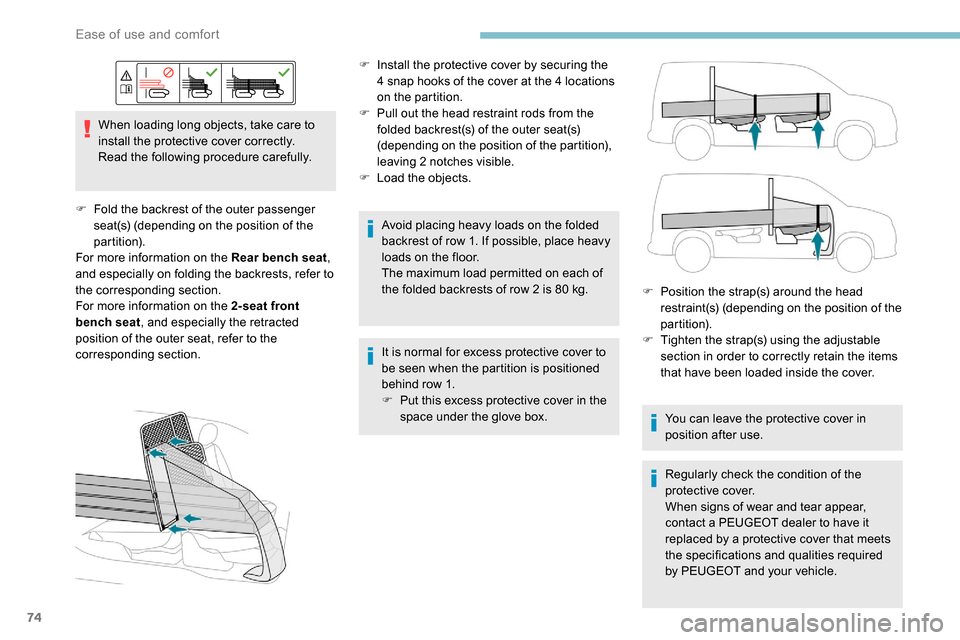
When loading long objects, take care to
install the protective cover correctly.
Read the following procedure carefully.
F
F
old the backrest of the outer passenger
seat(s) (depending on the position of the
partition).
For more information on the Rear bench seat ,
and especially on folding the backrests, refer to
the corresponding section.
For more information on the 2-seat front
bench seat , and especially the retracted
position of the outer seat, refer to the
corresponding section. F
I
nstall the protective cover by securing the
4 snap hooks of the cover at the 4 locations
on the partition.
F P ull out the head restraint rods from the
folded backrest(s) of the outer seat(s)
(depending on the position of the partition),
leaving 2 notches visible.
F
L
oad the objects.
Avoid placing heavy loads on the folded
backrest of row 1. If possible, place heavy
loads on the floor.
The maximum load permitted on each of
the folded backrests of row 2 is 80
kg.
It is normal for excess protective cover to
be seen when the partition is positioned
behind row 1.
F
P
ut this excess protective cover in the
space under the glove box. F
P
osition the strap(s) around the head
restraint(s) (depending on the position of the
partition).
F
T
ighten the strap(s) using the adjustable
section in order to correctly retain the items
that have been loaded inside the cover.
You can leave the protective cover in
position after use.
Regularly check the condition of the
protective cover.
When signs of wear and tear appear,
contact a PEUGEOT dealer to have it
replaced by a protective cover that meets
the specifications and qualities required
by PEUGEOT and your vehicle.
Ease of use and comfort
Page 104 of 312

102
Sand
This mode allows little spin on the
two driving wheels at the same time
to allow the vehicle to move for ward
and limit the risks of getting stuck in
the sand.
(mode active up to 75 mph (120 km/h))
Do not use the other modes on sand as
the vehicle may become stuck.You can deactivate the ASR
and DSC systems by turning
the knob to the " OFF" position. Recommendations
Your vehicle is designed principally to
drive on tarmac roads but it allows you to
occasionally drive on other less passable
terrain.
However, it does not permit off-road
driving such as:
-
c
rossing and driving on terrain which
could damage the underbody or strip
away components (fuel pipe, fuel
cooler, etc.) due to obstacles or stones
in particular,
-
d
riving on terrain with steep gradients
and poor grip,
-
c
rossing a stream.
The ASR and DSC systems will no longer act
on the engine operation or the brakes in the
event of an involuntary change of trajectory.
These systems are reactivated automatically
from 30 mph (50 km/h) or every time the
ignition is switched on.
Hill Assist Descent
Control
System that provides assistance when
descending on loose or soft sur faces (gravel,
mud, etc.) or a steep gradient.
This system reduces the risk of slip or loss
of control of the vehicle when descending,
whether going forward or in reverse.
During a descent, it assists the driver in
maintaining a constant speed, depending
on the gear engaged, while progressively
releasing the brakes. For the system to activate, the slope must
be greater than 5%.
The system can be used with the gearbox
in neutral.
Otherwise engage a gear corresponding
to the speed to prevent the engine stalling.
With an automatic gearbox, the system
can be used with the selector at N
, D or R.
When the system is regulating, the Active
Safety Brake system is automatically
deactivated.
The system is not available:
- i f the speed of the vehicle is above 43 mph
(70
km/h),
-
i
f the speed of the vehicle is being
controlled by the Adaptive Cruise Control,
depending on the type of gearbox.
Switching on
By default, the system is not selected.
The system's status is not saved when the ignition
is switched off.
The driver can select the system when the engine
is running, when the vehicle is stationary or moving
at speeds up to approx. 30
mph (50 km/h).
Safety
Page 105 of 312

103
F At a speed below 30 mph
(50 km/h), press this button
until its indicator lights up to
select the system; this indicator
lamp appears in green in the
instrument panel.
F
W
hen the vehicle begins its descent, you
can release the accelerator and brake
pedals; the system regulates the speed:
The system becomes active at a speed below
18
mph (30 km/h).
-
i
f the gearbox is in first or second
gear, the speed decreases and
the warning lamp flashes rapidly,
-
i
f the gearbox is in neutral or if
the clutch pedal is depressed,
the speed decreases and the
warning lamp flashes slowly;
in this case, the maintained
descent speed is lower. During a descent, with the vehicle stationary, if
you release the accelerator and brake pedals,
the system will release the brakes to set the
vehicle gradually in motion.
The brake lamps light up automatically when
the system is regulating.
If the speed exceeds 18
mph (30 km/h),
regulation is paused automatically, the warning
lamp goes back to grey in the instrument panel,
but the indicator lamp in the button remains lit.
Regulation resumes automatically when the
speed falls below 18
mph (30 km/h) again, and
the slope and pedal release conditions are met.
You can depress the accelerator or brake pedal
again at any time.
Switching off
F Press this button until its indicator lamp goes off; the indicator lamp also goes off in
the instrument panel.
Above 43
mph (70 km/h), the system is
automatically deactivated; the indicator lamp in
the button goes off.
Malfunction
If a fault occurs with the system,
this warning lamp comes on,
accompanied by the display of a
message in the instrument panel.
Seat belts
Front seat belts
The front seat belts are fitted with a pyrotechnic
pretensioning and force limiting system.
This system improves safety in the front
seats in the event of a front or side impact.
Depending on the severity of the impact, the
pretensioning system instantly tightens the seat
belts against the body of the occupants.
The pretensioning seat belts are active when
the ignition is on.
The force limiter reduces the pressure of the
seat belt on the chest of the occupant, thus
improving their protection. Have it checked by a PEUGEOT dealer or a
qualified workshop.
5
Safety