2019 Peugeot Partner Box
[x] Cancel search: BoxPage 149 of 312

147
70
70
Indicator lampDisplay Associated messageComments
(green) +
(orange) "Take back control of the vehicle" The driver must take back control of the vehicle
by accelerating or braking, depending on the
circumstances.
(green) +
(red) "Take back control of the vehicle"
The system cannot manage the critical situation
alone (emergency braking of the target vehicle, rapid
insertion of another vehicle between the two vehicles).
The driver must immediately take back control of
the vehicle.
or
(grey) "Activation not possible, conditions
unsuitable"
The system refuses to activate the cruise control.
For more information, refer to Operating Limits
.
With automatic gearbox Indicator lamp Display Associated messageComments
or
(grey)/(green) according to the inter-vehicle
distance selected and the actual distance from the target vehicle "Cruise control paused"
(for a few seconds) The system has brought the vehicle to a complete
stop and is holding it immobilised.
The driver must accelerate to move off again.
The cruise control remains paused until the driver
reactivates it.
6
Driving
Page 151 of 312

149
The system is not intended for the
following situations:
-
i
f the front end of the vehicle has
been modified (addition of long-range
headlamps, painting of the front
bumper),
-
d
riving on a racing circuit,
-
r
unning on a rolling road,
-
u
se of snow chains, non-slip covers or
studded tyres.
The use of mats not approved by
PEUGEOT may inter fere with the
operation of the cruise control.
To avoid any risk of jamming the pedals:
-
e
nsure that the mat is secured
c o r r e c t l y,
-
d
o not place one mat on top of another.
The following situations may interfere with
the operation of the system or prevent it
from working:
-
d
riving on a winding road,
-
p
oor visibility (inadequate street
lighting, falling snow, heavy rain, dense
fog, etc.),
-
d
azzle (headlamps of an oncoming
vehicle, low sun, reflections on a damp
road, leaving a tunnel, alternating
shade and light, etc.),
-
c
amera obstructed (mud, frost, snow,
condensation, etc.).
In these situations, detection performance
may be reduced.Malfunction
If the cruise control
malfunctions, dashes are
displayed instead of the
cruise control speed setting.
If this warning lamp comes
on, accompanied by an alert
message and an audible
signal, this confirms a
malfunction.
The adaptive cruise control deactivates
automatically if the use of a "space-saver"
type spare wheel is detected or if there is
a malfunction on the lateral brake lamps or
trailer brake lamps (for approved trailers).
The cruise control operates by day and
night, in fog or moderate rainfall.
However, it is strongly recommended that
you always keep a safe distance from
vehicles ahead, according to the driving
conditions, the weather and the road
sur face.
Use the cruise control only where the
driving conditions allow running at a
constant speed and keeping an adequate
safety distance.
Do not activate the cruise control in urban
areas where pedestrians are likely to
cross the road, in heavy traffic (except for
versions with EAT8 gearbox), on winding
or steep roads, on slippery or flooded
roads, when there is snowfall, if the
windscreen is damaged or when the brake
lamps have failed.
In certain circumstances, it may not
be possible for the speed setting to be
maintained or even attained: loaded
vehicle, ascending a steep hill, etc.
Have the system checked by a PEUGEOT
dealer or a qualified workshop.
Memorising speeds
Linked to the speed limiter and programmable
cruise control, this function allows speed limits
to be registered which will then be suggested
as settings for these two systems.
You can memorise several speed settings for
each system.
6
Driving
Page 154 of 312
152
Where the speed of your vehicle is too
high approaching another vehicle, the first
level of alert may not be displayed: the
level 2 alert may be displayed directly.
Important: the level 1 alert is never
displayed for a stationary obstacle or
when the " Close" trigger threshold has
been selected.
Intelligent emergency
braking assistance
If the driver brakes, but not sufficiently to avoid
a collision, this system will supplement the
braking, within the limits of the laws of physics.
This assistance will only be provided if you
press the brake pedal.
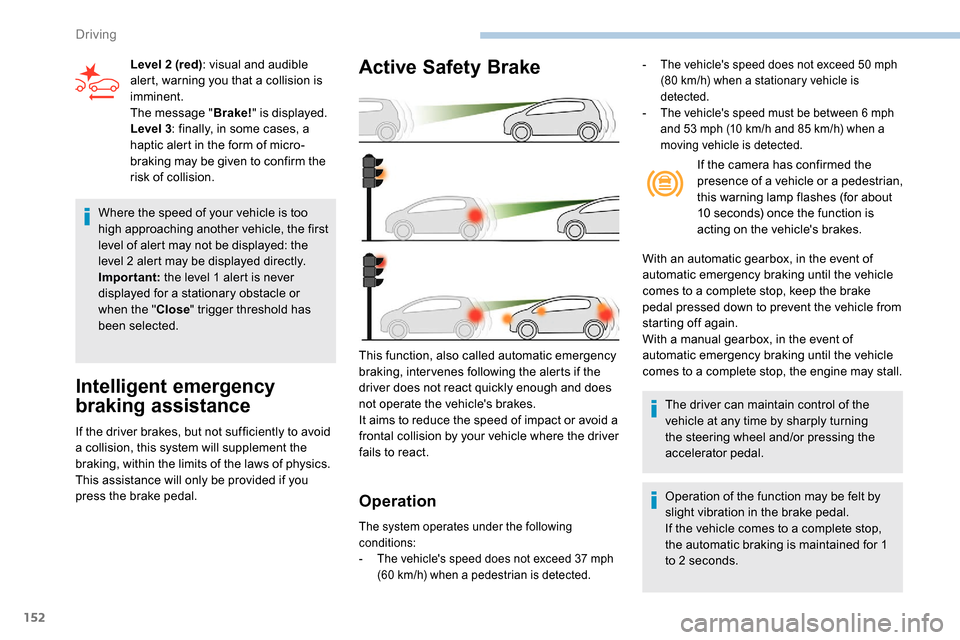
Active Safety Brake
Operation
The system operates under the following
conditions:
-
T
he vehicle's speed does not exceed 37 mph
(60
km/h) when a pedestrian is detected.
This function, also called automatic emergency
braking, inter venes following the alerts if the
driver does not react quickly enough and does
not operate the vehicle's brakes.
It aims to reduce the speed of impact or avoid a
frontal collision by your vehicle where the driver
fails to react.
Level 2 (red)
: visual and audible
alert, warning you that a collision is
imminent.
The message " Brake!" is displayed.
Level 3 : finally, in some cases, a
haptic alert in the form of micro-
braking may be given to confirm the
risk of collision. If the camera has confirmed the
presence of a vehicle or a pedestrian,
this warning lamp flashes (for about
10 seconds) once the function is
acting on the vehicle's brakes.
With an automatic gearbox, in the event of
automatic emergency braking until the vehicle
comes to a complete stop, keep the brake
pedal pressed down to prevent the vehicle from
starting off again.
With a manual gearbox, in the event of
automatic emergency braking until the vehicle
comes to a complete stop, the engine may stall.
The driver can maintain control of the
vehicle at any time by sharply turning
the steering wheel and/or pressing the
accelerator pedal.
Operation of the function may be felt by
slight vibration in the brake pedal.
If the vehicle comes to a complete stop,
the automatic braking is maintained for 1
to 2
seconds.
- The vehicle's speed does not exceed 50 mph
(80 km/h) when a stationary vehicle is
detected.
-
T
he vehicle's speed must be between 6 mph
and 53
mph (10 km/h and 85 km/h) when a
moving vehicle is detected.
Driving
Page 165 of 312

163
Malfunction
If a fault occurs when shifting to
reverse, this warning lamp comes on
in the instrument panel, accompanied
by a message and an audible signal
(short beep).
Contact a PEUGEOT dealer or a qualified
workshop to have the system checked.
Reversing camera
With the ignition on, this system uses a camera
located near the third brake lamp to display a
view of the rear of your vehicle on the output
screen (if it is a panel van or has a solid
partition).
The reversing camera is activated automatically
when reverse gear is engaged. The image is
displayed on the output screen. The output
screen switches off when the gearbox is in
neutral or in a for ward gear. The blue lines 1 represent the general direction
of the vehicle (the gap corresponds to the width
of your vehicle with the mirrors).
The red line 2 represents a distance of about
30
cm beyond the edge of your vehicle's rear
b u m p e r.
The green lines 3 represent distances of
about 1 and 2
metres beyond the edge of your
vehicle's rear bumper.
The turquoise blue curves 4 represent the
maximum turning circle.
The reversing camera is a driving aid which
cannot, in any circumstances, replace the
need for vigilance on the part of the driver.
Some objects may not be seen by the
camera. Certain vehicles may be difficult to see
(dark colours, headlamps off) when the
brightness of the screen is reduced by the
vehicle’s lighting dimmer.
The image quality may be affected by the
environment, the exterior conditions (rain,
dirt, dust), the driving mode, the lighting
conditions (night, low sun).
In the presence of areas in shade, or in
conditions of bright sunlight or inadequate
lighting, the image may be darkened and
with lower contrast.
Obstacles may appear further away than
they actually are in reality.
During parking manoeuvres and lane
changes, it is important to check the sides
of the vehicle using the mirrors.
The rear parking sensors also provide
information on the vehicle's surroundings.
6
Driving
Page 176 of 312

174
Obser ve the maximum authorised towable
weight, indicated on your vehicle's
registration certificate, the manufacturer's
label and in the Technical data section of
this guide.
Complying with the maximum
authorised nose weight (towball)
also includes the use of accessories
(bicycle carriers, tow boxes, etc.).
Obser ve the legislation in force in the
country in which you are driving.
Towing devices
Depending on equipment, the vehicle can be
fitted with one of the following towing devices: Mounting position then towing device
reference
Type of towing device Plate fixed at the
bottom and towing
device fixed at the top
Plate fixed at the bottom and towing device fixed at the bottom
Plate+
G1 towball -
L CV std (standard)
L1
-
L
CV std (standard) L2 -
L CV cross (heavy-
duty) L1
-
L
CV cross (heavy-duty) L2
Plate +
Simple hook CL -
L
CV std (standard) L1
-
L
CV std (standard) L2
-
L
CV cross (heavy-duty) L1
-
L
CV cross (heavy-duty) L2 X
Plate +
Combined hook CK
Approval No.: E1 R55 (reference 2)
For more information on your towing
device, refer to the user guide supplied
with this equipment.Remove the quickly detachable towball
when not towing a trailer.
Practical information
Page 180 of 312

178
Engines
Petrol
Diesel
The location of the interior bonnet release
lever prevents opening of the bonnet when
the left-hand front door is shut.
When the engine is hot, handle the
exterior safety catch and the stay with
care (risk of burns), using the protected
area.
When the bonnet is open, take care not to
damage the safety catch.
Do not open the bonnet under very windy
conditions.
The cooling fan may star t after
switching off the engine: take care
with articles and clothing that might be
caught by the fan blades.
Opening
F Open the left-hand front door.F
P
ull the release lever, located at the bottom
of the door aperture, towards you.
F
L
ift the safety catch and raise the bonnet.
F
U
nclip the stay
from its housing
and place it in the
support slot to hold
the bonnet open.
Closing
F Take the stay out of the support slot.
F C lip the stay in its housing.
F
L
ower the bonnet and release it near the
end of its travel.
F
P
ull on the bonnet to check that it is fully
latched.
Because of the presence of electrical
equipment under the bonnet, it is
recommended that exposure to water
(rain, washing, etc.) be limited. These engines are examples provided as a
guide.
The locations of the dipstick and engine oil filler
cap may vary.
1.
Screenwash fluid reservoir.
2. Engine coolant reservoir.
3. Brake fluid reser voir.
4. Battery.
5. Fusebox.
6. A i r f i l t e r.
7. Engine oil dipstick.
8. Engine oil filler cap.
Practical information
Page 184 of 312

182
Oil filter
Change the oil filter each time the
engine oil is changed.
Particle filter (Diesel)
The start of saturation of the particle
filter is signalled by the temporary
illumination of one of these warning
lamps, accompanied by a message
warning of the risk of the filter
clogging up.
As soon as the traffic conditions permit,
regenerate the filter by driving at a speed
of at least 37
mph (60 km/h) until the
warning lamp goes off.
If the warning lamp stays on, this indicates
a low Diesel additive level.
For more information on Checking levels ,
refer to the corresponding section. On a new vehicle, the first particle
filter regeneration operations may be
accompanied by a "burning" smell, which
is per fectly normal.
Following prolonged operation of the
vehicle at very low speed or at idle,
you may, in exceptional circumstances,
notice the emission of water vapour at the
exhaust on acceleration. This does not
affect the behaviour of the vehicle or the
environment.
Manual gearbox
The gearbox does not require any
maintenance (no oil change).
Automatic gearbox
The gearbox does not require any
maintenance (no oil change).
Unless there is a leak in the circuit, a drop in
the brake fluid level indicates that the brake
pads are worn.
Brake disc wear
For all information on checking
brake disc wear, contact a
PEUGEOT dealer or a qualified
workshop.
Parking brake
If excessive travel or a loss of
effectiveness of this system is
noticed, the parking brake must
be adjusted, even between two
services.
This system must be checked by a PEUGEOT
dealer or a qualified workshop.
Brake pads
Brake wear depends on the style
of driving, particularly in the case
of vehicles used in town, over short
distances. It may be necessary to
have the condition of the brakes
checked, even between vehicle
services.
Practical information
Page 195 of 312
193
Removing a wheel
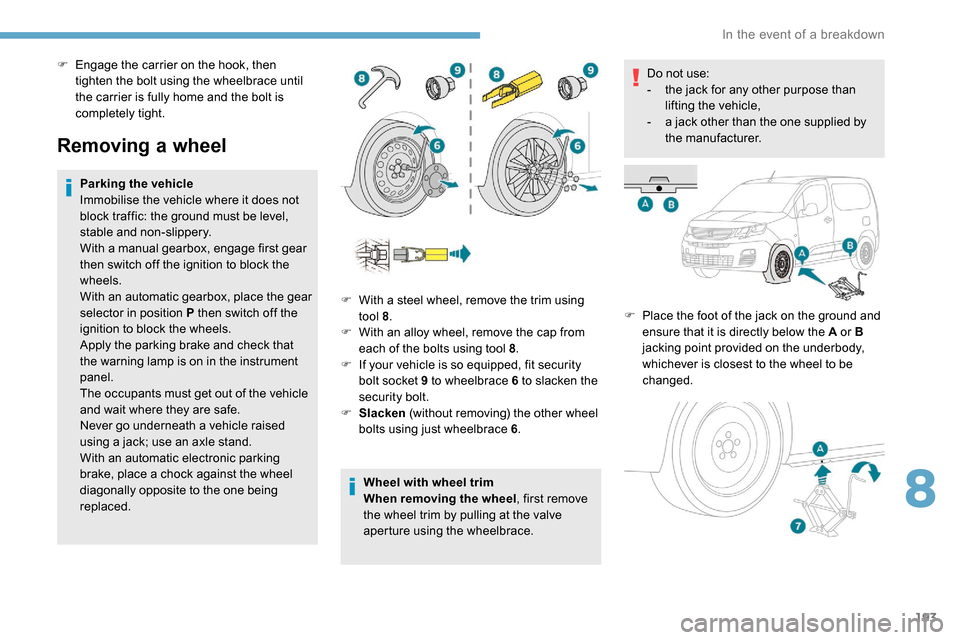
Parking the vehicle
Immobilise the vehicle where it does not
block traffic: the ground must be level,
stable and non-slippery.
With a manual gearbox, engage first gear
then switch off the ignition to block the
wheels.
With an automatic gearbox, place the gear
selector in position P then switch off the
ignition to block the wheels.
Apply the parking brake and check that
the warning lamp is on in the instrument
panel.
The occupants must get out of the vehicle
and wait where they are safe.
Never go underneath a vehicle raised
using a jack; use an axle stand.
With an automatic electronic parking
brake, place a chock against the wheel
diagonally opposite to the one being
replaced.Wheel with wheel trim
When removing the wheel
, first remove
the wheel trim by pulling at the valve
aperture using the wheelbrace. Do not use:
-
t
he jack for any other purpose than
lifting the vehicle,
-
a j
ack other than the one supplied by
the manufacturer.
F
P
lace the foot of the jack on the ground and
ensure that it is directly below the A or B
jacking point provided on the underbody,
whichever is closest to the wheel to be
changed.
F
W
ith a steel wheel, remove the trim using
tool 8 .
F
W
ith an alloy wheel, remove the cap from
each of the bolts using tool 8 .
F
I
f your vehicle is so equipped, fit security
bolt socket 9 to wheelbrace 6 to slacken the
security bolt.
F
S
lacken (without removing) the other wheel
bolts using just wheelbrace 6 .
F
E
ngage the carrier on the hook, then
tighten the bolt using the wheelbrace until
the carrier is fully home and the bolt is
completely tight.
8
In the event of a breakdown