2019 Peugeot 508 Information display
[x] Cancel search: Information displayPage 155 of 320
153
Steering mounted control
For more information on Speed Limit
recognition and recommendation,
refer
to
the corresponding section.
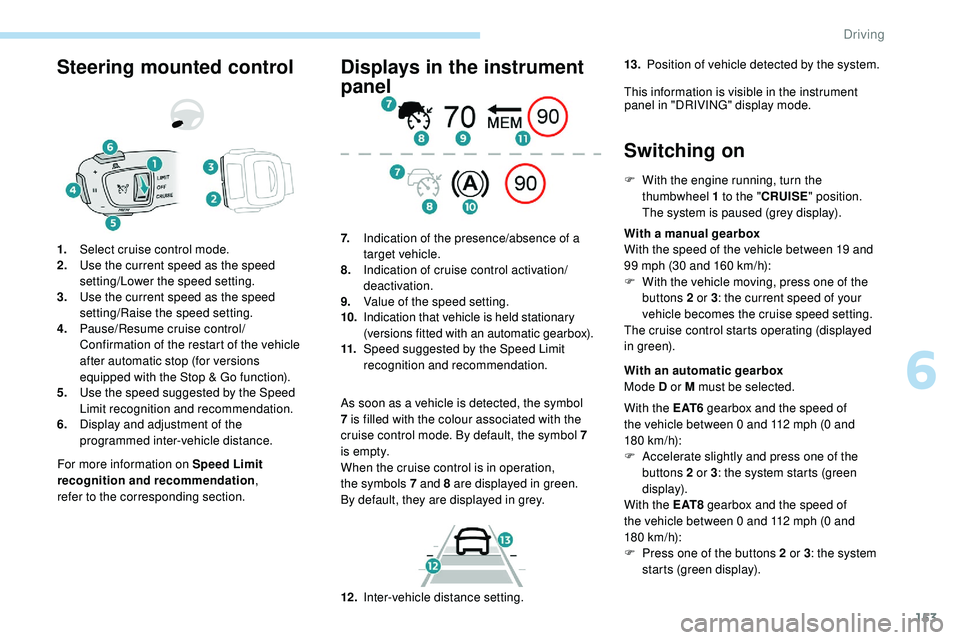
1.
Select cruise control mode.
2. Use the current speed as the speed
setting/Lower the speed setting.
3. Use the current speed as the speed
setting/Raise the speed setting.
4. Pause/Resume cruise control/
Confirmation of the restart of the vehicle
after automatic stop (for versions
equipped with the Stop & Go function).
5. Use the speed suggested by the Speed
Limit recognition and recommendation.
6. Display and adjustment of the
programmed inter-vehicle distance.
Displays in the instrument
panel
As soon as a vehicle is detected, the symbol
7
is filled with the colour associated with the
cruise control mode. By default, the symbol 7
i s e m pt y.
When the cruise control is in operation,
the
symbols 7 and 8 are displayed in green.
By
default, they are displayed in grey.
7.
Indication of the presence/absence of a
target vehicle.
8. Indication of cruise control activation/
deactivation.
9. Value of the speed setting.
10. Indication that vehicle is held stationary
(versions fitted with an automatic gearbox).
11. Speed suggested by the Speed Limit
recognition and recommendation.
Switching on
F With the engine running, turn the
thumbwheel 1 to the "CRUISE" position.
The system is paused (grey display).
With a manual gearbox
With the speed of the vehicle between 19 and
99 mph (30 and 160
km/h):
F
W
ith the vehicle moving, press one of the
buttons 2 or 3 : the current speed of your
vehicle becomes the cruise speed setting.
The cruise control starts operating (displayed
in green).
12 . Inter-vehicle distance setting. With an automatic gearbox
Mode D or M must be selected.
With the E AT 6 gearbox and the speed of
the vehicle between 0 and 112 mph (0
and
180
km/h):
F
A
ccelerate slightly and press one of the
buttons 2 or 3 : the system starts (green
display).
With the E AT 8 gearbox and the speed of
the vehicle between 0 and 112 mph (0
and
180
km/h):
F
P
ress one of the buttons 2 or 3 : the system
starts (green display).
13.
Position of vehicle detected by the system.
This information is visible in the instrument panel in "DRIVING" display mode.
6
Driving
Page 157 of 320
155
Take care: pressing and holding button 2
or 3 results in a rapid change in the speed
of your vehicle.
From the Speed Limit recognition
and recommendation system
F The suggested speed is displayed in the instrument panel.
F
M
ake an initial press on button 5 ; a
message is displayed to confirm the
memorisation request.
F
P
ress button 5 again to save the suggested
speed.
The speed displays immediately in the
instrument panel as the new speed setting.
For more information on the Speed Limit
recognition and recommendation , refer to
the corresponding section.
As a precaution, it is recommended
that you select a cruise speed close to
the current speed of your vehicle, so
as to avoid any sudden acceleration or
deceleration of the vehicle.
Modification of the programmed
inter-vehicle distance
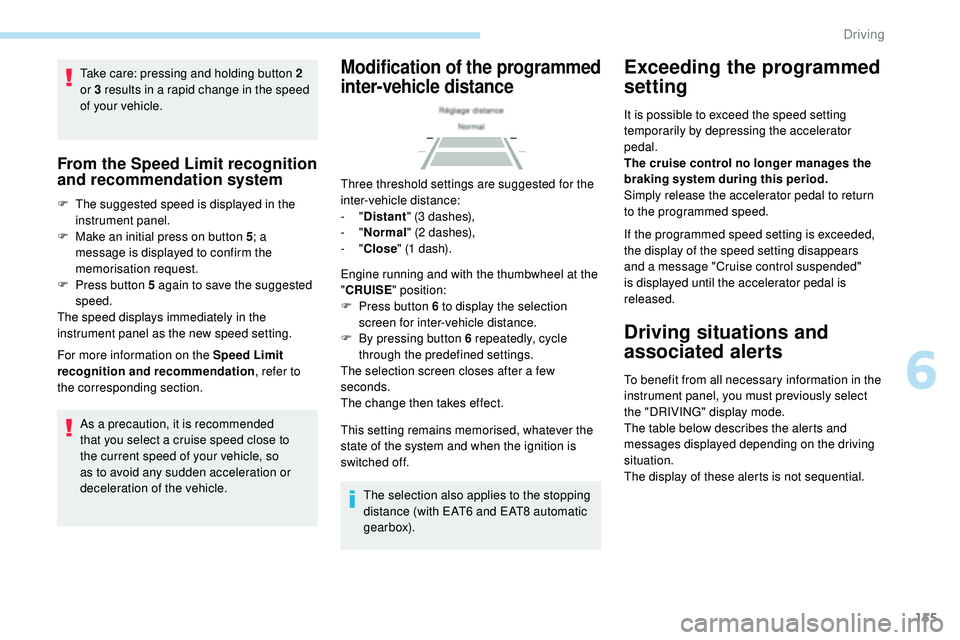
Three threshold settings are suggested for the
inter-vehicle distance:
- "Distant " (3 dashes),
-
"Normal " (2 dashes),
-
"Close " (1 dash).
Engine running and with the thumbwheel at the
" CRUISE " position:
F
P
ress button 6 to display the selection
screen for inter-vehicle distance.
F
B
y pressing button 6 repeatedly, cycle
through the predefined settings.
The selection screen closes after a few
seconds.
The change then takes effect.
This setting remains memorised, whatever the
state of the system and when the ignition is
switched off.
The selection also applies to the stopping
distance (with EAT6 and EAT8 automatic
gearbox).
Exceeding the programmed
setting
It is possible to exceed the speed setting
temporarily by depressing the accelerator
pedal.
The cruise control no longer manages the
braking system during this period.
Simply release the accelerator pedal to return
to the programmed speed.
If the programmed speed setting is exceeded,
the display of the speed setting disappears
and a message "Cruise control suspended"
is displayed until the accelerator pedal is
released.
Driving situations and
associated alerts
To benefit from all necessary information in the
instrument panel, you must previously select
the "DRIVING" display mode.
The table below describes the alerts and
messages displayed depending on the driving
situation.
The display of these alerts is not sequential.
6
Driving
Page 159 of 320

157
70
70
Warning/
Indicator lampDisplay
Associated messageComments
(green) +
(orange) "Take back control of the
vehicle"
The driver must take back control of the vehicle
by accelerating or braking, depending on the
circumstances.
(green) +
(red) "Take back control of the
vehicle"
The system cannot manage the critical situation alone
(emergency braking of the target vehicle, rapid insertion
of another vehicle between the two vehicles).
The driver must immediately take back control of the
vehicle.
or
(grey) (orange)
"Activation not possible,
conditions unsuitable"
The system refuses to activate the cruise control.
For more information, refer to Operating limits
.
With the EAT6 automatic gearbox – Stop function.
The table below describes the alerts and messages associated with the automatic stopping of the vehicle by the system. Warning/
Indicator lamp Display
Associated messageComments
or
(grey)/(green) according to the inter-vehicle
distance selected and the actual
distance from the target vehicle "Cruise control paused"
(for a few seconds)
The system has brought the vehicle to a complete stop
and is holding it immobilised.
The driver must accelerate to move off again.
The cruise control remains paused until the driver
reactivates it.
6
Driving
Page 174 of 320
172
If the system detects that the driver is not
holding the wheel firmly enough during
an automatic correction of trajectory,
it interrupts the correction. An alert is
triggered to encourage the driver to take
back control of the vehicle.
Driving situations and
associated alerts
To benefit from all necessary information in the
instrument panel, you must previously select
the "DRIVING" display mode.
The table below describes the alerts and
messages displayed depending on the driving
situation.
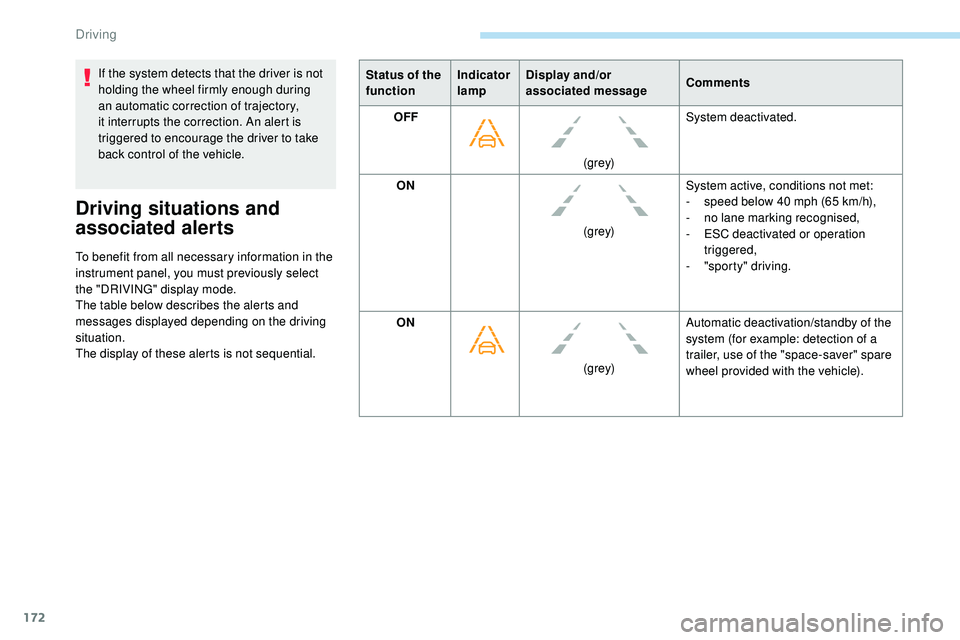
The display of these alerts is not sequential.Status of the
function
Indicator
lampDisplay and/or
associated message
Comments
OFF
(grey)System deactivated.
ON (grey)System active, conditions not met:
-
s
peed below 40 mph (65 km/h),
-
n
o lane marking recognised,
-
ES
C deactivated or operation
triggered,
- " sporty" driving.
ON (grey)Automatic deactivation/standby of the
system (for example: detection of a
trailer, use of the "space-saver" spare
wheel provided with the vehicle).
Driving
Page 179 of 320

177
This function is a manoeuvring aid which
cannot, in any circumstances, replace the
need for vigilance on the part of the driver.
The driver must remain attentive and stay
in control of their vehicle.
They must always check the vehicle’s
surroundings before undertaking a
manoeuvre.
During the entire manoeuvre, the driver
must ensure that the space remains clear.
Rear parking sensors
The system is switched on by engaging reverse
g e a r.
This is confirmed by an audible signal.
The system is switched off when you come out
of reverse gear.
Audible assistance
The proximity information is given by an
intermittent audible signal, the frequency of which
increases as the vehicle approaches the obstacle.
When the distance between the vehicle and
the obstacle becomes less than about thirty
centimetres, the sound signal becomes
continuous.
The sound emitted by the speaker (right or
left) indicates the side on which the obstacle is
located.
Adjusting the audible signalIn versions equipped with
PEUGEOT Connect Radio,
pressing this button opens the
audible signal volume adjustment
window. (white: more distant obstacles, orange: close
obstacles, red: very close obstacles).
When the obstacle is very close, the "Danger"
symbol is displayed on the screen.
Front parking sensors
In addition to the rear parking sensors, the
front parking sensors are triggered when an
obstacle is detected in front and the speed of
the vehicle is still below 6 mph (10 km/h).
The front parking sensors are interrupted if
the vehicle stops for more than three seconds
in for ward gear, if an obstacle is no longer
detected or when the speed of the vehicle
exceeds 6 mph (10 km/h).
The sound emitted by the speaker (front or
rear) locates the obstacle in relation to the
vehicle – in the vehicle trajectory, in front
or behind.
Side parking sensors
Visual assistance
The function signals the presence of obstacles
both within the sensor detection zone and in
the vehicle path defined by the orientation of
the steering wheel. It supplements the audible assistance, without
taking account of the vehicle's trajectory, by
displaying bars on the screen that represent the
distance between the obstacle and the vehicle
6
Driving
Page 180 of 320

178
Using four additional sensors located on the
sides of the front and rear bumpers, the system
records the position of fixed obstacles during
the manoeuvre and signals them when they are
located by the sides of the vehicle.Only fixed obstacles are signalled
correctly. Moving obstacles detected
at the beginning of the manoeuvre may
be signalled mistakenly, while moving
obstacles which appear at the sides of
the vehicle and which were not previously
recorded will not be signalled.
Deactivation/Activation
The function is deactivated and
activated in the Driving /Vehicle
menu of the touch screen.
The state of the function stays in the memory
when the ignition is switched off. The rear parking sensors system will
be deactivated automatically if a trailer
or bicycle carrier is connected to a
towing device installed in line with the
manufacturer's recommendations.
In this case, the outline of a trailer is
displayed at the rear of the image of the
vehicle.
The parking sensors are deactivated during the
space measurement phase of the Park Assist
and Full Park Assist functions.
For more information on the Park Assist or the
Full Park Assist , refer to the corresponding
section.
Operating limits
- Certain obstacles located in the sensors’ blind spots may not be detected or no
longer be detected during the manoeuvre.
-
S
ounds such as those emitted by noisy
vehicles and machinery (e.g. lorries,
pneumatic drills, etc.) may inter fere with the
vehicle's sensors.
-
C
ertain materials (fabrics) absorb sound
waves: pedestrians may not be detected.
-
A
ccumulated snow or dead leaves on the
road sur face can inter fere with the vehicle's
sensors.
Maintenance
recommendations
In bad or wintry weather, ensure that the
sensors are not covered with mud, ice or
snow. When reverse gear is engaged, an
audible signal (long beep) indicates that
the sensors may be dirty.
High pressure jet wash
When washing your vehicle, keep the lance
at least 12 inches (30 cm) away from the
sensors.
-
A f
ront or rear impact to the vehicle can
distort the settings of the sensors, which is
not always detected by the system: distance
measurements may be incorrect.
-
T
he tilting of the vehicle if the boot is
very loaded can affect the distance
measurements.
-
T
he sensors may be affected by poor
weather conditions (heavy rain, thick fog,
snowfall, etc.).
Driving
Page 181 of 320

179
Operating fault
If a fault occurs when shifting
to reverse, this warning lamp
comes on in the instrument panel,
accompanied by a message and an
audible signal (short beep).
Contact a PEUGEOT dealer or a qualified
workshop to have the system checked.
Visiopark 1 – Visiopark 2
Different contextual views can be displayed in
the left-hand part:
-
s
tandard view,
-
1
80° view,
-
z
oom view.
With the engine running, these systems allow
views of your vehicle’s close surroundings to
be displayed on the touch screen using one
camera for Visiopark 1 and two cameras for
Visiopark 2. The screen is divided into two parts: on the
left, a contextual view; on the right, a view from
above the vehicle in its close surroundings.
The parking sensors supplement the
information on the view from above the vehicle.
AUTO mode is activated by default.
In this mode, the system chooses the best view
to display (standard or zoom) according to the
information from the parking sensors.
You can change the type of view at any time
during a manoeuvre.
F
P
ress the button in the bottom-left corner of
the touch screen.
F
Sel
ect the type of view:
•
"Standard view ",
•
"180° view ",
•
"Zoom view ",
•
"AUTO view ".
The display is immediately updated with the
type of view selected.
The state of the system is not memorised when
the ignition is switched off.
Principle of operation
With Visiopark 2, the image is created using
both cameras, when going for ward and when
reversing.
When the function is activated, it is possible
that the view from above is not displayed.
If
the function is activated after the vehicle has
already been driven, the view from above may
be completely displayed. Using one or both cameras, the vehicle's close
surroundings are recorded during manoeuvres
at low speed.
An image from above your vehicle in its close
surroundings is created in real time, as the
vehicle manoeuvre progresses.
This representation facilitates the alignment of
your vehicle when parking and allows obstacles
close to the vehicle to be seen.
This image is automatically deleted if the
vehicle remains stationary for too long.
6
Driving
Page 184 of 320

182
Rear vision
If a trailer or a bicycle carrier is fitted to
the towball, the zone behind the vehicle on
the view from above goes dark.
The surroundings are reconstructed by the
front camera only.
The system activates automatically when
reverse gear is engaged.
The system is deactivated:
-
a
utomatically above about 6 mph (10 km/h),
-
w
hen shifting out of reverse (the rear view
image is replaced by the front view image
for 7 seconds),
-
b
y pressing the red cross in the top left-
hand corner of the touch screen. The rear vision views are similar to those for
Visiopark 1.
For more information on Visiopark 1
, refer to
the corresponding section.
Front and rear vision
With the engine running and the
speed below 12 mph (20 km/h), the
system is activated via the Driving/
Vehicle menu of the touch screen:
Using these cameras, the system displays
the vehicle's near surroundings on the touch
screen, offering views from the rear of the
vehicle (rear vision), when reverse gear is
engaged and views from the front of the vehicle
(front vision), when the gearbox is in neutral or
a gear is engaged.
F Select "Panoramic visual aid ".The system is deactivated:
-
a
utomatically above about 19 mph (30 km/h)
(the image disappears temporarily from 12
mph (20 km/h)),
-
b
y pressing the red cross in the top left-
hand corner of the touch screen.
Standard view
The area in front of your vehicle is displayed in
the screen.
The blue lines 1 represent the width of your
vehicle, with the mirrors unfolded; their
direction changes depending on the position of
the steering wheel.
AUTO mode is displayed by default, with front
vision, if the gearbox is in neutral or with a
gear engaged, or with rear vision, if reverse is
engaged.
Driving