2019 NISSAN LEAF navigation
[x] Cancel search: navigationPage 310 of 610

WARNING
• The air conditioning cooling func- tion operates only when the power
switch is in the ON position or when
the READY to drive indicator light is
ON.
• Do not leave children or adults who would normally require the assis-
tance of others alone in your vehicle.
Pets should also not be lef t alone.
They could accidentally injure them-
selves or others through inadver-
tent operation of the vehicle. Also,
on hot, sunny days, temperatures in
a closed vehicle could quickly be-
come high enough to causes severe
or possibly fatal injuries to people or
animals. • Do not use the recirculation mode
for long periods as it may cause the
interior air to become stale and the
windows to fog up.
NOTE:
•Odors from inside and outside the ve-
hicle can build up in the air conditioner
unit. Odor can enter the passenger
compartment through the vents.
• When parking, set the heater or air con-
ditioner controls to turn off air recircu-
lation to allow fresh air into the passen-
ger compartment. This should help
reduce odors inside the vehicle. The climate control system (air conditioner
and heater functions) can be operated
when the READY to drive indicator light is
illuminated. However, while charging, the
climate control system can be used when
the power switch is in the ON position.
The fan, heater and air conditioning can be
turned on manually, using the timer func-
tion and using the remote climate control
function.
These functions operate in the following
conditions.
Power switch position
LOCK/OFFACCON READY to drive
Fan --Available Available
Heater and air conditioner --Available*1 Available
Timer (Climate Ctrl. Timer) AvailableAvailable- -
Remote control*2 AvailableAvailable- -
*1: The climate control system will only start when charging is being performed. Af ter charging is complete, it will continue to operate if the EVSE (Electric Vehicle
Supply Equipment) is connected.
*2: Models with Navigation System.
HEATER AND AIR CONDITIONER
(AUTOMATIC)
Monitor, climate, audio, phone and voice recognition systems4-31
Page 311 of 610
NOTE:
•A series of operation sounds may be
heard immediately af ter climate con-
trol ON/OFF operation. This is not a mal-
function.
• Compressor and motor fan may sud-
denly start to operate during charging
operation. This is not a malfunction.
• Condensation forms inside the air con-
ditioning unit when the air conditioner
is running, and is safely discharged un-
derneath your vehicle. Traces of water
on the ground are therefore normal.
Water may drop underneath the vehicle
when climate control is operating.
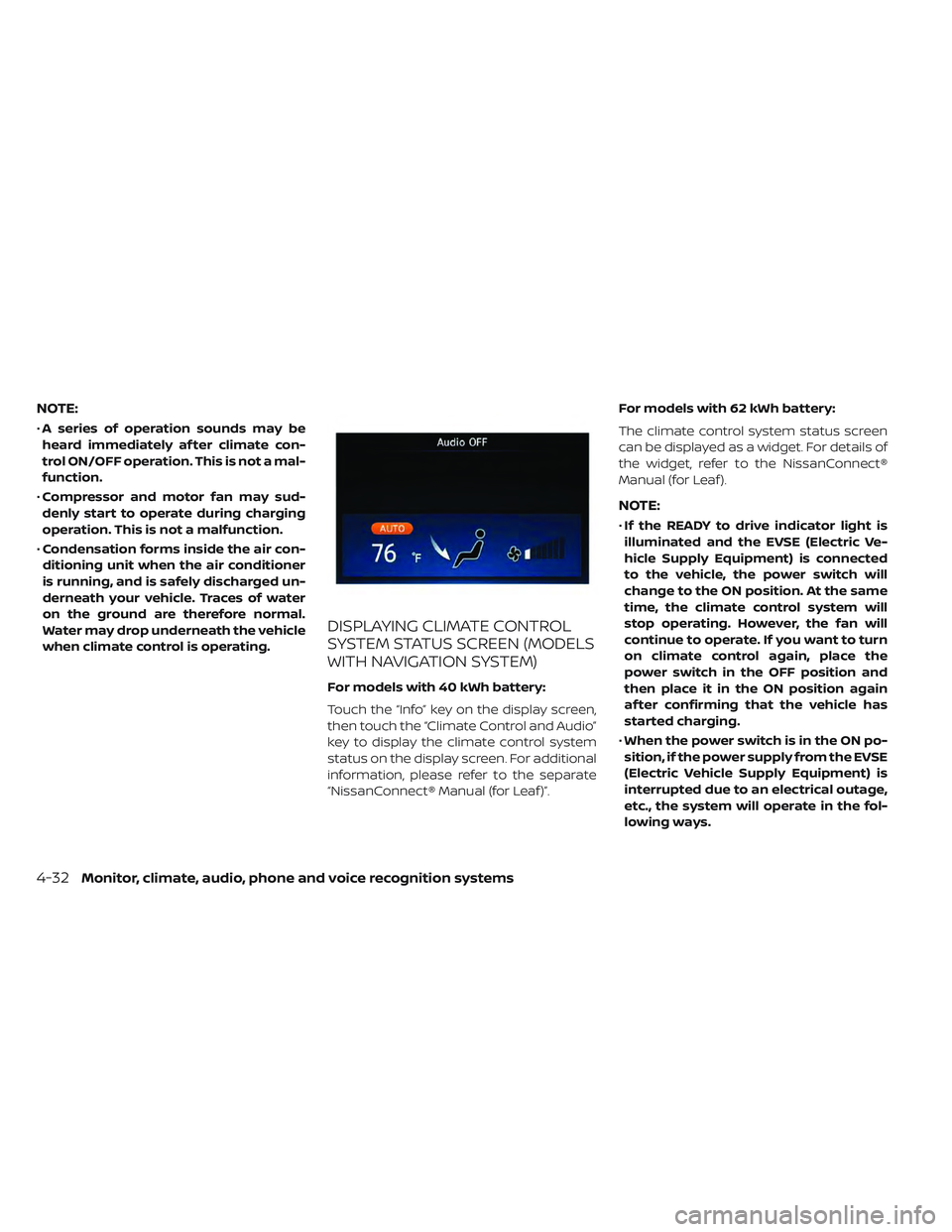
DISPLAYING CLIMATE CONTROL
SYSTEM STATUS SCREEN (MODELS
WITH NAVIGATION SYSTEM)
For models with 40 kWh battery:
Touch the “Info” key on the display screen,
then touch the “Climate Control and Audio”
key to display the climate control system
status on the display screen. For additional
information, please refer to the separate
“NissanConnect® Manual (for Leaf )”. For models with 62 kWh battery:
The climate control system status screen
can be displayed as a widget. For details of
the widget, refer to the NissanConnect®
Manual (for Leaf ).
NOTE:
•
If the READY to drive indicator light is
illuminated and the EVSE (Electric Ve-
hicle Supply Equipment) is connected
to the vehicle, the power switch will
change to the ON position. At the same
time, the climate control system will
stop operating. However, the fan will
continue to operate. If you want to turn
on climate control again, place the
power switch in the OFF position and
then place it in the ON position again
af ter confirming that the vehicle has
started charging.
• When the power switch is in the ON po-
sition, if the power supply from the EVSE
(Electric Vehicle Supply Equipment) is
interrupted due to an electrical outage,
etc., the system will operate in the fol-
lowing ways.
4-32Monitor, climate, audio, phone and voice recognition systems
Page 313 of 610

• If the charge connector is connected tothe vehicle when it is in the READY to drive
mode and the air conditioner or heater is
on, the power switch automatically
changes to the ON position. Place the
power switch in the off position to begin
charging. Turn on the desired climate con-
trol function.
• For normal charge, the climate control system is operative when charging opera-
tion is complete. For quick charge how-
ever, the climate control system stops op-
erating when charging operation stops.
• The climate control timer or remote cli- mate control (for models with Navigation
System) may fog up windows depending
on the set temperature or outside
temperature.
• When turning on the seat heater (if so equipped) switch prior to operating the
climate control timer or the remote cli-
mate control (for models with Navigation
System), the seat heater will also turn on
automatically when the outside tempera-
tureislow.IN-CABIN MICROFILTER
The climate control system is equipped
with an in-cabin microfilter which collects
dirt, dust etc. To make sure the air condi-
tioner heats defogs, and ventilates effi-
ciently, replace the filter regularly. To re-
place the filter, it is recommended that you
visit a NISSAN certified LEAF dealer.
The filter should be replaced if the air
flow decreases significantly or if win-
dows fog up easily when operating the
climate control system.
4-34Monitor, climate, audio, phone and voice recognition systems
Page 314 of 610
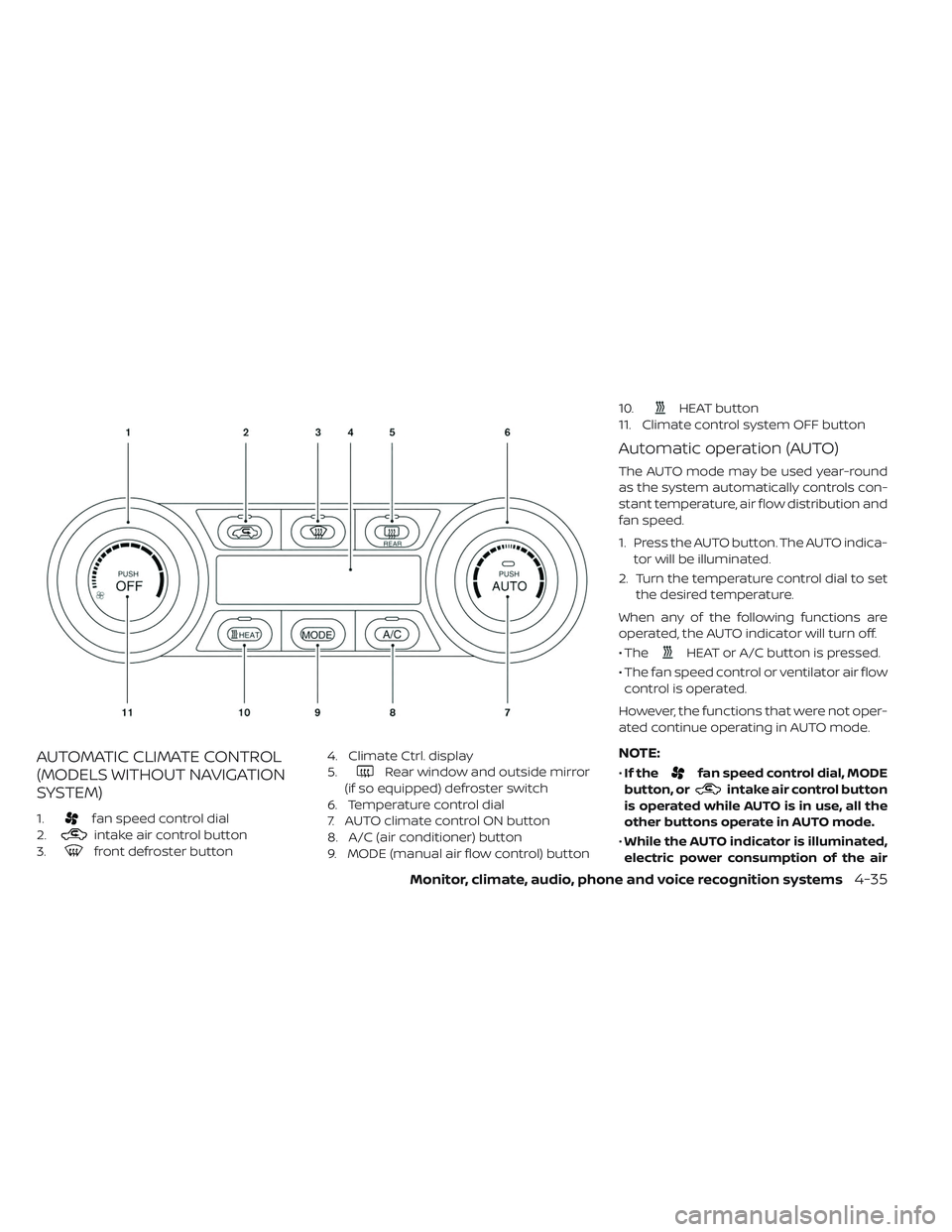
AUTOMATIC CLIMATE CONTROL
(MODELS WITHOUT NAVIGATION
SYSTEM)
1.fan speed control dial
2.
intake air control button
3.
front defroster button 4. Climate Ctrl. display
5.
Rear window and outside mirror
(if so equipped) defroster switch
6. Temperature control dial
7. AUTO climate control ON button
8. A/C (air conditioner) button
9. MODE (manual air flow control) button 10.
HEAT button
11. Climate control system OFF button
Automatic operation (AUTO)
The AUTO mode may be used year-round
as the system automatically controls con-
stant temperature, air flow distribution and
fan speed.
1. Press the AUTO button. The AUTO indica- tor will be illuminated.
2. Turn the temperature control dial to set the desired temperature.
When any of the following functions are
operated, the AUTO indicator will turn off.
• The
HEAT or A/C button is pressed.
• The fan speed control or ventilator air flow control is operated.
However, the functions that were not oper-
ated continue operating in AUTO mode.
NOTE:
• If thefan speed control dial, MODE
button, or
intake air control button
is operated while AUTO is in use, all the
other buttons operate in AUTO mode.
• While the AUTO indicator is illuminated,
electric power consumption of the air
Monitor, climate, audio, phone and voice recognition systems4-35
Page 317 of 610

To set the automatic control mode, press
and hold the
intake air control button.
The indicator light will blink twice and the
inside/outside circulation will then be con-
trolled automatically. When in automatic
mode, the indicator light will come on when
inside air recirculation is active.
Rear window and outside mirror (if so
equipped) defroster switch:
For additional information, refer to “Rear
window and outside mirror (if so equipped)
defroster switch” in the “Instruments and
controls” section of this manual
To turn the system off
To turn off the climate control, press the
Climate control system OFF button. The
same operating mode (Heater or A/C) that
was active when the system is turned off is
active when system is turned back on.
AUTOMATIC CLIMATE CONTROL
(MODELS WITH NAVIGATION
SYSTEM)
1. Temperature control button
2.
HEAT button
3. Climate Ctrl. Timer indicator 4.
front defroster button
5.
fan speed control button
6.
Rear window and outside mirror
(if so equipped) defroster switch
7.
intake air control button
8. Climate control system ON·OFF button
9. AUTO climate control ON button
4-38Monitor, climate, audio, phone and voice recognition systems
Page 319 of 610

Dehumidified heating:
1. Press the A/C button to illuminate theA/C indicator light.
2. Press the
HEAT button to illuminate
the HEAT indicator light
NOTE:
Electric power consumption of climate
control increases while A/C button indi-
cator and
HEAT button indicator si-
multaneously illuminate. As a result, the
driving range may be decreased.
Heating (A/C off ):
1. Press the
HEAT button to illuminate
the HEAT indicator light.
2. Press the A/C button to turn off the A/C indicator light.
• Do not set temperature lower than the outside air temperature. Doing so may
prevent the temperature from being con-
trolled properly.
• If the windows fog up, use dehumidified heating instead of the A/C off heating. Ventilation:
Press the
HEAT button and A/C but-
ton if the indicator lights are on so that
both indicator lights turn off.
NOTE:
• The ventilation mode requires a lower
power consumption, so cruising dis-
tance will increase.
• In ventilation mode, temperature is not
indicated on the navigation monitor or
on the air conditioner display.
Dehumidified defrosting/defogging:
Press the
front defroster button (the
indicator light will illuminate).
• To remove moisture or fog on the front window quickly, set the temperature to
the high temperature and the fan speed
to their maximum level.
• Af ter the windshield is cleared, press the
front defroster button again (the in-
dicator light will turn off ).
• When the
front defroster button is
pressed, the air conditioner and heater will
automatically turn on to defog the wind-
shield. The outside air recirculation mode will be selected to improve the defogging
performance.
Fan speed control:
Press the
fan speed control button to
manually control the fan speed.
Press the AUTO button to change the fan
speed to the automatic mode.
Air flow control:
Press the MODE button to change the air
flow mode.
— Air flows from the center and side
ventilators.
—Air flows from the center and side
ventilators and foot outlets.
—Air flows mainly from the foot
outlets.
—Air flows from the defroster out-
lets and foot outlets.
—Air flows from the defroster
vents.
Temperature control:
Press the temperature control buttons to
set the desired temperature.
4-40Monitor, climate, audio, phone and voice recognition systems
Page 321 of 610
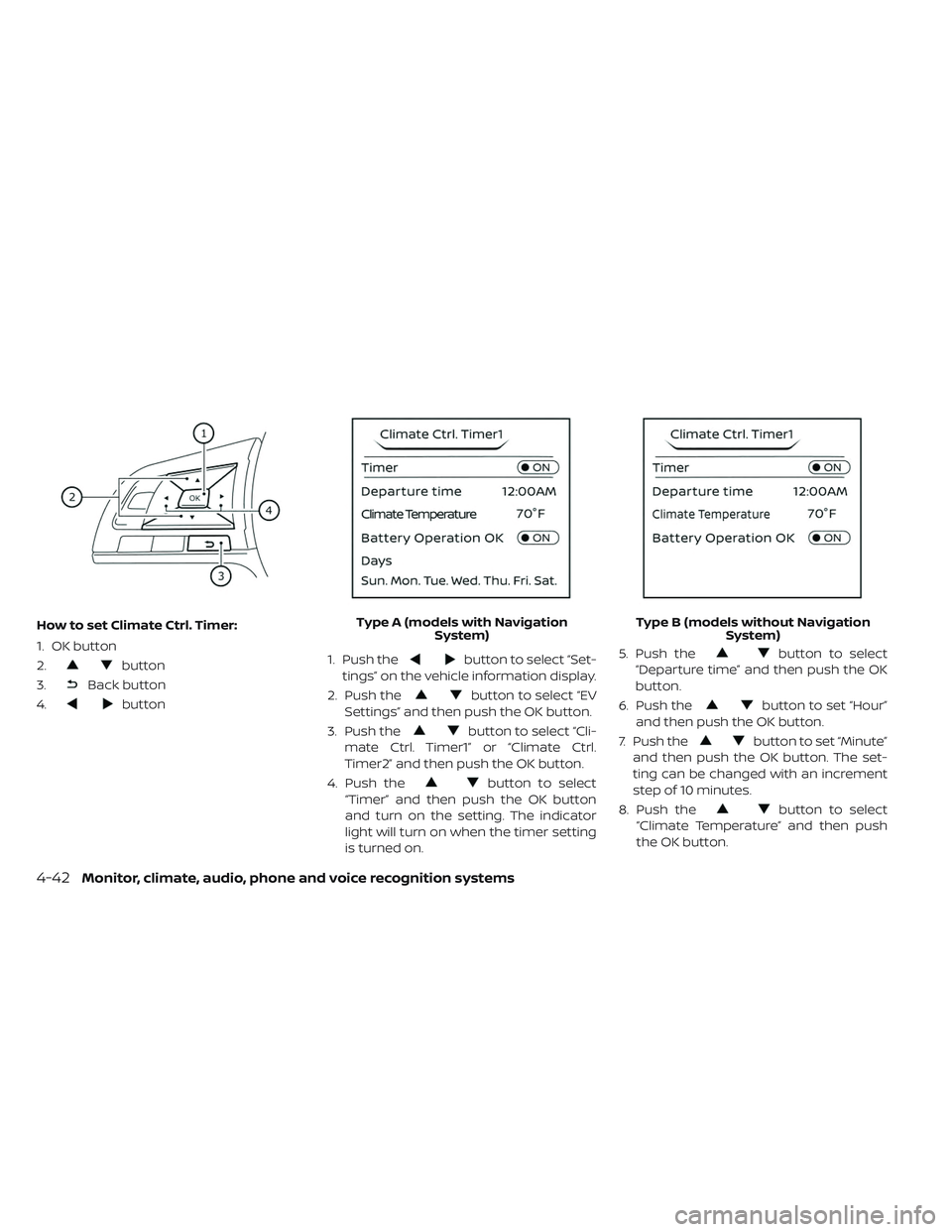
How to set Climate Ctrl. Timer:
1. OK button
2.
button
3.
Back button
4.
button 1. Push the
button to select “Set-
tings” on the vehicle information display.
2. Push the
button to select “EV
Settings” and then push the OK button.
3. Push the
button to select “Cli-
mate Ctrl. Timer1” or “Climate Ctrl.
Timer2” and then push the OK button.
4. Push the
button to select
“Timer” and then push the OK button
and turn on the setting. The indicator
light will turn on when the timer setting
is turned on. 5. Push the
button to select
“Departure time” and then push the OK
button.
6. Push the
button to set “Hour”
and then push the OK button.
7. Push the
button to set “Minute”
and then push the OK button. The set-
ting can be changed with an increment
step of 10 minutes.
8. Push the
button to select
“Climate Temperature” and then push
the OK button.
Type A (models with Navigation
System) Type B (models without Navigation
System)
4-42Monitor, climate, audio, phone and voice recognition systems
Page 322 of 610

9. Push thebutton to set Climate
Temperature and then push the OK
button.
10. * Push the
button to select
"Days" and then push the OK button.
The current day of the week is dis-
played with an underline.
Push the
button to select the
days of the week you wish to activate
the Climate Control system and then
push the OK button. The indicator light
of the selected button will turn on.
11. * Af ter setting the day of the week, push the Back button and return to the pre-
vious screen.
The set day of the week is lit in white.
12. Af ter the setting is complete, place the power switch in the OFF position, and
then connect the charge connector to
the vehicle.
* models with Navigation System Info:
The Climate Ctrl. Timer does not activate if
the charge connector is not connected to
the vehicle. When the “Battery Operation
OK” is turned on and the charging connec-
tor is not connected to the vehicle, the Cli-
mate Ctrl. Timer will activate for 15 minutes.
When the outside temperature is high, the
interior temperature may not reach the set
temperature within the 15 minutes.
Turn "Battery Operation OK" to OFF when it
is not necessary to operate air condition-
ing timer in order to prevent Li-ion battery
from discharging.
For models without Navigation System, the
Climate Ctrl. Timer operates repeatedly ev-
ery day once it is turned on.
Operating tips for using Climate
Ctrl. Timer
• The Climate Ctrl. Timer will only start when
the power switch is in the LOCK/OFF or
ACC position.
• To turn off the Climate Ctrl. Timer function, turn off the “Climate Ctrl. Timer1” and
"Climate Ctrl. Timer2" setting in the video
information display using the
button on the steering wheel. The start
and stop time settings will not be deleted
even if the Climate Ctrl. Timer function is
turned off.
• While the Climate Ctrl. Timer is operating, the Climate Ctrl. Timer indicator and the
charging status indicator lights flash. If the
Climate Ctrl. Timer is set to activate, the
Climate Ctrl. Timer indicator illuminates.*
• If the Climate Ctrl. Timer starts operating while the vehicle is being charged, the
time required for charging will be longer.
• Operating the Climate Ctrl. Timer or re- mote climate control in an environment
where the temperature is low may de-
crease the rate of battery charge.
• Timer setting can also be changed while Climate Ctrl. Timer is operated. When the
power position is switched to OFF, the air
conditioner starts or enters waiting mode
depending on the new timer settings.
• When the difference in temperature be- tween the air conditioner setting tem-
perature and the temperature outside the
vehicle is large, the temperature inside the
vehicle may not be maintained at the set-
ting temperature.
Monitor, climate, audio, phone and voice recognition systems4-43