2019 MERCEDES-BENZ SPRINTER service
[x] Cancel search: servicePage 135 of 354

#
When driving on unpa vedro ads or off-
ro ad, regular lych eck theve hicle under‐
side. #
Remo vetrapped plants or other flam‐
mable material. #
Ifth ere is damage, consult a qualified
specialist workshop immediately. *
NO
TEDama getotheve hicle af ter driving
off-road When driving off-road or on unpa
ved sur fa‐
ces, fore ign bodies such as stones and
branches could become trapped on theve hi‐
cle underside, on wheels and tires, causing
damage totheve hicle.
Fo reign bodies could cause thefo llowing
damage:
R Damage the suspension, the fuel tank or
th e brake sy stem.
R Disturb the balance and cause vibrations. #
Regular lyremo veany trapped fore ign
bodies, e.g. stones and branches. #
After driving off-road, check carefully
whe ther there is any damage tothe
ve hicle. #
Ifth ere is damage, ha vetheve hicle
ch ecked at a qualified specialist work‐
shop. When driving off-road or on unpa
ved sur faces,
ch eck theve hicle underside, wheels and tires
re gularly at regular inter vals. In particular,
re mo veany trapped fore ign bodies, e.g. stones
and branches.
Obser vethefo llowing no tesre ga rding fore ign
bodies of this kind:
R They may damage the suspension, the fuel
ta nk or the brake sy stem.
R They may disturb the balance and cause
vibrations.
R They may be flung out from theve hicle when
yo u continue driving.
If th ere is any damage, inform a qualified special‐
ist workshop.
When driving off-road on steep inclines, you must
make sure that the DEF tank is su fficiently filled.
Therefore, ensure a le vel of at least ten li ters
before off-road driving. When driving off-road and on con
stru ction sites,
sand, mud and water,also mixed with oil, can get
into the brakes. This may lead toare duction in
braking ef fect or total brake failure, also as a
re sult of increased wear. The braking characteris‐
tics will vary depending on the material that has
got into the sy stem. Clean the brakes af ter driv‐
ing off-road. If youth en notice a reduced braking
ef fect or hear scraping noises, ha vethe brake
sy stem checked immediately at a qualified spe‐
cialist workshop. Adjust your driving style to the
ch anged braking characteristics.
Driving off- road or on con stru ction sites increa‐
ses the possibility of vehicle damage which may
in turn lead tothefa ilure of cer tain major assem‐
blies and sy stems. Adapt your driving style to the
off-road driving conditions. Drive carefull y.Ha ve
any vehicle damage rectified at a qualified spe‐
cialist workshop as soon as possible.
When driving on rough cross-country terrain, do
not shift the transmission into the neutral posi‐
tion and do not disengage the clutch. You could
lose control when attem pting tobrake theve hicle
with the service brake. If your vehicle cannot
manage an uphill incline, drive back down in
re ve rsege ar.
When loading your vehicle for off-road driving or
on a construction site, keep theve hicle's center
of gr avity as low as possible.
Checklist before off-road driving R Check the fuel and DEF le vels (/ page163)
and add if necessary (/ page 125).
R Engine: check the oil le vel and add oil if nec‐
essary (/ page 205). Before driving up or
down extreme inclines or slopes, fill th e oil to
th e maximum le vel.
% If
yo u drive up or down extreme inclines or
slopes, the00B2 symbol may appear in the
multifunction displa y.The engine operating
saf ety is not put at risk if you ha vefilled the
engine oil tothe maximum le vel before the
jou rney.
R Vehicle tool kit: check that the jack is work‐
ing (/ page 250).
R Make sure that a lug wrench (/ page 250), a
wo oden underlay forth e jac k,aro bust tow
ro pe, a folding spade and a wheel chock are
car ried in theve hicle.
R Tire s and wheels: check the tire tread dep th
( / page 232) and the tire pressure
(/ page 239). Driving and parking
111
Page 137 of 354
This increases
road adhesion, especially on
we tro adw ays.
R Check the wheels and tires and wheel wells
fo r trapped fore ign objects and remo vethem.
Tr apped fore ign objects can damage the
wheels and tires or may be flung out from the
ve hicle when continuing the journe y.
R Check the underbody for trapped branches or
ot her parts of plants and remo vethem.
R Clean the brake discs, brakepads and axle
joints, particularly af ter operation in sand,
mud, grit and gr avel,wa ter or similar lydirty
conditions.
R Check the entire floor assembly, the tires,
wheels, bodywork stru cture, brakes, steering,
suspension and exhaust sy stem for any dam‐
age.
R Check the service brake for operating saf ety,
e.g. car ryout a brake test.
R Ifyo u notice strong vib rations af ter driving
off-road, check the wheels and driv etra in for
fo re ign objects again. Remo veany fore ign
objects which can lead toimbalances and
th us cause vibrations. In theeve nt of damage
to the wheels and the drive train, visit a quali‐
fi ed specialist workshop immediately. ECO display function
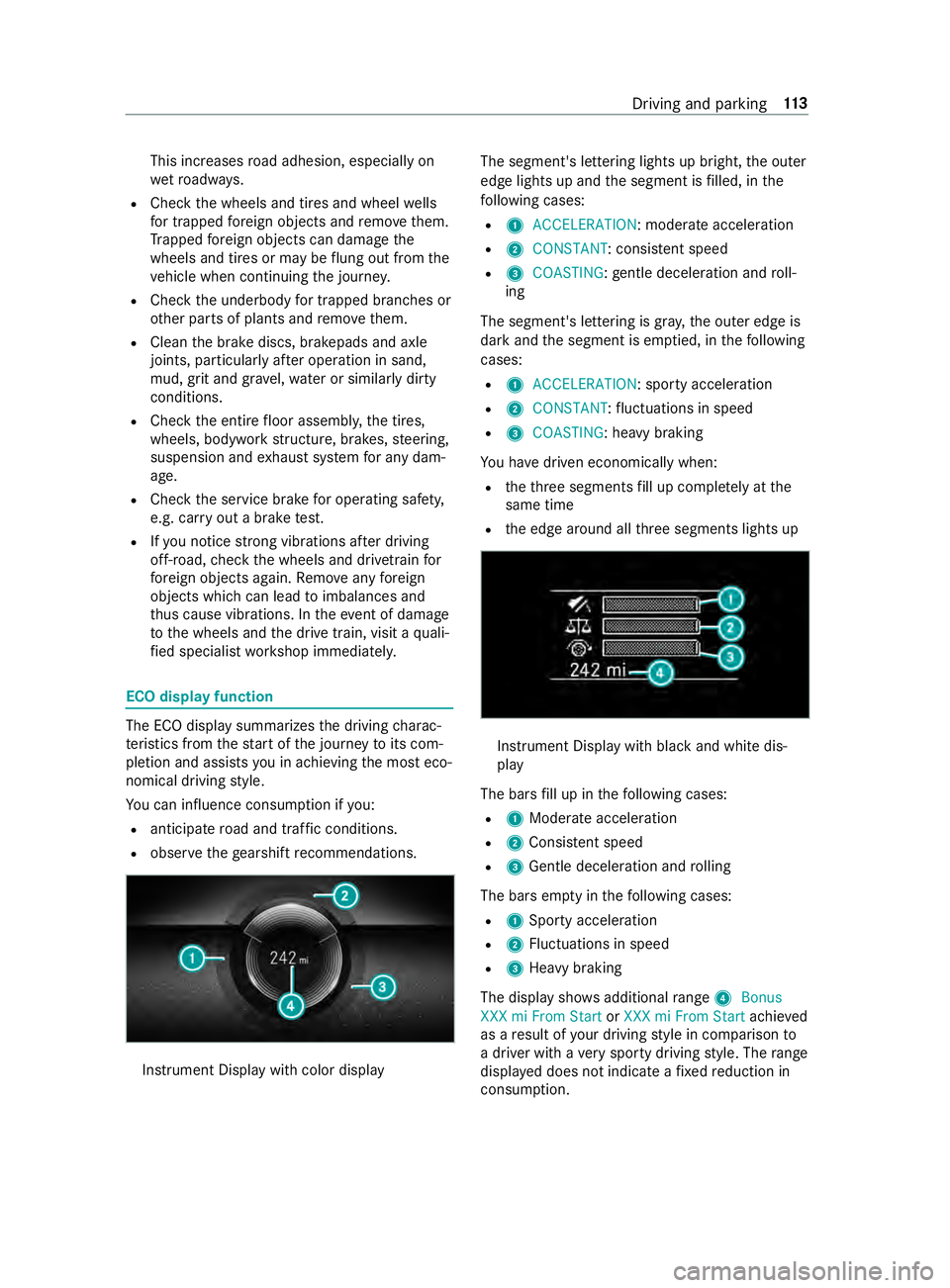
The ECO display summarizes
the driving charac‐
te rist ics from thest art of the journey toits com‐
pletion and assists you in achieving the most eco‐
nomical driving style.
Yo u can influence consum ption if you:
R anticipate road and traf fic conditions.
R obser vethege arshift recommendations. Instrument Display wi
thcolor display The segment's lettering lights up bright,
the outer
edge lights up and the segment is filled, in the
fo llowing cases:
R 1 ACCELERATION : moderate acceleration
R 2 CONSTANT: consis tent speed
R 3 COASTING: gentle deceleration and roll‐
ing
The segment's lettering is gray ,th e outer edge is
dark and the segment is em ptied, in thefo llowing
cases:
R 1 ACCELERATION: sporty acceleration
R 2 CONSTANT :fl uctuations in speed
R 3 COASTING: heavy braking
Yo u ha vedriven economically when:
R theth re e segments fill up comple tely at the
same time
R the edge around all thre e segments lights up Instrument Display with black and white dis‐
play
The bars fill up in thefo llowing cases:
R 1Moderate acceleration
R 2Consis tent speed
R 3Gentle deceleration and rolling
The bars em pty in thefo llowing cases:
R 1Sporty acceleration
R 2Fluctuations in speed
R 3Heavy braking
The display sho wsadditional range 4Bonus
XXX mi From Start orXXX mi From Start achieved
as a result of your driving style in comparison to
a driver with a very sporty driving style. The range
displ ayed does not indicate a fixe dre duction in
consum ption. Driving and parking
11 3
Page 146 of 354
The jack may tip.
#
Press the Service button on the air sus‐
pension remo tecontrol before raising
th eve hicle.
This pr events au tomatic readjustment
of theve hicle le vel and pr events it from
being raised or lo wered manually. &
WARNING Risk of accident due tolow‐
ered or raised chassis
Driving with a lo wered or raised chassis may
greatly impair braking and handling charac‐
te rist ics. You may also exceed the permissible
ve hicle height when thech assis is raised. #
Set the driving le vel before pulling away. &
WARNING Risk of accident from mal‐
function of electronic le vel control
If elect ronic le vel control is malfunctioning,
th eve hicle le vel may be asymmetrical, too
high or too lo w.
The driving and steering characteristics of the
ve hicle may be noticeably dif fere nt. #
Adapt your driving style according lyand
drive carefull y. #
Stop, paying attention toroad and traf‐
fi c conditions. #
Consult a qualified specialist workshop. *
NO
TERisk of damage tothech assis from
lo we redve hicle le vel If electronic le
vel control is malfunctioning or
re adjusts while you are driving, theve hicle
le ve l may be lo wered. #
Pay attention tothero ad conditions and
ensure there is suf ficient ground clear‐
ance. #
Drive carefully. The le
vel of theve hicle depends on vehicle load
and the load distribution. Elect ronic le vel control
adjusts the le vel of there ar axle automatically on
ve hicles with an air-sprung rear axle. The vehicle
le ve l is thereby alw ays maintained at the driving
le ve l,re ga rdless of vehicle load. Driving dynamics
re main unaf fected. The height dif fere nce
between the sides of theve hicle may be up to
0.4 in (1 cm). Electronic le
vel control is not engine-dependent
and is only operational when the ignition is
switched on. The electronic le vel control com‐
pressor works audibl y.
% If
th e compressor works cons tantly or starts
up se veral times per minute, elect ronic le vel
control is malfunctioning.
Depending on theve hicle equipment, electronic
le ve l control switches between manual and auto‐
matic mode depending on either theve hicle
speed or the position of the parking brake.
If electronic le vel control switches depending on
ve hicle speed, manual operation is automatically
activated when theve hicle is stationar y.Yo u may
ra ise or lo werth eve hicle le vel. If you subse‐
qu ently drive faster than 6 mph (10 km/h), man‐
ual mode is automatically deactivated and auto‐
matic mode sets theve hicle le vel.
If elect ronic le vel control switches depending on
th e parking brake position, manual mode is auto‐
matically activated when the parking brake is
applied. You may raise or lo werth eve hicle le vel
to load and unload. If youre lease the parking
brake, manual mode is automatically deactivated
and automatic mode sets the driving le vel.
When working on theve hicle or changing a
wheel, you can deactivate electronic le vel control
(/ page 123).
If electronic le vel control is malfunctioning or the
ve hicle le vel is too high or too lo w,an audible sig‐
nal sounds.
The driving and steering characteristics of the
ve hicle will be noticeably dif fere nt. Electronic
le ve l control adjusts theve hicle le velto the nor‐
mal le vel as soon as possible. Continue driving
carefully until the audible signal stops. Only then
is theve hicle at normal le vel.
Au tomatic mode and electronic le vel control
automatically switch on again torestore theve hi‐
cle le vel, depending on the option selected:
R when the parking brake is released
R from speeds of appr oximately 6 mph
(10 km/h)
If th e electronic le vel control compressor thre at‐
ens to ov erheat, e.g. due torepeated raising or
lo we ring wi thin a short period, elect ronic le vel
control is deactivated. You can raise or lo werthe
ve hicle le vel again af ter appro ximately
one minu te. 12 2
Driving and pa rking
Page 152 of 354

R
Diluting DEF #
Only use DEF in acco rdance with ISO
22 241. #
Do not mix additives. #
Do not dilu teDEF. *
NO
TEDama geand malfunctions caused
by impurities in DEF Impurities in DEF
result in thefo llowing:
R Higher emission values
R Damage tothe catalytic con verter
R Engine damage
R Malfunctions in the DEF exhaust gas
af te rtre atment sy stem #
Avoid impurities in DEF. *
NO
TEDEF residue cr ystallizes af ter
some time. Remo veDEF residue. #
Immediately rinse su rfaces that come in
con tact wi thDEF when filling with
wate r. #
DEF can also be remo ved with a damp
clo thand cold water. #
If DEF has already cr ystallized, clean
using a spon geand cold water. DEF is a li
quid urea solution used forex haust gas
af te rtre atment of diesel engines. In order forthe
ex haust gas af tertre atment tofunction properly,
only use DEF in accordance with ISO 222 41 .
DEF has thefo llowing properties:
R non-t oxic
R colorless and odorless
R non-flammable
DEF availability:
R you can ha veDEF added byfast service at a
qu alified specialist workshop, e.g. an author‐
ized Mercedes-Benz Center.
R DEF is available at numerous gasst ations via
DEF filling pumps.
R alternatively, DEF is available at qualified spe‐
cialist workshops, e.g. an authorized
Mercedes-Benz Center, and at numerous gas
st ations as a DEF refill canis ter or DEF refill
bottle. %
DEF freezes at a
temp erature of appr ox‐
imately 12.2 °F (-11 °C). The vehicle is equip‐
ped with a DEF preheating sy stem at thefa c‐
to ry. This means that winter operation is also
ensured forte mp eratures below 12.2 °F
(-11 °C). If you add DEF at temp eratures
below 12.2 °F (-11 °C), the DEF le vel in the
instrument clus ter may not be displa yed cor‐
re ctly. If the DEF is frozen, drive for at least
20 minutes and then park theve hicle for a
minimum of 30 seconds, so that the le vel is
cor rectly displa yed. In extreme winter condi‐
tions, the time needed todetect theto p-up
amount may be considerably longer. Park the
ve hicle in a warm garage tospeed up this
process.
% Ensure
the connection between there fill con‐
ta iner and vehicle filler neck does not drip.
Calling up the DEF range and DEF le velga uge
On-board computer:
4 Service #
Select DEFand confirm.
The DEF fill le vel and the DEF range appear. Instrument Display wi
thcolor display
1 DEF range
2 DEF fill le vel Instrument Display with black
and white dis‐
play
1 DEF fill le vel
2 DEF range 12 8
Driving and pa rking
Page 157 of 354

Obser
vethefo llowing points toensure that the
ve hicle is properly secured against rolling away
unin tentionally: #
Always apply the parking brake. #
Vehicles with automatic transmission:
engage transmission position 005D.#
On uphill or downhill inclines: turnthe
front wheels towa rdsth e curb. #
On uphill or downhill inclines: securethe
re ar axle with a chock or an object without
sharp edges.
% Yo
u can operate the side windo wsforfive
minutes af teryo u ha veswitched off theve hi‐
cle. Manual parking brake
Applying/releasing
the handbrake le ver &
WARNING Risk of skidding or an acci‐
dent bybraking with the parking brake
If yo u ha vetobrake your vehicle with the
parking brake, the braking dis tance is consid‐
erab lylonger and the wheels may loc k.There
is an increased risk of skidding and/or acci‐
dent. #
Only brake theve hicle with the parking
brake if the service brake has failed. #
Inthis case, do not apply the parking
brake with too much forc e. #
Ifth e wheels loc k,immediately release
th e parking brake as much as required
fo rth e wheels toturn again. &
WARNING Risk offire and an accident if
th e parking brake is not released
If th e parking brake is not fully released when
driving, thefo llowing situations can occur:
R The parking brake can overheat and cause
a fire
R The parking brake can lose its holding
function #
Comple tely release the parking brake
before driving off. The brake lights do not light up when
you brake
th eve hicle with the parking brake.
Generally, you may only apply the parking brake
when theve hicle is stationar y. #
Toapply the pa rking brake: pull handbrake
le ve r1 up as far as the last possible de tent.
When the engine is running, the0049
and 0024 (USA) or 0024(Canada) indicator
lamps in the Instrument Display light up. If
th eve hicle is in motion, a warning tone
sounds.
% In
vehicles with a folding handbrake le ver,
yo u can then press handbrake le ver1 down
as far as it will go. #
Torelease the pa rking brake: onvehicles
with a folding handbrake le ver,firs t pull hand‐
brake le ver1 up as far as it will go. #
Pull handbrake le ver1 slightly and press
re lease knob 2. #
Guide handbrake le ver1 down toas far as it
will go.
The 0049 and0024 (USA) or 0024(Canada)
indica tor lamps in the Instrument Display go
out.
Fo lding the handbrake le ver up or down (only
in vehicles with a folding handbrake le ver)
Re quirements:
R The handbrake le ver is applied. #
Tofold down the handbrake le ver:push the
handbrake le ver down as far as it will go. #
Toraise the handbrake le ver:pull the hand‐
brake le ver up as far as it will go. Driving and parking
13 3
Page 158 of 354

Pe
rforming emer gency braking with the hand‐
brake le ver If, in
exceptional cases, the service brake fails,
yo u may use the parking brake toper form emer‐
ge ncy braking. #
Eme rgency braking: press and hold release
button 2and carefully pull brake le ver1. Electric parking brake
Note
s onthe electric pa rking brake &
WARNING Risk of accident and inju ry
due tochildren and animals left unat ten‐
ded in theve hicle
If yo u lea vechildren and animals unat tended
in theve hicle, they may be able toset the
ve hicle in motion, forex ample by:
R Releasing the parking brake.
R Shifting the automatic transmission out of
park position 005D.
R Starting the engine.
In addition, they may operate vehicle equip‐
ment and become trapped. #
Never lea vechildren and animals unat‐
te nded in theve hicle. #
When leaving theve hicle, alw aysta ke
th e SmartK eywith you and lock the
ve hicle. Fo
rth e automatic functions towo rkcor rectl y,the
driver must be seated in the cor rect seat position
(/ page 59).
The function of the electric parking brake is
dependent on the on-board electrical sy stem volt‐ age. If
the on-board electrical sy stem voltage is
low or there is a malfunction in the sy stem, it
may not be possible toapply the electric parking
brake and theye llow 0024 indicator lamp lights
up.
In this case, park theve hicle in thefo llowing way:
R Park theve hicle on le velground and secure it
to prev ent it from rolling away.
R Ve
hicles with automatic transmission:
shift the transmission toposition 005D.
% The electric parking brake is only actually
applied when
there d0049 and0024 (USA)
or 0024 (Canada) indicator lamps light up
continuousl y.
It may not be possible torelease a parking brake
if th e on-board electrical sy stem voltage is low or
if th ere is a malfunction in the sy stem. Inform a
qu alified specialist workshop. When the engine is
switched off, the electric parking brake car ries
out a function test at regular inter vals. Noises are
normal in this process.
Au tomatically applying the electric parking
brake
Ve hicles with automatic transmission:
The electric parking brake is auto matically
applied when the transmission is in position 005D.
In addition, at least one of thefo llowing condi‐
tions must be fulfilled:
R the engine is switched off
R the driver is not sitting in the driver's seat
R the belt buckle is undone To
prev ent the electric parking brake from apply‐
ing automaticall y,pull switch 1. 134
Driving and pa rking
Page 187 of 354

Overview of Instrument Display
&
WARNING Risk of accident due toan
instrument display malfunction
If th e Instrument Display has failed or mal‐
functioned, you may not recognize function
re strictions applying tosaf etyre leva nt sys‐
te ms.
The operating saf ety of your vehicle may be
impaired. #
Drive on carefull y. #
Have theve hicle checked immediately
at a qualified specialist workshop. If
yo ur vehicle's operational saf ety is impaired,
park theve hicle in a safe location immediatel y.
Inform a qualified specialist workshop.
Instrument Display Example: Instrument Display with color display
1
Speedome ter
2 Multifunction display
3 Tach ome ter
4 Coolant temp erature display
5 Fuel le vel and tank cap position displ ay
In normal driving mode, coolant temp erature dis‐
play 4is permitted torise tothere d marking. Example: Instrument Display with black and white
display
1
Speedome ter
2 Indicator lamps display
3 Tach ome ter
4 Multifunction display
* NO
TEEngine damage due toexc essively
high engine speeds The engine will be damaged if
you drive with
th e engine in theov errevving range. #
Do not drive wi th the engine in theove r‐
re vving range. When
there d marking in tach ome ter3 is
re ached (o verspeed range), the fuel supply will be
inter rupte d in order toprotect the engine. &
WARNING Danger of bu rns when open‐
ing the hood
If yo u open the hood when the engine has
ove rheated or during a fire inthe engine com‐
partment, you could come into con tact wi th
hot gases or other escaping operating fluids. #
Before opening the hood, allow the
engine tocool down. #
Intheeve nt of a fire inthe engine com‐
partment, keep the hood closed and call
th efire service. Instrument Display and on-board computer
16 3
Page 189 of 354

The on-board computer is operated via left-hand
To uch Control 2and the back button on the left
1. The on-board computer is operated using
thefo l‐
lowing buttons:
R the back button on the left 1
R the left-hand Touch Control 2
R the main menu button on the left 3
The following menus are available:
R Service
R Assistance
R Trip
R Radio
R Media
R Phone
R Settings #
Tocall up the main menu: pressthe back
button on the left 1repeatedly, or press and
hold it.
% Ve
hicles without Active Di stance Assist
DISTRO NIC:you can call up the main menu
of the on-board computer with the00E2 but‐
to n. #
Tobrows eth rough the menu bar: swipeto
th e left or right on left-hand Touch Control
2. #
Tocall up a menu or confirm a selection:
press left-hand Touch Control 2. #
Tobrows eth rough displa ysor lists in the
menu: swipe upwards or down wards on left-
hand Touch Control 2. #
Tocall up a submenu or confirm a selec‐
tion: press left-hand Touch Control 2. #
Toexit a submenu: pressthe back button on
th e left 1.
If yo u are in a submenu and press and hold the
back button on the left 1,the main menu
appears. Overview of
the displa yson the multifunc‐
tion display In
stru ment Display with color display
1 Outside temp erature
2 Transmission position
3 Clock
4 Display section In
stru ment Display with black and white dis‐
play
1 Outside temp erature
2 Display section
3 Clock
4 Transmission position
Fu rther displa yson the multifunction display:
0097 Gearshift
recommendation
é Parking Assist PARKTRONIC swit ched
off
00B2 Cruise cont
rol (/ page 141)
ç Active Dis tance Assi stDISTRONIC
(/ page 143) In
stru ment Display and on-board computer 16 5