2019 MERCEDES-BENZ SL ROADSTER transmission oil
[x] Cancel search: transmission oilPage 8 of 330

Aud
iosys tem
see Digital Oper ator'sMan ual
Aut horized Mercedes -Benz Cent er
see Qualif iedspec ialist workshop
Aut horized work shop
see Qualif iedspec ialist workshop
AUT Oligh ts
Dis play message ............................ 217
see Ligh ts
Aut oma ticcar wash (care)...............2 71
Automatic enginestart (ECO
start/stop function)....... ................... 130
Automatic engineswitch-off (ECO
start/stop function)....... ................... 129
Automatic headlampmode.............. 109
Automatic transmission
Accelera torped alposi tion ............. 138
Cha nging gear....... ........................138
Displ aymessa ge....... ..................... 228
Drive program....... .........................138
Drive programdispla y<0011001100110011001100110011001100110011001100110011001100110011
0011001100110011[ 135
Drivi ngtips<0011001100110011001100110011001100110011001100110011001100110011
0011001100110011001100110011001100110011001100110011001100110011
0011001100110011> 138
DYNAM ICSELECT button (all
veh icles exce ptMer cedes-AM G
veh icles) <0011001100110011001100110011001100110011001100110011001100110011
0011001100110011001100110011001100110011001100110011001100110011
00110011001100110011001100110011> 132
DYNAM ICSELECT controller
(Me rced es-AM Gveh icles) .............. 133
Emerg encyrunningmod e.............. 144
Enga ging drive pos ition <0011001100110011001100110011001100110011001100110011001100110011
00110011[ 137
Enga ging neu tral <0011001100110011001100110011001100110011001100110011001100110011
001100110011001100110011001100110011001100110011[ 136
Enga ging park pos ition automa ti-
cal ly<0011001100110011001100110011001100110011001100110011001100110011
0011001100110011001100110011001100110011001100110011001100110011
001100110011001100110011001100110011001100110011001100110011> 136
Enga ging reve rsegear<0011001100110011001100110011001100110011001100110011001100110011
001100110011[ 136
Enga ging the park pos ition ............ 136
Ge ars hift reco mmend ation ............ 143
Kickd own<0011001100110011001100110011001100110011001100110011001100110011
0011001100110011001100110011001100110011001100110011001100110011
0011001100110011001100110011> 138
Ma nua lshi fting <0011001100110011001100110011001100110011001100110011001100110011
00110011001100110011001100110011001100110011001100110011[ 141
Oil temp erature (on-boa rdcom-
pu ter, Mercedes-AM Gveh icles) ..... 202
Ove rview <0011001100110011001100110011001100110011001100110011001100110011
0011001100110011001100110011001100110011001100110011001100110011
00110011001100110011001100110011> 134
Pro blem (ma lfunction) <0011001100110011001100110011001100110011001100110011001100110011
001100110011[ 144
Pu lling away <0011001100110011001100110011001100110011001100110011001100110011
0011001100110011001100110011001100110011001100110011001100110011
001100110011> 128
Sel ector lever <0011001100110011001100110011001100110011001100110011001100110011
0011001100110011001100110011001100110011001100110011001100110011[ 134
Starti ngthe engi ne<0011001100110011001100110011001100110011001100110011001100110011
00110011001100110011001100110011[ 128
Steer ingwheelpa dd leshi fters ...... 141
Tra nsmi ssion pos ition displ ay........ 135
Tra nsmi ssion pos itions <0011001100110011001100110011001100110011001100110011001100110011
00110011[ 137Auto
matic transmission eme r-
ge ncymode <0011001100110011001100110011001100110011001100110011001100110011
0011001100110011001100110011001100110011001100110011001100110011
0011001100110011001100110011> 144 B
Back button<0011001100110011001100110011001100110011001100110011001100110011
0011001100110011001100110011001100110011001100110011001100110011
0011001100110011001100110011> 244
BAS (Brake Assist Sys tem) <0011001100110011001100110011001100110011001100110011001100110011
0011[ 61
Battery (SmartKe y)
Ch ecki ng<0011001100110011001100110011001100110011001100110011001100110011
0011001100110011001100110011001100110011001100110011001100110011
0011001100110011001100110011001100110011> 77
Imp orta ntsafety notes <0011001100110011001100110011001100110011001100110011001100110011
0011001100110011[ 76
Re placi ng <0011001100110011001100110011001100110011001100110011001100110011
0011001100110011001100110011001100110011001100110011001100110011
001100110011001100110011001100110011> 77
Battery (vehi cle)
Ch arg ing <0011001100110011001100110011001100110011001100110011001100110011
0011001100110011001100110011001100110011001100110011001100110011
00110011001100110011001100110011> 284
Disp laymes sage <0011001100110011001100110011001100110011001100110011001100110011
001100110011001100110011001100110011001100110011[ 219
Imp orta ntsafety notes <0011001100110011001100110011001100110011001100110011001100110011
00110011[ 282
Ju mp starting <0011001100110011001100110011001100110011001100110011001100110011
0011001100110011001100110011001100110011001100110011001100110011
0011> 285
Ove rview <0011001100110011001100110011001100110011001100110011001100110011
0011001100110011001100110011001100110011001100110011001100110011
00110011001100110011001100110011> 282
Re placi ng <0011001100110011001100110011001100110011001100110011001100110011
0011001100110011001100110011001100110011001100110011001100110011
0011001100110011001100110011> 285
Bel t
see Seatbe lts
Bel twarn ing<0011001100110011001100110011001100110011001100110011001100110011
0011001100110011001100110011001100110011001100110011001100110011
001100110011001100110011001100110011> 44
Bli nd Spo tAs sist
see Active Blind Spot Assist
Blue tooth®
Sea rchi ngfor amob ile pho ne........ 247
see also Digi talOpe rator'sMan-
ua l<0011001100110011001100110011001100110011001100110011001100110011
0011001100110011001100110011001100110011001100110011001100110011
0011001100110011001100110011001100110011001100110011001100110011
00110011[ 243
Tel ephony <0011001100110011001100110011001100110011001100110011001100110011
0011001100110011001100110011001100110011001100110011001100110011
001100110011001100110011> 246
Brake Assist Sys tem
see BAS (BrakeAssi stSys tem)
Brake Assist with cro ss-traffi c
func tion
Functi on/note s<0011001100110011001100110011001100110011001100110011001100110011
0011001100110011001100110011001100110011001100110011001100110011[ 61
Imp orta ntsafety notes <0011001100110011001100110011001100110011001100110011001100110011
0011001100110011[ 61
Brake fluid
Disp laymes sage <0011001100110011001100110011001100110011001100110011001100110011
001100110011001100110011001100110011001100110011[ 211
Note s<0011001100110011001100110011001100110011001100110011001100110011
0011001100110011001100110011001100110011001100110011001100110011
0011001100110011001100110011001100110011001100110011> 324
Brake forcedis tribu tion
see EBD (electroni cbra keforce
di stri bution)
Brake lamps
Ada ptive <0011001100110011001100110011001100110011001100110011001100110011
0011001100110011001100110011001100110011001100110011001100110011
00110011001100110011001100110011001100110011> 65
Disp laymes sage <0011001100110011001100110011001100110011001100110011001100110011
001100110011001100110011001100110011001100110011[ 217
Brakes
ABS <0011001100110011001100110011001100110011001100110011001100110011
0011001100110011001100110011001100110011001100110011001100110011
0011001100110011001100110011001100110011001100110011001100110011
00110011[ 60
Ada ptive Bra keAssi st<0011001100110011001100110011001100110011001100110011001100110011
001100110011001100110011[ 64
BAS <0011001100110011001100110011001100110011001100110011001100110011
0011001100110011001100110011001100110011001100110011001100110011
0011001100110011001100110011001100110011001100110011001100110011
00110011[ 616
In
dex
Page 76 of 330
Smar
tKey Import
antsafety notes G
WARNING
If children areleft unsupervised inthe vehi-
cle, they could:
R operate thevehicle's equipment
Additionally, childrencouldsetthe vehicle in
motion if,for example, they:
R release theparking brake
R shift theautomatic transmissionoutof
park position 005D
R start theengine
There isarisk ofan accident andinjury.
Never leavechildren oranimals unattended
in the vehicle.
When leaving thevehicle, alwaystake the
SmartK eywith youand lock thevehicle. This
also applie sfor the Digital Vehicle Keyifthe
"Digital Vehicle Key"functionisactivated via
Mercedes meconn ect. G
WARNING
If you attach heavyorlarge object sto the
SmartK ey,the SmartK eycould beuninten -
tionally turnedinthe ignition lock.This
could cause theengine tobe switched off.
There isarisk ofan accident.
Do not attach anyheavy orlarge object sto
the SmartK ey.Remove anybulky keyrings
before insertin gthe SmartK eyinto theigni-
tion lock.
! Keep
theSmartK eyaway fromstrongmag-
netic fields. Otherwise, theremote control
funct ioncould beaffected.
Str ong magnetic fieldscanoccur inthe
vicinity ofpowerful electrical installations.
Do not keep theSmartK ey:
R with electron icdevices, e.g.amobile phone
or another SmartKey
R with metallic objects,e.g. coins ormetal foil
R inside metallic objects,e.g. ametal case
This canaffect thefunct ionality ofthe
SmartK ey. Smar
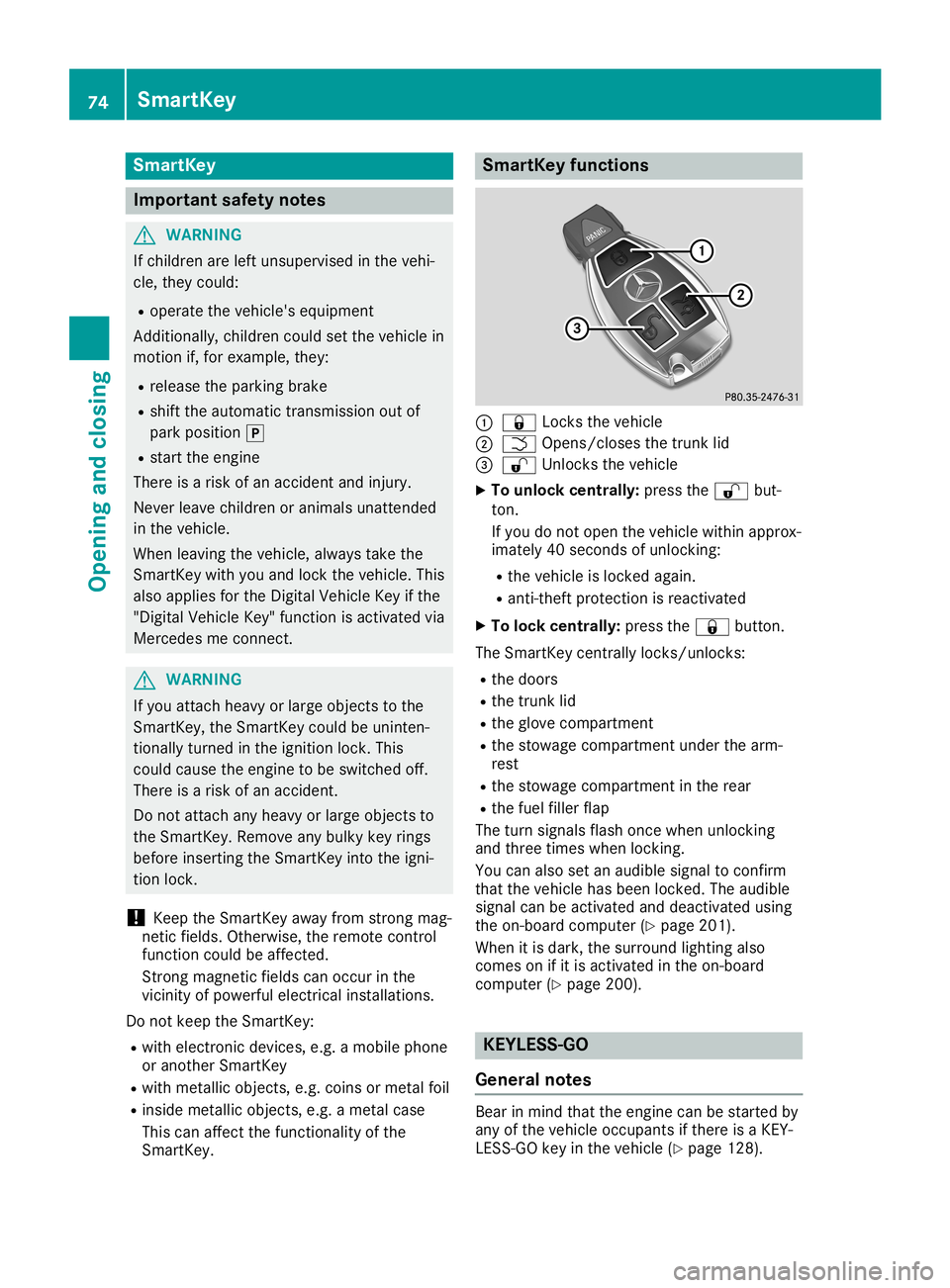
tKeyfunctions 0043
0037 Locks thevehicle
0044 0054 Opens/c losesthetrunk lid
0087 0036 Unlock sthe vehicle
X To unlock centrally: pressthe0036 but-
ton.
If you donot open thevehicle withinapprox-
imately 40seconds ofunlocking:
R the vehicle islocked again.
R anti-t heftprotect ionisreactivated
X To lock centrally: pressthe0037 button.
The SmartK eycent rally locks/un locks:
R the doors
R the trunk lid
R the glove compartmen t
R the stowage compartmen tunder thearm-
rest
R the stowage compartmen tin the rear
R the fuel filler flap
The turn signals flashonce when unlocking
and three times whenlocking.
You canalso setanaudib lesignal toconfirm
that thevehicle hasbeen locked. Theaudib le
signal canbeactivated anddeactivated using
the on-board computer (Ypage 201).
When itis dark, thesurround lightingalso
comes onifit is activated inthe on-board
computer (Ypage 200). KEY
LESS-GO
General notes Bear
inmind thattheengine canbestarted by
any ofthe vehicle occupants ifthere isaKEY-
LES S-GO keyinthe vehicle (Ypage 128). 74
Smar
tKeyOpening andclosing
Page 146 of 330
Problems
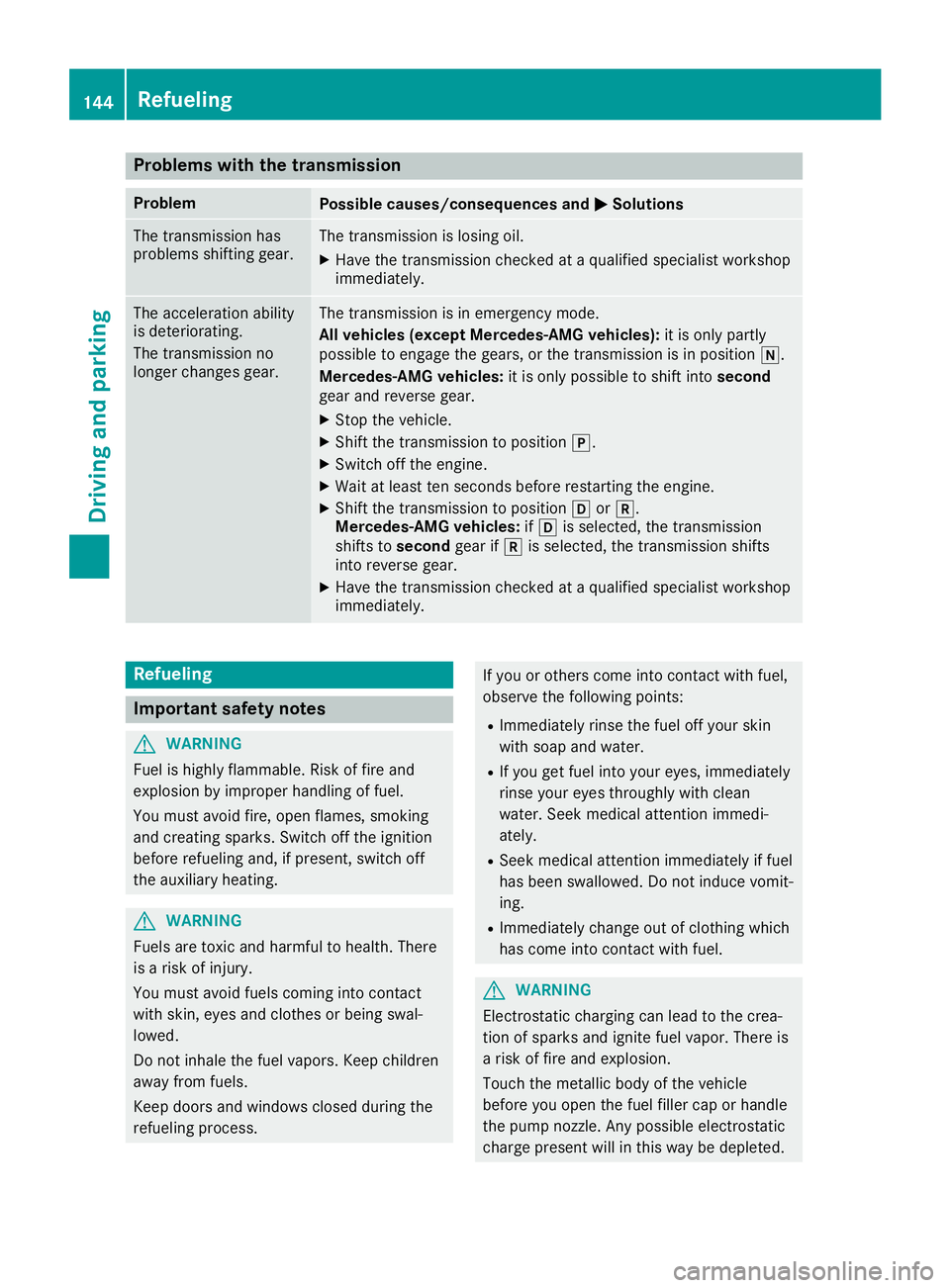
withthetransmission Problem
Possible
causes/co nsequences and0050 0050
Solutions The
transm issionhas
problems shiftinggear. The
transm issionislosing oil.
X Have thetransm issioncheckedataquali fiedspecialist workshop
immediately. The
acceleration ability
is deteriorating.
The transm issionno
longer changes gear. The
transm issionisin emergency mode.
All vehicles (exceptMercedes-AMG vehicles):it is only partly
possible toengage thegears, orthe transm issionisin position 005C.
Mercedes-AMG vehicles:itis only possible toshift intosecond
gear andreverse gear.
X Stop thevehicle.
X Shift thetransm issiontoposition 005D.
X Switch offthe engine.
X Wait atleast tenseconds beforerestartingthe engine.
X Shift thetransm issiontoposition 005Bor005E.
Mercedes-AMG vehicles:if005B isselected, thetransm ission
shifts tosecond gearif005E isselected, thetransm issionshifts
into reverse gear.
X Have thetransm issioncheckedataquali fiedspecialist workshop
immediately. Refueling
Import
antsafety notes G
WARNING
Fuel ishighly flammable. Riskoffire and
explosion byimproper handlingoffuel.
You must avoid fire,open flames, smoking
and creating sparks.Switchoffthe ignition
before refueling and,ifpresent, switchoff
the auxilia ryheating. G
WARNING
Fuels aretoxic andharmful tohealth. There
is arisk ofinjury.
You must avoid fuelscoming intocontact
with skin, eyesandclothes orbeing swal-
lowed.
Do not inhale thefuel vapors. Keepchildren
away fromfuels.
Keep doors andwindows closedduringthe
refueling process. If
you orothers comeintocontactwith fuel,
observe thefollowing points:
R Immediately rinsethefuel offyour skin
with soap andwater.
R Ifyou getfuel into your eyes, immediately
rinse youreyes throughly withclean
water. Seekmedical attentionimmedi-
ately.
R Seek medical attentionimmediately iffuel
has been swallow ed.Donot induce vomit-
ing.
R Immediately changeoutofclothing which
has come intocontactwith fuel. G
WARNING
Elect rostatic charging canlead tothe crea-
tion ofsparks andignite fuelvapor. Thereis
a risk offire and explosion.
Touch themetallic bodyofthe vehicle
before youopen thefuel filler caporhandle
the pump nozzle.Any possible electrostatic
charge present willinthis way bedepleted. 144
RefuelingDriving
andparking
Page 204 of 330
X
Press the0059 or0065 button onthe steer-
ing wheel toselect theSett. Sett.
menu.
X Press the0064 or0063 button toselect the
Convenienc e Convenienc
esubmenu.
X Press 0076toconf irm.
X Using 0064or0063, select theEasy Easy
Entry/Exit Entry/Exit
function.
If the Easy Entry/Exit Easy
Entry/Exit functionisactiva-
ted, themultifunc tiondisplay showsthe
steerin gwheel inorange.
X Press the0076 button tosave thesetting.
Further informationonthe EASY-E NTRY/EXIT
feature (Ypage 103).
Switching theseat beltadjustm ent
on/off
X Press the0059 or0065 button onthe steer-
ing wheel toselect theSett. Sett.
menu.
X Press the0064 or0063 button toselect the
Convenienc e Convenienc
esubmenu.
X Press 0076toconf irm.
X Press the0064 or0063 button toselect the
Belt Adjustment Belt
Adjustment function.
When theBelt Adjustment Belt
Adjustment functionis
activat ed,the seat beltisdisplayed in
orange inthe multifunc tiondisplay.
X Press the0076 button tosave thesetting.
For further informationonbelt adjustmen t,
see (Ypage 44).
Switching thefold-in mirrorswhen lock-
ing featu reon/off
This funct ionisonly availabl ewhen thevehicle
is equipped withtheelectric alfold-in function.
This funct ionisonly availabl ein Canada.
When youactivat ethe Auto. Mirror Fold‐ Auto.
Mirror Fold‐
ing ing
funct ion,theexter iormirrors arefolded in
when thevehicle islocked.
If you have switched onthe Auto. Mirror Auto.
Mirror
Folding Folding
functionand youfold inthe exter ior
mirrors usingthebutton onthe door
(Y page 105), theywillnotfold outautomati-
cally. Theexter iormirrors canthen onlybefol-
ded outusing thebutton onthe door.
X Press the0059 or0065 button onthe steer-
ing wheel toselect theSett. Sett.
menu.
X Press the0064 or0063 button toselect the
Convenienc e Convenienc
esubmenu.
X Press 0076toconf irm. X
Press the0064 or0063 button toselect the
Auto. Mirror Folding Auto.
Mirror Folding function.
If the Auto. Mirror Folding Auto.
Mirror Folding functionis
switched on,the multifunc tiondisplay
shows theexter iormirror inorange.
X Press the0076 button tosave thesetting.
Restor ingthe factor ysettings X
Press the0059 or0065 button onthe steer-
ing wheel toselect theSett. Sett.
menu.
X Press the0064 or0063 button toselect the
Factory Setting Factory
Settingsubmenu.
X Press 0076toconf irm.
The Reset AllSettings? Reset
AllSettings? function
appears.
X Press the0064 or0063 button toselect No No
or Yes Yes.
X Press the0076 button toconf irmtheselec-
tion.
If you have selected Yes Yes
andconf irmed, the
multifunc tiondisplay showsaconf irmation
message.
For safety reasons, theDaytime Running Daytime
Running
Lights Lights
functioninthe Lights Lights
submenu is
only reset ifthe vehicle isstation ary. AMG
menu (Mercedes-AMG vehicles)
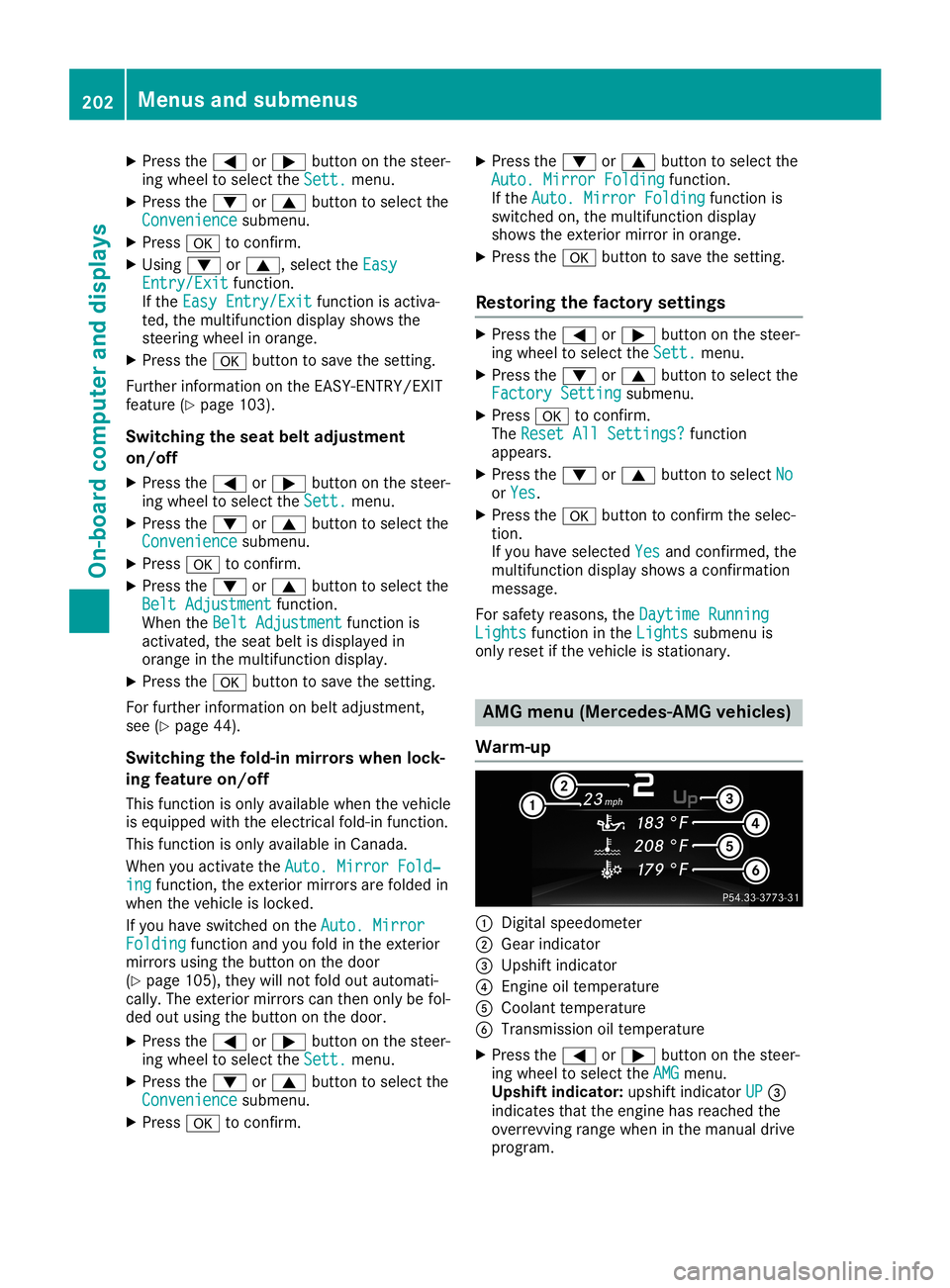
War m-up 0043
Digital speedometer
0044 Gear indicator
0087 Upshift indicator
0085 Engine oiltemperat ure
0083 Coolant temperat ure
0084 Transmission oiltemperat ure
X Press the0059 or0065 button onthe steer-
ing wheel toselect theAMG AMG
menu.
Upshift indicator: upshiftindicator UP UP
0087
indicates thattheengine hasreached the
overrevv ingrange wheninthe manual drive
program. 202
Menus
andsubmenusOn-board computerand display s