2019 MERCEDES-BENZ GLS SUV navigation
[x] Cancel search: navigationPage 341 of 729
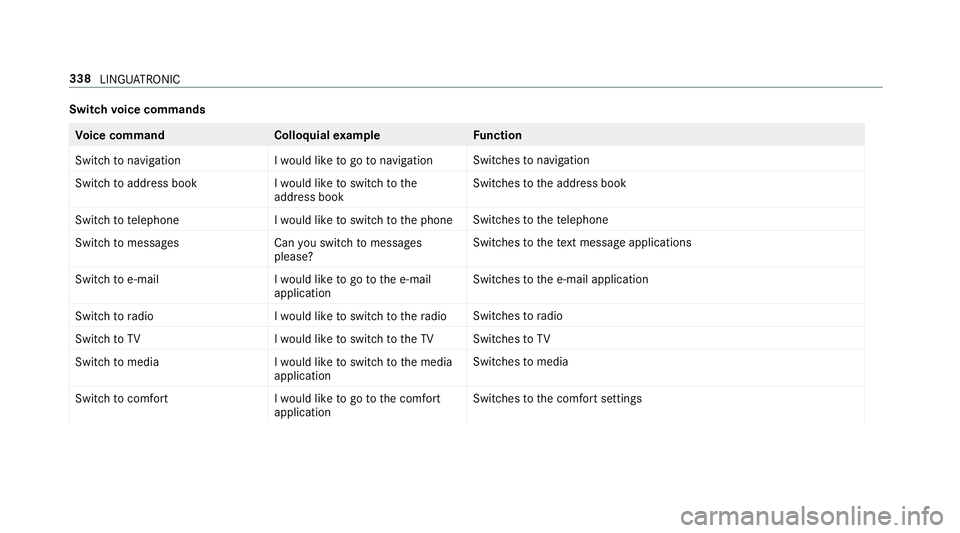
Switch
voice commands Vo
ice command Colloquialexample Function
Switch to navigation I would like to go to navigationSwitches
tonavigation
Switch to address book I would like to switch to the
address bookSwitches
tothe address book
Switch to telephon eI would like to switch to the phone Swit
ches tothete lephone
Switch to messages Can you switch to messages
please?Swit
ches tothete xt messa geapplications
Switch to e-mail I would like to go to the e-mail
applicationSwit
ches tothe e-mail application
Switch to radio I would like to switch to the radioSwitches
toradio
Switch to TV I would like to switch to the TVSwitches
toTV
Switch to media I would like to switch to the media
applicationSwitches
tomedia
Switch to comfort I would like to go to the comfort
applicationSwitches
tothe comfort settings 338
LINGU ATRO NIC
Page 342 of 729
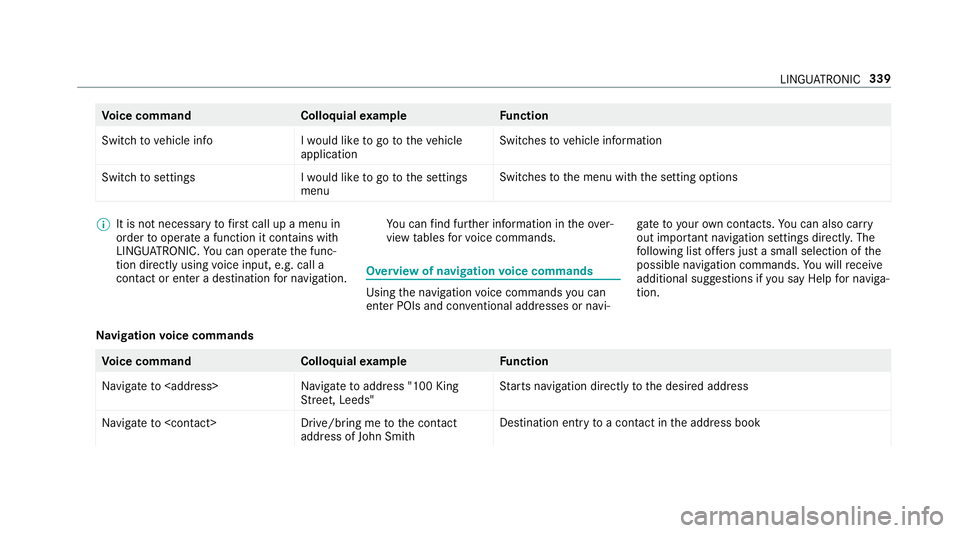
Vo
ice command Colloquialexample Function
Switch to vehicle info I would like to go to the vehicle
applicationSwitches
tovehicle information
Switch to settings I would like to go to the settings
menuSwitches
tothe menu with the setting options %
It is not necessary tofirs t call up a menu in
order tooperate a function it contains with
LINGU ATRO NIC. You can operate the func‐
tion directly using voice input, e.g. call a
con tact or enter a destination for navigation. Yo
u can find fur ther information in theove r‐
view tables forvo ice commands. Overview of navigation
voice commands Using
the navigation voice commands you can
en ter POIs and con ventional addresses or navi‐ ga
te to your ow n contacts. You can also car ry
out impor tant navigation settings di rectl y.The
fo llowing list of fers just a small selection of the
possible navigation commands. You will recei ve
additional suggestions if you say Help for naviga-
tion.
Na vigation voice commands Vo
ice command Colloquialexample Function
Navigate to
Street, Leeds"St
arts navigation direct lyto the desired address
Navigate to
address of John Smith Destination entry
toa con tact in the address book LINGU
ATRO NIC 339
Page 343 of 729
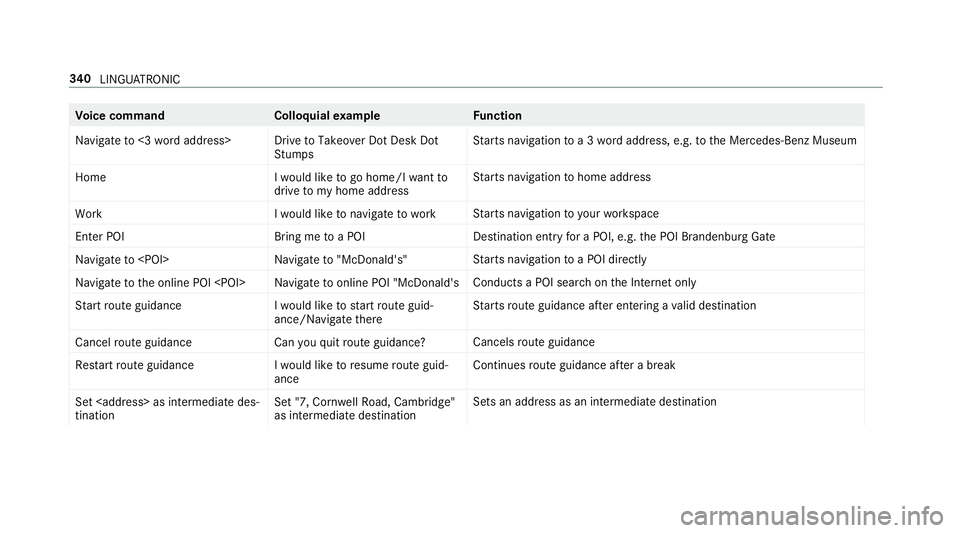
Vo
ice command Colloquialexample Function
Navigate to <3 word address> Drive to Takeover Dot Desk Dot StumpsSt
arts navigation toa 3 wordaddress, e.g. tothe Mercedes-Benz Museum
Home I would like to go home/I want to
drive to my home addressSt
arts navigation tohome address
Work I would like to navigate to workSt
arts navigation to yourwo rkspace
Enter POI Bring me to a POIDestination entry
for a POI, e.g. the POI Brandenburg Gate
Navigate to
arts navigation toa POI direct ly
Navigate to the online POI
chon the Internet only
Start route guidance I would like to start route guid-
ance/Navigate thereSt
arts route guidance af ter entering a valid destination
Cancel route guidanc eCan you quit route guidance? Cancels
route guidance
Restart route guidance I would like to resume route guid-
anceContinues
route guidance af ter a break
Set as intermediate des-
tination Set "7, Cornwell Road, Cambridge"
as intermediate destinationSets an addre
ss as an intermediate destination340
LINGU ATRO NIC
Page 355 of 729
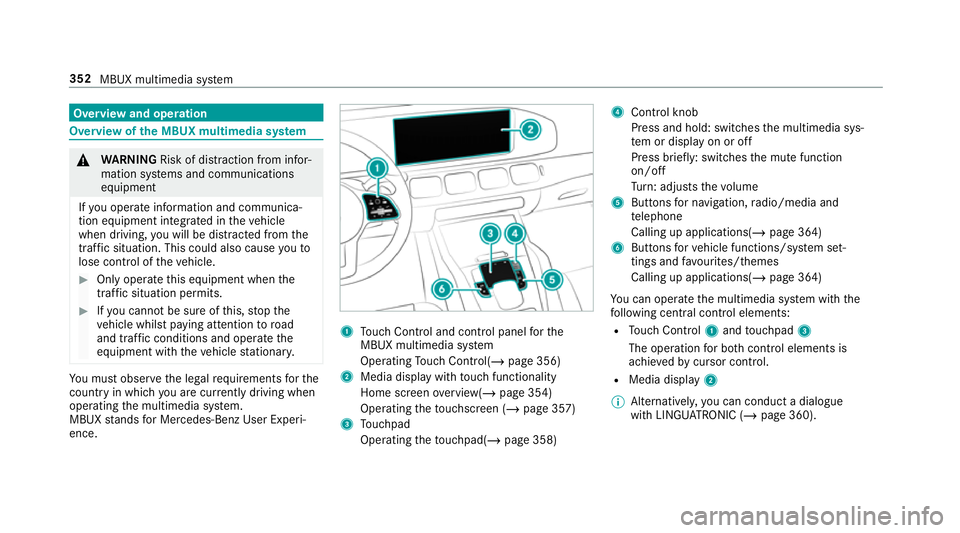
Overview and operation
Overview of
the MBUX multimedia sy stem &
WARNING Risk of di stra ction from infor‐
mation sy stems and communications
equipment
If yo u operate information and communica‐
tion equipment integ rated in theve hicle
when driving, you will be distracted from the
traf fic situation. This could also cause youto
lose control of theve hicle. #
Only operate this equipment when the
traf fic situation permits. #
Ifyo u cannot be sure of this, stop the
ve hicle whilst paying attention toroad
and traf fic conditions and ope rate the
equipment with theve hicle stationar y. Yo
u must obse rveth e legal requirements forthe
country in whi chyou are cur rently driving when
operating the multimedia sy stem.
MBUX stands for Mercedes-Benz User Experi‐
ence. 1
Touch Control and cont rol panel forthe
MBUX multimedia sy stem
Operating Touch Control(/ page 356)
2 Media displ aywith touch functionality
Home sc reen ove rview(/ page 354)
Operating theto uchsc reen (/ page 357)
3 Touchpad
Operating theto uchpad( /page 358) 4
Control knob
Press and hold: swit ches the multimedia sys‐
te m or display on or off
Press brief ly: switches the mute function
on/off
Tu rn: adjusts thevo lume
5 Buttons for navigation, radio/media and
te lephone
Calling up applications(/ page 364)
6 Buttons forve hicle functions/sy stem set‐
tings and favo urites/ themes
Calling up applications(/ page 364)
Yo u can operate the multimedia sy stem with the
fo llowing central control elements:
R Touch Control 1and touchpad 3
The operation for bo thcontrol elements is
achie vedby cursor control.
R Media displ ay2
% Alternati vely, you can conduct a dialogue
with LINGU ATRO NIC (/ page 360). 352
MBUX multimedia sy stem
Page 356 of 729
%
Ifth eve hicle is fitted wi thgesture mode,
selected functions of the multimedia sy stem
can be operated conta ct-free aswell as turn‐
ing there ading light on or off (/ page 360).
Nu merous application, online services, services
and apps are available foryo u. You can call
th ese up using the home screen or using buttons
5 and 6next totheto uchpad.
Yo u can co nveniently call up and add favo urites
using theß rocker switch on thesteering
wheel or using theß button next tothe
to uchpad. Quic k-access in the home screen and
in the applications ser vetoselect functions
more quickl y.
If yo u use the learn function of the multimedia
sy stem, you will recei vesuggestions during oper‐
ation of the most probable navigation destina‐
tions, media sources, radio stations and con‐ ta
cts. The configu ration of the suggestions takes
place in your profile. You can co mpileyour pro‐
fi le from various vehicle settings and settings of
th e multimedia sy stem. You can create themes
fo rva rious driving situations in the home screen
as well as using theß rocker switch or the
ß button.
The Notifications Centre collects incoming notifi‐
cations, e.g. about an available software update.
Depending on the type of notification it of fers
va rious actions. You can call up the Notifications
Centre on the home screen and in the applica‐
tion menus.
Wi th th eglobal sear chintheve hicle you can
sear chon-board across many categories as well
as online in the Internet. You can use theglobal
sear chinthe home screen and in the notifica‐
tions. Anti-theft pr
otection
This device is equipped with tech nical pr ovisions
to protect it against theft. More de tailed informa‐
tion about anti-theft pr otection can be obtained
at a qualified specialist workshop. Note
s onthe media display Obser
vethe no tes on caring forth e interior
(/ page 547).
Au tomatic temperature-cont rolled switch-
off feature: ifth ete mp erature is too high, the
brightness is initially reduced automatically. The
media display may then switch off comple tely for
a while.
% Ifyo u are wearing polarised sun glasses, it
may be dif ficult toread the multimedia sys‐
te m displa y. MBUX multimedia sy
stem 353
Page 364 of 729
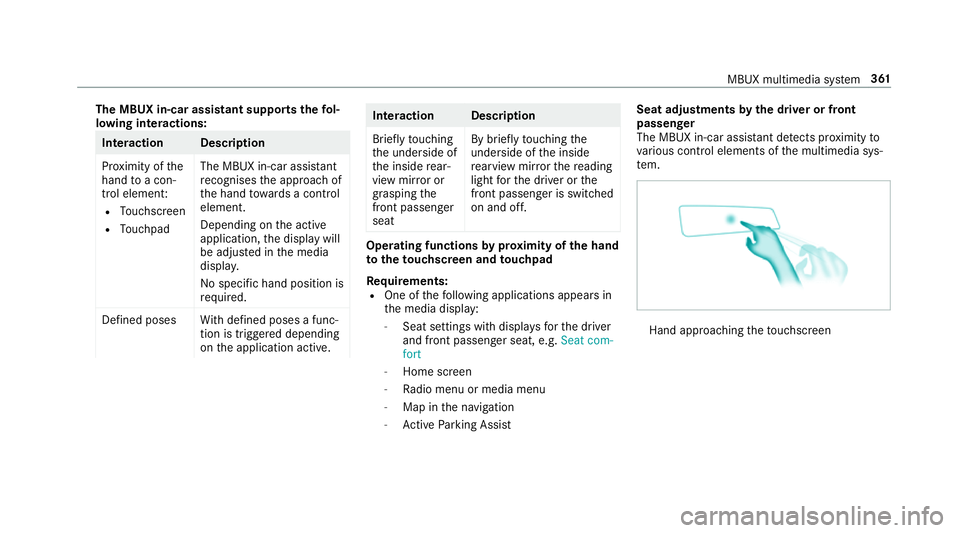
The MBUX in-car assistant suppo
rtsth efo l‐
lowing interactions: Interaction Description
Pr
ox imity of the
hand toa con‐
trol element:
R Touchsc reen
R Touchpad The MBUX in-car assis
tant
re cognises the approach of
th e hand towa rds a control
element.
Depending on the active
application, the display will
be adjus ted in the media
displa y.
No sp ecific hand position is
requ ired.
Defined poses With defined poses a func‐
tion is triggered depending
on the application active. Interaction Description
Brief
lytouching
th e underside of
th e inside rear‐
view mir ror or
grasping the
front passenger
seat By brief
lytouching the
underside of the inside
re arview mir rorth ere ading
light forth e driver or the
front passenger is switched
on and off. Operating functions
byprox imity of the hand
to theto uchscreen and touchpad
Re quirements:
R One of thefo llowing applications appears in
th e media display:
- Seat settings with displa ysforth e driver
and front passenger seat, e.g. Seat com-
fort
- Home screen
- Radio menu or media menu
- Map in the navigation
- Active Parking Assist Seat adju
stments bythe driver or front
passenger
The MBUX in-car assis tant de tects pr oximity to
va rious contro l elements of the multimedia sys‐
te m. Hand appro
achingtheto uchsc reen MBUX multimedia sy
stem 361
Page 365 of 729
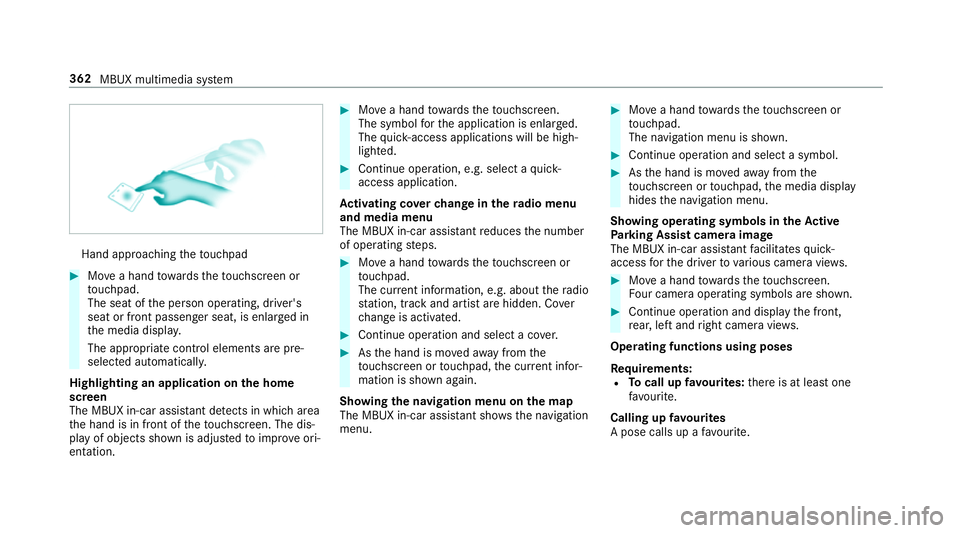
Hand approaching
theto uchpad #
Movea hand towa rdsth eto uchsc reen or
to uchpad.
The seat of the person operating, driver's
seat or front passenger seat, is enlar ged in
th e media displa y.
The appropriate contro l elements are pre-
selec ted automatically.
Highlighting an application on the home
screen
The MBUX in-car assis tant de tects in whi charea
th e hand is in front of theto uchsc reen. The dis‐
play of objects shown is adjus tedto impr oveori‐
entation. #
Movea hand towa rdsth eto uchsc reen.
The symbol forth e application is enlar ged.
The quick- access applications will be high‐
lighted. #
Continue operation, e.g. select a quick-
access application.
Ac tivating co verch ange in thera dio menu
and media menu
The MBUX in-car assis tant reduces the number
of operating steps. #
Movea hand towa rdsth eto uchsc reen or
to uchpad.
The cur rent information, e.g. about thera dio
st ation, track and artist are hidden. Co ver
ch ange is activated. #
Continue operation and select a co ver. #
Asthe hand is mo vedaw ay from the
to uchsc reen or touchpad, the cur rent infor‐
mation is shown again.
Showing the navi gation menu on the map
The MBUX in-car assi stant sho ws the navigation
menu. #
Movea hand towa rdsth eto uchsc reen or
to uchpad.
The navigation menu is shown. #
Continue operation and select a symbol. #
Asthe hand is mo vedaw ay from the
to uchsc reen or touchpad, the media display
hides the navigation menu.
Showing operating symbols in theAc tive
Pa rking Assist camera ima ge
The MBUX in-car assis tant facilitates quick-
access forth e driver tovarious camera vie ws. #
Movea hand towa rdsth eto uchsc reen.
Fo ur camera operating symbols are shown. #
Continue operation and displ aythe front,
re ar, left and right camera vie ws.
Operating functions using poses
Re quirements:
R Tocall up favo urites: there is at least one
fa vo urite.
Calling up favo urites
A pose calls up a favo urite. 362
MBUX multimedia sy stem
Page 367 of 729
Settings
for the MBUX in-car assistant
Multimedia sy stem:
4 © 5
Settings 5
System
5 Interior assistant #
Toswitch on full functionality of the
MBUX in-car assistant: selectOn.
The option is activated #.#
Toactivate additional functions forre ad‐
ing and sear chlights: selectIncluding read-
ing light.
When the option is switched on, the display
button is activated.
The functions forth ere ading and sear ch
lights are activated in addition tothe pr oxim‐
ity functions. #
Toswitch off the MBUX in-car assistant:
select Off.
The option is activated #. Main functions
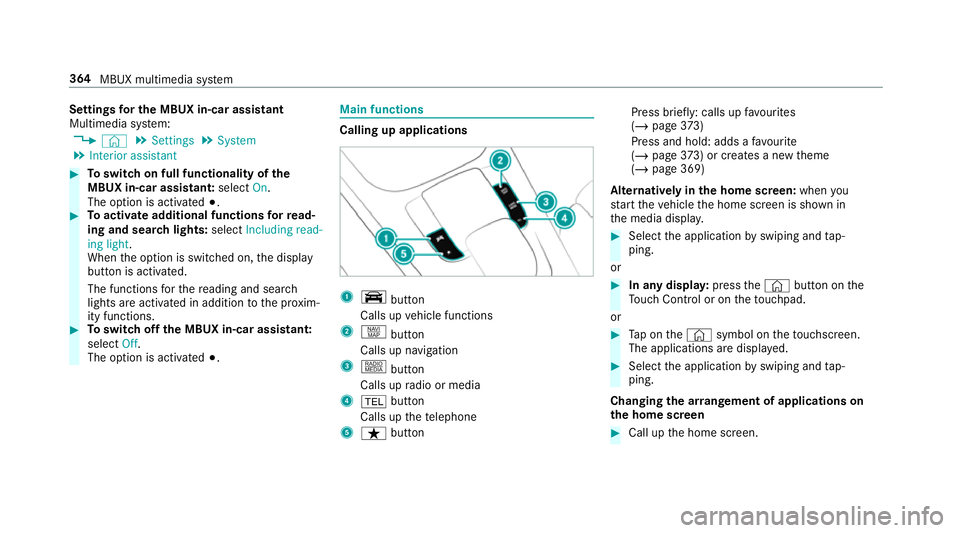
Calling up applications
1
y button
Calls up vehicle functions
2 z button
Calls up navigation
3 | button
Calls up radio or media
4 % button
Calls up thete lephone
5 ß button Press brief
ly: calls up favo urites
(/ page 373)
Press and hold : adds afavo urite
(/ page 373) or creates a new theme
(/ page 369)
Alternatively in the home screen: whenyou
st art theve hicle the home screen is shown in
th e media displa y. #
Select the application byswiping and tap‐
ping.
or #
In any displa y:press the© button on the
To uch Control or on theto uchpad.
or #
Tap on the© symbol on theto uchsc reen.
The applications are displa yed. #
Select the application byswiping and tap‐
ping.
Changing the ar rangement of applications on
th e home screen #
Call up the home screen. 364
MBUX multimedia sy stem