2019 MERCEDES-BENZ GLC SUV deactivate
[x] Cancel search: deactivatePage 21 of 673
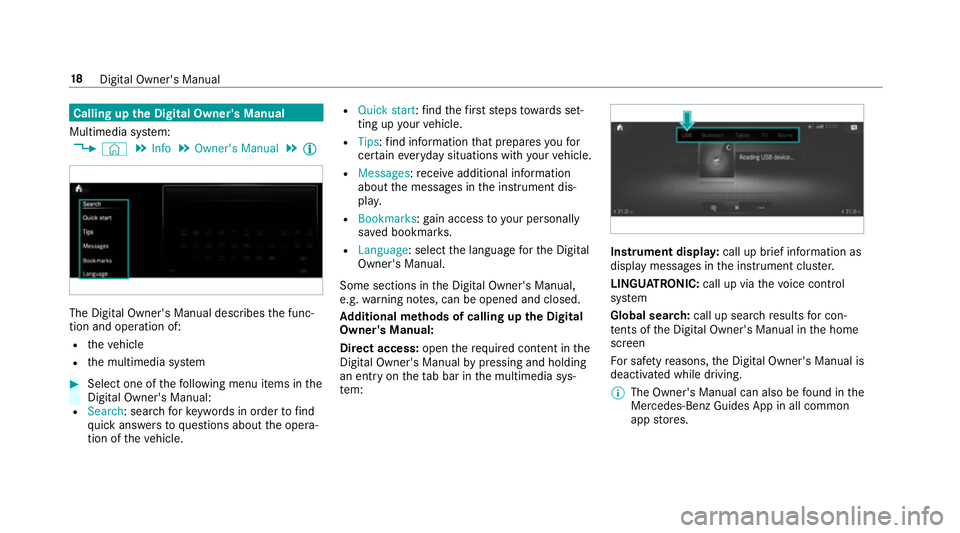
Calling up
the Digital Owner's Manual
Multimedia sy stem:
4 © 5
Info 5
Owner's Manual 5
Õ The Digital Owner's Manual describes
the func‐
tion and operation of:
R theve hicle
R the multimedia sy stem #
Select one of thefo llowing menu items in the
Digital Owner's Manual:
R Search: sea rchfo rke ywords in order tofind
qu ick answers toquestions about the opera‐
tion of theve hicle. R
Quick start: find thefirs tst eps towa rds set‐
ting up your vehicle.
R Tips: find information that prepares youfor
cer tain eve ryday situations with your vehicle.
R Messages: recei veadditional information
about the messages in the instrument dis‐
pla y.
R Bookmarks :ga in access to your personally
sa ve d bookmar ks.
R Language: select the language forth e Digital
Owner's Manual.
Some sections in the Digital Owner's Manual,
e.g. warning no tes, can be opened and closed.
Ad ditional methods of calling up the Digital
Owner's Manual:
Di rect access: openthere qu ired con tent in the
Digital Owner's Manual bypressing and holding
an ent ryon theta b bar in the multimedia sys‐
te m: Instrument displa
y:call up brief information as
displ aymessa ges in the instrument clus ter.
LINGU ATRO NIC: call up via thevo ice control
sy stem
Global sear ch:call up sear chresults for con‐
te nts of the Digital Owner's Manual in the home
screen
Fo r saf etyre asons, the Digital Owner's Manual is
deactivated while driving.
% The Owner's Manual can also be found in the
Mercedes-Benz Guides App in all common
app stores. 18
Digital Owner's Manual
Page 34 of 673
R
entered navigation destinations
R data about the use of internet services
This data can be sa ved locally in theve hicle or it
is located on a device which you ha veconnected
to theve hicle (e.g. a smartphone, USB flash
drive or MP3 pla yer). If this data is stored in the
ve hicle, you can dele teit at any time. This data
is sent tothird parties only at your requ est, par‐
ticular lywhen you use online services in accord‐
ance with the settings that you ha veselected.
Yo u can store or change con venience settings/
individualisations in theve hicle at any time.
Depending on the equipment, this includes, for
ex ample:
R settings forth e seat and steering wheel posi‐
tions
R suspension and climate control settings
R customisations such as interior lighting
If yo ur vehicle is accordingly equipped, you can
connect your smartphone or ano ther mobile end
device totheve hicle. You can cont rolth is by
means of the control elements integrated in the
ve hicle. Images and audio from the smartphone can be output via
the multimedia sy stem. Cer‐
ta in information is simultaneously transfer redto
yo ur smartphone.
Depending on the type of integration, this can
include:
R general vehicle data
R position data
This allo wsyouto use selected apps on your
smartphone, such as navigation or music play‐
bac k.There is no fur ther interaction between the
smartphone and theve hicle; in particular, vehi‐
cle data is not directly accessible. Which type of
fur ther data processing occurs is de term ined by
th e pr ovider of the specific app used. Which set‐
tings you can make, if an y,depends on the spe‐
cific app and the operating sy stem of your
smartphone. Online services
Wire
less network connection
If yo ur vehicle has a wireless network connec‐
tion, it enables data tobe exc hanged between
yo ur vehicle and additional sy stems. The wire‐ less network connection is enabled via
theve hi‐
cle's transmission and reception unit or via con‐
nected mobile end devices (e.g. sma rtphones).
Online functions can be used via the wireless
network connection. This includes online serv‐
ices and applications/apps pr ovided bythe man‐
ufacturer or other pr oviders.
Manu factu rer's se rvices
Re garding online services of the manufacturer,
th e individual functions are described bythe
manufacturer in a suita ble place (e.g. Owner's
Manual, website of the manufacturer) along with
th ere leva nt da taprotection information. Per‐
sonal data may be used forth e pr ovision of
online services. Data is exchanged via a secure
connection, e.g. the manufacturer's designated
IT sy stems. Personal data is collected, pro‐
cessed and used via the pr ovision of services
ex clusively on the basis of legal permissions or
with prior consent.
The services and functions (sometimes subject
to afe e) can usually be activated or deactivated.
In some cases, this also applies tothe entire
ve hicle's data connection. This excludes, in par‐
ticular, legally prescribed functions and services. General no
tes31
Page 42 of 673
also deploy in
theev ent of an accident along
with other sy stems. #
Only one person should use each seat
belt at any one time. Seat belt adjustment function
Ve
hicles with PRE-SAFE ®
:if th e front seat belt
is not pulled tight across your body, the seat belt
adjustment may automatically apply a cer tain
tigh tening forc e. Do not hold the seat belt tightly
while it is adjusting.
Yo u can activate and deactivate the seat belt
adjustment function using the multimedia sys‐
te m (/ page 39). Re
leasing a seat belt #
Press there lease button in the seat belt
buckle and guide the seat belt back with the
seat belt tongue. Ac
tivating/deactivating seat belt adjustment
via the multimedia sy stem Multimedia sy
stem:
4 © 5
Settings 5
Vehicle #
Activate or deacti vate Belt adjustment. Seat belt
warning function for the driver and
front passen ger The
ü seat belt warning lamp in the instru‐
ment display is a reminder that all vehicle occu‐
pants must weartheir seat belts cor rectly.
In addition, a warning tone may sound.
As soon as the driver and front passenger fasten
th eir seat belts, the seat belt warning goes out. Fu
nction of there ar seat belt status display The
rear seat belt status display is on lyavailable
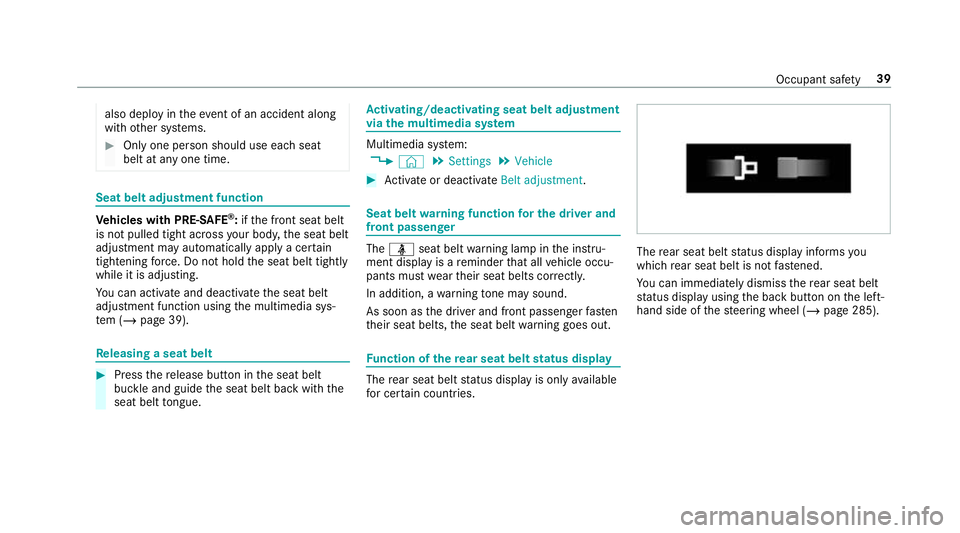
fo r cer tain countries. The
rear seat belt status display informs you
which rear seat belt is not fastened.
Yo u can immediately dismiss there ar seat belt
st atus display using the back button on the left-
hand side of thesteering wheel (/ page 285). Occupant saf
ety39
Page 47 of 673
#
The entire base of thech ild restra int
sy stem must alw aysre st on the sitting
sur face of the front passenger seat. #
The backrest of thefo rw ard-facing child
re stra int sy stem must, as far as possi‐
ble, be resting on the seat backrest of
th e front passenger seat. #
Alw ays comply with thech ild restra int
sy stem manufacturer's ins tallation
instructions. A person on
the front passenger seat must
obser vethefo llowing information:
R Fasten seat belts cor rectly (/ page 35).
R Sit in an almost upright seat position with
their back against the seat backrest.
R Sit with their feet resting on thefloor, if pos‐
sible.
The front passenger airbag may otherwise be
disabled bymis take ,fo rex ample in thefo llowing
situations:
R The front passen ger transfers their weight by
supporting themselves on a vehicle armrest. R
The front passenger sits in such a wayth at
th eir weight is raised from the sitting sur‐
fa ce. &
WARNING Risk of inju ryor death due to
deactivated front passenger airbag
If th ePA SSENGER AIRB AGOFF indicator
lamp is lit, the front passenger airbag is disa‐
bled. It will not be deplo yed in theeve nt of
an accident and cannot pe rform its intended
pr otective function.
A person in the front passenger seat could
th en, forex ample, come into con tact wi th
th eve hicle interior, especially if the person is
sitting too close tothe cockpit.
If th e front passenger seat is occupied,
alw ays ensure that:
R The classification of the person in the
front passenger seat is cor rect and the
front passenger airbag is enabled or disa‐
bled in accordance with the person in the
front passenger seat. R
The front passenger seat has been mo ved
as far back as possible.
R The person is seated cor rectl y. #
Ensu re, bo thbefore and during the jour‐
ne y,that thest atus of the front
passenger airbag is cor rect. If
th e front passenger seat is occupied, the clas‐
sification of the person or child restra int sy stem
on the front passenger seat take s place af terthe
front passenger airbag shutoff self-test. The
PA SSENGER AIR BAG indicator lamps displ aythe
st atus of the front passenger airbag.
Alw ays obser vethe no tes on the function of the
PA SSENGER AIR BAG indicator lamps
(/ page 45). 44
Occupant saf ety
Page 76 of 673
#
Press the le ver in direction 1(activate) or
2 (deactivate). #
Make sure that thech ild saf ety loc ksare
wo rking properly.
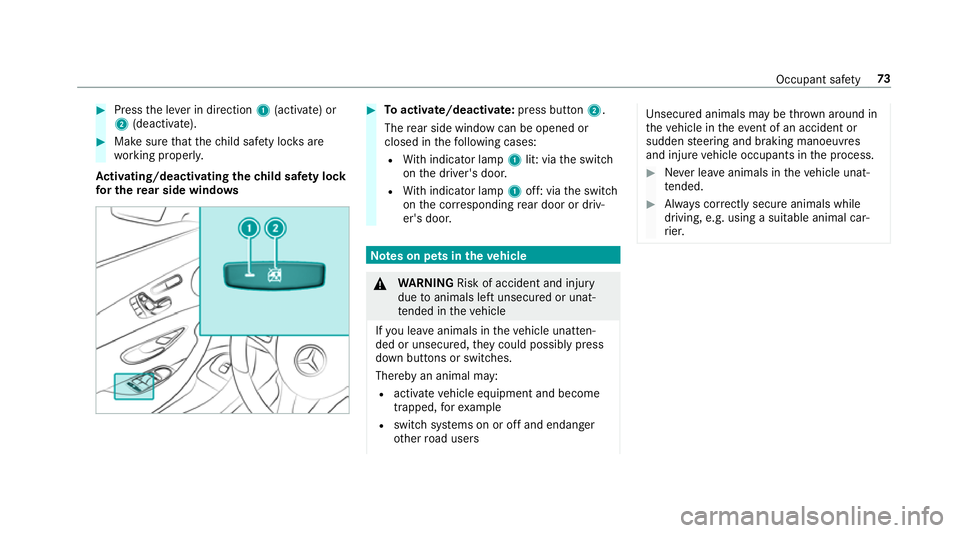
Ac tivating/deactivating the child saf ety lock
fo r the rear side windo ws #
Toactivate/deacti vate:press button 2.
The rear side wind owcan be opened or
closed in thefo llowing cases:
R With indicator lamp 1lit: via the switch
on the driver's door.
R With indicator lamp 1off: via the switch
on the cor responding rear door or driv‐
er's door. Note
s on pets in theve hicle &
WARNING Risk of accident and inju ry
due toanimals left unsecured or unat‐
te nded in theve hicle
If yo u lea veanimals in theve hicle unatten‐
ded or unsecured, they could possib lypress
down buttons or switches.
Thereby an animal may:
R activate vehicle equipment and become
trapped, forex ample
R swit chsystems on or off and endanger
ot her road users Uns
ecured animals may be throw n around in
th eve hicle in theeve nt of an accident or
sudden steering and braking manoeuvres
and injure vehicle occupants in the process. #
Never lea veanimals in theve hicle unat‐
te nded. #
Alw ays cor rectly secu reanimals while
driving, e.g. using a suitable animal car‐
ri er. Occupant saf
ety73
Page 78 of 673
If
th eve hicle is not opened within appr oximately
40 seconds af ter unlocking, it loc ksagain. Anti-
th eft pr otection is primed again.
Do not keep theke yto ge ther with electronic
devices or me tal objects. This can af fect the
ke y's functionalit y.
% If battery check lamp 2does not light up
af te r pressing theÜ orß button, the
battery is dischar ged.
Changing theke y bat tery ( / page 76). Ac
tivating/deactivating the acoustic lo cking
ve rification signal Multimedia sy
stem:
4 © 5
Settings 5
Vehicle #
Activate or deacti vate Acoustic lock .
% Please no
te:
The selected setting forth e acoustic locking
ve rification signal must comply wi th there le‐
va nt national road and traf fic re gulations. In
some countri es, including German y,using
th e acoustic locking verification signal is for‐
bidden bytraf fic la ws(in accordance with §16
Para. 1 and §30 Para. 1 of the German
national road traf fic re gulations). The driver
of theve hicle must comply with these regu‐
lations. In countri es wherethe use of this
function is forbidden, this function is not
activated in theve hicle and must not be acti‐
va ted. Changing
the unlocking settings Po
ssible unlocking functions of theke y:
R cent ral unlocking
R unlocking the driver's door and fuel filler flap #
Toswitch between settings: pressthe
Ü andß buttons simultaneously for
appr oximately six seconds until the battery
ch eck lamp flashes twice.
Options if the unlocking function forth e driver's
door and fuel filler flap has been selec ted:
R pressing theÜ button a second time cen‐
trally unloc kstheve hicle
R Vehicles with KEYLESS-GO: ifyo uto uch
th e inner sur face of the door handle on thedriver's door, only
the driver's door and fuel
fi ller flap are unlo cked. Deactivating
theke y functions If
yo u do not use theve hicle or a keyfo r an
ex tended pe riod of time, you can reduce the
energy consum ption of there spective key.Todo
so, deactivate theke y functions. #
Todeactivate: presstheß button on the
ke y twice in quick succession.
The battery check lamp of theke yflashes
twice brief lyand lights up once. #
Toactivate: press any button on thekey.
% When theve hicle is star ted with theke y in
th estow age compartment of the cent recon‐
sole, theke y functions are automatical ly
activated (/ page174). Opening and closing
75
Page 82 of 673
#
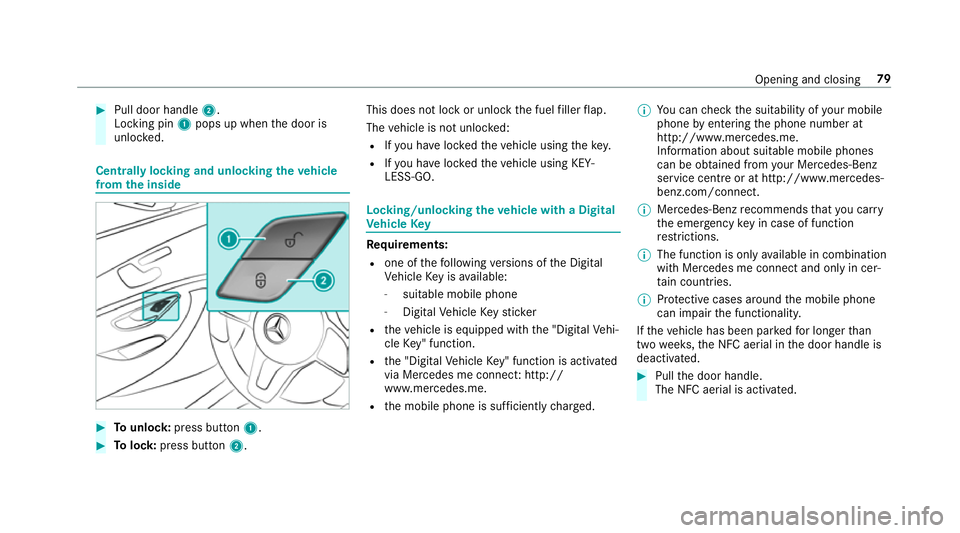
Pull door handle 2.
Locking pin 1pops up when the door is
unloc ked. Centrally locking and unlocking
theve hicle
from the inside #
Tounlo ck:press button 1. #
Tolock: press button 2. This does not lock or unlock
the fuel filler flap.
The vehicle is not unloc ked:
R Ifyo u ha veloc kedth eve hicle using thekey.
R Ifyo u ha veloc kedth eve hicle using KEY‐
LESS-GO. Locking/unlocking
theve hicle with a Digital
Ve hicle Key Re
quirements:
R one of thefo llowing versions of the Digital
Ve hicle Key is available:
- suitable mobile phone
- Digital Vehicle Keyst icker
R theve hicle is equipped with the "Digital Vehi‐
cle Key" function.
R the "Digital Vehicle Key" function is activated
via Mercedes me connec t:http://
www.mercedes.me.
R the mobile phone is suf ficiently charge d. %
You can check the suitability of your mobile
phone byentering the phone number at
http://www.mercedes.me.
Information about suitable mobile phones
can be obtained from your Mercedes-Benz
service centre or at http://www.mercedes-
benz.com/connect.
% Mercedes-Benz recommends that you car ry
th e emer gency key in case of function
re strictions.
% The function is only available in combination
with Mercedes me connect and on lyin cer‐
ta in countries.
% Protective cases around the mobile phone
can impair the functionality.
If th eve hicle has been par kedfo r longer than
two weeks, the NFC aerial in the door handle is
deactivated. #
Pull the door handle.
The NFC aerial is activated. Opening and closing
79
Page 83 of 673
#
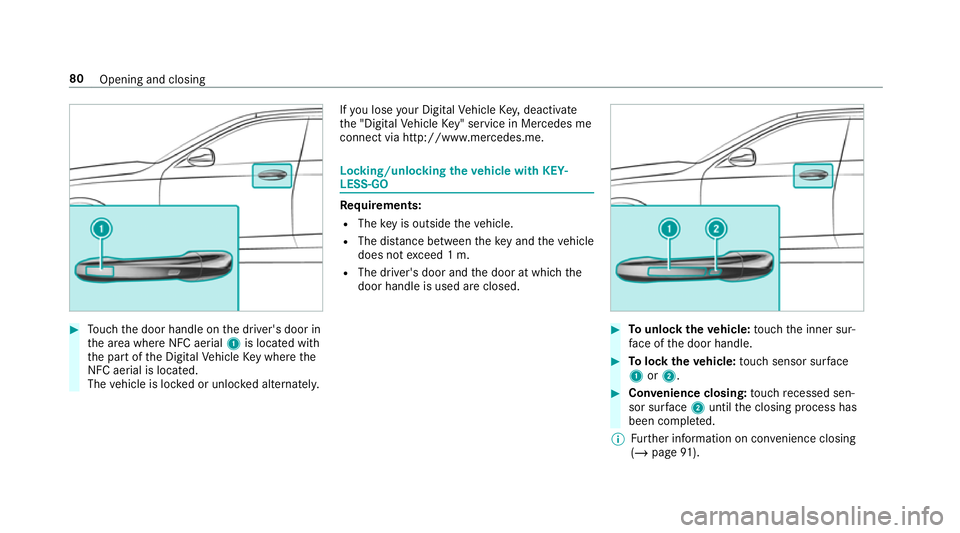
Touch the door handle on the driver's door in
th e area where NFC aerial 1is located with
th e part of the Digital Vehicle Key where the
NFC aerial is located.
The vehicle is loc ked or unloc ked alternately. If
yo u lose your Digital Vehicle Key,deactivate
th e "Digital Vehicle Key" service in Mercedes me
connect via http://www.mercedes.m e. Locking/unlocking
theve hicle with KEY‐
LESS-GO Re
quirements:
R The key is outside theve hicle.
R The dis tance between theke y and theve hicle
does not exceed 1 m.
R The driver's door and the door at which the
door handle is used are closed. #
Tounlo cktheve hicle: touch the inner sur‐
fa ce of the door handle. #
Tolock theve hicle: touch sensor sur face
1 or2. #
Convenience closing: touch recessed sen‐
sor su rface 2until the closing process has
been comple ted.
% Further information on con venience closing
(/ page 91). 80
Opening and closing