2019 MERCEDES-BENZ EQC SUV engine
[x] Cancel search: enginePage 566 of 629
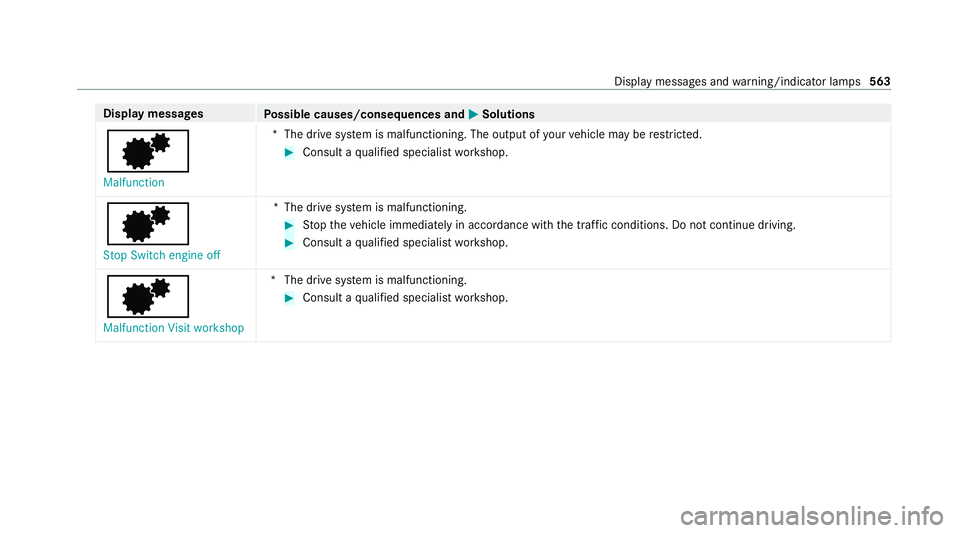
Display messages
Possible causes/consequences and M
MSolutions
d Malfunction *T
he drive sy stem is malfunctioning. The output of your vehicle may be restricted. #
Consult a qualified specialist workshop.
d Stop Switch engine off *T
he drive sy stem is malfunctioning. #
Stop theve hicle immediately in accordance with the traf fic conditions. Do not continue driving. #
Consult a qualified specialist workshop.
d Malfunction Visit workshop *T
he drive sy stem is malfunctioning. #
Consult a qualified specialist workshop. Display messages and
warning/indicator lamps 563
Page 591 of 629

Switching on/off .................................
15 0
THERMOTRONIC contro l panel ............15 0
Ve ntilating theve hicle (con venience
opening) ................................................ 89
Climate style
Fu nction ............................................... 151
Coat hook on the tailgate ...................... .122
Cock pit......................................................... 6
Overview ................................................. 6
Co ffee cup symbol
see ATTENTION ASSIST
Combination switch ................................13 5
Compass .................................................. 385
Compu ter
see On-board computer
Connection status
Displ aying ............................................ 430
Overview ............................................ .430
Connectivity Switching transmission of theve hicle
position on/off .................................... 331 Contacts
................................................... 399
Calling up ............................................ 400
Deleting ............................................... 402
Deleting favo urites .............................. 402
Downloading (from mobile phone) ...... 400
Importing ............................................ .401
Importing (o verview) ............................ 401
Information .......................................... 399
Making a call ...................................... .401
Na me form at ...................................... .400
Options ................................................ 401
Saving as a favo urite .......................... .402
Selecting options for suggestions ........ 402
St oring .................................................4 01
Con venience closing ................................. 89
Con venience opening ................................ 89
Coolant (engine) Check le vel .......................................... 461
No tes ................................................... 514
Copyright .................................................. .29
Cornering light ........................................ .137
Cr aw ler mode .......................................... 226
Fu nction/no tes ................................... 226 Cross
Traf fic Alert .................................. .244
Crosswind Assist Function/no tes ................................... 201
Cruise control .......................................... 208
Ac tivating ............................................ .210
Buttons ................................................ 210
Calling up a speed .............................. .210
Deactivating ......................................... 210
Fu nction .............................................. 208
Re quirements ...................................... 210
Selecting .............................................. 210
Setting a speed .................................... 210
St oring a speed .................................... 210
Sy stem limitations ...............................2 08
Cup holder ................................................ 12 6
Fitting/removing (centre console) ....... 12 6
Re ar .................................................... .127 D
Damage de tection (pa rked vehicle) .......196
Dash cam Starting/ending a video recording ...... 389
Dashboard see Co ckpit 588
Index
Page 594 of 629
6
Left windowbag malfunction
Consult workshop (Example) ............... 531
b Malfunction See Owner's Man‐
ual .......................................................5 64
d Malfunction Visit workshop ........ 563
Û Malfunction Visit workshop ........ 561
d Malfunction ................................ 563
Û Malfunction ................................ 560
ð Maximum speed exceeded ......... 542
ç Off..............................................5 40
ë Off.............................................. 540
ï Operation only possible in
transmission position P ....................... 553
! Parking brake See Owner's
Manual ................................................ 525
& Pre-entry climate control (via
ke y) available again af ter engine
st art .................................................... 556
& Pre-ent ryclimate control (via
ke y) inoperati veHV-battery low ........... 557 _
Rear left seat backrest not
loc ked (Example) .................................5 55
h Rectify tyre pressure ..................547
d Reduced output See Owner's
Manual ................................................ 560
! Release parking brake ................ 525
À Replace key See Owner's Man‐
ual ...................................................... .548
Á Replace key ................................ 549
Ý Reser veleve l Char gehigh-volt‐
age battery .......................................... 562
6 Restra int sys. malfunction Con‐
sult workshop ...................................... 529
Ù Steering malfunction Incre ased
ph ysical ef fort See Owner's Manual .... 553
Ù Steering malfunction Stop
immediately See Owner's Manual .......554
Û Stop immediately Drive will be
deactivated Char gehigh-volt. battery
.............................................................5 62d
Stop Switch engine off ............... 563
ç suspended ................................. 540
b Switch off lights ......................... 565
b Switch on headlamps ................. 565
+ Top up coolant See Owner ’s
Manual ................................................ 557
¥ Top up washer fluid .................... 555
á Towing not permit ted See Own‐
er's Manual .........................................5 59
ï Trailer coupling extending… ........ 551
! Turn on the ignition torelease
th e parking brake ................................ 525
d Vehicle is operational Switch
off ignition before exiting .................... .551
h Warning tyre defect ....................547
h Wheel sensor(s) missing ............546
Û Without starting engine again,
consult workshop ................................ 561
Ac tive Blind Spot Assi stcur rently
una vailable See Owner's Manual .........538 Index
591
Page 596 of 629
Haza
rdwa rning lamps malfunction‐
ing ...................................................... .566
Limi ter inoperative .............................. 542
Limiter passive .................................... 542
Mercedes me connect Services limi‐
te d See Owner's Manual .....................533
N permanently active Risk of vehicle
ro lling .................................................. 543
Not possible tounlo ck ch arging
cable See Owner's Manual .................. 558
On lyselect Park (P) when vehicle is
st ationary ............................................ 543
Place theke y in the mar ked space
See Owner's Manual ...........................550
PRE-SAFE inope rative See Owner's
Manual ................................................ 533
Ra dar sensors dirty See Owner's
Manual ................................................ 534
Re duce speed ...................................... 548Re
versing not poss. Consult work‐
shop ....................................................5 44
Risk of vehicle rolling Driver door
open and transmission not in P ...........543
Speed limit (winter tyres) XXX km/h ...542
Speed Limit Assi stcur rently una vail‐
able See Owner's Manual .................... 539
Speed Limit Assist inope rative ........... .539
To shift out of P or N,depress brake
and start engine .................................. 543
To switch off the engine, press
St art/ Stop button for at least 3 sec‐
onds or 3 times. .................................. 557
Tr af fic Sign Assi stcur rently una vaila‐
ble See Owner's Manual ...................... 539
Tr af fic Sign Assi stinope rative ............. 539
Tr ansmission Malfunction Stop ........... 544
Ty re press. monitor cur rently una vail‐
able .................................................... .545
Ty re press. monitor inoperative ...........545Ty
re press. monitor inoperative No
wheel sensors .................................... .545
Ty re(s) ove rheated ...............................5 47
Ve hicle not cur rently being charged
Charging station fault .......................... 558
Wi thout changing gear, consult work‐
shop ....................................................5 44
Display on the windscreen
see Head-up display
Distance control see Active Dis tance Assi stDISTRONIC
Di stance recorder
see Trip dis tance
DI STRO NIC
see Active Dis tance Assi stDISTRONIC
Door Additional door lock ...............................76
Child saf ety lock (rear door) .................. 69
Locking (emer gency key) ...................... .81
Opening (from the inside) ......................77
Un locking (emer gency key) .................... 81
Un locking (from the inside) ...................77 Index
593
Page 599 of 629
ENERGIZING seat kinetics
see ENERGIZING COMFORT
Energy flow displ ay
Displ aying ............................................ 16 0
Fu nction/no tes ................................... 16 0
Engine Engine number .................................... .511
St arting (Digital Vehicle Keyst icke r) .... 16 4
St arting (eme rgency operation
mode) .................................................. 16 5
St arting (mobile phone) ...................... .164
St arting (s tart/s top button) .................1 63
St arting assis tance .............................. 482
Switching off (s tart/s top button) ........ 189
Engine bonnet Opening/closing ................................ .460
Engine electronics Notes .................................................. 509
Engine number ......................................... 511
Entering characters ................................ 323
Fu nction/no tes ................................... 323
On theto uchpad ................................ .323
On theto uchsc reen (media display) ....3 26
Setting theke yboard .......................... .329 EQ-o
ptimised route
see Route
ERA-G LONA SS test mode
St arting/ending .................................. 425
ESC (Elect ronic Stability Control)
see ESP ®
(Electronic Stability Prog ram)
ESP ®
Crosswind Assist ................................. 201
Tr ailer stabilisation .............................. 201
ESP ®
(Elect ronic Stability Prog ram) ...... 19 8
Ac tivating/deactivating ...................... .201
Fu nction/no tes ................................... 19 8
EU general operating permit number .....511
Exterior lighting Care .................................................... 469
Exterior lighting see Lights F
Fa tigue de tection
see ATTENTION ASSIST
Fa ult message
see Displ aymessa ge Favo
urites
Ad ding .................................................3 16
Ad ding a destination ............................ 351
Calling up .............................................3 16
Del eting .............................................. .317
Home address .................................... .351
Moving .................................................3 17
Overview ..............................................3 16
Re naming ............................................. 317
Wo rkaddress ...................................... .351
Fi re extinguisher ...................................... 474
Firs t-aid kit (soft sided) ...........................474
Flacon Inserting/removing ............................ .153
Flat towing
see Tow- bar sy stem
Flat tyre ....................................................4 75
No tes ................................................... 475
TIREFIT kit ............................................ 476
Wheel change ...................................... 502
Floor mats ................................................ 13 2
Fo il co vering
Ra dar and ultrasonic sensors .............. 197596
Index
Page 600 of 629

Fo
r an EQ-optimised route
Overview ............................................. 354
Fr ag rance
see Fragrance sy stem
Fr ag rance sy stem .................................... 15 3
Inserting/removing theflacon ............ .153
Setting ................................................. 15 2
Fr ee software ............................................ 29
Fr equencies
Mobile phone ...................................... .510
Tw o-w ayradio ...................................... 51 0
Fr equency band
Dialling (on-board computer) .............. .271
Fr ont airbag (driver, front passenger) .....37
Fr ont passenger seat
see Seat
Fu el consum ption indicator
Calling up ............................................ .173
Fu nction seat
see Door cont rol panel
Fu ses ........................................................ 486
Before replacing a fuse ........................ 486 Fu
se assignment diagram ...................4 86
Fu se box in the engine compartment .. 487
Fu se box in the front passenger foot‐
we ll ...................................................... 488
Fu se box in the load compartment ...... 489
Fu se box on the dashboard ................. 488
No tes .................................................. 486 G
Garage door opener Cleari ngthe memory ........................... 19 3
Opening or closing the door ................1 92
Programming buttons .......................... 19 0
Ra dio equipment appr oval numbers .... 19 3
Re solving problems ............................. 19 2
Synchronising thero lling code ............ .191
Genera l operating permit number
(EU) ............................................................ 511
Genuine parts ............................................ 17
Global sear ch
Fu nction .............................................. 320
Overview ............................................. 320
Glo vecompa rtment
Locking/unlo cking .............................. .114 H
Handbrake see Electric parking brake
Handling characteristics (unusual) ....... 490
HANDS-FREE ACCESS ................................ 85
Ha ptic accelerator pedal ........................16 9
Hazard warning lights ............................ .136
HD prog rammes
see CI+ module
Head restra int
Fr ont (adjusting mechanically) .............1 03
Re ar (adjusting) .................................. .104
Head-up display ....................................... 273
Ad justing display elements (on-board
compu ter) ............................................ 273
Ad justing the brightness (on-board
computer) ............................................ 273
Fu nction ............................................... 274
Menu (on-board computer) .................. 273
Setting the position (on-board com‐
puter) ................................................... 273
Switching on/off ................................. 274 Index
597
Page 601 of 629
Headlamp
flasher ................................... .135
High beam Adaptive Highbeam Assist Plus .......... .138
Switching on/off ................................. 13 5
High-pressure cleaner (care) ................. 464
High-voltage battery ................175, 481, 517
Charging time ...................................... 517
Fu nction/no tes ................................... 481
No tes/charging ................................... 175
Ra nge ................................................... 517
Setting the maximum possible charg‐
ing cur rent ........................................... 183
Ty pe .....................................................5 17
High-voltage battery charged
Ending thech arging process ................ 187
High-voltage battery charged
see High-voltage on-board electrical sy stem
High-voltage on-board electrical sys‐
te m .................................................... 158, 187
Charging cable cont rol panel .............. .181
Charging the high-voltage battery at
a ch arging station (mode 3/4) ............ 184
Charging the high-voltage battery at
a wa llbox (mode 3) .............................. 183Charging
the high-voltage battery at
th e mains soc ket (mode 2) .................. 180
Disconnect device ............................... 15 8
Ending thech arging process ................ 187
Indicator lamps on vehicle soc ket ........ 17 9
Manual disconnection .........................1 58
No tes on charging the high-voltage
battery .................................................1 75
Setting the maximum possible charg‐
ing cur rent ........................................... 183
St arting thech arging process .............. 184
Hill Start Assist ....................................... 224
HOLD function ......................................... 225
Fu nction/no tes ................................... 225
Switching on/off ................................. 225
Home screen (media display) Overview ............................................. 297
Hotspot Setting up (Wi-Fi) ................................. 333 I
i-Size child seat securing sy stem
Fitting .................................................... 59
Seats suitable for attaching ................... 58 Identification plate
Engine .................................................. 511
Ve hicle .................................................5 11
Ignition Swit ching on (S tart/S top button) ........ 16 2
Ignition key
see Key
Immedia tepre-entry climate control ....15 6
Immobiliser ................................................ 96
Implied warranty
Ve hicle .................................................. 26
In-Car Of fice .................................... 406, 408
Answering e-mail ................................ .408
Calling up ............................................ 406
Fe atures .............................................. 406
Fo rw arding e-mail ................................ 409
Managing e-mails ................................ 408
Marking a task as comple ted .............. 407
Noting an incoming call ...................... .407
Selecting functions (calendar entry) .... 407
Selecting functions (Tas ks& Calls) ...... 407
Wr iting e-mail ...................................... 408 598
Index
Page 609 of 629
Selecting actions
for a notification ..... .319
Using theglobal sear ch....................... 320 O
Occupant saf ety
Pe ts in theve hicle ................................. 70
Occupant saf ety
see Airbag
see Automatic front passenger front
airbag shutoff
see PRE-SAFE ®
(anticipatory occu‐
pant pr otection)
see PRE-SAFE ®
PLUS (anticipatory
occupant pr otection plus)
see Restra int sy stem
see Seat belt
Odome ter
see Total dis tance
On-board co mputer ................................. 264
Assis tance menu ................................. 268
Displaying ECO Assi st.......................... 16 9
Displ aying the service due date ........... 459
Head-up display menu .........................2 73
Media menu ......................................... 272Menu
overview .................................... 264
Multifunction display .......................... .267
Na vigation menu ................................. 270
Operate ............................................... 264
Ra dio menu .........................................2 71
Service menu ...................................... 268
Te lephone menu .................................. 272
Tr ip menu ............................................ 269
On-boa rddiagno stics inter face
see Diagno stics connection
On-boa rdelectronics
Engine electronics .............................. .509
No tes .................................................. 509
Tw o-w ayradios .................................... 509
Online services Data storage .......................................... 28
Online services see In-Car Of fice
Open-source so ftwa re .............................. 29
Opening the tailgate using your foot
see HANDS-FREE ACCESS
Ope rating fluids
Brake fluid ............................................ 514Coolant (engine) ..................................
514
No tes ................................................... 513
Wi ndsc reen washer fluid ...................... 51 5
Operating saf ety
Declaration of conformity (electro‐
magnetic compatibility) ........................ .21
Declaration of conformity (ja ck) ............ 23
Declaration of con form ity (TIREFIT kit) .. 24
Declaration of conformity (wireless
ve hicle components) .............................. 21
Information ............................................ 19
Operating sy stem
see On-board computer
Outside mir rors ............................... 146, 147
Anti-dazzle mode (automatic) .............. 147
Au tomatic mir rorfo lding function ........ 14 9
Fo lding in/out .................................... .146
Operating the memory function ........... 111
Pa rking position .................................. .148
Setting ................................................. 14 6
Overhead control panel Overview ............................................... 10
Overview For an EQ-optimised route .................. 354 606
Index