2019 MERCEDES-BENZ EQC SUV lock
[x] Cancel search: lockPage 554 of 629
Ve
hicle Display messages
Possible causes/consequences and M
MSolutions
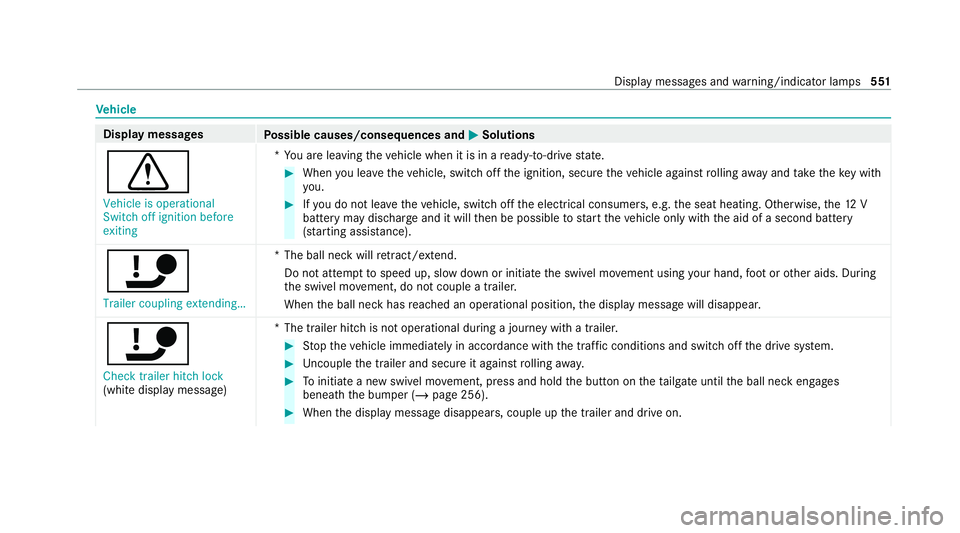
d Vehicle is operational
Switch off ignition before
exiting *Y
ou are leaving theve hicle when it is in a ready-to-drive state. #
When you lea vetheve hicle, switch off the ignition, secure theve hicle against rolling away and take theke y with
yo u. #
Ifyo u do not lea vetheve hicle, switch off the electrical consumers, e.g. the seat heating. Otherwise, the12 V
battery may dischar geand it will then be possible tostart theve hicle only with the aid of a second battery
(s ta rting assis tance).
ï Trailer coupling extending… *T
he ball neck will retract/ extend.
Do not attem pttospeed up, slow down or initiate the swivel mo vement using your hand, foot or other aids. During
th e swivel mo vement, do not couple a trailer.
When the ball neck has reached an operational position, the display message will disappear.
ï
Check trailer hitch lock
(white display message) *T
he trailer hitch is not operational during a journey with a trailer. #
Stop theve hicle immediately in accordance with the traf fic conditions and switch off the drive sy stem. #
Uncouple the trailer and secure it against rolling away. #
Toinitiate a new swivel mo vement, press and hold the button on theta ilgate until the ball neck engages
beneath the bumper (/ page 256). #
When the display message disappears, couple up the trailer and drive on. Display messages and
warning/indicator lamps 551
Page 557 of 629
Display messages
Possible causes/consequences and M
MSolutions
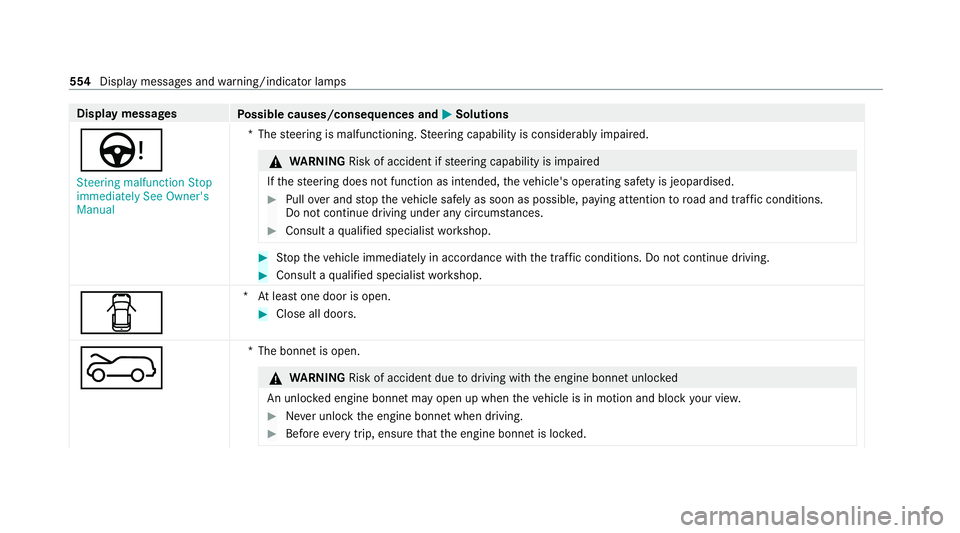
Ù Steering malfunction Stop
immediately See Owner's
Manual *T
hesteering is malfunctioning. Steering capability is considerably impaired. &
WARNING Risk of accident if steering capability is impaired
If th esteering does not function as intended, theve hicle's operating saf ety is jeopardised. #
Pull over and stop theve hicle safely as soon as possible, paying attention toroad and traf fic conditions.
Do not continue driving under any circums tances. #
Consult a qualified specialist workshop. #
Stop theve hicle immediately in accordance with the traf fic conditions. Do not continue driving. #
Consult a qualified specialist workshop.
C *A
t least one door is open. #
Close all doors.
? *T
he bonnet is open. &
WARNING Risk of accident due todriving with the engine bonn etunlo cked
An unloc ked engine bonn etmay open up when theve hicle is in motion and block your vie w. #
Never unlock the engine bonn etwhen driving. #
Before every trip, ensure that the engine bonn etis loc ked. 554
Display messages and warning/indicator lamps
Page 558 of 629
Display messages
Possible causes/consequences and M
MSolutions #
Stop theve hicle immediately, paying attention toroad and traf fic conditions. #
Close the bonn et.
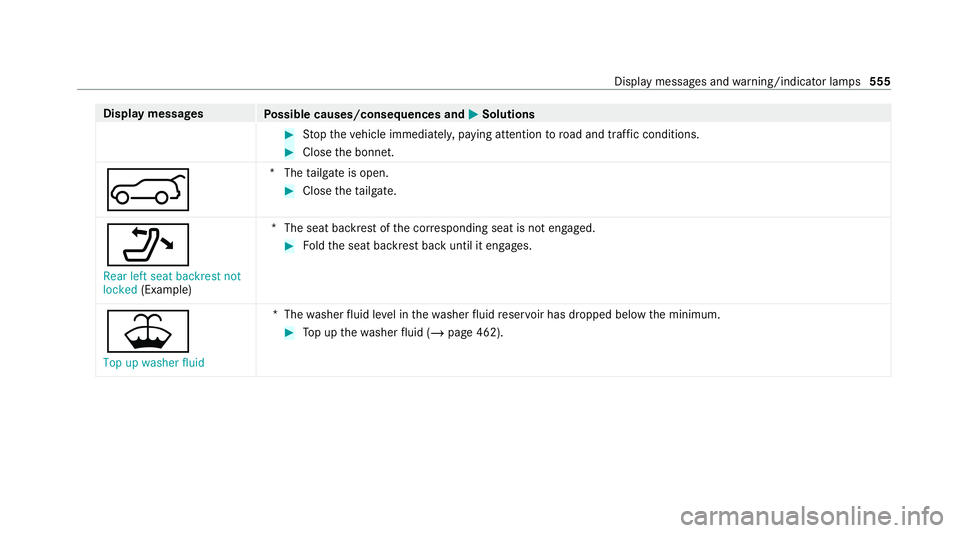
A *T
hetailgate is open. #
Close theta ilgate.
_ Rear left seat backrest not
locked (Example) *T
he seat backrest of the cor responding seat is not engaged. #
Foldthe seat backrest back until it engages.
¥ Top up washer fluid *T
hewasher fluid le vel in thewa sher fluid reser voir has dropped below the minimum. #
Top up thewa sher fluid (/ page 462). Display messages and
warning/indicator lamps 555
Page 561 of 629
Display messages
Possible causes/consequences and M
MSolutions
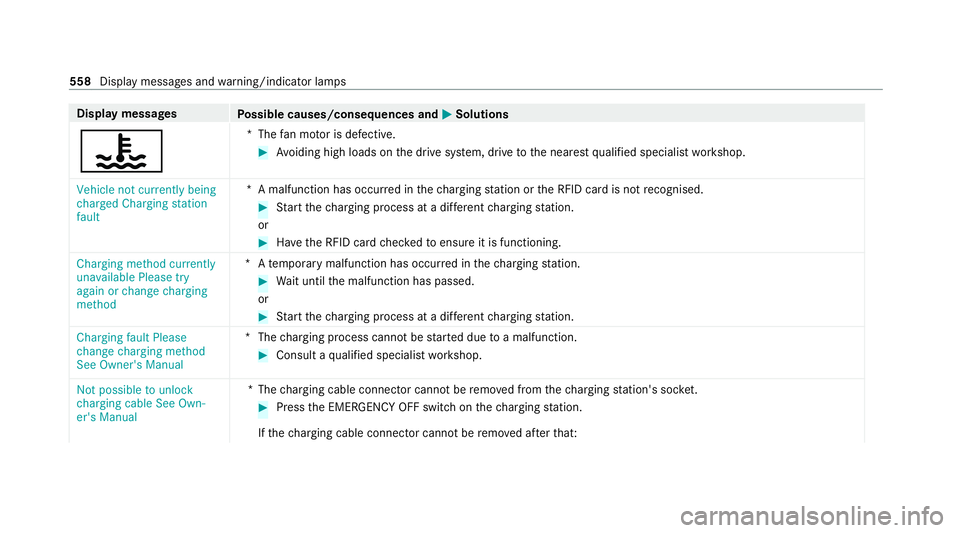
? *T
hefan mo tor is defective. #
Avoiding high loads on the drive sy stem, drive tothe nearest qualified specialist workshop.
Vehicle not currently being
charged Charging station
fault *A
malfunction has occur red in thech arging station or the RFID card is not recognised. #
Start thech arging process at a dif fere nt charging station.
or #
Have the RFID card checkedto ensure it is functioning.
Charging method currently
unavailable Please try
again or change charging
method *A
temp orary malfunction has occur red in thech arging station. #
Wait until the malfunction has passed.
or #
Start thech arging process at a dif fere nt charging station.
Charging fault Please
change charging method
See Owner's Manual *T
hecharging process cannot be star ted due toa malfunction. #
Consult a qualified specialist workshop.
Not possible to unlock
charging cable See Own-
er's Manual *T
hecharging cable connec tor cannot be remo ved from thech arging station's soc ket. #
Press the EMERG ENCY OFF switch on thech arging station.
If th ech arging cable connec tor cannot be remo ved af terth at: 558
Display messages and warning/indicator lamps
Page 571 of 629
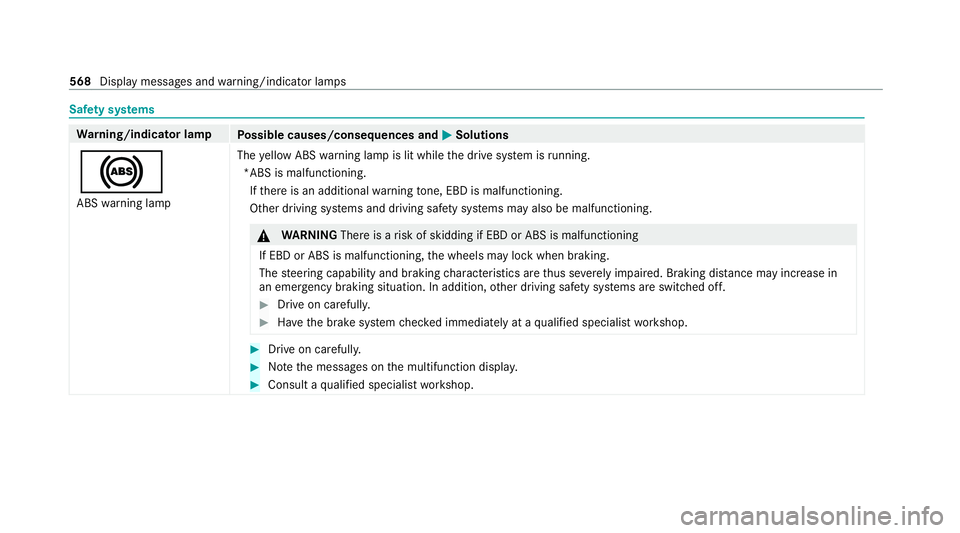
Saf
ety sy stems Wa
rning/indicator lamp
Possible causes/consequences and M
MSolutions
! ABS warning lamp The
yellow ABS warning lamp is lit while the drive sy stem is running.
*ABS is malfunctioning. If th ere is an additional warning tone, EBD is malfunctioning.
Other driving sy stems and driving saf ety sy stems may also be malfunctioning. &
WARNING Thereis a risk of skidding if EBD or ABS is malfunctioning
If EBD or ABS is malfunctioning, the wheels may lock when braking.
The steering capability and braking characteristics are thus se verely impaired. Br aking distance may increase in
an eme rgency braking situation. In addition, other driving saf ety sy stems are switched off. #
Drive on carefull y. #
Have the brake sy stem checked immediately at a qualified specialist workshop. #
Drive on carefully. #
Notethe messages on the multifunction displa y. #
Consult a qualified specialist workshop. 568
Display messages and warning/indicator lamps
Page 584 of 629
1,
2, 3 ...
12 V battery
see Battery (vehicle)
12 V so cket
see Soc ket (12 V)
230 V so cket
see Soc ket (230 V)
360° Camera ........................................... 235
Ca re .................................................... 469
Fu nction .............................................. 235
Opening the camera co ver (r eve rsing
camera) .............................................. .238
Selecting a view .................................. 238
Setting favo urites ................................ 238
Swit ching automatic operation
on/off (r eversing camera) .................. .238 A
A/C function Activating/deactivating (multimedia
sy stem) ................................................ 151
ABS (Anti-lock Braking Sy stem) ............ .198 Ac
celerator pedal
see Haptic accelerator pedal
Ac cess data
Setting (Blue tooth®
) ............................ 428
Ac cident and breakdown manage‐
ment
Mercedes me connect ........................ .418
Ac oustic locking verification signal
Ac tivating/deactivating ......................... 73
Ac oustic presence indica tor (sound
ge nerator)
No tes ................................................... 15 8
Ac tivating/deactivating automatic
vo lume adjustment
Ad vanced sound sy stem ......................4 58
Burmes ter®
sur round sound sy stem ... 457
Ac tive Blind Spot Assi st......................... 250
Ac tivating/deactivating ...................... .253
Brake application ................................. 252
Fu nction .............................................. 250
Sy stem limitations ...............................2 50
Tr ailer operation .................................. 252 Ac
tive Brake Assi st
Fu nction/no tes ................................... 202
Setting .................................................2 08
Ac tive Di stance Assist DISTRO NIC......... 212
Ac tive Emergency Stop Assist .............2 22
Ac tive Lane Change Assi st................... 221
Calling up a speed ............................... 214
Displ ays in the instrument display .......2 23
Fu nction ............................................... 212
Increasing/decreasing speed .............. 214
Re quirements: .................................... .214
Ro ute-based speed adap tation ........... .217
Selecting .............................................. 214
St eering wheel buttons ........................ 214
St oring a speed .................................... 214
Switching off/deacti vating .................. 214
Switching on/activating ....................... 214
Sy stem limitations ...............................2 12
Ac tive Eme rgency Stop Assist ...............222
Ac tive headlamps .................................... 137
Ac tive Lane Change Assi st..................... 221
Ac tivating/deactivating ...................... .222
Fu nction .............................................. 221 Index
581
Page 586 of 629
Air pressu
re
see Tyre pressure
Air vents ................................................... 157
Ad justing (front) ................................... 157
Ad justing (rear) .................................... 157
Air vents
see Air vents
Ai r-re circulation mode ............................ 15 2
Air-water duct .......................................... 463
Ke eping free ........................................4 63
Airbag ........................................................ .37
Ac tivation .............................................. 31
Fr ont airbag (driver, front passenger) ....37
Ins tallation locations ............................ .37
Knee airbag ........................................... 37
Overview ............................................... 37
PA SSENGER AIR BAG indicator lamp .... .41
Pr otection ..............................................38
Re duced pr otection ...............................39
Side impact airbag ................................. 37
Wi ndow airbag ....................................... 37
Alarm sy stem
see ATA (anti-theft alarm sy stem) All-wheel distribution
Function ............................................... 175
All-wheel drive Function ............................................... 175
Alternative route
see Route
Ambient lighting Setting (multimedia sy stem) ................1 41
Android Auto ............................................ 413
Connecting a mobile phone ................ .413
Control using the application buttons .. 414
Ending .................................................. 414
Information ..........................................4 13
Overview ..............................................4 13
Sound settings ..................................... 414
Tr ans ferred vehicle data ....................... 41 5
Animals Pets in theve hicle ................................. 70
Anti-lock braking sy stem
see ABS (Anti-lock Braking Sy stem)
Anti-skid chains
see Snow chains Anti-theft ala
rmsystem
see ATA (anti-theft alarm sy stem)
Anti-theft pr otection
Ad ditional door lock ...............................76
Immobiliser ........................................... 96
Anti-theft pr otection
see ATA (anti-theft alarm sy stem)
Anticipatory occupant pr otection
see PRE- SAFE®
(anticipatory occu‐
pant pr otection)
see PRE-SAFE ®
PLUS (anticipatory
occupant pr otection plus)
Apple CarPlay ®
......................................... 411
Connecting an iPhone ®
........................ 412
Control using the application buttons .. 412
Ending .................................................. 412
No tes ................................................... 412
Overview ..............................................4 11
Sound settings ..................................... 412
Tr ans ferred vehicle data ....................... 41 5
Asht ray
Fr ont centre console ............................ 127
Re ar passenger compartment ............ .128 Index
583
Page 588 of 629
St
arting assis tance .............................. 482
Battery charged
see High-voltage on-board electrical sy stem
Belt see Seat belt
Bicycle rack
Tr ailer operation .................................. 260
Blind Spot Assist .................................... .250
Ac tivating/deactivating ...................... .253
Fu nction .............................................. 250
Sy stem limitations ...............................2 50
Blue tooth ®
................................................ 331
Information .......................................... 331
Setting up an Internet connection ....... 428
Switching on/off ................................. 331
Boot lid see Tailgate
Brake Assist Sy stem
see BAS (Brake Assi stSystem)
Brake fluid
No tes ................................................... 514Brake
forc e distribution
EBD (Elect ronic Brake forc e Distribu‐
tion) ..................................................... 201
Brakes ABS (Anti-lock Braking Sy stem) ........... 19 8
Ac tive Brake Assi st.............................. 202
Ad aptive brake lights .......................... .208
BA S (Brake Assi stSystem) .................. 19 8
Driving tips .......................................... 16 5
EBD (Electronic Brake forc e Distribu‐
tion) ..................................................... 201
HOLD function .....................................2 25
Limi ted braking ef fect (salt-trea ted
ro ads) .................................................. 16 5
Re cuperation ........................................ 161
Braking assistance see BAS (Brake Assi stSystem)
Breakdown Overview of the help functions .............. 14
To w- starting ........................................ 486
To wing away ........................................ 483
Tr ansporting theve hicle ......................4 85
Wheel change ...................................... 502 Breakdown
see Flat tyre
Bu rm ester ®
sur round sound sy stem .....4 56
Ad justing the balance/fader ............... 457
Ad justing the sound focus ................... 457
Ad justing treble, mid-range and bass
settings ............................................... 457
Au tomatic volume adjustment ............ .457
Calling up the sound menu .................. 456
Information .......................................... 456
Selecting the sound profile .................. 457
Butto ns
St eering wheel .................................... 263 C
Call list Deleting ............................................... 404
Making a call ....................................... 403
Overview ............................................. 403
Selecting options ................................ 403
Selecting options for suggestions ........ 403
Calling up the sound menu
Adva nced sound sy stem ......................4 58
Burmes ter®
sur round sound sy stem ... 456 Index
585