2019 MERCEDES-BENZ AMG GT ROADSTER sensor
[x] Cancel search: sensorPage 62 of 298
You can activate or deactivate Active Brake
Assist (Y page 168) in the on-board computer.
When deactivated, the distance warning func-
tion and the autonomous braking function are
also deactivated.
If Active Brake Assist is deactivated, the 00D4
symbol appears in the assistance graphic dis-
play.
Distance warning function General information
The distance warning function can help you to
minimize the risk of a front-end collision with a
vehicle ahead or reduce the effects of such a
collision. If the distance warning function
detects that there is a risk of a collision, you will
be warned visually and acoustically.
Important safety notes i Observe the "Important safety notes" sec-
tion for driving safety systems (Y page 58).G
WARNING
The distance warning function does not react:
R to people or animals
R to oncoming vehicles
R to crossing traffic
R when cornering
The distance warning function may not give
warnings in all critical situations. There is a
risk of an accident.
Always pay careful attention to the traffic sit-
uation and be ready to brake.
Always adapt your speed to suit the prevailing
road and traffic conditions. G
WARNING
The distance warning function cannot always
clearly identify objects and complex traffic
situations.
In such cases, the distance warning function
may:
R give an unnecessary warning
R not give a warning
There is a risk of an accident. Always pay careful attention to the traffic sit-
uation and do not rely solely on the distance
warning function.
Function
Starting at a speed of approximately 4 mph
(7 km/h), the distance warning function warns
you if you rapidly approach a vehicle in front. An intermittent warning tone will then sound, and
the 00BA distance warning lamp will light up in
the instrument cluster.
X Brake immediately in order to increase the
distance from the vehicle in front.
or
X Take evasive action provided it is safe to do
so.
Due to the nature of the system, particularly
complicated but non-critical driving conditions
may also cause the system to display a warning. With the help of the radar sensor system, the
distance warning function can detect obstacles
that are in the path of your vehicle for an exten-
ded period of time.
Up to a speed of approximately 44 mph
(70 km/h), the distance warning function can
also react to stationary obstacles, such as stop-
ped or parked vehicles.
Autonomous braking function If the driver does not react to the distance warn-
ing signal in a critical situation, Active Brake
Assist can assist the driver with the autonomous braking function.
The autonomous braking function:
R gives the driver more time to react to critical
driving situations
R can help the driver to avoid an accident or
R reduces the effects of an accident
Vehicles without Active Distance Assist
DISTRONIC: the autonomous braking function
is available in the following speed ranges:
R 4 - 65 mph (7 - 105 km/h) for moving objects
R 4 - 31 mph (7 - 50 km/h) for stationary
objects 60
Driving safety systemsSafety
Page 63 of 298
Vehicles with Active Distance Assist
DISTRONIC: the autonomous braking function
is available in the following speed ranges:
R 4 - 124 mph (7 - 200 km/h) for moving
objects
R 4 - 31 mph (7 - 50 km/h) for stationary
objects
Due to the nature of the system, particularly
complicated but non-critical driving conditions
may also cause the autonomous braking func-
tion to intervene.
If the autonomous braking function requires a
particularly high braking force, preventative
passenger protection measures (PRE-SAFE ®
)
are activated simultaneously (Y page 54).
Situation-dependent brake boosting
effect General information
i Observe the "Important safety notes" sec-
tion (Y page 58).
With the help of the radar sensor system, Active Brake Assist can detect obstacles that are in the
path of your vehicle for an extended period of
time.
If Active Brake Assist detects a risk of collision
with the vehicle in front, it calculates the brake
pressure necessary to avoid a collision. If you
apply the brakes forcefully, the situation-
dependent brake boosting effect automatically
increases the brake pressure to a degree appro- priate to the traffic situation.
The situation-dependent brake boosting effect
provides braking assistance in hazardous situa-
tions at speeds above 4 mph (7 km/h). It uses
radar sensor technology to assess the traffic
situation.
The situation-dependent brake boosting effect
is capable of reacting to moving objects that
have already been detected as such at least
once over the period of observation, up to a
speed of around 155 mph (250 km/h).
The situation-dependent brake boosting effect
reacts to stationary obstacles up to a speed of
approximately 44 mph (70 km/h).
If the situation-dependent brake boosting effect demands particularly high brake pressure, pre-
ventative passenger protection measures (PRE-
SAFE ®
) are triggered simultaneously
(Y page 54). X
Keep the brake pedal depressed until the
emergency braking situation is over.
ABS prevents the wheels from locking.
The brakes will work normally again if: R you release the brake pedal
R there is no longer any danger of a collision
R no obstacle is detected in front of your vehicle
The situation-dependent brake boosting effect
is then deactivated.
Important safety notes i Observe the "Important safety notes" sec-
tion for driving safety systems (Y page 58). G
WARNING
Adaptive Brake Assist does not react:
R to people or animals
R to oncoming vehicles
R to crossing traffic
R when cornering
As a result, Adaptive Brake Assist may not
intervene in all critical conditions. There is a
risk of an accident.
Always pay careful attention to the traffic sit- uation and be ready to brake. G
WARNING
Adaptive Brake Assist cannot always clearly
identify objects and complex traffic situa-
tions.
In such cases, Adaptive Brake Assist might:
R intervene unnecessarily
R not intervene
There is a risk of an accident.
Always pay careful attention to the traffic sit- uation and be ready to brake. Terminate the
intervention in a non-critical driving situation.
Due to the nature of the system, complex but
non-critical driving conditions may also cause
Active Brake Assist to intervene.
Even if Active Brake Assist is not available due to a malfunction in the radar sensor system, the
brake system is still available with full brake
boosting effect and BAS. Driving safety systems
61Safety Z
Page 68 of 298
SmartKey
Important safety notes
G
WARNING
If children are left unsupervised in the vehicle, they could:
R open the doors, thus endangering other
people or road users.
R get out and disrupt traffic.
R operate the vehicle's equipment.
Additionally, children could set the vehicle in
motion if, for example, they:
R release the parking brake.
R shifting the automatic transmission out of
park position P
R Start the engine.
There is a risk of an accident and injury.
When leaving the vehicle, always take the
SmartKey with you and lock the vehicle. Never
leave children or animals unattended in the
vehicle. Always keep the SmartKey out of
reach of children. G
WARNING
If you attach heavy or large objects to the
SmartKey, the SmartKey could be uninten-
tionally turned in the ignition lock. This could
cause the engine to be switched off. There is a risk of an accident.
Do not attach any heavy or large objects to the
SmartKey. Remove any bulky key rings before
inserting the SmartKey into the ignition lock.
! Keep the SmartKey away from strong mag-
netic fields. Otherwise, the remote control
function could be affected.
Strong magnetic fields can occur in the vicin- ity of powerful electrical installations.
Do not keep the SmartKey: R with electronic devices, e.g. a mobile phone
or another SmartKey
R with metallic objects, e.g. coins or metal foil
R inside metallic objects, e.g. a metal case
This can affect the functionality of the Smart-
Key. Vehicles with KEYLESS-GO start function:
do
not keep the SmartKey in the trunk. Otherwise, the SmartKey may not be detected, e.g. when
starting the engine using the Start/Stop button.
A brief radio connection between the vehicle
and the SmartKey determines whether a valid
SmartKey is in, or in the direct vicinity of, the
vehicle.
This occurs, for example:
R when starting the engine
R while driving
R when using the trunk lid unlocking sensor
R when the external door handles are touched
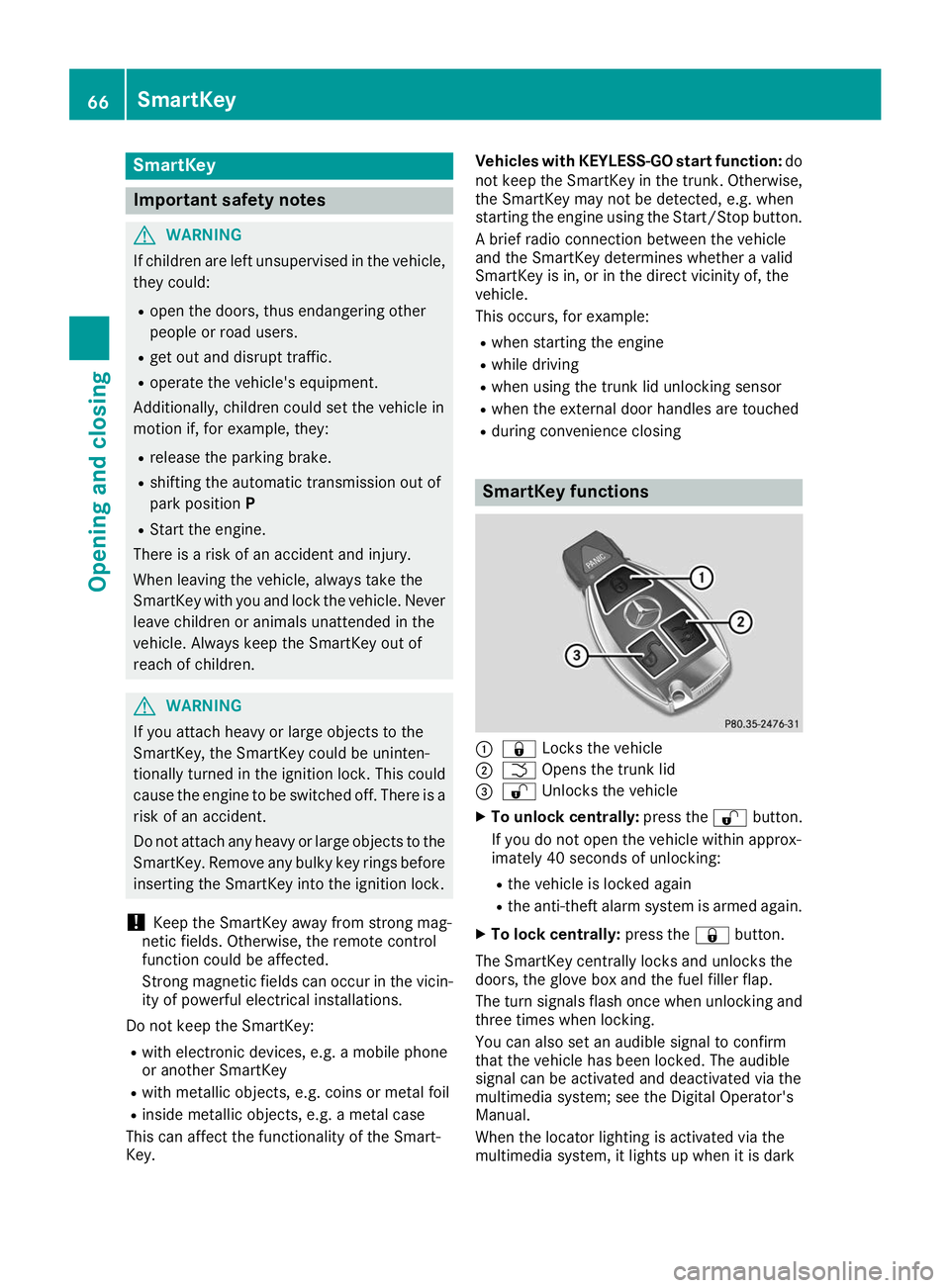
R during convenience closing SmartKey functions
0043
0037 Locks the vehicle
0044 0054 Opens the trunk lid
0087 0036 Unlocks the vehicle
X To unlock centrally: press the0036button.
If you do not open the vehicle within approx-
imately 40 seconds of unlocking:
R the vehicle is locked again
R the anti-theft alarm system is armed again.
X To lock centrally: press the0037button.
The SmartKey centrally locks and unlocks the
doors, the glove box and the fuel filler flap.
The turn signals flash once when unlocking and three times when locking.
You can also set an audible signal to confirm
that the vehicle has been locked. The audible
signal can be activated and deactivated via the
multimedia system; see the Digital Operator's
Manual.
When the locator lighting is activated via the
multimedia system, it lights up when it is dark 66
SmartKeyOpening and closing
Page 69 of 298
after the vehicle is unlocked with the SmartKey.
Information on activating and deactivating the
locator lighting can be found in the Digital Oper-
ator's Manual.
X To open the trunk lid: press and hold the
0054 button until the trunk lid opens. KEYLESS-GO
General notes Bear in mind that the engine can be started by
any of the vehicle occupants if there is a Smart-
Key in the vehicle (Y page 112).
Locking/unlocking centrally You can start, lock or unlock the vehicle using
KEYLESS-GO. To do this, you only need carry the
SmartKey with you. You can combine the func-
tions of KEYLESS-GO with those of a conven-
tional SmartKey. Unlock the vehicle by using
KEYLESS-GO, for instance, and lock it using the 0037 button on the SmartKey.
The driver's door and the door at which the han- dle is used, must both be closed. The SmartKey
must be outside the vehicle. When locking or
unlocking with KEYLESS-GO, the distance
between the SmartKey and the corresponding
door handle must not be greater than 3 ft (1 m).
A check which periodically establishes a radio
connection between the vehicle and the Smart-
Key determines whether a valid SmartKey is in
the vehicle. This occurs, for example:
R when starting the engine
R while driving
R when using the remote trunk lid opening sen-
sor
R when the external door handles are touched
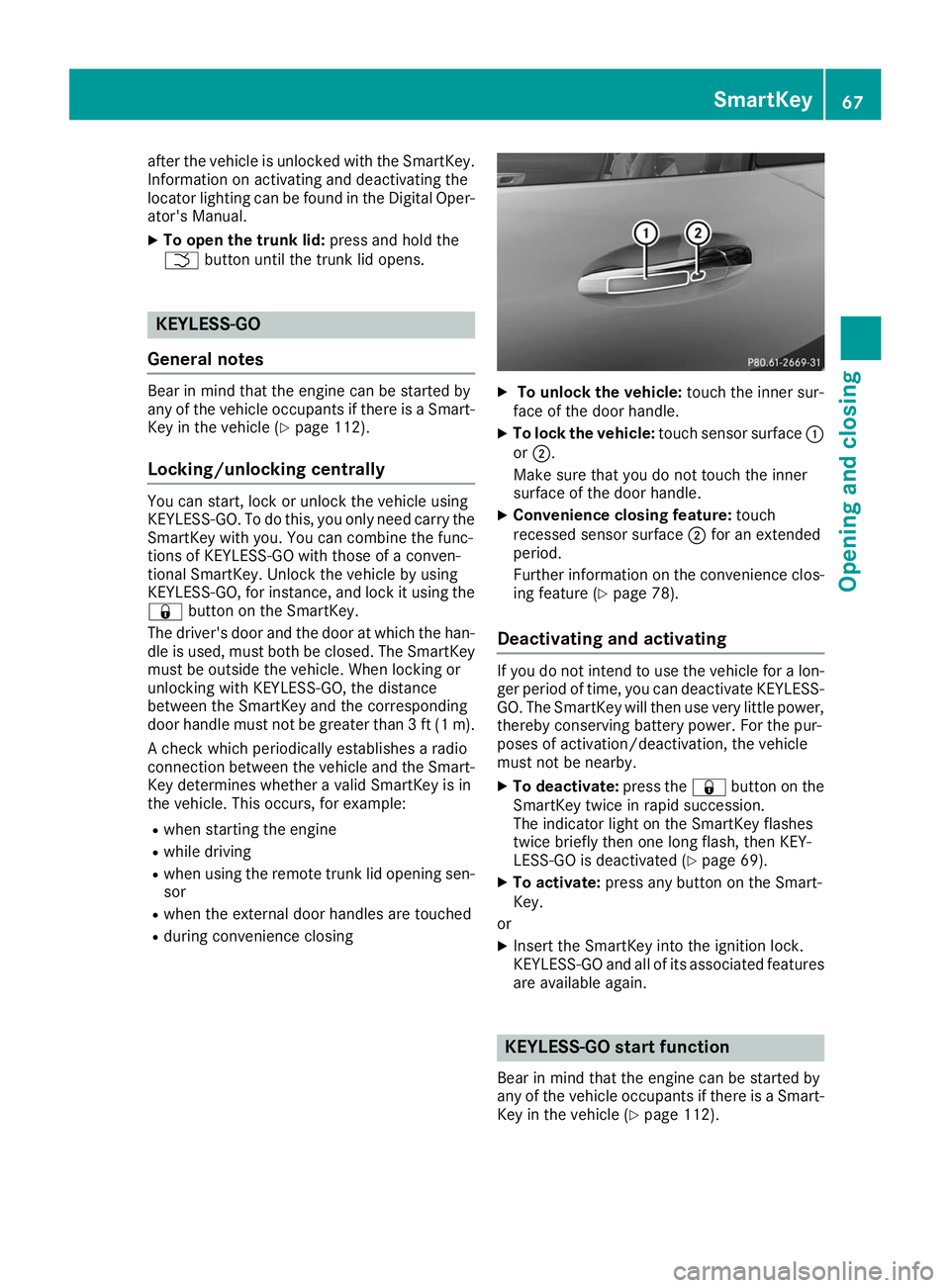
R during convenience closing X
To unlock the vehicle: touch the inner sur-
face of the door handle.
X To lock the vehicle: touch sensor surface 0043
or 0044.
Make sure that you do not touch the inner
surface of the door handle.
X Convenience closing feature: touch
recessed sensor surface 0044for an extended
period.
Further information on the convenience clos-
ing feature (Y page 78).
Deactivating and activating If you do not intend to use the vehicle for a lon-
ger period of time, you can deactivate KEYLESS-
GO. The SmartKey will then use very little power, thereby conserving battery power. For the pur-
poses of activation/deactivation, the vehicle
must not be nearby.
X To deactivate: press the0037button on the
SmartKey twice in rapid succession.
The indicator light on the SmartKey flashes
twice briefly then one long flash, then KEY-
LESS-GO is deactivated (Y page 69).
X To activate: press any button on the Smart-
Key.
or X Insert the SmartKey into the ignition lock.
KEYLESS-GO and all of its associated features
are available again. KEYLESS-GO start function
Bear in mind that the engine can be started by
any of the vehicle occupants if there is a Smart- Key in the vehicle (Y page 112). SmartKey
67Opening and closing Z
Page 70 of 298
Changing the settings of the locking
system
You can change the settings of the locking sys-
tem. This means that only the driver's door, the
glove box and the fuel filler flap are unlocked
when the vehicle is unlocked. This is useful if you
frequently travel on your own.
X To change the setting: press and hold down
the 0036 and0037 buttons simultaneously
for approximately six seconds until the indi-
cator lamp flashes twice (Y page 69).
If the setting of the locking system is changed
within the signal range of the vehicle, pressing
the 0037 or0036 button:
R locks or
R unlocks the vehicle
The SmartKey now functions as follows:
X To unlock: press the0036button once.
X To unlock centrally: press the0036button
twice.
X To lock: press the 0037button.
The KEYLESS-GO functions can be changed as
follows:
X To unlock the driver's door: touch the inner
surface of the door handle on the driver's
door.
X To unlock centrally: touch the inner surface
of the front-passenger door handle.
X To lock centrally: touch the outer sensor
surface on one of the door handles.
Restoring factory settings:
X Press the 0036and0037 buttons simultane-
ously for approximately six seconds until the
indicator lamp flashes twice (Y page 69).Mechanical key
General notes If the vehicle can no longer be locked or
unlocked with the SmartKey or KEYLESS-GO,
use the mechanical key.
If you use the mechanical key to unlock and
open the driver's door, the anti-theft alarm sys- tem will be triggered. Switch off the alarm
(Y page 64). If you unlock the vehicle using the mechanical
key, the fuel filler flap will not be unlocked auto-
matically.
X To unlock the fuel filler flap: insert the
SmartKey into the ignition lock.
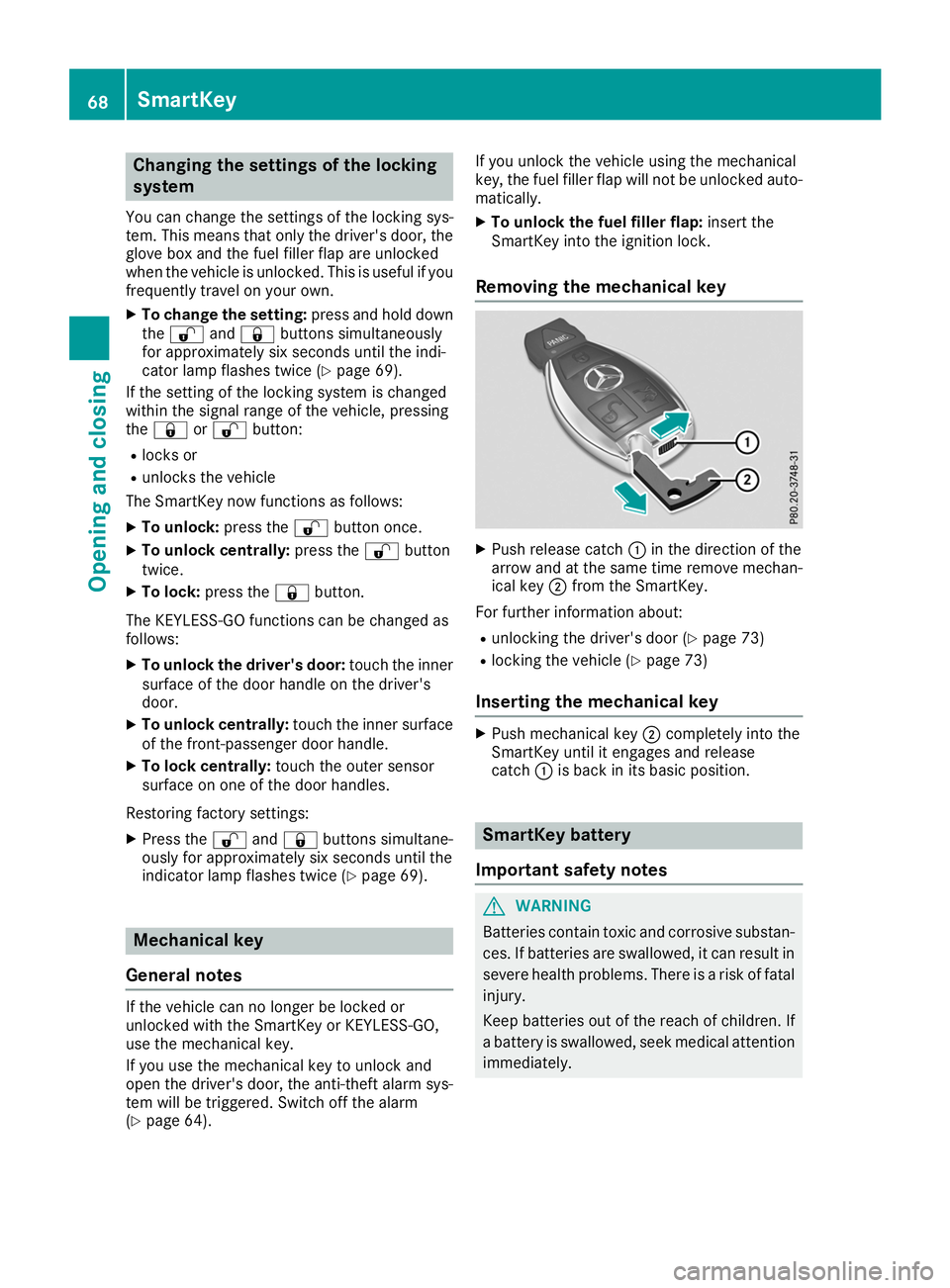
Removing the mechanical key X
Push release catch 0043in the direction of the
arrow and at the same time remove mechan- ical key 0044from the SmartKey.
For further information about:
R unlocking the driver's door (Y page 73)
R locking the vehicle (Y page 73)
Inserting the mechanical key X
Push mechanical key 0044completely into the
SmartKey until it engages and release
catch 0043is back in its basic position. SmartKey battery
Important safety notes G
WARNING
Batteries contain toxic and corrosive substan- ces. If batteries are swallowed, it can result in
severe health problems. There is a risk of fatal injury.
Keep batteries out of the reach of children. If
a battery is swallowed, seek medical attention immediately. 68
SmartKeyOpening and closing
Page 76 of 298
tem will be triggered. Switch off the alarm
(Y page 64). Trunk
Important safety notes
G
DANGER
Combustion engines emit poisonous exhaust
gases such as carbon monoxide. Exhaust
gases can enter the vehicle interior if the
trunk lid is open while the engine is running,
especially if the vehicle is in motion. There is a risk of poisoning.
Always switch off the engine before opening
the trunk lid. Never drive with the trunk lid
open. G
WARNING
If objects, luggage or loads are not secured or not secured sufficiently, they could slip, tip
over or be flung around and thereby hit vehicle
occupants. There is a risk of injury, particu-
larly in the event of sudden braking or a sud-
den change in direction.
Always store objects so that they cannot be
flung around. Secure objects, luggage or
loads against slipping or tipping before the
journey.
! The trunk lid swings upwards when opened.
Therefore, make sure that there is sufficient
clearance above the trunk lid.
The opening dimensions of the trunk lid can be
found in the "Vehicle data" section
(Y page 293).
If the rear spoiler has been extended manually,
the height when opened is higher by this
amount. If in doubt, retract the rear spoiler again manually before opening the trunk lid
(Y page 229).
Do not leave the SmartKey in the trunk. You
could otherwise lock yourself out.
You should preferably place luggage or loads in the trunk. Observe the loading guidelines
(Y page 218). Opening/closing from outside
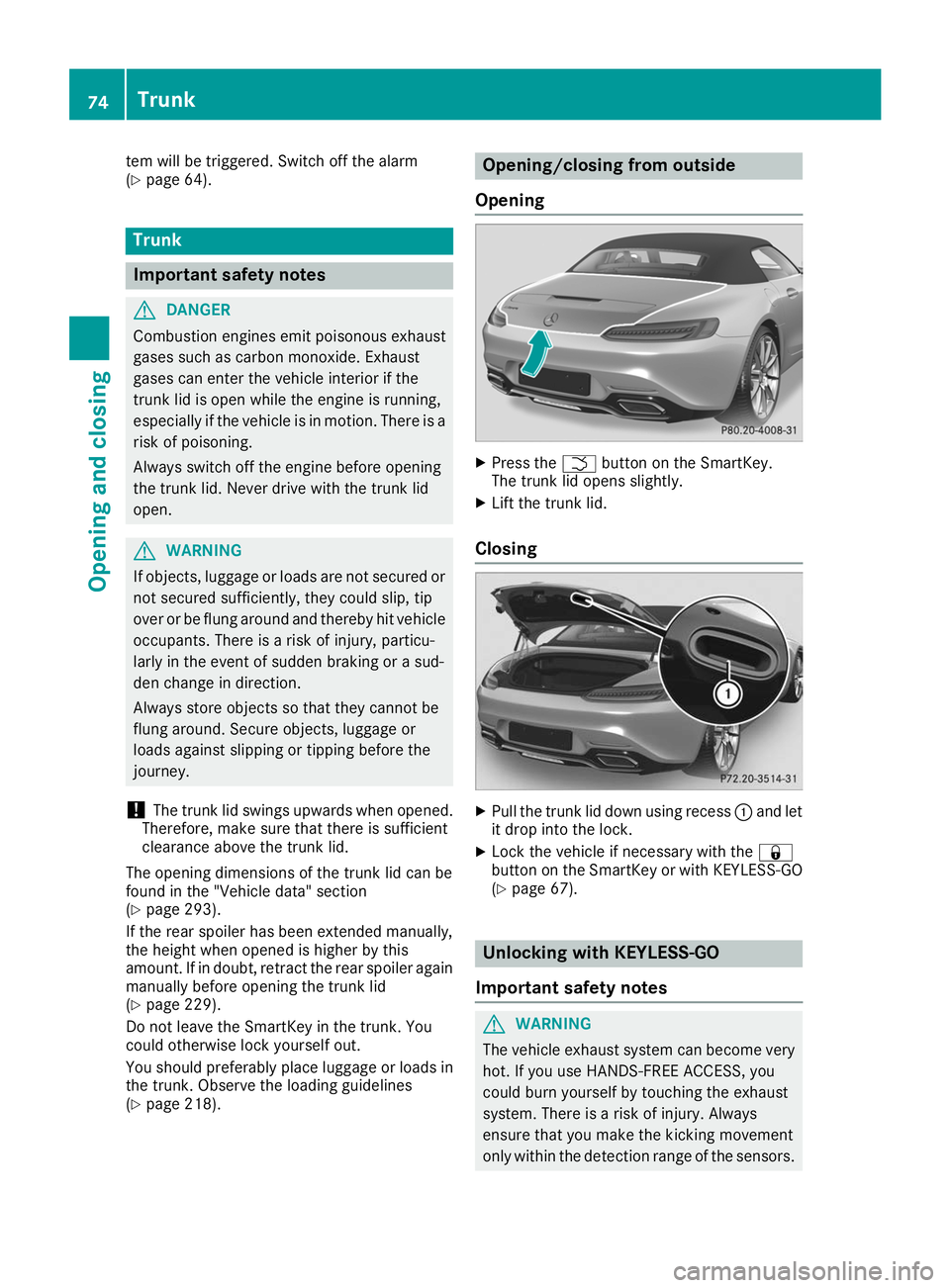
Opening X
Press the 0054button on the SmartKey.
The trunk lid opens slightly.
X Lift the trunk lid.
Closing X
Pull the trunk lid down using recess 0043and let
it drop into the lock.
X Lock the vehicle if necessary with the 0037
button on the SmartKey or with KEYLESS-GO
(Y page 67). Unlocking with KEYLESS-GO
Important safety notes G
WARNING
The vehicle exhaust system can become very
hot. If you use HANDS-FREE ACCESS, you
could burn yourself by touching the exhaust
system. There is a risk of injury. Always
ensure that you make the kicking movement
only within the detection range of the sensors. 74
TrunkOpening and closing
Page 77 of 298
!
If the SmartKey is within the rear detection
range of KEYLESS-GO, the following situa-
tions, for example, could lead to the uninten-
tional opening of the trunk lid:
R when using an automatic car wash
R when using a power washer
Make sure that the SmartKey is at least 10 ft
(3 m) away from the vehicle.
General notes Vehicles with KEYLESS-GO without carbon
package: you can unlock the trunk lid without
using your hands. This is useful if you have your hands full. To do this, make a kicking movement
under the rear bumper with your foot.
Observe the following points:
R Carry your KEYLESS-GO key about your per-
son. The SmartKey must be at the rear of the
vehicle in the detection range of KEYLESS-
GO.
R When making the kicking movement, make
sure that you are standing firmly on the
ground and that there is sufficient clearance
to the rear of the vehicle. You could otherwise lose your balance, for example on ice. R
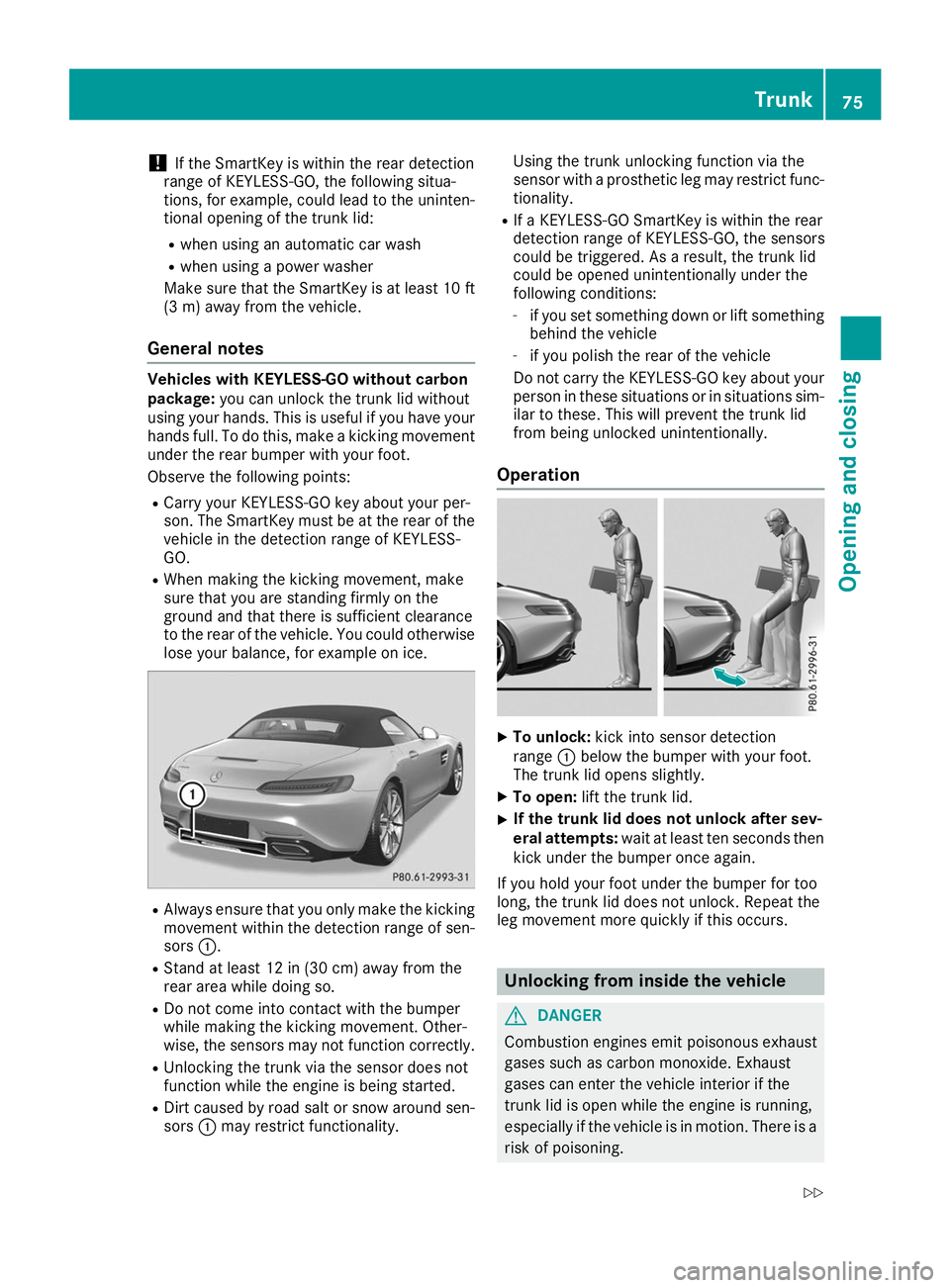
Always ensure that you only make the kicking
movement within the detection range of sen- sors 0043.
R Stand at least 12 in (30 cm) away from the
rear area while doing so.
R Do not come into contact with the bumper
while making the kicking movement. Other-
wise, the sensors may not function correctly.
R Unlocking the trunk via the sensor does not
function while the engine is being started.
R Dirt caused by road salt or snow around sen-
sors 0043may restrict functionality. Using the trunk unlocking function via the
sensor with a prosthetic leg may restrict func-
tionality.
R If a KEYLESS-GO SmartKey is within the rear
detection range of KEYLESS-GO, the sensors
could be triggered. As a result, the trunk lid
could be opened unintentionally under the
following conditions:
- if you set something down or lift something
behind the vehicle
- if you polish the rear of the vehicle
Do not carry the KEYLESS-GO key about your
person in these situations or in situations sim-
ilar to these. This will prevent the trunk lid
from being unlocked unintentionally.
Operation X
To unlock: kick into sensor detection
range 0043below the bumper with your foot.
The trunk lid opens slightly.
X To open: lift the trunk lid.
X If the trunk lid does not unlock after sev-
eral attempts:
wait at least ten seconds then
kick under the bumper once again.
If you hold your foot under the bumper for too
long, the trunk lid does not unlock. Repeat the
leg movement more quickly if this occurs. Unlocking from inside the vehicle
G
DANGER
Combustion engines emit poisonous exhaust
gases such as carbon monoxide. Exhaust
gases can enter the vehicle interior if the
trunk lid is open while the engine is running,
especially if the vehicle is in motion. There is a risk of poisoning. Trunk
75Opening and closing
Z
Page 80 of 298
Convenience opening
General notes You can ventilate the vehicle before you start
driving.
If the SmartKey is in close proximity to the vehi-
cle, the convenience opening function is availa- ble.
To do so, open the side windows using the
SmartKey.
The "convenience opening" feature is also avail-
able when the vehicle is unlocked.
Convenience opening X
After unlocking the vehicle, press and hold
the 0036 button on the SmartKey until the
side windows begin to open.
or
X When the vehicle is unlocked, press and hold
the 0036 button until the side windows have
reached the desired position.
X To interrupt convenience opening: release
the 0036 button. Convenience closing feature
Important safety notes G
WARNING
When using the convenience closing feature,
parts of the body could be trapped in the clos- ing area when a side window is being closed. There is a risk of injury.
Observe the complete closing procedure
when the convenience closing feature is oper-
ating. Make sure that no body parts are in
close proximity during the closing procedure.
When you lock the vehicle, you can close the
windows at the same time. Using the SmartKey X
Press and hold the 0037button until the side
windows are fully closed.
X Make sure that all the side windows are
closed.
X To interrupt convenience closing: release
the 0037 button.
Using KEYLESS-GO The driver's door and the door at which the han-
dle is used, must both be closed. The SmartKey
must be outside the vehicle. The gap between
the SmartKey and the corresponding door han-
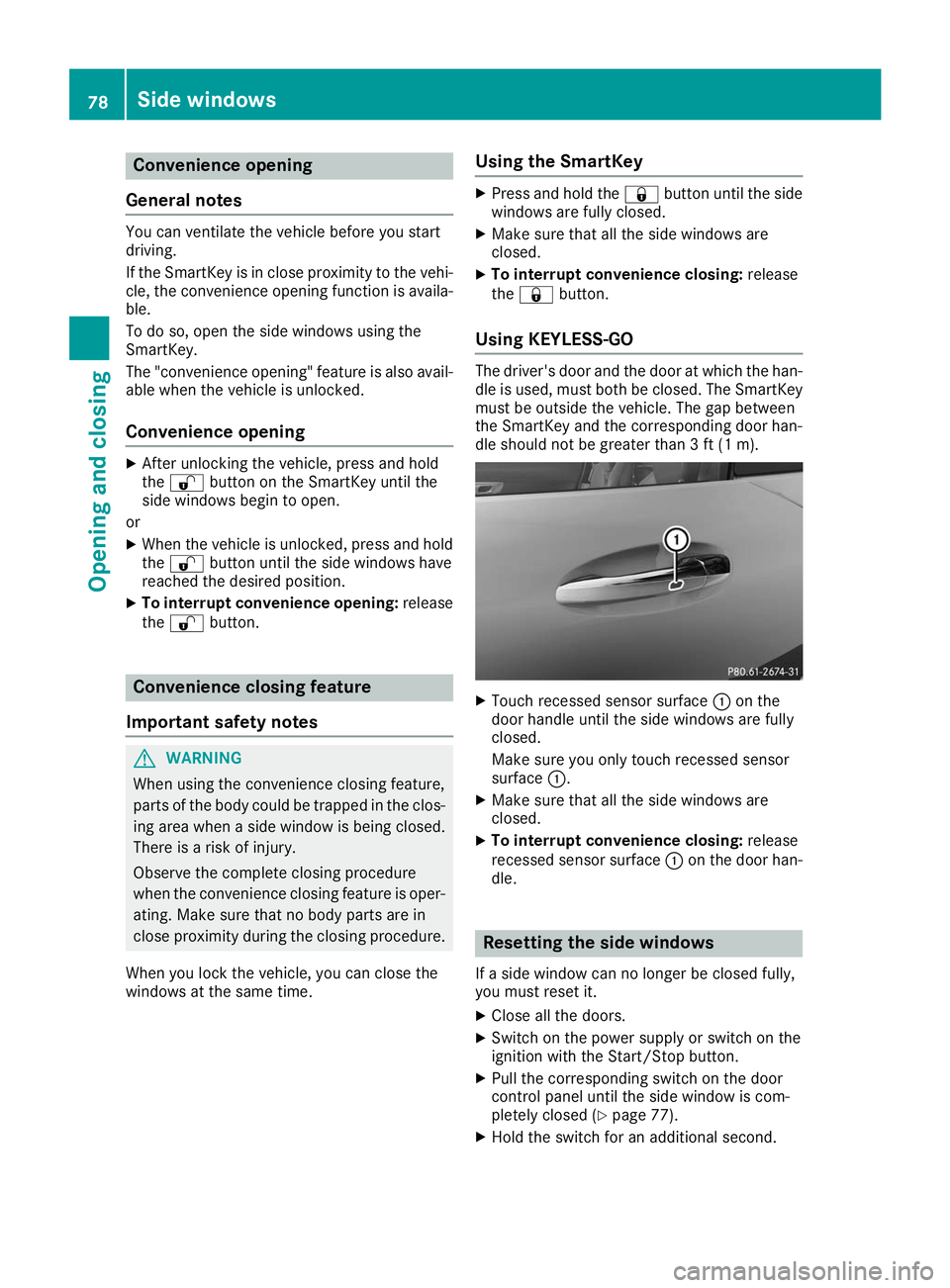
dle should not be greater than 3 ft (1 m). X
Touch recessed sensor surface 0043on the
door handle until the side windows are fully
closed.
Make sure you only touch recessed sensor
surface 0043.
X Make sure that all the side windows are
closed.
X To interrupt convenience closing: release
recessed sensor surface 0043on the door han-
dle. Resetting the side windows
If a side window can no longer be closed fully,
you must reset it.
X Close all the doors.
X Switch on the power supply or switch on the
ignition with the Start/Stop button.
X Pull the corresponding switch on the door
control panel until the side window is com-
pletely closed (Y page 77).
X Hold the switch for an additional second. 78
Side windowsOpening and closing